diffvisualizationgithub-gistdeveloper-toolscode-review
Generate and visualize unified diffs as HTML or PNG with GitHub Gist sharing and local file output.
Quick Install
Automated & IDE SetupCopy the AI prompt to install this server into Claude Code, Cursor, or another agent — or use 1-click editor setup below.
Not yet automatically verified
We haven't yet run this listing's install command through our automated sandbox check. This isn't a red flag — we're steadily working through the catalog.
Manual Client & Custom JSON ConfigExpand JSON ▾
Client Config & Setup
Choose your client or environment
Target File:
💡 Paste the JSON block into your client's configuration file under mcpServers, then restart the application.
Overview
Use cases
Visualize and preview unified diffs in a browser
Save diff visualizations as local HTML or PNG files
Share diffs instantly via GitHub Gist with auto-delete
Create side-by-side or line-by-line diff comparisons
Export diffs for documentation or presentations
Key features
HTML diff visualization with syntax highlighting
GitHub Gist integration for sharing diffs
Local file output in PNG or HTML formats
Auto-delete temporary Gists after configurable time
Multi-level security settings for shared diffs
Cross-platform support (Windows, macOS, Linux)
Capabilities & Tool Schemas
Inspect callable tools, capabilities, and parameters exposed to AI agents by Unified Diff MCP.
Extracted Tool Capabilities
HTML diff visualization with syntax highlighting
GitHub Gist integration for sharing diffs
Local file output in PNG or HTML formats
Auto-delete temporary Gists after configurable time
Multi-level security settings for shared diffs
Cross-platform support (Windows, macOS, Linux)
Documentation Overview
Unified Diff MCP Server
Beautiful diff visualization for Claude Desktop. Transform code diffs into stunning visual comparisons with GitHub Gist integration and local file output.
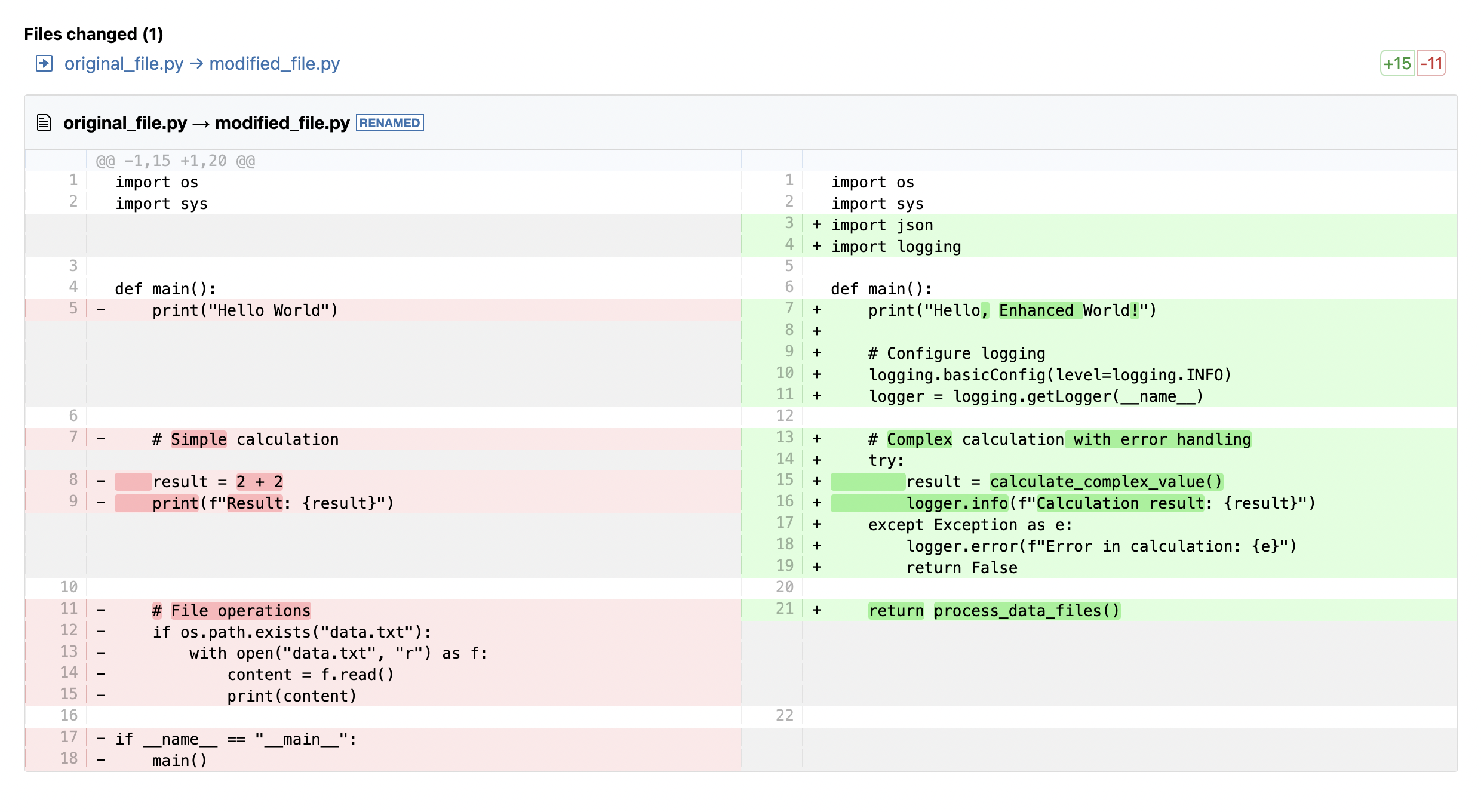
✨ Features
- 🎨 Beautiful HTML diff visualization using diff2html
- 🌐 GitHub Gist integration for instant sharing
- 📁 Local file output (PNG/HTML)
- 🔄 Auto-delete functionality for temporary diffs
- 🖥️ Cross-platform support (Windows, macOS, Linux)
- ⚡ High-performance with Bun runtime
- 🛡️ Enhanced Security with multi-level protection for shared diffs
- 🔒 Multi-level security (Low/Medium/High) for different use cases
🚀 Quick Start
Installing via Smithery
Manual Installation
- Install Claude Desktop and Bun
- Clone and build:
- Configure Claude Desktop - see Configuration below
🛠️ Tools Overview
| Tool | Purpose | Output | Best For |
|---|---|---|---|
visualize_diff_html_content | Browser display & sharing | GitHub Gist + HTML preview URL | Quick sharing, instant viewing |
visualize_diff_output_file | Local file storage | PNG/HTML files | Local storage, presentations |
📖 Usage Examples
🎯 Optimal Prompts by Purpose
| Purpose | Recommended Prompt | Tool Used | Output |
|---|---|---|---|
| Quick Preview | Please visualize and preview the following diff:以下のdiffを可視化してプレビューしてください | visualize_diff_html_content | GitHub Gist + HTML preview URL |
| Local Storage | Please visualize and save the following diff to a file:以下のdiffを可視化してファイルに保存してください | visualize_diff_output_file | Local HTML/PNG file |
| Share with Others | Please visualize the following diff and create a shareable link:以下のdiffを可視化して共有リンクを作成してください | visualize_diff_html_content | GitHub Gist with shareable URL |
| Image Export | Please visualize and save the following diff as a PNG image:以下のdiffを可視化してPNG画像で保存してください | visualize_diff_output_file | Local PNG image |
| Code Review | Please visualize the following diff in side-by-side format:以下のdiffをside-by-side形式で可視化してください | Either tool | Side-by-side comparison |
| Documentation | Please visualize and save the following diff as an HTML file:以下のdiffを可視化してHTMLファイルで保存してください | visualize_diff_output_file | Local HTML file |
| 🔒 Secure Sharing | Please visualize this diff with high security:以下のdiffを高セキュリティで可視化してください | visualize_diff_html_content | Secret Gist with auto-delete |
Share diff instantly (GitHub Gist)
Save diff locally
🎛️ Configuration
Environment Variables
| Variable | Description | Default |
|---|---|---|
GITHUB_TOKEN | GitHub Personal Access Token (for Gist integration) | Required for visualize_diff_html_content |
DEFAULT_AUTO_OPEN | Auto-open generated files | false |
DEFAULT_OUTPUT_MODE | Default output format (html or image) | html |
GitHub Token Setup
- Go to GitHub Settings > Personal Access Tokens
- Generate new token with
gistscope - Add to your environment:
Claude Desktop Configuration
macOS:
Windows:
Configuration template:
📋 Parameters Reference
Common Parameters
| Parameter | Type | Default | Description |
|---|---|---|---|
diff | string | (required) | Unified diff text |
format | string | side-by-side | Display format (line-by-line or side-by-side) |
showFileList | boolean | true | Show file list summary |
highlight | boolean | true | Enable syntax highlighting |
oldPath | string | file.txt | Original file path |
newPath | string | file.txt | Modified file path |
autoOpen | boolean | false | Auto-open in browser |
GitHub Gist Specific
| Parameter | Type | Default | Description |
|---|---|---|---|
expiryMinutes | number | 30 | Auto-delete time (1-1440 minutes) |
public | boolean | false | Public vs secret gist |
Local File Specific
| Parameter | Type | Default | Description |
|---|---|---|---|
outputType | string | html | Output format (html or image) |
🌍 Platform Support
| Platform | Auto-Open | Commands |
|---|---|---|
| Windows | ✅ | start (primary), explorer (fallback) |
| macOS | ✅ | open (primary), AppleScript (fallback) |
| Linux | ✅ | xdg-open |
🔧 Development
Development mode (with hot reload):
Production mode:
📚 Advanced Usage
🔒 Enhanced Security Levels
When GitHub Token isn't available or for secure sharing, you can choose from multiple security levels:
| Security Level | Configuration | Features | Use Cases |
|---|---|---|---|
| 🟢 Low | Secret Gist + 60min auto-delete | URL-only access | Code examples, learning |
| 🟡 Medium | Secret Gist + Password + 30min auto-delete | URL + Access code required | Team reviews |
| 🔴 High | Secret Gist + Password + 15min auto-delete | URL + Access code + Short duration | Sensitive code |
Usage Example
Response Example:
🔄 Fallback Functionality
When GitHub Token is unavailable, the system falls back to local files:
- HTML saved as temporary file
- Automatic browser opening
- Security-based file management
For detailed setup and integration guides:
- 🇺🇸 English: CLAUDE_CODE_INTEGRATION.md
- 🇯🇵 日本語: CLAUDE_CODE_INTEGRATION_JP.md
🤝 Supported Clients
- Claude Desktop (Primary)
- Claude Code (CLI)
- VS Code + MCP Extension
- Cline and other MCP clients
📄 License
MIT License - see LICENSE file for details.
Dependencies
| Library | License | Purpose |
|---|---|---|
| diff2html | MIT | HTML diff generation |
| playwright-core | Apache 2.0 | Browser automation |
| @modelcontextprotocol/sdk | MIT | MCP integration |
Made with ❤️ for the Claude Desktop community
Related MCP Servers
Adoption & maintenance
Factual signals from GitHub, npm, and our automated checks — not a rating.
GitHub stars
12
Stargazers on the source repository.
npm downloads
30k
Package downloads in the last 30 days.
Last commit
1y ago
Most recent push to the default branch.
Directory activity
1 views
Config copies, upvotes, and views on AllMCPs.
Reviews
No reviews yet — be the first to share how this listing worked for you.
Frequently Asked Questions about Unified Diff MCP
AllMCPs Directory Badge
Showcase your server listing on GitHub or your project documentation. Embed this dynamic SVG badge to highlight official listing status and live engagement.
Badge Style:
Live Dynamic SVG Preview
Markdown (GitHub README)
[](https://allmcps.com/mcp/gorosun-unified-diff-mcp)HTML Embed
<a href="https://allmcps.com/mcp/gorosun-unified-diff-mcp"><img src="https://allmcps.com/api/badge/gorosun-unified-diff-mcp?style=directory" alt="Unified Diff MCP on AllMCPs" /></a>Technical Specs & Signals
CategoryFile Systems
PricingBring your own API key (usage-based cost)
10/10 checks healthy over the last 32d
51Quality signal: Good · 51/100How this signal is calculated ▾
Server availabilityNot measured
Not scored for repo-hosted servers — we can't reach the running server, only its GitHub page. Hosted MCP endpoints are health-checked live.
Verified ownership10/20
Documentation & tools23/30
Adoption & activity5/15
Community engagement0/10
A guidance signal from public completeness & health data — not a user rating. New listings start lower and rise as they add docs, get verified, and grow adoption. Signals we can't observe for a listing are skipped, not counted against it.
Supply-chain signal
No high-severity advisories surfaced by our automated scan.
Critical 0High 0Medium 0Low 0
Scanned 28d ago via OSV.dev · @smithery/cli (npm)
Own this project?
This directory is pre-filled from public sources. Claim via GitHub README, site badge, or DNS TXT to unlock edit access and the Official badge — proof is checked automatically, then reviewed by our team.
Free dofollow backlink: add your website and place the AllMCPs badge on it — no claim needed. We detect it automatically and keep it verified as long as the badge stays live.
Claim & get free dofollowShare & Embed
Add our SVG badge (dark/light directory styles) or embeddable widget to your site.