AllMCPs
BrowseBestCategoriesStackCompareToolsGuidesBlog
Log in Submit MCP

Stay in the loop

Get new MCP servers and top picks in your inbox.

AllMCPs

The open directory for discovering and installing Model Context Protocol servers.

AllMCPs on GitHub (opens in a new tab)
Launched onTiny Startupstinystartups.com
Explore
  • Browse servers
  • Best MCP servers
  • Categories
  • MCP clients
  • Agent prompts
  • Stack Builder
  • Compare servers
  • Random discovery New
  • Submit a server
  • Pricing & Boost Boost
Learn
  • Guides hub
  • What is MCP?
  • Install guide
  • Build an MCP server
  • Deploy an MCP server
  • Security guide
  • Troubleshooting
  • MCP for SEO & AEO
  • Protocol versioning
  • Blog & updates
Tools
  • All developer tools
  • Config generator
  • Config validator
  • Config auditor
  • MCP playground
  • Token calculator
  • OpenAPI β†’ MCP
  • Badge generator
For agents
  • REST API docs
  • Trust & traffic Live
  • Remote MCP server SSE β†— (opens in a new tab)
  • llms.txt β†— (opens in a new tab)
  • Catalog JSON β†— (opens in a new tab)
Company
  • About
  • Advertise Sponsor
  • Contact
  • GitHub β†— (opens in a new tab)
  • Terms
  • Privacy
AllMCPs VerifiedAllMCPs VerifiedFeatured on Nick LaunchesFeatured on Nick LaunchesLaunch Llama NewsletterLaunch Llama NewsletterVerified DR - allmcps.comVerified DR - allmcps.comFeatured on SaaSGrowFeatured on SaaSGrowFeatured on Twelve ToolsFeatured on Twelve ToolsFeatured on Saaspa.geFeatured on Saaspa.geFeatured on Findly.toolsFeatured on Findly.toolsFeatured on Startup FameFeatured on Startup FameFeatured on LaunchKiwiFeatured on LaunchKiwiFeatured on ScrollLaunchFeatured on ScrollLaunchFeatured on DailyPingsFeatured on DailyPingsFazier badgeFazier badgeFeatured on NewTool.siteFeatured on NewTool.siteFeatured on saasfame.comFeatured on saasfame.comDR Checker - Domain RatingDR Checker - Domain RatingListed on Turbo0Listed on Turbo0Launched on LaunchBoard - Product Launch PlatformLaunched on LaunchBoard - Product Launch PlatformList on SimilarlabsList on Similarlabshttps://codetrendy.comhttps://codetrendy.comListed on DevTool.ioFeatured on BuildlistFeatured on BuildlistLaunched on Tiny StartupsFeatured on ShowMeBestAIFeatured on ShowMeBestAIFind us on LaunchZoneFind us on LaunchZoneAllMCPs VerifiedAllMCPs VerifiedFeatured on Nick LaunchesFeatured on Nick LaunchesLaunch Llama NewsletterLaunch Llama NewsletterVerified DR - allmcps.comVerified DR - allmcps.comFeatured on SaaSGrowFeatured on SaaSGrowFeatured on Twelve ToolsFeatured on Twelve ToolsFeatured on Saaspa.geFeatured on Saaspa.geFeatured on Findly.toolsFeatured on Findly.toolsFeatured on Startup FameFeatured on Startup FameFeatured on LaunchKiwiFeatured on LaunchKiwiFeatured on ScrollLaunchFeatured on ScrollLaunchFeatured on DailyPingsFeatured on DailyPingsFazier badgeFazier badgeFeatured on NewTool.siteFeatured on NewTool.siteFeatured on saasfame.comFeatured on saasfame.comDR Checker - Domain RatingDR Checker - Domain RatingListed on Turbo0Listed on Turbo0Launched on LaunchBoard - Product Launch PlatformLaunched on LaunchBoard - Product Launch PlatformList on SimilarlabsList on Similarlabshttps://codetrendy.comhttps://codetrendy.comListed on DevTool.ioFeatured on BuildlistFeatured on BuildlistLaunched on Tiny StartupsFeatured on ShowMeBestAIFeatured on ShowMeBestAIFind us on LaunchZoneFind us on LaunchZone
Β© 2026 Jackalope Digital LLC. All rights reserved.
  1. Home
  2. πŸ’» Developer Tools
  3. GoDrop
GoDrop logo
Health: ActiveRecent health check succeeded.Last checked 9/7/2026, 7:56:48 PM

GoDrop

User RatingsBe the first to rate and review this MCP server! Enrichment pendingWe haven’t run our AI enrichment pass on this listing yet, so the overview, use cases, and FAQ below may be sparse or missing. We work through the catalog over time β€” check back soon.
View Repository1 GitHub StarsTotal stargazers on GitHub for the source repository (1 stars).Visit Website

Self-hosted file host: upload a file, get a public URL an agent can paste into a pull request.

Quick Install

Automated & IDE Setup

Copy the AI prompt to install this server into Claude Code, Cursor, or another agent β€” or use 1-click editor setup below.

Add to CursorAdd to VS Code
Not yet automatically verified

We haven't yet run this listing's install command through our automated sandbox check. This isn't a red flag β€” we're steadily working through the catalog.

Manual Client & Custom JSON ConfigExpand JSON β–Ύ

Client Config & Setup

Choose your client or environment
Target File:~/Library/Application Support/Claude/claude_desktop_config.json
claude_desktop_config.json
{
  "mcpServers": {
    "godrop": {
      "command": "npx",
      "args": [
        "-y",
        "skills"
      ]
    }
  }
}

πŸ’‘ Paste the JSON block into your client's configuration file under mcpServers, then restart the application.

Install Directory Badge Claim listing AlternativesπŸ’» More in Developer Tools

Documentation Overview

GoDrop

Upload a file, get a hard-to-guess URL.
A drop box your coding agents can use: one Go binary, no database, your disk.

CI Go Reference License: MIT

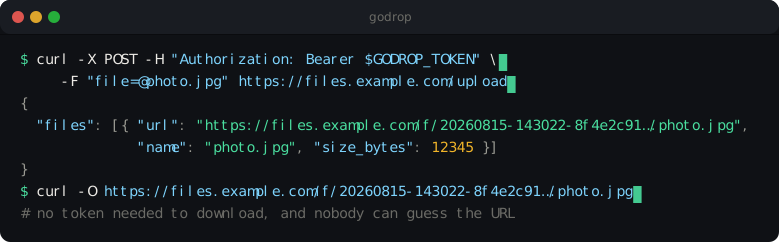
Uploading photo.jpg with curl and getting back a hard-to-guess URL

That is the whole idea. Downloads need no token; uploads and deletes do.

The same thing as text, for copying
Terminal
curl -X POST \
  -H "Authorization: Bearer $GODROP_TOKEN" \
  -F "file=@photo.jpg" \
  https://files.example.com/upload
config.json
{
  "files": [
    {
      "url": "https://files.example.com/f/20260815-143022-8f4e2c91b7934b38a72d1c0e5b6a4f3d/photo.jpg",
      "name": "photo.jpg",
      "size_bytes": 12345
    }
  ]
}

Why this exists: screenshots in pull requests

Coding agents write the code, run the tests and open the pull request. Asking them for a screenshot is the cheapest way to review the branches you are never going to check out and run yourself. They can take one: they start the app, drive a browser and capture the page. Then they cannot attach it.

GitHub has no supported API for attaching an image to a pull request. The web interface takes a drag and drop, and that is the whole of it (cli/cli#4228, #1895, #12960 "critical for agentic workflows", community#28219). What is left is committing binaries into the repository, an undocumented upload endpoint that can stop working on any deploy, or a bucket with a policy, a key and a bill attached to it.

An agent that can run curl can do this instead:

bash
URL=$(curl -sS -X POST -H "Authorization: Bearer $GODROP_TOKEN" \
  -F "file=@login-after-fix.png" $GODROP_URL/upload | jq -r '.files[0].url')

gh pr comment 42 --body "Login page after the fix:

![login]($URL)"

The identifier carries 128 random bits and the URL needs no token to open, so GitHub renders it inline for everyone on the thread. The file itself is on your own disk, which is where a picture of your unreleased work belongs, and it can delete itself: -H "X-Expires-In: 30d".

Nothing about this is specific to screenshots. It is the same three lines for a video of a flaky test, a profile, a build log too long for a comment, or a generated report. What an agent needs to do it by itself, including a skill it can install, is in For AI agents.

Install

Terminal
curl -fsSL https://raw.githubusercontent.com/fatihbaltaci/GoDrop/v1.3.1/install.sh | sh

The script picks the right binary for your machine, verifies its SHA-256 checksum against the published SHA256SUMS, installs it, and hands over to a setup wizard that writes your configuration, creates your first token and checks that the internet can actually reach you.

No root anywhere. The binary goes to ~/.local/bin, the configuration to ~/.godrop, and the uploads into a docker volume, so updating and removing GoDrop later are the work of the same account. Run it as root, or set GODROP_BIN_DIR=/usr/local/bin, to install it for everybody instead. The one thing that does need root, once, is being in the docker group; setup checks that before it writes anything.

Other ways:

bash
# Docker: comes back up after a reboot, and after a crash
docker run -d --name godrop --restart always \
  -p 8747:8747 \
  -e GODROP_TOKENS=$(openssl rand -hex 16) \
  -v godrop-data:/data \
  ghcr.io/fatihbaltaci/godrop

# Debian or Ubuntu: installs the systemd service and creates its user.
# Download the .deb for your architecture from the releases page:
# https://github.com/fatihbaltaci/GoDrop/releases/latest
sudo dpkg -i godrop_1.3.1_linux_amd64.deb

# Fedora, RHEL or openSUSE
sudo rpm -i godrop_1.3.1_linux_amd64.rpm

# From source (Go 1.26+). Binaries built this way send no telemetry at all.
go install github.com/fatihbaltaci/GoDrop/cmd/godrop@latest

Every package, archive and checksum is on the releases page, and the container image is at ghcr.io/fatihbaltaci/godrop.

Platforms

ServerCLINotes
Linux (amd64, arm64)βœ…βœ…Where it is meant to run: .deb, .rpm, .apk, container image, systemd unit
macOS (Intel, Apple silicon)βœ…βœ…Fine for development and small installs; no systemd, so use Docker or start it yourself
Windows (amd64, arm64)βš οΈβœ…The binary works and is tested in CI, but there is no service wrapper, no installer script and no firewall guidance. Take the zip from Releases
FreeBSDπŸ”§πŸ”§Compiles and passes tests; no binaries published

The suite runs on Linux, macOS and Windows for every change, and each release artefact carries signed build provenance:

bash
gh attestation verify godrop_1.3.1_linux_amd64.tar.gz --repo fatihbaltaci/GoDrop

Guided setup

console
$ godrop init

  GoDrop 1.3.1 setup
  Upload a file, get a hard-to-guess URL.

  Public address
  ? Public URL              https://files.example.com
  Service
  ? How should it run?      docker compose
  HTTPS
  ? Certificate             GoDrop gets one from Let's Encrypt
  Limits
  ? Settings                Recommended: 100MB per file, 20GB quota, no expiry

Checks
  βœ“ storage                docker volume godrop-data
  βœ“ output directory       /home/you/.godrop
  βœ“ docker compose         available
  βœ“ port                   443 is free

Written
  βœ“ /home/you/.godrop/.env  (chmod 600, contains your token)
  βœ“ /home/you/.godrop/docker-compose.yml
  βœ“ /home/you/.godrop/sample.png  (a picture, so the first example below uploads something)

Your API token

  β”Œβ”€β”€β”€β”€β”€β”€β”€β”€β”€β”€β”€β”€β”€β”€β”€β”€β”€β”€β”€β”€β”€β”€β”€β”€β”€β”€β”€β”€β”€β”€β”€β”€β”€β”€β”€β”€β”€β”
  β”‚ gd_7f3a9c2e1b8d4a6f0c5e2d9b3a7f1e4c β”‚
  β””β”€β”€β”€β”€β”€β”€β”€β”€β”€β”€β”€β”€β”€β”€β”€β”€β”€β”€β”€β”€β”€β”€β”€β”€β”€β”€β”€β”€β”€β”€β”€β”€β”€β”€β”€β”€β”€β”˜

  ⚠ shown once and never again, so copy it now

Starting
  βœ“ containers started

Verifying
  βœ“ firewall               ufw allows port 443
  βœ“ firewall               ufw allows port 80
  βœ“ external access        reachable (HTTP 200, from FRA)

Use it
      curl -X POST -H "Authorization: Bearer gd_7f3a…" \
        -F "file=@/home/you/.godrop/sample.png" https://files.example.com/upload
      ...

Anonymous heartbeat
  - once a day: {install_id, version, os, arch, deploy}
  β†’ turn it off any time with: godrop telemetry off

Four questions, and the last one is a choice between the recommended limits and setting them yourself. Everything the answers depend on is checked before a single file is written, so a setup that cannot work says so at the start rather than at the end, and the service is started and verified here rather than left as a command to paste. The picture is there so that the first command you paste uploads a real file.

Answering "GoDrop gets one from Let's Encrypt" is all HTTPS takes: it obtains the certificate itself and renews it, so there is no proxy to install and nothing to configure. The question only offers it for a name Let's Encrypt can actually issue for, and the listen port question disappears, because serving TLS means 443.

Changing your mind later is the same command with the setting on it. The token, the uploads and every answer you do not mention stay where they are, and the service restarts into the change:

bash
godrop init --base-url https://files.example.com   # or --port, --retention, --tls…

Every question shows its default and can be answered with a flag instead, so CI and agents run the same code path without a terminal. Prompts are skipped automatically when there is no TTY; --no-input makes that explicit:

bash
godrop init --no-input \
  --base-url https://files.example.com \
  --data-dir /var/lib/godrop \
  --max-total-size 20GB --json

The wizard only offers what the host can do: systemd appears on Linux, not on macOS or Windows, and the commands it prints use the right shell.

The API

Nine endpoints, no SDK, no client library: an agent that can call curl has everything, and GET /llms.txt describes this exact instance in plain text.

MethodPathAuthPurpose
POST/uploadβœ…multipart, one or more file fields
PUT/upload/{name}βœ…raw request body
GET/HEAD/f/{id}/{name} Β· /f/{id}.{ext}download; supports Range and ETag
DELETE/f/{id}/{name} Β· /f/{id}.{ext}βœ…delete
GET/healthzliveness
GET/readyzreadiness: is storage writable
GET/statsβœ…file count, bytes, quota, uptime
GET/llms.txt Β· /openapi.yamlmachine-readable description
GET/skill.mdthe agent skill, installable by URL
bash
# Several files at once: all succeed or none do, and the response lists them
# in the order they were sent
curl -X POST -H "Authorization: Bearer $GODROP_TOKEN" \
  -F "file=@a.png" -F "file=@b.pdf" -F "file=@notes.txt" \
  https://files.example.com/upload

Read the full README β†’View source on GitHub β†’

Related MCP Servers

View all in Developer Tools View all alternatives
  • Payram Helper MCP Server logoPayram Helper MCP Server

    Remote MCP server to integrate and validate self-hosted Payram deployments.

    πŸ’» Developer Tools1 views
    Compare vs Payram Helper MCP Server β†’
  • PraisonAI logoPraisonAI

    AI Agents Framework with Self Reflection and MCP support

    πŸ’» Developer Tools1 views
    Compare vs PraisonAI β†’
  • TokenSave logoTokenSave

    Code intelligence for 15+ languages: semantic graph queries instead of file reads. 37 MCP tools.

    πŸ’» Developer Tools0 views
    Compare vs TokenSave β†’
  • Labelhead Artist Momentum logoLabelhead Artist Momentum

    Trending hip-hop artist momentum scores across four cultural dimensions.

    πŸ’» Developer Tools0 views
    Compare vs Labelhead Artist Momentum β†’

Reviews

No reviews yet β€” be the first to share how this listing worked for you.

Frequently Asked Questions about GoDrop

Add the following block to your claude_desktop_config.json under mcpServers: "mcpServers": { "godrop": { "command": "npx", "args": ["-y", "GoDrop"] } }

AllMCPs Directory Badge

Full Badge Customizer

Showcase your server listing on GitHub or your project documentation. Embed this dynamic SVG badge to highlight official listing status and live engagement.

Badge Style:
Live Dynamic SVG PreviewGoDrop AllMCPs Directory Badge

Markdown (GitHub README)
[![AllMCPs](https://allmcps.com/api/badge/godrop?style=directory)](https://allmcps.com/mcp/godrop)
HTML Embed
<a href="https://allmcps.com/mcp/godrop"><img src="https://allmcps.com/api/badge/godrop?style=directory" alt="GoDrop on AllMCPs" /></a>

Technical Specs & Signals

CategoryπŸ’»Developer Tools
More technical detailsExpand β–Ύ
TransportSTDIO
RuntimeNode.js
Last updatedSep 7, 2026
Views0
Unique ViewsTotal visits recorded for this listing page on AllMCPs.
Installs0
Installs & Copy ActionsTotal times users copied install commands or configuration snippets for this server.
GitHub stars1
GitHub Star CountTotal stargazers on GitHub representing community popularity (1 stars).
36Quality signal: Fair Β· 36/100How this signal is calculated β–Ύ
Server availabilityNot measured

Not scored for repo-hosted servers β€” we can't reach the running server, only its GitHub page. Hosted MCP endpoints are health-checked live.

Verified ownership10/20
Documentation & tools16/30
Adoption & activity1/15
Community engagement0/10

A guidance signal from public completeness & health data β€” not a user rating. New listings start lower and rise as they add docs, get verified, and grow adoption. Signals we can't observe for a listing are skipped, not counted against it.

β˜… FeaturedMoxie Docs MCP logo

Moxie Docs MCP

MCP & Agent Skills for Automated Documentation, and codebase conventions + context

Explore Server β†’

Own this project?

This directory is pre-filled from public sources. Claim via GitHub README, site badge, or DNS TXT to unlock edit access and the Official badge β€” proof is checked automatically, then reviewed by our team.

Free dofollow backlink: add your website and place the AllMCPs badge on it β€” no claim needed. We detect it automatically and keep it verified as long as the badge stays live.

Claim & get free dofollow

Share & Embed

Add our SVG badge (dark/light directory styles) or embeddable widget to your site.

Explore more

More in πŸ’» Developer Tools β†’Best MCP servers for Developers β†’Alternatives to GoDrop β†’Install in Claude DesktopInstall in CursorInstall in VS Code