Multi-account Gmail on a Cloudflare Worker you deploy yourself: read, send, reply, labels, threads
Quick Install
Automated & IDE SetupCopy the AI prompt to install this server into Claude Code, Cursor, or another agent — or use 1-click editor setup below.
Manual Client & Custom JSON ConfigExpand JSON ▾
Client Config & Setup
Remote HTTPChoose your client or environment
Target File:
💡 Paste the JSON block into your client's configuration file under mcpServers, then restart the application.
Documentation Overview








gmail-mcp connects Gmail to Claude and any other MCP client. It can search and read mail, send and reply-all with quoted history, forward, handle attachments and inline images, and manage drafts, labels, and threads — across several Google accounts at the same time.
It runs as a remote server on your own Cloudflare Worker, so the same connection answers from Claude Code on a laptop, claude.ai in a browser, and Claude on a phone. Each connection signs in to one Google account, and the Google refresh token stays in your Cloudflare account.
Two things push people here. The Gmail connectors built into Claude and Google read mail and write drafts, but cannot send, and hold one Google account per assistant account. Servers that can send are usually local processes — fine at a desk, invisible from a phone.
How it compares
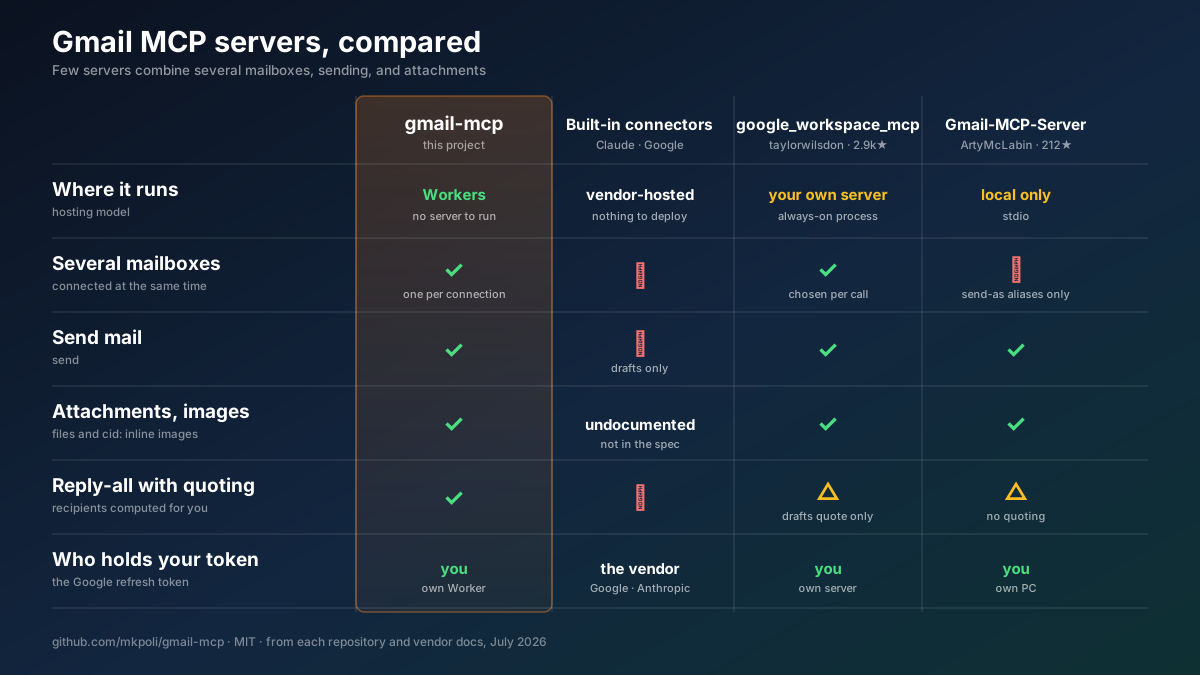
A longer comparison — six projects, twelve rows
| gmail-mcp | Claude · Google built-in | taylorwilsdon/ google_workspace_mcp | ArtyMcLabin/ Gmail-MCP-Server | shinzo-labs/ gmail-mcp | aaronsb/ google-workspace-mcp | |
|---|---|---|---|---|---|---|
| Where it runs | Cloudflare Workers | vendor-hosted | your server or local | local | local | local |
| Reachable from a phone | ✅ | ✅ | ✅ | ❌ | ❌ | ❌ |
| Several mailboxes at once | ✅ bound per connection | ❌ | ✅ chosen per call | ❌ aliases only | ❌ | ✅ chosen per call |
| Send mail | ✅ | ❌ | ✅ | ✅ | ✅ | ✅ |
Attachments · inline cid: images | ✅ | undocumented | ✅ | ✅ | ❌ | ✅ |
| Reply-all with quoted history | ✅ | ❌ | drafts only | no quoting | ❌ | ✅ |
| Forward | ✅ | ❌ | ✅ | ❌ | ❌ | ✅ |
| Honors each part's charset | ✅ | — | ❌ UTF-8 assumed | ❌ UTF-8 assumed | ❌ | ❌ |
| Rejects CRLF header injection | ✅ | — | ✅ framework | ✅ strips | ❌ none | ✅ |
| Mailbox settings (filters, vacation) | ❌ out of scope | ❌ | filters | filters | ✅ | ❌ |
| Tool count | 24 | 11–16 | 14 (Gmail) | 30 | 64 | 11 |
| Who holds your refresh token | you | vendor | you | you | you | you |
google_workspace_mcp is the most complete project here. It covers all of Workspace rather than Gmail alone, and it appends your Gmail signature and pulls attachments straight from a URL, neither of which gmail-mcp does. shinzo-labs/gmail-mcp reaches vacation responders, delegates, and S/MIME through its 64 tools; those live under gmail.settings.*, a scope gmail-mcp never requests, so they stay beyond its reach whatever happens to a grant.
Two design differences decide most of the rest. Routing accounts by a call argument lets one grant touch every connected mailbox, while binding the mailbox to the connection means a wrong argument reaches nothing. And on reading, the local servers decode every part as UTF-8: ISO-2022-JP and Shift_JIS mail arrives garbled, and long messages that Gmail stores as attachment blobs come back with an empty body.
Deploy it
About ten minutes. You need a Cloudflare account, bun, and a Google account. A domain on the Cloudflare account is optional — without one the Worker answers on workers.dev.
1 · Create a Google OAuth client
Google exposes no API for the next two steps, so they happen in the Cloud console:
- OAuth consent screen → External, then under Audience press Publish app. Left in Testing, Google expires every refresh token after 7 days and each connection dies with its token. Published, the app shows an unverified-app warning at sign-in and serves up to 100 accounts.
- Credentials → Create credentials → OAuth client ID → Web application, with
https://<your-host>/callbackas an authorized redirect URI. Keep the client ID and secret.
<your-host> is the domain you point at the Worker, or the workers.dev hostname it gets otherwise. Deploying first and coming back to fill this in works — the guide the Worker serves at / shows the exact value.
2 · Deploy the Worker
The button copies the repository into your GitHub account, creates the KV namespace and the Durable Object, and asks for the four secrets. It deploys to workers.dev; a custom domain is attached afterwards under Settings → Domains & Routes.
From a terminal instead:
bun run setup asks which domain to answer on, creates or reuses the OAUTH_KV namespace, takes the client ID and secret, generates a cookie key, and deploys. Those first two answers land in wrangler.local.jsonc, which git ignores — wrangler.jsonc names no account's namespace and no one's domain, so a clone deploys anywhere. Re-running setup to rotate a single secret is safe.
3 · Connect a client
Leave the client ID and secret fields empty — MCP clients register themselves.
Run /mcp in Claude Code to sign each connection in to its Google account. In claude.ai it is Settings → Connectors → Add custom connector with the same URL. Any single-segment label works after /mcp/, which is how one deployment serves several mailboxes to clients that reject two servers sharing a URL.
Your deployment serves this guide at https://<your-host>/.
What it can do
| 📖 Read | ✍️ Write | 🏷 Organize |
|---|---|---|
|
|
|
|
Messages leave the way a mail client sends them: plain text with an HTML alternative, file attachments, and inline images referenced by cid:, nested as multipart/mixed › multipart/related › multipart/alternative. Subjects and display names use RFC 2047, filenames use RFC 2231, so Japanese, Chinese, and emoji survive the trip.
reply_all reads the original's Reply-To, From, To, and Cc, drops your own address and any address you send mail as, answers from the one the sender wrote to, carries the References chain, and quotes the original in whichever parts you send. forward_message reproduces the forwarded envelope and can re-attach the original's files.
Related MCP Servers
Reviews
No reviews yet — be the first to share how this listing worked for you.
Frequently Asked Questions about Gmail MCP
AllMCPs Directory Badge
Showcase your server listing on GitHub or your project documentation. Embed this dynamic SVG badge to highlight official listing status and live engagement.
Badge Style:
Live Dynamic SVG Preview
Markdown (GitHub README)
[](https://allmcps.com/mcp/gmail-mcp-2)HTML Embed
<a href="https://allmcps.com/mcp/gmail-mcp-2"><img src="https://allmcps.com/api/badge/gmail-mcp-2?style=directory" alt="Gmail MCP on AllMCPs" /></a>Technical Specs & Signals
CategoryCommunication
39Quality signal: Fair · 39/100How this signal is calculated ▾
Server availabilityNot measured
Not scored for repo-hosted servers — we can't reach the running server, only its GitHub page. Hosted MCP endpoints are health-checked live.
Verified ownership10/20
Documentation & tools16/30
Adoption & activity3/15
Community engagement0/10
A guidance signal from public completeness & health data — not a user rating. New listings start lower and rise as they add docs, get verified, and grow adoption. Signals we can't observe for a listing are skipped, not counted against it.
Own this project?
This directory is pre-filled from public sources. Claim via GitHub README, site badge, or DNS TXT to unlock edit access and the Official badge — proof is checked automatically, then reviewed by our team.
Free dofollow backlink: add your website and place the AllMCPs badge on it — no claim needed. We detect it automatically and keep it verified as long as the badge stays live.
Claim & get free dofollowShare & Embed
Add our SVG badge (dark/light directory styles) or embeddable widget to your site.