Sandboxed computer-use for AI agents: drive real browser + desktop apps in nested X11 windows
Quick Install
Automated & IDE SetupCopy the AI prompt to install this server into Claude Code, Cursor, or another agent — or use 1-click editor setup below.
Manual Client & Custom JSON ConfigExpand JSON ▾
Client Config & Setup
Remote HTTPChoose your client or environment
Target File:
💡 Paste the JSON block into your client's configuration file under mcpServers, then restart the application.
Capabilities & Tool Schemas (1)
Inspect callable tools, capabilities, and parameters exposed to AI agents by Glovebox MCP.
launch_appCallable MCP tool function
Documentation Overview
glovebox-mcp
A sandboxed computer-use MCP server — let an AI agent drive a real browser and desktop apps (mouse, keyboard, screenshots, vision grounding), confined to a nested X11 window so it can never touch your real screen, files, or other apps.
Like a lab glovebox: the agent reaches in and manipulates real applications, sealed off from everything else. Bring the sandbox up, log into whatever sites or apps you want to automate inside that window, and the agent operates only there — you can watch it live and close it instantly.
Speaks the Model Context Protocol, so it works with MCP clients like Claude Code. Your host can run Wayland; the sandbox gives the agent a real X server to drive.
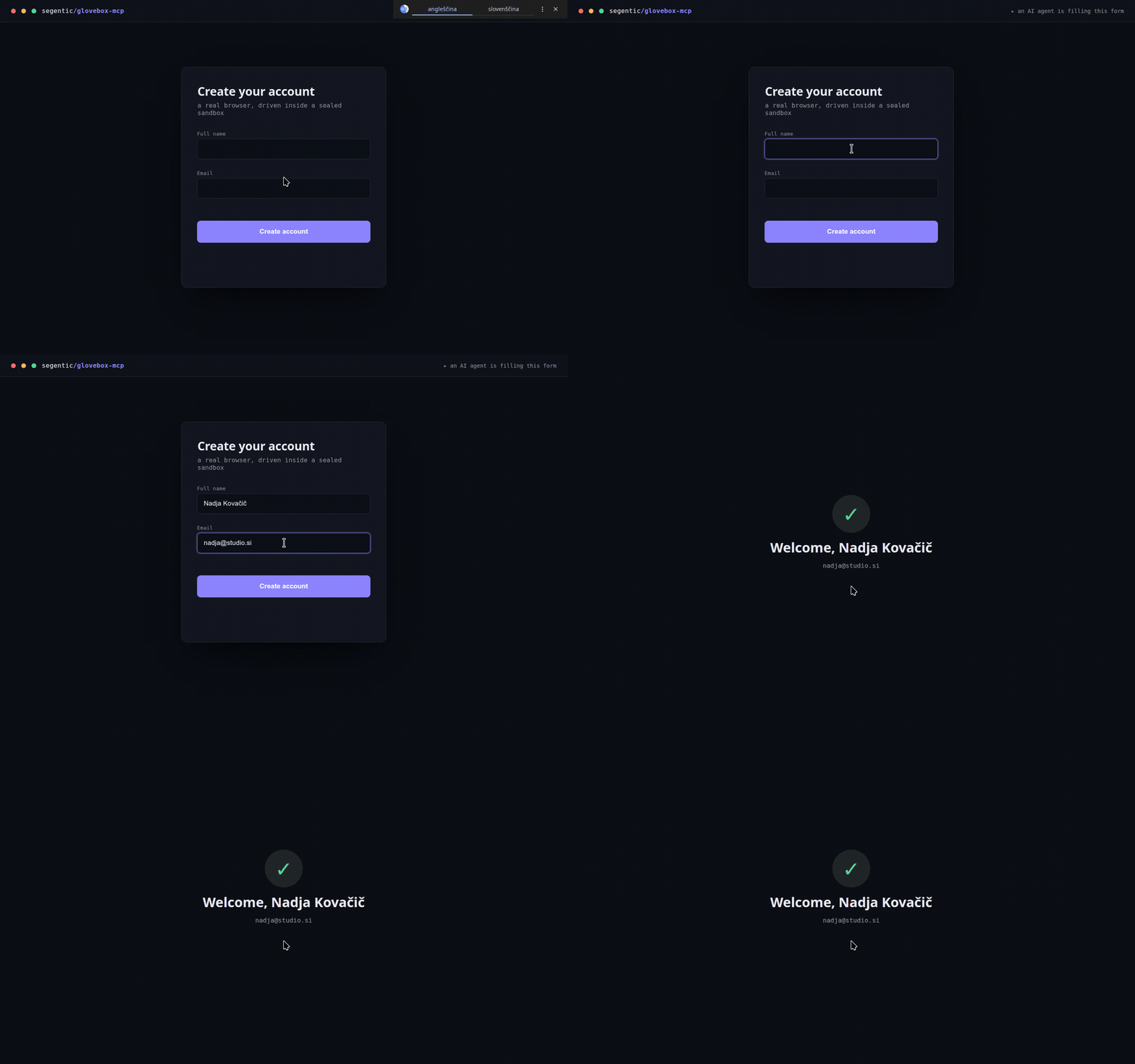
An agent driving a real browser in the sandbox — gliding the cursor, inserting a unicode name (Nadja Kovačič), typing, and submitting. All confined to a nested X11 window.
Why a nested X11 sandbox?
- Most desktop automation (xdotool, PyAutoGUI) is X11-only, but many modern desktops run Wayland.
- Xephyr provides a real X server inside a single window (
DISPLAY :1). Everything the agent does — clicks, typing, screenshots — is confined to that window, not your real desktop. - You stay in control: watch it live,
pkill Xephyrto close everything.
Requirements
- Linux — the sandbox nests a real X server (Xephyr), so it works even on Wayland hosts (via Xwayland). Not macOS/Windows. Developed on Ubuntu; any modern Linux with the packages below.
- Python 3.10+ and
uv(used for the virtualenv). - System packages —
xserver-xephyr(Xephyr),openbox,scrot,x11-utils,xdotool,wmctrl,xclip(+tesseract-ocrforbasic). On Debian/Ubuntu the installer auto-installs them viaapt(sudo); on Fedora/Arch it prints the matchingdnf/pacmancommand. The MCP server itself is distro-agnostic — any Linux with these tools works. - A browser in the sandbox (Chromium or Chrome).
- NVIDIA GPU (≥6 GB VRAM) — only for the
localvision mode.
Install
Pick a vision backend and run its one-liner (clone → install). Each one installs the system packages
(auto via apt on Debian/Ubuntu) and the Python deps for that mode, and writes a ready-to-paste
mcp-config.json with your paths.
none — no local models; your agent reads screenshots itself (lightest, instant):
basic — Tesseract OCR grounding (parse_screen → text + coordinates, CPU-only):
local — OmniParser on an NVIDIA GPU (parse_screen → text + icons, pixel-precise; ~4 GB weights, ≥6 GB VRAM):
Your choice is written to .vision-mode (override per run with the GLOVEBOX_VISION env var).
Works with any MCP client / harness
Claude Code, Cursor, Codex, or your own agent — it's a standard MCP server, not tied to any one host.
Two compatibility notes: basic/local return element coordinates as text, so they work even
with text-only agents; none relies on the client passing the tool's screenshots to a
multimodal model (fine for Claude Code, Cursor, and other image-capable MCP clients).
Quickstart
- Start the sandbox (leave it running): Log into any sites or apps you want to automate in that window.
- Register the server with your MCP client.
install.shalready wrotemcp-config.jsonwith your real install path — copy itsgloveboxblock into your client's MCP config: Restart the client so it loads the server. - Ask the agent to screenshot / click / type — it operates only on the
:1window.
Driving it with an AI agent? Paste
AGENTS.mdinto the agent's system prompt — it teaches the observe → act → verify loop, grounding, the upload/unicode gotchas, and when to stop.
Tools
| Tool | What |
|---|---|
status() | Server + sandbox status in one read-only call: version, vision backend, host display, live instances, and which system deps (xdotool, xclip, Xephyr, tesseract, OmniParser weights) are present. Run it first — and paste it into bug reports. |
parse_screen() | Vision grounding → JSON of detected elements (id, type, label, interactive, pixel-center; capped at 300 per call, flagged via "truncated") + a numbered Set-of-Mark image at /tmp/glovebox_annotated_<N>.png. (local mode: OmniParser on GPU, ~2 s.) |
click_element(id) | Click an element from the last parse_screen (no coordinate guessing). |
screenshot() | Screenshot of an instance. |
click(x,y) · move_mouse · scroll · drag · double_click | Pointer ops. |
type_text(text) | Unicode-safe typing (ASCII via xdotool; anything with č/š/ž… is inserted via the clipboard, because xdotool's synthetic unicode is silently dropped by some GTK apps). |
press_keys("ctrl+a"/"Return"/…) | Keys/combos (xdotool syntax). |
upload_file(filepath, selector?) | Attach a local file to a page's <input type=file> via the Chrome DevTools Protocol. The nested X11 file picker is invisible to automation and hangs the renderer, so use this for all uploads — never click an upload button expecting a dialog. Works on Chromium started by launch_app/start-display.sh (they open a per-instance --remote-debugging-port, 9222+N). Browser file inputs only — for native apps see open_file. |
open_file(filepath, app?) | Open a local file in a native app on the instance's display (e.g. app="gimp") or via xdg-open. GTK apps get the same X11/D-Bus handling as launch_app. |
list_files() | The instance's staging folder files/<N>/ (under the install dir) + its contents. |
launch_app(command, name?, size?) · list_instances() · close_instance(n) | Multi-instance control (see below). |
wait_ms(ms) · get_screen_size() | Timing / sandbox size. |
Every control tool takes instance=N and optional observe / settle_ms (see below).
In local mode OmniParser is lazy-loaded on first parse_screen (~6 s once, then ~2 s/parse).
Structured, honest responses
Every tool returns JSON: {"ok": true, "action": "click", "instance": 1, "detail": "clicked (10,20) button 1", …}.
Failures come back with the MCP isError flag set and the same JSON shape embedded in the error
text — {"ok": false, "error": "…", "fix": "…"} — where fix names the call that unblocks you
(e.g. a click on a dead instance says to run list_instances() / launch_app(); an unknown element
id says to re-run parse_screen()). Silent no-ops are treated as failures too: an invalid keysym,
a zero scroll, closing an instance that isn't running, or non-ASCII typing without xclip all
error instead of pretending success. screenshot() returns a PNG image; observe="screenshot"|"parse"
returns [json, image] in one call.
Vision backend (selectable)
GLOVEBOX_VISION env var, or the .vision-mode file, or default local:
| Mode | parse_screen | Needs | When |
|---|---|---|---|
none | disabled (returns a note) — use screenshot() + reason | nothing (mcp, mss, xdotool) | lightest; let the agent's own vision do grounding |
basic | Tesseract OCR → text elements + coords | tesseract-ocr + pytesseract | no GPU; text-only grounding |
local | OmniParser → text + icons + coords | torch + CUDA + OmniParser weights | best grounding |
Switch anytime with ./install.sh <mode> (installs only what that mode needs).
Multi-instance (a fleet of app windows)
Every control tool takes instance=N (default 1 = the start-display.sh sandbox). Spin up more —
each its own Xephyr display/window on the host desktop:
launch_app(command, name?, size?)→ starts the next free:Nrunning any GUI app (chromium,gimp,inkscape,xterm, …). Chromium auto-gets X11 flags, a per-instance profile, a remote-debugging port, and D-Bus isolation. Returns the instance id.list_instances()·close_instance(n).
Because each display has its own cursor, multiple agents can drive different instances in parallel —
one window each. The only shared resource is the GPU for local-mode parse_screen (it just queues).
The host display for new windows is GLOVEBOX_HOST_DISPLAY (default :0); XAUTHORITY is auto-discovered.
One-call action + observe
click · click_element · type_text · press_keys · scroll · drag · double_click take
observe (none default · screenshot · parse) and settle_ms. With observe="screenshot"
the action returns its result and the resulting screen in a single call (with settle_ms to let the
page update first) — no separate screenshot round-trip. Default none keeps routine steps cheap; opt
into screenshot/parse on the steps that change the page (navigations, submits).
Files & uploads
Each instance gets a staging folder files/<N>/ inside the install dir — a stable place to drop
files for that instance (readable by native apps and, since it's under $HOME, by snap Chromium too).
list_files(instance) shows the folder and its contents.
Related MCP Servers
Adoption & maintenance
Factual signals from GitHub, npm, and our automated checks — not a rating.
GitHub stars
13
Stargazers on the source repository.
Last commit
2mo ago
Most recent push to the default branch.
Tools exposed
1
Callable tools this server registers over MCP.
Reviews
No reviews yet — be the first to share how this listing worked for you.
Frequently Asked Questions about Glovebox MCP
AllMCPs Directory Badge
Showcase your server listing on GitHub or your project documentation. Embed this dynamic SVG badge to highlight official listing status and live engagement.
Badge Style:
Live Dynamic SVG Preview
Markdown (GitHub README)
[](https://allmcps.com/mcp/glovebox-mcp)HTML Embed
<a href="https://allmcps.com/mcp/glovebox-mcp"><img src="https://allmcps.com/api/badge/glovebox-mcp?style=directory" alt="Glovebox MCP on AllMCPs" /></a>Technical Specs & Signals
CategoryDeveloper Tools
52Quality signal: Good · 52/100How this signal is calculated ▾
Server availabilityNot measured
Not scored for repo-hosted servers — we can't reach the running server, only its GitHub page. Hosted MCP endpoints are health-checked live.
Verified ownership10/20
Documentation & tools24/30
Adoption & activity5/15
Community engagement0/10
A guidance signal from public completeness & health data — not a user rating. New listings start lower and rise as they add docs, get verified, and grow adoption. Signals we can't observe for a listing are skipped, not counted against it.
Own this project?
This directory is pre-filled from public sources. Claim via GitHub README, site badge, or DNS TXT to unlock edit access and the Official badge and attach your website — proof is checked automatically, then reviewed by our team.
Free dofollow backlink: add your website and place the AllMCPs badge on it — no claim needed. We detect it automatically and keep it verified as long as the badge stays live.
Claim & get free dofollowShare & Embed
Add our SVG badge (dark/light directory styles) or embeddable widget to your site.