MCP Cybersec Watchdog
by girste
Linux server security audit and real-time monitoring with 87+ checks covering CIS, NIST, PCI-DSS, and anomaly detection.
Install MCP Cybersec Watchdog
Pick your client, then add it in one click or paste the config.
No confirmed install command yet
We only publish a config when the install details come from the project itself — its README, its docs, or a verified owner. We haven’t found those for girste/mcp-cybersec-watchdog, and we’d rather show nothing than a guess you’d paste into your client.
Open setup steps on GitHubOverview
Use cases
- Audit Linux server security posture against CIS, NIST, and PCI-DSS standards
- Monitor system services and resources continuously with anomaly detection
- Detect and alert on suspicious activity in firewall, SSH, Docker, and network
- Integrate real-time alerts via Discord, Slack, or custom webhooks
- Check health of databases, backups, and storage devices on Linux hosts
Key features
- Single static binary, zero dependencies, no configuration needed
- 89+ security and compliance checks including firewall, SSH, SSL/TLS, fail2ban
- Continuous monitoring mode with configurable alert thresholds
- Webhook notifications compatible with Discord, Slack, Microsoft Teams, and others
- Health checks for systemd services, databases, Docker containers, and storage
- Detailed audit reports in terminal or JSON output formats
Security & health
What it can reach and how reliably it runs — from our own checks, not the maintainer’s claims.
Recent health check succeeded.
Adoption & maintenance
Factual signals from GitHub, npm, and our automated checks — not a rating.
From the project README


🎯 What is Chihuaudit?
A portable, single-binary system auditing tool for Linux. Like Lynis but faster and smarter.
No configuration needed. No dependencies. Just run.
sudo ./chihuaudit audit
✨ Features
- 🔒 Security: Firewall, SSH hardening, SSL/TLS, fail2ban, SUID binaries, open ports
- 🚀 Services: Systemd services, web servers, databases, Docker
- 💻 Resources: CPU, RAM, disk usage, top processes
- 💾 Storage: SMART health, inode usage, filesystem errors
- 🗄️ Databases: PostgreSQL, MySQL, Redis health checks
- 🐳 Docker: Container status, resource usage, volumes
- 🌐 Network: DNS resolution, latency, interfaces, connections
- 📦 Backups: Backup detection and freshness checks
- 📝 Logs: Error analysis, SSH attempts, service restarts
- ⏰ Monitoring: Continuous mode with Discord webhook notifications
🤖 Claude Skill Alternative

Don't want to install anything? Use the Claude Skill version instead!
Execute the same comprehensive system audit directly through Claude (Sonnet, Opus, or Haiku) using native shell commands - no binary installation required.
Key Benefits:
- 🚀 Zero Installation - Works immediately with sudo access
- 🔄 Consistent Results - 1+ year of production use with extremely reliable output
- 📊 Same Coverage - All 87 checks, 10 categories, identical methodology
- ⚡ Fast - 30-90 second execution time
Requirements: Linux with systemd, sudo NOPASSWD configured, Claude with shell access
Documentation: docs/skill/chihuaudit-skill.md
🚀 Quick Start
Build
make build
# or
./build.sh
Run
# Single audit
sudo ./bin/chihuaudit audit

# JSON output
sudo ./bin/chihuaudit audit --json

# Continuous monitoring
sudo ./bin/chihuaudit monitor --interval=5m

# Generate config
./bin/chihuaudit init-config
📊 Example Output
Terminal Output
=== CHIHUAUDIT REPORT ===
Timestamp: 2026-02-05 12:38:27
Hostname: server.example.com
OS: Ubuntu 24.04.3 LTS

--- 1. SECURITY ---
Firewall: active (ufw) ✓
SSH: active
SSH Port: 2244
SSH Password Auth: disabled ✓
SSH Root Login: no ✓
External Ports: [443, 80, 2244]
Localhost-Only Ports: [5432, 6379]
SSL Certificates: 5 (all valid)

--- 2. SERVICES ---
Total Running: 31
Failed: 0 ✓
Web: caddy (active)
Database: postgresql (active)

[... 8 more categories ...]

Total Checks: 87
🔧 Webhook Notifications
Chihuaudit supports webhook notifications for real-time monitoring alerts. While optimized for Discord, it works with any webhook-compatible service (Slack, Microsoft Teams, Mattermost, custom endpoints, etc.).
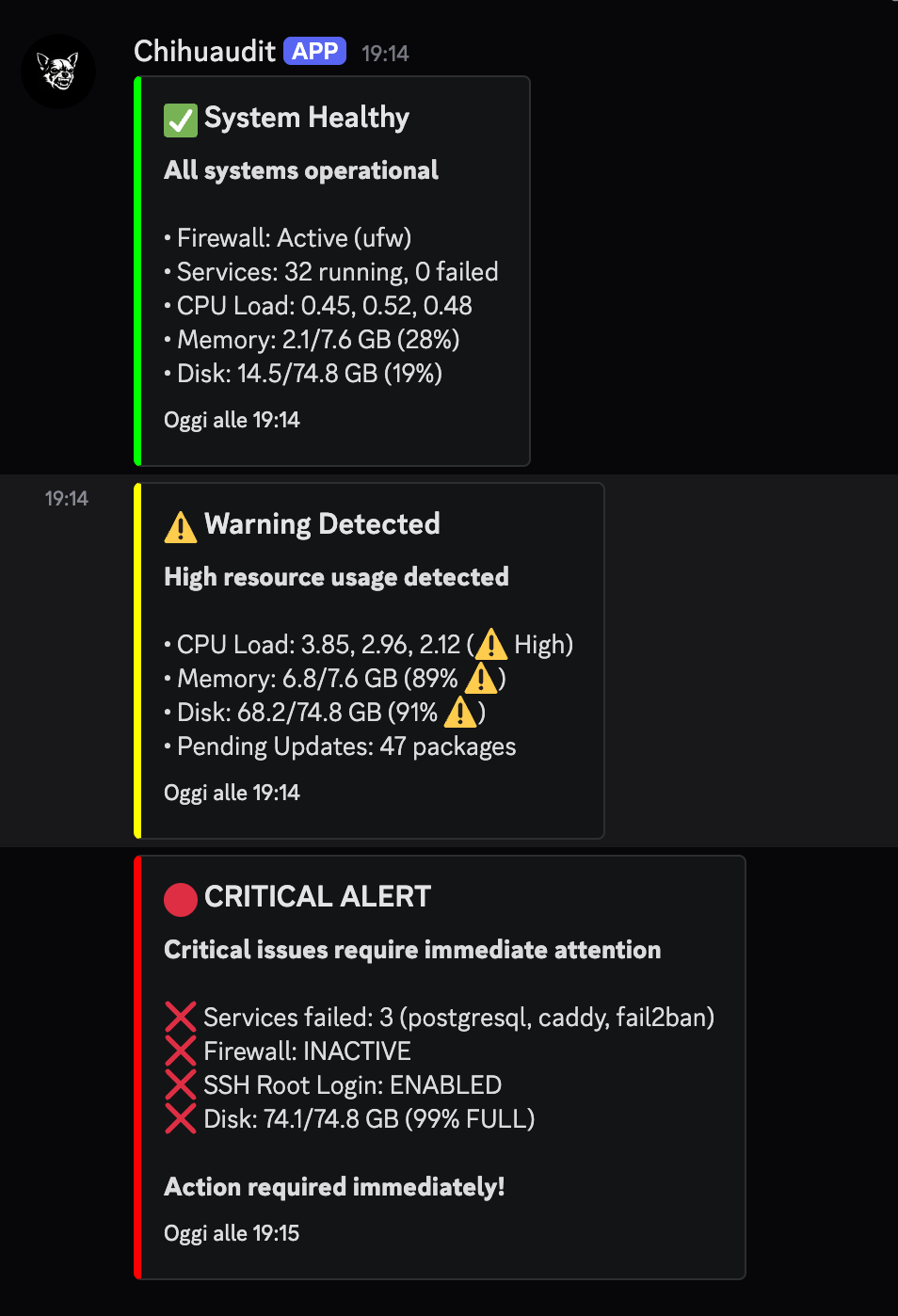
Color-coded alerts: 🟢 Green (healthy), 🟡 Yellow (warnings), 🔴 Red (critical)
Setup
# Generate default config
./bin/chihuaudit init-config

# Edit configuration
nano ~/.chihuaudit/config.json
Configuration
{
  "discord_webhook": "https://discord.com/api/webhooks/YOUR_WEBHOOK_ID/YOUR_WEBHOOK_TOKEN",
  "notification_whitelist": {
    "cpu_threshold": 70,
    "memory_threshold": 70,
    "disk_threshold": 85,
    "ignore_changes": ["uptime", "active_connections"]
  }
}
Webhook Compatibility
Discord (native support):
- Rich embeds with color-coded alerts
- Custom avatar and username
- Timestamp and structured fields
Slack (works with minor format differences):
- Use
discord_webhookfield with your Slack webhook URL - Embeds translate to Slack attachments
- Colors and formatting preserved
Other services:
- Any service accepting JSON POST with
embedsfield - Microsoft Teams incoming webhooks
- Mattermost webhooks
- Custom webhook handlers
Alert Thresholds
CPU Load: Trigger when load average exceeds threshold
Memory Usage: Alert on RAM usage percentage
Disk Space: Warning when disk usage crosses limit
Ignore List: Skip notifications for frequently changing metrics
Monitoring Mode
# Monitor every 5 minutes with webhook alerts
sudo ./bin/chihuaudit monitor --interval=5m
Changes are detected and only significant events trigger notifications, reducing alert fatigue.
🎯 Design Philosophy
- Universal: Works on any Linux distro without configuration
- Portable: Single static binary, zero dependencies
- Safe: Read-only checks, no system modifications
- Fast: Parallel execution, ~1 second for full audit
- Simple: Minimal code, maximum clarity
- Automated: Perfect for CI/CD and monitoring
📖 Documentation
🏗️ Architecture
chihuaudit/
├── main.go           # CLI entry point
├── checks/           # 10 audit categories
│   ├── security.go   # Firewall, SSH, SSL, ports
│   ├── services.go   # Systemd, web, DB servers
│   ├── resources.go  # CPU, RAM, disk
│   └── ...
├── detect/           # OS/tool detection
├── notify/           # Discord webhooks
├── report/           # Text/JSON formatters
└── state/            # Change tracking
🤝 Contributing
Contributions welcome! See CONTRIBUTING.md for guidelines.
Keep code:
- Simple: Minimal, readable, maintainable
- Portable: Detection-based, no hardcoded paths
- Safe: No shell injection, no user input in commands
- Consistent: Follow existing patterns
📜 License
MIT License - see LICENSE for details
Made with ❤️ for sysadmins everywhere

Reviews
No reviews yet — be the first to share how it worked for you.
Frequently Asked Questions about MCP Cybersec Watchdog
Related MCP servers
Add a badge to your READMEShow it’s listed — live SVG, Markdown or HTML.
AllMCPs Directory Badge
Showcase your server listing on GitHub or your project documentation. Embed this dynamic SVG badge to highlight official listing status and live engagement.
[](https://allmcps.com/mcp/girste-mcp-cybersec-watchdog)<a href="https://allmcps.com/mcp/girste-mcp-cybersec-watchdog"><img src="https://allmcps.com/api/badge/girste-mcp-cybersec-watchdog?style=directory" alt="MCP Cybersec Watchdog on AllMCPs" /></a>