
Ghostlight MCP
Give your agent a visible place in the browser you already use.



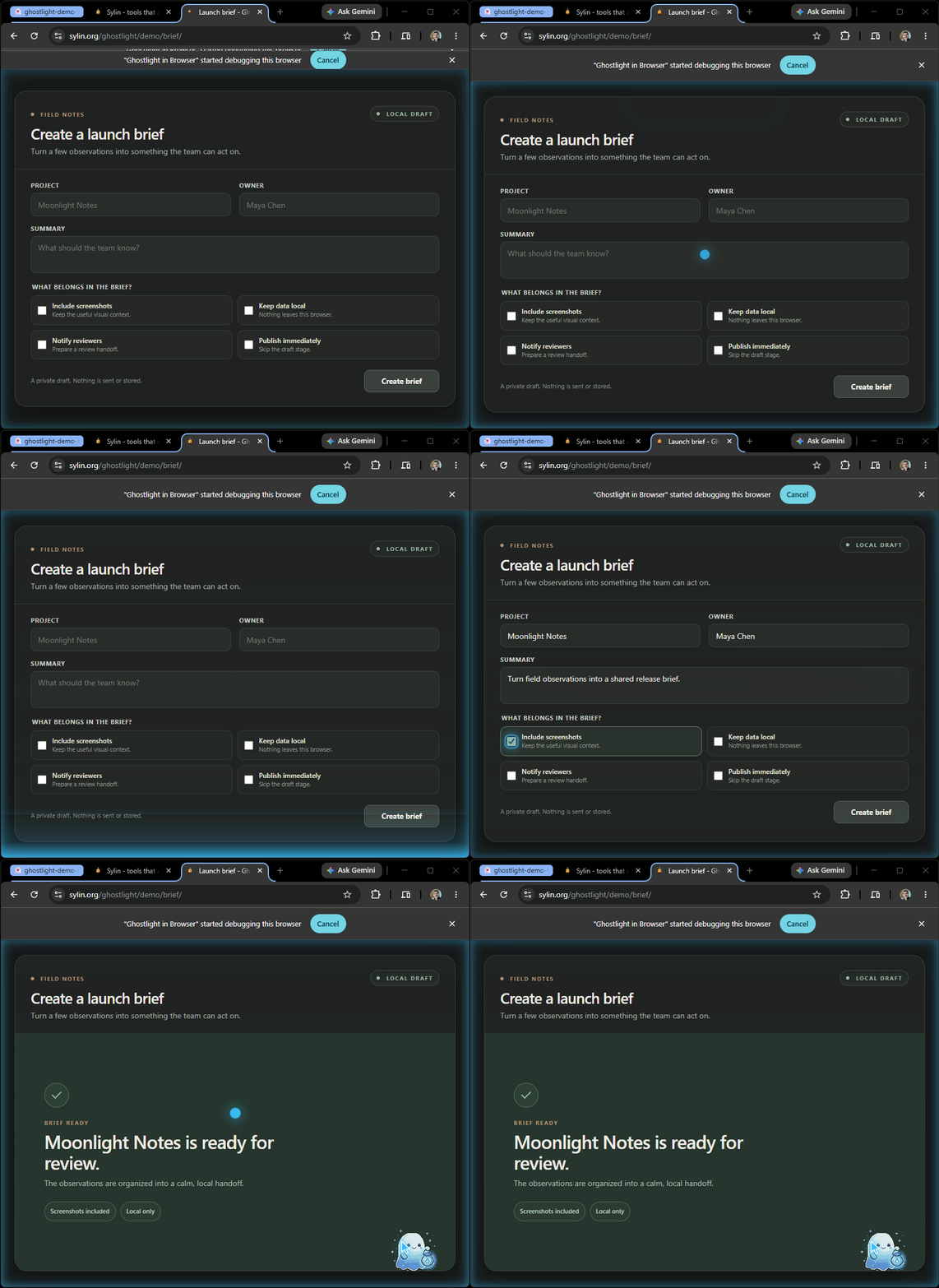
A launch brief moves from empty form to ready for review, in full view.
Install Ghostlight | See where it fits | Installation guide | Trust Center
Your agent needs a page you are signed in to. The usual answer is a second, empty browser that knows none of your sessions, driven by a model that has to learn Chrome internals to get anything done.
Ghostlight gives it a tab group inside the Chromium you already have open. The work happens in front of you: watch it, pause it, take the wheel, or end the session. The model says what it wants, and Ghostlight does the browser part.
Ask an agent to read a page, complete a form, handle a file, follow a popup, or investigate a failed web workflow. Ghostlight carries the task across tabs and browser changes while keeping the browser work and its controls on your machine.
A light left burning, so the halls stay safe.
Where it stands today
The published release is 2.0.1. It is available as the GitHub release
v2.0.1, the npm package
ghostlight@2.0.1, the Chrome Web Store adapter v2.0.1, and the MCP Registry record
org.sylin/ghostlight 2.0.1, all observed on 2026-10-22 and recorded in
docs/public-status.json and the
release custody record.
What you get
- 23 catalog tools: 22 browser tools covering tabs, navigation, reading a page, screenshots, semantic clicks and hovers, form input, file upload, scripts, waits, short flows, dialogs, and diagnostics, plus one policy tool that explains the authority in force. One call carries the intent; Ghostlight performs the browser steps behind it.
- One truthful answer per call: what happened, what changed in the browser, what is ready, and whether running it again is safe. Ghostlight writes that answer, never the page, and adds at most two recovery steps of its own. When an effect is uncertain it says so rather than guessing, and never proposes a replay that could submit a form twice.
- A desktop workbench in the tray that shows work as it happens.
- Your machine, and only your machine. Ghostlight runs as you, reaches your browser over local IPC, and keeps a payload-free local record. No account, no telemetry, no activation service, no update ping, no hosted control plane, and no second hidden browser. The only network traffic is the browsing you asked for.
Your first five minutes
You need Chrome, Edge, Brave, or Chromium 125+ and an MCP client. The npx installer needs
Node.js; the one-line installers do not. The service you run afterward is native Rust. Agent setup
supports Windows and Linux; macOS is not supported yet.
-
Install Ghostlight. It registers the MCP clients it finds and opens the Ghostlight window on its setup steps:
npx -y ghostlight installWithout Node.js, use the one-liner for your system. On Windows, in PowerShell:
irm https://sylin.org/ghostlight/get.ps1 | iexOn Linux:
curl -fsSL https://sylin.org/ghostlight/get.sh | sh -
Add Ghostlight in Browser from the step the window shows. It lists the browsers on your computer. Add opens the Chrome Web Store listing in that browser, which is also where Edge gets the extension. If the browser already holds the extension, the row reads Open instead.
-
Ask your agent:
Open sylin.org/ghostlight/demo/desk and ring the bell.
If the install named an agent to restart, restart it first; the install says so. There is no other restart step.
A sky-blue Ghostlight group appears in your browser, the agent rings the bell on a demo page that submits and stores nothing, and the window shows Ready. That one prompt proves the whole connection. For a read-only first task instead, ask:
Open https://example.com/ in a new Ghostlight tab, summarize the page, and tell me which tab you used. Do not click, type, submit, or change the page.
When a session ends, the tabs Ghostlight keeps open leave its group and stay where they are, so no idle group is saved to your bookmarks bar. Next time, the same agent gets its group back and reuses a tab Ghostlight opened for it on that site and left open, so repeated work stops littering your tab strip. It never takes over a tab you opened, or a tab another agent left open. After a browser restart, an agent's remembered tab is used only when the browser still shows that tab at the page Ghostlight last saw there; otherwise the agent opens a fresh tab. The one case it cannot tell apart is a tab of yours that the restarted browser gave the same id and that shows the same address, such as a restored copy of the agent's page.
If a step needs attention, run:
ghostlight doctor
If you installed with npm and ghostlight is not on your PATH, npx -y ghostlight doctor runs the
same check.
doctor checks the client entry, local service, browser connection, and extension, then names the
next action. The installation guide covers targeted clients, source
builds, updates, uninstall, and symptom-led recovery.
From one page to a whole workflow
Ghostlight is at its best when browser work has a thread to follow:
- Pick up where you are signed in. Open an application in the Chromium profile you chose and work with the session already there. Credentials stay with the browser.
- Finish the interaction. Navigate, fill forms, upload files, resolve dialogs, wait for page state, and carry results from one step into the next.
- Follow the browser. Keep working when a site opens a supported child tab or when a known workspace changes underneath the task.
- See what failed. Bring page state, console messages, and network requests together so the next debugging step comes from evidence instead of guesswork.
Use the same browser capability from any agent Ghostlight sets up (the installation guide lists every one), or from another compatible stdio MCP client. Agents receive structured page reads, exact element references, bounded action receipts, and specific recovery guidance. They can ask the policy tool to explain the authority in force at any moment.
The browser stays a shared space
Ghostlight works in a dedicated sky-blue tab group inside the browser window you chose. Page scans, clicks, typing, drags, and longer phases share one visual language, so the movement on screen has an explanation.
Pause the workspace, take over for a delicate step, or stop it. Move its tabs where you want them; Ghostlight follows the workspace instead of snapping it back. Ordinary tabs remain outside the agent's owned set: a tab you opened is never reused, regrouped, or navigated, even on the same site, and loading a page yourself in a tab Ghostlight left open takes that tab back.
Closing a tab needs two independent yes votes: the orchestrator's authority, which needs Action on that tab's site, and the browser's own preserve-tabs setting, which ships on. That keeps the evidence of what happened in front of you. Closing a tab yourself always works.
Personal use is complete without a policy manifest. Start with the full browser engine and get
useful work done. When a workflow needs stronger boundaries, grant read, action, write, and
execute by domain. Add sacred domains and structured audit, and preview a policy against your
own history before you apply it, with Check in the window or ghostlight policy simulate, while
the browser experience stays the same. The
governance guide shows the operating model, and the
Trust Center carries the security, privacy, continuity, deployment, and
procurement evidence.
What it will and will not do
With no policy configured, HTTP(S) browsing is allowed, including localhost, loopback, and link-local destinations. Host restrictions belong to policy. Non-HTTP schemes and stale handles remain restricted. Optional local and managed policy layers can only take capability away.
Credential input requires your explicit instruction. Fill and typing accept a per-request acknowledgement from the agent; without it, the call returns guidance without pausing the session. That acknowledgement cannot override policy or your Pause and End session controls. Repeated policy refusals also leave later permitted work available; a tab that policy refused a landing on stays held until the agent moves it to an allowed page or closes it. Browser messages and animations remain passive, with no buttons or interference with your input; interactive runtime control belongs in the workbench.
The audit record holds identifiers, decisions, and content-minimized measurements: which tool ran,
whether authority allowed it, how long it took, and what it did -- 3 fields, 1,240 words, 1280x720.
The site an action landed on is named, because that answers where your agent went and is already in
your own tab strip. Paths, queries, fragments, page text, field values, screenshots, selectors, and
dialog text never enter it. docs/guides/siem-integration.md is
the exact record shape.
The full catalog is in docs/1.0/LANGUAGE.md, and the exact policy schema
is in docs/guides/governance-configuration.md.
The workbench
Open the tray icon and you land At a glance: the action running right now in full, finished actions stacking below it, newest first, each in Ghostlight's own words -- "Opened example.com.", "Read 1,240 words.", "Filled 3 fields and submitted the form." -- never the page's. Beside it sit Integrations, which connects the coding clients you already have and merges into their configuration with a backup (goose and Continue get Copy setup to paste, never an edit); Status, which answers whether the stack is healthy; Policy, which states what the current rules allow, one plain line per capability, naming the layer that decided each one; Settings, a tab with a rail for this screen, who else can watch, browser work, notifications and diagnostics, and where you can quit Ghostlight; and About, which carries the promise underneath it: it never phones home.
Pause and resume sit in the header beside the lamp on every tab, the same control the tray offers. They work
with or without a connected browser, because Ghostlight itself holds the pause. When configured
policy is not valid, Ghostlight refuses all browser work and the header never reads Ready. It reads
Policy not valid and points to Policy, unless a more urgent state such as Not connected or Paused
comes first. A broken edit to a local policy that is already in force is different: the last valid
version stays in force, Status warns about the edit, and the header does not change. Closing the
window leaves the icon in the tray and Ghostlight running, and the first time it says so in one
notification. The service serves with no display, so if the window program cannot start, or the
computer has no display, web view or tray, Ghostlight keeps working and ghostlight status says
why there is no window.
Build it from source
Rust 1.89 or newer, plus Chromium 125 or newer for browser validation.
cargo build --workspace
Three executables land side by side:
ghostlight-service-- the orchestrator and the workbench it serves on loopback. It links no UI toolkit and runs with no display;ghostlight-- the edge: the MCP stdio relay (ghostlight mcp), the Chromium native-messaging relay, and the front door that hands every other command to the service;ghostlight-desktop-- the shell: the window, the tray and the notices. On Linux building it needs the WebKitGTK 4.1, GTK 3 and AppIndicator development packages; running the service does not.
Deploy a build with pwsh scripts/dev-loop.ps1: it installs your build into ~/.ghostlight/bin
as the development channel, because a build directory never serves on its own.
docs/DEV-LOOP.md covers the loop, browser registration and the full
validation loop.
After setup there is no startup ritual: launching a connected MCP client or Chromium demand-starts Ghostlight when it is not already running.
On Windows, WinGet is another way to install: winget install Sylin.Ghostlight, then run
ghostlight install once. The self-contained Claude Desktop MCPB is a third. Every route puts the
three executables in ~/.ghostlight/bin: WinGet only delivers them, and ghostlight install
copies them there. After winget upgrade, the next ghostlight install carries the newer version
there. An older copy never replaces a newer one. WinGet serves 2.0.0 until its 2.0.1 manifest is accepted into winget-pkgs; the one-line
installer serves 2.0.1.
Current release and compatibility
Platform state. Windows (x64) and Linux (x86_64, with glibc or musl, such as Alpine) are the supported 2.0 platforms. 2.0.1 was tested before publication on Windows, Bluefin and Alpine, and its public install was proven on Alpine on 2026-10-22. macOS has no artifact yet.
Extension state. The Chrome Web Store listing serves adapter v2.0.1, compatible with service 2.0.x under adapter protocol 4. The service gives the extension the page code it runs, so a 2.0 service update needs no extension update or reload. A 1.x extension updates once to 2.0.
The service and Chrome adapter are delivered separately with compatible mechanisms. The compatibility map is authoritative, and the public status file owns current release, platform, and store state.
The MCP edge negotiates a compatible stdio revision per client; the compatibility map records them. See the changelog for release changes and upgrade consequences.
How Ghostlight fits together
MCP Client <--stdio--> ghostlight mcp <--relay--> ghostlight-service
    <--relay--> ghostlight (browser) <--native messaging--> Extension <--CDP--> Browser
The orchestrator makes every product decision and owns everything the model reads. The edge carries protocol and relay lifecycle, nothing more. The extension owns Chromium, the page, and the drawing, and never policy. Adding a feature normally means changing the orchestrator alone; that is a contract the shores are held to, not a happy accident.
The desktop is a presentation adapter in a process of its own, not a second service. It has no GUI
protocol, command runner, filesystem access, or browser primitives.
ADR-0102 records why.
docs/SPEC.md gives the deeper governance model.
Choose your next step
| I want to... | Start here |
|---|---|
| Install, verify, update, recover, or uninstall | Installation guide |
| Let an AI client perform setup | Agent install guide |
| Try a complete visible workflow | Launch brief demo |
| Build from source and test locally | Build from source |
| Understand which browser operating model fits | Decision aid |
| Add boundaries or review trust evidence | Governance guide and Trust Center |
| Read the product promise and journeys | docs/1.0/INTENT.md |
| Read the complete model-facing language | docs/1.0/LANGUAGE.md |
| Read the architecture and acceptance contracts | docs/1.0/ARCHITECTURE.md, docs/1.0/ACCEPTANCE.md |
| See where the candidate stands | docs/STATUS.md |
| Contribute code, docs, testing, or ideas | Contributing guide |
| Read every decision, and why | ADR index |
License and continuity
Ghostlight is entirely free and open source: everything in this repository, including the
governance module, is Apache-2.0 OR MIT. LICENSING.md explains what that
covers. The former open-core split and its paid tiers were withdrawn by
ADR-0140.
License state never reaches runtime -- there is no license check to reach it. An installed copy keeps working on its own terms, with no check-in and no expiry. The Continuity Promise carries the durable version of that.
Questions and contributions
GitHub Issues for reproducible defects, GitHub Discussions for questions and ideas, and hello@sylin.org for security, licensing, or anything that should not be public.
I build Ghostlight in partnership with AI coding agents.
CONTRIBUTING.md explains the current boundaries and the gates every change
passes.