Geond Agent Protocol README
The full upstream README, mirrored here for reference. Install config, tool schemas, adoption signals, and an original overview live on the Geond Agent Protocol listing page.
Language: English | 한국어 | 日本語 | 简体中文 | Español | Français | Deutsch
Geond Agent Protocol



Shared memory and coordination for AI agents that work on the same repo.
Geond gives Copilot Chat, Codex, Claude Code, Antigravity, Manus, CLI agents, and MCP-capable tools a durable place to share what happened, why it happened, what changed, what is reserved, how it was validated, and what the next agent or reviewer should do.
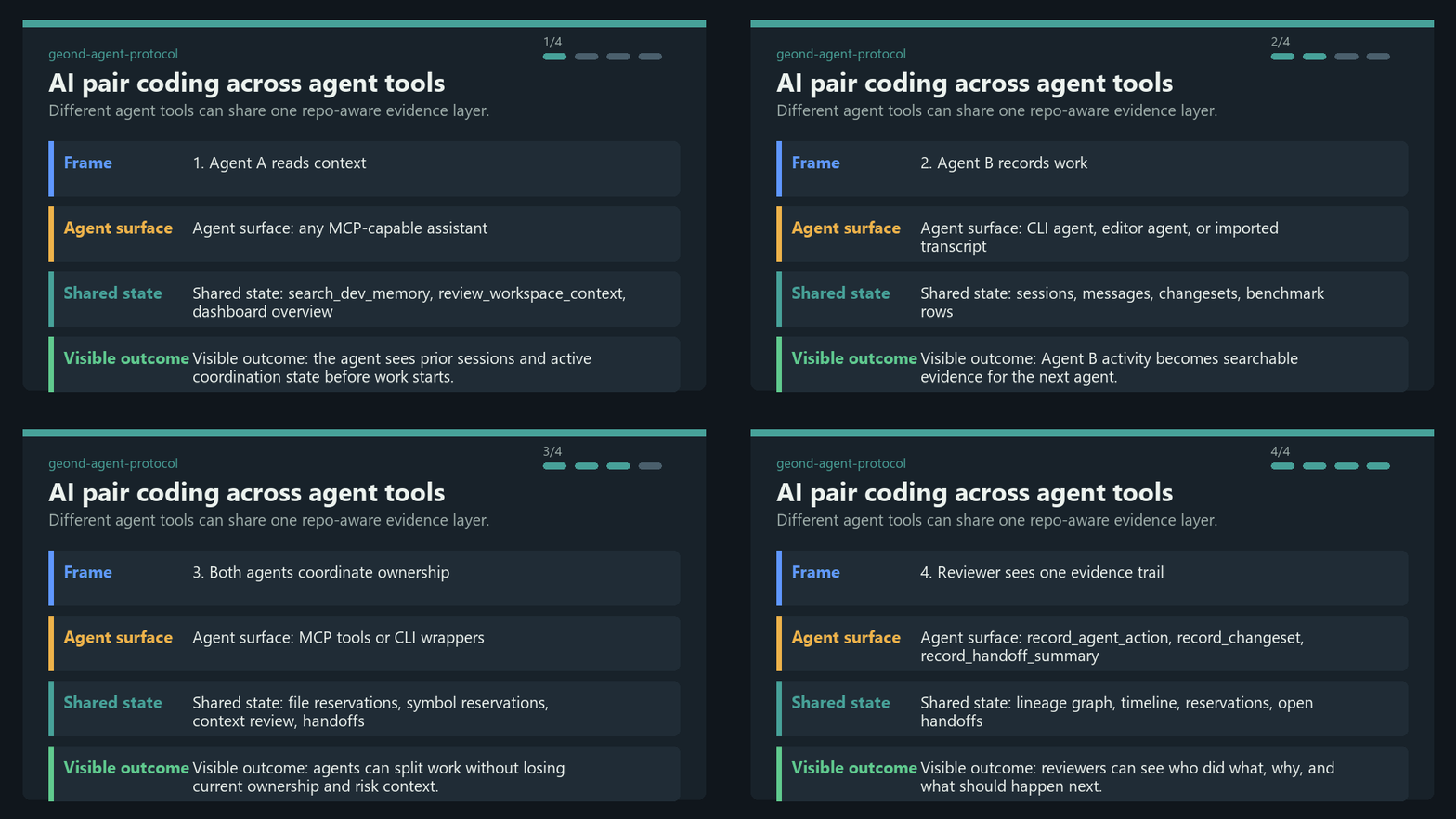
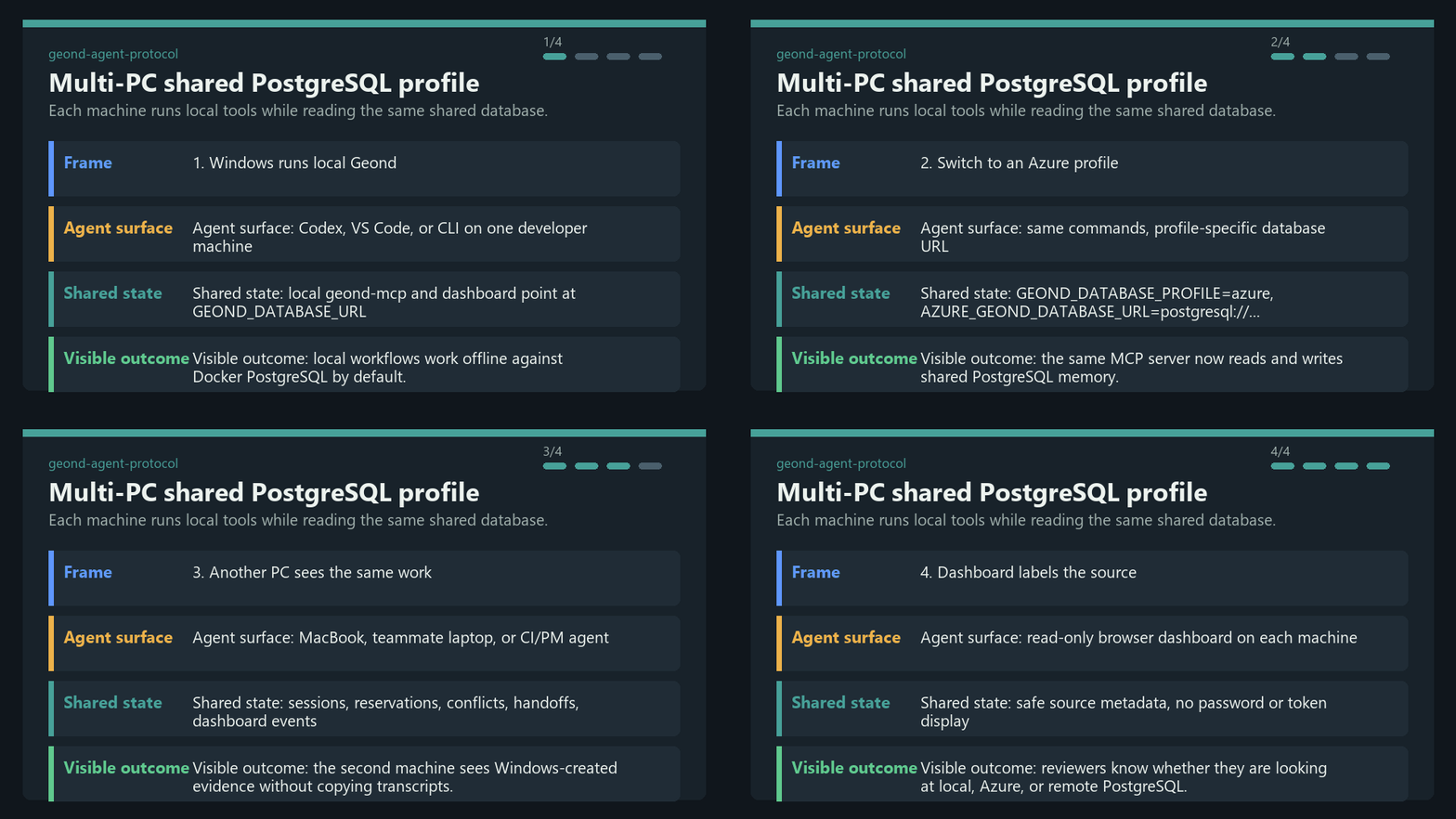
Geond is local-first by default. Your editor, CLI, MCP server, dashboard, and importers can run on your machine against local PostgreSQL. When a team wants multi-machine collaboration, those same local processes can point at a shared PostgreSQL-compatible profile such as Azure Database for PostgreSQL.
Geond is alpha software. Repository-centered memory, MCP, CLI, dashboard read models, reservations, handoffs, code graph indexing, usage evidence, benchmarks, and shared PostgreSQL validation are implemented today. Enterprise IAM, row-level security, dedicated MCP audit streams, broad SaaS adapters, and dependency-expanded automatic reservations are roadmap areas.
About the name: Geond is inspired by an Old English root of "beyond" and is pronounced "Jee-ond". The project helps agents go beyond stateless prompts by connecting them to inspectable shared memory.
Quick Start
Prerequisites: Python 3.11+, uv, Docker with Compose, Git, and ripgrep. See
docs/developer_setup.md for OS-specific notes.
Start the MCP server:
Preview or write MCP client config:
Serve the read-only dashboard:
Open the printed localhost URL. More MCP client examples are in docs/mcp_client_config.md.
MCP Server And Glama Release

Run the stdio MCP server directly:
Run it from a Docker image:
GEOND_DATABASE_URL points Geond at PostgreSQL. Local development usually uses
the Compose database from the quick start. Team mode can use
GEOND_DATABASE_PROFILE=azure plus AZURE_GEOND_DATABASE_URL to share memory
across machines while keeping each MCP process local.
For registry validation, Glama should deploy this repository's Dockerfile,
create a Glama release, and call get_geond_server_info first. That tool does
not require a database connection, so it is safe for browser-based smoke tests.
Three representative MCP workflows:
- Start coordinated work:
review_workspace_context->reserve_files-> edit ->record_changeset. - Explain prior context:
search_dev_memory->explain_change->get_changeset_detail. - Leave a handoff:
record_agent_action->record_handoff_summary->list_handoff_summaries.
What Geond Makes Possible
| Scenario | What you can do | Proof and entrypoint |
|---|---|---|
| AI pair coding across agent tools | Let different agents work on the same repo through shared memory, reservations, handoffs, and review context. Verified locally with Codex and Antigravity; the same pattern applies to Copilot, Claude Code, Continue, Manus, or custom MCP agents. | docs/antigravity_codex_geond_verification.md, docs/mcp_client_config.md |
| Multi-PC collaboration | Run geond-mcp, CLI, and dashboard locally on each machine while Windows, MacBook, CI, or another teammate all read and write the same shared PostgreSQL profile. | docs/azure_validation/team_collab_validation.md, docs/azure_validation/README.md |
| PM and reviewer dashboard | Review agent lanes, sessions, handoffs, changesets, code risk, usage evidence, timeline, and lineage without reading raw MCP JSON. | uv run geond dashboard serve, docs/agent_activity_dashboard.md |
| Safe parallel editing | Ask agents to review current context, reserve files or symbols, record changesets, and leave structured handoffs before another agent edits the same target. | docs/agent_operating_loop.md, uv run geond review-context ... |
| Cross-agent memory import | Import Copilot Chat, Codex, Claude Code, Antigravity, and Manus task evidence into one redacted search and evidence model. | docs/agent_testbeds.md, docs/manus_integration.md |
| Compact MCP context | Return snippets, evidence refs, scores, and follow-up detail paths instead of flooding an LLM with raw transcripts by default. | tests/test_mcp_payload_budget.py, docs/ai_usage_observability.md |
Demo GIFs
These GIFs are generated from sanitized scenario text, not private transcripts.
Regenerate them with uv run python scripts/render_readme_gifs.py.
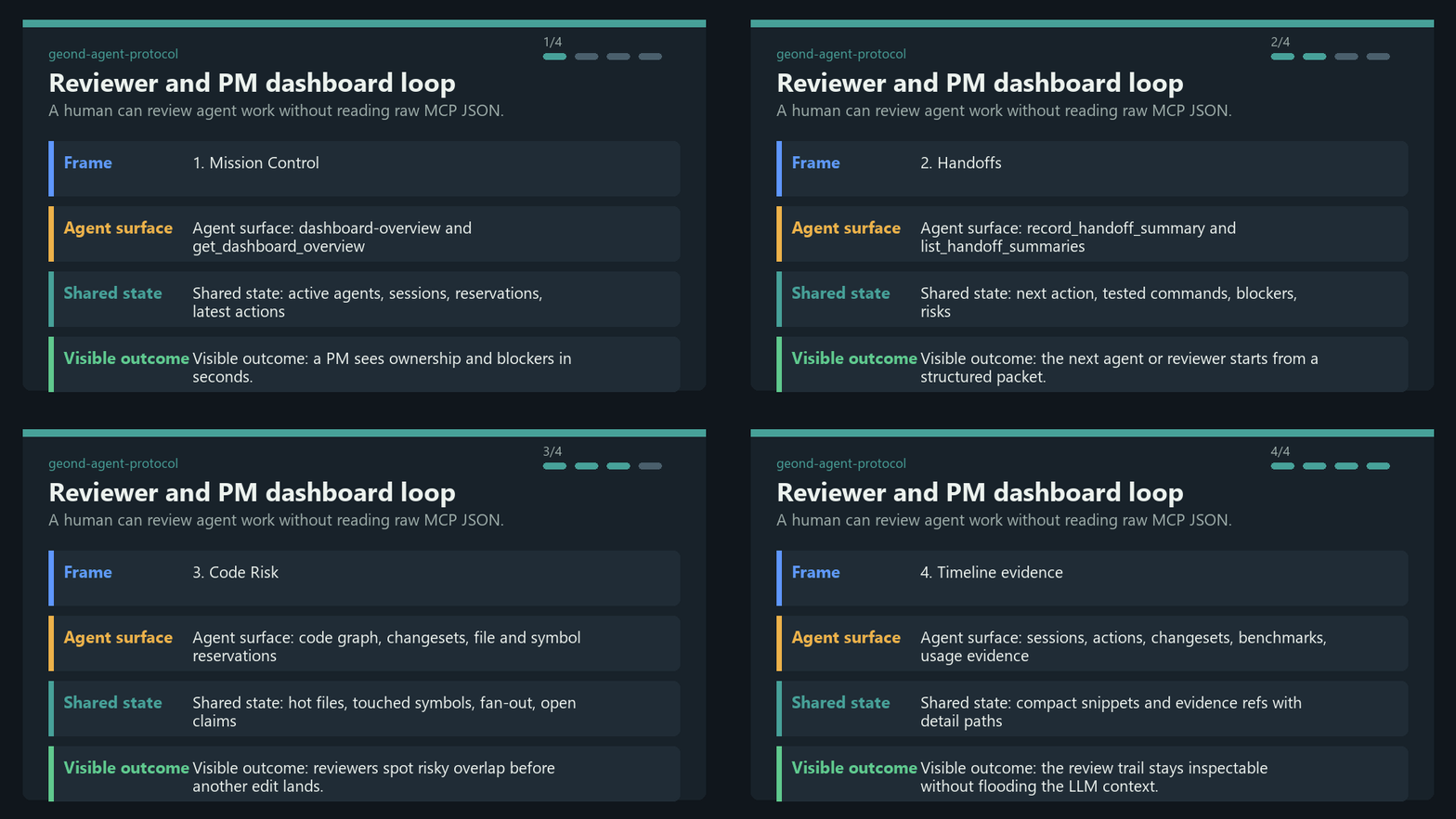
For browser-verified dashboard captures and longer terminal demo notes, see docs/public_demo_script.md.
Learning Path
Start with learn/README.md for guided notebooks that mirror the README scenarios:
| Lesson | Focus |
|---|---|
| 01 Local Shared Memory | Run local PostgreSQL, seed sample evidence, search memory, and smoke-test MCP. |
| 02 Handoffs And Reservations | Practice context review, symbol reservations, conflicts, and handoff packets. |
| 03 AI Pair Coding Workflow | Share evidence between Agent A and Agent B across different agent tools. |
| 04 Shared PostgreSQL Team Mode | Understand optional shared PostgreSQL profiles for multi-PC collaboration. |
How It Works
- Memory: importers normalize sessions, events, messages, usage records, and task history from agent tools, then redact common secrets before persistence.
- Code graph: Python, TypeScript, and JavaScript indexers connect files, symbols, imports, calls, references, and changesets.
- Reservations: agents can claim files or symbols with TTLs, policy checks, renewals, releases, and auditable reservation events.
- Handoffs: agents leave structured next-action packets with tested commands, blockers, remaining risks, and evidence refs.
- Dashboard: humans and PM/orchestrator agents read compact overview, activity, timeline, code risk, usage, lineage, reservations, and handoff read models.
- Shared PostgreSQL: local-first setups use Docker PostgreSQL; team profiles can point local processes at Azure or another PostgreSQL-compatible backend.
Common Workflows
| Goal | Command or doc |
|---|---|
| Check environment | uv run geond doctor --format text |
| Import Copilot Chat | uv run geond import-vscode <workspaceStorage-or-session-path> |
| Import Codex | uv run geond import-codex <codex-sessions-dir> --workspace-uri <uri> |
| Import Claude Code | uv run geond import-claude-code <claude-projects-dir> --workspace-uri <uri> |
| Import Antigravity | uv run geond import-antigravity <storage-path> --workspace-uri <uri> |
| Import Manus task | uv run geond import-manus-task <task-id> --workspace-uri <uri> |
| Search memory | uv run geond search "why did this change" --mode hybrid |
| Index code | uv run geond index-tree-sitter <path> |
| Record a changeset | uv run geond record-changeset <workspace-id-or-uri> ... |
| Reserve work | uv run geond reserve-files ... or uv run geond reserve-symbols ... |
| Review conflicts | uv run geond review-context <workspace-id-or-uri> --format markdown |
| Leave handoff | uv run geond record-handoff <workspace-id-or-uri> ... |
| Check orchestrator run | uv run geond orch status <run-id> |
| Agent operating loop | docs/agent_operating_loop.md |
| MCP clients | docs/mcp_client_config.md |
For a more complete demo path, see docs/demo.md.
Shared Team Database
Use GEOND_DATABASE_URL for the default local database. To keep local processes
but share memory across machines, add a second profile:
The dashboard classifies the active source as local PostgreSQL, Azure PostgreSQL, or remote PostgreSQL without showing user info, passwords, or tokens. The validated team flow is documented in docs/azure_validation/team_collab_validation.md.
README Patterns Borrowed
Geond's README borrows a few public onboarding patterns and adapts them to this project rather than copying their product scope:
- OpenHuman: explain transparent, local-first memory and compact context clearly.
- CLI-Anything: make the first screen visual and action-oriented with short commands and GIFs.
- Microsoft AI Agents for Beginners: present agent concepts as scenario tables and repeatable learning paths.
Documentation
- docs/architecture.md explains the system layers and data model.
- docs/agent_activity_dashboard.md describes dashboard read models and PM/orchestrator views.
- docs/agent_operating_loop.md defines the read, reserve, record, and handoff loop for agents.
- docs/agent_testbeds.md tracks Copilot Chat, Codex, Claude Code, and Antigravity test beds.
- docs/manus_integration.md documents Manus API v2 import, context packets, task contracts, and limitations.
- docs/mcp_client_config.md shows VS Code, Claude Desktop, Continue, Antigravity, and other MCP client setup.
- docs/ai_usage_observability.md covers token, cost, pricing snapshot, and usage-versus-evidence design.
- docs/benchmarking.md explains retrieval, evidence, and agent-run benchmark commands.
- docs/open_source_readiness.md tracks launch risks, privacy, dependency, and governance issues.
- learn/README.md provides a notebook-based onboarding path.
Contributing
Contributions are welcome while the project is alpha. Good first areas are importers, docs, tests, dashboard read-model improvements, MCP contract tests, installer ergonomics, and focused adapters for non-development work artifacts.
Read CONTRIBUTING.md before opening a PR. It covers setup, privacy rules, test commands, redaction expectations, and files that must stay out of git. Security reporting is in SECURITY.md.
Security And Privacy
Geond is designed for local-first use. Importers redact common secrets before
persistence, external embeddings are opt-in, and the dashboard avoids exposing
credential-bearing connection strings. Even so, agent transcripts can contain
sensitive information. Review .env, transcripts, screenshots, benchmark logs,
and dashboard captures before sharing them.
Do not commit private transcripts, local evidence exports, local-only drafts,
repo, tmp, result, results, or generated videos. See
SECURITY.md and docs/open_source_readiness.md.
License
Apache-2.0. See LICENSE.