AllMCPs
BrowseBestCategoriesStackCompareToolsGuidesBlog Log in Submit MCP

Stay in the loop

Get new MCP servers and top picks in your inbox.

AllMCPs

The open directory for discovering and installing Model Context Protocol servers.

Explore

  • Browse servers
  • Best MCP servers
  • Categories
  • MCP clients
  • Agent prompts
  • Stack Builder
  • Compare servers
  • Tags index
  • Submit a server
  • Pricing

Learn

  • Guides hub
  • What is MCP?
  • Install guide
  • Troubleshooting
  • Security
  • Blog
  • Blog RSS

Tools

  • All tools
  • Config generator
  • Config validator
  • MCP playground
  • OpenAPI β†’ MCP
  • Badge generator

For agents

  • API docs
  • Trust & traffic
  • llms.txt β†— (opens in a new tab)
  • Catalog JSON β†— (opens in a new tab)
  • Remote MCP β†— (opens in a new tab)

Company

  • About
  • Contact
  • X (@AllMCPs) β†— (opens in a new tab)
  • GitHub β†— (opens in a new tab)
  • Terms
  • Privacy
AllMCPs VerifiedAllMCPs VerifiedFeatured on Nick LaunchesFeatured on Nick LaunchesLaunch Llama NewsletterLaunch Llama NewsletterVerified DR - allmcps.comVerified DR - allmcps.comFeatured on SaaSGrowFeatured on SaaSGrowFeatured on Twelve ToolsFeatured on Twelve ToolsFeatured on Saaspa.geFeatured on Saaspa.geFeatured on Findly.toolsFeatured on Findly.toolsFeatured on Startup FameFeatured on Startup FameFeatured on LaunchKiwiFeatured on LaunchKiwiFeatured on ScrollLaunchFeatured on ScrollLaunchFeatured on DailyPingsFeatured on DailyPingsFazier badgeFazier badgeFeatured on NewTool.siteFeatured on NewTool.siteFeatured on saasfame.comFeatured on saasfame.comDR Checker - Domain RatingDR Checker - Domain RatingListed on Turbo0Listed on Turbo0Launched on LaunchBoard - Product Launch PlatformLaunched on LaunchBoard - Product Launch PlatformList on SimilarlabsList on Similarlabshttps://codetrendy.comhttps://codetrendy.comListed on DevTool.ioFeatured on BuildlistFeatured on BuildlistAllMCPs VerifiedAllMCPs VerifiedFeatured on Nick LaunchesFeatured on Nick LaunchesLaunch Llama NewsletterLaunch Llama NewsletterVerified DR - allmcps.comVerified DR - allmcps.comFeatured on SaaSGrowFeatured on SaaSGrowFeatured on Twelve ToolsFeatured on Twelve ToolsFeatured on Saaspa.geFeatured on Saaspa.geFeatured on Findly.toolsFeatured on Findly.toolsFeatured on Startup FameFeatured on Startup FameFeatured on LaunchKiwiFeatured on LaunchKiwiFeatured on ScrollLaunchFeatured on ScrollLaunchFeatured on DailyPingsFeatured on DailyPingsFazier badgeFazier badgeFeatured on NewTool.siteFeatured on NewTool.siteFeatured on saasfame.comFeatured on saasfame.comDR Checker - Domain RatingDR Checker - Domain RatingListed on Turbo0Listed on Turbo0Launched on LaunchBoard - Product Launch PlatformLaunched on LaunchBoard - Product Launch PlatformList on SimilarlabsList on Similarlabshttps://codetrendy.comhttps://codetrendy.comListed on DevTool.ioFeatured on BuildlistFeatured on Buildlist
Β© 2026 Jackalope Digital LLC. All rights reserved.
  1. Home
  2. πŸ“‚ Browser Automation
  3. Gecko Mcp
G
Health: ActiveRecent health check succeeded.Last checked 8/11/2026, 12:00:02 AM

Gecko Mcp

Enrichment pendingWe haven’t run our AI enrichment pass on this listing yet, so the overview, use cases, and FAQ below may be sparse or missing. We work through the catalog over time β€” check back soon.
View Repository1 GitHub StarsTotal stargazers on GitHub for the source repository (1 stars).

Control Firefox browsers (Floorp, LibreWolf, Zen, Firefox) from any MCP client.

Quick Install

Automated & IDE Setup

Copy the AI prompt to install this server into Claude Code, Cursor, or another agent β€” or use 1-click editor setup below.

Add to CursorAdd to VS Code
Not yet automatically verified

We haven't yet run this listing's install command through our automated sandbox check. This isn't a red flag β€” we're steadily working through the catalog.

Manual Client & Custom JSON ConfigExpand JSON β–Ύ

Install Config Generator

Choose your client
claude_desktop_config.json
{
  "mcpServers": {
    "gecko-mcp": {
      "command": "npx",
      "args": [
        "-y",
        "gecko-mcp"
      ]
    }
  }
}

πŸ’‘ Paste into ~/Library/Application Support/Claude/claude_desktop_config.json (macOS) or %APPDATA%\Claude\claude_desktop_config.json (Windows)

Install Tool Schemas (36) Directory Badge Claim listing AlternativesπŸ“‚ More in Browser Automation

Capabilities & Tool Schemas (36) ~708 tokensApproximate context cost of this server’s tool schemas (~4 chars/token), before any tool is called. Actual usage depends on your client and model.Self-reported Self-reportedParsed from the repository README, not verified against a live server β€” may be incomplete or out of date.

Inspect callable tools, capabilities, and parameters exposed to AI agents by Gecko Mcp.

list_tabs

List all open tabs (title, URL, browserId, active, pinned).

open_tab

Open a new tab at a URL; **returns the new tab's `browserId`** so you can target it.

get_active_tab

Return the active tab's title, URL and browserId.

navigate_tab

Navigate an existing tab to a URL.

close_tab

Close a tab.

read_page

Read a tab's content as clean Markdown (or HTML / accessibility tree). Output is capped (default 25 KB) to protect the context.

Documentation Overview

gecko-mcp

CI License: MIT

An MCP (Model Context Protocol) server that lets AI assistants β€” Claude Code, Claude Desktop, Cursor, and any MCP client β€” read pages, take screenshots and manage tabs in Floorp and other Firefox-based browsers (LibreWolf, Waterfox, Zen, Mullvad, Firefox…), using your real, logged-in session.

Think "Claude in Chrome", but for the whole Firefox/Gecko family.
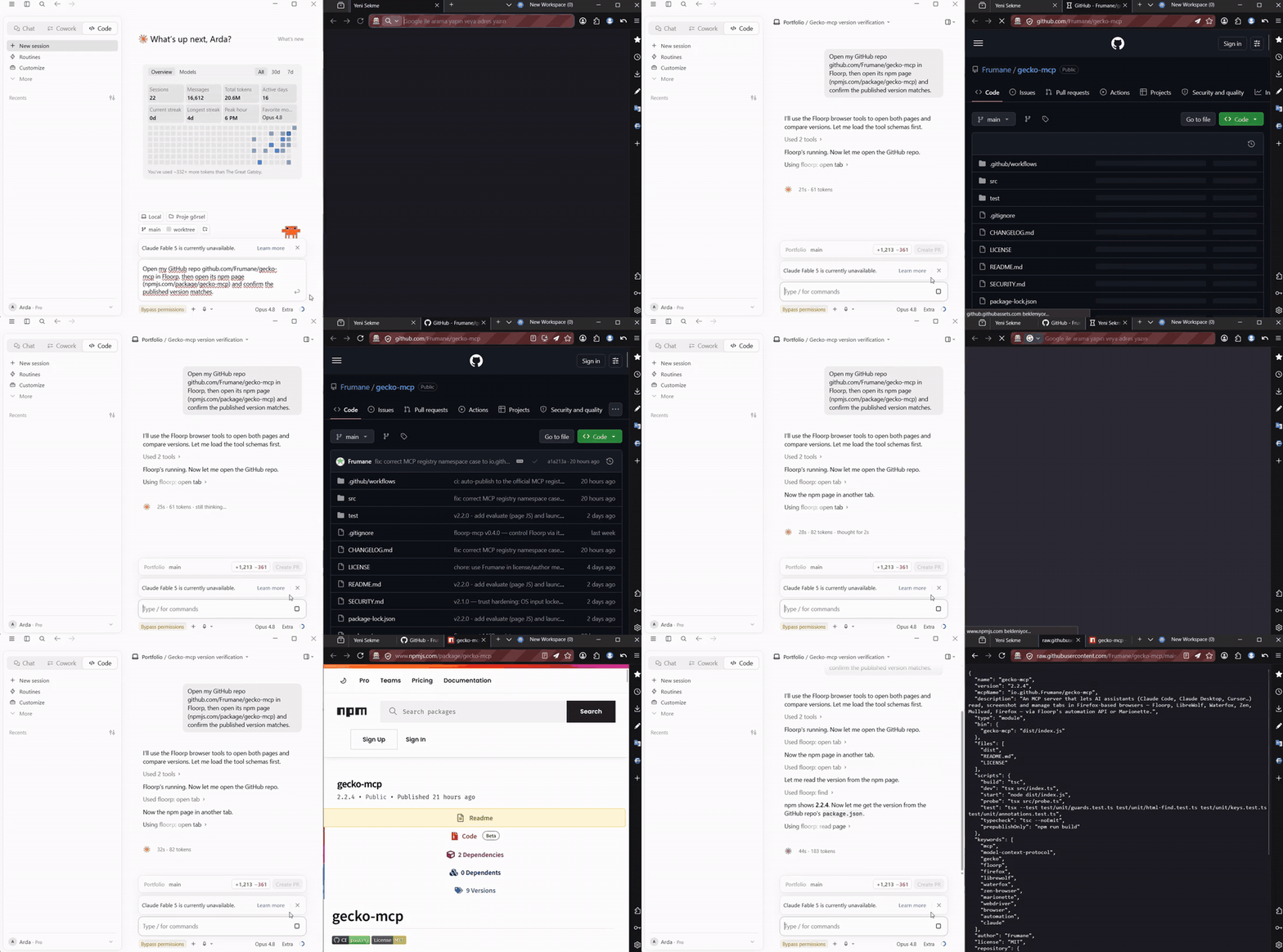
Claude driving Floorp via gecko-mcp β€” opening the GitHub repo and the npm page from a natural-language prompt

Get started in ~30 seconds:

Terminal
npx gecko-mcp setup

Registers gecko-mcp with Claude Code, Claude Desktop, Cursor, VS Code (Copilot), Windsurf, Zed, Codex and more β€” per-project or global. See Setup for manual config and Requirements for the one-time browser step.

Cautious about installing this? Good β€” you should be. It's small (2 deps, all in src/), the OS keyboard/mouse is locked by default (browser-only until you opt in), releases ship with npm provenance (verifiable against this source), and the full threat model is in SECURITY.md. Read it before you run npx gecko-mcp.

How it works

gecko-mcp talks to the browser through one of two backends, picked automatically:

  • Floorp ships a built-in automation HTTP API. Set floorp.mcp.enabled = true in about:config and gecko-mcp uses the fast http://127.0.0.1:58261 API β€” no extension, richest feature set.
  • Any other Gecko browser β€” launch it with Marionette (the automation engine built into every Firefox fork) and gecko-mcp drives your live session over it. Same tools, same real session.
Code
  Claude Code / Desktop / Cursor
            β”‚  MCP (stdio)
            β–Ό
      gecko-mcp ──► Floorp :58261 (built-in API)        ─┐
   (this project) ──► Marionette :2828 (any Gecko fork)  ─┴─► your real tabs

Requirements

  • A Firefox-based browser installed and running, with automation enabled:
    • Floorp: set floorp.mcp.enabled to true in about:config, restart Floorp.
    • Other forks (LibreWolf / Waterfox / Zen / Mullvad / Firefox): launch the browser with -marionette (see Browser support).
  • Node.js β‰₯ 18.

Setup

Quick start β€” the setup wizard

Terminal
npx gecko-mcp setup

An interactive wizard registers gecko-mcp with the AI coding tool(s) of your choice β€” Claude Code, Cursor, Windsurf, VS Code (Copilot), Gemini CLI, Codex, Zed, Cline (and a copy-paste snippet for Kimi Code, Antigravity, or any other MCP client) β€” and lets you install it for the current project or globally (all repos). It merges into existing config (and backs it up first).

Non-interactive / scriptable:

Terminal
npx gecko-mcp setup --list                          # show supported tools
npx gecko-mcp setup --tool claude-code,cursor --scope global
npx gecko-mcp setup --tool codex --scope global --print   # dry run

Manual

Any MCP client works with this server block (no clone/build needed β€” npx fetches it):

config.json
{
  "mcpServers": {
    "gecko": {
      "command": "npx",
      "args": ["-y", "gecko-mcp"]
    }
  }
}

Or with Claude Code's CLI: claude mcp add gecko -s user -- npx -y gecko-mcp.

One-time Floorp step: set floorp.mcp.enabled = true in about:config and restart Floorp so its automation API is available.

Browser support

gecko-mcp picks its backend automatically: if Floorp's :58261 API is reachable it uses that; otherwise it connects to Marionette, the automation engine built into every Gecko browser. To use a non-Floorp browser, launch it once with Marionette enabled:

BrowserLaunch with Marionette
Floorp(no flag β€” just set floorp.mcp.enabled=true; uses the native API)
Firefoxfirefox -marionette
LibreWolflibrewolf -marionette
Waterfoxwaterfox -marionette
Zenzen -marionette
Mullvadmullvad-browser -marionette

Marionette listens on TCP 2828 by default. To use another port, set the marionette.port pref in the profile (e.g. via user.js) and start gecko-mcp with a matching MARIONETTE_PORT. Force a backend with GECKO_MCP_BACKEND=marionette.

Note: Marionette must be enabled at launch to attach to your live session. On the Marionette backend, Floorp-only extras (snapshot fingerprints, list_workspaces/switch_workspace, accessibility tree) return a clear "not supported" message β€” use find / read_page instead. Everything else (tabs, navigation, click, type, forms, screenshots, cookies, real OS input…) works.

Tools

Tabs & reading

ToolWhat it does
list_tabsList all open tabs (title, URL, browserId, active, pinned).
open_tabOpen a new tab at a URL; returns the new tab's browserId so you can target it.
get_active_tabReturn the active tab's title, URL and browserId.
navigate_tabNavigate an existing tab to a URL.
close_tabClose a tab.
read_pageRead a tab's content as clean Markdown (or HTML / accessibility tree). Output is capped (default 25 KB) to protect the context.
findFast element locator β€” search a page server-side by visible text and/or tag; returns a compact list of ready-to-use CSS selectors (~1 KB) instead of the whole HTML. Use it to find a button/link/field, then act on the selector.
snapshotStructured page map: Markdown with inline fp: refs + an element selector map β€” locate elements without grepping HTML, then act via a ref.
screenshotCapture a screenshot of a tab (viewport or full page).
launch_floorpEnsure Floorp is running β€” launches it if the API isn't reachable (Windows).
launchStart any Firefox-based browser (Firefox, LibreWolf, Zen…) with Marionette enabled so gecko-mcp can drive it.

Interaction

ToolWhat it does
clickClick an element by CSS selector or a ref from snapshot; auto-scrolls it into view first.
type_textType into an input/textarea β€” or a rich/contenteditable editor (Slate, ProseMirror…) β€” by CSS selector.
fill_formFill multiple fields at once.
press_keyPress a keyboard key (Enter, Tab, …).
wait_for_elementWait for an element to attach / become visible / etc.
get_valueSensitive. Read the current value of an input/textarea/select (can read password fields).

Most tools target the active tab by default; pass a browserId (from list_tabs) to target a specific tab.

OS keyboard & mouse β€” locked by default πŸ”’

The tools below can affect things outside the browser, so they are disabled until you turn them on. With nothing set, gecko-mcp does browser automation only. Unlock them per-session by just asking ("enable OS input", which calls the enable_os_input tool), or persistently with GECKO_MCP_ENABLE_OS_INPUT=1. Lock again with disable_os_input. While locked, these tools refuse with a clear message.

The evaluate tool (run arbitrary page JavaScript) is locked the same way β€” unlock with enable_evaluate or GECKO_MCP_ENABLE_EVALUATE=1.

ToolWhat it does
enable_os_input / disable_os_inputUnlock / re-lock the OS keyboard & mouse tools for this session.
enable_evaluate / disable_evaluateUnlock / re-lock the evaluate (run page JS) tool for this session.
evaluateLocked. Run JavaScript in the page and return its value (return …).

Real OS keyboard (Windows) β€” for React/rich editors and bot-guarded submits that ignore synthetic input:

ToolWhat it does
real_typeType into the focused element via genuine OS key events (isTrusted).
real_keyPress a real key/combo, e.g. "Enter", "ctrl+a".
real_clearReal Ctrl+A + Delete β€” reliably clears a rich/contenteditable field.

These produce input a page can't distinguish from a human's, so they drive React/Slate editors and submit composers that synthetic clicks/typing can't. Workflow: click the field to focus it β†’ real_clear / real_type / real_key "Enter".

Safety guard: OS keystrokes go to the foreground window, so before sending anything these tools bring Floorp to the foreground and verify it β€” if Floorp isn't running or can't be focused, they abort without typing a single key, so input can never leak into another app.

Real OS mouse (Windows) β€” genuine isTrusted clicks at screen coordinates:

ToolWhat it does
window_boundsFloorp's window rectangle in screen pixels (to compute targets).
move_cursorMove the real OS cursor to a screen pixel inside Floorp.
real_clickReal OS click (left/right, single/double) at a screen pixel inside Floorp.

Double guard: the click is sent only when Floorp is verified foreground and the point lies inside Floorp's window rect β€” a stray coordinate is refused, so a click can never land in another app/window. Coordinates are screen pixels (note display scaling/DPI when mapping from a screenshot).

More interaction & queries

ToolWhat it does
hover / double_click / right_clickMouse gestures on an element (selector or ref).
select_optionChoose an option in a <select>.
set_checkedCheck/uncheck a checkbox or radio.
submit_formSubmit a form.
upload_fileSensitive. Set a file <input> by absolute path β€” restrict with GECKO_MCP_ALLOW_UPLOAD_DIRS.
get_attributeRead an element attribute (href, value, …).
get_articleReadability-extracted main article as Markdown.
get_cookiesSensitive. Cookies visible to the page β€” values redacted unless includeValues: true.
wait_for_network_idleWait for network activity to settle.
list_workspaces / switch_workspaceFloorp workspaces (where supported).

Security

Understand the threat model before enabling this. Two risks dominate:

  1. Floorp's automation API has no authentication by default. While floorp.mcp.enabled is on, any local process can drive your logged-in browser via 127.0.0.1:58261 β€” not just this server. There is also no Origin check, so hostile web pages may attempt CSRF/DNS-rebinding tricks against it. Mitigations:
    • Turn floorp.mcp.enabled off when you're not using automation.
    • Set the GECKO_MCP_TOKEN environment variable β€” this server then sends it as a Bearer token on every request (effective on Floorp builds that enforce a token; harmless otherwise).
  2. Prompt injection ("lethal trifecta"). The assistant reads untrusted page content and can act on your authenticated sessions (click, type, submit, navigate, real OS input). A malicious page could try to instruct the assistant to act against you. Treat everything read from a page as untrusted; don't run automation unattended on sites you don't trust.

Hardening built into this server:

  • OS keyboard/mouse is locked by default (least privilege): the only tools that can act outside the browser refuse to run until you explicitly unlock them (enable_os_input tool, or GECKO_MCP_ENABLE_OS_INPUT=1). By default gecko-mcp can only automate the browser, never your wider machine.
  • Real OS input is double-guarded: keys/clicks are sent only after verifying Floorp is the foreground window, and mouse clicks must land inside Floorp's window rectangle β€” otherwise it aborts without sending anything. PowerShell payloads are passed base64-encoded via process-private environment variables (no shell interpolation, no temp script files on disk).
  • URL scheme + host allowlist: open_tab/navigate_tab accept only http(s) (and about:blank) by default, and refuse loopback/private hosts (127.0.0.1, localhost, 10/8, 172.16/12, 192.168/16, 169.254/16, IPv6 ULA/link-local). This stops a prompt-injected agent from pivoting the browser onto Floorp's own API or your LAN and reading the response back. Lift with GECKO_MCP_ALLOW_PRIVILEGED_URLS=1. Optionally pin navigation to a domain allowlist with GECKO_MCP_ALLOW_DOMAINS.
  • Cookie values are redacted by default in get_cookies; raw values require an explicit includeValues: true.
  • get_value can read secrets: browsers let same-origin JS read password fields, so this tool can return a typed password. It's flagged SENSITIVE β€” use it only on fields the user asked about, never to harvest credentials.
  • Upload allowlist: set GECKO_MCP_ALLOW_UPLOAD_DIRS (;-separated directories) to confine upload_file. Paths are canonicalised with realpath (symlinks resolved) and checked so .., a symlink, a same-prefix sibling directory, or a UNC path can't escape the allowed folders.
  • find skips hidden elements (inline display:none/visibility:hidden, hidden, type=hidden, aria-hidden) so a page can't lure the agent into clicking an invisible button via text search.
  • Input bounds: numeric/text tool parameters are range- and length-capped (coordinates, timeouts, maxChars, find limit, typed text, form fields) to prevent resource-exhaustion / crash inputs.
  • Truncated API errors & validated port: Floorp error bodies are truncated before reaching the model; GECKO_MCP_PORT is validated as 1–65535.
  • Tool annotations for human-in-the-loop: every tool carries MCP hints (readOnlyHint/destructiveHint/…) so your client can auto-run read-only tools and confirm destructive ones (close_tab, navigate_tab, submit_form, upload_file). A server can't show prompts itself β€” approval is the client's job β€” so this is how gecko-mcp tells the client what's safe vs consequential.
  • No evaluate tool: arbitrary page-JS execution is deliberately not exposed.

What is not defended (inherent / Floorp-side): a malicious local process can still read or impersonate the unauthenticated loopback API (plaintext, no TLS), and prompt injection from a page you choose to automate can still drive legitimate actions on that page. Disable floorp.mcp.enabled when idle and don't automate untrusted sites unattended.

Environment variableEffect
GECKO_MCP_TOKENSent as Authorization: Bearer … to the Floorp API.
GECKO_MCP_PORTAPI port (default 58261, validated 1–65535).
GECKO_MCP_ALLOW_PRIVILEGED_URLS1 allows non-http(s) URLs and loopback/private hosts in open/navigate.
GECKO_MCP_ALLOW_DOMAINSComma-separated domain allowlist for navigation (subdomains included). Unset = any public host.
GECKO_MCP_ALLOW_UPLOAD_DIRSRestrict upload_file to these directories (;-separated).
FLOORP_PATHFull path to floorp.exe for launch_floorp.
GECKO_MCP_BACKENDForce the backend: floorp or marionette. Default: auto-detect.
MARIONETTE_PORTMarionette TCP port for non-Floorp browsers (default 2828).
GECKO_MCP_ENABLE_OS_INPUT1 unlocks the OS keyboard/mouse tools at startup (otherwise locked until the enable_os_input tool is called).
GECKO_MCP_ENABLE_EVALUATE1 unlocks the evaluate (run page JS) tool at startup (otherwise locked until enable_evaluate).
GECKO_MCP_BROWSER_PROCESSProcess-name regex the real OS keyboard/mouse may target (default covers the common Gecko forks).

The legacy FLOORP_MCP_* variable names still work as fallbacks (from before the rename), so existing configs keep working β€” prefer GECKO_MCP_* going forward.

Performance

  • HTTP tool calls are cheap β€” a full attach β†’ act β†’ detach round-trip against Floorp's local API is ~5–6 ms. find searches the page server-side and returns ~1 KB of ready-to-use selectors instead of dumping the whole HTML, and read_page is capped (default 25 KB) so a page read can't flood the context.
  • Real OS input uses a persistent PowerShell host. Spawning powershell.exe (~700 ms) and compiling the P/Invoke helper (~600 ms) used to happen on every real_*/move_cursor/window_bounds call (~1.9 s each). Now one host is started lazily, compiles once, and runs a read-eval loop β€” so the first call pays ~1.6 s but every call after is ~350 ms for a guarded key/click (~5Γ— faster) and a few ms for a window-bounds query. The foreground/bounds safety guards still run on every command; the host is recycled if it hangs or dies.

Notes & limitations

Learned from driving real apps (incl. Google Flow):

  • Rich editors: type_text handles plain inputs and contenteditable editors (Slate, ProseMirror, Lexical) β€” it falls back to dispatching a real text-input event when an element has no .value. Reliably clearing such editors isn't solved yet (no select-all/evaluate).
  • Submitting React composers: many chat/prompt composers submit on a real Enter keydown, not on a synthetic click of the send button. Prefer press_key "Enter" over click for those.
  • Trusted events: you cannot forge isTrusted=true from page JavaScript β€” it is a browser security invariant. Floorp injects input at a privileged layer, so ordinary clicks/keys behave like real ones; but flows guarded by reCAPTCHA or strict bot-detection may still refuse automated submission.
  • evaluate: the page-JS eval endpoint returns HTTP 404 on some Floorp builds, so it is not exposed as a tool here.
  • Multiple windows: when more than one window is open, the "active tab" is ambiguous (each window has its own active tab). Prefer the browserId returned by open_tab, or one from list_tabs, and pass it explicitly to every tool.

Roadmap

  • Tab management, page reading, screenshots
  • Interaction tools: click, type, fill forms, key presses, read field values
  • Real OS keyboard (Windows): real_type / real_key / real_clear, with a foreground safety guard β€” drives React/Slate editors & bot-guarded submits
  • snapshot (fingerprint refs + selector map) + click by ref + auto-scroll-into-view
  • launch_floorp β€” start Floorp if not running (Windows)
  • Extra tools: hover, double/right-click, select_option, set_checked, submit, upload_file, get_attribute, get_article, get_cookies, wait_for_network_idle, workspaces
  • Real OS mouse (Windows): window_bounds / move_cursor / real_click, with a foreground + in-window-bounds double guard
  • Marionette backend β€” all Firefox-based browsers (LibreWolf, Waterfox, Zen, Mullvad, Firefox…), auto-selected when Floorp's API isn't present
  • macOS / Linux native-input backends
  • JS evaluate (available in newer Floorp builds; older ones return HTTP 404)
  • Optional bearer-token auth
  • launch helper for non-Floorp browsers (start them with -marionette)

Acknowledgements

Built against the automation API exposed by Floorp. The official Floorp-Projects/floorp-mcp-server was a useful reference for mapping the endpoint surface. This is an independent, clean-room MIT-licensed implementation.

License

MIT Β© Frumane

Related MCP Servers

View all in Browser Automation View all alternatives
  • Feedthrough logoFeedthrough

    In-browser debug bridge that injects into your running web app, so an agent can read the DOM, console logs and network requests, and click/fill/inspect the page. Runs inside the page (not an external CDP driver), so it works in any browser and inside Cypress/Playwright runs.

    πŸ“‚ Browser Automation2 views
    Compare vs Feedthrough β†’
  • Pagemap logoPagemap

    Compresses 100K-token HTML into 2-5K-token structured maps while preserving every actionable element. AI agents can read and interact with any web page at 97% fewer tokens.

    πŸ“‚ Browser Automation2 views
    Compare vs Pagemap β†’
  • Chrome Mcp Secure logoChrome Mcp Secure

    Security-hardened Chrome automation with post-quantum encryption (ML-KEM-768 + ChaCha20-Poly1305), secure credential vault, memory scrubbing, and audit logging. 22 tools for browser automation and secure logins.

    πŸ“‚ Browser Automation2 views
    Compare vs Chrome Mcp Secure β†’
  • Ios Simulator Mcp logoIos Simulator Mcp

    A Model Context Protocol (MCP) server for interacting with iOS simulators. This server allows you to interact with iOS simulators by getting information about them, controlling UI interactions, and inspecting UI elements.

    πŸ“‚ Browser Automation2 views
    Compare vs Ios Simulator Mcp β†’

Frequently Asked Questions about Gecko Mcp

Add the following block to your claude_desktop_config.json under mcpServers: "mcpServers": { "gecko-mcp": { "command": "npx", "args": ["-y", "gecko-mcp"] } }

AllMCPs Directory Badge

Full Badge Customizer

Showcase your server listing on GitHub or your project documentation. Embed this dynamic SVG badge to highlight official listing status and live engagement.

Badge Style:
Live Dynamic SVG PreviewGecko Mcp AllMCPs Directory Badge

Markdown (GitHub README)
[![AllMCPs](https://allmcps.com/api/badge/gecko-mcp?style=directory)](https://allmcps.com/mcp/gecko-mcp)
HTML Embed
<a href="https://allmcps.com/mcp/gecko-mcp"><img src="https://allmcps.com/api/badge/gecko-mcp?style=directory" alt="Gecko Mcp on AllMCPs" /></a>

Technical Specs & Signals

CategoryπŸ“‚Browser Automation
More technical detailsExpand β–Ύ
TransportSTDIO
RuntimeNode.js
4/4 checks healthy over the last 6h
Views0
Unique ViewsTotal visits recorded for this listing page on AllMCPs.
Installs0
Installs & Copy ActionsTotal times users copied install commands or configuration snippets for this server.
GitHub stars1
GitHub Star CountTotal stargazers on GitHub representing community popularity (1 stars).
Last commit1mo ago
Last Repository CommitThe most recent commit or push recorded for this server's GitHub repository.Last commit on Jun 20, 2026
npm downloads223/mo
Monthly npm DownloadsAverage monthly package installs recorded from npm registry statistics.
52Quality signal: Good Β· 52/100How this signal is calculated β–Ύ
Server availabilityNot measured

Not scored for repo-hosted servers β€” we can't reach the running server, only its GitHub page. Hosted MCP endpoints are health-checked live.

Verified ownership10/20
Documentation & tools24/30
Adoption & activity5/15
Community engagement0/10

A guidance signal from public completeness & health data β€” not a user rating. New listings start lower and rise as they add docs, get verified, and grow adoption. Signals we can't observe for a listing are skipped, not counted against it.

β˜… Spotlight Slot

Feature Your MCP Server

Get maximum visibility for your server across our directory, search results, and detail pages.

Spotlight Your Server

Own this project?

This directory is pre-filled from public sources. Claim via GitHub README, site badge, or DNS TXT to get the verified badge and attach your website.

Free dofollow backlink: after claiming, verify your product site and place a dofollow AllMCPs badge β€” we recheck it stays live.

Claim & get free dofollow

Share & Embed

Add our SVG badge (dark/light directory styles) or embeddable widget to your site.

Explore more

More in πŸ“‚ Browser Automation β†’Best MCP servers for Browser Automation β†’Alternatives to Gecko Mcp β†’Install in Claude DesktopInstall in CursorInstall in VS Code
