Drive Gearotons M17 open-source servomotors from plain English over RS-485; mock mode, no hardware.
Quick Install
Automated & IDE SetupCopy the AI prompt to install this server into Claude Code, Cursor, or another agent — or use 1-click editor setup below.
One-click editor setup isn’t available for this listing yet — we don’t have a confirmed install command, and we’d rather show nothing than point your editor at the wrong package or host. Follow the project’s own setup instructions, linked above.
Manual Client & Custom JSON ConfigExpand JSON ▾
No confirmed setup config for this listing yet. We only publish a config block when the install details come from the project itself — its README, its docs, or a verified owner. We haven’t found those for Gearotons M17 Servomotor, and we’d rather show nothing than a guess you’d paste into your client. Follow the project’s own setup instructions for the current steps.
Documentation Overview
servomotor-mcp
Drive open-source Gearotons M17 servomotors from natural language.
An MCP server that exposes the M17 — a NEMA-17 integrated, closed-loop, RS-485 servomotor — to Claude Desktop, Claude Code, or any MCP client. Control real motors by just asking:
"Find my motors and rotate the one on the bench two full turns, slowly."
Nothing is hardcoded: the server discovers your serial ports, auto-detects the
motors on the bus (the firmware's "Detect devices" command), and exposes the entire
firmware command set — every command in the servomotor library's catalog becomes an
MCP tool automatically (48 commands as of library 0.10.0), plus a few high-level tools
for everyday moves. It ships with a mock backend, so you can try the whole thing with
no hardware.
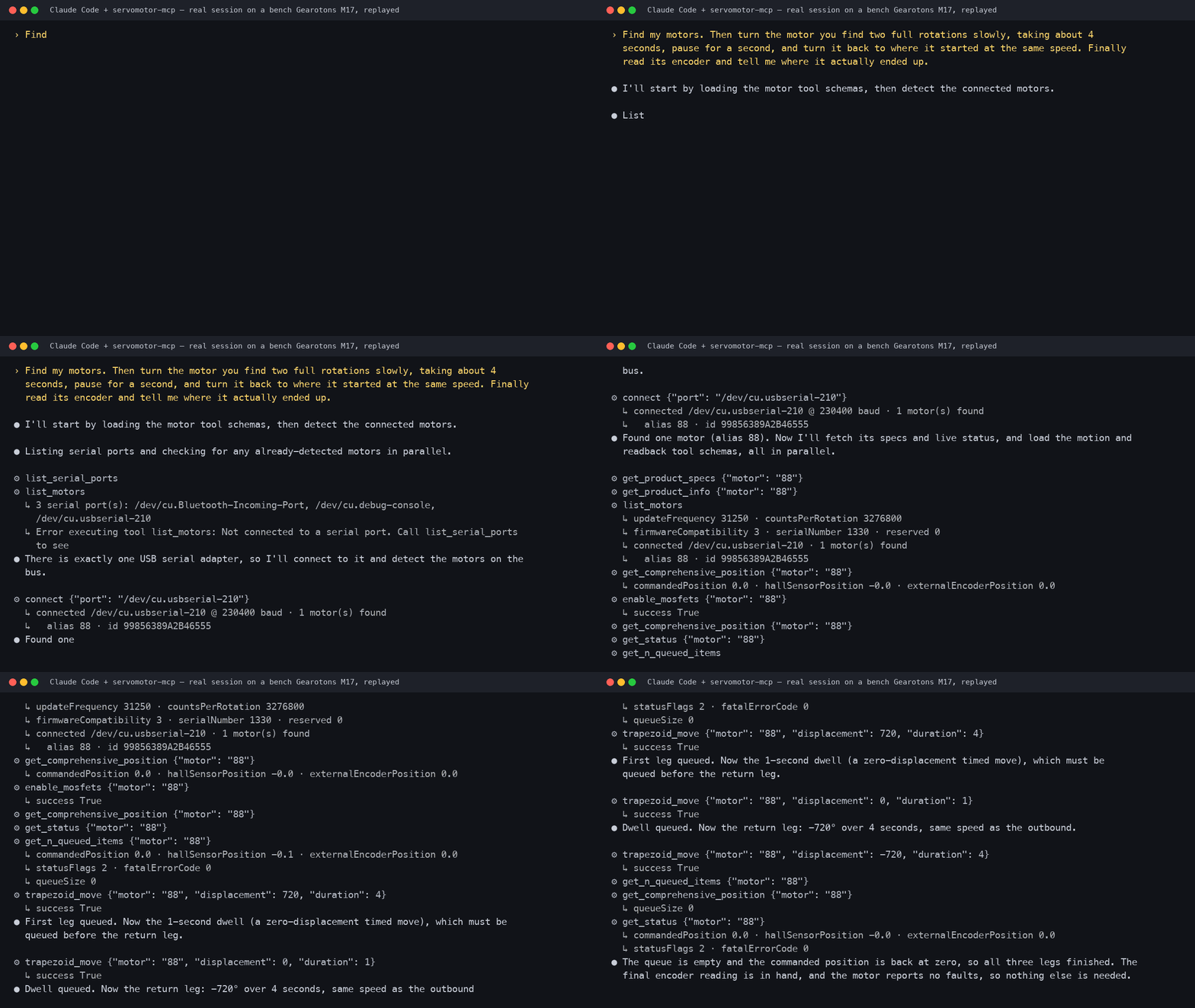
▶ 50-second video: the real motor and this session side by side — recorded 2026-09-09 on a bench M17; every line above is from the session log.
Step-by-step tutorial (boxed motor to "talk to it" in about twenty minutes): Talk to a servomotor from Claude Code on Hackster.
The first servomotor with an official MCP server. Open hardware, open firmware, open software — and now an open, AI-native control interface.
Quickstart (no hardware, ~2 minutes)
Then add it to Claude Desktop — copy the block from
examples/claude_desktop_config.json into your
claude_desktop_config.json, restart Claude Desktop, and ask:
"What serial ports do you see? Connect and find my motors."
See examples/demo_prompts.md for a scripted demo.
Drive real motors
Plug an M17 (or a daisy-chain of them) into a USB↔RS-485 adapter and install the
[serial] extra — that's it, no configuration:
With the servomotor library installed the server uses the real serial backend
automatically. Without it, the server runs its simulator and says so: list_serial_ports
and connect return a notice field, and a warning goes to stderr. With uv, use
uvx --from 'servomotor-mcp[serial]' servomotor-mcp. In a session, the model then:
list_serial_ports— enumerates the machine's ports (macOS/dev/cu.*, WindowsCOM*, Linux/dev/ttyUSB*), flagging USB serial adapters;connect— opens the port you (or it) picked, at 230400 baud;- auto-detects every motor on that bus (unique ID + alias) — no address maps to write;
- drives them. Tell it in plain English which adapter to use if you have several.
Tools
High-level (discovery + everyday motion):
| Tool | What it does |
|---|---|
list_serial_ports | Enumerate serial ports with USB metadata (call first). |
connect / disconnect | Open a port and auto-detect the motors on that bus. |
detect_devices | Re-scan the bus (reboots the motors on it). |
list_motors | Detected motors with live position/voltage/temperature/status. |
move_to / move_relative | Absolute / relative moves in degrees; waits for completion. |
stop | Emergency-stop one or all motors. |
get_motor_status | One motor's snapshot, fatal errors decoded to plain English. |
run_sequence | Choreographed steps ("draw a square"), incl. raw command steps. |
Plus one tool per firmware command, generated from the library's command catalog:
enable_mosfets, go_to_position, move_with_velocity, move_with_acceleration,
multimove, homing, zero_position, get_position, get_temperature,
set_device_alias, set_pid_constants, system_reset, vibrate, ping, … — anything
the motor can do, the model can do. Motors are addressed by their alias number, their
16-hex-digit unique ID, or "all" (broadcast). Values are in friendly units (degrees,
seconds, degrees/s, volts, °C); the server converts to firmware units.
How it works
The server is a thin layer over the Gearotons servomotor Python library. The library is
data-driven — motor_commands.json defines every firmware command — and the server turns
that same catalog into MCP tools, so new library commands appear automatically. Tool calls
are forwarded straight to the hardware — no software clamping; full multi-turn travel, any
speed. The motor's own firmware protections (over-current / over-voltage /
over-temperature) still apply. The same tools run against the mock backend
(GEAROTONS_MOTOR_BACKEND=mock) for development and CI.
Environment variables (all optional):
GEAROTONS_MOTOR_BACKEND—auto(default: serial when theservomotorlibrary is installed, else mock),serial, ormock.GEAROTONS_SERIAL_PORT— default port forconnectwhen the model doesn't pass one.GEAROTONS_DEFAULT_SPEED_DPS— default speed formove_to/move_relative(180).
Develop / test
hardware_tests/ contains scripts that exercise the real serial path end to end
(port sweep, full command suite, stdio MCP session) against a bench motor.
Status
- ✅ Full firmware command surface (48 commands), serial-port discovery, bus
auto-detection — verified on a physical M17 (fw 0.15.3.0) over a real stdio MCP
session and via
uvx, on all four test adapters (motor found only where it truly is). - ✅ Mock backend + 39 unit tests, no hardware needed.
- ✅ Cross-platform port handling (macOS / Windows / Linux) via pyserial enumeration.
License
MIT. Hardware, firmware, and software for the M17 are open-source — see github.com/tomrodinger/servomotor.
Related MCP Servers
Reviews
No reviews yet — be the first to share how this listing worked for you.
Frequently Asked Questions about Gearotons M17 Servomotor
AllMCPs Directory Badge
Showcase your server listing on GitHub or your project documentation. Embed this dynamic SVG badge to highlight official listing status and live engagement.
Badge Style:
Live Dynamic SVG Preview
Markdown (GitHub README)
[](https://allmcps.com/mcp/gearotons-m17-servomotor)HTML Embed
<a href="https://allmcps.com/mcp/gearotons-m17-servomotor"><img src="https://allmcps.com/api/badge/gearotons-m17-servomotor?style=directory" alt="Gearotons M17 Servomotor on AllMCPs" /></a>