Add inline, range-anchored comments to Google Docs - the one comment op the Google APIs can't do.
Quick Install
Automated & IDE SetupCopy the AI prompt to install this server into Claude Code, Cursor, or another agent — or use 1-click editor setup below.
Manual Client & Custom JSON ConfigExpand JSON ▾
Client Config & Setup
Choose your client or environment
Target File:
💡 Paste the JSON block into your client's configuration file under mcpServers, then restart the application.
Documentation Overview
gdocs-comments-mcp
Inline, range-anchored comments for Google Docs — the one comment operation the Google APIs can't do.


Quickstart · Scope · Tools · Configuration · How it works · Troubleshooting · Server deployment · FAQ
You're building an AI process around Google Docs — an agent that reviews drafts, audits contracts, gives editorial feedback. The natural way to deliver that feedback is how humans do it: a comment pinned to the exact sentence it's about, not a wall of text dumped at the end of the doc or into chat.
Then you hit the wall: the Google APIs can't create anchored comments. The Docs API has no comment endpoints at all, and the Drive API accepts an anchor field only to have the Docs editor ignore it — the comment shows up as a general, whole-document comment.
This MCP server closes that gap. Your agent calls add_comment with a text fragment and a comment; the server posts it through a real, logged-in Google Docs session, so it lands anchored to that exact text — just as if a human had selected it and pressed Ctrl+Alt+M:
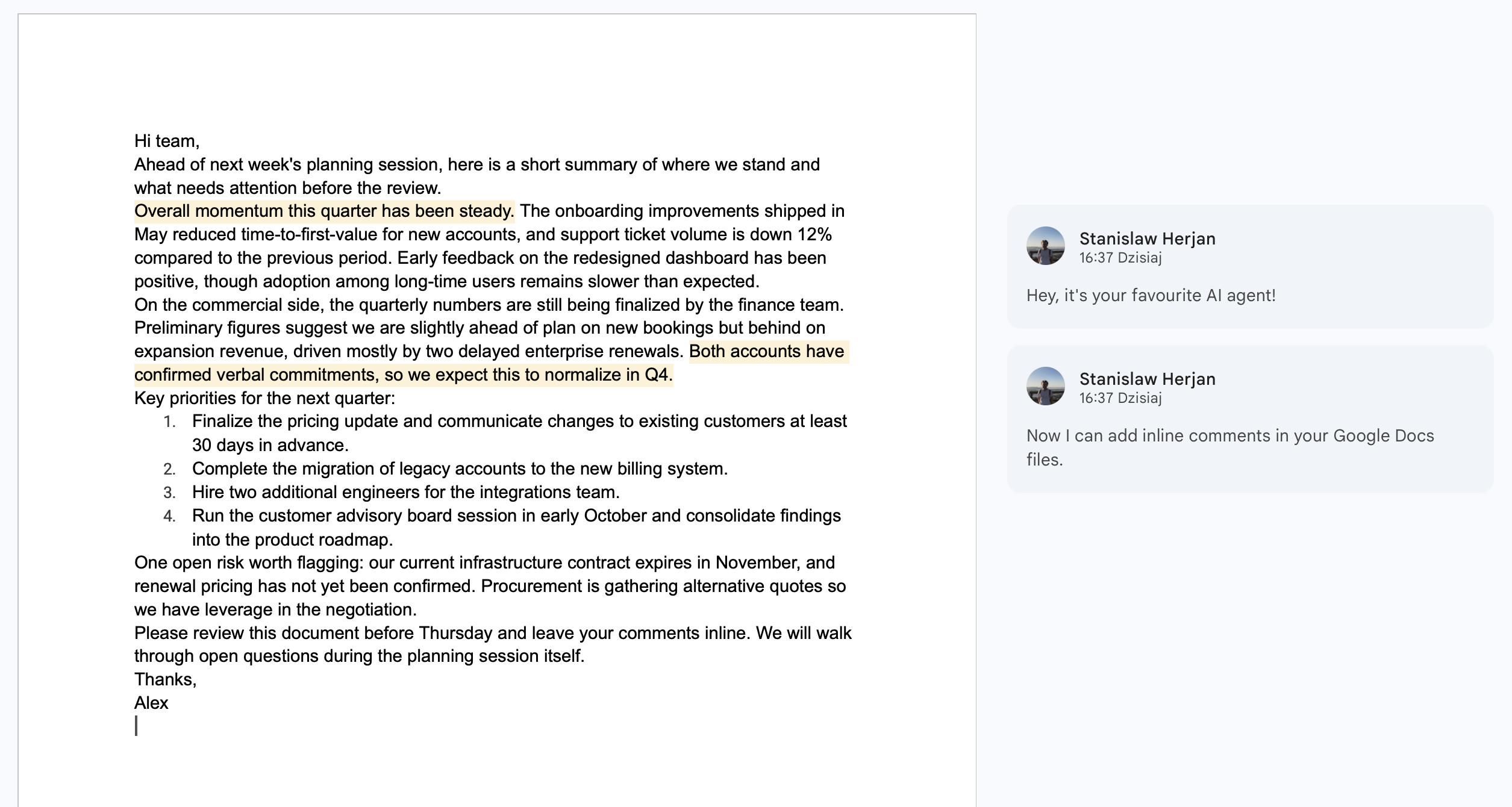
Why not the official APIs?
This server does one thing: add a comment to a Google Doc. The interesting case is the anchored one — a comment pinned to a specific text range — which no Google API can do.
| Add a comment… | Google Docs API | Google Drive API | this server |
|---|---|---|---|
| unanchored (whole document) | ❌ | ✅ | ✅ |
| anchored to a text range | ❌ | ❌ | ✅ |
The Docs API has no comment endpoints at all. The Drive API's comments.create accepts an anchor field, but the Docs editor ignores it — the comment renders as an unanchored, whole-document comment. The editor's own anchor format (kix.*) is undocumented and can't be produced externally (Drive API docs, issuetracker #292610078, open since 2016). Driving the editor UI is the only way — so this server does exactly that, and nothing else. (Listing, replying, resolving, and deleting comments already work over the Drive API — use a Drive-based tool for those.)
What this does — and what it doesn't
This server is deliberately one narrow thing. Read this before wiring it in.
✅ It does: add comments to a Google Doc — anchored to a specific text range (the part no API can do), or unanchored on the whole document.
❌ It does NOT:
| You want to… | Use instead |
|---|---|
| Read the document's content (so an agent can decide what to comment on, or get the exact text to anchor to) | Google Docs API (documents.get) or a Docs-reading MCP |
| Export the doc (text / markdown / PDF) | Google Drive API (files.export) |
| List / reply to / resolve / delete comments | Google Drive API (comments.*) — faster, no browser |
Important: this tool never returns document content — its output is structured-only (
{ ok, anchored, occurrence_used, verified }), by design, so a malicious doc can't inject instructions into your agent. That means the agent is writing blind: to review a doc intelligently, pair this with a read capability (Docs APIdocuments.get) and feed the exact quoted text back in asfind_text. The two use different auth — this server drives a logged-in browser session (no OAuth), while the Docs/Drive APIs need an OAuth token or service account — but they can run against the same Google account.
Quickstart
One command — signs you in (opens a browser once), then registers the server with Claude Code:
That's it — skip to Use it below. Prefer to do it by hand, or use another client? The manual steps are below.
Manual setup
1. Log in once — opens a browser window; the Google session is saved to a local profile (~/.gdocs-comments-mcp/profile):
2. Add the server to your MCP client:
Other MCP clients — after login, add the config for your client:
Claude Desktop / Cowork
Add to claude_desktop_config.json (Settings → Developer → Edit Config):
Project-level .mcp.json (shared with your team via git)
Create .mcp.json in the project root — Claude Code, Cowork, and most MCP clients pick it up:
Note: every user of the project still runs npx gdocs-comments-mcp login once on their own machine — sessions are personal and never shared through git.
Cursor
Add to .cursor/mcp.json (project) or ~/.cursor/mcp.json (global):
VS Code (GitHub Copilot)
Add to .vscode/mcp.json:
3. Use it — ask your agent:
Add a comment to https://docs.google.com/document/d/1AbC…/edit — anchor it to "quarterly numbers" and say "Update this before Friday".
The agent calls add_comment and gets back:
…and the comment is sitting on the highlighted phrase in the doc, from the account you logged in with.
No Playwright browser download is needed — by default the server drives your installed Google Chrome via playwright-core.
Tools
add_comment
| Param | Required | Description |
|---|---|---|
doc | ✅ | Document id or full docs.google.com/document/d/<id>/edit URL |
comment_text | ✅ | Comment body (plain text, newlines OK) |
find_text | — | Exact, single-line text fragment to anchor to (must match the doc text). Omit to add a general, unanchored comment on the whole document. |
occurrence | — | Anchor to the N-th match when find_text appears multiple times (default 1) |
Returns { ok, anchored, occurrence_used, verified } — verified: true means the posted comment was observed in the page after submitting. If find_text is given but not found, the call fails with TEXT_NOT_FOUND and nothing is posted.
The tool never returns document content, so a malicious doc can't inject instructions into your agent through it.
check_connection
Probes the Google session; returns { connected, mode }. If connected: false, run npx gdocs-comments-mcp login again.
Scope note: this server does one thing — creating anchored comments. Listing, replying, resolving, and deleting comments all work fine through the Drive API (
comments.*), which is faster and needs no browser — use a Drive-based MCP for those.
CLI
Configuration
All optional, via environment variables:
| Env var | Default | Purpose |
|---|---|---|
GDOCS_COMMENTS_PROFILE_DIR | ~/.gdocs-comments-mcp/profile | Where the logged-in browser profile lives (set a different dir per Google account) |
GDOCS_COMMENTS_BROWSER_CHANNEL | chrome | chrome | msedge | chromium (bundled; needs npx playwright install chromium) |
GDOCS_COMMENTS_HEADLESS | true | Set false to watch the automation work |
GDOCS_COMMENTS_IDLE_CLOSE_MIN | 10 | Close the managed browser after N idle minutes (0 = keep open) |
GDOCS_COMMENTS_CDP_URL | — | Attach to an existing browser over CDP instead of managing a profile (see below) |
GDOCS_COMMENTS_AUDIT_LOG | off | JSONL audit log (hashes only, no content) |
Troubleshooting
Related MCP Servers
Reviews
No reviews yet — be the first to share how this listing worked for you.
Frequently Asked Questions about Gdocs Comments MCP
AllMCPs Directory Badge
Showcase your server listing on GitHub or your project documentation. Embed this dynamic SVG badge to highlight official listing status and live engagement.
Badge Style:
Live Dynamic SVG Preview
Markdown (GitHub README)
[](https://allmcps.com/mcp/gdocs-comments-mcp)HTML Embed
<a href="https://allmcps.com/mcp/gdocs-comments-mcp"><img src="https://allmcps.com/api/badge/gdocs-comments-mcp?style=directory" alt="Gdocs Comments MCP on AllMCPs" /></a>Technical Specs & Signals
CategoryDeveloper Tools
27Quality signal: Emerging · 27/100How this signal is calculated ▾
Server availabilityNot measured
Not scored for repo-hosted servers — we can't reach the running server, only its GitHub page. Hosted MCP endpoints are health-checked live.
Verified ownership8/20
Documentation & tools11/30
Adoption & activity1/15
Community engagement0/10
A guidance signal from public completeness & health data — not a user rating. New listings start lower and rise as they add docs, get verified, and grow adoption. Signals we can't observe for a listing are skipped, not counted against it.
Own this project?
This directory is pre-filled from public sources. Claim via GitHub README, site badge, or DNS TXT to unlock edit access and the Official badge and attach your website — proof is checked automatically, then reviewed by our team.
Free dofollow backlink: add your website and place the AllMCPs badge on it — no claim needed. We detect it automatically and keep it verified as long as the badge stays live.
Claim & get free dofollowShare & Embed
Add our SVG badge (dark/light directory styles) or embeddable widget to your site.