securitythreat-intelligencecortexobservable-analysisrust
Rust MCP server exposing Cortex analyzers for observable threat intelligence and automated security responses.
Quick Install
Automated & IDE SetupCopy the AI prompt to install this server into Claude Code, Cursor, or another agent — or use 1-click editor setup below.
One-click editor setup isn’t available for this listing yet — we don’t have a confirmed install command, and we’d rather show nothing than point your editor at the wrong package or host. Follow the project’s own setup instructions, linked above.
Manual Client & Custom JSON ConfigExpand JSON ▾
No confirmed setup config for this listing yet. We only publish a config block when the install details come from the project itself — its README, its docs, or a verified owner. We haven’t found those for gbrigandi/mcp-server-cortex, and we’d rather show nothing than a guess you’d paste into your client. Follow the project’s own setup instructions for the current steps.
Overview
Use cases
Analyze IP addresses for reputation and abuse reports
Scan URLs using VirusTotal or urlscan.io analyzers
Automate threat intelligence enrichment workflows
Integrate Cortex analysis results into AI-driven security platforms
Trigger automated security responses based on analysis
Key features
Exposes Cortex analyzers as MCP tools
Supports multiple analyzers including AbuseIPDB, AbuseFinder, VirusTotal, urlscan.io
API key authentication for Cortex instance access
Configurable via environment variables
Rust-based implementation for performance and safety
Capabilities & Tool Schemas (1)
Inspect callable tools, capabilities, and parameters exposed to AI agents by MCP Server Cortex.
DescriptionAnalyzes an IP address using an AbuseIPDB analyzer (or a similarly configured IP reputation analyzer) via Cortex. Returns the job report if successful.
Documentation Overview
MCP Server for Cortex
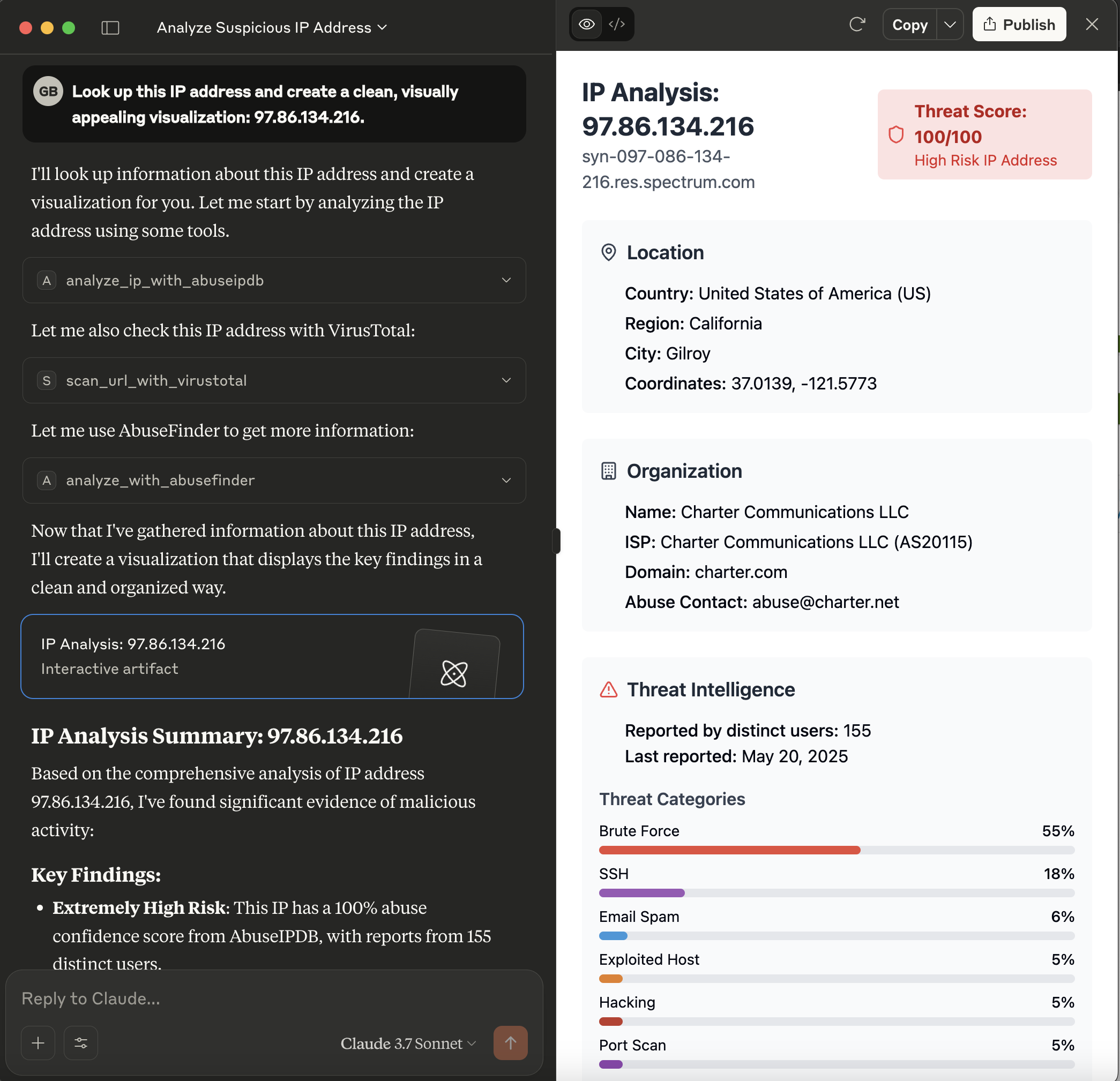
This server acts as a bridge, exposing the powerful analysis capabilities of a Cortex instance as tools consumable by Model Context Protocol (MCP) clients, such as large language models like Claude. It allows these clients to leverage Cortex analyzers for threat intelligence tasks.
What is Cortex?
Cortex is a powerful, free, and open-source observable analysis and active response engine. It allows you to analyze observables (like IPs, URLs, domains, files, etc.) using a variety of "analyzers" – modular pieces of code that connect to external services or perform local analysis.
Benefits of using Cortex (and this MCP server):
- Centralized Analysis: Run various analyses from a single point.
- Extensibility: Easily add new analyzers for different threat intelligence feeds and tools.
- Automation: Automate the process of enriching observables.
- Integration: Designed to work closely with TheHive, a Security Incident Response Platform (SIRP), but can also be used standalone.
- Security: API-key based access to protect your Cortex instance.
This MCP server makes these benefits accessible to MCP-compatible clients, enabling them to request analyses and receive structured results.
Prerequisites
- Rust Toolchain: Ensure you have Rust installed (visit rustup.rs).
- Cortex Instance: A running Cortex instance is required.
- The server needs network access to this Cortex instance.
- An API key for Cortex with permissions to list analyzers and run jobs.
- Configured Analyzers: The specific analyzers you intend to use (e.g.,
AbuseIPDB_1_0,Abuse_Finder_3_0,VirusTotal_Scan_3_1,Urlscan_io_Scan_0_1_0) must be enabled and correctly configured within your Cortex instance.
Installation
The recommended way to install the MCP Server for Cortex is to download a pre-compiled binary for your operating system.
-
Go to the Releases Page: Navigate to the GitHub Releases page.
-
Download the Binary: Find the latest release and download the appropriate binary for your operating system (e.g.,
mcp-server-cortex-linux-amd64,mcp-server-cortex-macos-amd64,mcp-server-cortex-windows-amd64.exe). -
Place and Prepare the Binary:
- Move the downloaded binary to a suitable location on your system (e.g.,
/usr/local/binon Linux/macOS, or a dedicated folder likeC:\Program Files\MCP Servers\on Windows). - For Linux/macOS: Make the binary executable:
- Ensure the directory containing the binary is in your system's
PATHif you want to run it without specifying the full path.
- Move the downloaded binary to a suitable location on your system (e.g.,
Alternatively, you can build the server from source (see the Building section below).
Configuration
The server is configured using the following environment variables:
CORTEX_ENDPOINT: The full URL to your Cortex API.- Example:
http://localhost:9000/api
- Example:
CORTEX_API_KEY: Your API key for authenticating with the Cortex instance.RUST_LOG(Optional): Controls the logging level for the server.- Example:
info(for general information) - Example:
mcp_server_cortex=debug,cortex_client=info(for detailed server logs and info from the cortex client library)
- Example:
Cortex Analyzer Configuration
For the tools provided by this MCP server to function correctly, the corresponding analyzers must be enabled and properly configured within your Cortex instance. The server relies on these Cortex analyzers to perform the actual analysis tasks.
The tools currently use the following analyzers by default (though these can often be overridden via tool parameters):
analyze_ip_with_abuseipdb: Uses an analyzer likeAbuseIPDB_1_0.- This analyzer typically requires an API key from AbuseIPDB. Ensure this is configured in Cortex.
analyze_with_abusefinder: Uses an analyzer likeAbuse_Finder_3_0.- AbuseFinder might have its own configuration requirements or dependencies within Cortex.
scan_url_with_virustotal: Uses an analyzer likeVirusTotal_Scan_3_1.- This analyzer requires a VirusTotal API key. Ensure this is configured in Cortex.
analyze_url_with_urlscan_io: Uses an analyzer likeUrlscan_io_Scan_0_1_0.- This analyzer requires an API key for urlscan.io. Ensure this is configured in Cortex.
Key Points:
- Enable Analyzers: Make sure the analyzers you intend to use are enabled in your Cortex instance's "Organization" -> "Analyzers" section.
- Configure Analyzers: Each analyzer will have its own configuration page within Cortex where you'll need to input API keys, set thresholds, or define other operational parameters. Refer to the documentation for each specific Cortex analyzer.
- Test in Cortex: It's a good practice to test the analyzers directly within the Cortex UI first to ensure they are working as expected before trying to use them via this MCP server.
If an analyzer is not configured, not enabled, or misconfigured (e.g., invalid API key), the corresponding tool call from the MCP client will likely fail or return an error from Cortex.
Example: Claude Desktop Configuration
For MCP clients like Claude Desktop, you typically configure them by specifying the command to launch the MCP server and any necessary environment variables for that server.
-
Build or Download the Server Binary: Ensure you have the
mcp-server-cortexexecutable. If you've built it from source, it will be intarget/debug/mcp_server_cortexortarget/release/mcp_server_cortex. -
Configure Your LLM Client (e.g., Claude Desktop):
-
The method for configuring your LLM client will vary depending on the client itself.
-
For clients that support MCP, you will typically need to point the client to the path of the
mcp-server-cortexexecutable. -
Example for Claude Desktop
claude_desktop_config.json: You would modify your Claude Desktop configuration file (usuallyclaude_desktop_config.json) to include an entry for this server.For instance, if your
mcp-server-cortexbinary is located at/opt/mcp-servers/mcp-server-cortex, your configuration might look like this:
-
Available Tools
The server provides the following tools, which can be called by an MCP client:
-
analyze_ip_with_abuseipdb- Description: Analyzes an IP address using an AbuseIPDB analyzer (or a similarly configured IP reputation analyzer) via Cortex. Returns the job report if successful.
- Parameters:
ip(string, required): The IP address to analyze.analyzer_name(string, optional): The specific name of the AbuseIPDB analyzer instance in Cortex. Defaults toAbuseIPDB_1_0.max_retries(integer, optional): Maximum number of times to poll for the analyzer job to complete. Defaults to 5.
-
analyze_with_abusefinder- Description: Analyzes various types of data (IP, domain, FQDN, URL, or email) using an AbuseFinder analyzer via Cortex. Returns the job report if successful.
- Parameters:
data(string, required): The data to analyze (e.g., "1.1.1.1", "example.com", "http://evil.com/malware", "test@example.com").data_type(string, required): The type of the data. Must be one of:ip,domain,fqdn,url,mail.analyzer_name(string, optional): The specific name of the AbuseFinder analyzer instance in Cortex. Defaults toAbuse_Finder_3_0.max_retries(integer, optional): Maximum number of times to poll for the analyzer job to complete. Defaults to 5.
-
scan_url_with_virustotal- Description: Scans a URL using a VirusTotal_Scan analyzer (e.g.,
VirusTotal_Scan_3_1) via Cortex. Returns the job report if successful. - Parameters:
url(string, required): The URL to scan.analyzer_name(string, optional): The specific name of the VirusTotal_Scan analyzer instance in Cortex. Defaults toVirusTotal_Scan_3_1.max_retries(integer, optional): Maximum number of times to poll for the analyzer job to complete. Defaults to 5.
- Description: Scans a URL using a VirusTotal_Scan analyzer (e.g.,
-
analyze_url_with_urlscan_io- Description: Analyzes a URL using a Urlscan.io analyzer (e.g.,
Urlscan_io_Scan_0_1_0) via Cortex. Returns the job report if successful. - Parameters:
url(string, required): The URL to analyze.analyzer_name(string, optional): The specific name of the Urlscan.io analyzer instance in Cortex. Defaults toUrlscan_io_Scan_0_1_0.max_retries(integer, optional): Maximum number of times to poll for the analyzer job to complete. Defaults to 5.
- Description: Analyzes a URL using a Urlscan.io analyzer (e.g.,
Building
To build the server from source, ensure you have the Rust toolchain installed (as mentioned in the "Prerequisites" section).
- Clone the repository (if you haven't already): If you are already working within a cloned repository and are in its root directory, you can skip this step.
Related MCP Servers
Adoption & maintenance
Factual signals from GitHub, npm, and our automated checks — not a rating.
GitHub stars
16
Stargazers on the source repository.
Last commit
9mo ago
Most recent push to the default branch.
Tools exposed
1
Callable tools this server registers over MCP.
Directory activity
1 views
Config copies, upvotes, and views on AllMCPs.
Reviews
No reviews yet — be the first to share how this listing worked for you.
Frequently Asked Questions about MCP Server Cortex
AllMCPs Directory Badge
Showcase your server listing on GitHub or your project documentation. Embed this dynamic SVG badge to highlight official listing status and live engagement.
Badge Style:
Live Dynamic SVG Preview
Markdown (GitHub README)
[](https://allmcps.com/mcp/gbrigandi-mcp-server-cortex)HTML Embed
<a href="https://allmcps.com/mcp/gbrigandi-mcp-server-cortex"><img src="https://allmcps.com/api/badge/gbrigandi-mcp-server-cortex?style=directory" alt="MCP Server Cortex on AllMCPs" /></a>Technical Specs & Signals
CategorySecurity
PricingFree
11/11 checks healthy over the last 33d
44Quality signal: Fair · 44/100How this signal is calculated ▾
Server availabilityNot measured
Not scored for repo-hosted servers — we can't reach the running server, only its GitHub page. Hosted MCP endpoints are health-checked live.
Verified ownership10/20
Documentation & tools21/30
Adoption & activity2/15
Community engagement0/10
A guidance signal from public completeness & health data — not a user rating. New listings start lower and rise as they add docs, get verified, and grow adoption. Signals we can't observe for a listing are skipped, not counted against it.
Own this project?
This directory is pre-filled from public sources. Claim via GitHub README, site badge, or DNS TXT to unlock edit access and the Official badge — proof is checked automatically, then reviewed by our team.
Free dofollow backlink: add your website and place the AllMCPs badge on it — no claim needed. We detect it automatically and keep it verified as long as the badge stays live.
Claim & get free dofollowShare & Embed
Add our SVG badge (dark/light directory styles) or embeddable widget to your site.