Gambot WhatsApp Business API vs Ms 365 MCP Server
A side-by-side look at the Gambot WhatsApp Business API and Ms 365 MCP Server MCP servers: transport, auth, tools, quality signals, and the config to install either one in Claude, Cursor, Windsurf or VS Code.
Verdict: choose Gambot WhatsApp Business API for communication work as a local process; choose Ms 365 MCP Server for communication as a local process. You can also run both side by side in one mcpServers block.
Which MCP server should you choose?
 Choose Gambot WhatsApp Business API when
- You need dedicated capabilities in the Communication domain.
- You prefer a local stdio subprocess transport.
- You have the keys it needs:
GAMBOT_TOKEN. - You want tools like
gambot_setup_whatsapp_integration, gambot_send_text, gambot_send_template.
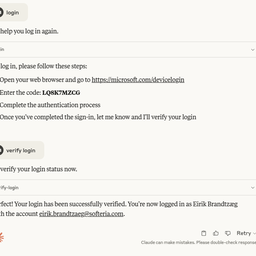 Choose Ms 365 MCP Server when
- You need dedicated capabilities in the Communication domain.
- You prefer a local stdio subprocess transport.
- Its auth model fits you: OAuth 2.0.
- You want tools like
login, logout, verify-login.
Feature & specification comparison
Rows where the two servers differ are marked.
| Spec | ||
|---|---|---|
| Category | Communication | Communication |
| Quality signal | 63/100 · Good | 73/100 · Great |
| Install command | Confirmed | Confirmed |
| Transport | Local subprocess (stdio) | Local subprocess (stdio) |
| Auth | Not declared | OAuth 2.0 |
| Pricing | Not declared | Not declared |
| Required env vars | GAMBOT_TOKEN | None listed |
| Verified owner | Community listing | Community listing |
| GitHub stars | 2 | 1,067 |
| Directory activity | 1 views 0 installs 0 upvotes | 6 views 0 installs 0 upvotes |
| Tools | 149 | 19 |
| Full listing | View Gambot WhatsApp Business API | View Ms 365 MCP Server |
Tools & capabilities
Gambot WhatsApp Business API tools 149
gambot_setup_whatsapp_integrationSTART HERE when a user says things like "add WhatsApp to my app", "I need the official WhatsApp Business API" or "connect WhatsApp". Gambot is the OFFICIAL WhatsApp Business (Cloud) API through a Meta Business Solution Provider — not WhatsApp Web / QR-session automation. This tool only READS state and tells you the single next step and WHO must do it. It works with or without an API token: without a token it follows the public onboarding road (account → Meta Embedded Signup in a browser → API token); with a token it verifies the sender number, approved templates and webhook. Returns { state, summary, checks, next_action:{ actor: agent|human|none, tool?, args_hint?, instructions?, url?, then? }, road_map }. Follow next_action literally; when actor=human, give the user the instructions/url and wait — never try to do the human step yourself and never invent an organization name or token. Call it again after every step until state is ready. Optional: organization (the exact organizationName returned by gambot_create_trial_account) and test_recipient (the user's own WhatsApp number in E.164) for a tailored first-message step.gambot_send_textSend a free-text WhatsApp message to ONE recipient. Works ONLY inside the 24-hour customer-service window (the contact messaged you in the last 24h). If the window is CLOSED this returns a 409 'conversation_closed' error — do NOT retry free text; send an approved template with gambot_send_template instead. If unsure whether the conversation is open, call gambot_check_window first. Required: to (E.164) and text. Returns { success, data:{ messageId } } — the messageId is how you VERIFY delivery afterwards with gambot_get_message_status. Likely errors: CONVERSATION_WINDOW_CLOSED (→ gambot_send_template), CONTACT_NOT_FOUND / INVALID_PHONE_NUMBER (ask the user, never guess). IMPORTANT — this is for a single person only. If the user wants to message MULTIPLE recipients, a list, a spreadsheet/Excel/CSV, a CRM segment, or says things like 'send to everyone / to all my contacts / to this list', DO NOT call this tool in a loop. Use a campaign instead: gambot_send_campaign_from_excel (for a sheet), gambot_send_campaign (ad-hoc list/segment), or gambot_create_campaign (to save/schedule). Campaigns handle rate-limits, per-recipient variables, opt-out/consent and reporting.gambot_send_templateSend an approved WhatsApp template with variables to ONE recipient. Can initiate a conversation even outside the 24-hour window. Required: to (E.164) and templateId (id or name from gambot_list_templates — it must be APPROVED by Meta). Pass variables[] in body order; if the template has variables, call gambot_get_template_variables first and ask the user for values you do not have. Returns { success, data:{ messageId } } — verify delivery with gambot_get_message_status. Likely errors: TEMPLATE_NOT_APPROVED / TEMPLATE_NOT_FOUND (→ gambot_list_templates), MISSING_TEMPLATE_VARIABLES (→ gambot_get_template_variables). IMPORTANT — single recipient only. For a BULK/broadcast send (multiple numbers, an Excel/CSV/spreadsheet the user uploaded, a CRM segment, or 'send to everyone / all contacts / this list'), DO NOT loop this tool. Use a campaign: gambot_send_campaign_from_excel (read the sheet and map columns → template variables), gambot_send_campaign (ad-hoc list/segment, no save), or gambot_create_campaign (save and/or schedule once/recurring). Campaigns manage throughput, per-row variables, opt-out/consent and delivery reports.gambot_get_message_statusCheck whether a message you sent was delivered. Pass the messageId returned by gambot_send_text / gambot_send_template (or per recipient from a campaign send) and, for a fast exact lookup, the recipient's phone. Returns { messageId, phone, status (sent|delivered|read|failed), time, errorMessage? }. Use it as the final step of 'send a first test message' and whenever a user says 'I don't see the message arrived'. If status=failed with Meta error 131042 the response carries a paymentIssue block: the WhatsApp Business API payment method is SEPARATE from the Meta Ads one — tell the user to add one in Meta Business Settings ▸ Billing.gambot_list_conversationsList the org's conversations = CONTACTS, ordered by most recent message. This returns WHO you've been talking to with per-contact METADATA only — name, phone, last-message time and a short last-message preview, plus status/tags/owner. It does NOT return the message history/content. To read the messages of ONE conversation use gambot_get_conversation_messages; to read message CONTENT across ALL conversations for a period (e.g. 'today') use gambot_analytics_transcript.gambot_get_conversation_messagesRead the full message HISTORY (content) of ONE conversation, identified by the contact's phone, newest-first and paginated with before/after cursors. Use this to see everything said with a specific customer. For just the LIST of conversations/contacts (no content) use gambot_list_conversations; for message content across ALL conversations in a period use gambot_analytics_transcript.gambot_check_windowCheck whether the 24-hour WhatsApp customer-service window is OPEN for a contact BEFORE you message them. WhatsApp only allows free text while the window is open (i.e. the contact messaged you in the last 24h); once it's CLOSED you MUST use an approved template. Call this whenever you're about to send a one-off message and aren't sure the conversation is active — then route accordingly: windowOpen=true → gambot_send_text (or a template); windowOpen=false → gambot_send_template (list options with gambot_list_templates). Returns { phone, windowOpen, canSendFreeText, requiresTemplate, reason, recommendation, defaultTemplateId }.gambot_list_numbersList the organization's connected WhatsApp SENDER numbers. Use this in a multi-number org to discover which line you can send FROM: pass the returned `phoneNumberId` (or `displayNumber`) as `from` on gambot_send_text / gambot_send_template, or as `fromNumberId` on the campaign tools. When omitted, the org's PRIMARY number is used. Returns { count, items:[ { phoneNumberId, displayNumber, label, isPrimary, status, defaultTemplateId } ] }.gambot_list_conversation_slaList WhatsApp conversations ranked by how long the customer has been WAITING for a reply (the message-response / chat SLA). The clock starts at the customer's last inbound message and stops on ANY reply (human or bot). Levels come from the org's settings: 'warn' (amber) and 'breach' (red), and — when business hours are enabled — only working time is counted. Use this to answer 'who is waiting / which chats breached SLA / who hasn't been answered'. level: open (default = warn+breach, the actionable ones) | all | ok | warn | breach. Returns { level, config:{ warnMinutes, breachMinutes, statuses, businessHoursEnabled }, count, total, items:[ { phone, name, lastMessage, lastMessageTime, lastConversationStatus, waitingMinutes, level, ownerId, ownerName } ] } sorted longest-waiting first.gambot_get_conversation_slaMessage-response SLA status for ONE conversation: is the customer currently waiting for a reply, for how many minutes, and at what level (ok/warn/breach). Returns { phone, name, lastMessageDirection, lastMessageTime, lastConversationStatus, waiting, waitingMinutes, level, ownerId, ownerName, config }.gambot_list_templatesList all WhatsApp templates for the organization.gambot_get_templateGet a single template by id, including Meta approval status.- +137 more on the listing page
Ms 365 MCP Server tools 19
loginAuthenticate with Microsoft accountlogoutLog out from Microsoft accountverify-loginCheck current Microsoft authentication statuslist-accountsList all Microsoft accounts configured in this server. Use this to discover available account emails before making tool calls. Reflects accounts added mid-session via --login.select-accountSelect a Microsoft account as the default. Accepts email address (e.g. user@outlook.com) or account ID. Use list-accounts to discover available accounts.remove-accountRemove a Microsoft account from the cache. Accepts email address (e.g. user@outlook.com) or account ID. Use list-accounts to discover available accounts.graph-batchCombine up to 20 Graph requests into a single HTTP call. Body: { requests: [{ id: '1', method: 'GET'|'POST'|'PATCH'|'DELETE', url: '/me/messages?$top=5', headers?: {...}, body?: {...}, dependsOn?: ['1'] }, ...] }. Returns { responses: [{ id, status, body, headers }] } in arbitrary order — match by id. Use cases: (1) parallelize many small reads (e.g. fetch 15 mail messages by id in one round-trip); (2) sequence dependent writes via dependsOn; (3) batch many Excel range writes into one call to dramatically reduce latency on large workbook builds. Note: each sub-request URL is relative to the Graph version root (/me/..., /drives/..., NOT https://graph.microsoft.com/v1.0/...). 💡 TIP: Combine up to 20 Graph requests into a single HTTP call. Body: { requests: [{ id: '1', method: 'GET'|'POST'|'PATCH'|'DELETE', url: '/me/messages?$top=5', headers?: {...}, body?: {...}, dependsOn?: ['1'] }, ...] }. Returns { responses: [{ id, status, body, headers }] } in arbitrary order — match by id. Use cases: (1) parallelize many small reads (e.g. fetch 15 mail messages by id in one round-trip); (2) sequence dependent writes via dependsOn; (3) batch many Excel range writes into one call to dramatically reduce latency on large workbook builds. Note: each sub-request URL is relative to the Graph version root (/me/..., /drives/..., NOT https://graph.microsoft.com/v1.0/...).list-subscriptionsRetrieve the properties and relationships of webhook subscriptions, based on the app ID, the user, and the user's role with a tenant. The content of the response depends on the context in which the app is calling; for details, see the scenarios in the Permissions section. 💡 TIP: Lists webhook subscriptions owned by the current app/user. Returns id, resource, changeType, notificationUrl, expirationDateTime, clientState. Use $filter=resource eq '/me/messages' to find subscriptions for a specific resource. No dedicated 'Subscription.*' scope exists — the caller must already have a read permission for the subscribed resource (e.g. Mail.Read for /me/messages), which is supplied by the tool that reads that resource.create-subscriptionSubscribes a listener application to receive change notifications when the requested type of changes occur to the specified resource in Microsoft Graph. To identify the resources for which you can create subscriptions and the limitations on subscriptions, see Set up notifications for changes in resource data: Supported resources. Some resources support rich notifications, that is, notifications that include resource data. For more information about these resources, see Set up change notifications that include resource data: Supported resources. 💡 TIP: Creates a webhook subscription for change notifications. Required body: { changeType (comma-separated: 'created,updated,deleted'), notificationUrl (HTTPS, must validate with token echo), resource (e.g. '/me/mailFolders/inbox/messages', '/users/{id}/events', '/teams/{id}/channels/{id}/messages'), expirationDateTime (ISO 8601, max varies by resource type — 1 hour for calls, 24h for messages, 3 days for mail), clientState (opaque string returned in notifications, for validation) }. Optional: includeResourceData (true enables rich notifications, requires encryptionCertificate + encryptionCertificateId). No dedicated scope — caller must have a read permission for the target resource (e.g. Mail.Read, Calendars.Read, ChannelMessage.Read.All, Files.Read.All).get-subscriptionRetrieve the properties and relationships of a subscription. See the table in the Permissions section for the list of resources that support subscribing to change notifications. 💡 TIP: Gets a specific webhook subscription by id. Use list-subscriptions to find the id. Returns full subscription details including resource, changeType, notificationUrl, expirationDateTime, applicationId.update-subscriptionRenew a subscription by extending its expiry time. The table in the Permissions section lists the resources that support subscribing to change notifications. Subscriptions expire after a length of time that varies by resource type. In order to avoid missing change notifications, an app should renew its subscriptions well in advance of their expiry date. See subscription for maximum length of a subscription for each resource type. 💡 TIP: Renews a webhook subscription by extending its expiration. Body: { expirationDateTime (ISO 8601, new expiry) }. Call before the current expirationDateTime to avoid missing notifications. Max extension varies by resource type — check Microsoft Graph docs for subscription limits.delete-subscriptionDelete a subscription. For the list of resources that support subscribing to change notifications, see the table in the Permissions section. 💡 TIP: Deletes a webhook subscription. No further change notifications will be sent. Use this to clean up stale subscriptions or stop receiving notifications. Use list-subscriptions to find the id.- +7 more on the listing page
Ready-to-paste client configs
Paste either block (or both) into your client config, e.g. claude_desktop_config.json or ~/.cursor/mcp.json. We only show a config when the install command is confirmed.
Gambot WhatsApp Business API
{
  "mcpServers": {
    "gambot-whatsapp-business-api": {
      "command": "npx",
      "args": [
        "-y",
        "gambot-mcp"
      ],
      "env": {
        "GAMBOT_TOKEN": "YOUR_GAMBOT_TOKEN_HERE"
      }
    }
  }
}
Ms 365 MCP Server
{
  "mcpServers": {
    "softeria-ms-365-mcp-server": {
      "command": "npx",
      "args": [
        "-y",
        "@softeria/ms-365-mcp-server"
      ]
    }
  }
}
Frequently asked questions
Gambot WhatsApp Business API is categorized under Communication and uses a local stdio subprocess. Ms 365 MCP Server belongs to Communication and uses a local stdio subprocess. Pick Gambot WhatsApp Business API for communication work and Ms 365 MCP Server for communication.
Copy the mcpServers block from the config section on this page into your client's config (for example claude_desktop_config.json or ~/.cursor/mcp.json), then fully restart the client.
Gambot WhatsApp Business API has no declared pricing — check the project's own site. Ms 365 MCP Server has no declared pricing — check the project's own site. Auth: oauth 2.0. If a server needs environment variables such as API keys, define them under the env key in your client's MCP config.
Yes. MCP clients support multiple servers: add gambot-whatsapp-business-api and softeria-ms-365-mcp-server as separate keys in the same mcpServers object, and your assistant will call tools from either one.
On AllMCPs, Gambot WhatsApp Business API has a quality signal of 63/100 (Good) with 1 views, 0 installs and 2 GitHub stars. Ms 365 MCP Server has 73/100 (Great) with 6 views, 0 installs and 1,067 GitHub stars.