A decision surface for typography: curate font directions on your real site, ship next/font code.
Quick Install
Automated & IDE SetupCopy the AI prompt to install this server into Claude Code, Cursor, or another agent — or use 1-click editor setup below.
Not yet automatically verified
We haven't yet run this listing's install command through our automated sandbox check. This isn't a red flag — we're steadily working through the catalog.
Manual Client & Custom JSON ConfigExpand JSON ▾
Client Config & Setup
Choose your client or environment
Target File:
💡 Paste the JSON block into your client's configuration file under mcpServers, then restart the application.
Documentation Overview
Font Lab



Pick the fonts. Fix the words. Your agent does the work.
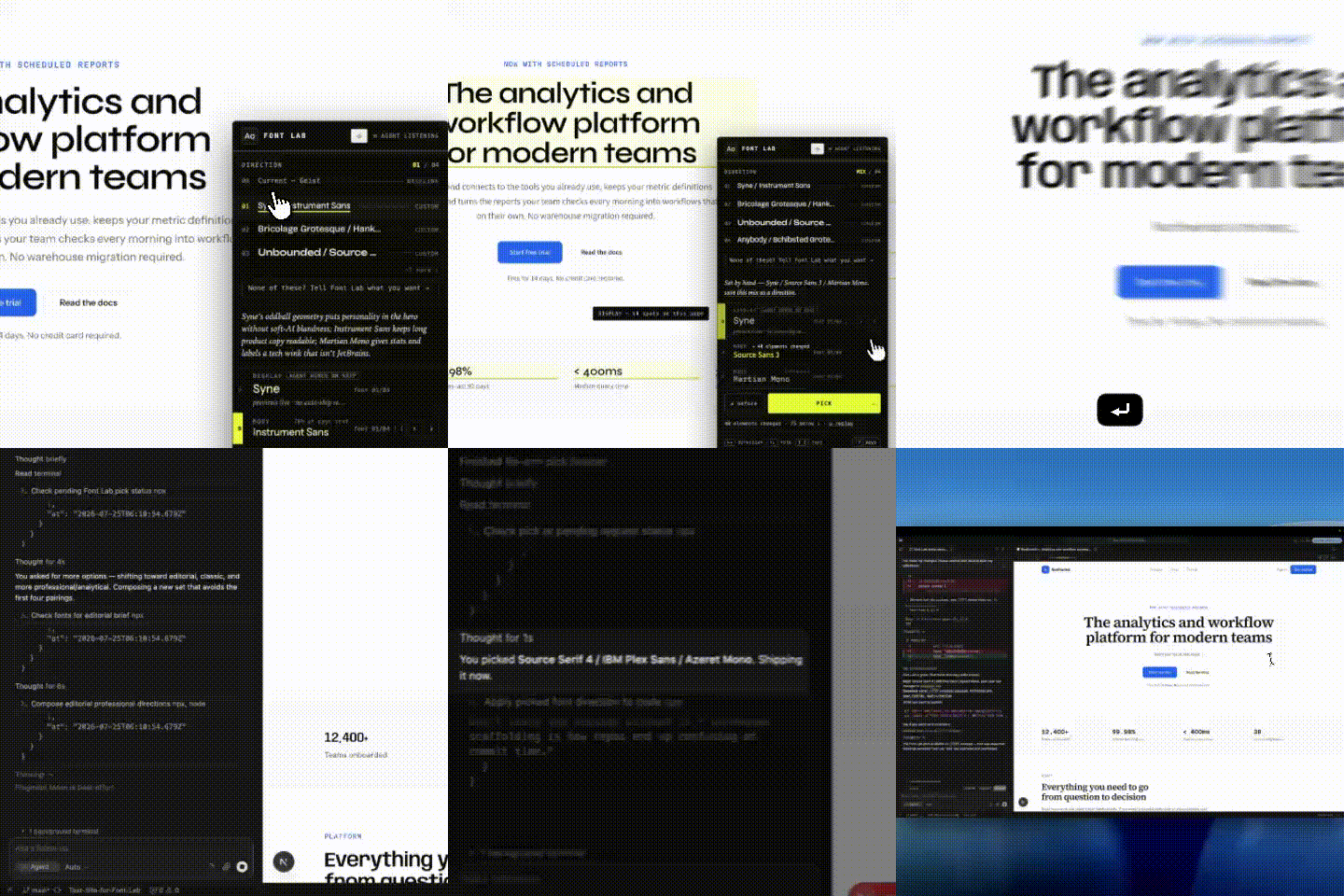
Font Lab is a real-time typography and text editor for AI-built sites. Your agent installs it, composes curated font directions Google fonts and distinctive open-foundry faces, and renders them live on your real site. You can toggle between the fonts and pick the one you like. The agent then finishes it up— next/font + Tailwind on Next.js, self-hosted @font-face everywhere else — reversibly.
Most AI-built sites ends up with generic fonts, like Inter or Geist, because the agent just uses defaults. Font Lab brings the human choose from options the agents curates based on some intake questions. It also allows you to edit text to make it sound like you wrote it.
copy-able prompt here: https://www.jack-mcgovern.com/fontlab
Install
Inside your project — use this prompt:
Works with: Claude Code · Cursor · VS Code · Codex · Windsurf · Gemini CLI For: any framework with a CSS seam — Next.js gets the full live-panel experience; everything else ships through the same engine (see the matrix below).
Install auto-detects which agents you have and wires them all — skill, MCP server, config, each in the right format. On a stack with no seam at all, Font Lab refuses to half-apply and hands you the generated code with a clear reason instead.
Newly registered MCP tools load on the next session reload — but the agent never has to wait: every tool also runs as a one-shot CLI, npx font-lab run <tool> '<json-args>' (same tool table, same JSON out), so the loop starts the moment install finishes. That's also the fallback whenever an MCP server drops mid-session.
Frameworks — what ships where
The taste engine, shippability gate, portable preview, and screenshots work on every stack. What varies is the preview surface and how the pick lands in your code — font-lab analyze prints the exact verdict for your project:
| Your stack | Preview | Auto-ship |
|---|---|---|
| Next.js App Router + Tailwind v4 | live in-app panel + real-site screenshots | next/font + Tailwind codegen |
| Any framework + Tailwind v4 (Vite, Astro, Remix, SvelteKit, TanStack, …) | real-site screenshots (headless paint) + portable sheet | self-hosted @font-face + @theme role map in your CSS entry |
Any framework + Tailwind v3 (fonts in tailwind.config fontFamily) | real-site screenshots (headless paint) + portable sheet | self-hosted @font-face + utility/Preflight overrides in your CSS entry |
No Tailwind, fonts routed through CSS variables (--font-body, --fd, …) | real-site screenshots (headless paint) + portable sheet | self-hosted @font-face + your own font vars repointed |
No seam (hardcoded font-family, CSS-in-JS) | real-site screenshots (headless paint) + portable sheet | hand-apply: Font Lab generates the block, you paste it |
Every auto-ship path is fenced, idempotent, and reversible (font-lab undo). Agents: read capabilities + shipNote from font_lab_analyze — a non-Next stack is a different route through the same loop, never a reason to stop.
Upgrading
Always use upgrade, not bare npm install.
Font Lab lives in two places: the npm package and the panel code stamped into your project (app/_fontlab/). A bare npm install font-lab@latest updates the package but leaves the panel on the old version — which shows a "stale version" warning. upgrade moves everything together in one command: package, panel re-stamp, MCP re-pin, and stale-endpoint shutdown.
How it works
- Ask. Font Lab asks what you're going for — what feeling, how bold a departure, a brand to evoke or avoid — so the directions are tailored to you, not a generic default.
- Compose. Your agent composes a small set of font directions (display + body + mono, each with a rationale), reaching past the overexposed AI defaults. A built-in anti-generic rubric rejects menus that are all Inter/Geist/Space Grotesk.
- Pick. You compare them on your own site — screenshots in chat (works on web or phone) or a live flip/mix/compare panel locally. You always make the pick.
- Ship. The agent writes the real code for your stack —
next/font+ Tailwind on Next.js; self-hosted@font-facewired through Tailwind's theme, v3 utilities, or your own CSS font variables elsewhere. Every change is reversible. - Finish clean. Click done ✓ (or say so) and the agent runs
font_lab_finish: the dev-panel scaffolding comes out, and you get a git-verified commit plan — your copy edits and font change with ready-to-run commands, nothing of Font Lab's mixed in. The scaffolding and state are self-ignoring in git the whole session, sogit statuswas never noisy to begin with.
The panel
The Font Lab panel sits on top of your running site — your real pages, your real content — and lets you change fonts and words in real time.
- Flip through directions with arrow keys — see each pairing on your actual content across multiple routes
- Mix roles — heading from one direction, body from another — and save the mix as its own direction
- Before/after — hold
Bto peek at your current fonts; tapspaceto snap between your two finalists - Inspect — hover any text to see its role, typeface, size, and how many elements share it
- Edit words — double-click any text, retype it, and it saves straight to your source files
- Change receipts — see exactly what changed across the page after every edit
- Undo everything — every modification ships with a reversal command
- Done ✓ — one click ends the session cleanly: your agent strips the dev tooling and hands you the exact commit plan
The panel runs headless too: the agent screenshots your site in each direction and shows you the images in chat — a chat-sized hero shot per direction, with the full-page capture behind it. Works on a phone, on the web, anywhere your agent runs.
The live panel is Next-only — but the real-site preview isn't. On every other framework, Font Lab paints your actual running pages in each direction (the same render-first census machinery the panel flips with, injected headlessly — no scaffolding, no source writes; preview fonts cache in self-ignored state, so your git status stays clean until you actually ship). If no dev server is running, the screenshot tool starts your project's own dev command itself — bound to 127.0.0.1, health-checked, stopped after the capture — which is what makes the loop work unattended in cloud/container agents (Claude Code on the web, and friends) where the human can't reach the agent's localhost. With no dev server possible at all, the fallback is the portable preview: a self-contained HTML specimen sheet (fonts embedded, opens offline) on your own palette and copy — clearly labeled as specimen cards, never passed off as your pages.
Honesty
Font Lab's core promise is preview == ship: what you see in the panel is what the codegen writes.
- Guaranteed fidelity for every font the gate admits — or an honest "may render slightly differently" badge when it can't be byte-for-byte.
- Auto-ships only where the stack has a real seam; anywhere else it hands you the generated code with a clear reason rather than guessing. Never a half-applied change — that's the contract.
- Text sourced externally triggers an explicit notice, never a silent edit.
- The human's pick overrides everything.
Contributing & testing
Testers are the point — especially "it did the wrong thing on my repo" reports. The analyzer output is the most useful thing you can include.
- Issue forms — bugs and "support my stack" requests
CONTRIBUTING.md— code contributions and how to run the testsSECURITY.md— security issues
Going deeper
cli/README.md— the full user guide: install flags, the agent loop, every keyboard shortcut, the CLI referencedocs/CONCEPT.md— the vision and the core beliefdocs/ARCHITECTURE.md— how the choosing moment works and theselection.jsoncontractdocs/SHIP-SPEC.md— how a pick becomes real, reversible codedocs/PRODUCT.md·docs/PANEL-VISION.md— product and brand context
Open source · MIT · Published with npm provenance — every release is traceable to this repo and commit. Built and dogfooded on jack-mcgovern.com.
Related MCP Servers
Reviews
No reviews yet — be the first to share how this listing worked for you.
Frequently Asked Questions about Font Lab
AllMCPs Directory Badge
Showcase your server listing on GitHub or your project documentation. Embed this dynamic SVG badge to highlight official listing status and live engagement.
Badge Style:
Live Dynamic SVG Preview
Markdown (GitHub README)
[](https://allmcps.com/mcp/font-lab)HTML Embed
<a href="https://allmcps.com/mcp/font-lab"><img src="https://allmcps.com/api/badge/font-lab?style=directory" alt="Font Lab on AllMCPs" /></a>Technical Specs & Signals
CategoryDeveloper Tools
37Quality signal: Fair · 37/100How this signal is calculated ▾
Server availabilityNot measured
Not scored for repo-hosted servers — we can't reach the running server, only its GitHub page. Hosted MCP endpoints are health-checked live.
Verified ownership10/20
Documentation & tools16/30
Adoption & activity2/15
Community engagement0/10
A guidance signal from public completeness & health data — not a user rating. New listings start lower and rise as they add docs, get verified, and grow adoption. Signals we can't observe for a listing are skipped, not counted against it.
Own this project?
This directory is pre-filled from public sources. Claim via GitHub README, site badge, or DNS TXT to unlock edit access and the Official badge — proof is checked automatically, then reviewed by our team.
Free dofollow backlink: add your website and place the AllMCPs badge on it — no claim needed. We detect it automatically and keep it verified as long as the badge stays live.
Claim & get free dofollowShare & Embed
Add our SVG badge (dark/light directory styles) or embeddable widget to your site.