FoggyKitchen Terraform/OpenTofu blueprints, landing zones, modules, and labs.
Quick Install
Automated & IDE SetupCopy the AI prompt to install this server into Claude Code, Cursor, or another agent — or use 1-click editor setup below.
Manual Client & Custom JSON ConfigExpand JSON ▾
Client Config & Setup
Remote HTTPChoose your client or environment
Target File:
💡 Paste the JSON block into your client's configuration file under mcpServers, then restart the application.
Documentation Overview
FoggyKitchen MCP for Codex & Claude Code
Bring FoggyKitchen cloud architecture context directly into the AI coding tool you already use.
FoggyKitchen MCP gives compatible AI coding agents controlled access to FoggyKitchen Terraform/OpenTofu modules, implementation examples, architecture patterns, landing-zone guidance, and entitlement-aware technical catalog resources.
It is designed for engineers working with Azure, Oracle Cloud Infrastructure, Terraform/OpenTofu, AKS, OKE, cloud networking, private connectivity, landing zones, and multicloud architectures.
FoggyKitchen MCP is not another hosted LLM, a Terraform execution service, or a generic documentation search engine. It is an entitlement-aware context layer between FoggyKitchen technical assets and your own AI coding agent.
Professional+ required for FoggyKitchen technical catalog MCP access.
Users authenticate with FoggyKitchen. Available MCP capabilities depend on workspace plan and entitlements. Starter remains focused on self-study and platform access; Professional+ enables technical catalog MCP access for compatible AI coding clients.
What can FoggyKitchen MCP do?
Find the right Terraform/OpenTofu module
Help the AI agent locate reviewed FoggyKitchen modules by cloud, architecture intent, topic, repository, and implementation context. The goal is to lead the agent toward an existing FoggyKitchen building block before generating generic infrastructure code from scratch.
Resolve architecture patterns
Use FoggyKitchen context for scenarios such as Azure hub-and-spoke, Azure Firewall transit, private AKS, OCI VCN architecture, private OKE, Autonomous Database private access, OCI landing zones, private endpoints, routing, and OCI <-> Azure connectivity.
Bring implementation examples into the coding loop
Allow the AI client to discover labs, examples, and implementation scenarios so it can point engineers toward working usage patterns rather than only generic documentation.
Use architecture context while coding
FoggyKitchen MCP helps Codex and Claude Code reason about architecture decisions, module selection, implementation paths, networking trade-offs, and deployment structure while the engineer stays in the coding workflow.
Keep access entitlement-aware
FoggyKitchen MCP returns only assets and capabilities available to the authenticated FoggyKitchen workspace. Professional+ is currently the entry point for technical catalog MCP access.
Try these prompts
Azure hub-and-spoke
OCI private OKE
Architecture review
Landing zone discovery
OCI / Azure multicloud
How it works
- Engineer asks a cloud or IaC question in Codex or Claude Code.
- The AI agent calls FoggyKitchen MCP.
- FoggyKitchen resolves relevant catalog/context according to entitlement.
- The AI agent combines that context with the user's current coding task.
- Engineer reviews and implements the resulting architecture or code.
FoggyKitchen MCP provides context. The AI client remains responsible for reasoning and code generation, and the engineer remains responsible for review.
See it in practice
OAuth-first authentication
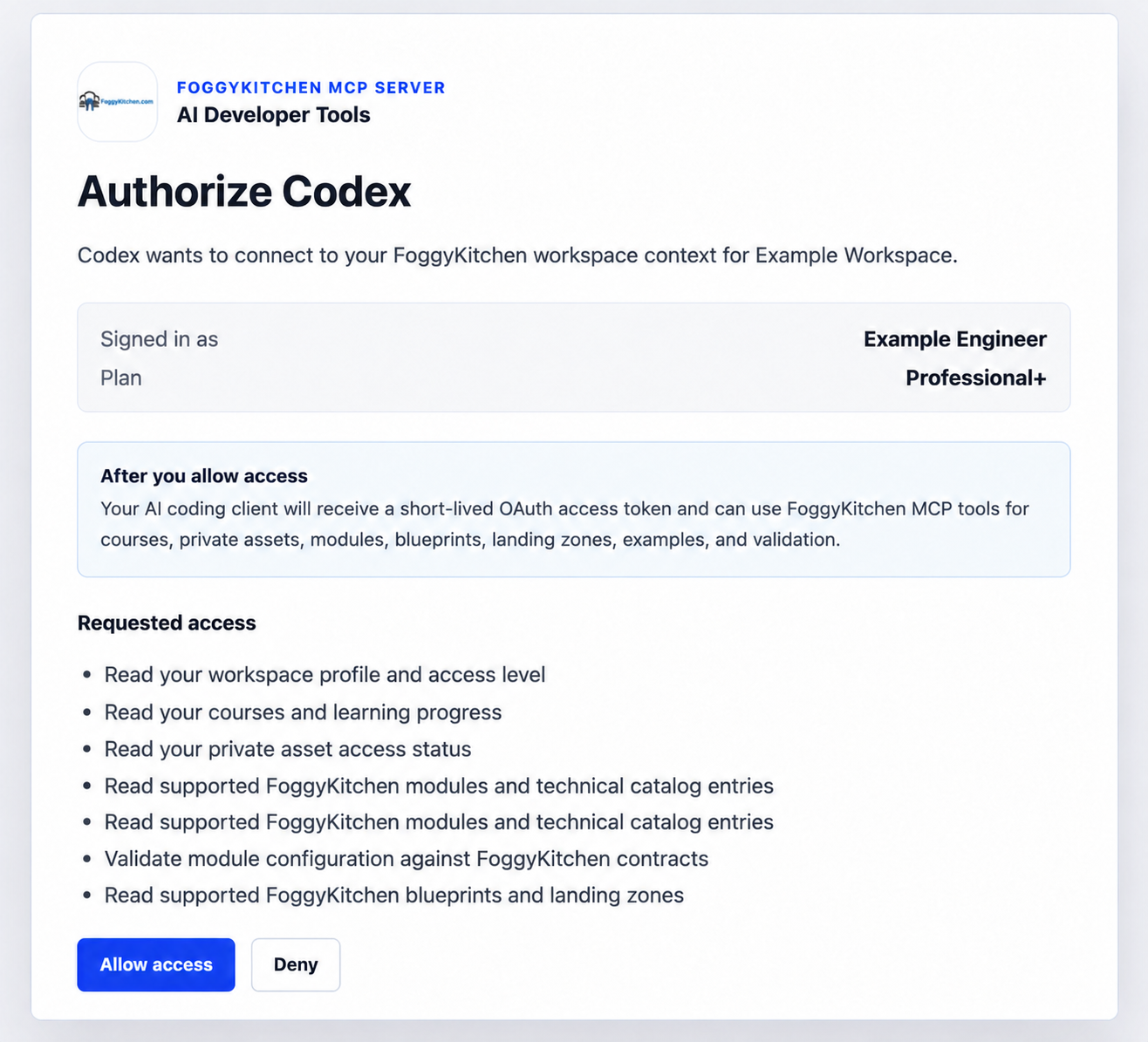
Codex and Claude Code authenticate to FoggyKitchen through OAuth/PKCE. Personal MCP Tokens remain available only as a fallback for legacy or unsupported clients.
Codex + FoggyKitchen MCP
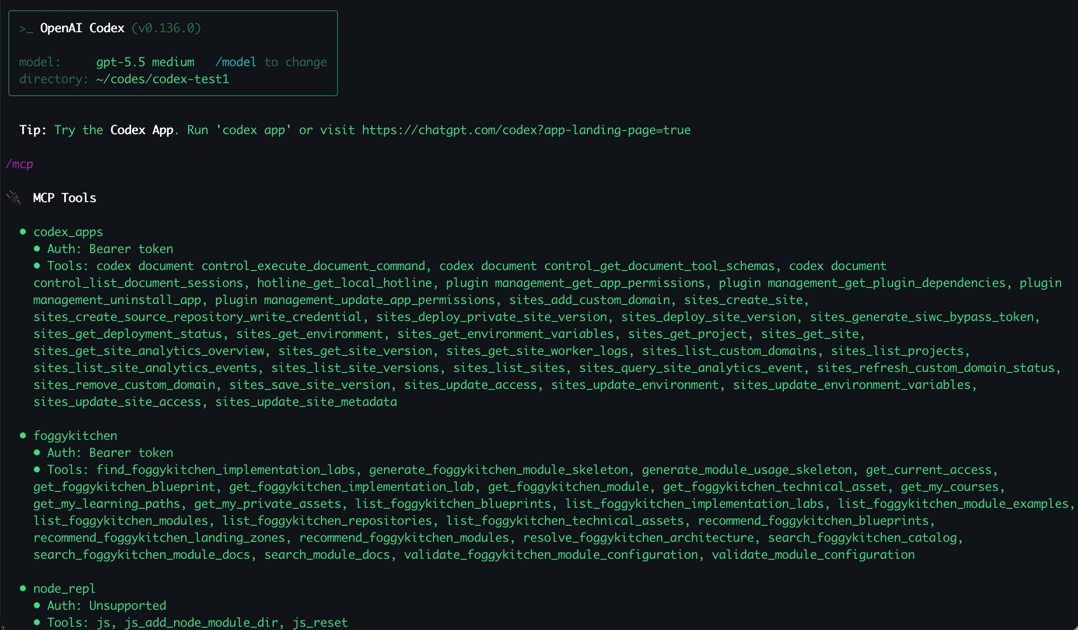
FoggyKitchen technical catalog context becomes available directly in the Codex workflow.
Claude Code + FoggyKitchen MCP
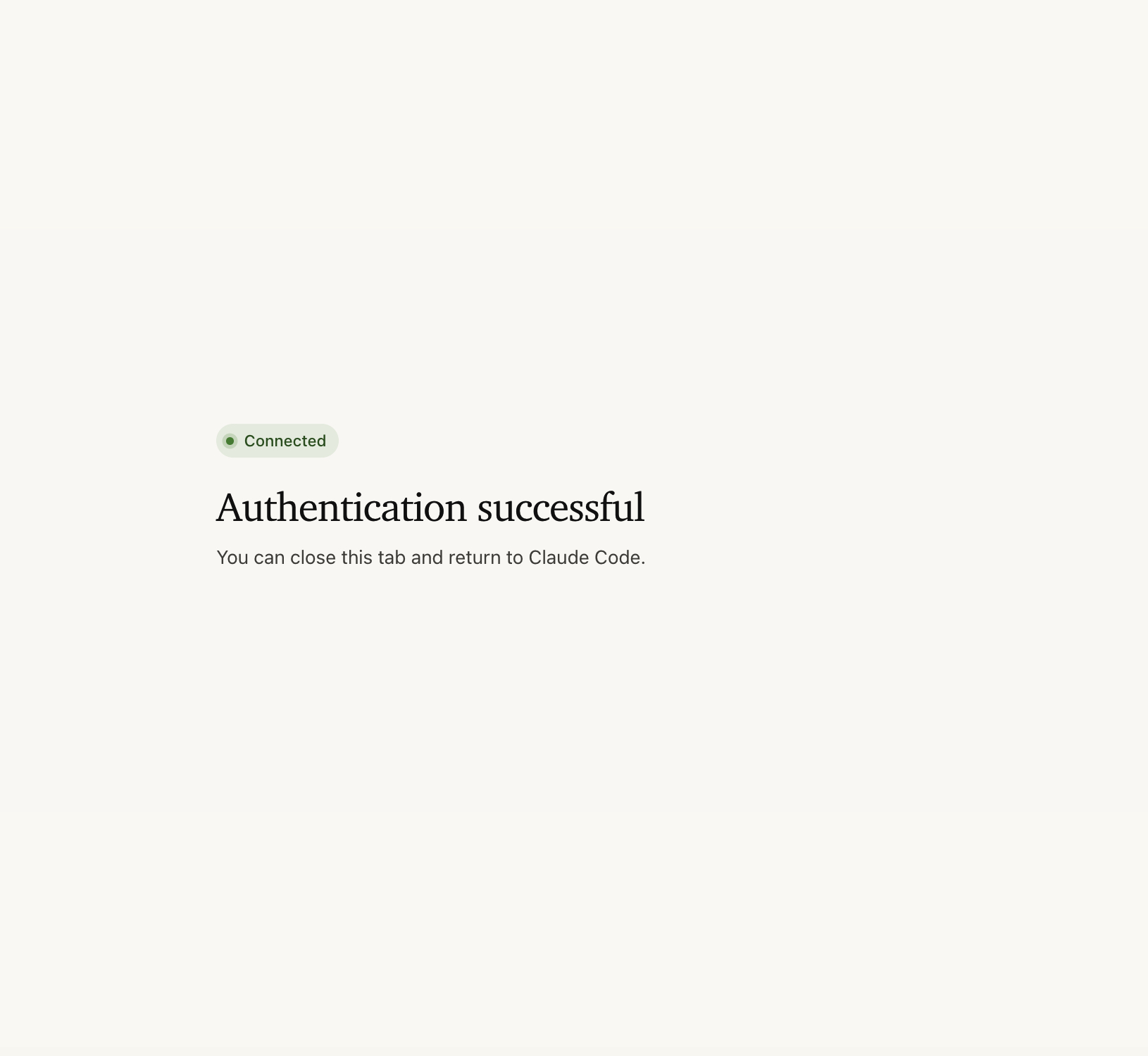
Claude Code can connect to FoggyKitchen MCP and return to the coding session with FoggyKitchen resources available to the agent.
Why this is different from generic AI coding
A generic AI coding model can produce Terraform code.
FoggyKitchen MCP adds curated FoggyKitchen implementation context:
- known modules;
- implementation examples;
- architecture patterns;
- landing-zone assets;
- cloud-specific context;
- entitlement-aware private resources.
The goal is not to replace model reasoning. The goal is to give the model better domain context before it makes infrastructure decisions.
MCP + FoggyKitchen Skills
MCP gives the AI agent access to FoggyKitchen resources and technical catalog context.
Skills teach the agent when and how to apply specialized FoggyKitchen workflows. This repository includes the FoggyKitchen skill, which routes Codex or Claude Code toward FoggyKitchen context for Terraform/OpenTofu, Azure networking, OCI networking, AKS, OKE, Autonomous Database, hub-spoke, private endpoint, landing-zone, and multicloud interconnect work.
Skills do not replace authentication or entitlement checks. The MCP server still controls what resources and tools are available to the authenticated workspace.
Requirements
- Node.js 18 or newer
- A FoggyKitchen Professional+ membership for OAuth access to MCP tools
- Codex with local plugin support, or Claude Code
Install in Codex
Add the FoggyKitchen marketplace:
Then install the plugin:
Alternatively, configure the MCP server directly in ~/.codex/config.toml:
Restart Codex or start a new thread after installing so the MCP tools are loaded.
Install in Claude Code
Register FoggyKitchen as a remote HTTP MCP server:
You can also use this repository as a project-level MCP configuration. Claude Code auto-detects the .mcp.json at the root of this repo. It connects to https://foggykitchen.com/mcp over HTTP and uses OAuth/PKCE with FoggyKitchen. If you clone the repo and open it as a project, Claude Code will prompt you to approve the foggykitchen MCP server on first use.
Plugin installation is still supported where Claude Code plugin marketplaces are enabled:
Or from within a Claude Code session:
Restart Claude Code or start a new session after adding/installing the server so the MCP tools are loaded.
Sign in with FoggyKitchen
FoggyKitchen MCP supports OAuth/PKCE for Codex and Claude Code. Start the OAuth flow from your AI coding client. FoggyKitchen Settings are used only for manual Personal MCP Tokens.
OAuth is available for Professional+ memberships. Individual Learner and Starter accounts can browse FoggyKitchen, but they cannot authorize MCP access for Codex, Claude Code, or other AI coding clients.
Codex OAuth login
STEP 1. Start login from Codex:
STEP 2. Your browser opens FoggyKitchen. If you are not signed in, sign in first.
STEP 3. FoggyKitchen shows the OAuth approval screen with Allow access and Deny. Click Allow access.
STEP 4. Codex completes authentication and the FoggyKitchen MCP tools become available.
STEP 5. Run /mcp in Codex to verify the tool list.
Claude Code OAuth login
STEP 1. Start Claude Code, open /mcp, select foggykitchen, and authenticate. Your browser should show FoggyKitchen login if needed, then the OAuth approval screen with Allow access and Deny. After approval, Claude Code should show the server as connected.
STEP 2. Once authenticated, you can close the browser window and return to Claude Code.
STEP 3. Claude Code will notify you about being connected to the MCP server.
STEP 4. Review Claude Code MCP connection details from /mcp.
Manual fallback: Personal MCP Token
Personal MCP Tokens remain available in FoggyKitchen Settings -> AI Developer Tools for legacy clients, smoke tests, and tools that cannot complete OAuth/PKCE yet. OAuth is the recommended flow for Codex and Claude Code.
Related MCP Servers
Reviews
No reviews yet — be the first to share how this listing worked for you.
Frequently Asked Questions about FoggyKitchen MCP
AllMCPs Directory Badge
Showcase your server listing on GitHub or your project documentation. Embed this dynamic SVG badge to highlight official listing status and live engagement.
Badge Style:
Live Dynamic SVG Preview
Markdown (GitHub README)
[](https://allmcps.com/mcp/foggykitchen-mcp)HTML Embed
<a href="https://allmcps.com/mcp/foggykitchen-mcp"><img src="https://allmcps.com/api/badge/foggykitchen-mcp?style=directory" alt="FoggyKitchen MCP on AllMCPs" /></a>Technical Specs & Signals
CategoryCloud Platforms
35Quality signal: Fair · 35/100How this signal is calculated ▾
Server availabilityNot measured
Not scored for repo-hosted servers — we can't reach the running server, only its GitHub page. Hosted MCP endpoints are health-checked live.
Verified ownership10/20
Documentation & tools15/30
Adoption & activity1/15
Community engagement0/10
A guidance signal from public completeness & health data — not a user rating. New listings start lower and rise as they add docs, get verified, and grow adoption. Signals we can't observe for a listing are skipped, not counted against it.
Own this project?
This directory is pre-filled from public sources. Claim via GitHub README, site badge, or DNS TXT to unlock edit access and the Official badge — proof is checked automatically, then reviewed by our team.
Free dofollow backlink: add your website and place the AllMCPs badge on it — no claim needed. We detect it automatically and keep it verified as long as the badge stays live.
Claim & get free dofollowShare & Embed
Add our SVG badge (dark/light directory styles) or embeddable widget to your site.