AllMCPs
BrowseBestCategoriesStackCompareToolsGuidesBlog Log in Submit MCP

Stay in the loop

Get new MCP servers and top picks in your inbox.

AllMCPs

The open directory for discovering and installing Model Context Protocol servers.

Explore

  • Browse servers
  • Best MCP servers
  • Categories
  • MCP clients
  • Agent prompts
  • Stack Builder
  • Compare servers
  • Tags index
  • Submit a server
  • Pricing

Learn

  • Guides hub
  • What is MCP?
  • Install guide
  • Troubleshooting
  • Security
  • Blog
  • Blog RSS

Tools

  • All tools
  • Config generator
  • Config validator
  • MCP playground
  • OpenAPI β†’ MCP
  • Badge generator

For agents

  • API docs
  • Trust & traffic
  • llms.txt β†— (opens in a new tab)
  • Catalog JSON β†— (opens in a new tab)
  • Remote MCP β†— (opens in a new tab)

Company

  • About
  • Contact
  • X (@AllMCPs) β†— (opens in a new tab)
  • GitHub β†— (opens in a new tab)
  • Terms
  • Privacy
AllMCPs VerifiedAllMCPs VerifiedFeatured on Nick LaunchesFeatured on Nick LaunchesLaunch Llama NewsletterLaunch Llama NewsletterVerified DR - allmcps.comVerified DR - allmcps.comFeatured on SaaSGrowFeatured on SaaSGrowFeatured on Twelve ToolsFeatured on Twelve ToolsFeatured on Saaspa.geFeatured on Saaspa.geFeatured on Findly.toolsFeatured on Findly.toolsFeatured on Startup FameFeatured on Startup FameFeatured on LaunchKiwiFeatured on LaunchKiwiFeatured on ScrollLaunchFeatured on ScrollLaunchFeatured on DailyPingsFeatured on DailyPingsFazier badgeFazier badgeFeatured on NewTool.siteFeatured on NewTool.siteFeatured on saasfame.comFeatured on saasfame.comDR Checker - Domain RatingDR Checker - Domain RatingListed on Turbo0Listed on Turbo0Launched on LaunchBoard - Product Launch PlatformLaunched on LaunchBoard - Product Launch PlatformList on SimilarlabsList on Similarlabshttps://codetrendy.comhttps://codetrendy.comListed on DevTool.ioFeatured on BuildlistFeatured on BuildlistAllMCPs VerifiedAllMCPs VerifiedFeatured on Nick LaunchesFeatured on Nick LaunchesLaunch Llama NewsletterLaunch Llama NewsletterVerified DR - allmcps.comVerified DR - allmcps.comFeatured on SaaSGrowFeatured on SaaSGrowFeatured on Twelve ToolsFeatured on Twelve ToolsFeatured on Saaspa.geFeatured on Saaspa.geFeatured on Findly.toolsFeatured on Findly.toolsFeatured on Startup FameFeatured on Startup FameFeatured on LaunchKiwiFeatured on LaunchKiwiFeatured on ScrollLaunchFeatured on ScrollLaunchFeatured on DailyPingsFeatured on DailyPingsFazier badgeFazier badgeFeatured on NewTool.siteFeatured on NewTool.siteFeatured on saasfame.comFeatured on saasfame.comDR Checker - Domain RatingDR Checker - Domain RatingListed on Turbo0Listed on Turbo0Launched on LaunchBoard - Product Launch PlatformLaunched on LaunchBoard - Product Launch PlatformList on SimilarlabsList on Similarlabshttps://codetrendy.comhttps://codetrendy.comListed on DevTool.ioFeatured on BuildlistFeatured on Buildlist
Β© 2026 Jackalope Digital LLC. All rights reserved.
  1. Home
  2. πŸ”Ž Search & Data Extraction
  3. Fitter
F
Health: Not checked yetWe have not completed a health check for this listing yet.Last checked 8/11/2026, 12:11:10 AM

Fitter

Enrichment pendingWe haven’t run our AI enrichment pass on this listing yet, so the overview, use cases, and FAQ below may be sparse or missing. We work through the catalog over time β€” check back soon.
View Repository

Turn any website or API into structured JSON with LLM-authored declarative scraping configs.

Quick Install

Automated & IDE Setup

Copy the AI prompt to install this server into Claude Code, Cursor, or another agent β€” or use 1-click editor setup below.

Add to CursorAdd to VS Code
Manual Client & Custom JSON ConfigExpand JSON β–Ύ

Install Config Generator

Choose your client
claude_desktop_config.json
{
  "mcpServers": {
    "fitter": {
      "command": "npx",
      "args": [
        "-y",
        "fitter"
      ]
    }
  }
}

πŸ’‘ Paste into ~/Library/Application Support/Claude/claude_desktop_config.json (macOS) or %APPDATA%\Claude\claude_desktop_config.json (Windows)

Install Directory Badge Claim listing AlternativesπŸ”Ž More in Search & Data Extraction

Documentation Overview

Fitter β€” web data for AI agents

MCP Toplist

Release License: MIT Go Reference Sponsor

Fitter turns any website or API into structured JSON β€” declaratively. One JSON/YAML config describes where the data lives (HTTP request, headless browser, file, static value) and what to extract (JSON paths, CSS selectors, XPath). No code, no brittle scraping scripts.

πŸš€ Try it in your browser β€” the real engine compiled to WebAssembly: live examples, a visual config builder, no install.

Because configs are plain data, LLMs can author them. The built-in MCP server lets Claude Code, Claude Desktop, or any MCP client write and run scraping pipelines on your machine, on demand:

"Get the top 5 HackerNews stories with titles and scores" β†’ the model authors a fitter config, validates it, runs it locally, and gets clean JSON back.

One engine, five ways to use it:

πŸ€– Fitter MCPMCP server exposing fitter to Claude Code, Claude Desktop and any MCP client
🧠 Fitter AgentAI-powered CLI: natural language β†’ config β†’ executed result
πŸ–₯ Fitter CLIrun configs locally for test/debug/home usage
πŸ“¦ Fitter Libembed the engine in your own Go program
βš™οΈ Fitterlong-running service mode with scheduling & notifications

Why fitter for AI agents?

  • Declarative & auditable β€” the agent produces a config you can read, save and re-run, not throwaway code
  • Local-first β€” all fetching happens on your machine; no third-party scraping API, no keys, no per-request billing
  • Batteries included β€” HTTP client, headless browser (Playwright/Chromium/Docker), JSON/HTML/XML/XPath/PDF parsing, pagination, cached references, host rate-limits β€” in a single static binary
  • Reusable β€” what the agent authored today becomes tomorrow's cron job or service config
fitter demo β€” declarative config to structured JSON

How to use Fitter_MCP

Fitter MCP is a Model Context Protocol server (stdio transport) which lets any MCP client β€” Claude Code, Claude Desktop, IDE assistants, custom agents β€” run Fitter configs and get structured JSON back.

Quick start (Claude Desktop β€” one click)

Download fitter-mcp-<os>-<arch>.mcpb from the release page and open it β€” Claude Desktop installs the server automatically.

Quick start (Claude Code)

bash
# 1. get the binary: download fitter_mcp_<version>-<os>-<arch> from the release page
#    https://github.com/PxyUp/fitter/releases β€” or build it from source:
go build -o fitter_mcp ./cmd/mcp

# 2. register it once, available in every project
claude mcp add fitter -s user -- "$(pwd)/fitter_mcp"

Then just ask:

Get the top 5 HackerNews stories with titles and scores using fitter

The model calls fitter_config_reference, authors a config, optionally checks it with fitter_validate_config and executes it via fitter_run β€” all data fetching happens locally on your machine. For a ready-made pipeline try examples/config_morning_briefing.json:

Run examples/config_morning_briefing.json with fitter and give me the briefing

Register in Claude Desktop

config.json
{
  "mcpServers": {
    "fitter": {
      "command": "/path/to/fitter_mcp"
    }
  }
}

Tools

ToolDescription
fitter_runRun a Fitter config passed inline (JSON or YAML string) and return the extracted data as JSON. Accepts an optional input value available in the config via {{{FromInput=.}}} / {{{FromInput=json.path}}}
fitter_run_fileSame as fitter_run but reads the config from a local .json/.yaml file
fitter_run_urlSame as fitter_run but downloads the config from an HTTP(S) URL, e.g. a raw GitHub link
fitter_validate_configValidate a config without executing it (structure, response_type, connector data source, model). Useful while iterating on a config
fitter_config_referenceReturn a condensed reference of the whole config format (connectors, parsers, model/field schema, placeholders, notifiers, references, limits) with working examples, so the model can author configs without external docs

The reference is also exposed as MCP resource fitter://config-reference for clients that support resources.

The config format is exactly the same as for Fitter_CLI: a top-level object with item (required), limits and references. Notifiers work too (the result is additionally pushed to http/telegram/redis/file/console); trigger_config and http_server are service-mode only and are ignored in MCP calls.

Remote / hosted mode (streamable HTTP)

By default fitter_mcp talks stdio. Pass --http to serve the streamable HTTP transport instead β€” for a shared team server, a container, or any remote deployment:

bash
# serve MCP at http://<host>:8080/mcp (health probe at /healthz)
FITTER_MCP_AUTH_TOKEN=my-secret fitter_mcp --http :8080

# register the remote endpoint in Claude Code
claude mcp add --transport http fitter http://localhost:8080/mcp --header "Authorization: Bearer my-secret"
  • --http <addr> (env FITTER_MCP_HTTP_ADDR) β€” listen address; stdio mode when empty
  • FITTER_MCP_AUTH_TOKEN β€” when set, every /mcp request must send Authorization: Bearer <token>; without it the endpoint is unauthenticated, so bind to localhost or put it behind a proxy
  • --stateless (env FITTER_MCP_STATELESS=true) β€” no per-session state, so replicas can sit behind a load balancer without sticky sessions

The server shuts down gracefully on SIGINT/SIGTERM.

Docker

A slim multi-arch image (linux/amd64 + linux/arm64) ships with every release:

bash
# hosted HTTP mode
docker run --rm -p 8080:8080 \
  -e FITTER_MCP_HTTP_ADDR=:8080 \
  -e FITTER_MCP_AUTH_TOKEN=my-secret \
  ghcr.io/pxyup/fitter-mcp:latest

# or stdio mode, spawned by the MCP client
claude mcp add fitter -s user -- docker run --rm -i ghcr.io/pxyup/fitter-mcp:latest

The slim image contains only the fitter binary and CA certificates: server/static/file connectors work, browser connectors (chromium/docker/playwright) do not.

For browser-based configs use the playwright variant, which bundles Playwright with Chromium, Firefox and WebKit (matched to the playwright-go version fitter is built against, so no "install": true is needed in configs):

Terminal
docker run --rm -i ghcr.io/pxyup/fitter-mcp:playwright        # stdio mode
# per-release tag: ghcr.io/pxyup/fitter-mcp:vX.Y.Z-playwright

It is built from Dockerfile.mcp-playwright; build with --build-arg PLAYWRIGHT_BROWSERS=chromium for a smaller Chromium-only image.

OAuth2 accounts in Docker

Both images ship fitter_cli, so the one-time OAuth2 login can run inside the container. Store the token on a volume mounted at /tokens (pre-created writable in the image) and share it with the MCP server:

bash
# one-time login, device flow: no ports needed β€” open the printed url on any device
docker run --rm -it -v fitter-tokens:/tokens --entrypoint fitter_cli \
  ghcr.io/pxyup/fitter-mcp:latest \
  auth --provider github --client-id <ID> --client-secret <SECRET> --token-file /tokens/github.json

# or browser flow (device flow not enabled for the app): publish the callback port and
# bind on 0.0.0.0 so the published port reaches the listener; the browser still visits 127.0.0.1
docker run --rm -it -p 8988:8988 -e FITTER_AUTH_LISTEN=0.0.0.0 \
  -v fitter-tokens:/tokens --entrypoint fitter_cli ghcr.io/pxyup/fitter-mcp:latest \
  auth --provider github --client-id <ID> --client-secret <SECRET> --token-file /tokens/github.json

# then run the MCP server with the same volume; configs reference "token_file": "/tokens/github.json"
# stdio mode (spawned by the MCP client, no port):
docker run --rm -i -v fitter-tokens:/tokens ghcr.io/pxyup/fitter-mcp:latest
# hosted HTTP mode (MCP endpoint on 8080, like the run examples above):
docker run --rm -p 8080:8080 -v fitter-tokens:/tokens \
  -e FITTER_MCP_HTTP_ADDR=:8080 \
  -e FITTER_MCP_AUTH_TOKEN=my-secret \
  ghcr.io/pxyup/fitter-mcp:latest

Note: 8988 is only for the one-time browser-flow login; the MCP server itself needs no port in stdio mode and only 8080 in hosted HTTP mode.

Logged-in browser sessions in Docker

Browser sessions need the playwright image (the slim one has no browsers). The one-time headed login needs a display, so run it on the host, then bind-mount the session dir into the container (the image pre-creates a writable /sessions):

bash
# on the host: log in once, save the session
fitter_cli browser-login --url https://example.com/login --storage-state ~/.fitter/sessions/example.json

# run the MCP server with the sessions dir mounted; configs reference "storage_state_file": "/sessions/example.json"
docker run --rm -i -v ~/.fitter/sessions:/sessions ghcr.io/pxyup/fitter-mcp:playwright

Use a bind mount (not a named volume): the container writes refreshed cookies back after every run, so the host copy stays current and can be re-extended with browser-login at any time.

The volume must stay writable for the server: rotated refresh tokens are written back on every refresh.

Environment variables

  1. FITTER_PLUGINS - string[""] - path for plugins folder, same as the --plugins flag of Fitter/Fitter_CLI
  2. FITTER_MCP_HTTP_ADDR - string[""] - listen address for remote mode, same as --http
  3. FITTER_MCP_AUTH_TOKEN - string[""] - bearer token protecting the HTTP endpoint
  4. FITTER_MCP_STATELESS - bool[false] - stateless HTTP transport, same as --stateless

Recipes

Complete, tested configs showing the main patterns. All of them run unchanged via Fitter_MCP (fitter_run_file), Fitter_CLI or the library β€” more in examples/.

Scrape a page that has no API, enrich from one that does

GitHub trending has no official API β€” scrape the HTML for repo slugs (html_attribute reads the href), then fan each one out into the GitHub REST API with {PL}:

examples/config_github_trending.json

config.json
{
  "item": {
    "connector_config": {
      "response_type": "HTML",
      "url": "https://github.com/trending",
      "server_config": { "method": "GET", "headers": { "User-Agent": "Mozilla/5.0 (fitter demo)" } }
    },
    "model": {
      "array_config": {
        "root_path": "article.Box-row h2 a",
        "length_limit": 5,
        "item_config": {
          "field": {
            "type": "string",
            "html_attribute": "href",
            "generated": { "model": {
              "type": "object",
              "connector_config": {
                "response_type": "json",
                "url": "https://api.github.com/repos{PL}",
                "server_config": { "method": "GET", "headers": { "User-Agent": "fitter-demo" } },
                "null_on_error": true
              },
              "model": { "object_config": { "fields": {
                "repo": { "base_field": { "type": "string", "path": "full_name" } },
                "stars": { "base_field": { "type": "int", "path": "stargazers_count" } },
                "language": { "base_field": { "type": "string", "path": "language" } }
              } } }
            } }
          }
        }
      }
    }
  },
  "limits": { "host_request_limiter": { "api.github.com": 2 } }
}
json
[{"repo": "block/buzz", "stars": 6214, "language": "Rust"}, {"repo": "koala73/worldmonitor", "stars": 71179, "language": "TypeScript"}]

Join on a JSON field with an expression

When array items are objects, the join key lives inside them β€” pull it out with {{{FromExp=...}}} (expr-lang over fRes, the current item). Book search β†’ author details, search query supplied via input:

examples/config_book_authors.json

json
"url": "https://openlibrary.org/authors/{{{FromExp=fromJSON(fRes).author_key[0]}}}.json"
bash
./fitter_cli --path=examples/config_book_authors.json --input=dune
json
[{"title": "Dune", "year": 1965, "author": {"name": "Frank Herbert", "born": "8 October 1920", "died": "11 February 1986"}}]

Write results to a local file

The file_storage generated field turns fields into writes β€” top-5 crypto coins appended to a CSV, one row per item. Bare {{{json.path}}} placeholders read the current item; {HUMAN_INDEX} stamps the 1-based rank (items are processed in parallel, so appends land in completion order β€” sort by the rank column):

examples/config_crypto_csv.json

json
"file_storage": {
  "content": "{HUMAN_INDEX},{{{name}}},{{{current_price}}},{{{price_change_percentage_24h}}}\n",
  "file_name": "coins.csv",
  "path": "/tmp/fitter-report",
  "append": true
}
bash
$ sort -n /tmp/fitter-report/coins.csv
1,Bitcoin,64778,-2.3
2,Ethereum,1881.01,-3.4
3,Tether,0.999265,0

Extract text from a PDF

response_type: "pdf" turns any fetched PDF into a JSON document β€” {"text": "...", "pages": ["..."], "total_pages": N} β€” so regular JSON paths (text, pages.0) and expressions work on it. The Bitcoin whitepaper, page count plus a trimmed intro:

examples/config_pdf.json

config.json
{
  "item": {
    "connector_config": {
      "response_type": "pdf",
      "url": "https://bitcoin.org/bitcoin.pdf",
      "server_config": { "method": "GET" }
    },
    "model": {
      "object_config": {
        "fields": {
          "total_pages": { "base_field": { "type": "int", "path": "total_pages" } },
          "intro": {
            "base_field": {
              "type": "string",
              "path": "pages.0",
              "generated": {
                "calculated": {
                  "type": "string",
                  "expression": "trim(fRes[:100]) + \"...\""
                }
              }
            }
          }
        }
      }
    }
  }
}
config.json
{"intro": "Bitcoin: A Peer-to-Peer Electronic Cash SystemSatoshi Nakamotosatoshin@gmx.comwww.bitcoin.orgAbstrac...", "total_pages": 9}

Way to collect information

  1. Server - parsing response from some API's or http request(usage of http.Client)
  2. Browser - emulate real browser using chromium + docker + playwright/cypress and get DOM information
  3. Static - parsing static string as data

Format which can be parsed

  1. JSON - parsing JSON to get specific information
  2. XML - parsing xml tree to get specific information
  3. HTML - parsing dom tree to get specific information
  4. XPath - parsing dom tree to get specific information but by xpath
  5. PDF - extracting text from PDF documents; the content is exposed as JSON {"text": "...", "pages": ["..."], "total_pages": N} so regular JSON paths like text or pages.0 work

Use like a library

bash
go get github.com/PxyUp/fitter
server.ts
package main

import (
	"fmt"
	"github.com/PxyUp/fitter/lib"
	"github.com/PxyUp/fitter/pkg/config"
	"log"
	"net/http"
)

func main() {
	res, err := lib.Parse(&config.Item{
		ConnectorConfig: &config.ConnectorConfig{
			ResponseType:  config.Json,
			Url:           "https://random-data-api.com/api/appliance/random_appliance",
			ServerConfig: &config.ServerConnectorConfig{
				Method: http.MethodGet,
			},
		},
		Model: &config.Model{
			ObjectConfig: &config.ObjectConfig{
				Fields: map[string]*config.Field{
					"my_id": {
						BaseField: &config.BaseField{
							Type: config.Int,
							Path: "id",
						},
					},
					"generated_id": {
						BaseField: &config.BaseField{
							Generated: &config.GeneratedFieldConfig{
								UUID: &config.UUIDGeneratedFieldConfig{},
							},
						},
					},
					"generated_array": {
						ArrayConfig: &config.ArrayConfig{
							RootPath: "@this|@keys",
							ItemConfig: &config.ObjectConfig{
								Field: &config.BaseField{
									Type: config.String,
								},
							},
						},
					},
				},
			},
		},
	}, nil, nil, nil, nil)
	if err != nil {
		log.Fatal(err)
	}
	fmt.Println(res.ToJson())
}


Output:

config.json
{
  "generated_array": ["id","uid","brand","equipment"],
  "my_id": 6000,
  "generated_id": "26b08b73-2f2e-444d-bcf2-dac77ac3130e"
}

Use lib.ParseCtx(ctx, ...) to pass a context.Context: cancelling it aborts in-flight fetches (HTTP requests, headless browsers, docker containers) and applies deadlines end-to-end. lib.Parse is equivalent to lib.ParseCtx(context.Background(), ...).

How to use Fitter

Download latest version from the release page

or locally:

bash
go run cmd/fitter/main.go --path=./examples/config_api.json

Arguments

  1. --path - string[""] - path for the configuration of the Fitter
  2. --url - string[""] - url for the configuration of the Fitter
  3. --verbose - bool[false] - enable logging
  4. --plugins - string[""] - path for plugins for Fitter
  5. --log-level - enum["info", "error", "debug", "fatal"] - set log level(only if verbose set to true)

How to use Fitter_CLI

Download latest version from the release page

or locally:

bash
go run cmd/cli/main.go --path=./examples/cli/config_cli.json

Arguments

  1. --path - string[""] - path for the configuration of the Fitter_CLI
  2. --url - string[""] - url for the configuration of the Fitter_CLI
  3. --copy - bool[false] - copy information into clipboard
  4. --pretty - bool[true] - make readable result(also affect on copy)
  5. --verbose - bool[false] - enable logging
  6. --omit-error-pretty - bool[false] - Provide pure value if pretty is invalid
  7. --plugins - string[""] - path for plugins for Fitter
  8. --log-level - enum["info", "error", "debug", "fatal"] - set log level(only if verbose set to true)
  9. --input - string[""] - specify input value for formatting. Examples: --input=\""124"\" --input=124 --input='{"test": 5}'
bash
./fitter_cli_${VERSION} --path=./examples/cli/config_cli.json --copy=true

fitter_cli auth β€” connect an OAuth2 account

One-time interactive login which stores a (refresh) token for the oauth2 connector config:

bash
# device flow (default when the provider supports it): no callback, works headless
./fitter_cli_${VERSION} auth --provider github --client-id <ID> --client-secret <SECRET> --token-file ~/.fitter/tokens/github.json

# custom provider without preset
./fitter_cli_${VERSION} auth --auth-url https://.../authorize --token-url https://.../token --client-id <ID> --token-file ./token.json

Arguments:

  1. --provider - preset with known endpoints: github|google|microsoft|gitlab|spotify
  2. --client-id / --client-secret - OAuth2 app credentials (some device flows work without secret)
  3. --token-file - where to store the received token (0600 permissions); reference the same path in oauth2.token_file
  4. --flow - auto (device if available, else browser), device (visit a url + enter a code) or browser (localhost callback with PKCE, default port 8988 β€” register http://127.0.0.1:8988/callback as the app callback url)
  5. --scopes - comma separated scopes
  6. --auth-url/--token-url/--device-auth-url/--auth-style - endpoint overrides for providers without preset
  7. --port - int[8988] - browser flow callback port (env FITTER_AUTH_PORT); with the default the callback url to register at the provider is http://127.0.0.1:8988/callback
  8. --listen - browser flow bind address, default 127.0.0.1; set 0.0.0.0 inside a container so the published port reaches the listener (env FITTER_AUTH_LISTEN)
  9. --redirect-url - callback url registered at the provider when it differs from the listen address, e.g. docker port mapping (env FITTER_AUTH_REDIRECT_URL)
  10. --no-browser - only print the authorization url

Running inside Docker: see OAuth2 accounts in Docker.

After login the command prints the ready-to-use oauth2 config block. The connector refreshes the access token automatically and writes rotated refresh tokens back to the token file, so the login is needed only once.

fitter_cli browser-login β€” reuse a real login session

For sites without an API/OAuth: log in once by hand in a real (headed) browser window β€” any auth scheme works, including passwords, 2FA, SSO and captchas β€” and save the session for headless scraping via storage_state_file:

bash
./fitter_cli_${VERSION} browser-login --url https://example.com/login --storage-state ~/.fitter/sessions/example.json
# a browser window opens; log in, then press Enter in the terminal to save the session

Arguments:

  1. --url - login page to open (required)
  2. --storage-state - where to save the session (cookies + localStorage, 0600 permissions); reference the same path in playwright.storage_state_file (required)
  3. --browser - enum["Chromium", "FireFox", "WebKit"] default "Chromium"; use the same value as the scraping config β€” sites may bind sessions to the browser fingerprint
  4. --install - bool[false] - install playwright browsers first
  5. --indexeddb - bool[false] - include IndexedDB in the snapshot (Firebase Auth and similar)

Re-running the command loads the existing state first, so you can extend/refresh a session without logging in from scratch. The scraping connector also writes refreshed cookies back after every run, keeping the session alive as long as it is used regularly. Needs a display: inside Docker run this command on the host and mount the file β€” see browser sessions in Docker.

Examples:

  1. Server version HackerNews + Quotes + Guardian News - using API + HTML + XPath parsing
  2. Chromium version Guardian News + Quotes - using HTML parsing + browser emulation
  3. Docker version Docker version: Guardian News + Quotes - using HTML parsing + browser from Docker image
  4. Playwright version Playwright version: Guardian News + Quotes - using HTML parsing + browser from Playwright framework
  5. Playwright version Playwright version: England Cities + Weather - using HTML + XPath parsing + browser from Playwright framework
  6. JSON version Generate pagination - using static connector for generate pagination array
  7. Server version Get current time - get time from url and format it

How to use Fitter_Agent

Fitter Agent is an AI-powered CLI that uses Claude to convert natural language requests into Fitter configurations and execute them automatically.

Download latest version from the release page

or locally:

server.ts
export ANTHROPIC_API_KEY=<your-anthropic-api-key>
go run cmd/agent/main.go

Arguments

  1. --api-key - string[""] - Anthropic API key. Prefer the ANTHROPIC_API_KEY environment variable so the key does not end up in your shell history
  2. --model - string["claude-opus-4-8"] - Claude model to use
  3. --effort - enum["low", "medium", "high", "xhigh", "max"] - reasoning effort, default "high". Lower it for faster/cheaper configs, raise it for harder extractions
  4. --verbose - bool[false] - enable logging
  5. --log-level - enum["info", "error", "debug", "fatal"] - set log level
  6. --plugins - string[""] - path for plugins for Fitter
  7. --chromium-limit - uint[0] - limit concurrent Chromium instances
  8. --docker-limit - uint[0] - limit concurrent Docker containers
  9. --playwright-limit - uint[0] - limit concurrent Playwright instances

How it works

Code
β”Œβ”€β”€β”€β”€β”€β”€β”€β”€β”€β”€β”€β”€β”€β”€β”€β”€β”€β”€β”€β”€β”€β”€β”€β”€β”€β”€β”€β”€β”€β”€β”€β”€β”€β”€β”€β”€β”€β”€β”€β”€β”€β”€β”€β”€β”€β”€β”€β”€β”€β”€β”€β”€β”€β”€β”€β”€β”€β”€β”€β”€β”€β”€β”€β”€β”€β”
β”‚  1. User enters natural language request                       β”‚
β”‚     "Get top 5 HackerNews stories with titles and scores"      β”‚
β”‚                              ↓                                  β”‚
β”‚  2. Claude returns a config in a schema-constrained response   β”‚
β”‚                              ↓                                  β”‚
β”‚  3. Agent validates it; on failure the error is handed back    β”‚
β”‚     to Claude to repair (up to 3 attempts)                     β”‚
β”‚                              ↓                                  β”‚
β”‚  4. Agent displays config and asks for confirmation            β”‚
β”‚                              ↓                                  β”‚
β”‚  5. On confirmation, executes via lib.Parse()                  β”‚
β”‚                              ↓                                  β”‚
β”‚  6. Returns structured JSON result                             β”‚
β””β”€β”€β”€β”€β”€β”€β”€β”€β”€β”€β”€β”€β”€β”€β”€β”€β”€β”€β”€β”€β”€β”€β”€β”€β”€β”€β”€β”€β”€β”€β”€β”€β”€β”€β”€β”€β”€β”€β”€β”€β”€β”€β”€β”€β”€β”€β”€β”€β”€β”€β”€β”€β”€β”€β”€β”€β”€β”€β”€β”€β”€β”€β”€β”€β”€β”˜

Refining a config

The agent keeps the conversation, so after a config is generated you can just say what to change instead of restating the whole request:

Code
> Get top 3 HackerNews stories with titles and scores
refine> Only return 5 items and also include the article URL

Use new to forget the current config and start a fresh session.

Interactive REPL Commands

  • help - show help message
  • new/reset - forget the current config and start fresh
  • clear - clear the screen
  • exit/quit/q - exit the agent

Example Session

server.ts
$ export ANTHROPIC_API_KEY=sk-ant-...
$ ./fitter_agent

╔══════════════════════════════════════════════════════════════╗
β•‘           Fitter Agent - AI-Powered Data Extraction           β•‘
β•šβ•β•β•β•β•β•β•β•β•β•β•β•β•β•β•β•β•β•β•β•β•β•β•β•β•β•β•β•β•β•β•β•β•β•β•β•β•β•β•β•β•β•β•β•β•β•β•β•β•β•β•β•β•β•β•β•β•β•β•β•β•β•β•

Describe what you want to extract. Follow-up messages refine the
previous config. Type 'help' for commands.

> Get top 3 HackerNews stories with titles and scores

β”Œβ”€ Generated Fitter Config ───────────────────────────────────────
{
  "item": {
    "connector_config": {
      "response_type": "json",
      "url": "https://hacker-news.firebaseio.com/v0/topstories.json",
      "server_config": { "method": "GET" }
    },
    "model": {
      "array_config": {
        "root_path": "@this",
        "length_limit": 3,
        "item_config": {
          "fields": {
            "id": { "base_field": { "type": "int" } },
            "story": {
              "base_field": {
                "type": "int",
                "generated": {
                  "model": {
                    "type": "object",
                    "connector_config": {
                      "response_type": "json",
                      "url": "https://hacker-news.firebaseio.com/v0/item/{PL}.json",
                      "server_config": { "method": "GET" }
                    },
                    "model": {
                      "object_config": {
                        "fields": {
                          "title": { "base_field": { "type": "string", "path": "title" } },
                          "score": { "base_field": { "type": "int", "path": "score" } }
                        }
                      }
                    }
                  }
                }
              }
            }
          }
        }
      }
    }
  }
}
└──────────────────────────────────────────────────────────────────

Execute this config? [y/n]: y

β”Œβ”€ Result ────────────────────────────────────────────────────────
[
  {
    "id": 46740029,
    "story": { "title": "Show HN: Open-source project", "score": 161 }
  },
  {
    "id": 46737630,
    "story": { "title": "Interesting article", "score": 237 }
  },
  {
    "id": 46735644,
    "story": { "title": "New technology release", "score": 192 }
  }
]
└──────────────────────────────────────────────────────────────────

> exit
Goodbye!

Example Requests

RequestWhat it does
Get Bitcoin price from CoinGecko APIFetches current BTC price
Scrape headlines from news.ycombinator.com with linksHTML scraping with CSS selectors
Get top 5 stories from HackerNews with titlesNested API calls
Fetch weather data from wttr.in for LondonSimple API extraction
Scrape product names and prices from example.comWeb scraping

Supported Capabilities

The agent can generate configs for:

  • JSON APIs - REST APIs with GET/POST methods
  • HTML Scraping - CSS selector-based extraction
  • XPath Scraping - XPath-based extraction
  • Nested API Calls - Fetch details for each item in a list
  • Browser Emulation - Playwright for JS-rendered pages
  • Formatted Fields - URL templates with placeholders
  • Array Limiting - Limit results to N items

Configuration

Connector

It is the way how you fetch the data

go
type ConnectorConfig struct {
    ResponseType ParserType `json:"response_type" yaml:"response_type"`
    Url          string     `json:"url" yaml:"url"`
    Attempts     uint32     `json:"attempts" yaml:"attempts"`
    
    NullOnError bool `yaml:"null_on_error" json:"null_on_error"`
    
    StaticConfig          *StaticConnectorConfig      `json:"static_config" yaml:"static_config"`
    IntSequenceConfig     *IntSequenceConnectorConfig `json:"int_sequence_config" yaml:"int_sequence_config"`
    ServerConfig          *ServerConnectorConfig      `json:"server_config" yaml:"server_config"`
    BrowserConfig         *BrowserConnectorConfig     `yaml:"browser_config" json:"browser_config"`
    PluginConnectorConfig *PluginConnectorConfig      `json:"plugin_connector_config" yaml:"plugin_connector_config"`
    ReferenceConfig       *ReferenceConnectorConfig   `yaml:"reference_config" json:"reference_config"`
    FileConfig            *FileConnectorConfig        `json:"file_config" yaml:"file_config"`
}
  • NullOnError[false] - if set to true then all errors a ignored
  • ResponseType - enum["HTML", "json", "xpath", "XML", "pdf"] - in which format data comes from the connector
  • Attempts - how many attempts to use for fetch data by connector
  • Url - define which address to request. Important: can be with inject of the parent value as a string https://api.open-meteo.com/v1/forecast?latitude={{{latitude}}}&longitude={{{longitude}}}&hourly=temperature_2m&forecast_days=1

Config can be one of:

  • ServerConfig
  • BrowserConfig
  • StaticConfig
  • PluginConnectorConfig
  • ReferenceConfig
  • IntSequenceConfig
  • FileConfig

Example:

config.json
{
  "response_type": "xpath",
  "attempts": 3,
  "url": "https://openweathermap.org/find?q={PL}",
  "browser_config": {
    "playwright": {
      "timeout": 30,
      "wait": 30,
      "install": false,
      "browser": "Chromium"
    }
  }
}

PluginConnectorConfig

Connector can be defined via plugin system. For use that you need apply next flags to Fitter/Cli(location of the plugins):

bash
... --plugins=./examples/plugin

--plugins - looking for all files with ".so" extension in provided folder(subdirs excluded)

go
type PluginConnectorConfig struct {
	Name   string          `json:"name" yaml:"name"`
	Config json.RawMessage `json:"config" yaml:"config"`
}
config.json
{
    "name": "connector",
    "config": {
      "name": "Elon"
    }
}
  • Name - name of the plugin
  • Config - json config of the plugin

How to build plugin

Build plugin

bash
go build -buildmode=plugin -gcflags="all=-N -l" -o examples/plugin/connector.so examples/plugin/connector/connector.go

Make sure you export Plugin variable which implements pl.ConnectorPlugin interface

Example for CLI:

https://github.com/PxyUp/fitter/blob/master/examples/cli/config_plugin.json#L5

Plugin example:

server.ts
package main

import (
	"context"
	"encoding/json"
	"fmt"
	"github.com/PxyUp/fitter/pkg/config"
	"github.com/PxyUp/fitter/pkg/logger"
	"github.com/PxyUp/fitter/pkg/builder"
	pl "github.com/PxyUp/fitter/pkg/plugins/plugin"
)

var (
	_ pl.ConnectorPlugin = &plugin{}

	Plugin plugin
)

type plugin struct {
	log  logger.Logger
	Name string `json:"name" yaml:"name"`
}

func (pl *plugin) Get(ctx context.Context, parsedValue builder.Interfacable, index *uint32, input builder.Interfacable) ([]byte, error) {
	return []byte(fmt.Sprintf(`{"name": "%s"}`, pl.Name)), nil
}

func (pl *plugin) SetConfig(cfg *config.PluginConnectorConfig, logger logger.Logger) {
	pl.log = logger

	if cfg.Config != nil {
		err := json.Unmarshal(cfg.Config, pl)
		if err != nil {
			pl.log.Errorw("cant unmarshal plugin configuration", "error", err.Error())
			return
		}
	}
}

ReferenceConnectorConfig

Connector which allow get prefetched data from references

go
type ReferenceConnectorConfig struct {
	Name string `yaml:"name" json:"name"`
}

Example

https://github.com/PxyUp/fitter/blob/master/examples/cli/config_ref.json#L66

  • Name - reference name from references map

IntSequenceConnectorConfig

Improved version of static connector which generate int sequence as result

go
type IntSequenceConnectorConfig struct {
	Start int `json:"start" yaml:"start"`
	End   int `json:"end" yaml:"end"`
	Step  int `json:"step" yaml:"step"`
}
  • Start[0] - start point for generation(included)
  • End[0] - end point for generation(excluded from final result like range in any lang)
  • Step[1] - interval for sequence

Example

config.json
{
    "start": 0,
    "end": 2 
    // Generate [0, 1]
}

Config example

FileConnectorConfig

Connector type which fetch data from provided file

go
type FileConnectorConfig struct {
    Path          string `yaml:"path" json:"path"`
    UseFormatting bool   `yaml:"use_formatting" json:"use_formatting"`
}
  • Path - file path. Support formatting
  • UseFormatting[false] - use formatting file content or not

StaticConnectorConfig

Connector type which fetch data from provided string

go
type StaticConnectorConfig struct {
    Value string `json:"value" yaml:"value"`
    Raw   json.RawMessage `json:"raw" yaml:"raw"`
}
  • Value - static string as data, can be html, json
  • Raw - accept raw json. Example. Also support formatting

Example:

https://github.com/PxyUp/fitter/blob/master/examples/cli/config_static_connector.json#L5

config.json
{
  "value": "[1,2,3,4,5]"
}

ServerConnectorConfig

Connector type which fetch data using golang http.Client(server side request like curl)

go
type ServerConnectorConfig struct {
    Method      string            `json:"method" yaml:"method"`
    Headers     map[string]string `yaml:"headers" json:"headers"`
    Timeout     uint32            `yaml:"timeout" json:"timeout"`
    JsonRawBody json.RawMessage   `json:"json_raw_body" yaml:"json_raw_body"`
    Body        string            `yaml:"body" json:"body"`
    
    Proxy  *ProxyConfig  `yaml:"proxy" json:"proxy"`
    OAuth2 *OAuth2Config `yaml:"oauth2" json:"oauth2"`
}
  • Method - supported all http methods: GET, POST, PUT, DELETE, PATCH, OPTIONS, HEAD
  • Headers - predefine headers for using during request can be injected into key/value
  • Timeout[sec] - default 60sec timeout or used provided
  • Body - body of the request, parsed value can be injected
  • JsonRawBody - body of the request in json format; value can be injected
  • Proxy - setup proxy for request config
  • OAuth2 - fetch/refresh an access token automatically and send it as Authorization header config

Example:

config.json
{
  "method": "GET",
  "proxy": {
    "server": "http://localhost:8080",
    "username": "pyx"
  }
}
OAuth2 config

Automatically obtains an access token before the request and injects it as the Authorization header (overriding one set via headers). Tokens are cached in memory and refreshed before expiry; on a 401 response the cached token is dropped and the request is retried once with a fresh one.

go
type OAuth2Config struct {
    TokenUrl       string            `json:"token_url" yaml:"token_url"`
    GrantType      OAuth2GrantType   `json:"grant_type" yaml:"grant_type"`
    ClientId       string            `json:"client_id" yaml:"client_id"`
    ClientSecret   string            `json:"client_secret" yaml:"client_secret"`
    Scopes         []string          `json:"scopes" yaml:"scopes"`
    RefreshToken   string            `json:"refresh_token" yaml:"refresh_token"`
    EndpointParams map[string]string `json:"endpoint_params" yaml:"endpoint_params"`
    AuthStyle      string            `json:"auth_style" yaml:"auth_style"`
    TokenFile      string            `json:"token_file" yaml:"token_file"`
}
  • TokenUrl - token endpoint URL. Also support formatting
  • GrantType - enum["client_credentials", "refresh_token"], default is "client_credentials". Use "refresh_token" for APIs where the user consented once (Google, Microsoft, ...) and you hold a long-lived refresh token
  • ClientId/ClientSecret - client credentials. Also support formatting, e.g. {{{FromEnv=CLIENT_SECRET}}}
  • Scopes - requested scopes
  • RefreshToken - required for the "refresh_token" grant. Also support formatting
  • EndpointParams - extra token endpoint parameters (e.g. audience for Auth0), "client_credentials" grant only
  • AuthStyle - enum["", "header", "params"] - how client credentials are passed to the token endpoint: basic auth header or request body; empty means auto detect
  • TokenFile - optional path (supports ~/) for persisting tokens between runs; the stored token is preferred over RefreshToken and rotated refresh tokens are written back β€” required for providers with single-use refresh tokens (GitHub Apps and similar). Create it with fitter_cli auth

Example:

config.json
{
  "method": "GET",
  "oauth2": {
    "token_url": "https://oauth2.googleapis.com/token",
    "grant_type": "refresh_token",
    "client_id": "{{{FromEnv=GOOGLE_CLIENT_ID}}}",
    "client_secret": "{{{FromEnv=GOOGLE_CLIENT_SECRET}}}",
    "refresh_token": "{{{FromEnv=GOOGLE_REFRESH_TOKEN}}}"
  }
}
Proxy config
go
type ProxyConfig struct {
    // Proxy to be used for all requests. HTTP and SOCKS proxies are supported, for example
    // `http://myproxy.com:3128` or `socks5://myproxy.com:3128`. Short form `myproxy.com:3128`
    // is considered an HTTP proxy.
    Server string `json:"server" yaml:"server"`
    // Optional username to use if HTTP proxy requires authentication.
    Username string `json:"username" yaml:"username"`
    // Optional password to use if HTTP proxy requires authentication.
    Password string `json:"password" yaml:"password"`
}
  • Server - address with schema of proxy server. Also support formatting
  • Username - username for proxy(can be empty). Also support formatting
  • Password - password for proxy(can be empty). Also support formatting
config.json
{
  "server": "http://localhost:8080",
  "username": "pyx"
}
Environment variables
  1. FITTER_HTTP_WORKER - int[1000] - default concurrent HTTP workers

BrowserConnectorConfig

Connector type which emulate fetching of data via browser

go
type BrowserConnectorConfig struct {
	Chromium   *ChromiumConfig   `json:"chromium" yaml:"chromium"`
	Docker     *DockerConfig     `json:"docker" yaml:"docker"`
	Playwright *PlaywrightConfig `json:"playwright" yaml:"playwright"`
}

Config can be one of:

  • Chromium - use local installed Chromium for fetch data
  • Docker - use docker as service for spin up container for fetch data
  • Playwright - use playwright framework for fetch data

Example:

config.json
{
    "docker": {
      "wait": 10000,
      "image": "docker.io/zenika/alpine-chrome:with-node",
      "entry_point": "chromium-browser",
      "purge": true
    }
}

Chromium

Use locally installed Chromium for fetch the data

go
type ChromiumConfig struct {
	Path    string   `yaml:"path" json:"path"`
	Timeout uint32   `yaml:"timeout" json:"timeout"`
	Wait    uint32   `yaml:"wait" json:"wait"`
	Flags   []string `yaml:"flags" json:"flags"`
}
  • Path - path to binary of Chromium
  • Timeout[sec] - timeout for execution of the chromium
  • Wait[msec] - timeout of page loading
  • Flags - flags for Chromium default: "--headless", "--proxy-auto-detect", "--temp-profile", "--incognito", "--disable-logging", "--disable-extensions", "--no-sandbox"

Example:

config.json
{
  "path": "/Applications/Google Chrome.app/Contents/MacOS/Google Chrome",
  "wait": 10000
}

Docker

Use Docker for spin up container for fetch data

go
type DockerConfig struct {
	Image       string   `yaml:"image" json:"image"`
	EntryPoint  string   `json:"entry_point" yaml:"entry_point"`
	Timeout     uint32   `yaml:"timeout" json:"timeout"`
	Wait        uint32   `yaml:"wait" json:"wait"`
	Flags       []string `yaml:"flags" json:"flags"`
	Purge       bool     `json:"purge" yaml:"purge"`
	NoPull      bool     `yaml:"no_pull" json:"no_pull"`
	PullTimeout uint32   `yaml:"pull_timeout" json:"pull_timeout"`
}

Docker default image: docker.io/zenika/alpine-chrome

  • Image - image for the docker registry(provide with registry host)
  • EntryPoint - cmd which will be run inside container
  • Timeout[sec] - timeout for run container(without pulling image)
  • Wait[msec] - timeout of page loading (works just for Chromium based containers)
  • Flags - cmd arguments for run containers, default for Chromium based: "--no-sandbox","--headless", "--proxy-auto-detect", "--temp-profile", "--incognito", "--disable-logging", "--disable-gpu"
  • Purge - should we remove container after work done(like docker rm)
  • NoPull - prevent pulling of the image
  • PullTimeout - define timeout for pull contains
Environment variables
  1. DOCKER_HOST - string - (EnvOverrideHost) to set the URL to the docker server.
  2. DOCKER_API_VERSION - string - (EnvOverrideAPIVersion) to set the version of the API to use, leave empty for latest.
  3. DOCKER_CERT_PATH - string - (EnvOverrideCertPath) to specify the directory from which to load the TLS certificates (ca.pem, cert.pem, key.pem).
  4. DOCKER_TLS_VERIFY - bool - (EnvTLSVerify) to enable or disable TLS verification (off by default)

Example:

config.json
{
  "wait": 10000,
  "image": "docker.io/zenika/alpine-chrome:with-node",
  "entry_point": "chromium-browser",
  "purge": true
}

Playwright

Run browsers via playwright framework

go
type PlaywrightConfig struct {
    Browser       PlaywrightBrowser          `json:"browser" yaml:"browser"`
    Install       bool                       `yaml:"install" json:"install"`
    Timeout       uint32                     `yaml:"timeout" json:"timeout"`
    Wait          uint32                     `yaml:"wait" json:"wait"`
    TypeOfWait    *playwright.WaitUntilState `json:"type_of_wait" yaml:"type_of_wait"`
    PreRunScript  string                     `json:"pre_run_script" yaml:"pre_run_script"`
    PostRunScript string                     `json:"post_run_script" yaml:"post_run_script"`
    Stealth       bool                       `json:"stealth" yaml:"stealth"`
    
    StorageStateFile string `json:"storage_state_file" yaml:"storage_state_file"`
    IndexedDB        bool   `json:"indexed_db" yaml:"indexed_db"`
    
    Proxy *ProxyConfig `yaml:"proxy" json:"proxy"`
}
  • Browser - enum["Chromium", "FireFox", "WebKit"] - which browser to use
  • Install - should we install browser (downloads the driver + browser matching the built-in playwright-go version on first use; not needed with the ghcr.io/pxyup/fitter-mcp:playwright image, which ships them preinstalled)
  • Timeout[sec] - timeout to run playwright
  • Wait[sec] - timeout of page loading
  • TypeOfWait - enum["load", "domcontentloaded", "networkidle", "commit"] which state of page we waiting, default is "load"
  • PreRunScript[""] - script which will be injected via AddInitScript and executed before any page script runs (on document creation, before navigation completes). Useful for patching the environment (navigator overrides, API stubs). Cannot access the loaded DOM. Also support placeholder {PL}
  • PostRunScript[""] - script which will be executed after page load, before reading content of the page. Useful for DOM interaction (clicks, scrolling). Also support placeholder {PL}
  • Stealth[false] - add script for trying passing bot defends
  • StorageStateFile[""] - path (supports ~/) to a playwright storage state json (cookies + localStorage): loaded into the browser context before navigation, written back after every run so refreshed sessions stay alive. Lets headless runs reuse a real login β€” create the file once with fitter_cli browser-login. Use the same browser for login and scraping: sites may bind sessions to the browser fingerprint. Also support formatting
  • IndexedDB[false] - include IndexedDB in the persisted storage state (some SPAs, e.g. Firebase Auth, keep tokens there)
  • Proxy - setup proxy for request config

Example

config.json
{
  "timeout": 30,
  "wait": 30,
  "install": false,
  "browser": "Chromium"
}

Model

With model we define result of the scrapping

go
type Model struct {
    ObjectConfig *ObjectConfig `yaml:"object_config" json:"object_config"`
    ArrayConfig  *ArrayConfig  `json:"array_config" yaml:"array_config"`
    BaseField    *BaseField    `json:"base_field" yaml:"base_field"`
    IsArray      bool          `json:"is_array" yaml:"is_array"`
}

Config can be one of:

  • ObjectConfig - configuration of object format
  • ArrayConfig - configuration of array format
  • BaseField - configuration of single/generated field
  • IsArray - bool[false] - force indicate that field is array(usable in case of model field with base field)

Example:

config.json
{
  "object_config": {}
}

ObjectConfig

Configuration of the object and fields

go
type ObjectConfig struct {
    Fields      map[string]*Field `json:"fields" yaml:"fields"`
    Field       *BaseField        `json:"field" yaml:"field"`
    ArrayConfig *ArrayConfig      `json:"array_config" yaml:"array_config"`

    Condition string `json:"condition" yaml:"condition"`
}
  • Condition - optional condition expression evaluated against the source node before resolution; when false the whole object is omitted from the parent (fields are not resolved at all)

Config can be one of:

  • Fields - map of each field definition; key - field name, value - configuration
  • Field - used for element of array; fields which will be deserialized like basic type like "string", "int" and etc (used here for case array of basic types)
  • ArrayConfig - used for element of array; deserialization array of array

Example:

config.json
{
  "fields": {
    "title": {
      "base_field": {
        "type": "string",
        "path": "type"
      }
    }
  }
}

ArrayConfig

Configuration of the array and fields

go
type ArrayConfig struct {
    RootPath    string        `json:"root_path" yaml:"root_path"`
    Reverse     bool          `yaml:"reverse" json:"reverse"`
    
    ItemConfig  *ObjectConfig `json:"item_config" yaml:"item_config"`
    LengthLimit uint32        `json:"length_limit" yaml:"length_limit"`

    Condition     string `json:"condition" yaml:"condition"`
    ItemCondition string `json:"item_condition" yaml:"item_condition"`
    
    StaticConfig *StaticArrayConfig `json:"static_array"  yaml:"static_array"`
}
  • RootPath - selector for find root element of the array or repeated element in case of html parsing, size of array will be amount of children element under the root
  • Reverse - bool[false] - indicate that need use reverse iteration(n to 1)
  • LengthLimit - for define size of array only for generated(not working for static)
  • Condition - optional condition expression evaluated against the source node before resolution; when false the whole array is omitted from the parent
  • ItemCondition - optional condition expression evaluated against every built item (fRes - item value, fSrc - source element, fIndex - item index); items resolving to false are dropped from the array - declarative filtering. Not applied to static_array

Config can be one of:

  • ItemConfig - configuration of each element of the array
  • StaticConfig - configuration of the static array

Example:

config.json
{
  "root_path": "#content dt.quote > a",
  "item_config": {
    "field": {
      "type": "string"
    }
  }
}

Field

Common of the field

go
type Field struct {
	BaseField    *BaseField    `json:"base_field" yaml:"base_field"`
	ObjectConfig *ObjectConfig `json:"object_config" yaml:"object_config"`
	ArrayConfig  *ArrayConfig  `json:"array_config" yaml:"array_config"`

	FirstOf []*Field `json:"first_of" yaml:"first_of"`
}

Config can be one of:

  • BaseField - fields which will be deserialized like basic type like "string", "int" and etc
  • ObjectConfig - in case our field in nested object
  • ArrayConfig - in case our field in array
  • FirstOf - first not empty resolved field will be selected

Example:

config.json
{
  "base_field": {
    "type": "string",
    "path": "div.current-temp span.heading"
  }
}

BaseField

In case we want get some static information or generate new one

go
type BaseField struct {
	Type FieldType `yaml:"type" json:"type"`
	Path string    `yaml:"path" json:"path"`

	HTMLAttribute string `json:"html_attribute" yaml:"html_attribute"`

	Condition string `json:"condition" yaml:"condition"`

	Generated *GeneratedFieldConfig `yaml:"generated" json:"generated"`

	FirstOf []*BaseField `json:"first_of" yaml:"first_of"`
}
  • FieldType - enum["null", "boolean", "string", "int", "int64", "float", "float64", "array", "object", "html", "raw_string"] - static field for parse. Important: type html will only works from connector which return HTML (HTMLAttribute - have no effect in this case). Example
  • Path - selector(relative in case it is array child) for parsing
  • HTMLAttribute - extra value which have effect only in HTML parsing via goquery. Here you can specify which attribute need to be parsed.
  • Condition - optional condition expression evaluated against the extracted value (fRes/fResJson/fResRaw, fIndex; fSrc - the node the field was resolved from, siblings included); when false the field is omitted from the parent object/array instead of producing null. Evaluated before Generated, so a false condition also skips generated work (sub-requests, file downloads)

Important: by default "string" type trimmed and all special chars is replaced, if you need plain string use "raw_string"

Config can be one of or empty:

  • Generated - field can be generated one which custom configuration
  • FirstOf - first not empty resolved field will be selected

Examples

config.json
{
  "generated": {
    "uuid": {}
  }
}
config.json
{
  "type": "string",
  "path": "text()"
}

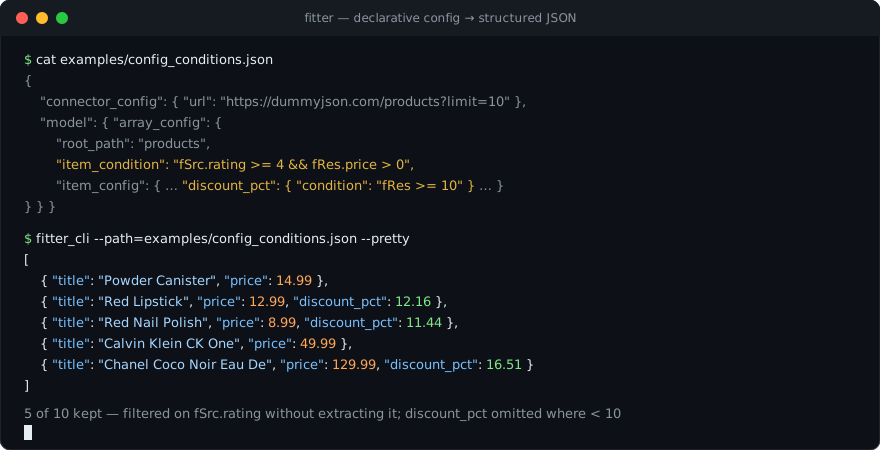
Conditional fields

Every field can carry a condition - an expr-lang expression (predefined values). When it evaluates to anything except true the field is omitted from the output (the key/item disappears), not set to null. An invalid expression also omits the field and logs an error.

Where the condition is evaluated:

  • BaseField.condition - after extraction: fRes is the extracted value, fSrc the node the field was resolved from (its siblings included) - so fSrc.on_sale == true can gate a field on data you did not extract. A false condition skips generated work entirely (no sub-request, no file download)
  • ObjectConfig.condition / ArrayConfig.condition - before resolution: fRes/fSrc are the source node (parsed value for json, text content for html)
  • ArrayConfig.item_condition - against every built item: fRes is the item, fSrc the source element it was built from, fIndex its index; false items are dropped - declarative array filtering. Use fSrc to filter on source attributes without adding them to the output

Filter array items - fSrc.in_stock reads the source element (not extracted into the output), fRes.price the built item:

config.json
{
  "array_config": {
    "root_path": "products",
    "item_condition": "fSrc.in_stock && fRes.price > 0",
    "item_config": {
      "fields": {
        "title": { "base_field": { "type": "string", "path": "title" } },
        "price": { "base_field": { "type": "float", "path": "price" } }
      }
    }
  }
}

Omit a key unless the value passes a check:

config.json
{
  "discount": {
    "base_field": {
      "type": "float",
      "path": "discount_pct",
      "condition": "fRes > 0"
    }
  }
}

Special cases:

  • in a static array an omitted item stays null (positions are fixed by definition, indexes never shift)
  • if the root model config is omitted the parse result is null
  • inside first_of a branch with a false condition counts as empty, so the next branch is tried

Runnable example: examples/config_conditions.json

GeneratedFieldConfig

Provide functionality of generating field on the flight

go
type GeneratedFieldConfig struct {
    UUID             *UUIDGeneratedFieldConfig   `yaml:"uuid" json:"uuid"`
    Static           *StaticGeneratedFieldConfig `yaml:"static" json:"static"`
    Formatted        *FormattedFieldConfig       `json:"formatted" yaml:"formatted"`
    Plugin           *PluginFieldConfig          `yaml:"plugin" json:"plugin"`
    Calculated       *CalculatedConfig           `yaml:"calculated" json:"calculated"`
    File             *FileFieldConfig            `yaml:"file" json:"file"`
    Model            *ModelField                 `yaml:"model" json:"model"`
    FileStorageField *FileStorageField           `json:"file_storage" yaml:"file_storage"`
}

Config can be one of:

  • UUID - generate random UUID V4
  • Static - generate static field
  • Formatted - format field
  • Model - model generated from the other connector and model
  • Plugin - plugin field
  • Calculated - calculated field
  • File - file field (for download file from server)
  • FileStorage - file field which can be saved to local file

Examples:

config.json
{
    "uuid": {}
}

https://github.com/PxyUp/fitter/blob/master/examples/cli/config_cli.json#L58

config.json
{
    "model": {
      "type": "array",
      "model": {
        "array_config": {
          "root_path": "#content dt.quote > a",
          "item_config": {
            "field": {
              "type": "string"
            }
          }
        }
      },
      "connector_config": {
        "response_type": "HTML",
        "url": "http://www.quotationspage.com/random.php",
        "attempts": 3,
        "browser_config": {
          "chromium": {
            "path": "/Applications/Google Chrome.app/Contents/MacOS/Google Chrome",
            "wait": 10000
          }
        }
      }
    }
}

UUID

Generate random UUID V4 on the flight, can be used for generate uniq id

go
type UUIDGeneratedFieldConfig struct {
	Regexp string `yaml:"regexp" json:"regexp"`
}
  • Regexp - provide matcher which can be used for get part of generated uuid

Static

Generate static field

go
type StaticGeneratedFieldConfig struct {
    Type  FieldType       `yaml:"type" json:"type"`
    Value string          `json:"value" yaml:"value"`
    Raw   json.RawMessage `json:"raw" yaml:"raw"`
}
  • Type - enum["null", "boolean", "string", "int","int64","float","float64", "array", "object"] - type of the field
  • Value - string value of the field
  • Raw - pure json value of the field

Example

config.json
{
  "type": "int",
  "value": "65"
}
config.json
{
  "type": "array",
  "value": "[65,45]"
}
config.json
{
  "type": "array",
  "raw": [65,45]
}

Formatted Field Config

Generate formatted field which will pass value from parent base field

go
type FormattedFieldConfig struct {
	Template string `yaml:"template" json:"template"`
}
  • Template - template in with placeholder {PL} where parent value will be injected like string

Example: https://github.com/PxyUp/fitter/blob/master/examples/cli/config_cli.json#L98

config.json
{
  "template": "https://news.ycombinator.com/item?id={PL}"
}

File Storage Field

Field can be used for store field result as local file

go
type FileStorageField struct {
    Content string          `json:"content" yaml:"content"`
    Raw     json.RawMessage `yaml:"raw" yaml:"raw"`
    
    FileName string `json:"file_name" yaml:"file_name"`
    Path     string `json:"path" yaml:"path"`
    Append   bool   `json:"append" yaml:"append"`
}
  • Content - template string for content. Important: can be with inject of the parent value as a string
  • Raw - raw json content of field. Important: can be with inject of the parent value as a string
  • FileName - local file name for storing file. By default, it is try get FileName from header, after that from url. Important: can be with inject of the parent value as a string.
  • Path - local file parent directory for storing file. Default path it is process directory. Important: can be with inject of the parent value as a string
  • Append[false] - append to file or not
config.json
{
  "content": "{{{id}}}, {{{message}}}\n",
  "append": true,
  "file_name": "{{{id}}}.csv",
  "path": "/Users/pxyup/fitter/examples/cli/test/csv"
}

File Field

Field can be used for download file from server locally

go
type FileFieldConfig struct {
	Config *ServerConnectorConfig `yaml:"config" json:"config"`

	Url      string `yaml:"url" json:"url"`
	FileName string `json:"file_name" yaml:"file_name"`
	Path     string `json:"path" yaml:"path"`
}
  • Config - ServerConfig use default fitter http.Client for send request
  • Url - url of the image. Important: URL in the connector can be with inject of the parent value as a string
  • FileName - local file name for storing file. By default, it is try get FileName from header, after that from url. Important: can be with inject of the parent value as a string.
  • Path - local file parent directory for storing file. Default path it is process directory. Important: can be with inject of the parent value as a string

Result of the field will be local file path as string

config.json
{
  "url": "https://images.shcdn.de/resized/w680/p/dekostoff-gobelinstoff-panel-oriental-cat-46-x-46_P19-KP_2.jpg",
  "path": "/Users/pxyup/fitter/bin",
  "config": {
    "method": "GET"
  }
}

With propagated URL (inject of the parent value as a string)

config.json
{
  "url": "https://picsum.photos{PL}",
  "path": "/Users/pxyup/fitter/bin",
  "config": {
    "method": "GET"
  }
}

Config example:

https://github.com/PxyUp/fitter/blob/master/examples/cli/config_image.json

https://github.com/PxyUp/fitter/blob/master/examples/cli/config_image_multiple.json

Calculated field

Field can generate different types depends from expression

go
type CalculatedConfig struct {
	Type       FieldType `yaml:"type" json:"type"`
	Expression string    `yaml:"expression" json:"expression"`
}
  • Type - resulting type of expression\
  • Expression - expression for calculation (we use this lib for calculated expression)
Predefined values

FNull - alias for builder.Nullvalue

FNil - alias for nil

isNull(value T) - function for check is value is FNull

fRes - it is raw(with proper type) result from the parsing base field

fIndex - it is index in parent array(only if parent was array field)

fResJson - it is JSON string representation of the raw result

fResRaw - result in bytes format

fSrc - only in condition/item_condition expressions: the source node the value was resolved from (parsed value for json - siblings included, text content for html). Not available in calculated/formatted/notifier expressions

FNewLine - new line separator

config.json
{
  "type": "bool",
  "expression": "fRes > 500"
}

Plugin field

Field can be some external plugin for fitter

More

go
type PluginFieldConfig struct {
	Name string `json:"name" yaml:"name"`
	Config json.RawMessage `json:"config" yaml:"config"`
}
  • Name - name of the plugin(without extension just name)
  • Config - json config of the plugin

Model Field

Field type which can be generated on the flight by news model and connector

go
type ModelField struct {
	// Type of parsing
	ConnectorConfig *ConnectorConfig `yaml:"connector_config" json:"connector_config"`
	// Model of the response
	Model *Model `yaml:"model" json:"model"`

	Type FieldType `yaml:"type" json:"type"`
	Path string             `yaml:"path" json:"path"`

	Expression string    `yaml:"expression" json:"expression"`
}
  • ConnectorConfig - which connector to use. Important: URL in the connector can be with inject of the parent value as a string
  • Model - configuration of the underhood model
  • Type - enum["null", "boolean", "string", "int", "int64", "float", "float64", "array", "object"] - type of generated field
  • Path - in case we cant extract some information from generated field we can use json selector for extract
  • Expression - string which can be used for post processing of the Model (ignoring path field)

Examples:

https://github.com/PxyUp/fitter/blob/master/examples/cli/config_cli.json#L60

config.json
{
  "type": "array",
  "model": {
    "array_config": {
      "root_path": "#content dt.quote > a",
      "item_config": {
        "field": {
          "type": "string"
        }
      }
    }
  }
}

https://github.com/PxyUp/fitter/blob/master/examples/cli/config_weather.json#L37

config.json
{
    "type": "string",
    "path": "temp.temp",
    "model": {
       "object_config": {
        "fields": {
          "temp": {
            "base_field": {
              "type": "string",
              "path": "//div[@id='forecast_list_ul']//td/b/a/@href",
              "generated": {
                "model": {
                  "type": "string",
                  "model": {
                    "object_config": {
                      "fields": {
                        "temp": {
                          "base_field": {
                            "type": "string",
                            "path": "div.current-temp span.heading"
                          }
                        }
                      }
                    }
                  },
                  "connector_config": {
                    "response_type": "HTML",
                    "attempts": 4,
                    "url": "https://openweathermap.org{PL}",
                    "browser_config": {
                      "playwright": {
                        "timeout": 30,
                        "wait": 30,
                        "install": false,
                        "browser": "FireFox",
                        "type_of_wait": "networkidle"
                      }
                    }
                  }
                }
              }
            }
          }
        }
      }
    },
    "connector_config": {
      "response_type": "xpath",
      "attempts": 3,
      "url": "https://openweathermap.org/find?q={PL}",
      "browser_config": {
        "playwright": {
          "timeout": 30,
          "wait": 30,
          "install": false,
          "browser": "Chromium"
        }
      }
    }
}

Static Array Config

Provide static(fixed length) array generation

go
type StaticArrayConfig struct {
    Items map[uint32]*Field `yaml:"items" json:"items"`
    Length uint32            `yaml:"length" json:"length"`
}
  • Items - map[uint32]*Field - key is index in array, value is field definition
  • Length - if set(1+) can be used for define custom length of array

Examples:

config.json
{
  "0": {
    "base_field": {
      "type": "string",
      "path": "div.current-temp span.heading"
    }
  }
}
config.json
{
  "length": 4,
  "0": {
    "base_field": {
      "type": "string",
      "path": "div.current-temp span.heading"
    }
  }
}
config.json
{
  "length": 4,
  "2": {
    "base_field": {
      "type": "string",
      "path": "div.current-temp span.heading"
    }
  }
}

Placeholder list

  1. {PL} - for inject value
  2. {INDEX} - for inject index in parent array
  3. {HUMAN_INDEX} - for inject index in parent array in human way
  4. {{{json_path}}} - will get information from propagated "object"/"array" field
  5. {{{RefName=SomeName}}} - get reference value by name. Example
  6. {{{RefName=SomeName json.path}}} - get reference value by name and extract value by json path. Example
  7. {{{FromEnv=ENV_KEY}}} - get value from environment variable
  8. {{{FromExp=fRes + 5 + fIndex}}} - get value from the expression. Predefined values
  9. {{{FromInput=.}}} or {{{FromInput=json.path}}} - get value from input of trigger or library
  10. {{{FromFile=./test_file.log}}} - get value from file by path. Content of file also can contain placeholders
  11. {{{FromURL=http://localhost:8081}}} - get response from url

Examples:

JSON Config
{{{FromExp="{{{FromEnv=TEST_VAL}}}" + "hello"}}}
text
Current time is: {PL} with token from TokenRef={{{RefName=TokenRef}}} and TokenObjectRef={{{RefName=TokenObjectRef token}}}
text
Current time is: {PL} with token from TokenRef={{{RefName=TokenRef}}} and TokenObjectRef={{{RefName=TokenObjectRef token}}}
text
TokenRef={{{RefName=TokenRef}}} and TokenObjectRef={{{RefName=TokenObjectRef token}}} Object={{{value}}} {PL} Env={{{FromEnv=TEST_VAL}}} {INDEX} {HUMAN_INDEX}

References

Special map which prefetched(before any processing) and can be user for connector or for placeholder

Can be used for:

  1. Cache jwt token and use them in headers
  2. Cache values
  3. Etc

Reference

go
type Reference struct {
    *ModelField
    
    Expire *uint32 `yaml:"expire" json:"expire"`
}
  • ModelField - is embedded struct, you can use same fields
  • Expire[sec] - duration when reference is expired after fetching. Not set => forever cached. Set to 0 => every time re-fetch. Set to n > 0 => cached for n second

For Fitter

go
type RefMap map[string]*Reference

type Config struct {
    // Other Config Fields

    Limits     *Limits `yaml:"limits" json:"limits"`
    References RefMap  `json:"references" yaml:"references"`
}

For Fitter Cli

go
type RefMap map[string]*Reference

type CliItem struct {
    // Other Config Fields

    Limits     *Limits `yaml:"limits" json:"limits"`
    References RefMap  `json:"references" yaml:"references"`
}
  • References - map[string]*Reference - object where is key if ReferenceName (can be user for connector or placeholder) and value is Reference
  • Limits

Example

https://github.com/PxyUp/fitter/blob/master/examples/cli/config_ref.json#L2

config.json
{
  "references": {
    "TokenRef": {
      "expire": 10,
      "connector_config": {
        "response_type": "json",
        "static_config": {
          "value": "\"plain token\""
        }
      },
      "model": {
        "base_field": {
          "type": "string"
        }
      }
    },
    "TokenObjectRef": {
      "connector_config": {
        "response_type": "json",
        "static_config": {
          "value": "{\"token\":\"token from object\"}"
        }
      },
      "model": {
        "object_config": {
          "fields": {
            "token": {
              "base_field": {
                "type": "string",
                "path": "token"
              }
            }
          }
        }
      }
    }
  }
}

Example

Notifiers

Optional per-item config item.notifier_config which pushes the parse result somewhere after processing. The result is still returned as usual (CLI/MCP output, service logs); the notifier additionally delivers it. Works in Fitter (service mode), Fitter_CLI and Fitter_MCP.

go
type NotifierConfig struct {
    Expression      string `yaml:"expression" json:"expression"`
    Force           bool   `json:"force" yaml:"force"`
    SendArrayByItem bool   `yaml:"send_array_by_item" json:"send_array_by_item"`
    Template        string `yaml:"template" json:"template"`

    // exactly ONE destination:
    Console     *ConsoleConfig       `yaml:"console" json:"console"`
    TelegramBot *TelegramBotConfig   `yaml:"telegram_bot" json:"telegram_bot"`
    Http        *HttpConfig          `yaml:"http" json:"http"`
    Redis       *RedisNotifierConfig `json:"redis" yaml:"redis"`
    File        *FileStorageField    `json:"file" yaml:"file"`
}
  • Expression - optional expr-lang condition: notify only when it evaluates to true. The parse result is available as fRes (parsed value), fResRaw (raw bytes), fResJson (JSON string), e.g. len(fResRaw) > 0
  • Force - notify even if parsing finished with an error
  • SendArrayByItem - if the result is an array, send each element as a separate notification
  • Template - optional template applied to the result before sending, placeholders allowed
  • Destination - exactly one of console, telegram_bot, http, redis, file

Destination configs:

go
type HttpConfig struct {
    Url     string            `yaml:"url" json:"url"`
    Method  string            `json:"method" yaml:"method"`
    Headers map[string]string `yaml:"headers" json:"headers"`
    Timeout uint32            `yaml:"timeout" json:"timeout"`
}

type TelegramBotConfig struct {
    Token   string  `json:"token" yaml:"token"`
    UsersId []int64 `json:"users_id" yaml:"users_id"`
    Pretty  bool    `json:"pretty" yaml:"pretty"`
    OnlyMsg bool    `json:"only_msg" yaml:"only_msg"`
}

type RedisNotifierConfig struct {
    Addr     string `json:"addr" yaml:"addr"`
    Password string `json:"password" yaml:"password"`
    DB       int    `json:"db" yaml:"db"`
    Channel  string `json:"channel" yaml:"channel"`
}

type ConsoleConfig struct {
    OnlyResult bool `json:"only_result" yaml:"only_result"`
}

The file destination uses the same FileStorageField as the file field type.

Example (examples/config_telegram.json):

config.json
{
  "item": {
    "connector_config": { "...": "..." },
    "model": { "...": "..." },
    "notifier_config": {
      "expression": "len(fResRaw) > 0",
      "telegram_bot": {
        "token": "{{{FromEnv=TG_TOKEN}}}",
        "users_id": [123456],
        "pretty": true
      }
    }
  }
}

Limits

Provide limitation for prevent DDOS, big usage of memory

go
type Limits struct {
	HostRequestLimiter HostRequestLimiter `yaml:"host_request_limiter" json:"host_request_limiter"`
	ChromiumInstance   uint32             `yaml:"chromium_instance" json:"chromium_instance"`
	DockerContainers   uint32             `yaml:"docker_containers" json:"docker_containers"`
	PlaywrightInstance uint32             `yaml:"playwright_instance" json:"playwright_instance"`
}
  • HostRequestLimiter - map[string]int64 - limitation per host name, key is host, value is amount of parallel request(usage for server connector)
  • ChromiumInstance - amount of parallel chromium instance
  • DockerContainers - amount of parallel docker instance
  • PlaywrightInstance - amount of parallel playwright instance

https://github.com/PxyUp/fitter/blob/master/examples/cli/config_cli.json#L2

config.json
{
  "limits": {
    "host_request_limiter": {
      "hacker-news.firebaseio.com": 5
    },
    "chromium_instance": 3,
    "docker_containers": 3,
    "playwright_instance": 3
  }
}

Related MCP Servers

View all in Search & Data Extraction View all alternatives
  • S
    Scrapling MCP Server

    Web scraping with stealth HTTP, real browsers, and Cloudflare bypass. CSS selectors supported.

    πŸ”Ž Search & Data Extraction0 views
    Compare vs Scrapling MCP Server β†’
  • R
    Riveter

    MCP server for Riveter's enrichment, scraping, and monitoring API

    πŸ”Ž Search & Data Extraction0 views
    Compare vs Riveter β†’
  • M
    Mcp Server

    Official GrabzIt MCP server for AI web scraping, screenshots, and PDF/DOCX generation.

    πŸ”Ž Search & Data Extraction0 views
    Compare vs Mcp Server β†’
  • Wigolo logoWigolo

    Local-first, keyless web intelligence in one server: search, fetch, crawl, extract, cache, find-similar, and research. Multi-engine search with local ML reranking and a persistent SQLite cache, renders JS-heavy pages, and keeps everything on your machine. Install via npx wigolo init --non-interactive --agents=.

    πŸ”Ž Search & Data Extraction2 views
    Compare vs Wigolo β†’

Frequently Asked Questions about Fitter

Add the following block to your claude_desktop_config.json under mcpServers: "mcpServers": { "fitter": { "command": "npx", "args": ["-y", "Fitter"] } }

AllMCPs Directory Badge

Full Badge Customizer

Showcase your server listing on GitHub or your project documentation. Embed this dynamic SVG badge to highlight official listing status and live engagement.

Badge Style:
Live Dynamic SVG PreviewFitter AllMCPs Directory Badge

Markdown (GitHub README)
[![AllMCPs](https://allmcps.com/api/badge/fitter?style=directory)](https://allmcps.com/mcp/fitter)
HTML Embed
<a href="https://allmcps.com/mcp/fitter"><img src="https://allmcps.com/api/badge/fitter?style=directory" alt="Fitter on AllMCPs" /></a>

Technical Specs & Signals

CategoryπŸ”ŽSearch & Data Extraction
More technical detailsExpand β–Ύ
TransportSTDIO
RuntimeNode.js
0/4 checks healthy over the last 6h
Views0
Unique ViewsTotal visits recorded for this listing page on AllMCPs.
Installs0
Installs & Copy ActionsTotal times users copied install commands or configuration snippets for this server.
27Quality signal: Emerging Β· 27/100How this signal is calculated β–Ύ
Server availabilityNot measured

Not scored for repo-hosted servers β€” we can't reach the running server, only its GitHub page. Hosted MCP endpoints are health-checked live.

Verified ownership8/20
Documentation & tools11/30
Adoption & activity1/15
Community engagement0/10

A guidance signal from public completeness & health data β€” not a user rating. New listings start lower and rise as they add docs, get verified, and grow adoption. Signals we can't observe for a listing are skipped, not counted against it.

β˜… FeaturedMoxie Docs MCP logo

Moxie Docs MCP

MCP & Agent Skills for Automated Documentation, and codebase conventions + context

Explore Server β†’

Own this project?

This directory is pre-filled from public sources. Claim via GitHub README, site badge, or DNS TXT to get the verified badge and attach your website.

Free dofollow backlink: after claiming, verify your product site and place a dofollow AllMCPs badge β€” we recheck it stays live.

Claim & get free dofollow

Share & Embed

Add our SVG badge (dark/light directory styles) or embeddable widget to your site.

Explore more

More in πŸ”Ž Search & Data Extraction β†’Best MCP servers for Web Search & Scraping β†’Alternatives to Fitter β†’Install in Claude DesktopInstall in CursorInstall in VS Code

