SAP Fiori - Model Context Protocol (MCP) server
Quick Install
Automated & IDE SetupCopy the AI prompt to install this server into Claude Code, Cursor, or another agent — or use 1-click editor setup below.
Manual Client & Custom JSON ConfigExpand JSON ▾
Client Config & Setup
Remote HTTPChoose your client or environment
Target File:
💡 Paste the JSON block into your client's configuration file under mcpServers, then restart the application.
Documentation Overview

Open UX Tools

The Open UX tools project aims to provide open source modules that make the development of SAP Fiori applications more efficient. The project is maintained by the same team that is responsible for SAP Fiori tools and driven by the SAP community. The main goal of this project is to collaborate with the community to create transparency and therefore increase the adoption of our tools.
Collaboration: SAP has a great and active development community that is eager to help improve SAP products. With SAP Fiori tools, we have collaborated with stakeholders using roundtables, surveys, and usability testing. We have even collaborated using SAP's incident management systems, connecting with users that did not just report issues but also debugged and identified the root cause. With Open UX tools, we want to take this collaboration to the next level by empowering users to contribute findings, fixes, and improvements to the project.
Transparency: Anyone can inspect the sources, check for inconsistencies or problems, or get inspired to enhance the tools for the SAP Fiori community. Transparency matters to us. It builds trust in our tools and promotes more open communication.
Adoption: The first consumer of these modules is SAP Fiori tools but every module is designed to be reusable by anyone building any kind of tools to develop SAP Fiori applications. This may be other open source projects or internal projects with very specific use cases. With our initial set of modules, we want to enable generator/scaffolding projects to use building blocks to create a common project structure across the SAP ecosystem.
Modules
Our long-term vision is to completely transition our SAP Fiori tools to open source. This is not an easy endeavor due to the size of the code base and dependencies to other not-yet-open-sourced modules. If you would like to better understand how we started and how we are planning to move forward, please have a look at our blog posts History and vision of the Open UX tools and The Open UX Tools Journey Continues.
As a starting point, we have extracted the templates for generating SAP Fiori applications. The templates have been dissected into small but easy to use building blocks that are simple to combine. We then continued adding the most important UI5 tooling middlewares. The repository also contains reusable helper modules e.g. to modify UI5 tooling configuration files.
The image below gives an overview of the currently included modules and their dependencies. It also shows the known consumers of these modules, the SAP Fiori generator (@sap/generator-fiori) and the easyUI5 open source project (generator-easy-ui5).
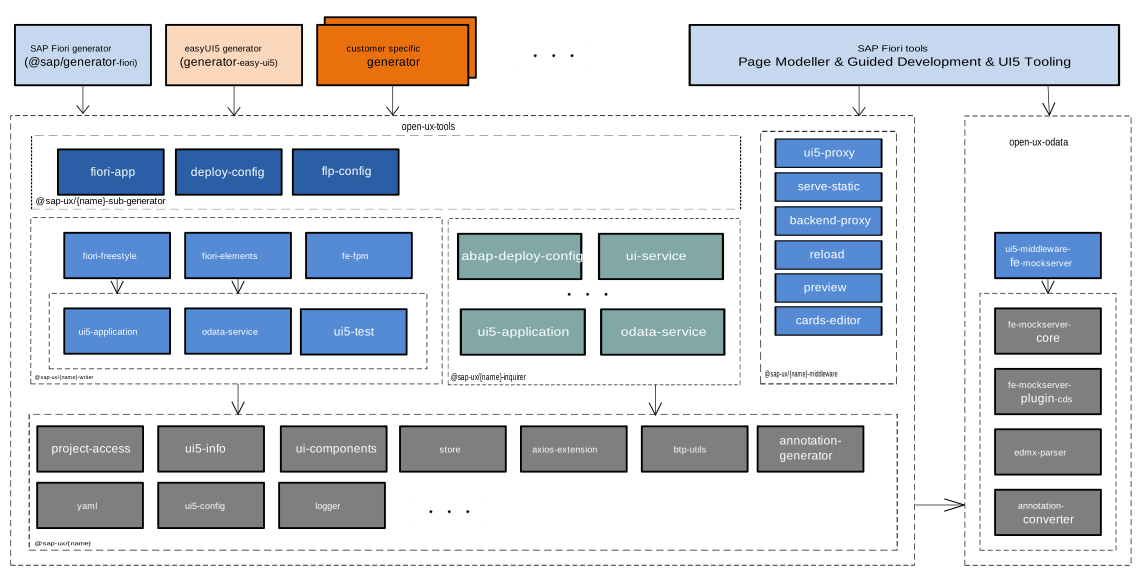
The repository contains no private modules i.e. all modules are published to npmjs.com under the scope @sap-ux. The name of the published modules (without scope) matches the folder name in packages e.g. ./packages/fiori-freestyle-writer is published as @sap-ux/fiori-freestyle-writer.
Additionally, we have the ./examples folder containing show case implementations using multiple of our modules together.
Requirements
Everything is released as node modules requiring node with a version matching ">=18".
Contributing
Please check the Development Conventions and Guidelines document as well as the Development Setup section in this document.
Development Setup
Local Development
To install pnpm globally using npm, run the following:
More information on pnpm installation options can be found here.
GitHub Codespaces
To open and develop using GitHub Codespaces:
- Expand the dropdown '<> Code' button on the
open-ux-toolsgithub repository page - Select 'Codespaces' tab
- Press the 'Create codespace on main' button to create a new GitHub Codespace based on the configuration in the file
.devcontainer/devcontainer.json
VS Code Development in a Container
To use VS Code and develop in a container:
- Install docker
- Install VS Code or VS Code Insiders edition
- Install the Dev Containers VS Code extension or the Remote Development VS Code extension pack
Open currently opened workspace in dev container using the command Dev Containers: Reopen in Container. This will open a new window using the Dev Containers extension and the configuration in the file .devcontainer/devcontainer.json
Alternatively, you can clone the repository in a container using the command Dev Containers: Clone Repository in Container Volume... and paste the repository URL.
More information on VS Code development in a container can be found here
Install dependencies
To install dependencies and devDependencies, run following command at root of the repository:
Build packages
To transpile the packages, run the following command at the root of the repository or in the individual package:
Format sources using prettier
To format sources, run the following command at the root of the repository or in the individual package:
Run linting of sources using eslint
To run linting of sources, run the following command at the root of the repository or in the individual package:
To fix linting errors that can be fixed automatically, run the following command at the root of the repository or in the individual package:
Run unit tests in packages
To run unit tests using jest, run the following command at the root of the repository or in the individual package:
Note: if the test run fails due to dependency issues, run pnpm install && pnpm build in the root of the repository again to make sure all projects are up-to-date.
Debug packages
When analyzing a problem, it is helpful to be able to debug the modules. How to debug them depends on the IDE you are using. In this section, it is described how you could debug with VSCode.
Each of the packages has an extensive set of unit tests covering as many as possible different scenarios, therefore, as a starting point for debugging, it is a good idea to use the tests. The easiest (but not the only) way to debug a specific test in VSCode is to open a JavaScript Debug Terminal and then go to the package that needs to be debugged. Using the debug terminal, execute all tests with pnpm test or a specific one, e.g. execute pnpm test -- test/basic.test.ts in the fiori-freestyle-writer directory (./packages/fiori-freestyle-writer). When running either of the commands in the debug terminal, breakpoints set in VSCode will be active.
Additionally, for the *-writer modules it is sometimes helpful to manually inspect the generated output of the unit tests on the filesystem. This can be achieved by setting the variable UX_DEBUG before running the tests e.g. in fiori-freestyle-writer run UX_DEBUG=true pnpm test and after the tests finish, the generated files can be found at ./test/test-output.
Additional checks can be performed on the generated projects by also setting UX_DEBUG_FULL e.g. UX_DEBUG=true UX_DEBUG_FULL=true pnpm test.
This includes checks such as npm install, npm run ts-typecheck, npm run lint as appropriate to the project.
Create changesets for feature or bug fix branches
A changeset workflow has been setup to version and publish packages to npmjs.com. To create changesets in a feature or bug fix branch, run one of the following commands:
This command brings up an inquirer.js style command line interface with prompts to capture changed packages, bump versions (patch, minor or major) and a message to be included in the changelog files. The changeset configuration files in the .changeset folder at the root need to be committed and pushed to the branch. These files will be used in the GitHub Actions workflow to bump versions and publish the packages.
Related MCP Servers
Adoption & maintenance
Factual signals from GitHub, npm, and our automated checks — not a rating.
GitHub stars
156
Stargazers on the source repository.
Last commit
8d ago
Most recent push to the default branch.
Reviews
No reviews yet — be the first to share how this listing worked for you.
Frequently Asked Questions about Fiori MCP Server
AllMCPs Directory Badge
Showcase your server listing on GitHub or your project documentation. Embed this dynamic SVG badge to highlight official listing status and live engagement.
Badge Style:
Live Dynamic SVG Preview
Markdown (GitHub README)
[](https://allmcps.com/mcp/fiori-mcp-server)HTML Embed
<a href="https://allmcps.com/mcp/fiori-mcp-server"><img src="https://allmcps.com/api/badge/fiori-mcp-server?style=directory" alt="Fiori MCP Server on AllMCPs" /></a>Technical Specs & Signals
CategoryDeveloper Tools
4/5 checks healthy over the last 45d
43Quality signal: Fair · 43/100How this signal is calculated ▾
Server availabilityNot measured
Not scored for repo-hosted servers — we can't reach the running server, only its GitHub page. Hosted MCP endpoints are health-checked live.
Verified ownership10/20
Documentation & tools14/30
Adoption & activity8/15
Community engagement0/10
A guidance signal from public completeness & health data — not a user rating. New listings start lower and rise as they add docs, get verified, and grow adoption. Signals we can't observe for a listing are skipped, not counted against it.
Own this project?
This directory is pre-filled from public sources. Claim via GitHub README, site badge, or DNS TXT to unlock edit access and the Official badge — proof is checked automatically, then reviewed by our team.
Free dofollow backlink: add your website and place the AllMCPs badge on it — no claim needed. We detect it automatically and keep it verified as long as the badge stays live.
Claim & get free dofollowShare & Embed
Add our SVG badge (dark/light directory styles) or embeddable widget to your site.