AllMCPs
BrowseBestCategoriesStackCompareToolsGuidesBlog
Log in Submit MCP

Stay in the loop

Get new MCP servers and top picks in your inbox.

AllMCPs

The open directory for discovering and installing Model Context Protocol servers.

AllMCPs on GitHub (opens in a new tab)
Launched onTiny Startupstinystartups.com
Explore
  • Browse servers
  • Best MCP servers
  • Categories
  • MCP clients
  • Agent prompts
  • Stack Builder
  • Compare servers
  • Random discovery New
  • Submit a server
  • Pricing & Boost Boost
Learn
  • Guides hub
  • What is MCP?
  • Install guide
  • Build an MCP server
  • Deploy an MCP server
  • Security guide
  • Troubleshooting
  • MCP for SEO & AEO
  • Protocol versioning
  • Blog & updates
Tools
  • All developer tools
  • Config generator
  • Config validator
  • Config auditor
  • MCP playground
  • Token calculator
  • OpenAPI β†’ MCP
  • Badge generator
For agents
  • REST API docs
  • Trust & traffic Live
  • Remote MCP server SSE β†— (opens in a new tab)
  • llms.txt β†— (opens in a new tab)
  • Catalog JSON β†— (opens in a new tab)
Company
  • About
  • Advertise Sponsor
  • Contact
  • GitHub β†— (opens in a new tab)
  • Terms
  • Privacy
AllMCPs VerifiedAllMCPs VerifiedFeatured on Nick LaunchesFeatured on Nick LaunchesLaunch Llama NewsletterLaunch Llama NewsletterVerified DR - allmcps.comVerified DR - allmcps.comFeatured on SaaSGrowFeatured on SaaSGrowFeatured on Twelve ToolsFeatured on Twelve ToolsFeatured on Saaspa.geFeatured on Saaspa.geFeatured on Findly.toolsFeatured on Findly.toolsFeatured on Startup FameFeatured on Startup FameFeatured on LaunchKiwiFeatured on LaunchKiwiFeatured on ScrollLaunchFeatured on ScrollLaunchFeatured on DailyPingsFeatured on DailyPingsFazier badgeFazier badgeFeatured on NewTool.siteFeatured on NewTool.siteFeatured on saasfame.comFeatured on saasfame.comDR Checker - Domain RatingDR Checker - Domain RatingListed on Turbo0Listed on Turbo0Launched on LaunchBoard - Product Launch PlatformLaunched on LaunchBoard - Product Launch PlatformList on SimilarlabsList on Similarlabshttps://codetrendy.comhttps://codetrendy.comListed on DevTool.ioFeatured on BuildlistFeatured on BuildlistLaunched on Tiny StartupsFeatured on ShowMeBestAIFeatured on ShowMeBestAIFind us on LaunchZoneFind us on LaunchZoneAllMCPs VerifiedAllMCPs VerifiedFeatured on Nick LaunchesFeatured on Nick LaunchesLaunch Llama NewsletterLaunch Llama NewsletterVerified DR - allmcps.comVerified DR - allmcps.comFeatured on SaaSGrowFeatured on SaaSGrowFeatured on Twelve ToolsFeatured on Twelve ToolsFeatured on Saaspa.geFeatured on Saaspa.geFeatured on Findly.toolsFeatured on Findly.toolsFeatured on Startup FameFeatured on Startup FameFeatured on LaunchKiwiFeatured on LaunchKiwiFeatured on ScrollLaunchFeatured on ScrollLaunchFeatured on DailyPingsFeatured on DailyPingsFazier badgeFazier badgeFeatured on NewTool.siteFeatured on NewTool.siteFeatured on saasfame.comFeatured on saasfame.comDR Checker - Domain RatingDR Checker - Domain RatingListed on Turbo0Listed on Turbo0Launched on LaunchBoard - Product Launch PlatformLaunched on LaunchBoard - Product Launch PlatformList on SimilarlabsList on Similarlabshttps://codetrendy.comhttps://codetrendy.comListed on DevTool.ioFeatured on BuildlistFeatured on BuildlistLaunched on Tiny StartupsFeatured on ShowMeBestAIFeatured on ShowMeBestAIFind us on LaunchZoneFind us on LaunchZone
Β© 2026 Jackalope Digital LLC. All rights reserved.
  1. Home
  2. πŸ’» Developer Tools
  3. Figuard MCP
Figuard MCP logo
Health: ActiveRecent health check succeeded.Last checked 9/7/2026, 7:58:56 PM

Figuard MCP

User RatingsBe the first to rate and review this MCP server! Enrichment pendingWe haven’t run our AI enrichment pass on this listing yet, so the overview, use cases, and FAQ below may be sparse or missing. We work through the catalog over time β€” check back soon.
View Repository2 GitHub StarsTotal stargazers on GitHub for the source repository (2 stars).Visit Website

Pre-flight spend authorization for AI agents. Set a budget, enforce limits, audit every decision.

Quick Install

Automated & IDE Setup

Copy the AI prompt to install this server into Claude Code, Cursor, or another agent β€” or use 1-click editor setup below.

Add to CursorAdd to VS Code
Not yet automatically verified

We haven't yet run this listing's install command through our automated sandbox check. This isn't a red flag β€” we're steadily working through the catalog.

Manual Client & Custom JSON ConfigExpand JSON β–Ύ

Client Config & Setup

Choose your client or environment
Target File:~/Library/Application Support/Claude/claude_desktop_config.json
claude_desktop_config.json
{
  "mcpServers": {
    "figuard-mcp": {
      "command": "npx",
      "args": [
        "-y",
        "figuard-mcp"
      ]
    }
  }
}

πŸ’‘ Paste the JSON block into your client's configuration file under mcpServers, then restart the application.

Install Directory Badge Claim listing AlternativesπŸ’» More in Developer Tools

Documentation Overview

FiGuard

CI License: Apache 2.0 Tests PyPI npm npm


A travel-booking agent hit a Stripe timeout and retried twice. The customer's card was charged three times for the same flight before anyone noticed β€” 40 minutes later.

No alert fired. No limit existed. The agent had a valid API key and no concept of "I already did this."

FiGuard gives agents bounded resources β€” money, tokens, API calls, GPU hours, any unit you define β€” and they ask permission before consuming them. You set the ceiling, the retry rules, and the idempotency policy once. Every attempt, authorized or denied, lands in an append-only audit log.

That exact failure is in the stress harness: a retried charge produces 0 double-charges, and 100 agents racing one budget produce 0 overspends β€” verified against the ledger, reproducibly (make bench).

Your framework decides what to do next. FiGuard decides whether the resource-consuming action is allowed.

Code
  Your agent code  (LangChain Β· LangGraph Β· CrewAI Β· any runtime)
  orchestrates β€” decides what to do next
          ↓  agent wants to spend / call / execute
  figuard.authorize()
  checks: limit Β· category Β· velocity Β· dedup
          ↓  AUTHORIZED β€” action proceeds
  Stripe Β· OpenAI Β· any API or service
  executes β€” real money or resource consumed
          ↓  action completes
  figuard.confirm()
  settles reservation β€” ledger updated

LangChain / LangGraph β€” FiGuard authorizes each tool call before it executes. A budget-exhausted agent stops cleanly instead of running up cost β€” even across parallel nodes in a LangGraph.

CrewAI β€” Each crew member gets a delegation token with its own cap. A runaway specialist is stopped at its limit without affecting the rest of the crew.

OpenAI Agents SDK / MCP β€” Wrap tools with @guarded_function_tool or add the FiGuard MCP server β€” every tool call is pre-flight authorized before it reaches the API.

Not using a framework? β€” The raw SDK works anywhere β€” a Python script, a background job, a serverless function. If it calls an API that costs money or consumes a bounded resource, FiGuard fits.

FiGuard demo

Try it now β€” no setup, no signup:
β†’ pip install figuard β€” runs locally on your machine, nothing hosted (Quickstart)
β†’ Run in Colab β€” or try it in the browser
β†’ Live dashboard

FiGuard is the authorization and ledger layer β€” not a payment processor, not a policy DSL, not an adversarial-agent firewall. Full scope β†’


Quickstart

Tested with:

FrameworkVersionsPython
LangChainβ‰₯ 0.3.03.9 – 3.12
LangGraphβ‰₯ 0.2.03.10 – 3.12
CrewAIβ‰₯ 0.1023.10 – 3.12
OpenAI Agents SDKβ‰₯ 0.0.53.10 – 3.12
TypeScript SDKNode β‰₯ 18β€”
MCP serverClaude Code, Cursor, Claude Desktopβ€”
Terminal
pip install figuard
server.ts
from figuard import FiGuardClient

# Zero-config, zero-infra β€” runs enforcement locally (embedded SQLite, no server).
# To share one budget across agents/processes, point at a server:
#   FiGuardClient(api_key="fg_live_...", base_url="https://figuard.mycompany.internal")
client = FiGuardClient()

budget = client.create_budget(
    user_id="agent_001",
    total_limit=500.00,
    currency="USD",
    intent_context="travel booking session",
)

auth = client.authorize(budget=budget, amount=270.00)
print(auth.decision)          # AUTHORIZED
print(auth.approved_quantity) # 270.0

# Confirm with actual charged amount β€” may differ from requested (taxes, FX, discounts)
client.confirm(auth, 267.00)

# Second spend β€” exceeds what's left ($500 - $267 = $233 remaining)
auth2 = client.authorize(budget=budget, amount=350.00)
print(auth2.decision)       # DENIED
print(auth2.denial_reason)  # INSUFFICIENT_FUNDS

Same calls run against a self-hosted server β€” and there, every authorization, denial, and confirmation shows up in the live spend-tree dashboard. (Embedded keeps the same ledger in your local SQLite; the live dashboard is a server feature.)

Not sure what limits to set? Add trust_mode="SHADOW" to create_budget β€” all checks run, nothing is blocked, and auth.would_have_been tells you what would have happened. When the limits look right, switch to enforcement without recreating the budget: client.update_budget(budget.id, trust_mode="FULL_ENFORCEMENT").


How It Works

Embedded and server run the same engine. These four operations β€” and all 29 structured denial codes β€” behave identically whether you pip install figuard and run embedded (in-process, against a local SQLite file) or point the client at a self-hosted server. Session tokens, delegation tokens, and the live spend-tree dashboard shown below are server-mode features; embedded keeps the same append-only ledger in your local file and exposes the tree programmatically via get_spend_tree().

Four operations. Everything else is detail.

OperationWhat it does
authorize()Agent asks permission β€” capacity reserved, nothing moved yet
confirm()Report what actually moved β€” releases the reservation
void()Cancel a pending authorization β€” reservation released
fail()Record a failed action β€” reservation released

authorize() reserves capacity; confirm() / fail() / void() then settles or releases it β€” every transition lands in the append-only ledger, and execution happens externally (FiGuard never sees the data or proxies the call). In embedded mode you call authorize/confirm directly on the budget; in server mode the budget issues session tokens β€” and delegation tokens for fleets β€” but the four operations are otherwise identical. The full lifecycle (budget β†’ tokens β†’ fleet delegation β†’ ledger) is diagrammed in the API Reference.

The spend tree shows the full causal chain across an orchestrator and its sub-agents:
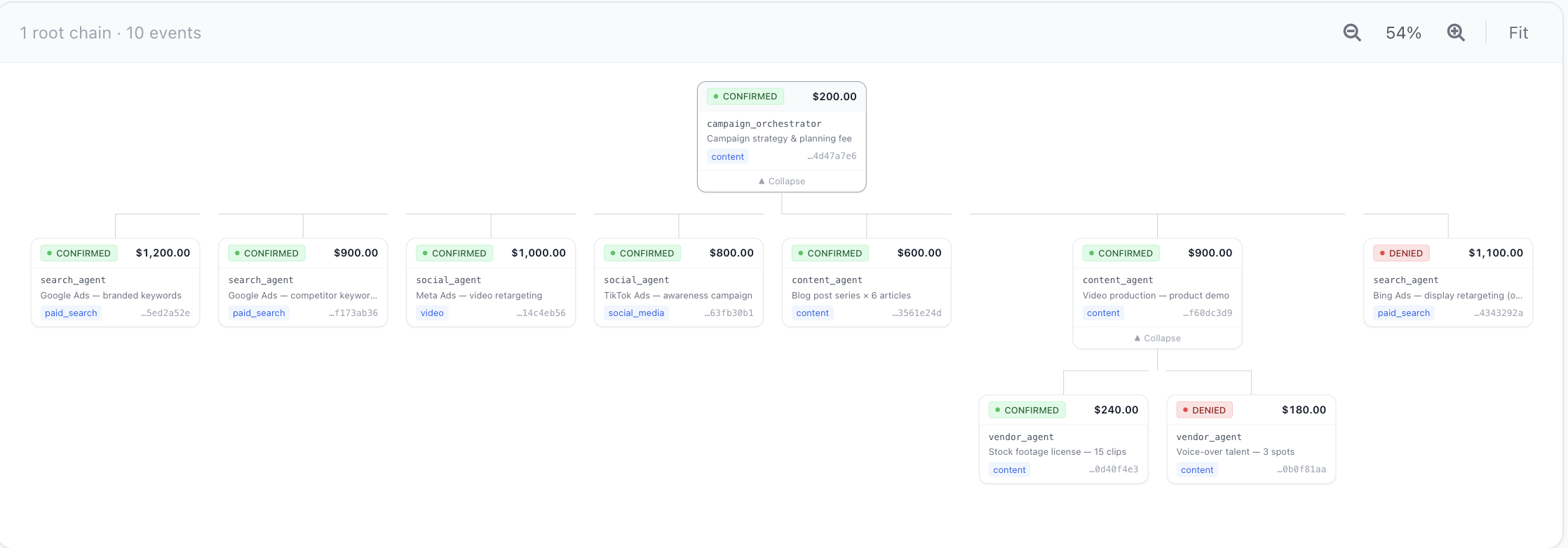
FiGuard Spend Tree β€” orchestrator with confirmed and denied sub-agent events


How the Hard Parts Are Solved

The authorize endpoint looks simple β€” check the balance, write a record. The parts that matter aren't obvious until you've hit them in production:

Concurrent authorization β€” two agents sharing a budget can both read the same available balance, both see enough funds, and both get approved. By the time the second write lands, you're over limit. The fix is a pessimistic write lock on the budget row during authorization. Easy to know, easy to forget.

Dangling reservations β€” a network timeout between the authorization write and the HTTP response leaves the agent with no event ID and the budget with a reserved amount it can't release. You need idempotency keyed to the request, not the response, so a retry finds the original authorization instead of creating a second one.

The reservation/confirmation split β€” if you use a single amountSpent field and deduct at authorization time, two concurrent authorizations both read the same balance before either writes. The correct model is two fields: amountReserved (deducted at authorization) and amountSpent (moved from reserved at confirmation). This is the two-phase reserve-then-capture pattern that payment processors use. It's not novel β€” it's just usually hidden inside Stripe.

Session token security β€” you need a token that scopes to exactly one budget, is returned exactly once, and is never stored in plaintext. If you store the raw token and your database is breached, every active agent session is compromised. Hash at write time, never store the raw value.

Append-only ledger β€” a mutable status field on an authorization record loses history. When you need to reconstruct what happened and why a budget hit its limit β€” or when a finance team asks why $40K of agent spend happened last Tuesday β€” you want every state transition as a separate row, not an update to the previous one.

These are the same problems payment infrastructure teams solved 20 years ago. The reserve-then-confirm pattern, idempotency keyed to the request, append-only ledger β€” none of it is novel. FiGuard is that infrastructure applied to agent systems.


Failure Scenarios

These are failure modes that logging and observability tools can't catch β€” they require enforcement at authorization time. Each has a Colab to run with no API keys needed.

Notebooks live in figuard-notebooks; each runs in Colab with no API keys required.

Read the full README β†’View source on GitHub β†’

Related MCP Servers

View all in Developer Tools View all alternatives
  • T
    Tldraw

    Draw and visually collaborate with your agents on tldraw's canvas.

    πŸ’» Developer Tools0 views
    Compare vs Tldraw β†’
  • PraisonAI logoPraisonAI

    AI Agents Framework with Self Reflection and MCP support

    πŸ’» Developer Tools1 views
    Compare vs PraisonAI β†’
  • Codealive MCP logoCodealive MCP

    Semantic code search and analysis from CodeAlive for AI assistants and agents.

    πŸ’» Developer Tools0 views
    Compare vs Codealive MCP β†’
  • Labelhead Artist Momentum logoLabelhead Artist Momentum

    Trending hip-hop artist momentum scores across four cultural dimensions.

    πŸ’» Developer Tools0 views
    Compare vs Labelhead Artist Momentum β†’

Reviews

No reviews yet β€” be the first to share how this listing worked for you.

Frequently Asked Questions about Figuard MCP

Add the following block to your claude_desktop_config.json under mcpServers: "mcpServers": { "figuard-mcp": { "command": "npx", "args": ["-y", "figuard-mcp"] } }

AllMCPs Directory Badge

Full Badge Customizer

Showcase your server listing on GitHub or your project documentation. Embed this dynamic SVG badge to highlight official listing status and live engagement.

Badge Style:
Live Dynamic SVG PreviewFiguard MCP AllMCPs Directory Badge

Markdown (GitHub README)
[![AllMCPs](https://allmcps.com/api/badge/figuard-mcp?style=directory)](https://allmcps.com/mcp/figuard-mcp)
HTML Embed
<a href="https://allmcps.com/mcp/figuard-mcp"><img src="https://allmcps.com/api/badge/figuard-mcp?style=directory" alt="Figuard MCP on AllMCPs" /></a>

Technical Specs & Signals

CategoryπŸ’»Developer Tools
More technical detailsExpand β–Ύ
TransportSTDIO
RuntimeNode.js
Last updatedSep 7, 2026
Views0
Unique ViewsTotal visits recorded for this listing page on AllMCPs.
Installs0
Installs & Copy ActionsTotal times users copied install commands or configuration snippets for this server.
GitHub stars2
GitHub Star CountTotal stargazers on GitHub representing community popularity (2 stars).
37Quality signal: Fair Β· 37/100How this signal is calculated β–Ύ
Server availabilityNot measured

Not scored for repo-hosted servers β€” we can't reach the running server, only its GitHub page. Hosted MCP endpoints are health-checked live.

Verified ownership10/20
Documentation & tools16/30
Adoption & activity2/15
Community engagement0/10

A guidance signal from public completeness & health data β€” not a user rating. New listings start lower and rise as they add docs, get verified, and grow adoption. Signals we can't observe for a listing are skipped, not counted against it.

β˜… Spotlight Slot

Feature Your MCP Server

Get maximum visibility for your server across our directory, search results, and detail pages.

Spotlight Your Server

Own this project?

This directory is pre-filled from public sources. Claim via GitHub README, site badge, or DNS TXT to unlock edit access and the Official badge β€” proof is checked automatically, then reviewed by our team.

Free dofollow backlink: add your website and place the AllMCPs badge on it β€” no claim needed. We detect it automatically and keep it verified as long as the badge stays live.

Claim & get free dofollow

Share & Embed

Add our SVG badge (dark/light directory styles) or embeddable widget to your site.

Explore more

More in πŸ’» Developer Tools β†’Best MCP servers for Developers β†’Alternatives to Figuard MCP β†’Install in Claude DesktopInstall in CursorInstall in VS Code




