
Forge
Terminal MCP server for AI coding agents. Spawn, manage, and monitor real PTY sessions via the Model Context Protocol.


Why
AI coding agents (Claude Code, Codex, etc.) typically run one command at a time. Forge gives them persistent terminals — run your React frontend, Java API, and Postgres migrations in parallel, monitor all three, and only read what changed. Full-stack work without the bottleneck.
Works with any MCP-compatible client — Claude Code, Codex, Gemini CLI, or your own agent.
Key differentiators:
- Real PTY via
node-pty(same lib as VS Code terminal) — interactive programs, colors, TUI apps all work - Incremental reads — ring buffer with per-consumer cursors means each
read_terminalonly returns NEW output, saving context window tokens - Clean screen reads —
@xterm/headlessrenders the terminal server-side, soread_screenreturns exactly what a human would see (no ANSI escape codes) - Multi-agent orchestration — spawn Claude, Codex, and Gemini sub-agents, session groups, output multiplexing, event subscriptions, and templates for managing multiple concurrent sessions
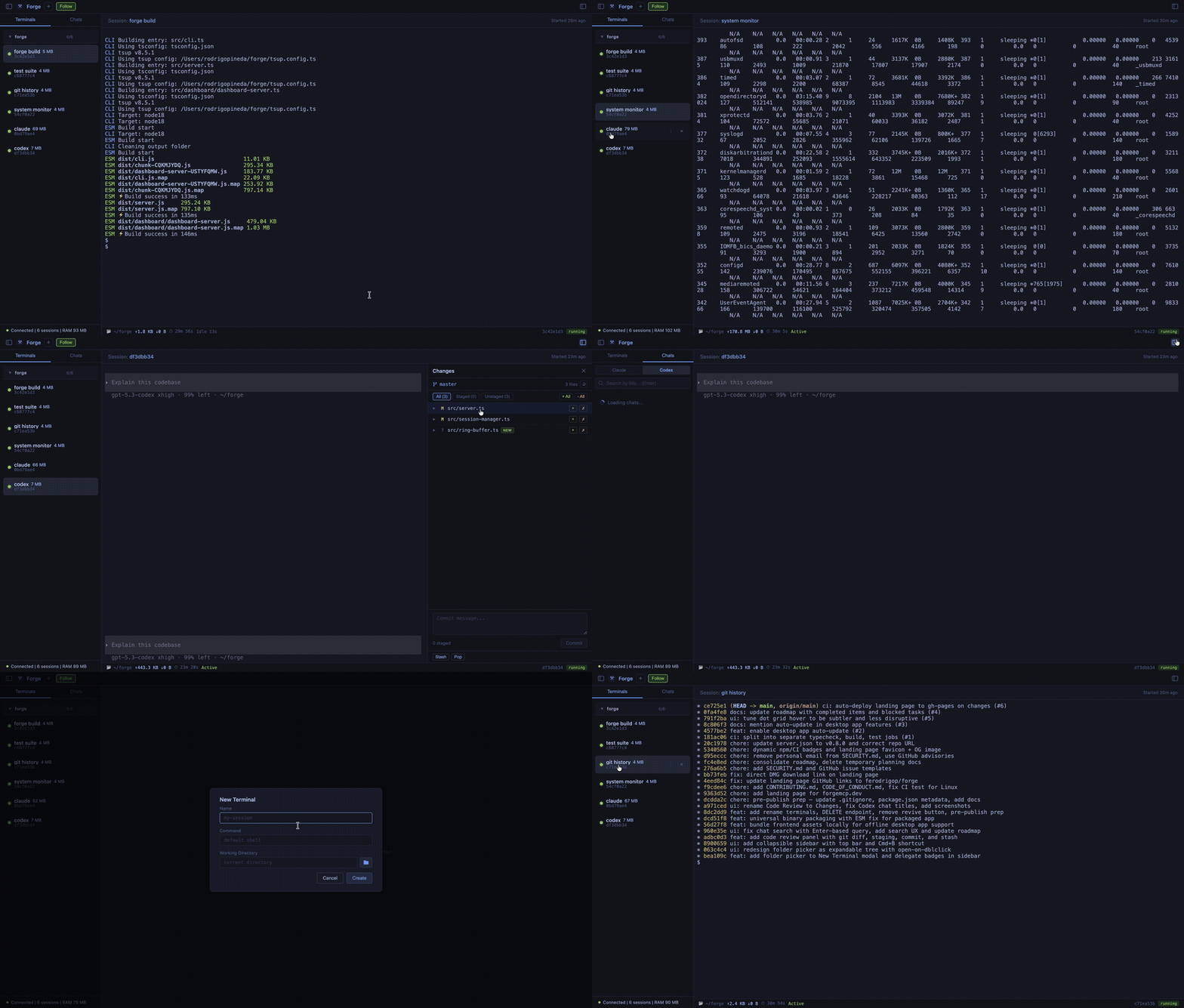
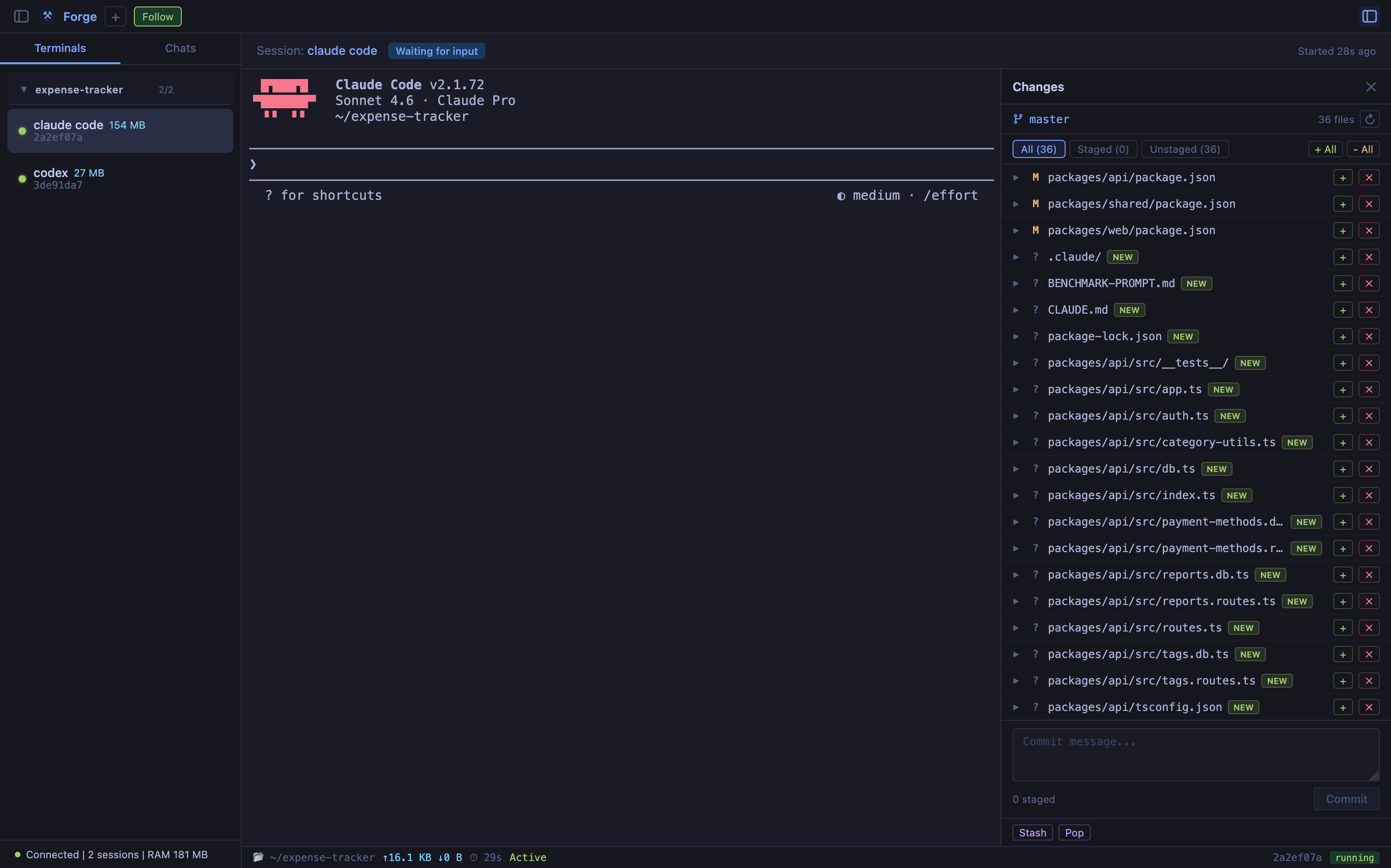
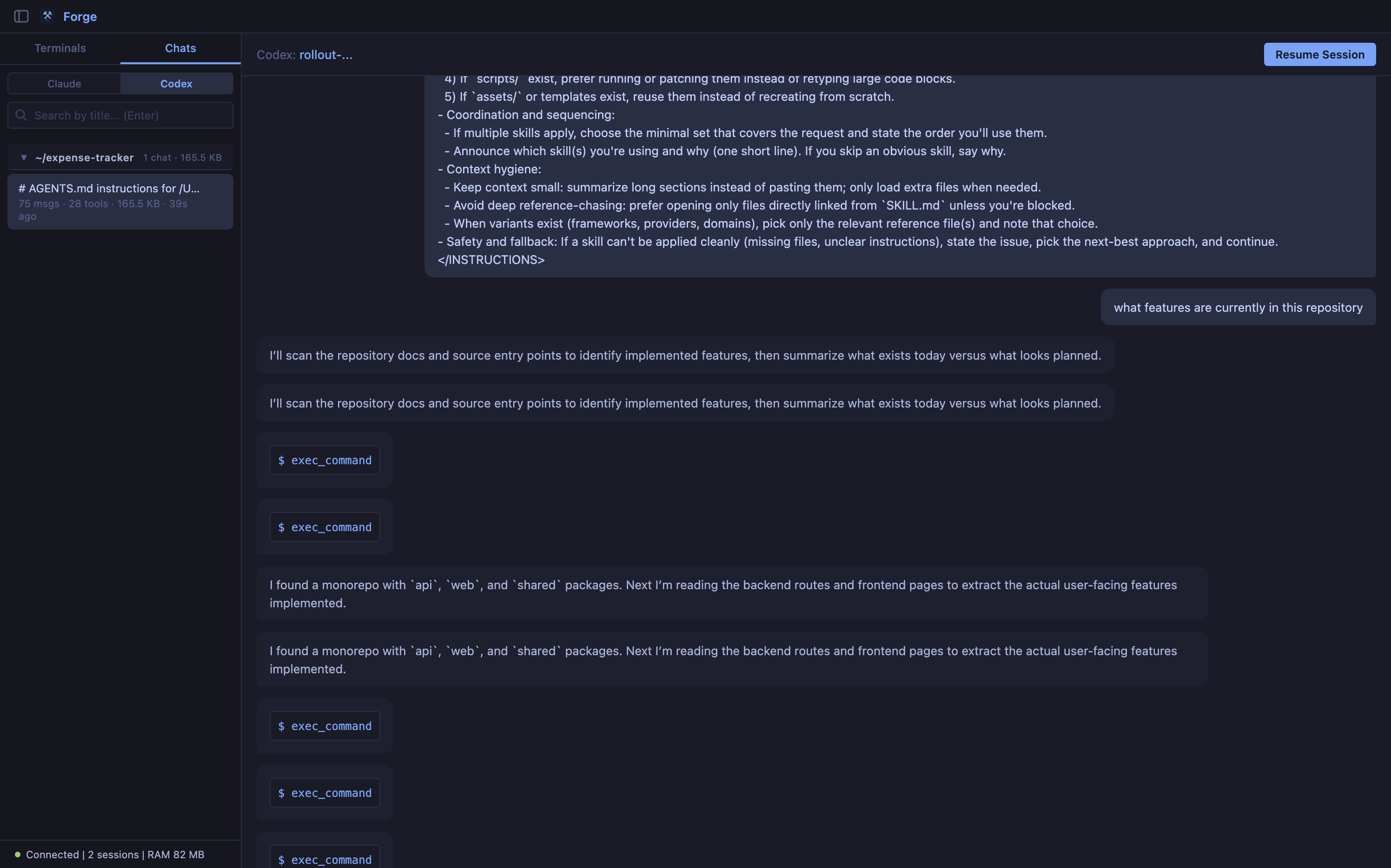
- Web dashboard — real-time Preact-based browser UI to watch what your agents are doing across all terminals, browse past chat sessions, and monitor activity
- Zero config — single
npxcommand or HTTP MCP endpoint
Install
# bun (recommended)
bun install -g forge-terminal-mcp

# npm (requires Node.js ≥ 18)
npm install -g forge-terminal-mcp

# Or standalone binary (no Node.js required)
curl -fsSL https://forgemcp.dev/install.sh | sh
After install, the forge command is available globally:
forge start              # Start the server
forge start -d           # Start as background daemon
forge start -d --dashboard --port 3141   # With web dashboard
Update
# bun
bun update -g forge-terminal-mcp

# npm
npm update -g forge-terminal-mcp

# Standalone binary — re-run the install script
curl -fsSL https://forgemcp.dev/install.sh | sh

# Desktop app updates automatically on restart
Quick Start
1. Add to Your Agent
Claude Code
# Recommended: auto-starts daemon and registers HTTP transport
forge setup --agent claude-code

# Or manually:
forge start -d                  # Start daemon in background
claude mcp add --transport http forge http://127.0.0.1:3141/mcp
Note: Always use HTTP transport so Claude Code connects to the running daemon. This ensures sessions appear in the dashboard and avoids conflicts from isolated processes.
Codex
# Add Forge as HTTP MCP server
codex mcp add forge --url http://127.0.0.1:3141/mcp

# Verify
codex mcp list
codex mcp get forge
Codex stores this in ~/.codex/config.toml:
[mcp_servers.forge]
url = "http://127.0.0.1:3141/mcp"
Gemini CLI
# Start Forge daemon first
npx forge-terminal-mcp start -d --dashboard --port 3141

# Add Forge as HTTP MCP server
gemini mcp add --transport http forge http://127.0.0.1:3141/mcp
HTTP MCP (any client)
Start the daemon (choose one launch mode), then point any MCP client at the HTTP endpoint:
# If forge is on PATH (global install or npm link)
forge start -d

# From this repo (local clone)
node dist/cli.js start -d

# Without install (published package)
npx forge-terminal-mcp start -d
{
  "mcpServers": {
    "forge": {
      "type": "http",
      "url": "http://127.0.0.1:3141/mcp"
    }
  }
}
Restart your agent and Forge tools are available.
Important: Claude Code, Codex, and Gemini CLI load MCP servers at process start. If you add/remove servers, restart the current agent session.
2. Smoke Test (60s)
# Codex MCP registration
codex mcp list
codex mcp get forge

# Forge daemon status
node dist/cli.js status
Expected:
codex mcp listshowsforgeas enablednode dist/cli.js statusreports running andhttp://127.0.0.1:3141
Troubleshooting
| Symptom | Fix |
|---|---|
forge: command not found | Use node dist/cli.js ... from the repo root, or npx forge-terminal-mcp .... |
No MCP servers configured yet in Codex | Run codex mcp add forge --url http://127.0.0.1:3141/mcp, then restart Codex. |
listen EPERM ... 127.0.0.1:3141 | Run Forge in an environment that allows local port binding, or use a different port with --port and update the MCP URL to match. |
| A message appears typed but agent does not answer | The input may be queued; press Enter (or use submit=true when writing programmatically). |
| MCP server is configured but tools do not appear | Restart the current agent session so MCP servers reload. |
3. Use It
Your agent now has access to 23 tools across 7 categories:
Session Lifecycle
create_terminal      → Spawn a PTY session with optional name, tags, buffer size
create_from_template → Spawn from a built-in template (shell, next-dev, vite-dev, etc.)
spawn_claude         → Launch a Claude Code sub-agent in a dedicated session
spawn_codex          → Launch a Codex sub-agent in a dedicated session
spawn_gemini         → Launch a Gemini CLI sub-agent in a dedicated session
close_terminal       → Kill a session and free resources
close_group          → Close all sessions matching a tag
list_terminals       → List sessions, optionally filtered by tag
list_templates       → Show available session templates
I/O
write_terminal       → Send input (appends newline by default)
read_terminal        → Read NEW output since last read (incremental)
read_screen          → Get rendered viewport as clean text (no ANSI)
read_multiple        → Batch read from up to 20 sessions at once
send_control         → Send Ctrl+C, arrow keys, Tab, Enter, etc.
resize_terminal      → Change terminal dimensions
Search & Wait
grep_terminal        → Regex search across a session's output buffer
wait_for             → Block until output matches a pattern or process exits
Execution
run_command → Run a command to completion, return output, auto-cleanup
Events
subscribe_events     → Get notified when a session exits or matches a pattern
unsubscribe_events   → Cancel an event subscription
Agent Delegation
delegate_task → Delegate a task to another agent — oneshot or interactive multi-turn
Ops
health_check         → Server version, uptime, session count, memory usage
get_session_history  → Tool call history for agent sessions
clear_history        → Clear persisted stale session entries
Example Conversations
You: Start a Next.js dev server and run the test suite in parallel
Agent: (uses
create_from_templatewith "next-dev",wait_for"Ready", then creates a second session fornpm test, usesread_multipleto poll both)
You: Spin up 3 sub-agents to research different parts of the codebase
Agent: (uses
spawn_claudethree times with tag "research", monitors withlist_terminalsfiltered by tag, cleans up withclose_group)
You: Build and test, just give me the result
Agent: (uses
run_commandwithnpm run build && npm test— creates terminal, waits for exit, returns output, auto-cleans up)
Best Practices
run_command vs create_terminal
Use run_command when you want a result and don't need the session afterwards:
- Build steps (
npm run build,cargo build) - Test runs (
npm test,pytest) - Install commands (
npm install,pip install) - One-off scripts that exit cleanly
Use create_terminal when you need an ongoing session:
- Dev servers (
npm run dev,vite,next dev) - Watchers (
npm run watch,tsc --watch) - REPLs or interactive processes
- Long-running processes you'll poll with
read_terminal
# Good — build is a one-shot task
run_command({ command: "npm run build && npm test" })

# Good — dev server needs to stay alive
create_terminal({ command: "npm run dev", name: "dev-server" })
wait_for({ id, pattern: "ready on" })
waitForExit vs pattern matching
Use pattern matching (default) when the process stays alive after printing the signal:
wait_for({ id, pattern: "Server running on port 3000" })
# returns as soon as the line appears — process keeps running
Use waitForExit: true when the process exits naturally and you want all output:
wait_for({ id, pattern: ".", waitForExit: true })
# waits for the process to finish, returns everything
fromSession for sub-agents
When spawning a sub-agent to work on the same project, use fromSession instead of hardcoding paths:
# Instead of this (brittle):
spawn_claude({ prompt: "...", cwd: "/Users/me/projects/my-app" })

# Do this (inherits cwd from current session):
spawn_claude({ prompt: "...", fromSession: currentSessionId })
This ensures the sub-agent works in the correct directory even when Forge is used across different machines or worktrees.
Worktrees for parallel agents
When running multiple agents on the same codebase, use worktree: true to isolate changes:
spawn_claude({ prompt: "Add auth", worktree: true, branch: "feature/auth" })
spawn_claude({ prompt: "Add payments", worktree: true, branch: "feature/payments" })
# Both agents work in parallel without stepping on each other
Tools Reference
create_terminal
| Parameter | Type | Default | Description |
|---|---|---|---|
command | string | User's $SHELL | Command to run |
args | string[] | [] | Command arguments |
cwd | string | Process cwd | Working directory |
env | object | {} | Additional env vars (merged with process env) |
cols | number | 120 | Terminal width |
rows | number | 24 | Terminal height |
name | string | — | Human-readable session name |
tags | string[] | — | Tags for filtering/grouping (max 10) |
bufferSize | number | Server default | Ring buffer size in bytes (1 KB – 10 MB) |
Returns session info including the id used by all other tools.
create_from_template
| Parameter | Type | Default | Description |
|---|---|---|---|
template | string | required | Template name (see list_templates) |
cwd | string | — | Working directory override |
env | object | — | Additional env vars |
name | string | Template name | Session name override |
Built-in templates:
| Template | Command | Tags | Wait For |
|---|---|---|---|
shell | $SHELL | shell | — |
next-dev | npx next dev | dev-server, next | "Ready" |
vite-dev | npx vite | dev-server, vite | "Local:" |
docker-compose | docker compose up | docker | — |
npm-test | npm test | test | — |
npm-test-watch | npm run test:watch | test, watch | — |
Templates with waitFor automatically block until the pattern appears (30s timeout).
spawn_claude
| Parameter | Type | Default | Description |
|---|---|---|---|
prompt | string | required | Prompt to send to Claude |
cwd | string | — | Working directory (explicit path) |
fromSession | string | — | Copy cwd from an existing session ID (alternative to setting cwd manually) |
model | string | — | Model (e.g., "sonnet", "opus") |
name | string | Auto from prompt | Session name |
tags | string[] | ["claude-agent"] | Tags (claude-agent always included) |
maxBudget | number | — | Max budget in USD |
bufferSize | number | Server default | Ring buffer size |
worktree | boolean | false | Create a git worktree (isolates file changes) |
branch | string | — | Branch name for worktree (required when worktree: true) |
oneShot | boolean | false | Run in --print mode (process prompt and exit) |
run_command
| Parameter | Type | Default | Description |
|---|---|---|---|
command | string | required | Command to run (supports && chaining) |
cwd | string | — | Working directory |
timeout | number | 300000 | Timeout in ms (max 5 minutes) |
Creates a terminal, waits for the process to exit, returns all output, and auto-cleans up the session. Ideal for build/test/install commands.
write_terminal
| Parameter | Type | Default | Description |
|---|---|---|---|
id | string | required | Session ID |
input | string | required | Text to send |
newline | boolean | true | Append \n after input |
read_terminal
| Parameter | Type | Default | Description |
|---|---|---|---|
id | string | required | Session ID |
Returns { status, data, bytes, droppedBytes? }. Only returns output produced since the last read. If droppedBytes > 0, some output was lost because the ring buffer wrapped.
read_screen
| Parameter | Type | Default | Description |
|---|---|---|---|
id | string | required | Session ID |
Returns the current terminal viewport as plain text — rendered through a headless xterm instance. No ANSI codes. Useful for TUI apps like htop, vim, or interactive prompts.
read_multiple
| Parameter | Type | Default | Description |
|---|---|---|---|
ids | string[] | required | Session IDs (1–20) |
mode | string | "incremental" | "incremental" or "screen" |
Returns a JSON array with per-session results. Sessions that error (e.g., not found) include an inline error field — the tool never fails as a whole, so partial results are always returned.
grep_terminal
| Parameter | Type | Default | Description |
|---|---|---|---|
id | string | required | Session ID |
pattern | string | required | Regex pattern |
context | number | 0 | Lines of context around each match (0–10) |
Returns { matches: [{ lineNumber, text, context? }], totalMatches }.
wait_for
| Parameter | Type | Default | Description |
|---|---|---|---|
id | string | required | Session ID |
pattern | string | — | Regex pattern to wait for |
timeout | number | 30000 | Timeout in ms (100–300000) |
waitForExit | boolean | false | Wait for process to exit instead of pattern match |
Checks the existing buffer first (instant match if pattern already appeared), then watches new output. Returns { matched, data?, reason?, elapsed }.
subscribe_events
| Parameter | Type | Default | Description |
|---|---|---|---|
id | string | required | Session ID |
events | string[] | required | ["exit"] and/or ["pattern_match"] |
pattern | string | — | Regex (required if pattern_match in events) |
Notifications are delivered as MCP logging messages with JSON payloads. Pattern match subscriptions auto-unsubscribe after the first match.
unsubscribe_events
| Parameter | Type | Default | Description |
|---|---|---|---|
subscriptionId | string | required | Subscription ID from subscribe_events |
list_terminals
| Parameter | Type | Default | Description |
|---|---|---|---|
tag | string | — | Filter sessions by tag |
Returns all sessions with id, pid, command, cwd, status, cols, rows, createdAt, lastActivityAt, name, tags.
close_terminal
| Parameter | Type | Default | Description |
|---|---|---|---|
id | string | required | Session ID |
close_group
| Parameter | Type | Default | Description |
|---|---|---|---|
tag | string | required | Tag to match |
Closes all active sessions with the matching tag. Returns the count closed.
send_control
| Parameter | Type | Default | Description |
|---|---|---|---|
id | string | required | Session ID |
key | string | required | Control key name |
Available keys: ctrl+c, ctrl+d, ctrl+z, ctrl+\, ctrl+l, ctrl+a, ctrl+e, ctrl+k, ctrl+u, ctrl+w, ctrl+r, ctrl+p, ctrl+n, up, down, right, left, home, end, tab, enter, escape, backspace, delete, pageup, pagedown
resize_terminal
| Parameter | Type | Default | Description |
|---|---|---|---|
id | string | required | Session ID |
cols | number | required | New width (1–500) |
rows | number | required | New height (1–200) |
health_check
No parameters. Returns { version, uptime, sessions: { active, max }, memory: { rss, heapUsed, heapTotal } }.
get_session_history
| Parameter | Type | Default | Description |
|---|---|---|---|
id | string | required | Session ID |
Returns timestamped tool call history for agent sessions (Claude, Codex).
clear_history
No parameters. Clears persisted stale session entries from previous server runs.
MCP Resources
Sessions are also exposed as MCP resources at terminal://sessions/{sessionId}, returning session metadata and rendered screen content. The resource list updates automatically when sessions are created or closed.
Web Dashboard
Enable the real-time web dashboard to monitor all terminals from your browser:
{
  "mcpServers": {
    "forge": {
      "command": "npx",
      "args": ["forge-terminal-mcp", "--dashboard", "--port", "3141"]
    }
  }
}
Open http://localhost:3141 to see:
- Live terminal sessions with real-time output via WebSocket
- Session grouping — terminals organized by working directory
- Activity log — tool calls and events for agent sessions
- Status bar — working directory, session ID, running/exited status
- Chat history browser — search, browse, and continue past Claude Code and Codex conversations grouped by project
- Session management — create, close, and switch between terminals
- Auto-follow mode — automatically switch to newly created sessions
- Memory monitoring — per-session and total RAM usage
If --auth-token is enabled, open the dashboard with ?token=YOUR_TOKEN so browser API/WebSocket calls are authorized.
The dashboard is built with Preact + htm + Preact Signals, loaded from CDN with zero build step. All UI code is bundled as string constants inside the server binary.
Desktop App (macOS)
Note: The pre-built macOS app is currently unavailable for general download. macOS requires apps to be code-signed with an Apple Developer certificate ($99/year) before they can be opened without security warnings. We're working on getting this set up — in the meantime, you can run the desktop app from source (see below) or use the CLI via
npx forge-terminal-mcp.
Forge includes an Electron-based desktop app for macOS with native window management, system tray, and notifications.
Running in Development
npm run build                    # Build forge core
cd desktop && npm install        # Install Electron deps
npx @electron/rebuild            # Rebuild node-pty for Electron
npm run dev                      # Launch the desktop app
Or from the repo root: npm run desktop:dev
Features
- Native macOS title bar with traffic light integration
- System tray with session count, new terminal, start-at-login toggle
- Close-to-tray (app keeps running when window closed)
- Native notifications on session created/exited
- Window state persistence across restarts
- Auto-detects existing CLI daemon — connects to it or starts in-process
- Automatic updates via GitHub Releases (downloads silently, installs on restart)
- Security hardened: sandboxed renderer, navigation lock, CSP, permission deny-all
Packaging
cd desktop
npm run package          # Build DMG + ZIP
Produces a signed Forge.app in desktop/release/. Requires Apple Developer certificate for notarization (see desktop/forge.entitlements.plist).
Configuration
All settings follow the precedence: CLI flag > environment variable > default.
| Flag | Env Var | Default | Description |
|---|---|---|---|
--max-sessions | FORGE_MAX_SESSIONS | 10 | Max concurrent PTY sessions |
--idle-timeout | FORGE_IDLE_TIMEOUT | 1800000 | Session idle timeout in ms (30 min) |
--buffer-size | FORGE_BUFFER_SIZE | 1048576 | Ring buffer size per session (1 MB) |
--shell | SHELL | /bin/bash | Default shell for create_terminal |
--claude-path | FORGE_CLAUDE_PATH | claude | Path to Claude CLI binary |
--auth-token | FORGE_AUTH_TOKEN | unset | Require Bearer token for /mcp, /api, and /ws |
--dashboard | FORGE_DASHBOARD | off | Enable web dashboard |
--port | FORGE_DASHBOARD_PORT | 3141 | Dashboard port |
--verbose | — | off | Enable debug logging to stderr |
Example with custom config:
{
  "mcpServers": {
    "forge": {
      "command": "npx",
      "args": ["forge-terminal-mcp", "--max-sessions", "20", "--idle-timeout", "3600000", "--dashboard"]
    }
  }
}
Architecture
MCP Client   <--HTTP-->  MCP Server (23 tools + 1 resource)
(Claude Code,
 Codex, etc)
                              |
                         SessionManager
                         (lifecycle, groups, persistence)
                              |
                    +---------+---------+
                    v         v         v
               TerminalSession    TerminalSession    ...
               +---------------+
               |   node-pty     |  <-- real PTY (colors, signals, TUI)
               |  RingBuffer    |  <-- 1 MB circular, per-consumer cursors
               | @xterm/headless|  <-- server-side rendering
               +---------------+
                              |
              +---------------+---------------+
              v               v               v
         MCP Client      Dashboard WS    Event Subs
         (incremental)   (live stream)   (notifications)
- Single Node.js process — MCP server communicates over HTTP (streamable)
- All logging to stderr — stdout is reserved for the MCP protocol
- Ring buffer per session — 1 MB circular buffer with cursor-based reads. When the buffer fills, old data is overwritten and
droppedBytestells the consumer how much was lost - Headless xterm per session — full terminal emulation server-side.
read_screenreturns the rendered viewport, correctly handling cursor positioning, alternate screen, line wrapping - Idle timeout — sessions auto-close after 30 minutes of inactivity (configurable)
- Session persistence — session metadata saved to
~/.forge/sessions.json, reloaded as stale entries on restart - Event system — subscribe to session exit or pattern match events, delivered as MCP logging messages
- Agent env stripping — spawned terminals have agent-specific env vars (e.g.,
CLAUDECODE) removed to prevent nesting errors
Development
git clone https://github.com/ferodrigop/forge-terminal-mcp.git
cd forge-terminal-mcp
npm install
npm run build       # Compile with tsup
npm test            # 161 tests (unit + integration)
npm run typecheck   # TypeScript strict mode
npm run lint        # ESLint
npm run dev         # Watch mode
Project Structure
src/
  cli.ts                        # Entry point, arg parsing, daemon management
  server.ts                     # McpServer + 22 tool registrations + resources
  core/
    types.ts                    # ForgeConfig, SessionInfo, defaults
    ring-buffer.ts              # Circular buffer with multi-consumer cursors
    terminal-session.ts         # PTY + headless xterm + ring buffer
    session-manager.ts          # CRUD, max sessions, groups, persistence
    state-store.ts              # ~/.forge/sessions.json persistence
    templates.ts                # Built-in session templates
    claude-chats.ts             # Claude Code chat session discovery
    command-history.ts          # Tool call history tracking
  dashboard/
    dashboard-server.ts         # HTTP + WebSocket + MCP transport server
    dashboard-html.ts           # HTML assembler (imports frontend parts)
    ws-handler.ts               # WebSocket message handling
    frontend/
      styles.ts                 # CSS styles (Tokyo Night theme)
      state.ts                  # Preact Signals + WebSocket + chat API
      utils.ts                  # timeAgo, formatSize, formatToolBlock
      app.ts                    # Root App component + JS concatenation
      assets.ts                 # Base64-embedded favicon + logo
      components/
        sidebar.ts              # Session list, chat browser, connection status
        terminal-view.ts        # XTerm container, activity log, status bar
        chat-view.ts            # Chat message viewer with bubbles
        modals.ts               # New terminal + delete chat modals
  utils/
    logger.ts                   # stderr-only JSON logger
    config.ts                   # CLI flags > env vars > defaults
    control-chars.ts            # Named key -> escape sequence map
    daemon.ts                   # Daemon lifecycle (PID, port, lock files)
desktop/
  main/
    index.ts                    # Electron main process entry
    daemon.ts                   # Forge server lifecycle (start/detect existing)
    window.ts                   # BrowserWindow + state persistence
    preload.ts                  # Context bridge (forgeDesktop API)
    tray.ts                     # System tray + context menu
    menu.ts                     # macOS application menu
    notifications.ts            # Native notification bridge
    auto-launch.ts              # Login item registration
    html-server.ts              # Lightweight HTTP server for desktop HTML
    daemon-bridge.ts            # WebSocket relay to existing daemon
    updater.ts                  # Auto-update via GitHub Releases
  electron-builder.yml          # Build config (DMG, universal binary)
  forge.entitlements.plist      # macOS entitlements
test/
  unit/                         # ring-buffer, config, control-chars, state-store, templates
  integration/                  # terminal-session, session-manager, mcp-tools E2E
Test Coverage
| Suite | Tests | Covers |
|---|---|---|
| Ring Buffer | 13 | Circular writes, multi-consumer, wrap-around, dropped bytes |
| Config | 10 | CLI parsing, env vars, defaults, precedence, codex path |
| Control Chars | 6 | Key resolution, case insensitivity, unknown keys |
| State Store | 4 | Load/save round-trip, corruption handling |
| Templates | 3 | Lookup, unknown template, list all |
| Stream JSON Parser | 11 | Claude event parsing, tool use extraction |
| Terminal Session | 8 | PTY spawn, read/write, screen render, resize, exit |
| Session Manager | 7 | CRUD, max limit, close all, stale entries |
| MCP Tools E2E | 51 | All 23 tools end-to-end via MCP client |
| Forge 0.7 Features | 28 | Codex spawn, worktree, dashboard API, chat history |
| Command History | 6 | Event tracking, retrieval, cleanup |
| Claude Chats | 14 | Session discovery, message parsing, search |
| Total | 161 |
Requirements
- Node.js >= 18
- macOS, Linux, or Windows (anywhere
node-ptybuilds)
License
MIT