AllMCPs
BrowseBestCategoriesStackCompareToolsGuidesBlog Log in Submit MCP

Stay in the loop

Get new MCP servers and top picks in your inbox.

AllMCPs

The open directory for discovering and installing Model Context Protocol servers.

Explore

  • Browse servers
  • Best MCP servers
  • Categories
  • MCP clients
  • Agent prompts
  • Stack Builder
  • Compare servers
  • Tags index
  • Submit a server
  • Pricing

Learn

  • Guides hub
  • What is MCP?
  • Install guide
  • Troubleshooting
  • Security
  • Blog
  • Blog RSS

Tools

  • All tools
  • Config generator
  • Config validator
  • MCP playground
  • OpenAPI β†’ MCP
  • Badge generator

For agents

  • API docs
  • Trust & traffic
  • llms.txt β†— (opens in a new tab)
  • Catalog JSON β†— (opens in a new tab)
  • Remote MCP β†— (opens in a new tab)

Company

  • About
  • Contact
  • X (@AllMCPs) β†— (opens in a new tab)
  • GitHub β†— (opens in a new tab)
  • Terms
  • Privacy
AllMCPs VerifiedAllMCPs VerifiedFeatured on Nick LaunchesFeatured on Nick LaunchesLaunch Llama NewsletterLaunch Llama NewsletterVerified DR - allmcps.comVerified DR - allmcps.comFeatured on SaaSGrowFeatured on SaaSGrowFeatured on Twelve ToolsFeatured on Twelve ToolsFeatured on Saaspa.geFeatured on Saaspa.geFeatured on Findly.toolsFeatured on Findly.toolsFeatured on Startup FameFeatured on Startup FameFeatured on LaunchKiwiFeatured on LaunchKiwiFeatured on ScrollLaunchFeatured on ScrollLaunchFeatured on DailyPingsFeatured on DailyPingsFazier badgeFazier badgeFeatured on NewTool.siteFeatured on NewTool.siteFeatured on saasfame.comFeatured on saasfame.comDR Checker - Domain RatingDR Checker - Domain RatingListed on Turbo0Listed on Turbo0Launched on LaunchBoard - Product Launch PlatformLaunched on LaunchBoard - Product Launch PlatformList on SimilarlabsList on Similarlabshttps://codetrendy.comhttps://codetrendy.comListed on DevTool.ioFeatured on BuildlistFeatured on BuildlistAllMCPs VerifiedAllMCPs VerifiedFeatured on Nick LaunchesFeatured on Nick LaunchesLaunch Llama NewsletterLaunch Llama NewsletterVerified DR - allmcps.comVerified DR - allmcps.comFeatured on SaaSGrowFeatured on SaaSGrowFeatured on Twelve ToolsFeatured on Twelve ToolsFeatured on Saaspa.geFeatured on Saaspa.geFeatured on Findly.toolsFeatured on Findly.toolsFeatured on Startup FameFeatured on Startup FameFeatured on LaunchKiwiFeatured on LaunchKiwiFeatured on ScrollLaunchFeatured on ScrollLaunchFeatured on DailyPingsFeatured on DailyPingsFazier badgeFazier badgeFeatured on NewTool.siteFeatured on NewTool.siteFeatured on saasfame.comFeatured on saasfame.comDR Checker - Domain RatingDR Checker - Domain RatingListed on Turbo0Listed on Turbo0Launched on LaunchBoard - Product Launch PlatformLaunched on LaunchBoard - Product Launch PlatformList on SimilarlabsList on Similarlabshttps://codetrendy.comhttps://codetrendy.comListed on DevTool.ioFeatured on BuildlistFeatured on Buildlist
Β© 2026 Jackalope Digital LLC. All rights reserved.
  1. Home
  2. πŸ’» Developer Tools
  3. Eyebrowse
E
Health: ActiveRecent health check succeeded.Last checked 8/10/2026, 11:58:28 PM

Eyebrowse

Enrichment pendingWe haven’t run our AI enrichment pass on this listing yet, so the overview, use cases, and FAQ below may be sparse or missing. We work through the catalog over time β€” check back soon.
View Repository1 GitHub StarsTotal stargazers on GitHub for the source repository (1 stars).

Stealthy, LLM-drivable browser engine β€” a Python library + 85-tool MCP server on stealth Chromium.

Quick Install

Automated & IDE Setup

Copy the AI prompt to install this server into Claude Code, Cursor, or another agent β€” or use 1-click editor setup below.

Add to CursorAdd to VS Code
Not yet automatically verified

We haven't yet run this listing's install command through our automated sandbox check. This isn't a red flag β€” we're steadily working through the catalog.

Manual Client & Custom JSON ConfigExpand JSON β–Ύ

Install Config Generator

Choose your client
claude_desktop_config.json
{
  "mcpServers": {
    "eyebrowse": {
      "command": "uvx",
      "args": [
        "eyebrowse"
      ]
    }
  }
}

πŸ’‘ Paste into ~/Library/Application Support/Claude/claude_desktop_config.json (macOS) or %APPDATA%\Claude\claude_desktop_config.json (Windows)

Install Directory Badge Claim listing AlternativesπŸ’» More in Developer Tools

Documentation Overview

πŸ‘οΈ EyeBrowse

A stealthy, LLM-drivable browser engine β€” one codebase, two faces.

A Python library and an MCP server for driving a real, hard-to-detect browser, so legitimate automation isn't false-flagged or IP-banned by Cloudflare, DataDome, Akamai, or PerimeterX. Built on CloakBrowser β€” a stealth Chromium (Chrome/146) that's a Playwright drop-in β€” so EyeBrowse gets the full Chrome DevTools Protocol: trusted cursorless clicks, deep network inspection, MHTML, PDF, and native video.

CI PyPI Python 3.12 License: MIT
MCP tools Engine: CloakBrowser Code style: Ruff PRs welcome

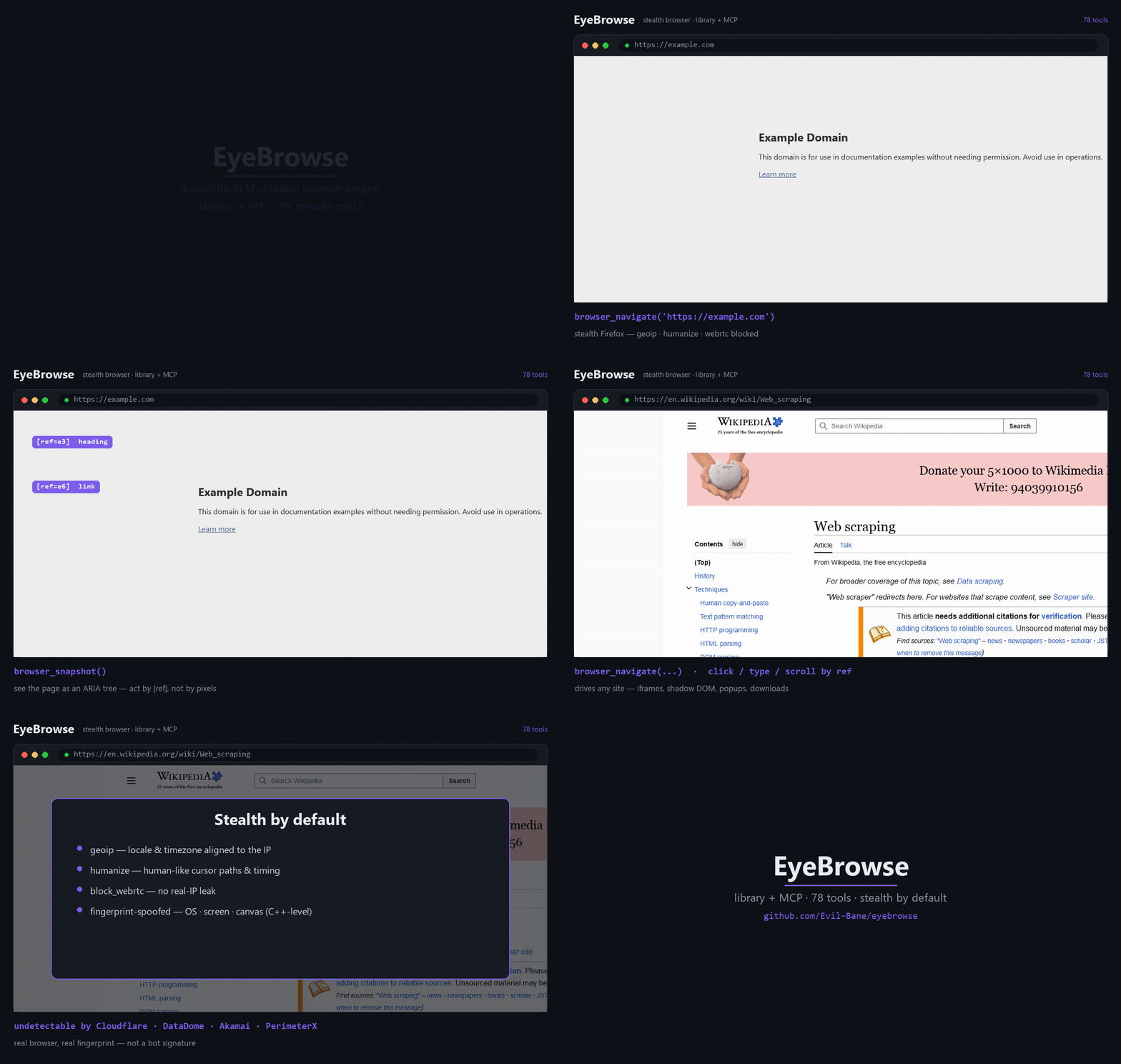
EyeBrowse β€” an AI agent driving a stealth browser past Cloudflare, over MCP

β–Ά Full-quality MP4: docs/demo.mp4 β€” an AI agent drives EyeBrowse over MCP: clears a Cloudflare check, then reads real docs (asyncio Β· httpx Β· MDN).


Why EyeBrowse?

  • πŸ₯· Stealth by default β€” engine-level fingerprint spoofing (geoip + humanize on out of the box, novel fingerprint per launch); navigator.webdriver masked; viewport auto-sized to the spoofed screen. No puppeteer-extra band-aids β€” the anti-detection is compiled into the browser.
  • πŸ€– Built for LLMs β€” pages are read as an ARIA tree with [ref=…] handles; the model acts by ref (click/type/hover), not by brittle CSS or raw pixels. Cross-origin iframes, shadow DOM, popups β€” handled.
  • ⚑ Chrome DevTools Protocol β€” trusted, cursorless clicks by node ref (Input.dispatchMouseEvent), raw Network/Performance/Emulation access, MHTML snapshots, PDF export, and native video β€” all reachable as tools.
  • 🧰 Library and MCP from one codebase β€” a clean Python API (EyeBrowse + Session), mirrored 1:1 by a thin MCP server (85 browser_* tools) for Claude Code and any MCP client.
  • πŸͺŸ Never boxed in β€” the curated high-level API doesn't hide Playwright: reach session.page / .context / .browser for anything it doesn't wrap.
  • πŸ”‹ Batteries included β€” multi-session, proxy + identity rotation, API-mode captcha solvers, native video, full HAR capture, and clean-markdown extraction.

Scope. EyeBrowse is a low-level browser engine β€” it holds no workflow logic. Consumers decide what to do; the engine provides what's possible.

Contents

Quickstart Β· Install Β· Features Β· Compare Β· Library Β· MCP Β· Proxy & identity Β· Extraction Β· Recording Β· How it works Β· Caveats Β· Tools Β· License

Quickstart

Terminal
pip install eyebrowse
# The stealth-Chromium binary downloads automatically on first launch β€” nothing else to run.
server.ts
import asyncio
from eyebrowse import EyeBrowse

async def main():
    eb = EyeBrowse()                          # stealth defaults: geoip Β· humanize
    async with eb.session() as s:
        await s.navigate("https://example.com")
        print(await s.snapshot())             # ARIA tree with [ref=...] handles
        await s.click("e6")                   # act on a ref from the snapshot
    await eb.aclose()

asyncio.run(main())

…or wire it into Claude Code (or any MCP client) β€” see Use over MCP.

Install

From PyPI

Terminal
pip install eyebrowse                 # or: uv pip install eyebrowse
# CloakBrowser fetches its Chromium binary lazily on first launch β€” nothing to run.
pip install "eyebrowse[extract]"     # optional: + Crawl4AI markdown extraction (heavier)

From source (development)

bash
git clone https://github.com/Evil-Bane/eyebrowse && cd eyebrowse
uv sync                              # core engine  (add --extra extract for Crawl4AI)
cp .env.example .env                 # only if you use a proxy / captcha keys

Python 3.12 (pinned <3.13). Engine: cloakbrowser>=0.3 (stealth Chromium, Chrome/146), on playwright 1.60 and mcp 1.27.

Features

πŸ₯· StealthCloakBrowser's patched-Chromium fingerprint spoofing (novel --fingerprint per launch); geoip + humanize by default; webdriver masked; viewport matched to the spoofed screen.
πŸ€– LLM interactionaria_snapshot(mode="ai") β†’ ARIA tree + [ref] handles; click / type / hover / select / drag / file-upload / dialogs / keyboard; coordinate mouse too.
⚑ CDPtrusted cursorless click by ref, raw CDP (Network / Performance / Emulation), MHTML capture, PDF export.
πŸͺŸ Frames & DOMcross-origin iframe routing by ref, shadow-DOM piercing, popup/new-tab switching, evaluate inside any frame.
πŸ—‚ Multi-sessionindependent stealth sessions, each with its own context / identity / proxy.
🌐 Networkinspect requests/responses (incl. XHR/fetch bodies & WebSocket frames), block URLs, mock responses, go offline, full HAR export.
πŸ’Ύ Statecookies, localStorage & sessionStorage (CRUD), storage_state save/reload.
πŸͺͺ Identity rotationfresh fingerprint + isolated profile + paired proxy; pluggable residential ProxyProvider.
🧩 Captchapluggable API-mode solvers (CapSolver / 2Captcha / CapMonster / NextCaptcha) + TOTP β€” no browser extension.
πŸ“„ ExtractionCrawl4AI raw: feed β†’ clean, token-efficient markdown (no LLM, no API keys).
πŸŽ₯ Capturescreenshots, Playwright tracing, and native video (.webm).
βœ… Verify & debugassertions, element highlighting, locator generation, geolocation/header emulation.

Full per-tool reference: docs/TOOLS.md (85 tools across 18 groups).

How EyeBrowse compares

EyeBrowsePlaywrightΒ MCPbrowser-useplaywright-stealth
Anti-detection compiled into the browserβœ…βŒβŒβš οΈ JS patches
LLM-native ARIA [ref] interaction modelβœ…βœ…βœ…βŒ
Ships an MCP serverβœ… (85 tools)βœ…βš οΈ partial❌
One codebase: Python library and MCPβœ…MCP-onlylib-onlylib-only
Full CDP (trusted clicks Β· network Β· MHTML Β· PDF Β· video)βœ…βš οΈ partial❌⚠️ partial
Captcha (API-mode) + TOTPβœ…βŒβŒβŒ
Proxy + identity rotation built inβœ…βŒβš οΈ partial❌
Cross-origin iframes Β· shadow DOM Β· popupsβœ…βœ…βš οΈ partialn/a

Fair-use note: each project targets a different niche β€” this compares them on the axes EyeBrowse optimizes for (stealth + LLM-drivable + one library/MCP codebase), not as an overall ranking.

Use as a library

server.ts
import asyncio
from eyebrowse import EyeBrowse

async def main():
    eb = EyeBrowse()                           # stealth defaults
    try:
        async with eb.session() as s:          # a stealth session (auto-closed)
            await s.navigate("https://example.com")
            print(await s.snapshot())          # ARIA tree with [ref=...] handles
            await s.click("e6")                # act on a ref
            await s.type("e8", "hello", submit=True)
            png = await s.screenshot(full_page=True)
            title = await s.page.title()        # full Playwright power when you need it
    finally:
        await eb.aclose()

asyncio.run(main())

Run the included proof: uv run python examples/direct_usage.py.

Use over MCP

EyeBrowse ships an MCP server (eyebrowse-mcp, FastMCP over stdio). Add it to any MCP client.

Claude Code (CLI):

Terminal
claude mcp add eyebrowse -- eyebrowse-mcp

Any MCP client (JSON config):

config.json
{
  "mcpServers": {
    "eyebrowse": {
      "command": "eyebrowse-mcp"
    }
  }
}

Then drive the loop: browser_navigate(url) β†’ read the snapshot β†’ act by ref (browser_click / browser_type / …). A default session is auto-created, so most tools just work. Full list: docs/TOOLS.md.

Proxy & identity (optional)

Runs proxyless by default (geoip still aligns locale/timezone to your real IP). Add a proxy only when you want one:

python
await eb.new_session(proxy="http://user:pass@residential.example:8080")
await eb.rotate_identity(proxy="socks5://host:1080")   # fresh fingerprint + paired IP
await eb.new_session(no_proxy=True)                     # force proxyless

Set a default once via EYEBROWSE_PROXY_* in .env, eb.set_static_proxy(...), or a custom ProxyProvider for rotation. Over MCP: browser_new_session(proxy_url=…) / browser_new_identity(proxy_url=…) / browser_set_proxy(…).

reCAPTCHA v3 / reputation gates are score-based and key off IP + session reputation β€” a fresh browser on a flagged IP fails regardless of stealth. Pair EyeBrowse with a clean residential proxy.

Extraction

eb.extract() (or browser_extract) hands the rendered HTML to Crawl4AI's raw: feed and returns clean, pruned markdown β€” no LLM is called and no LLM keys are ever read; the consuming agent does any structuring.

python
md  = await eb.extract()                            # markdown string
res = await eb.extract(output_path="data/page.md")  # β†’ {"path": ..., "chars": ...}

Recording

Native video β€” Playwright records the whole session to a .webm, written on close. The path is known up-front; the file finalizes when the session closes:

python
s = await eb.new_session(record_video=True)
# ... drive the browser ...
print(await s.video_path())          # path is known up-front; file finalizes on close
await eb.close_session(s.id)

Over MCP: browser_new_session(record_video=True) β†’ browser_video_path. Want a GIF for a README? Convert the .webm with ffmpeg (ffmpeg -i demo.webm demo.gif). The demo at the top was captured this way β€” see examples/make_demo.py.

How it works

server.ts
CONSUMERS                         ENGINE (library: eyebrowse/)
 Claude Code  ──MCP──▢  mcp/  ──▢  EyeBrowse faΓ§ade (public API)
 your code   ─ import ──────────▢   β”œβ”€ BrowserEngine (CloakBrowser / stealth Chromium)
 any MCP client                     β”œβ”€ proxy / identity rotation (pluggable)
                                    β”œβ”€ captcha solvers (pluggable, API-mode)
                                    └─ Crawl4AI (raw: feed) β†’ clean markdown

The faΓ§ade (EyeBrowse + Session) is the product; the MCP adapter is a thin 1:1 wrapper over it. The high-level API is curated and LLM-friendly β€” not a reimplementation of all of Playwright β€” and the raw page / context / browser objects are always one attribute away. The launcher is the only engine-specific layer; everything else is plain Playwright.

Caveats

Worth knowing:

  • evaluate runs in the page's main world (page globals reachable). To override a page's widget globals and fire a site callback (e.g. for captcha), EyeBrowse injects a <script> so the code runs in the page world β€” see captcha/inject.py.
  • HAR export closes the session β€” Playwright only flushes the HAR buffer when the context closes. Use the checkpoint pattern: browser_storage_state β†’ browser_har_export β†’ browser_new_session(storage_state=...). For the initiator-rich Chrome HAR (JS call stacks), reach the Network.* domain via browser_cdp_send.
  • Native video is .webm β€” convert to GIF/MP4 with ffmpeg if you need another format.

Project layout

Code
eyebrowse/
  api.py            EyeBrowse faΓ§ade β€” the single public entry point
  config.py         settings / secrets (pydantic-settings)
  snapshot.py       aria_snapshot(mode="ai") + aria-ref= resolution
  proxy.py          ProxyConfig + pluggable ProxyProvider
  identity.py       Identity + random_identity() (isolated profile dir)
  extract.py        Crawl4AI raw: feed β†’ markdown (lazy, optional dep)
  engine/           engine.py (CloakBrowser launch) + session.py (verbs + registry)
  captcha/          solver ABC + 4 providers + DOM detect/inject
  mcp/              FastMCP server + state + tools/ (18 groups Β· 85 tools)
examples/direct_usage.py   library proof (no MCP)
examples/make_demo.py      the native-video demo above
docs/TOOLS.md              full tool reference

Build notes, version-pin rationale, and verified engine behavior live in CLAUDE.md.

Use responsibly

EyeBrowse drives a real browser with anti-detection features. Use it only against sites you own or are explicitly authorized to automate, and within their terms and applicable law.

License

MIT Β© Evil-Bane


Found EyeBrowse useful? ⭐ Star the repo β€” it genuinely helps.

Built with Python Β· Playwright Β· CloakBrowser Β· FastMCP Β· the Model Context Protocol

Related MCP Servers

View all in Developer Tools View all alternatives
  • A
    Adeu

    Automated DOCX Redlining Engine

    πŸ’» Developer Tools0 views
    Compare vs Adeu β†’
  • A
    Ai Netcafe

    Compare LLM cost & latency on one prompt, translate PDF keeping layout, cited research, make PPTX

    πŸ’» Developer Tools0 views
    Compare vs Ai Netcafe β†’
  • Claude Task Master logoClaude Task Master

    AI-powered task management system for AI-driven development. Features PRD parsing, task expansion, multi-provider support (Claude, OpenAI, Gemini, Perplexity, xAI), and selective tool loading for optimized context usage.

    πŸ’» Developer Tools7 views
    Compare vs Claude Task Master β†’
  • W
    Windows MCP

    An MCP Server for computer-use in Windows OS

    πŸ’» Developer Tools1 views
    Compare vs Windows MCP β†’

Frequently Asked Questions about Eyebrowse

Add the following block to your claude_desktop_config.json under mcpServers: "mcpServers": { "eyebrowse": { "command": "npx", "args": ["-y", "eyebrowse"] } }

AllMCPs Directory Badge

Full Badge Customizer

Showcase your server listing on GitHub or your project documentation. Embed this dynamic SVG badge to highlight official listing status and live engagement.

Badge Style:
Live Dynamic SVG PreviewEyebrowse AllMCPs Directory Badge

Markdown (GitHub README)
[![AllMCPs](https://allmcps.com/api/badge/eyebrowse?style=directory)](https://allmcps.com/mcp/eyebrowse)
HTML Embed
<a href="https://allmcps.com/mcp/eyebrowse"><img src="https://allmcps.com/api/badge/eyebrowse?style=directory" alt="Eyebrowse on AllMCPs" /></a>

Technical Specs & Signals

CategoryπŸ’»Developer Tools
More technical detailsExpand β–Ύ
TransportSTDIO
RuntimePython
Views0
Unique ViewsTotal visits recorded for this listing page on AllMCPs.
Installs0
Installs & Copy ActionsTotal times users copied install commands or configuration snippets for this server.
GitHub stars1
GitHub Star CountTotal stargazers on GitHub representing community popularity (1 stars).
Last commit1mo ago
Last Repository CommitThe most recent commit or push recorded for this server's GitHub repository.Last commit on Jun 18, 2026
npm downloads123/mo
Monthly npm DownloadsAverage monthly package installs recorded from npm registry statistics.
41Quality signal: Fair Β· 41/100How this signal is calculated β–Ύ
Server availabilityNot measured

Not scored for repo-hosted servers β€” we can't reach the running server, only its GitHub page. Hosted MCP endpoints are health-checked live.

Verified ownership10/20
Documentation & tools16/30
Adoption & activity5/15
Community engagement0/10

A guidance signal from public completeness & health data β€” not a user rating. New listings start lower and rise as they add docs, get verified, and grow adoption. Signals we can't observe for a listing are skipped, not counted against it.

β˜… FeaturedMoxie Docs MCP logo

Moxie Docs MCP

MCP & Agent Skills for Automated Documentation, and codebase conventions + context

Explore Server β†’

Own this project?

This directory is pre-filled from public sources. Claim via GitHub README, site badge, or DNS TXT to get the verified badge and attach your website.

Free dofollow backlink: after claiming, verify your product site and place a dofollow AllMCPs badge β€” we recheck it stays live.

Claim & get free dofollow

Share & Embed

Add our SVG badge (dark/light directory styles) or embeddable widget to your site.

Explore more

More in πŸ’» Developer Tools β†’Best MCP servers for Developers β†’Alternatives to Eyebrowse β†’Install in Claude DesktopInstall in CursorInstall in VS Code