Receipt tracker with no friction: receipts arrive by email and file themselves
Quick Install
Automated & IDE SetupCopy the AI prompt to install this server into Claude Code, Cursor, or another agent — or use 1-click editor setup below.
Manual Client & Custom JSON ConfigExpand JSON ▾
Client Config & Setup
Remote HTTPChoose your client or environment
Target File:
💡 Paste the JSON block into your client's configuration file under mcpServers, then restart the application.
Documentation Overview
Expense
Expense is a seamless receipt tracking solution: receipts are automatically sent via email, mileage uses the tax rate provided by the IRS, and a smart AI assistant does your data entry so that you can forget about the process altogether.
Screenshots
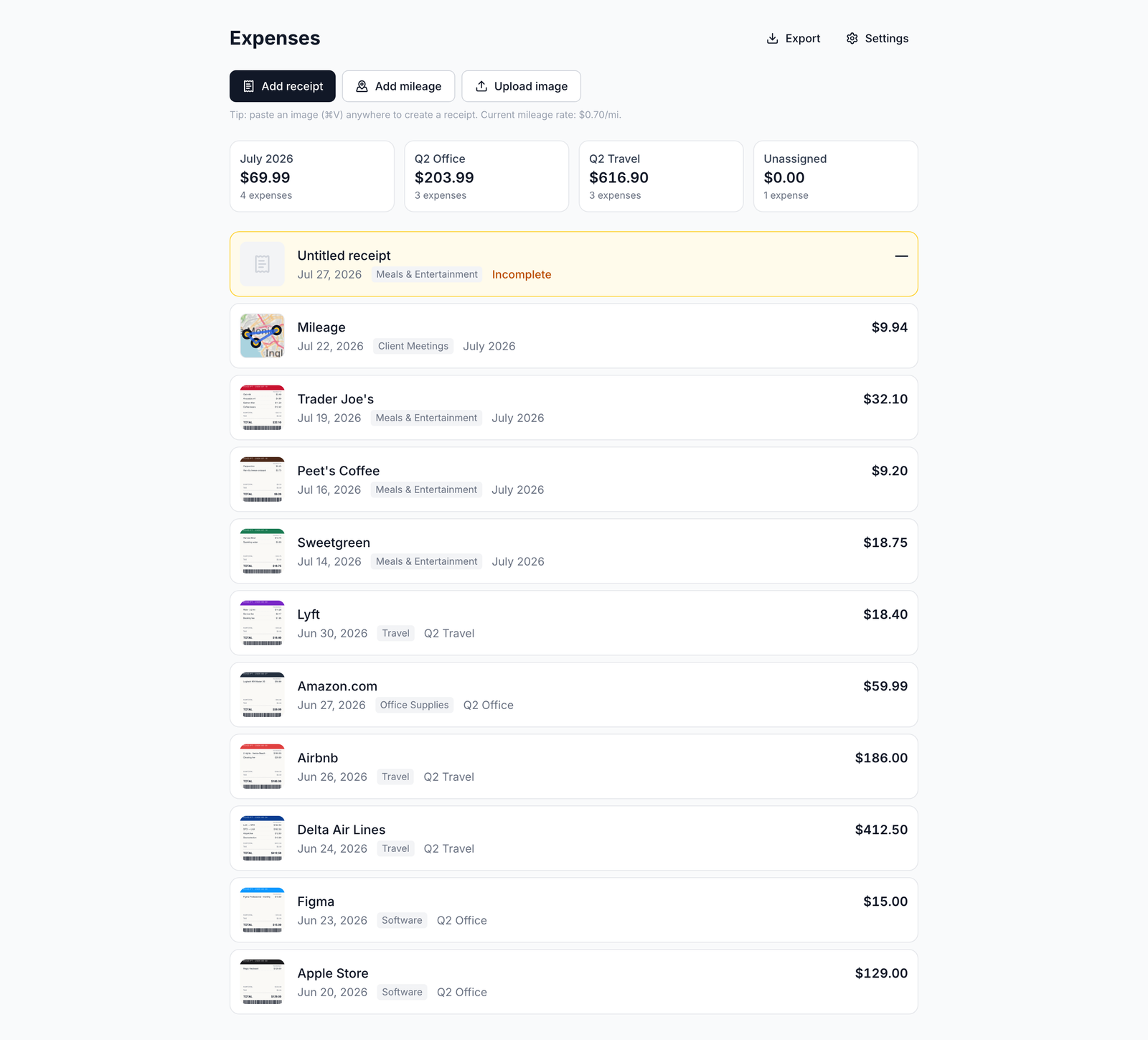
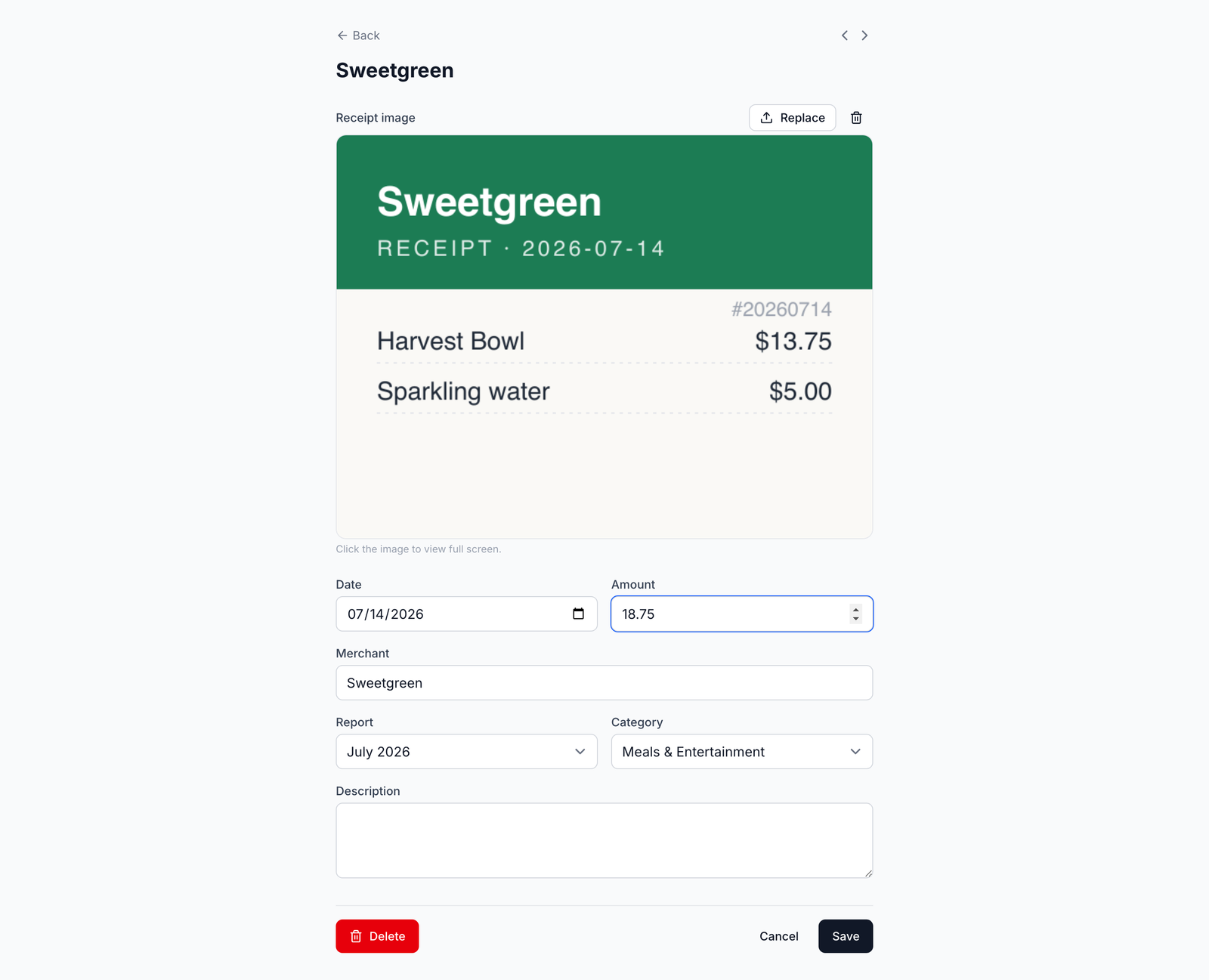
What it does:
- Log receipt expenses (upload/scan the image, specify the date, report, category, merchant, amount) and mileage expenses (map a route on the map, powered by Leaflet + OSRM, using the per year mileage rate)
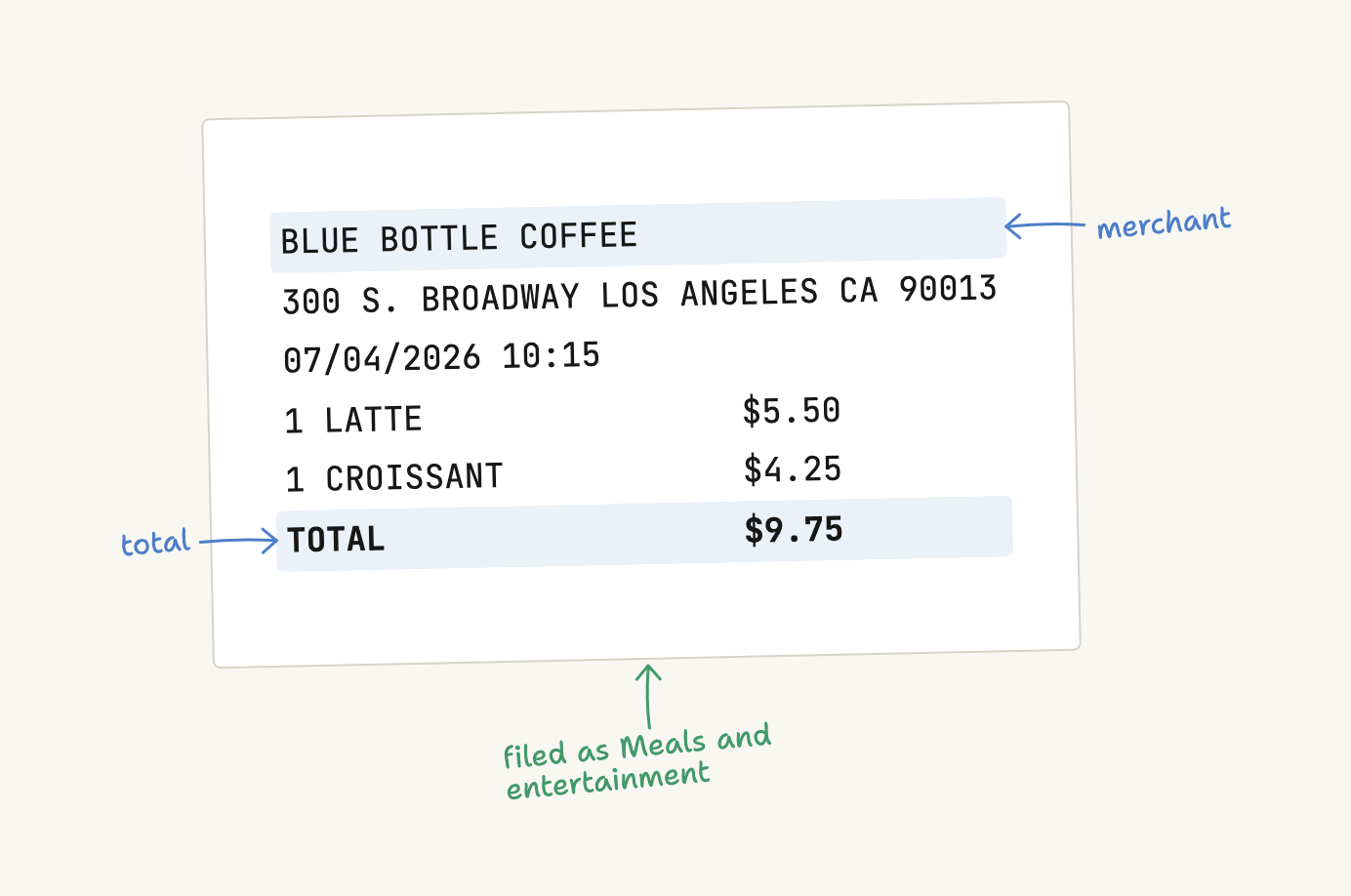
- Forward your receipt to the email associated with your Expense account, and the receipt will be parsed and automatically added (see below)
- Reports and categories to organize your expenses into; every receipt image is
saved and automatically renamed to
YYYY-MM-DD_Report_Name.jpg - Export: as a PDF (one PDF per report with receipt images attached) and a ZIP archive
Stack:
- React Router v8 (framework mode) + Tailwind v4, TypeScript
- Postgres via Prisma: accounts, users, expenses, reports, categories, settings, mileage, image blobs
- Images: Postgres BYTEA (production and development/test), with no external storage
- Deployed on Vercel + Supabase Postgres (git push to main automatically deploys)
Auth and accounts:
- Email/password login (hashed with scrypt), sessions with signed cookies
- Multi-user accounts: everything in one account is shared between users, each account is separate from other ones
- A user can join an account by entering an 8-character invite code (visible in Settings) and can sign up to a new account from scratch; image keys are namespaced by an account so that two accounts won't interfere
Accounts and sharing
Email/password login: email is the login name, stored in lowercase and validated, and unique at signup/join. All expenses, reports, categories, and settings belong to an account; everything in an account is shared between users, and accounts are fully isolated from each other.
- Sign up -> creates an entirely new account (empty).
- Join -> enters an account invite code (Settings -> Account) to join an existing account and share its data.
- The first account/user is bootstrapped from
APP_EMAIL/APP_PASSWORDwhen the database is empty; pre-existing accounts get their login restored fromAPP_EMAILon the first launch (initStore).
SEO and AI discovery
Marketing pages that are available publicly double as the AI search surface: if
an assistant is asked for an expense tracker, the GPTBot / OAI-SearchBot /
ClaudeBot / PerplexityBot crawler quotes them. The copy is written in such a way
that it's easily quotable and includes the app name and the URL and lives only
in one place, the content files under app/data/ (one markdown or YAML file per
page, parsed by app/lib/content.server.ts), which render all the surfaces:
| Page | Purpose |
|---|---|
/ | Landing page (SoftwareApplication JSON-LD) |
/about | Full feature/benefit list (AboutPage JSON-LD) |
/faq | 24 Q&As matching real AI queries (FAQPage JSON-LD) |
/alternatives | Expense vs Expensify comparison (WebPage + FAQPage JSON-LD) |
/llms.txt | The llmstxt.org file, the curated overview AI assistants read |
.md mirrors | Markdown mirrors per the llms.txt convention |
Plumbing to support it: public/robots.txt explicitly permits the AI crawlers
while app routes are blocked, and public/sitemap.xml lists the public pages.
These routes are public (see the root loader in app/root.tsx); everything
else still requires a session.
What it does
- Track receipt expenses (date, merchant, amount, image, category, report) and mileage expenses (date, 2+ addresses, distance, amount, report).
- Mileage routes run Home → stops → Home; distance is calculated using OSRM and the amount based on a per-year mileage rate. Maps is powered by Leaflet + OpenStreetMap; no API keys necessary.
- Incomplete expenses are highlighted to make it easy to complete them.
- Paste (⌘V) or upload an image anywhere to create a new receipt.
- Export each report as a PDF (grouped by category, with all receipt images
attached) and a ZIP archive (CSV + images named
YYYY-MM-DD_REPORT_FILE.ext). - AI assistants (MCP): any MCP client (Claude, OpenAI) can connect by logging in with your account (OAuth; no API keys). See AI assistants below.
AI assistants (MCP)
The app speaks the Model Context Protocol at https://expense.labnotes.org/mcp
(auth: OAuth 2.1 authorization-code + PKCE, where you sign in and authorize
the connection; no API keys). An assistant linked with to your account can:
- Upload a receipt: drag and drop a picture or PDF into chat; it processes the same way as the web app and uses the same OCR and extraction as well as your merchant history for categorization.
- Log a drive: drag and drop stops written in plain English; it geocodes, routs, and prices the route according to the year's IRS rates.
- Answer questions about spending: for example "how much have I spent on flights last quarter?" You'll receive the answer based on your data.
- Create reports: create/close a report, move expenses into it, export a report PDF.
- Reconcile: upload your bank statement as a CSV; it will match all charges without a matching receipt (read-only).
Connect any MCP client:
The client will open your browser; you'll log in and click Allow. You can manage
connections (delete per token, disconnect completely) in Settings -> Agents &
API (MCP). For the full reference, see docs/mcp.md and for
directory listings: docs/mcp-directories.md.
State
The storage is Postgres-only via Prisma 8 (prisma/contract.prisma is
the source of truth; pnpm build:prisma emits the contract artifacts the
runtime reads). DATABASE_URL is required upon launch (otherwise the app will
crash with an error). Image blobs are stored inside Postgres BYTEA
(image_blobs) in production and development; there is no additional storage
service.
| Data | Images |
|---|---|
accounts / users / | Postgres BYTEA (image_blobs, |
expenses / reports / | prod and dev) |
categories / settings / | |
mileage / image_blobs |
All reads/writes go through the modules in app/lib/db/ (Prisma queries scoped
by accountId); image storage is handled by app/lib/images.server.ts (Prisma
imageBlob). Image blobs are kept in images/{accountId}/... pathnames on all
backends. They are namespaced per account, so two accounts can never have a
name conflict. Schema changes: edit prisma/contract.prisma, run
pnpm build:prisma (contract emit), then pnpm db:push locally and on
deploy (see docs/deploy.md).
Environment variables
Load order: real process.env (Vercel dashboard, or inline) wins; a local
.env is used to fill holes. DATABASE_URL is required; .env is gitignored.
dev / test (local .env):
On an empty database the first account + user are bootstrapped from
APP_EMAIL/APP_PASSWORD (fail-closed if missing); thereafter, users are
created via the app's signup/join flow. SESSION_SECRET is always required.
APP_EMAIL/APP_PASSWORD can be omitted from .env after you have at least
one user.
Accounts created before email login (username era) retain their original
username as the stored email until APP_EMAIL is set; initStore then adds
that address to the bootstrap (oldest) user, so the configured credentials
continue to work.
Tests deliberately hardcode expense_test (Postgres with blobs/images), ignore
the local database, and reset the schema from Prisma on every run (pnpm test:db:push in the test setup).
prod (Vercel): set env vars in the project dashboard (Settings →
Environment Variables): DATABASE_URL (Supabase Supavisor pooled URL),
SESSION_SECRET,
and (only until the first user exists) APP_EMAIL / APP_PASSWORD.
Vercel sets them during runtime; .env does not exist.
Receipts by email
Forward an email receipt to your inbox address and it will be parsed and imported automatically: the merchant, amount, and category are extracted, the receipt is uploaded as an image, and the expense date is the date when the email was forwarded. In case something could not be parsed, an explanation email is sent back.
How it determines what to import:
Related MCP Servers
Adoption & maintenance
Factual signals from GitHub, npm, and our automated checks — not a rating.
GitHub stars
6
Stargazers on the source repository.
Last commit
3d ago
Most recent push to the default branch.
Reviews
No reviews yet — be the first to share how this listing worked for you.
Frequently Asked Questions about Expense
AllMCPs Directory Badge
Showcase your server listing on GitHub or your project documentation. Embed this dynamic SVG badge to highlight official listing status and live engagement.
Badge Style:
Live Dynamic SVG Preview
Markdown (GitHub README)
[](https://allmcps.com/mcp/expense)HTML Embed
<a href="https://allmcps.com/mcp/expense"><img src="https://allmcps.com/api/badge/expense?style=directory" alt="Expense on AllMCPs" /></a>