AllMCPs
BrowseBestCategoriesStackCompareToolsGuidesBlog
Log in Submit MCP

Stay in the loop

Get new MCP servers and top picks in your inbox.

AllMCPs

The open directory for discovering and installing Model Context Protocol servers.

Follow AllMCPs on X (opens in a new tab)AllMCPs on GitHub (opens in a new tab)
Launched onTiny Startupstinystartups.com
Explore
  • Browse servers
  • Best MCP servers
  • Categories
  • MCP clients
  • Agent prompts
  • Stack Builder
  • Compare servers
  • Random discovery New
  • Submit a server
  • Pricing & Boost Boost
Learn
  • Guides hub
  • What is MCP?
  • Install guide
  • Build an MCP server
  • Deploy an MCP server
  • Security guide
  • Troubleshooting
  • MCP for SEO & AEO
  • Protocol versioning
  • Blog & updates
Tools
  • All developer tools
  • Config generator
  • Config validator
  • Config auditor
  • MCP playground
  • Token calculator
  • OpenAPI β†’ MCP
  • Badge generator
For agents
  • REST API docs
  • Trust & traffic Live
  • Remote MCP server SSE β†— (opens in a new tab)
  • llms.txt β†— (opens in a new tab)
  • Catalog JSON β†— (opens in a new tab)
Company
  • About
  • Advertise Sponsor
  • Contact
  • X (@AllMCPs) β†— (opens in a new tab)
  • GitHub β†— (opens in a new tab)
  • Terms
  • Privacy
AllMCPs VerifiedAllMCPs VerifiedFeatured on Nick LaunchesFeatured on Nick LaunchesLaunch Llama NewsletterLaunch Llama NewsletterVerified DR - allmcps.comVerified DR - allmcps.comFeatured on SaaSGrowFeatured on SaaSGrowFeatured on Twelve ToolsFeatured on Twelve ToolsFeatured on Saaspa.geFeatured on Saaspa.geFeatured on Findly.toolsFeatured on Findly.toolsFeatured on Startup FameFeatured on Startup FameFeatured on LaunchKiwiFeatured on LaunchKiwiFeatured on ScrollLaunchFeatured on ScrollLaunchFeatured on DailyPingsFeatured on DailyPingsFazier badgeFazier badgeFeatured on NewTool.siteFeatured on NewTool.siteFeatured on saasfame.comFeatured on saasfame.comDR Checker - Domain RatingDR Checker - Domain RatingListed on Turbo0Listed on Turbo0Launched on LaunchBoard - Product Launch PlatformLaunched on LaunchBoard - Product Launch PlatformList on SimilarlabsList on Similarlabshttps://codetrendy.comhttps://codetrendy.comListed on DevTool.ioFeatured on BuildlistFeatured on BuildlistLaunched on Tiny StartupsFeatured on ShowMeBestAIFeatured on ShowMeBestAIFind us on LaunchZoneFind us on LaunchZoneAllMCPs VerifiedAllMCPs VerifiedFeatured on Nick LaunchesFeatured on Nick LaunchesLaunch Llama NewsletterLaunch Llama NewsletterVerified DR - allmcps.comVerified DR - allmcps.comFeatured on SaaSGrowFeatured on SaaSGrowFeatured on Twelve ToolsFeatured on Twelve ToolsFeatured on Saaspa.geFeatured on Saaspa.geFeatured on Findly.toolsFeatured on Findly.toolsFeatured on Startup FameFeatured on Startup FameFeatured on LaunchKiwiFeatured on LaunchKiwiFeatured on ScrollLaunchFeatured on ScrollLaunchFeatured on DailyPingsFeatured on DailyPingsFazier badgeFazier badgeFeatured on NewTool.siteFeatured on NewTool.siteFeatured on saasfame.comFeatured on saasfame.comDR Checker - Domain RatingDR Checker - Domain RatingListed on Turbo0Listed on Turbo0Launched on LaunchBoard - Product Launch PlatformLaunched on LaunchBoard - Product Launch PlatformList on SimilarlabsList on Similarlabshttps://codetrendy.comhttps://codetrendy.comListed on DevTool.ioFeatured on BuildlistFeatured on BuildlistLaunched on Tiny StartupsFeatured on ShowMeBestAIFeatured on ShowMeBestAIFind us on LaunchZoneFind us on LaunchZone
Β© 2026 Jackalope Digital LLC. All rights reserved.
  1. Home
  2. πŸ’» Developer Tools
  3. Evidrift
E
Health: Not checked yetWe have not completed a health check for this listing yet.No health check has run yet.

Evidrift

User RatingsBe the first to rate and review this MCP server! Enrichment pendingWe haven’t run our AI enrichment pass on this listing yet, so the overview, use cases, and FAQ below may be sparse or missing. We work through the catalog over time β€” check back soon.
View Repository

Lock TypeScript dependency assumptions through MCP; revalidate them deterministically in CI.

Quick Install

Automated & IDE Setup

Copy the AI prompt to install this server into Claude Code, Cursor, or another agent β€” or use 1-click editor setup below.

Add to CursorAdd to VS Code
Manual Client & Custom JSON ConfigExpand JSON β–Ύ

Client Config & Setup

Choose your client or environment
Target File:~/Library/Application Support/Claude/claude_desktop_config.json
claude_desktop_config.json
{
  "mcpServers": {
    "evidrift": {
      "command": "npx",
      "args": [
        "-y",
        "evidrift"
      ]
    }
  }
}

πŸ’‘ Paste the JSON block into your client's configuration file under mcpServers, then restart the application.

Install Directory Badge Claim listing AlternativesπŸ’» More in Developer Tools

Documentation Overview

Evidrift β€” replay-verified JSON reductions and API drift evidence

English | 繁體中文

CI npm version Website Indexed on TensorBlock MCP Index bm1016bm-svg/evidrift MCP server

Failures arrive noisy. APIs drift quietly. Evidrift turns both into deterministic evidence.

Evidrift has two deliberately separate workflows:

  • ReproMin repeatedly removes JSON data, replays each candidate against a disposable local HTTP target, and keeps only reductions that still match the selected failure identity.
  • Contract drift records an exact TypeScript call signature or repository JSON value as a content-addressed Receipt, then makes CI recompute it before merge.

Local-first CLI. STDIO MCP server for contract recording only. No account, cloud backend, telemetry, or LLM judge.
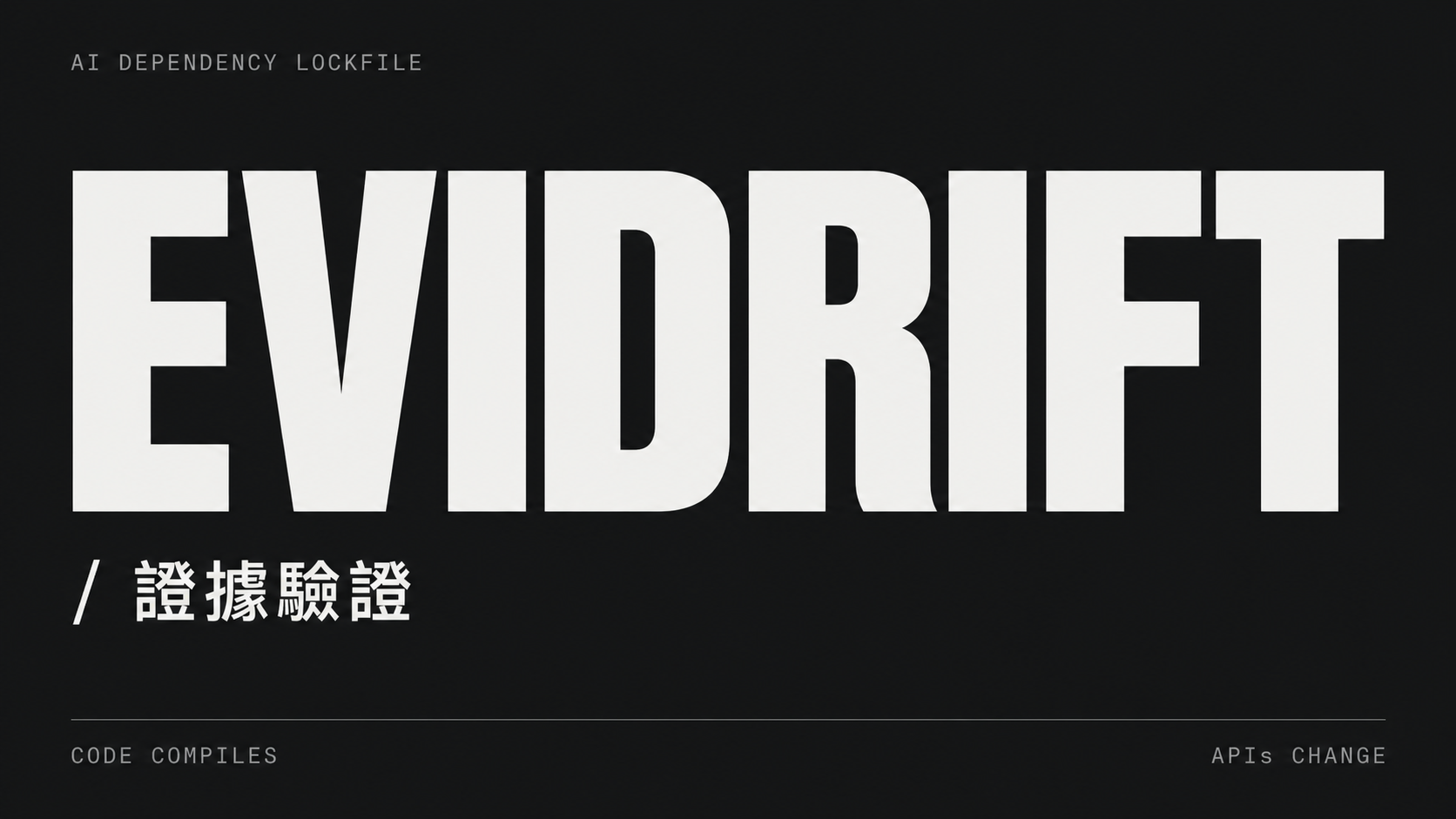
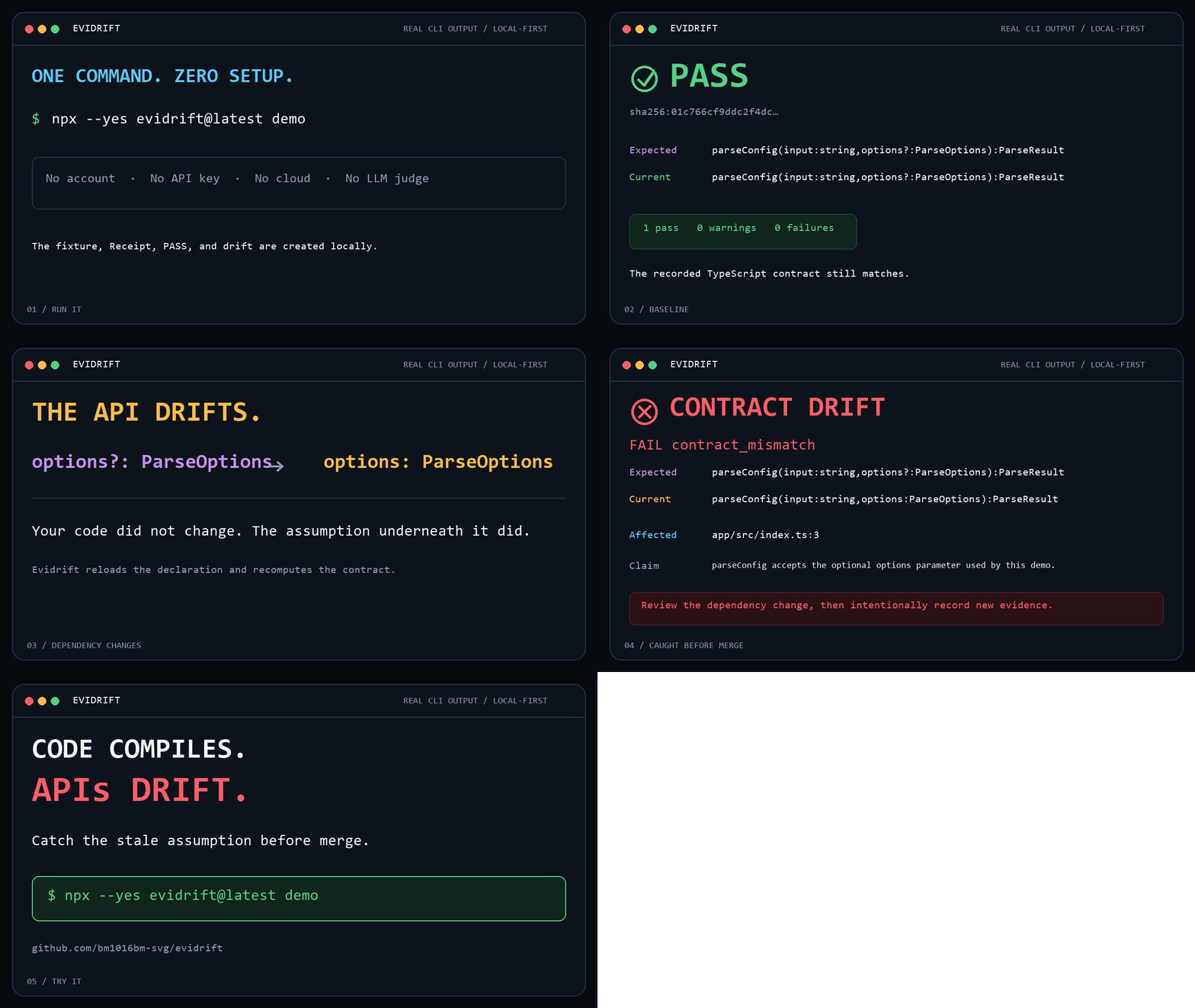
Evidrift β€” AI dependency lockfile

Real Evidrift CLI demo: a dependency contract passes, its TypeScript signature changes, and Evidrift catches the drift before merge

The animation is rendered from a captured CLI transcript. The PASS, changed signatures, affected file, and deterministic FAIL come from an actual local evidrift demo run; only the scene headings are editorial.

Quick Start β€” Minimize a Failing Request

Requires Node.js 22 or newer. The zero-setup demo starts a disposable loopback server, verifies one HTTP failure, minimizes its JSON request, verifies the result again, and shuts the server down:

Terminal
npx --yes evidrift@latest repro-demo

The result is not selected by an LLM. Every accepted reduction is actually replayed and must match both the expected HTTP status and error identity.

For your own local endpoint:

Terminal
npx evidrift minimize \
  --request failing-request.json \
  --status 500 \
  --response-pointer /error/code \
  --response-equals '"INVALID_FILTER"' \
  --output minimal-repro.json \
  --confirm-replay yes

Then replay the content-addressed artifact once:

Terminal
npx evidrift reproduce --artifact minimal-repro.json --confirm-replay yes

See the complete ReproMin fixture, guarantees, and replay safety boundary.

Quick Start β€” See Drift in One Command

Requires Node.js 22 or newer. Nothing to install globally:

Terminal
npx --yes evidrift@latest demo

The command creates a disposable local fixture, records the optional options parameter on parseConfig, checks it successfully, changes the fixture so options is required, then proves that evidrift check catches the mismatch. It runs no downloaded package code.

If that is a failure you want caught before merge, star Evidrift on GitHub.

Real-world Lab β€” React 19 useRef

The synthetic demo is fast; this source-repository lab proves the same workflow against a real, documented ecosystem change. React's official upgrade guide says React 19 makes the first useRef argument required. Evidrift records the no-argument overload from @types/react@18.3.12, upgrades only that type package to @types/react@19.0.1, and reports the missing overload:

bash
git clone https://github.com/bm1016bm-svg/evidrift.git
cd evidrift
npm ci --ignore-scripts
npm run demo:react-19

Both package versions are exact and verified after installation. The lab disables dependency lifecycle scripts, and its final evidrift check must return a deterministic contract mismatch. See the reproduction and complete trust boundary and the official React 19 upgrade guide.

Supported Today

SurfaceDeterministic evidenceStatus
Loopback HTTP JSON failureReplayed reduction matching status plus error identityCLI only
Installed TypeScript dependencySelected call signature, parameter, package version, and declarationSupported
Repository OpenAPI / JSON SchemaCanonical value selected through an RFC 6901 JSON PointerSupported for JSON
Contract CLI and local STDIO MCPThe same record and revalidation coreSupported
Remote replay, cURL import, YAML, remote $refNone; Evidrift refuses these inputs instead of guessingNot supported

Installation β€” Add It to a Repository

Initialize the current repository without a global install, account, API key, or cloud backend:

Terminal
npx --yes evidrift@latest init

To add an idempotent pull-request workflow with file-and-line annotations:

Terminal
npx --yes evidrift@latest init --github-actions

The initializer detects npm, pnpm, or Yarn, adds scripts.evidrift:check, and creates .github/workflows/evidrift.yml. Existing scripts and workflows are reported and preserved instead of being overwritten.

To pin Evidrift for a team or CI workflow:

Terminal
npm install --save-dev evidrift
npx evidrift init

That is the product: make an AI assumption reviewable now, then make CI check the same contract later.

Use It in a Repository

The dependency must already be installed inside the target repository, and the affected code path must name a real file.

bash
cd /path/to/your/repository
evidrift init

evidrift record \
  --project . \
  --package your-package \
  --symbol exportedFunction \
  --parameter options \
  --claim "exportedFunction accepts the options used here." \
  --code src/caller.ts:12

evidrift check

When --code includes a line containing an overloaded call, Evidrift asks TypeScript which overload that call actually resolves to. --overload <number> remains an explicit fallback for incomplete or non-compiling call sites.

Lock one value from a repository-local OpenAPI or JSON Schema document:

bash
evidrift record \
  --json openapi.json \
  --pointer /paths/~1users/get/operationId \
  --claim "The generated client calls listUsers." \
  --code src/client.ts:24

JSON Pointer follows RFC 6901, including ~1 for / and ~0 for ~. Evidrift reads .json files only; it never fetches URLs or resolves remote references.

Coding agents call the same core through evidrift_record and evidrift_record_json_pointer. Minimal Codex, Claude Code, and Cursor setup is included.

How It Works

mermaid
flowchart LR
  Author["Developer"] --> Minimize["Minimize failing JSON"]
  Minimize --> Replay["Replay loopback failure"]
  Replay --> Repro["Content-addressed reproduction"]
  Agent["Coding agent or developer"] --> Record["Record one assumption"]
  Record --> Adapter["TypeScript or JSON adapter"]
  Adapter --> Receipt["Content-addressed Receipt"]
  Receipt --> Review["Git review"]
  Review --> Check["evidrift check in CI"]
  Check --> Result{"Contract still matches?"}
  Result -->|Yes| Pass["PASS"]
  Result -->|Source unavailable| Warn["WARNING"]
  Result -->|No or tampered| Fail["FAIL"]

The CLI and MCP server are thin entry points over the same core. The complete component map, check policy, resource bounds, and trust boundary are documented in Architecture.

The Files

Evidrift writes one lock and one immutable JSON file per Receipt:

text
.evidrift/
  evidence.lock
  receipts/
    <64-character-sha256>.json

There is no .evidrift/receipts.json. evidence.lock contains only content-addressed Receipt IDs:

config.json
{
  "receipts": ["sha256:9bfbb065cff372abe52e8e269123959e9f2ae84cd02230dc751f768ac5e4c274"],
  "schemaVersion": 1
}

Each Receipt stores the claim and affected code plus one deterministic contract: an installed TypeScript symbol signature, or a repository JSON path, pointer, canonical value, and hashes. See the Receipt schema.

Add It to CI

Generate the package script and read-only pull-request workflow:

Terminal
npx evidrift init --github-actions

The generated package script pins the current Evidrift release:

config.json
{
  "scripts": {
    "evidrift:check": "npx --yes evidrift@0.4.1 check"
  }
}

Run the same pinned check locally with npm run evidrift:check.

The generated workflow installs locked repository dependencies with lifecycle scripts disabled, then runs the Marketplace Action. Contract mismatches and integrity failures become PR errors at the affected file and line; source-change and unavailable-evidence results become warnings.

bash
evidrift check --annotations github

With --format json, GitHub workflow commands are written to standard error so standard output remains valid JSON. The complete GitHub Actions setup documents the generated workflow, permissions, package-manager behavior, and manual setup.

Read the full README β†’View source on GitHub β†’

Related MCP Servers

View all in Developer Tools View all alternatives
  • PraisonAI logoPraisonAI

    AI Agents Framework with Self Reflection and MCP support

    πŸ’» Developer Tools1 views
    Compare vs PraisonAI β†’
  • Labelhead Artist Momentum logoLabelhead Artist Momentum

    Trending hip-hop artist momentum scores across four cultural dimensions.

    πŸ’» Developer Tools0 views
    Compare vs Labelhead Artist Momentum β†’
  • Ovecc logoOvecc

    Architecture guardrails for AI-written code: dependency graph, impact, dead code, CI gate

    πŸ’» Developer Tools2 views
    Compare vs Ovecc β†’
  • Awx MCP Server logoAwx MCP Server

    Control AWX/Ansible Tower through natural language - 49 tools for automation

    πŸ’» Developer Tools0 views
    Compare vs Awx MCP Server β†’

Reviews

No reviews yet β€” be the first to share how this listing worked for you.

Frequently Asked Questions about Evidrift

Add the following block to your claude_desktop_config.json under mcpServers: "mcpServers": { "evidrift": { "command": "npx", "args": ["-y", "Evidrift"] } }

AllMCPs Directory Badge

Full Badge Customizer

Showcase your server listing on GitHub or your project documentation. Embed this dynamic SVG badge to highlight official listing status and live engagement.

Badge Style:
Live Dynamic SVG PreviewEvidrift AllMCPs Directory Badge

Markdown (GitHub README)
[![AllMCPs](https://allmcps.com/api/badge/evidrift?style=directory)](https://allmcps.com/mcp/evidrift)
HTML Embed
<a href="https://allmcps.com/mcp/evidrift"><img src="https://allmcps.com/api/badge/evidrift?style=directory" alt="Evidrift on AllMCPs" /></a>

Technical Specs & Signals

CategoryπŸ’»Developer Tools
More technical detailsExpand β–Ύ
TransportSTDIO
RuntimeNode.js
Last updatedSep 7, 2026
Views0
Unique ViewsTotal visits recorded for this listing page on AllMCPs.
Installs0
Installs & Copy ActionsTotal times users copied install commands or configuration snippets for this server.
27Quality signal: Emerging Β· 27/100How this signal is calculated β–Ύ
Server availabilityNot measured

Not scored for repo-hosted servers β€” we can't reach the running server, only its GitHub page. Hosted MCP endpoints are health-checked live.

Verified ownership8/20
Documentation & tools11/30
Adoption & activity1/15
Community engagement0/10

A guidance signal from public completeness & health data β€” not a user rating. New listings start lower and rise as they add docs, get verified, and grow adoption. Signals we can't observe for a listing are skipped, not counted against it.

β˜… FeaturedMoxie Docs MCP logo

Moxie Docs MCP

MCP & Agent Skills for Automated Documentation, and codebase conventions + context

Explore Server β†’

Own this project?

This directory is pre-filled from public sources. Claim via GitHub README, site badge, or DNS TXT to unlock edit access and the Official badge and attach your website β€” proof is checked automatically, then reviewed by our team.

Free dofollow backlink: add your website and place the AllMCPs badge on it β€” no claim needed. We detect it automatically and keep it verified as long as the badge stays live.

Claim & get free dofollow

Share & Embed

Add our SVG badge (dark/light directory styles) or embeddable widget to your site.

Explore more

More in πŸ’» Developer Tools β†’Best MCP servers for Developers β†’Alternatives to Evidrift β†’Install in Claude DesktopInstall in CursorInstall in VS Code


