Interactive Entra ID identity relationship visualization — the 2003 polyarchy, live as an MCP App
Quick Install
Automated & IDE SetupCopy the AI prompt to install this server into Claude Code, Cursor, or another agent — or use 1-click editor setup below.
Not yet automatically verified
We haven't yet run this listing's install command through our automated sandbox check. This isn't a red flag — we're steadily working through the catalog.
Manual Client & Custom JSON ConfigExpand JSON ▾
Client Config & Setup
Choose your client or environment
Target File:
💡 Paste the JSON block into your client's configuration file under mcpServers, then restart the application.
Documentation Overview
EntraPulse Polyarchy
An interactive Microsoft Entra ID identity relationship visualization, served as an MCP App.



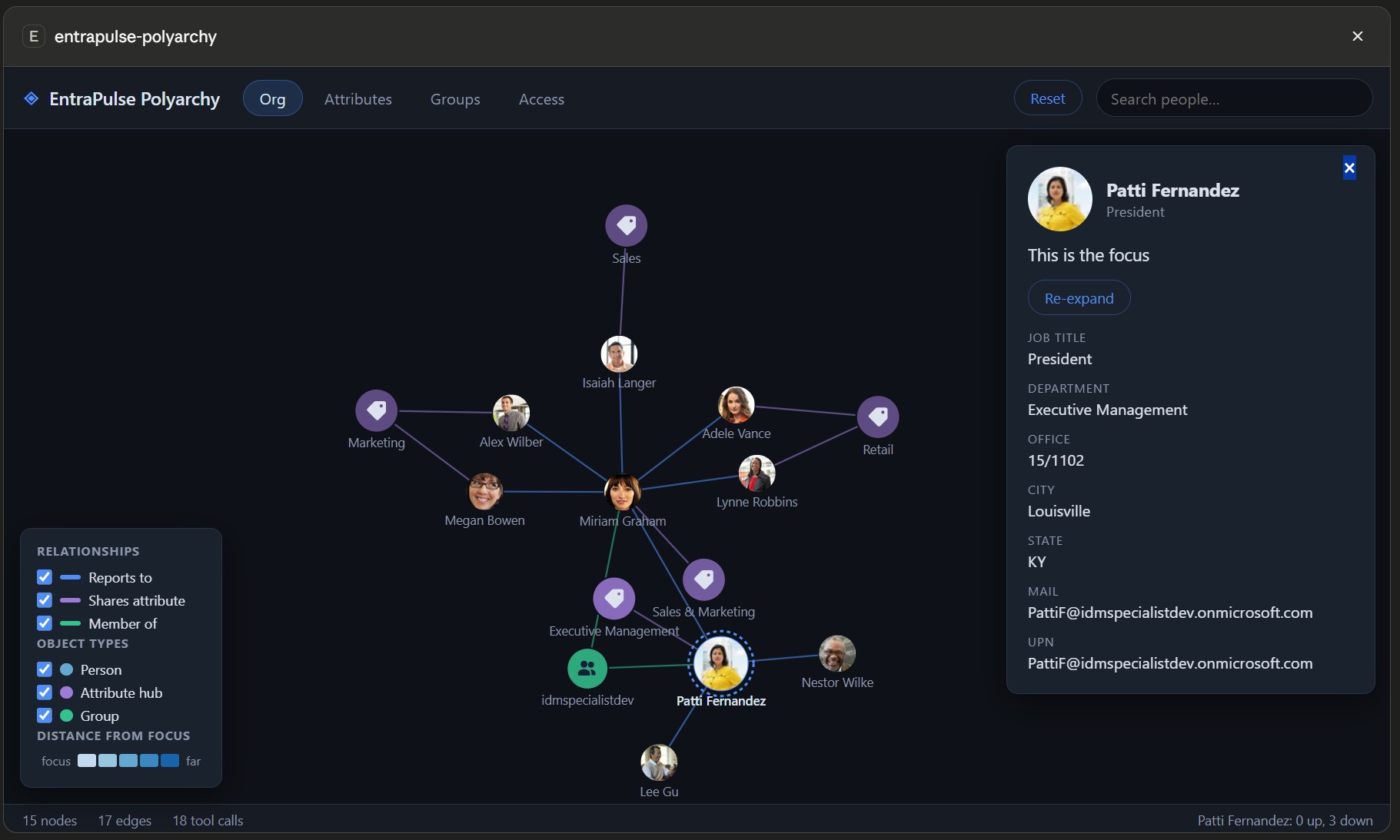
In 2003 Microsoft demoed PolyArchy Server — a web visual over identity data showing intersecting relationship hierarchies, where clicking a datapoint flipped the whole view to that context. It never shipped. This is it, finally real: a live D3 force-graph over your Entra ID tenant that renders inside your MCP client (Claude Desktop, VS Code Copilot, M365 Copilot, ChatGPT, Cursor, Goose, Postman — anything that supports the MCP Apps extension).
Ask your assistant "show me the identity polyarchy around Rebecca" and explore:
- Org — manager chains and direct reports
- Groups — memberships, and group fan-out to members
- Attributes — pivot hubs linking everyone who shares a value: pick from the
common defaults (department, office, city…) or type ahead into the full Graph
attribute catalog, including nested paths like
onPremisesExtensionAttributes/extensionAttribute9 - Access — directory roles and app assignments
Prefer data over pictures? polyarchy-report returns the same relationships as
structured JSON — manager chain, group memberships with type and assigned/dynamic,
roles, app assignments — for the assistant to reason over, no UI required.
Exploring
- Click a node to open its profile panel (photo, attributes, manager chain link).
- Double-click any node — or use the panel's Set as focus button — to flip the whole context to it: hop distances re-anchor, the view glides to center, and its relationships load. The original PolyArchy interaction.
- Reset (toolbar) clears the canvas for a fresh lineage without losing anything: everything fetched this session stays cached, so re-exploring the same people, groups or cohorts rebuilds instantly with zero extra Graph calls. The status bar shows when a neighbourhood was served from cache.
- Expand / Minimise (toolbar) toggles the app between fullscreen and its inline card. The automatic fullscreen claim happens only when a polyarchy opens, so this is the way back to full canvas after minimising in the host. Hidden on hosts without fullscreen support.
- Legend checkboxes filter relationship kinds and object types in place.
The graph accumulates across dimensions: one intersecting polyarchy, not four separate charts. People are shaded by degrees of separation from the focus (blue ramp); groups, roles, apps and attribute hubs wear the colour of the relationship that connects them — matching their edges — faded with distance so the hop cue survives. Light and dark theme follow your MCP client.
Install (Claude Desktop example)
That's it for most tenants — no app registration needed. Be aware of what that
means: with no configuration the server signs you in through Microsoft's first-party
"Microsoft Graph Command Line Tools" public client
(client ID 14d82eec-204b-4c2f-b7e8-296a70dab67e) — the same well-known app the Graph
PowerShell/CLI tooling uses. It exists in every tenant and already has broad delegated
consent in many. Hardened environments commonly block or restrict this app (Conditional
Access, consent policies, or app management restrictions) — if that's your tenant, use
your own app registration instead;
everything else works identically.
Sign-in happens on the first tool call — and then never again:
- Tokens persist in your OS keychain (DPAPI/Keychain/libsecret).
- The signed-in account is remembered in
~/.entrapulse-polyarchy/auth-record.json, so freshly spawned server processes sign in silently — MCP clients respawn stdio servers freely, and none of those spawns re-prompt. - Token acquisition is single-flighted and cached in-process: a focus flip fires a dozen-plus concurrent Graph calls (expansion + photos), and they all share one token request instead of racing the MSAL cache.
- Every auth event is mirrored to
~/.entrapulse-polyarchy/auth.logwith timings (silent acquisitions are milliseconds; anything interactive is obvious) — the first place to look if you ever see a prompt you didn't expect.
Auth modes
| Mode | Configure | Notes |
|---|---|---|
| Interactive (default) | nothing — or TENANT_ID + CLIENT_ID to use your own app | System browser sign-in (random loopback port — register http://localhost portless); delegated permissions; /me is the default focus |
| Device code | USE_DEVICE_CODE=true | Headless/SSH — code printed to the server log |
| App-only | TENANT_ID + CLIENT_ID + CLIENT_SECRET | Application permissions; no /me, so always pass a person to visualize-identity / polyarchy-report |
| Client-provided token | USE_CLIENT_TOKEN=true (+ optional ACCESS_TOKEN) | The MCP client supplies/refreshes a Graph bearer token via the set-access-token tool — seamless SSO for hosts like EntraPulse that already hold one |
Other env vars: POLYARCHY_DISABLE_TOKEN_CACHE=true disables OS-keychain token
persistence; POLYARCHY_AUTH_RECORD=<path> relocates the persisted sign-in record
(delete the file to force a fresh sign-in).
Permissions (delegated)
| Scope | Used for |
|---|---|
User.Read.All | org hierarchy, search, attribute pivots |
Group.Read.All | group memberships and members |
RoleManagement.Read.Directory | directory roles |
Application.Read.All | app assignments |
The default first-party client typically has broad delegated consent already. Missing
consent shows up as a clear 403 message naming the scope — ask your assistant to run
get-auth-status to see exactly which app registration, scopes and account your token
contains.
Scopes and directory roles are separate gates: the token must always carry the scopes above (an admin role can't substitute for them), while on the user side plain member default permissions cover everything this app reads — no admin role required. Only tenants that restrict default user read access (or guest users) need a role that includes directory read, for which Directory Readers is the least-privileged fit.
Hardened tenants: bring your own app registration
If the Graph Command Line Tools app is blocked, unconsented, or you simply want an app you control (own Conditional Access targeting, own consent trail), point the server at your own registration — supported in both interactive and device-code modes:
- Entra admin center → App registrations → New registration — single tenant is fine.
- Authentication → Add a platform → Mobile and desktop applications — add redirect
URI
http://localhost(no port!), and enable Allow public client flows if you want device-code sign-in. The port matters: interactive sign-in listens on a random loopback port each time (e.g.http://localhost:51106), and Entra only ignores the port when the registered redirect is the portlesshttp://localhost. Registering a fixed port like:3000, or reusing an app that only has web redirects (Graph Explorer, for instance), fails with a reply-URL mismatch. - API permissions → Microsoft Graph → Delegated — add the four scopes from the table above, then Grant admin consent.
- Configure the server with your IDs:
Setting TENANT_ID alone (without CLIENT_ID) is also useful on its own: it pins
sign-in to your tenant instead of the common endpoint, which multi-tenant users and
guest accounts often want regardless of which client app is used.
Attribute pivots
The Attributes view groups people around shared values. The toolbar picker offers the
everyday pivots (Department, Job title, Company, Office, City, State, Employee type),
plus Other attributes… which opens a type-ahead over the full Graph user-attribute
catalog — all fifteen onPremisesExtensionAttributes, employeeOrgData/costCenter,
onPremisesSamAccountName, employeeId and ~50 more. Matching is forgiving (ext9
finds extensionAttribute9), free text is accepted for anything uncatalogued, and
attributes you pick join the dropdown for the rest of the session. Nested paths are
resolved server-side: the needed property is $selected on demand and cohort filters
use Graph advanced queries, with attribute paths validated before they reach an OData
filter.
Tools
Related MCP Servers
Reviews
No reviews yet — be the first to share how this listing worked for you.
Frequently Asked Questions about Entrapulse Polyarchy
AllMCPs Directory Badge
Showcase your server listing on GitHub or your project documentation. Embed this dynamic SVG badge to highlight official listing status and live engagement.
Badge Style:
Live Dynamic SVG Preview
Markdown (GitHub README)
[](https://allmcps.com/mcp/entrapulse-polyarchy)HTML Embed
<a href="https://allmcps.com/mcp/entrapulse-polyarchy"><img src="https://allmcps.com/api/badge/entrapulse-polyarchy?style=directory" alt="Entrapulse Polyarchy on AllMCPs" /></a>