Engram README
The full upstream README, mirrored here for reference. Install config, tool schemas, adoption signals, and an original overview live on the Engram listing page.
Engram

An engram is the hypothetical physical trace of memory in neural tissue — the biochemical change that encodes what we've learned.
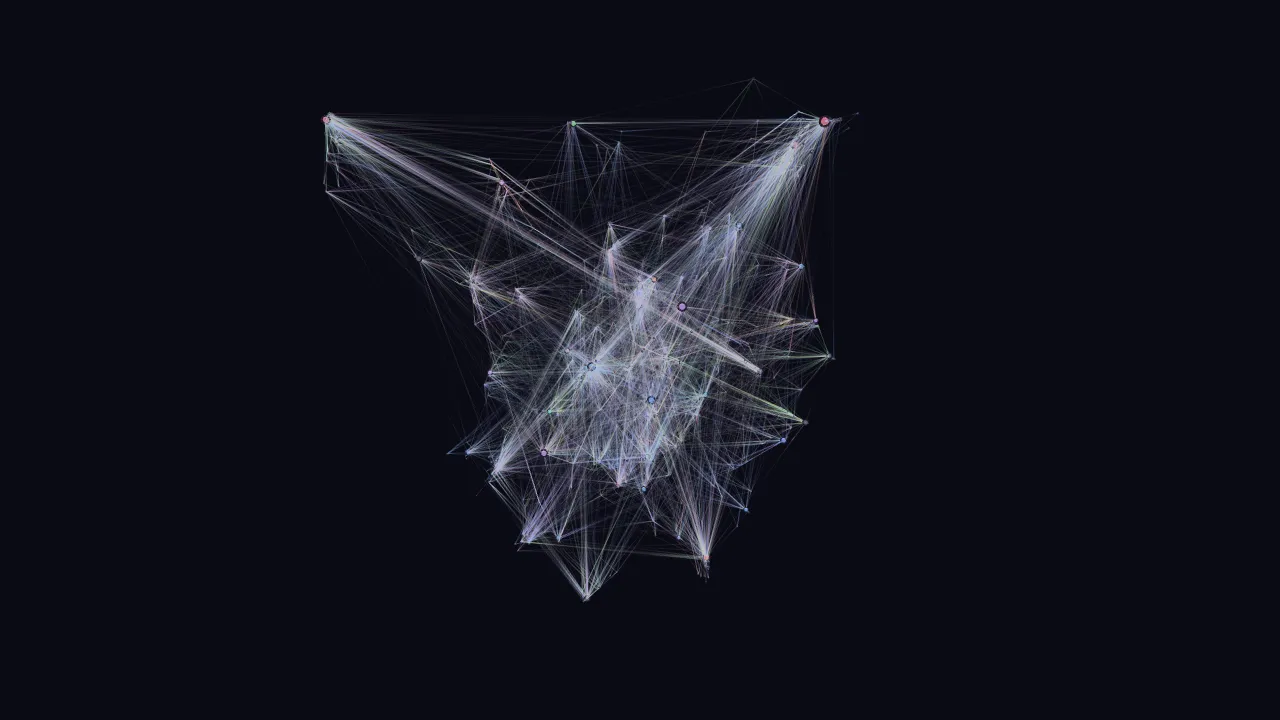
Local-first cognitive memory system that transforms raw LLM conversation history into structured, consolidated knowledge. Unlike traditional conversation search (which treats sessions as documents to retrieve), Engram mimics human memory architecture: episodic memories are captured, consolidated into semantic knowledge during "dream state" processing, and emergent connections surface through graph analysis — much like how a Zettelkasten's backlinks reveal Maps of Content that no individual note anticipated.
Designed as an MCP server for Claude Code and other LLM agents, with CLI and web visualization interfaces.
Install & first run
Prerequisites
- Node.js 22 or newer (
node --version) - macOS, Linux, or Windows for the CLI, MCP server, and web visualizer. Scheduled background consolidation ships an installer for each (launchd, systemd user timer, Task Scheduler); see the platform matrix below.
- Claude Code if you want
engram syncto ingest your conversation history from~/.claude/projects - At least one LLM provider for extraction and dream consolidation (see Configuration). Search,
remember, and the web visualizer work without one.
Quick start — three commands
engram setup walks a bare install to running and ends by telling you which LLM tier did
the extraction (extraction smoke: tier=ollama memories=3). Every step prints what it did and
the manual command it stands for, so nothing is hidden. It installs all three services —
the MCP HTTP daemon, the nightly dream timer and the web visualizer (port 3001, loopback) — by
default (decision #62); --no-daemons or --daemons=mcp,dream narrows that, --host claude
narrows host registration, --no-sync / --sync skip or force indexing, --no-smoke skips the
extraction, --yes answers every question for scripts (the Linux loginctl enable-linger
prompt is never implied), --json prints the result. With no LLM provider configured the
dream timer is still installed and setup ends with [warn] dream timer installed but no LLM tier is reachable … naming the variables to set — exit 0; only a required doctor failure (or a
failed init) exits 1. Later, engram doctor --fix repairs whatever is red — the service env
file, a model cache inside node_modules, a missing Ollama model (asked first), a stopped MCP
daemon, an unregistered host — printing the manual equivalent of each; a second run says
nothing to fix. See CLI and docs/api-reference.md.
The same, by hand
engram mcp install <host> edits the host's own config for you — ~/.claude.json
(--project: .mcp.json), ~/.codex/config.toml, ~/.cursor/mcp.json, or deploys the
Hermes plugin — atomically, with the previous content kept in <file>.bak, never touching
other servers, and re-running is a no-op. It prefers the HTTP daemon
(http://127.0.0.1:9907/mcp) when GET /health answers and falls back to stdio
(node …/dist/interfaces/cli/index.js mcp, which bridges to the daemon itself once one runs),
printing which and why; --transport http|stdio overrides, --dry-run shows the path and diff.
A daemon token is referenced as an environment variable (${ENGRAM_MCP_TOKEN} /
bearer_token_env_var / ${env:ENGRAM_MCP_TOKEN}), never written; engram mcp status reports
every host, whether it points at this install, whether its daemon answers and whether the
variable resolves. See Registering hosts below.
From source
Either way, continue with engram setup — or step by step:
engram doctor ends with an extraction smoke line: one real extraction over your most recent
conversation (or a bundled fixture when nothing is indexed yet) under a 60 s budget with a
capped input, reporting tier=<ollama|openai|openrouter|anthropic> memories=N or every tier's
reason when none answers. Memories it extracts from a real conversation are written like any
other, stamped source=smoke (find them with engram memories list, remove them with forget);
the fixture is never written. --no-smoke skips it; --strict exits 1 when any line is not
[ok] (CI).
First run downloads models once.
engram init(or the first search) pulls several hundred MB of model weights into~/.local/share/engram/models(or$ENGRAM_MODEL_CACHE_DIR/$HF_HOME/hub), where they survive reinstalls and upgrades; see Model cache. SetENGRAM_RERANK_ENABLED=falseto skip the reranker model.
Install as a Claude Code plugin (recommended)
No clone, no absolute paths. In Claude Code:
This repo is its own marketplace (.claude-plugin/marketplace.json); the plugin
(.claude-plugin/plugin.json) runs the published npm package as a stdio MCP server —
npx -y @devinmlowe/engram@<version> mcp, version pinned to the release — and adds the
/engram:recall, /engram:remember, /engram:explore-graph, /engram:reflect and
/engram:engram-connect commands (bundled from commands/; their tools are
mcp__plugin_engram_engram__<tool>). /mcp should list engram with 16 tools; the first
recall downloads the embedding model once (see the note above). The plugin updates through
the marketplace (/plugin update engram@engram after a release); engram update keeps
handling the CLI, daemons and the Hermes plugin.
The very first start is slow. The first
npxrun installs the package and its prebuilt native modules into the npm cache — once per pinned version, then it is a cache hit. If Claude Code reports the server timed out during that install, raise its startup timeout (milliseconds):MCP_TIMEOUT=120000 claude. Two warm paths:npm install -g @devinmlowe/engramfirst, so the package (andengram doctor/engram init) is already on the machine; or run the HTTP daemon (scripts/install-mcp-daemon.sh install, below) —engram mcpthen bridges to it and the host process never opens the database or loads the model (see Transports).
Registering hosts (engram mcp install)
Decisions: HTTP when the daemon answers /health, else stdio (#51); the token is referenced by
environment variable and never written unless you pass --inline-token (#52). With the Claude
Code plugin installed, mcp install claude skips the user-scope entry (it would register the
server twice) unless --force; mcp status lists the plugin as a registered Claude host. A
GUI-launched host does not inherit a fish/zsh login shell, so when the daemon requires a token
mcp status prints the platform fix (launchctl setenv ENGRAM_MCP_TOKEN … on macOS,
~/.config/environment.d/ on Linux, setx on Windows). No host process is restarted, and the
command needs no network beyond the loopback probe.
Manual configuration (if you would rather edit the file yourself)
Add the server to your Claude Code MCP config (~/.claude.json, or a project-level .mcp.json).
From npm:
or, for a source checkout, point at the compiled server with an absolute path:
The .mcp.json shipped in this repo does the same thing with a repo-relative path and is picked
up automatically when you open the engram checkout itself in Claude Code (it is for developing
engram; the plugin does not use it).
Optional: background consolidation and visualization
On Linux the same scripts detect uname -s and install systemd user units instead
(no root; loginctl enable-linger $USER if you want them to run while logged out):
macOS/Linux: MCP HTTP daemon lifecycle
scripts/install-mcp-daemon.sh has the same six verbs as its Windows sibling
(install, uninstall, start, stop, restart, status). It renders
launchd/com.engram.mcp.plist (macOS) or systemd/engram-mcp.service (Linux)
from the checkout it runs in, builds dist/, and waits for GET /health before
reporting success. The service runs scripts/run-mcp-daemon.sh, which sources
~/.config/engram/env (created on install, mode 600) so ENGRAM_DATA_DIR,
ENGRAM_MODEL_CACHE_DIR, ENGRAM_HTTP_WORKERS and ENGRAM_MCP_PORT can change
without re-rendering anything. The data directory the installer resolved is
also rendered into the service, so the daemon and the CLI never open different
databases; status prints it and warns when a second engram.db exists at the
legacy path. install stops an unsupervised process holding the port and
retires a hand-written ai.hermes.engram-mcp LaunchAgent from the 0.1.x docs
(the file is renamed *.retired-by-engram, not deleted). engram doctor
reports the same /health probe as its mcp daemon check.
On Windows, use the built-in per-user Task Scheduler adapters:
Windows: MCP HTTP daemon lifecycle
scripts/install-mcp-daemon.ps1 registers a per-user Task Scheduler task,
\Engram\MCP, that starts at logon and runs scripts/run-mcp-daemon.ps1 with
absolute paths to node.exe and the compiled dist\interfaces\mcp\server.js.
The server binds 127.0.0.1:9907 by design — it has no authentication and
never binds any other address, so the task never exposes the MCP port to the
network.
Six verbs, same shape as the other installers: install, uninstall,
start, stop, restart, status. status reports both the Task
Scheduler state and a live GET /health check against the daemon.
Process hygiene: the runner writes its own pid and the child node.exe pid
to files under the data directory; stop and uninstall tree-kill those
pids with taskkill.exe and then sweep for any leftover node.exe or
run-mcp-daemon.ps1 process by command line, so a stale or missing pid file
can never leave an orphan process behind.
Restart-on-failure is bounded at two levels: the runner gives up and exits 1 after 5 restarts within a 600-second window, and Task Scheduler itself retries a failed task 3 times at 1-minute intervals before stopping — so a broken install cannot restart-loop forever. A clean server exit (code 0) is treated as a deliberate stop and is not restarted. The task inherits your user-scope environment variables (API keys included); nothing is copied into the task definition or committed to the repo.
Reboot smoke-test procedure (copy-paste each block in order):
- Install and confirm it's healthy:
- Restart Windows and log back in — do not start anything by hand.
- Confirm the task came back on its own:
- Confirm the MCP handshake works — initialize, then the
initializednotification, thentools/list, threading theMcp-Session-Idresponse header through each call: - Confirm Codex/Claude Code can
recallandrememberthrough this same server without you starting Node by hand. - Stop it and confirm no MCP process survives:
- Uninstall and confirm only the visualizer task remains:
All visualizer paths run the same compiled Node server on loopback at http://127.0.0.1:3001
and write logs under the engram data directory; all dream paths run
node dist/interfaces/cli/index.js dream and log to <data dir>/logs/dream.log.
The installers render launchd/*.plist (macOS) or systemd/engram-{mcp,dream}.service (Linux)
from the checkout you run them in, whatever its
location, and use whichever node they find (fnm, Homebrew, nvm, or system). The dream daemon
takes its API keys from ~/.config/engram/env (mode 600, created by the installer with a
commented template; $XDG_CONFIG_HOME is honoured) — the plist itself never contains secrets.
If you installed before that file existed, move the keys there and re-run install; see
scripts/README.md for the steps.
Every script checks its external tools up front and names what to install. The visualizer
installer probes its port with node (or curl against /api/health), using lsof only as
an optional fast path when it is installed; the Claude Code post-compaction hook
(scripts/compact-dream.sh) and the Hermes heartbeat digest (scripts/commitments-surface.sh)
need only node; the hook honours ENGRAM_DATA_DIR / ENGRAM_LOGS_DIR. No script needs jq
or python3.
Supported platforms
| Component | macOS | Linux | Windows |
|---|---|---|---|
CLI (engram init/sync/search/dream) | yes | yes | yes |
| MCP server (stdio + HTTP) | yes | yes | yes |
Web visualizer (node dist/interfaces/web/server.js) | yes | yes | yes |
| Visualizer keep-alive service | launchd (scripts/install-visualizer.sh) | run under your own supervisor (systemd user unit, pm2) | Task Scheduler (scripts/install-visualizer.ps1) |
| Nightly dream daemon | launchd (scripts/install-daemon.sh) | systemd user timer engram-dream.timer (scripts/install-daemon.sh) | Task Scheduler (scripts/install-daemon.ps1) |
MCP HTTP daemon keep-alive (--http --port 9907) | run under your own supervisor (launchd agent, KeepAlive) | run under your own supervisor (systemd user unit) | Task Scheduler (scripts/install-mcp-daemon.ps1) |
Claude Code hooks (scripts/*.sh) | yes | yes (bash, node) | WSL or Git Bash only |
Supported platform/arch set
Engram depends on three native/prebuilt chains: better-sqlite3, sqlite-vec (alpha; ships
platform packages only), and onnxruntime-node (pulled in by @xenova/transformers). Engram
works where all three have prebuilt binaries for your process.platform, process.arch and libc
(glibc vs musl on Linux); since better-sqlite3 13 every chain is N-API, so the Node major no
longer matters as long as it is ≥ 22.
The table is generated from scripts/preflight.cjs, the same table the preflight and engram doctor consult, and a test fails when the two drift:
| Target | Machines | better-sqlite3 | sqlite-vec | onnxruntime-node | Engram |
|---|---|---|---|---|---|
darwin-arm64 | Apple silicon Macs | prebuilt | prebuilt | prebuilt | supported (CI: macos-latest) |
darwin-x64 | Intel Macs | prebuilt | prebuilt | prebuilt | supported |
linux-arm64 | 64-bit ARM Linux (glibc): Graviton, Raspberry Pi OS 64-bit, Apple-silicon VMs | prebuilt | prebuilt | prebuilt | supported (CI: ubuntu-24.04-arm) |
linux-x64 | x86-64 Linux (glibc: Debian, Ubuntu, Fedora, …) | prebuilt | prebuilt | prebuilt | supported (CI: ubuntu-latest) |
linuxmusl-arm64 | 64-bit ARM Alpine / musl | prebuilt | — | — | not supported |
linuxmusl-x64 | x86-64 Alpine / musl (node:*-alpine images) | prebuilt | — | — | not supported (CI: node:22-alpine container asserts this verdict) |
win32-arm64 | Windows on ARM (Snapdragon, Apple-silicon VMs running Windows 11 ARM) | prebuilt | — | prebuilt | not supported (CI: windows-11-arm asserts this verdict) |
win32-x64 | x86-64 Windows 10/11 | prebuilt | prebuilt | prebuilt | supported (CI: windows-latest, experimental) |
| any other target | FreeBSD, 32-bit x86, … | compiles | — | — | not supported |
Every native dependency (better-sqlite3, sqlite-vec, onnxruntime-node) is N-API / Node-version independent: the same binaries serve every Node major ≥ 22, odd (non-LTS) majors included. Generated from scripts/preflight.cjs by node scripts/supported-platforms.cjs --write; --check runs in the test suite.
Three things tell you where you stand:
npx @devinmlowe/engram preflight(orengram preflightonce installed,node scripts/preflight.cjsin a checkout) prints one line per native module —[ok] prebuilt,[warn] compiled locally/will compile (needs python3 + C++ toolchain),[FAIL] unsupported,[--] unknown (<reason>)— followed by the exact fix for your OS (xcode-select --install,sudo apt install build-essential python3,sudo dnf install gcc-c++ make python3,apk add build-base python3, Visual Studio Build Tools with the "Desktop development with C++" workload). The verdict comes from the static target table (every native module is N-API, so the Node major never matters); after an install it also confirms the shipped binary is really innode_modules(abuild/Release/better_sqlite3.nodein place of the bundledprebuilds/<target>.nodemeans node-gyp compiled it locally).--jsonprints the structured result;--strictexits 1 on any[FAIL];--expect prebuilt(or--expect better-sqlite3=prebuilt,sqlite-vec=unsupported) exits 1 unless the verdicts match, which is how CI fails a dependency bump that drops a prebuild.npm_config_platform/npm_config_arch/npm_config_target_arch/npm_config_libcoverride the target.npm installruns that preflight as a non-fatal postinstall hook (ENGRAM_SKIP_PREFLIGHT=1silences it). It never fails the install:package.jsondeliberately declares no hardos/cpufields, which would refuse to install for anyone with a working toolchain on an unlisted target.engram doctorruns the full post-build checks; itsbetter-sqlite3andsqlite-veclines end withprebuilt — …orcompiled locally — …, which tells an upgrade that silently fell back to node-gyp apart from one that used the prebuild (an offline or proxied install, ornpm_config_build_from_source, is the usual cause).
Caveats: Windows on ARM, armv7 and Alpine/musl. sqlite-vec publishes no binary for
win32-arm64 or linux-arm (armv7), and its Linux builds — like onnxruntime-node's — are
glibc-only (they need ld-linux and do not load on musl even with gcompat). better-sqlite3
itself ships prebuilds for win32-arm64 and musl (13.x dropped its 32-bit linux-arm ones, so
armv7 compiles it from source), so npm install succeeds there and engram init then fails on
the sqlite-vec load; the preflight reports [FAIL] sqlite-vec: unsupported up front. On Windows
on ARM the practical workaround is to install the x64 Node.js build: Windows 11 runs it under
emulation and the win32-x64 prebuilts load (slower, not covered by CI). On armv7 boards, use a
64-bit OS image (linux-arm64). On Alpine, use a glibc image (node:22-bookworm-slim).
npm 10 still runs node-gyp for better-sqlite3 13. The package bundles its binaries, but the
lockfile does not carry its gypfile: false, so npm 10 (Node 22's bundled npm) runs the implicit
node-gyp rebuild at install anyway. binding.gyp compiles nothing when a bundled prebuild
matches, yet node-gyp configure still needs Python 3 and the Node headers — downloaded from
nodejs.org once per Node version (cached under ~/.cache/node-gyp), so an offline or proxied
install can fail on a prebuilt target. On Windows this makes Node 22 installs need a
node-gyp-recognised Visual Studio (2019/2022 Build Tools with the C++ workload) plus Python 3,
because node-gyp configure fails with could not find a version of Visual Studio 2017 or newer
before it ever reads binding.gyp — CI's windows-latest, node 22 job shows exactly that. npm 11
(Node 24, or npm install -g npm@11 on Node 22) skips the script instead, so that is the simplest
workaround. The preflight reports [ok] better-sqlite3: prebuilt — prebuilds/<target>.node is bundled in the package either way.
Toolchain needed elsewhere. On a target better-sqlite3 bundles no prebuild for (a platform
not in the table, such as armv7 or FreeBSD), npm install compiles it from source with node-gyp,
which needs a C++ toolchain and Python 3:
- Windows: Visual Studio 2022 Build Tools with the "Desktop development with C++" workload
(MSVC compiler + Windows SDK) and Python 3. node-gyp finds them automatically; if it picks the
wrong Visual Studio run
npm config set msvs_version 2022. - Linux:
gcc/g++,make, andpython3— Debian/Ubuntusudo apt install build-essential python3; Fedorasudo dnf install gcc-c++ make python3; Alpineapk add build-base python3. - macOS: Xcode Command Line Tools (
xcode-select --install).
CI runs lint and the full test suite on Node 22 and 24 for x64 Linux, arm64 Linux
(ubuntu-24.04-arm), arm64 macOS and x64 Windows (experimental), runs preflight --strict --expect prebuilt on each so a dependency bump that drops a prebuild fails there and not on a
user's machine, and asserts the documented unsupported verdict on windows-11-arm and in a
node:22-alpine (musl) container. Dependabot groups bumps of the native modules separately and
they are labelled native-dep for manual prebuild review.
Core Principles
Memory is Not Search
Engram is a cognitive system — it extracts meaning, consolidates patterns, detects contradictions, and surfaces emergent connections. Raw conversations are the input, not the output.
Token Discipline
Memory injection must be surgical. Retrieved memories are capped within caller-specified token budgets, formatted for primacy placement, and delivered via progressive disclosure — pointers first, full content only on request.
Emergent Discovery
Like a Zettelkasten, the value is in the connections. Opportunistic bidirectional linking, Maps of Content emerging from graph density, and the dream state daemon acting as the librarian who notices patterns across the collection.
Local-First, Offline-Capable
All processing runs locally. No cloud dependencies except optional API calls for extraction/summarization (replaceable with local models via Ollama for true offline operation).
Architecture
Four domains with shared core infrastructure:
episodic/— Conversation archive ingestion, indexing, and episodic searchsemantic/— Knowledge extraction, consolidation, and semantic searchgraph/— Entity/relationship graph, topic clusters, file structure indexing, and graph traversaldream/— Autonomous consolidation pipeline (ingest → extract → consolidate → reflect → prune)interfaces/— CLI, MCP server, and web visualization_core/— Shared infrastructure (config, db, types, embeddings, search, llm, cache)decisions/— Architecture Decision Records
MCP Server
16 tools for LLM agent memory operations:
| Tool | Purpose |
|---|---|
recall | Hybrid search (vector + FTS5 + graph) with token budget; reinforces returned memories (FSRS bookkeeping, reinforce: false opts out) and accepts per-call scope / read_scopes |
remember | Store a single memory (fact, decision, pattern, etc.) |
show | Retrieve full conversation or memory context |
explore | Fixed-depth graph traversal from an entity; honours per-call scope / read_scopes (#25) |
reflect | Graph analysis — communities, bridges, temporal patterns |
recall_session | Stateful iterative search with session tracking and budget |
recall_drill | Deep drill into a specific search result with budget deduction |
explore_selective | Model-directed selective graph traversal with relevance filtering; honours read_scopes |
remember_batch | Batch memory ingest with entity linking and dedup |
fetch_snippets | Multi-range file snippet fetching (up to 20 ranges) |
index_file_structure | Parse file structure into graph entities (multi-language) |
scan_file | Regex-based file scanning with function context detection |
commitments | List tracked commitments (promises, intentions, follow-ups owed by others) — overdue first; honours read_scopes |
commitments_update | Mark a commitment done, dropped, or superseded |
ingest_turn | Record one user/assistant turn of an external agent session (session_id, turn_index, scope, user_text, assistant_text) — idempotent upsert into the episodic layer; extracted memories inherit the scope |
forget | Remove a memory the user says is wrong or stale (#55): memory_id (the id on every recalled <semantic>) acts in one call; query returns candidates with ids and only acts with confirm: true and a single unambiguous match. Soft delete kept for ENGRAM_FORGET_RETENTION_DAYS (vector/FTS rows removed at once, change-logged with the client's name, not re-extracted by dream); hard: true deletes outright; honours read_scopes; scope: "global" overrides that only when the server env does not pin reads (#109) |
Transports: stdio (default) and HTTP
dist/interfaces/mcp/server.js (and engram mcp, what the plugin runs) speaks
stdio by default, which is what the .mcp.json example in "Install & first
run" uses. Start it with --http to serve Streamable HTTP instead:
HTTP mode exposes POST /mcp (one MCP session per client, routed by the
Mcp-Session-Id header) plus GET /health, which returns JSON. It binds to
127.0.0.1 only. Point any Streamable-HTTP-capable client at it:
(engram mcp install <host> writes exactly this when the daemon answers /health, plus the
token header reference when one is configured.)
In HTTP mode every tool call runs on a node:worker_threads pool, so a
multi-second recall never blocks /health, the handshake, or other clients.
Each worker owns its own SQLite connection and embedding model. Stdio mode
never spawns workers.
Stdio bridges to a running daemon. A stdio start (engram mcp, the plugin's
npx command, node dist/interfaces/mcp/server.js) first probes
GET http://127.0.0.1:<port>/health (--port, else ENGRAM_MCP_PORT, else 9907,
1.5 s timeout). If the engram daemon answers, the process runs as a thin proxy —
an MCP client to the daemon's /mcp plus an MCP server on stdio forwarding
tools/list, tools/call and ping — and never opens the database or loads
the embedding model; every host then shares one warm daemon. Otherwise it runs
the full server in-process as before. One stderr line says which:
engram mcp --standalone (or ENGRAM_MCP_STANDALONE=1 in the server's env)
forces inline, and so do ENGRAM_SCOPE / ENGRAM_READ_SCOPES in that env (they
scope this process; the daemon would ignore them, #87). With ENGRAM_DB_PATH
set, the bridge is used only when the daemon's /health reports the same
dbPath. The bridge forwards Authorization: Bearer $ENGRAM_MCP_TOKEN
from its own environment when the daemon requires a token, re-opens its daemon
session under the host's clientInfo (so forget still records the real
actor) and survives a daemon restart (engram update) with one reconnect.
| Variable | Default | Purpose |
|---|---|---|
ENGRAM_HTTP_WORKERS | 2 | Worker count in HTTP mode (0 = run tool calls inline on the main thread) |
ENGRAM_WORKER_TIMEOUT_MS | 8000 | Per-call timeout; remember, remember_batch, index_file_structure and reflect --refresh use higher floors. A worker still silent at 2x the timeout is killed and respawned |
ENGRAM_MCP_TOKEN | — | When set, /mcp requires Authorization: Bearer <token> (401 otherwise); /health stays open for supervisors. Required before the daemon will bind anything but loopback |
ENGRAM_MCP_HOST | 127.0.0.1 | Bind address. Anything but loopback is refused unless ENGRAM_MCP_TOKEN is set |
ENGRAM_MCP_STANDALONE | — | 1 makes a stdio start run inline even when the daemon is healthy (same as --standalone) |
Authentication. Both HTTP servers rely on the loopback bind for access control by default:
anyone who can reach 127.0.0.1 (other local users, a reverse proxy) has full read/write access
to the memory store. Set ENGRAM_MCP_TOKEN (in ~/.config/engram/env for the supervised daemon)
to require a bearer token; Streamable-HTTP clients send it as a header, e.g.
{ "type": "http", "url": "http://127.0.0.1:9907/mcp", "headers": { "Authorization": "Bearer <token>" } },
and the Hermes plugin reads it from token in engram.json. engram mcp install never writes
the literal: it references the variable (Bearer ${ENGRAM_MCP_TOKEN} for Claude Code,
bearer_token_env_var for Codex, Bearer ${env:ENGRAM_MCP_TOKEN} for Cursor) so the secret
stays in ~/.config/engram/env — engram mcp status tells you when the host's environment does
not resolve it. The token is compared in constant time and never logged. The visualizer uses ENGRAM_WEB_TOKEN (falling back to ENGRAM_MCP_TOKEN);
see Web Visualization.
See the "MCP Server Transports" section of CLAUDE.md for the
worker-pool internals (worker-pool.ts, dispatch.ts, worker.ts).
Integrating other agents (Codex CLI, Cursor, custom hosts)
engram mcp install codex / cursor registers the MCP tools (see
Registering hosts); engram mcp install codex && engram mcp install cursor gives both hosts one engram.db, so a remember from Codex is
recall-able from Cursor. For auto-recall hooks and instruction blocks,
docs/integrate-your-agent.md is written to be
handed to an AI agent running in the host you want to connect. It states the
public contract (endpoints, handshake, tools, scoping) and the three behaviors
to implement (auto-recall before each turn, explicit MCP tools, capture via
remember), with a verify ladder and a worked Codex CLI example. The Hermes
Agent provider in interfaces/hermes-plugin/ is the reference implementation.
Updating an existing installation
Your data lives outside the repo (engram doctor prints the effective data
dir and database), schema migrations are additive and run on every database
open, and engram update does the rest — one command per platform:
What a run does, in order (the --plan output is this list with your machine's
paths filled in):
- Backup the data dir (
engram.db+-wal/-shm+archive/) to a sibling<data dir>.backup-<timestamp>after checkpointing the WAL. - Stop every running engram service through its supervisor: dream, then the MCP HTTP daemon, then the visualizer (launchd / systemd user units / Task Scheduler). A daemon that answers on its port with no supervisor is a blocker: stop it by hand or install the supervisor first.
- Snapshot the row counts (
engram stats --json). - Model cache: if a pre-0.4.0 cache still sits in
node_modules/@xenova/transformers/.cache, move it into the resolved cache dir (<data dir>/modelsby default) before npm touchesnode_modules.models/is not backed up (re-downloadable); rollback re-downloads if the cache is missing. - Code:
git pull --ff-only+npm cifor a checkout (a dirty tree is a blocker), ornpm install -g @devinmlowe/engram@<version>for an npm install. - Migrate: move a pre-0.2.0 data dir into the resolved one if that is where the only database lives (refusing when two dirs both hold one), then open the database once with the new build so schema migrations run.
- Restart the MCP daemon, then the visualizer, waiting for
/healthon each; re-enable the dream schedule; redeploy the Hermes plugin (interfaces/hermes-plugin/deploy.sh) to every profile that has it — you restart the gateways. (The Claude Code plugin is not touched: it updates through the marketplace,/plugin update engram@engram, and a stdio bridge that was talking to the old daemon reconnects to the new one.) - Verify:
engram doctor,/health, andengram statscounts that must not have dropped. When a step after the code swap fails, the run offers the rollback below:--yesperforms it, a terminal is askedRoll back to <previous>? [y/N], and a script without--yesgets the exact command to run. Whatever happens, the services come back.
Rolling back
Before it changes anything, engram update records a rollback plan at
<data dir>/updates/<stamp>.json (the last 10 are kept;
engram update --list-rollbacks lists them): the previous version and git
sha, install kind and root, the backup dir, the services that were running
with their start commands, the plugin deploy targets, the target version,
the database's schema version, the pre-update row counts, and a progress
marker advanced at every step — so the file exists even when the update
aborts at step 1, and the rollback knows how far the update got.
A rollback is code-only by default (decision #66): stop the services →
git checkout <previous sha> && npm ci or npm install -g @devinmlowe/engram@<previous>
→ engram migrate schema with the restored build in a child process →
restart what was running → the same verification (version, doctor, /health,
counts at least the snapshot). engram.db keeps everything written since the
update: schema migrations are additive, so the previous build reads the newer
database and ignores the columns and tables it does not know (the caveat is
printed). The backup is restored only with --restore-data, or automatically
when the failed verification that triggered the rollback showed counts below
the pre-update snapshot — never silently. --restore-data puts engram.db +
WAL + archive/ back (the archive is merged, backup winning) and is refused
when the update ran with --no-backup. Every rollback prints which mode ran
and that models/ is not part of the backup (#54). Should a release ever
ship a migration an older build cannot read past (BREAKING_MIGRATIONS in
src/_core/db/schema.ts, empty today), a code-only rollback across it is
refused and says so; --restore-data remains possible.
Which engram runs?
Two global trees — Homebrew's node and nvm's node each with a bin/engram —
mean npm i -g upgrades one while your shell keeps running the other.
engram doctor has an install path check that lists every engram on
PATH and warns ([--], never a failure) when there is more than one or the
first is not the install engram update would upgrade, with the fix
(npm uninstall -g @devinmlowe/engram with the other tree's npm, or reorder
PATH). engram update --plan prints the same warning.
Daily version notice
engram update --check caches its answer for 24 hours in
<data dir>/cache/update-check.json. engram doctor, health, stats,
search, sync and reflect print one line on stderr when a newer version is
known — engram 0.4.0 available (you have 0.3.0) — engram update — refreshing
the cache at most once a day (never with --json, never from the MCP server),
and the daemon's /health JSON carries update: {current, available, checkedAt}
from the same cache. Nothing ever updates itself; ENGRAM_NO_UPDATE_CHECK=1
disables the automatic lookup and the notice (an explicit engram update --check
still asks, and still reuses a fresh cache entry).
engram migrate [data-dir|model-cache|schema] [--dry-run] runs step 4 and 6
on their own, idempotently, for installs you update by hand (model-cache is a
no-op once the default applies and nothing legacy is left to move).
Read CHANGELOG.md for the release's notes — 0.2.0, for
example, re-extracts every conversation once on the first dream run (bound it
with ENGRAM_DREAM_MAX_CONVERSATIONS).
Updating by hand. The same steps, if you prefer to run them yourself:
For an npm install: npm install -g @devinmlowe/engram@latest, then engram migrate.
Then restart whatever supervises the running processes so they load the new
dist/ output (and redeploy the plugin + restart Hermes gateways):
| Platform | MCP HTTP daemon | Dream daemon | Visualizer |
|---|---|---|---|
| macOS (launchd) | ./scripts/install-mcp-daemon.sh restart | launchctl kickstart -k gui/$(id -u)/com.engram.dreamstate | ./scripts/install-visualizer.sh restart |
| Windows (Task Scheduler) | .\scripts\install-mcp-daemon.ps1 restart | .\scripts\install-daemon.ps1 restart | .\scripts\install-visualizer.ps1 restart |
| Linux (systemd) | ./scripts/install-mcp-daemon.sh restart (systemctl --user restart engram-mcp) | systemctl --user restart engram-dream | run under your own supervisor |
Only restart services that are actually installed (status on each installer says); a
hand-started node dist/interfaces/mcp/server.js --http is not supervised and must be
stopped and started by hand, or replaced with install-mcp-daemon.sh install.
Verify after restarting:
Windows: safe update and data-directory migration
0.2.0 changed the default data directory on Windows from
%USERPROFILE%\.local\share\engram to %LOCALAPPDATA%\engram. An install made
before that keeps its database at the old path, and after an upgrade every
engram command and the MCP daemon would open a new, empty database at
the new path unless the data is moved or ENGRAM_DATA_DIR is set. engram update handles this (step 6); if you update by hand, preflight first:
- Never run
engram initduring an upgrade — it creates a fresh database at the effective path. Only run it for a genuinely new installation. - Either move the data (
engram migrate data-dir, or by hand:engram.db,engram.db-wal,engram.db-shm,archive\,logs\) into%LOCALAPPDATA%\engram, or keep it where it is with a user-scope environment variable:setx ENGRAM_DATA_DIR "$env:USERPROFILE\.local\share\engram"(ENGRAM_DB_PATHfor just the database file). User scope matters: the Task Scheduler tasks inherit it, not the shell you install from. - Back up the active data directory before anything else
(
Copy-Item -Recurse $dataDir "$dataDir.backup-$(Get-Date -Format yyyyMMdd-HHmm)"). - Model weights live in
%LOCALAPPDATA%\engram\modelsby default (or whereverENGRAM_MODEL_CACHE_DIRpoints), sonpm cinever deletes them.
Install vs restart. restart on each installer assumes its task exists;
an older install may have a visualizer task but no MCP task, or still run a
manually started MCP process. Check first and pick the verb:
Only restart what is installed. The installers default to the same data dir
the CLI resolves (%LOCALAPPDATA%\engram, or ENGRAM_DATA_DIR), and accept
-DataDir / -DbPath explicitly — pass the same directory the CLI and hooks
use, and status shows what the task was registered with.
Stale process on the port. If status shows the task restarting or
healthy False while something answers on 9907, a process the supervisor does
not own holds the port:
uninstall and stop also sweep leftover node.exe / run-mcp-daemon.ps1
processes by command line, so a stale pid file never leaves an orphan behind.
Post-update verification (proves both data preservation and availability):
The visualizer, if installed: .\scripts\install-visualizer.ps1 status and
Invoke-RestMethod http://127.0.0.1:3001/api/health.
CLI
Web Visualization
Interactive knowledge graph visualization at localhost:3001:
Force Graph (/graph) | Depth View (/graph/depth) |
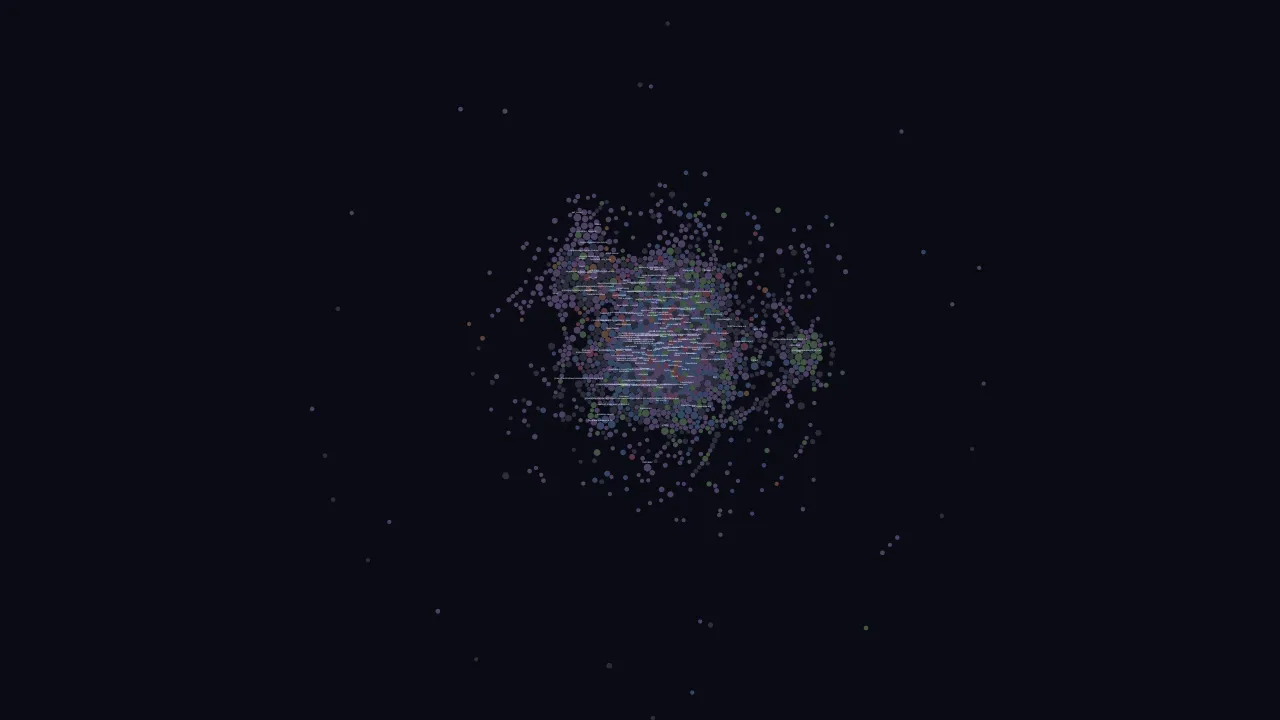
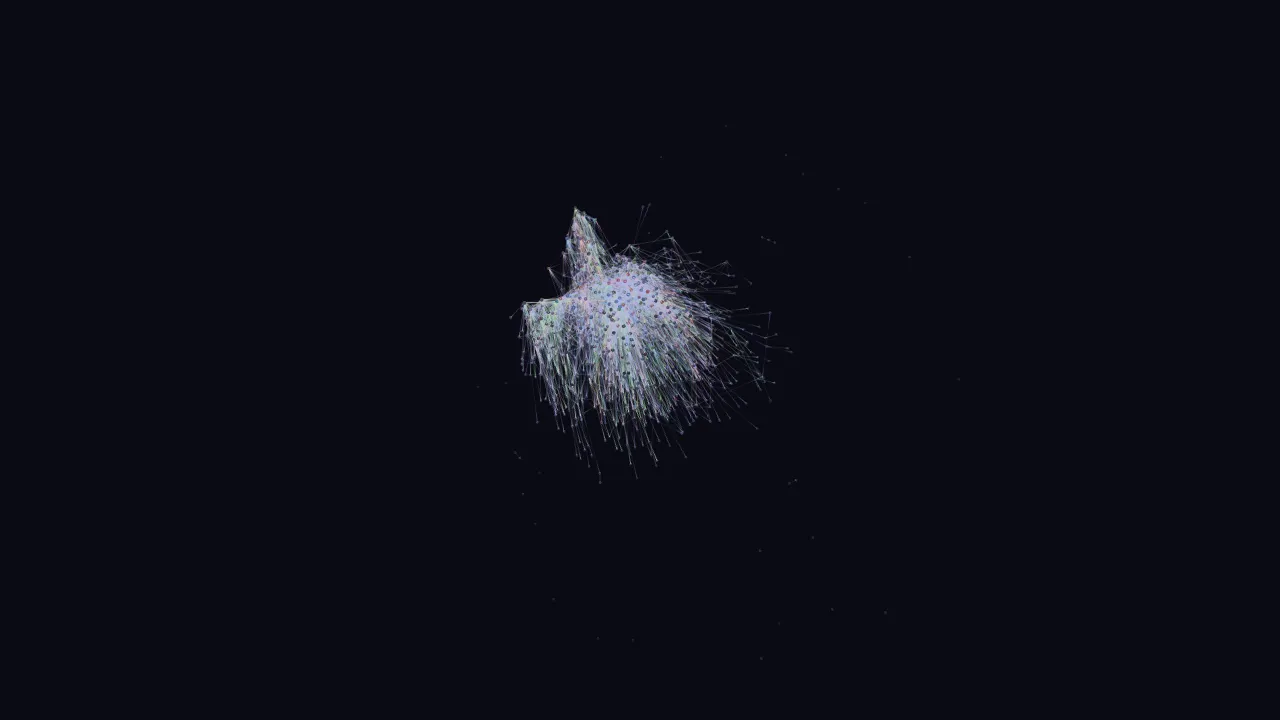
| Obsidian-inspired 2D force-directed graph on Canvas. Nodes sized by mention count (sqrt scale), colored by entity type with degree-based brightness. Edges render with configurable center-dim gradients. Mention threshold slider, type filter pills, text search with neighbor highlighting, click-to-focus, and node dragging. | Three.js 3D graph where the vertical axis encodes relevance — a weighted blend of recency (30%), mention frequency (25%), bridge score (20%), creation age (10%), and degree (15%). Older and less-connected nodes sink to the bottom; active hubs rise to the top. Includes gravity passes that pull satellites toward their hubs and a growth animation that replays the graph's history from first node to present. |
 |  |
Galaxy View (/graph/galaxy) | Word Cloud (/words) |
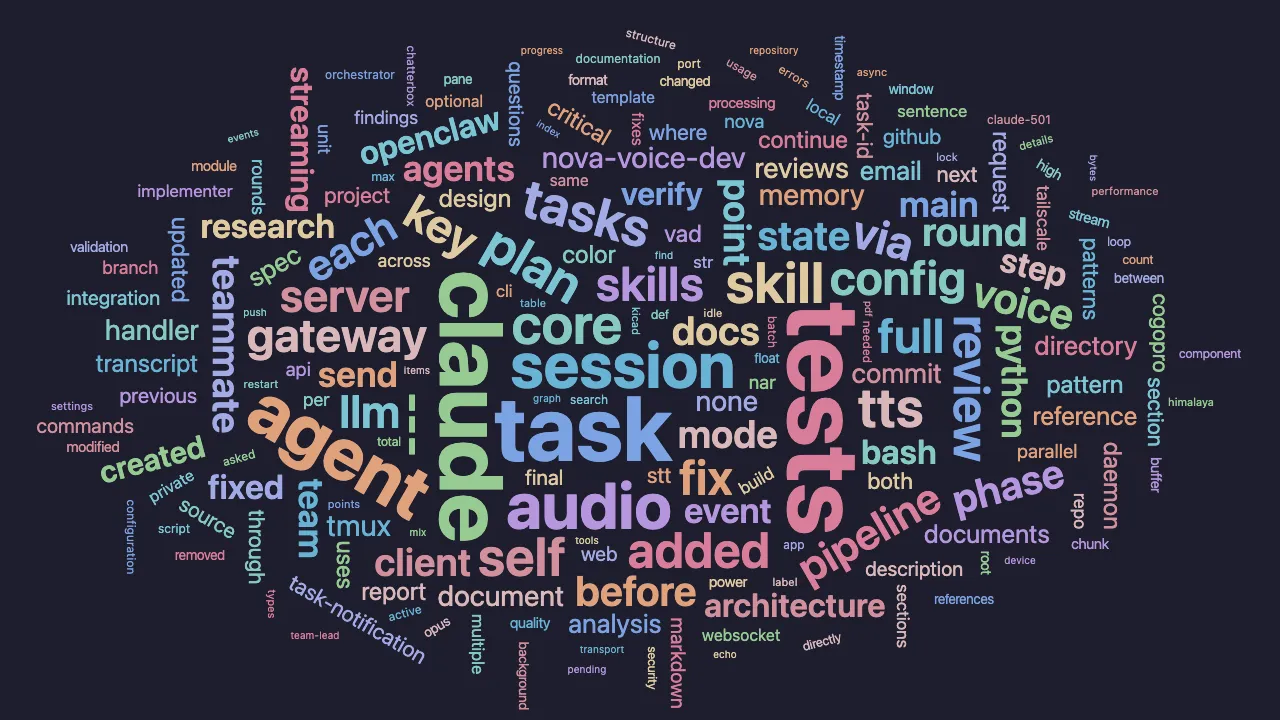
| Hub nodes (high degree + bridge score + mentions) become gravitational centers, each defining a unique orbital plane in 3D space. Satellites orbit their hub based on accretion strength (edge weight), placed at angles determined by Jaccard similarity to neighbors. Six custom forces — hub repulsion, satellite attraction, disk flattening, orbital alignment, bridge pulling, and standard charge — create a living solar-system metaphor. Configurable hub threshold, disk flatness, and system spacing. | D3 word cloud built from user messages in episodic memory. Words sized by sqrt-scaled frequency, filtered through an extensive stop-word list and hex-hash detector. Catppuccin Mocha 12-color palette, Archimedean spiral packing with mixed rotation (65% horizontal, 20% vertical, 15% angled). Hover shows mention count; live polling refreshes every 10 seconds with pulse animations on changes. |
|  |
- Dream Control — Live pipeline phase tracking with progress bars (the page polls
/graph/api/dream/status) - Live Updates — Every view polls its
api/diffroute every 1.5 s; a WAL watcher resets the server's caches when the database changes
Start: npx tsx src/interfaces/web/server.ts
Authentication. Loopback-only by default and unauthenticated. Set ENGRAM_WEB_TOKEN
(or ENGRAM_MCP_TOKEN) and every route except /api/health requires it: as
Authorization: Bearer <token> for API clients, or open any page once with ?token=<token>
and the server sets an HttpOnly cookie for that page's API calls. Binding a
non-loopback ENGRAM_BIND without a token is refused at startup.
For a persistent Windows installation, use scripts/install-visualizer.ps1. The macOS launchd path remains scripts/install-visualizer.sh.
Search
Hybrid search combining three sources with Reciprocal Rank Fusion:
- Vector — Semantic similarity via nomic-embed-text (384 dims) with MiniLM fallback
- FTS5 — SQLite full-text search across exchanges, memories, and entities
- Graph — Entity traversal and relationship-aware context expansion
All search responses respect caller-specified token budgets. Stateful sessions allow iterative refinement with budget tracking.
Dream Pipeline
Autonomous consolidation mimicking human memory synthesis:
- Ingest — Sync new conversation archives via the episodic layer
- Extract — LLM-based fact extraction (semantic) and entity/relationship extraction (graph)
- Consolidate — Deduplicate, merge, and resolve conflicts via semantic consolidator with embedding similarity
- Reflect — Detect communities, bridge entities, and temporal patterns via graph reflection
- Prune — Decay and remove low-value memories using FSRS-inspired retrievability scoring (semantic decay)
All phases use _core infrastructure: llm for LLM calls, db for persistence, embeddings for similarity.
Run via engram dream, the web UI dream button, or nightly at 02:00 via scripts/install-daemon.sh (launchd on macOS, engram-dream.timer on Linux) / scripts/install-daemon.ps1 (Windows Task Scheduler).
Technology
| Component | Technology |
|---|---|
| Runtime | Node.js ≥ 22 (TypeScript) |
| Database | SQLite + WAL mode (single-file, local-first) |
| Vector Search | sqlite-vec |
| Full-Text Search | SQLite FTS5 (Porter stemming) |
| Embeddings | nomic-embed-text via @xenova/transformers |
| Graph Analysis | graphology (Louvain communities, betweenness centrality) |
| LLM Providers | Anthropic, OpenRouter, Ollama (tiered cascade) |
| MCP Server | @modelcontextprotocol/sdk |
| Daemon | launchd (macOS), systemd user timer (Linux), Task Scheduler (Windows) — scripts/install-daemon.sh / .ps1 |
Development
Model cache
@xenova/transformers downloads ONNX model weights on first use (embeddings
nomic-ai/nomic-embed-text-v1.5, reranker Xenova/bge-reranker-base, and the NLI model used by
consolidation). Engram keeps them in a durable directory that resolves, in order, to:
ENGRAM_MODEL_CACHE_DIR— any absolute path (a shared network volume is fine; a read-only one works for already downloaded models but new downloads fail)$HF_HOME/hub— whenHF_HOMEis set, the Hugging Face hub-cache location<data dir>/models— the default:~/.local/share/engram/models(%LOCALAPPDATA%\engram\modelson Windows), next toengram.db
The library's own default, node_modules/@xenova/transformers/.cache/, is never used: every
npm install, npm ci, or global upgrade wipes it. An install upgraded from a build that cached
there moves the weights into the resolved directory on its first model load (or on engram init /
engram migrate model-cache) and logs one line — no re-download. engram doctor prints the
directory in use, whether it is writable, durable: yes|no (no only for an explicit path inside
node_modules), and which tier chose it. engram update never backs up models/; a rollback
re-downloads if the cache is missing. CI pins ENGRAM_MODEL_CACHE_DIR to a runner temp dir and
caches that between runs.
Configuration
All settings are environment variables; the CLI and MCP server read nothing from a config file.
The one exception is the launchd dream daemon, whose launcher (scripts/run-dream.sh) sources
~/.config/engram/env so API keys stay out of the plist — any variable below can be set there.
| Variable | Default | Purpose |
|---|---|---|
ANTHROPIC_API_KEY | — | Enables the Anthropic provider (final tier of the LLM cascade) |
OPENROUTER_API_KEY | — | Enables the OpenRouter provider |
ENGRAM_OPENAI_BASE_URL | https://api.openai.com/v1 | Generic OpenAI-compatible route: OpenAI, a LiteLLM gateway (http://localhost:4000), a self-hosted server. A bare origin gets /v1 appended |
ENGRAM_OPENAI_MODEL | — | Model served by that route; setting it activates the openai tier |
ENGRAM_OPENAI_API_KEY_ENV | OPENAI_API_KEY | Name of the environment variable holding the route's credential. Engram reads it at call time and never stores, prints or commits the value |
ENGRAM_OPENAI_TEMPERATURE | — | Sent only when set; the generic route omits temperature by default because many gateways and reasoning models reject it |
ENGRAM_LLM_PROVIDERS | ollama,openai,openrouter,anthropic | Tier order, comma-separated. A tier left out is never tried; unknown names are ignored with a warning |
ENGRAM_LLM_TIMEOUT_MS | 120000 | Per-request timeout for every tier. Raise it for a slow local model — a 27B model on Apple Silicon needs 2–4 minutes per extraction prompt; the extraction smoke budget grows to match |
OLLAMA_HOST | http://localhost:11434 | Ollama endpoint; used first if reachable |
ENGRAM_LOCAL_MODEL | qwen2.5:7b | Ollama model name (must be pulled on the Ollama host) |
ENGRAM_LOCAL_MODEL_FALLBACKS | — | Comma-separated Ollama models tried in order when ENGRAM_LOCAL_MODEL is not pulled (e.g. llama3.1:8b,qwen3:8b) |
ENGRAM_OPENROUTER_MODEL | google/gemini-2.5-flash-lite | OpenRouter model name |
ENGRAM_DATA_DIR | platform default (see below) | Root for database, archive, and logs |
ENGRAM_DB_PATH | $ENGRAM_DATA_DIR/engram.db | SQLite database location |
ENGRAM_ARCHIVE_DIR | $ENGRAM_DATA_DIR/archive | Conversation archive directory |
ENGRAM_LOGS_DIR | $ENGRAM_DATA_DIR/logs | Log directory |
ENGRAM_CLAUDE_PROJECTS_DIR | ~/.claude/projects | Where engram sync looks for Claude Code conversations |
ENGRAM_EMBEDDING_DIMS | 256 | Matryoshka embedding dimensions (must match the existing DB) |
ENGRAM_RERANK_ENABLED | true | Set to false or 0 to disable the cross-encoder reranker |
ENGRAM_MODEL_CACHE_DIR | $ENGRAM_DATA_DIR/models ($HF_HOME/hub when HF_HOME is set) | Where model weights are downloaded/cached; never inside node_modules (see Model cache) |
ENGRAM_SKIP_PREFLIGHT | — | Set to 1 to silence the npm install platform preflight |
ENGRAM_NO_UPDATE_CHECK | — | Set to 1 to disable the automatic daily version lookup and the "newer version available" notice; engram update --check still asks (see Daily version notice) |
ENGRAM_FORGET_RETENTION_DAYS | 30 | Days a forgotten memory is kept (out of recall, restorable) before the dream prune phase hard-deletes it; 0 purges on the next run. forget hard: true / engram memories delete --hard / purge --hard bypass it |
ENGRAM_BIND | 127.0.0.1 | Web visualizer bind address (0.0.0.0 to expose on the network; requires ENGRAM_WEB_TOKEN) |
ENGRAM_WEB_TOKEN | ENGRAM_MCP_TOKEN | Bearer token / ?token= required by the visualizer (all routes but /api/health) |
ENGRAM_MCP_TOKEN | — | Bearer token required on the MCP daemon's /mcp; see MCP Server |
ENGRAM_MCP_HOST | 127.0.0.1 | MCP daemon bind address (non-loopback requires ENGRAM_MCP_TOKEN) |
PORT | 3001 | Web visualizer port |
Data directory. When ENGRAM_DATA_DIR is unset the default is $XDG_DATA_HOME/engram on
Linux/macOS and %LOCALAPPDATA%\engram on Windows; if that variable is unset or blank too, engram
falls back to ~/.local/share/engram on every platform, so existing installs never move (on macOS,
where XDG_DATA_HOME is normally unset, the default stays ~/.local/share/engram). Every component
(CLI, MCP server, dream daemon, web visualizer) resolves paths through this one rule.
LLM providers. Extraction and the dream pipeline walk a cascade of tiers, by default Ollama
(if OLLAMA_HOST answers and ENGRAM_LOCAL_MODEL — or one of ENGRAM_LOCAL_MODEL_FALLBACKS — is
pulled there; otherwise the local tier is skipped with a one-time warning listing the models the
host does have), then the generic OpenAI-compatible route (if ENGRAM_OPENAI_MODEL is set:
OpenAI, a LiteLLM or other gateway, a self-hosted server, with the credential read from the env var
named by ENGRAM_OPENAI_API_KEY_ENV), then OpenRouter (if OPENROUTER_API_KEY is set), then
Anthropic (if ANTHROPIC_API_KEY is set). ENGRAM_LLM_PROVIDERS reorders or restricts the tiers,
e.g. openai,anthropic. engram doctor shows the order, each tier's endpoint/model and which env
var its key comes from (never the key), and which local model the Ollama tier resolved to.
The security boundary for the generic route: Engram is told a variable name, not a secret. Each
deployment maps its own credential to that variable outside the repository (shell profile, the
service env file ~/.config/engram/env, a wrapper, or the supervisor's environment); no token is
ever written to config, logs or --plan output. OpenRouter and the generic route share one
OpenAI-wire client, so request compatibility fixes apply to both.
At least one must be configured for engram extract and engram dream; search, remember,
remember_batch, and the web visualizer do not need an LLM.
References
- SPEC.md — Full system specification with requirements and interface contract
- CHANGELOG.md — Release notes and upgrade steps per version
- docs/history/SPEC-legacy.md — Original vision document with detailed design rationale (archived)
- plans/ — Implementation plans (phases 1–4, phase 6 RLM, phase 7 extensions)
- decisions/ — Architecture Decision Records