Agent-native ecological data discovery, analysis, visualization, and provenance
Quick Install
Automated & IDE SetupCopy the AI prompt to install this server into Claude Code, Cursor, or another agent — or use 1-click editor setup below.
Manual Client & Custom JSON ConfigExpand JSON ▾
Client Config & Setup
Choose your client or environment
Target File:
💡 Paste the JSON block into your client's configuration file under mcpServers, then restart the application.
Documentation Overview
WildDatum



WildDatum is a local-first ecological data workbench exposed as a standard Model Context Protocol server. It lets Codex, Claude, and other MCP agents discover, materialize, query, visualize, select, and cite scientific data without putting credentials, private paths, or millions of rows into model context.
NEON plus public ERDDAP services from EMSO ERIC, ICOS Carbon Portal, and Euro-Argo/Ifremer are built-in remote providers. Local tabular, raster, vector, point-cloud, image, hyperspectral, and N-dimensional array sources use the same provider-independent manifest, query, view, selection, and provenance model.
“Compare this NEON LiDAR tile with its hyperspectral cube. Show them together, let me select an individual return or image pixel, then query the exact source point or spectrum behind my selection.”
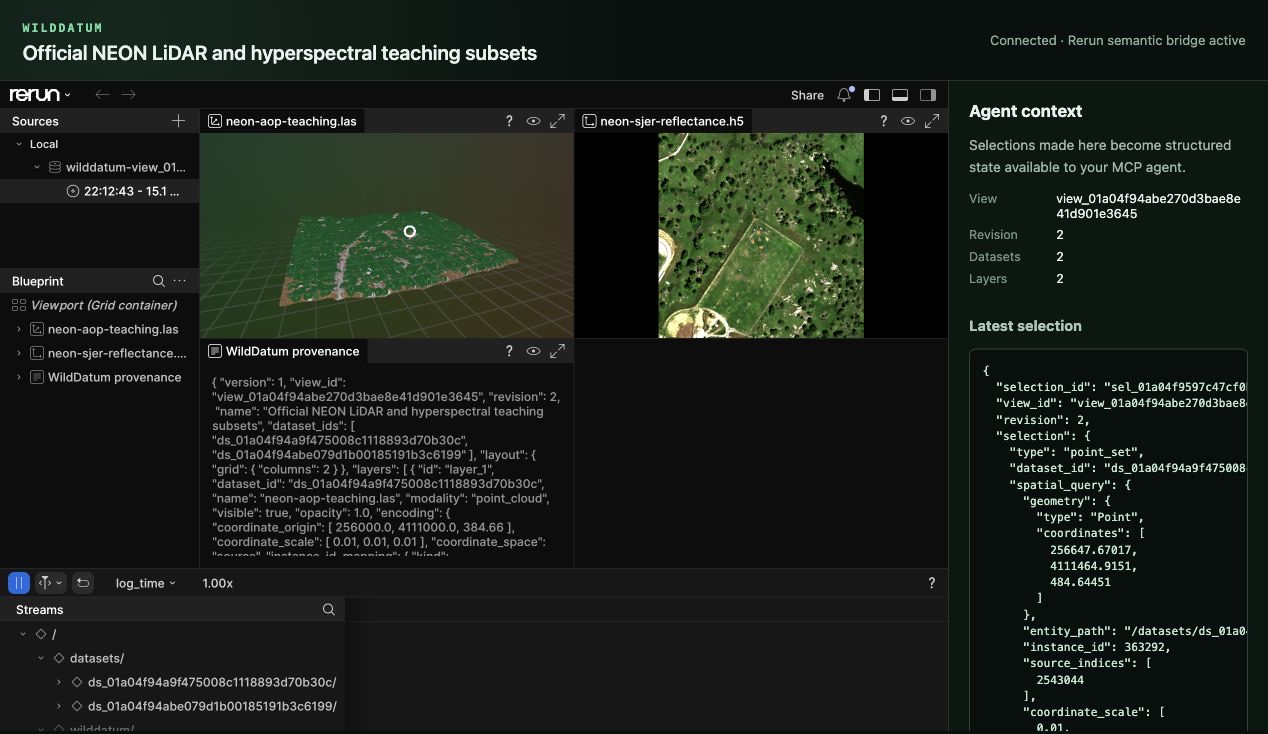
A real WildDatum browser session using Rerun Web Viewer: a 6.6-million-point NEON LAS tile, a 500×500×107 reflectance cube, immutable provenance, and a verified selection mapped back to LAS source row 2,543,044.
The human–agent loop
The visualization is not just a picture for the model to inspect. EcoViewSpec
is authoritative view state and SemanticSelection is authoritative interaction
state. A Rerun recording is a regenerable rendering artifact. For verified
WildDatum point batches, an instance pick maps back to an exact LAS/LAZ source
row; for a mapped cube, an image click maps back to the complete source spectrum.
For linked trajectories and vertical profiles, a map or profile point maps back
to the exact physical CSV/TSV, Parquet, or Arrow record, including
provider-native QC values.
What works in the alpha
- A normal MCP 2026-07-28 stdio server registerable with Codex and Claude Code.
- Public NEON catalog discovery plus reproducible plan, approval, background materialization, checksum, release, license, and citation handling.
- Public EMSO, ICOS ERDDAP, and Euro-Argo catalog discovery plus validated tabledap/griddap subsets, redirect-aware approval, streaming materialization, license, citation, and live-source provenance.
- Out-of-band local imports with streaming fingerprints and opaque agent-facing dataset IDs.
- Arrow/DataFusion tabular queries, spatial raster/vector queries, indexed COPC reads, and bounded HDF5/NetCDF/Zarr N-dimensional slices.
- Native and browser Rerun views for tables, images, GeoTIFFs, vectors, LiDAR, mapped scientific cubes, and linked geographic trajectories/vertical profiles.
- Durable human selections that can be converted into provenance-linked source queries and exported as CSV, Parquet, COG, or RO-Crate where applicable.
- Language-neutral community provider subprocesses with a provider-neutral v2 JSON-RPC contract; an RI contributor can work in Rust, Python, R, Go, or another language without adding provider-specific MCP tools.
Alpha.3: linked scientific views
The main branch can now inspect the scientific structure of an existing local or materialized dataset without exposing its private path:
The equivalent registered MCP tools are inspect_scientific_inventory and
suggest_views; create_view_from_suggestion accepts one of those opaque
suggestion IDs, and resolve_selection_links evaluates applicable rules after
a human selection. Inventories contain bounded fields, arrays, axes, units,
CF/QC relationships, evidence, and unresolved decisions. Suggestions remain
deterministic and side-effect free until accepted. On acceptance WildDatum
recomputes the suggestion, rejects client-invented IDs, and persists an
EcoViewSpec v2 with explicit scientific panels, encodings, and versioned link
rules. Existing v1 views remain readable.
For the official NEON teaching pair, WildDatum reads the 107 measured
wavelengths, selects bands nearest 650/550/450 nm, and ranks a 3D point-cloud +
RGB + spectrum workspace first. Cube-pixel → spectrum is marked exact. WildDatum
also extracts LAS WKT/GeoKey CRS metadata and the HDF5 EPSG, Map_Info, spatial
extent, scale factor, and no-data value. The teaching cube's Map_Info origin
disagrees with its declared reflectance extent by 500 m, and its footprint does
not overlap the teaching LAS tile, so point → image pixel correctly remains
unavailable for that pair instead of pretending that proximity is
registration.
Accepted point-cloud + spectral-cube views render through the same pinned Rerun adapter and browser explorer as manually created views. The browser reports the view-spec version and panel/link counts. A cube-pixel pick automatically materializes its exact wavelength-aware spectrum as a durable result with the selection and link rule in its provenance. Unavailable link rules remain visible structured state and create no result rather than becoming guessed interactions. Link evaluation refuses stale selections after the view revision changes.
For datasets with the same authoritative CRS, an internally consistent north-up affine transform, and overlapping footprints, an exact point pick can now derive the source cube pixel and immediately chain into the complete wavelength-aware spectrum. The derived pixel, both link decisions, and the spectrum result remain inspectable through the normal MCP, CLI, and browser interfaces.
After resolution, the browser regenerates the authoritative view as a complete Rerun recording with a magenta source/derived pixel marker and the linked wavelength/value series inside its spectrum panel. The structured selection and result provenance still drive the overlay; the browser does not reconstruct it from canvas coordinates.
Linked trajectory/profile views now accept CSV, TSV, Parquet, GeoParquet, Arrow IPC, and Feather sources. One map can drive up to eight QC-aware value profiles. Inclusive depth/pressure/height ranges and deterministic per-profile point budgets reduce visual load while transparent source slots preserve exact Rerun-instance → physical-record identity for every displayed format.
Detailed support and caveats are in the format matrix. Design boundaries are documented in architecture and implementation decisions. Planned Research Infrastructure, visualization, and deployment work is tracked in the public roadmap.
Install and see it work
The alpha ships self-contained macOS universal and Linux x86-64 packages. You do not need Rust, Node.js, CMake, or a separate Rerun installation:
The installer verifies the release SHA-256, installs under ~/.local by
default, and runs wilddatum setup. Set WILDDATUM_INSTALL_DIR to choose another
prefix. If ~/.local/bin is not already on your PATH, add it before continuing.
Existing EcoScope alpha installations remain readable. WildDatum falls back to
legacy ECOSCOPE_DATA_DIR, ECOSCOPE_CACHE_DIR, ECOSCOPE_WEB_DIST, default
application-data directories, and NEON keychain entries when their WildDatum
equivalents are absent. The installer also leaves an ecoscope command alias
when it can do so without replacing a user-owned file.
Create a deterministic LiDAR + hyperspectral demonstration and open it in the bundled Rerun browser viewer:
The generated LAS and HDF5 files pass through the same import, manifest, cube mapping, Rerun recording, and selection-query paths as user data. No network or credentials are needed. An opt-in official NEON teaching-data demonstration is also available (roughly 224 MiB):
Register the normal MCP server
WildDatum is published as io.github.krnzt/wilddatum in the official MCP
Registry. It is also a normal local stdio server: Codex, Claude Code, and any
compatible host launch the same wilddatum mcp process and discover its tools.
Both registration commands are safe to repeat and preserve an existing WildDatum entry. Platform-specific MCPB bundles are attached to every release for hosts and registries that install MCPB packages.
Equivalent host commands are:
Generic MCP configuration:
After registration, the host launches WildDatum like any other local MCP server, negotiates the protocol, discovers its tools, and receives bounded structured results rather than bulk scientific files.
Related MCP Servers
Reviews
No reviews yet — be the first to share how this listing worked for you.
Frequently Asked Questions about EcoScope
AllMCPs Directory Badge
Showcase your server listing on GitHub or your project documentation. Embed this dynamic SVG badge to highlight official listing status and live engagement.
Badge Style:
Live Dynamic SVG Preview
Markdown (GitHub README)
[](https://allmcps.com/mcp/ecoscope)HTML Embed
<a href="https://allmcps.com/mcp/ecoscope"><img src="https://allmcps.com/api/badge/ecoscope?style=directory" alt="EcoScope on AllMCPs" /></a>