Multi-LLM dev harness, MCP-operable: bugs, cycles, gates. Verdicts are exit codes, never opinions.
Quick Install
Automated & IDE SetupCopy the AI prompt to install this server into Claude Code, Cursor, or another agent — or use 1-click editor setup below.
Manual Client & Custom JSON ConfigExpand JSON ▾
Client Config & Setup
Choose your client or environment
Target File:
💡 Paste the JSON block into your client's configuration file under mcpServers, then restart the application.
Documentation Overview
Ducklab
A self-hosted harness that runs a project's full development cycle with several LLMs in fixed roles, under test gates that only you sign.
In one block: self-hosted development harness (Go engine + CLI + desktop,
Linux first) · brief → requirements → spec → plan → build → review → release ·
verdicts are exit codes, never model opinions · local models first (llama.cpp,
vLLM) beside any OpenAI-compatible or Anthropic endpoint · operable by humans
or by other agents over MCP with recorded, attributed decisions ·
Apache-2.0 · develops itself (the run records in .ducklab/ are the
receipts). Agents: start at AGENTS.md and llms.txt.
You give it a brief. It writes requirements, a spec and a plan; builds tasks with one model or several arguing; runs your project's real test gate; and stops for you before anything is committed. Every model call is logged. No model ever decides a verdict.
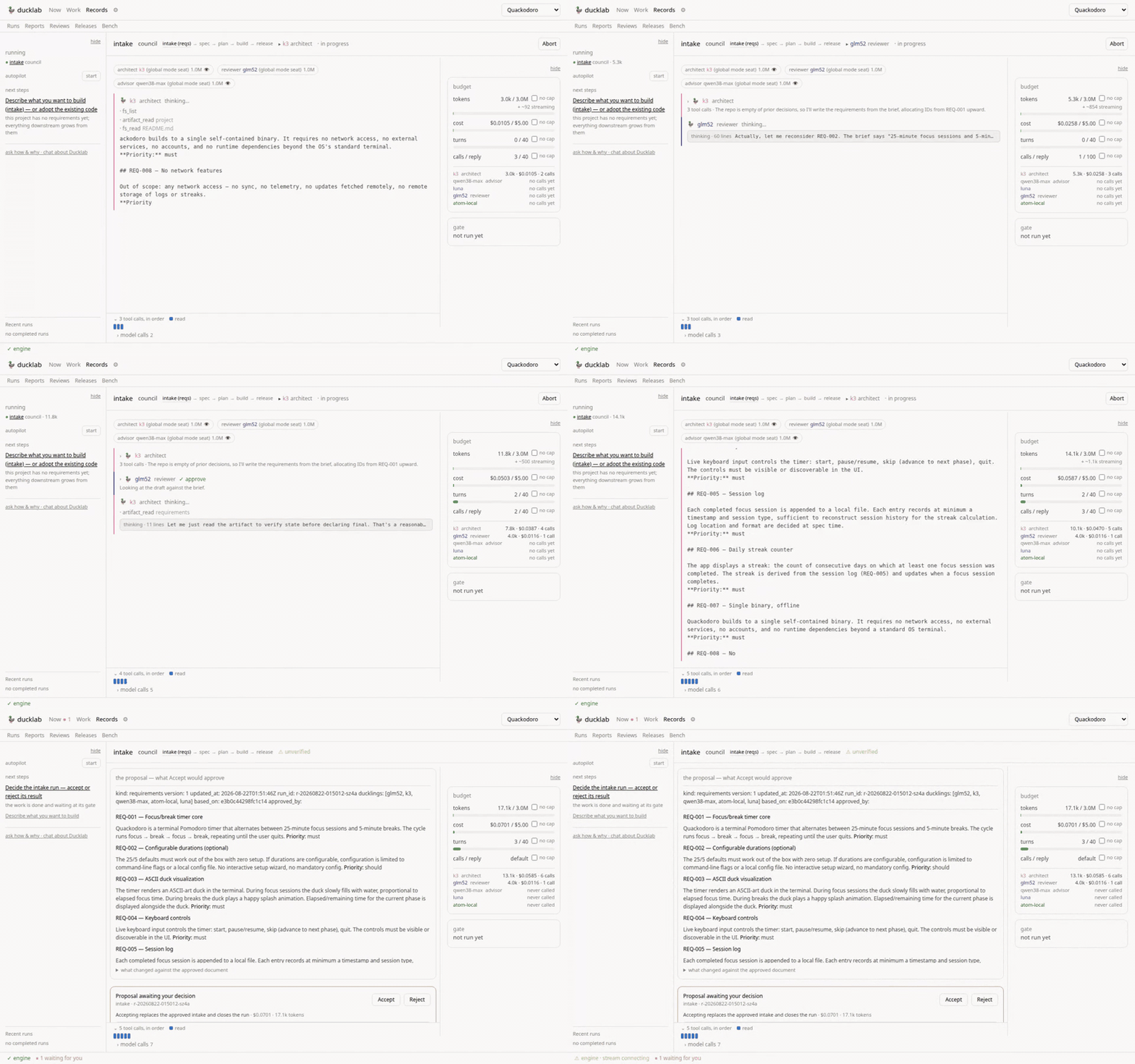
A real council intake, recorded live and sped up: the architect streams the draft, a different model reviews it, the budget ticks in cents — and the run stops at your gate. Total cost of what you just watched: $0.07.
It was built for local models first. Two of the seats that built most of it are a vLLM box on the LAN and a llama.cpp server on localhost, both priced at zero; hosted models sit beside them in the same roster, measured by the same evidence.
Why this exists
Most agentic coding tools assume one strong model and trust it. Ducklab assumes several cheap models and trusts none of them:
- The gate decides, never a model. A verdict is a command's exit code. A test-first run measures a green baseline before any test is written, the red over the new test after, and every accept reproduces the gate from a clean checkout of the committed sha — nothing lands that did not reproduce, and an accept whose reproduction fails takes its own commit back.
- Decorrelation everywhere. A different model reviews; a reviewer never learns who wrote the code (absent from the payload, not hidden in the UI); tournament judges choose blind; council critics read the draft, not each other.
- Work is a contract. A task's deliverables are the implementer's
numbered checklist; it reports on each by number, the reviewer checks each
against the diff, and an undelivered item summons the rubber duck — an
advisor seat that wakes only on measured distress (brake refusals, failure
streaks, red gates) and answers
none, a note that sends the implementer straight back to work, orstop. - Seats are chosen on evidence. Every duckling carries a scorecard — in-seat pass rate from your own runs, cost per run, coding index — and the roster board suggests seats from it, with the ranking criteria yours to reorder. Suggestions are rare and justified: pass rates rank by their Wilson lower bound, three runs minimum, locals never win on a $0 price.
- Nothing is unbounded. Turns, tokens, cost, wallclock, tool output, shell commands — every ceiling visible and liftable mid-run, on the record.
- Your documentation is not bounded by the model's window. Attach a wiki
to a stage and a big seat reads it whole; a small seat gets each document
digested to fit, the full text one
ref_readcall away, and the gate names any document nobody opened. A 32k local model can be briefed by a quarter-million characters of reference material — the harness carries the working memory.
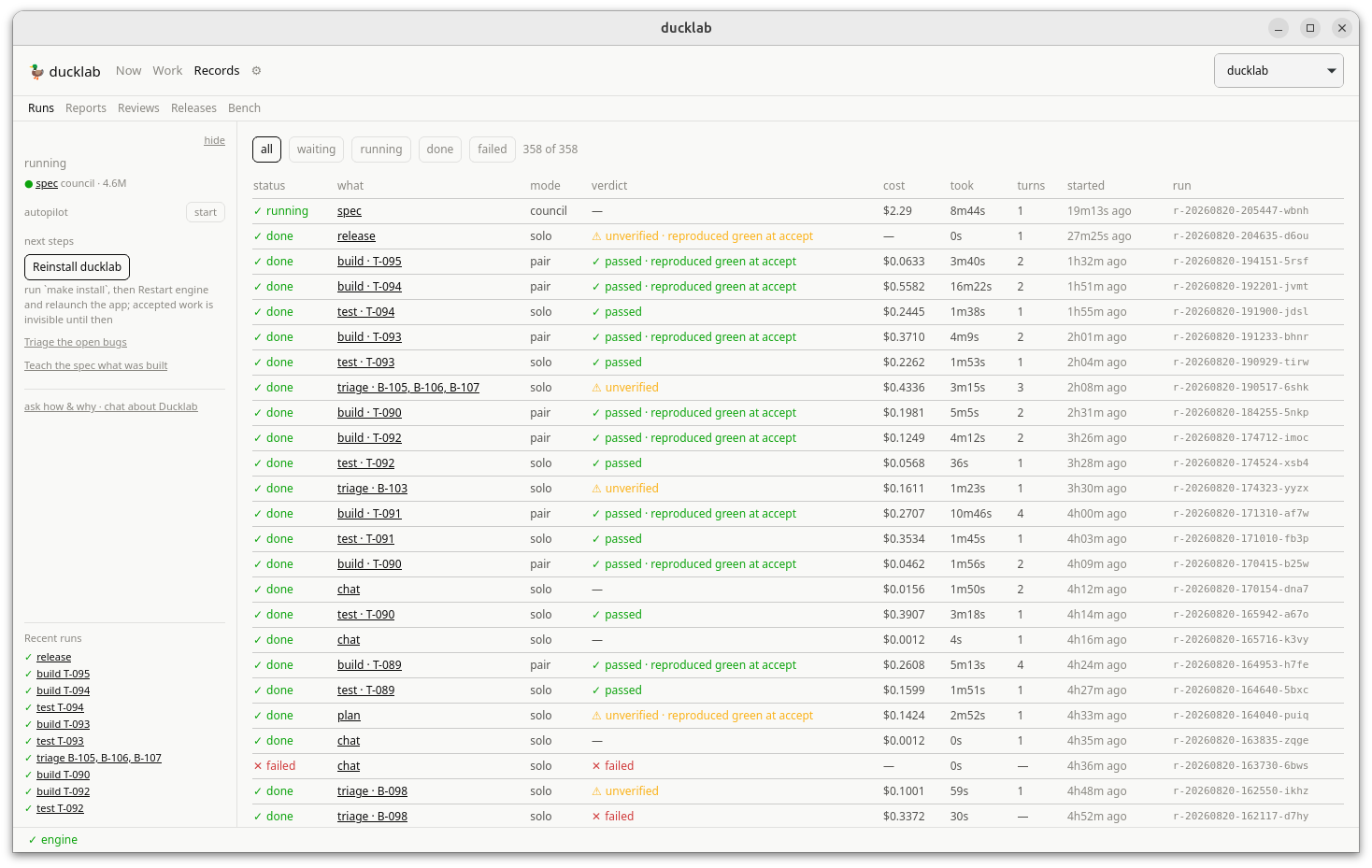
The record does not round up: every run with its verdict, its cost, and whether its accept reproduced green from a clean checkout.
Ducklab is developed inside ducklab. The plan, the bugs, the releases and the accepted tasks went through its own loop, driven by the same local and hosted models it measures; recent features (per-run worktrees, the merge-proof accept, the acceptance receipts, the governance write guard) were built by the duck and gated by a person. To check the claim yourself:
Receipts ship with every accept since v0.7.0: the committed sha, the gate command, its exit code, and the clean-checkout reproduction verdict — facts a third party re-derives, never assessments.
Status
v0.7.0 plus the phase-3 work now on main: every build and test run
executes in its own git worktree (your checkout is never touched),
acceptance rebases the run branch, re-runs the gate on the rebased commit
and merges fast-forward only, and an operator can re-close a finished run
as landed when its work reached main outside the engine. Before that:
seven stages, five modes, the roster board with measured scorecards,
reference documents with automatic digestion, skills managed from the
desktop, a seated consultant chat (vision verified before images are
sent), bug reports with screenshot evidence, adopt surveys with a
deterministic coverage check, provider-aware queueing that states why a
run waits, escalation suggestions when a seat measurably hits its
ceiling, acceptance receipts (ducklab proof verify), releases,
autopilot, a CLI, a desktop app, and an MCP server — in the
official MCP registry as
io.github.jrullan/ducklab — so another model can operate the loop with
recorded, attributed decisions.
docs/status.md tracks all acceptance criteria and does
not round up. Where code and spec differ, the difference is recorded in
docs/decisions/.
Install
Needs Go 1.25+, Node 22+ for the desktop, and git.
Linux
The CLI and engine are pure Go. The desktop is a Wails v3 app and needs the GTK/WebKit development packages:
On Ubuntu 24.04+ the desktop also needs an AppArmor profile — see
decision 0003 and
packaging/apparmor/.
macOS
Honesty note: ducklab is developed and exercised daily on Linux. The CLI and
engine compile-check for darwin/arm64 on every make cross, but no desktop
build has been verified on a Mac yet — the first person to try it is the
test, and make install gives you the CLI and engine either way. Please
report whatever breaks.
Both
make install installs to ~/.local/bin — make sure it is on your PATH.
It warns when the desktop binary predates frontend/src, because it will
happily install a stale one.
Frontend development without the desktop
To exercise the frontend in a browser, run the engine and Vite in separate terminals, then open the browser with its connection details. The fake engine is the quickest option; the same flow can use a real engine with its opt-in CORS flag:
The real engine remains same-origin restricted by default. --allow-origin
enables exactly one browser origin and is intended for local frontend development
and visual audits; it does not change authentication or the loopback bind. Without
this flag, a browser's cross-origin failure can look like a dead session.
The engine and token query parameters are available only in Vite dev
builds. They can also be supplied as VITE_DUCKLAB_ENGINE and
VITE_DUCKLAB_TOKEN environment variables. The desktop shell continues to use
its injected window.ducklab connection.
Three binaries
| What it is | |
|---|---|
ducklab-engine | The daemon. Owns every run. Binds 127.0.0.1 only, bearer token rotated each start. |
ducklab | The CLI client. Holds no state; it asks the engine. |
ducklab-desktop | The desktop app. Also a client, also holds no state. Starts (or adopts) the engine itself. |
Provider keys come from the engine's environment at call time — export them before it starts, or launch the desktop through a wrapper that loads them from your keyring. The app tells you when the engine it adopted is missing a key this app has, with the restart button beside the words.
A cycle, end to end
From the desktop: Projects → New project, then Cycle → Draft it. From a terminal:
Related MCP Servers
Reviews
No reviews yet — be the first to share how this listing worked for you.
Frequently Asked Questions about Ducklab
AllMCPs Directory Badge
Showcase your server listing on GitHub or your project documentation. Embed this dynamic SVG badge to highlight official listing status and live engagement.
Badge Style:
Live Dynamic SVG Preview
Markdown (GitHub README)
[](https://allmcps.com/mcp/ducklab)HTML Embed
<a href="https://allmcps.com/mcp/ducklab"><img src="https://allmcps.com/api/badge/ducklab?style=directory" alt="Ducklab on AllMCPs" /></a>Technical Specs & Signals
CategoryDeveloper Tools
27Quality signal: Emerging · 27/100How this signal is calculated ▾
Server availabilityNot measured
Not scored for repo-hosted servers — we can't reach the running server, only its GitHub page. Hosted MCP endpoints are health-checked live.
Verified ownership8/20
Documentation & tools11/30
Adoption & activity1/15
Community engagement0/10
A guidance signal from public completeness & health data — not a user rating. New listings start lower and rise as they add docs, get verified, and grow adoption. Signals we can't observe for a listing are skipped, not counted against it.
Own this project?
This directory is pre-filled from public sources. Claim via GitHub README, site badge, or DNS TXT to unlock edit access and the Official badge and attach your website — proof is checked automatically, then reviewed by our team.
Free dofollow backlink: add your website and place the AllMCPs badge on it — no claim needed. We detect it automatically and keep it verified as long as the badge stays live.
Claim & get free dofollowShare & Embed
Add our SVG badge (dark/light directory styles) or embeddable widget to your site.