DualSPHysics MCP README
The full upstream README, mirrored here for reference. Install config, tool schemas, adoption signals, and an original overview live on the DualSPHysics MCP listing page.
DualSPHysics MCP
Language: English | 中文



Design, run, and verify DualSPHysics simulations from an AI agent — not just stare at them.
Ten Model Context Protocol tools wrap a local DualSPHysics SPH toolchain end to end: design cases as structured parameters (no hand-written XML, no solver needed to iterate), run them as background CPU jobs with progress, throughput and the solver's own ETA on tap, post-process into ParaView-ready VTK and CSV time series, and verify a 2D dam-break against the Koshizuka & Oka (1996) experiment with per-time errors and MAE / RMSE / max.
The server only launches the DualSPHysics command-line tools as subprocesses; DualSPHysics itself is not distributed here — it is free LGPL-2.1-or-later software, this package neither links nor redistributes its code or binaries, so the MIT licence carries no extra obligations. If you publish work using DualSPHysics, cite Dominguez et al. (2022), Computational Particle Mechanics 9:867–895, doi:10.1007/s40571-021-00404-2.
Tools
| Tool | What it does |
|---|---|
check_environment | Find the four DualSPHysics tools on this machine: resolved path, provenance (env var, PATH, scan), version, solver feature flags; install hints when one is missing. |
create_case | Describe a 2D dam-break experiment in plain parameters and get a GenCase *_Def.xml back — no XML by hand, no solver needed. Returns a particle-count estimate for self-checking. |
edit_case | Change parameters of an existing case (in place or to a save_path), re-validating the merged result. |
describe_case | Read a case file back as a summary: dp, domain, column/tank/obstacle, timing, gauges, particle estimate. |
gencase | Discretise the case into Case.xml + Case.bi4 (plus preview VTK) and report the real particle counts. |
run_case | Start the CPU solver in the background (jobs/ directory, Run.out, Part_*.bi4) and return a job_id immediately. |
job_status | Poll a job: state, t/tmax, percent, the solver's Time/Sec throughput and projected finish, Run.out tail. |
partvtk | Turn Part_*.bi4 output into VTK particle files for ParaView; filters and variables pass through. |
measure_tool | Probe the solution at points and get CSV time series back (comma separator enforced for deterministic parsing). |
validate_dambreak | Reconstruct the dam-tip surge front from the CSV and score it against the embedded Koshizuka & Oka (1996) series: per-time errors + MAE/RMSE/max. |
Working chain: check_environment → create_case → describe_case →
gencase → run_case → poll job_status → partvtk + measure_tool →
validate_dambreak. Vocabulary, three guards and particle-estimate
arithmetic: docs/case-generation.md.
Domain contracts
Behaviours of the wrapped tools that their -h output does not tell you:
- Geometry outside the domain box is silently clipped by GenCase (exit 0, no warning) —
create_casecontainment-checks every domain. - DualSPHysics CSVs default to semicolon separators;
measure_toolforces commas unless the caller passes their own-csvsep. - MeasureTool points files reject leading
#comment lines; MeasureTool errors print on stdout, not stderr. Time/SecinRun.outis wall-clock seconds per simulated second — not steps/second; the row tail is the solver's projected finish.Run.outrow formats differ between solver v5.0/v5.2 and v5.4; the parser handles both.
All fourteen contracts (formats, exit codes): docs/domain-contracts.md.
Install
Python 3.10+. The binaries are discovered from DSPH_* environment
variables, PATH, or conventional install roots (/opt, /usr/local, ~/softwares, ~, cwd → <root>/DualSPHysics*/bin/linux).
Getting the solver (the GitHub repository ships GenCase / PartVTK / MeasureTool prebuilt but not the solver):
- Full package from https://dual.sphysics.org/downloads/, or
git clone https://github.com/DualSPHysics/DualSPHysicsand build the CPU solver withmake -f Makefile_cpu(g++ only, no CUDA needed), then copy the prebuilt tools frombin/linux/.
Configure through environment variables (no .env parsing; see .env.example
— the same paths appear in examples/mcp_config.example.json):
Run
Client registration templates: examples/mcp_config.example.json:
Example: 2D dam-break validation (Koshizuka & Oka 1996)
examples/dambreak_val2d/ holds the showcase: the official validation layout
(dp = 0.01 m; 1 m × 2 m water column in a 4 m × 3 m tank; TimeMax = 2 s,
TimeOut = 0.01 s; Verlet / Wendland / artificial viscosity 0.02 / Fourtakas
DDT 0.1), regenerated by gen_dambreak_val2d.py (MIT), a surge-front
MeasureTool points file (401 points along z = 0.03 m), and the digitised
experiment.
Measured on this case (GenCase v5.4.354 / solver v5.4.355, 8 CPU threads, i5-10210U):
| Quantity | Value |
|---|---|
| Total particles | 21,001 (fluid 20,000 + bound 1,001) |
| Part files | 201 (Part_0000 … Part_0200) |
| Solver wall time (TimeMax = 2 s) | ≈ 14 min |
| Dam-tip MAE vs experiment (0.09–0.75 s) | 0.220 m (22.0 % of the column); RMSE 0.240 m |
| Dam-tip error, early collapse (t ≤ 0.2 s) | within ±0.01–0.16 m |
| Wall impact | front pins at 3.98 m at t ≈ 0.67 s |
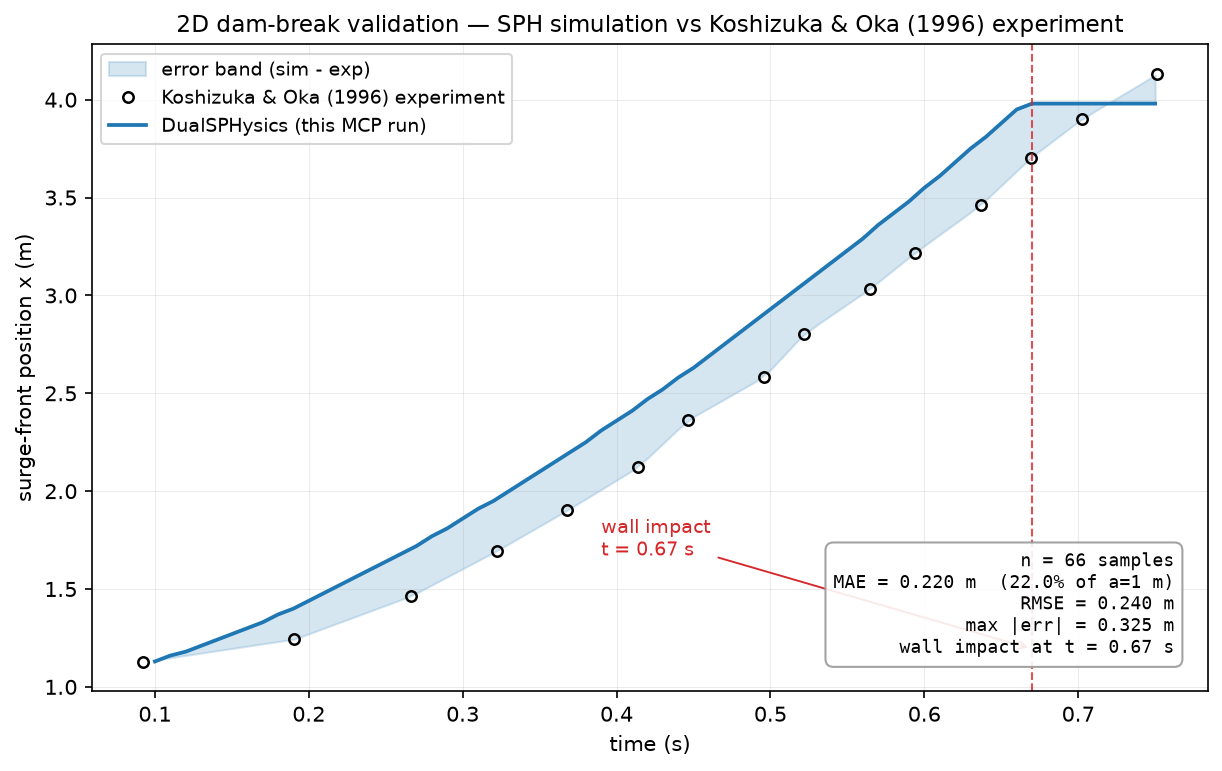
The residual is SPH physics, not a measurement artefact: the front extraction
tracks the solver's own SWL gauge (mean deviation 8 mm < 10 mm point spacing),
and the experiment ends at X/a ≈ 4.13 — beyond the 4 m tank — so the
comparison saturates after wall impact (validate_dambreak notes impact_time_s).
Agent transcript:
validate_dambreak reports per-time errors plus MAE / RMSE / max in metres
and as % of the 1 m column. The figure comes from
examples/make_validation_figure.py; examples/render_dambreak.py turns the
same run's Part_*.vtk into an MP4 animation (dev dependencies).
Tests
The suite is green without any solver installed (discovery, command
construction, log-fixture parsing, validation math, case generation, stdio
end-to-end). Tests marked solver exercise a real local toolchain and
auto-skip otherwise.
Contents
src/dualsphysics_mcp/— MCP server, tool discovery and config, error codes, the ten tools intools/.examples/— validation case,create_case_demo.py, figure + animation scripts, client template.tests/— pytest suite (solver tests auto-skip).
Repository rules
- Committed: source, tests, examples, documentation, templates.
- Not committed: DualSPHysics binaries or sources (LGPL work stays out),
virtual environments,
.env, job outputs and generated results. - Experiment values in
examples/dambreak_val2d/are digitised facts cited to Koshizuka & Oka (1996) as shipped with the DualSPHysics examples; the generated case XML and all code here are original MIT content — details in CONTRIBUTING.md.