Draugr README
The full upstream README, mirrored here for reference. Install config, tool schemas, adoption signals, and an original overview live on the Draugr listing page.
Draugr
Run Trivy, Semgrep, Gitleaks and more from one file. Get one SARIF report and one verdict.



Describe your app. Draugr figures out the rest.
Every application carries problems nobody put there on purpose: a library that turned out to have a hole in it, a password committed by accident, a server setting that leaves a door open. Draugr finds them, works out which ones actually matter for your app, and answers the question you are really asking before a release. is this safe to ship?
It runs the established open-source scanners for you, Trivy, Semgrep, Gitleaks and others, so there is nothing to choose between, wire up, or read five of. You describe what you built, once, in one file: where the repositories are, what images it builds, what it exposes, what infrastructure it runs on. Draugr picks the checks that apply, runs the right tool for each, and produces evidence you can hand to somebody else. Bring the scanners you already pay for, or use the open-source defaults.
Findings are ranked, not listed. A scanner's "critical" describes a flaw in the abstract. How
bad it could be at its worst, anywhere. The same flaw is act-now in the service strangers can reach
and backlog in the internal tool three people use, and no scanner can tell those apart because the
difference is in the file you wrote, not in the code. And draugr diff
gates a pull request on new findings only, so inheriting two hundred existing ones does not
block every change.
Quickstart · See it in action · What it checks · In your pipeline · Documentation · What Draugr doesn't promise · Security
See it in action
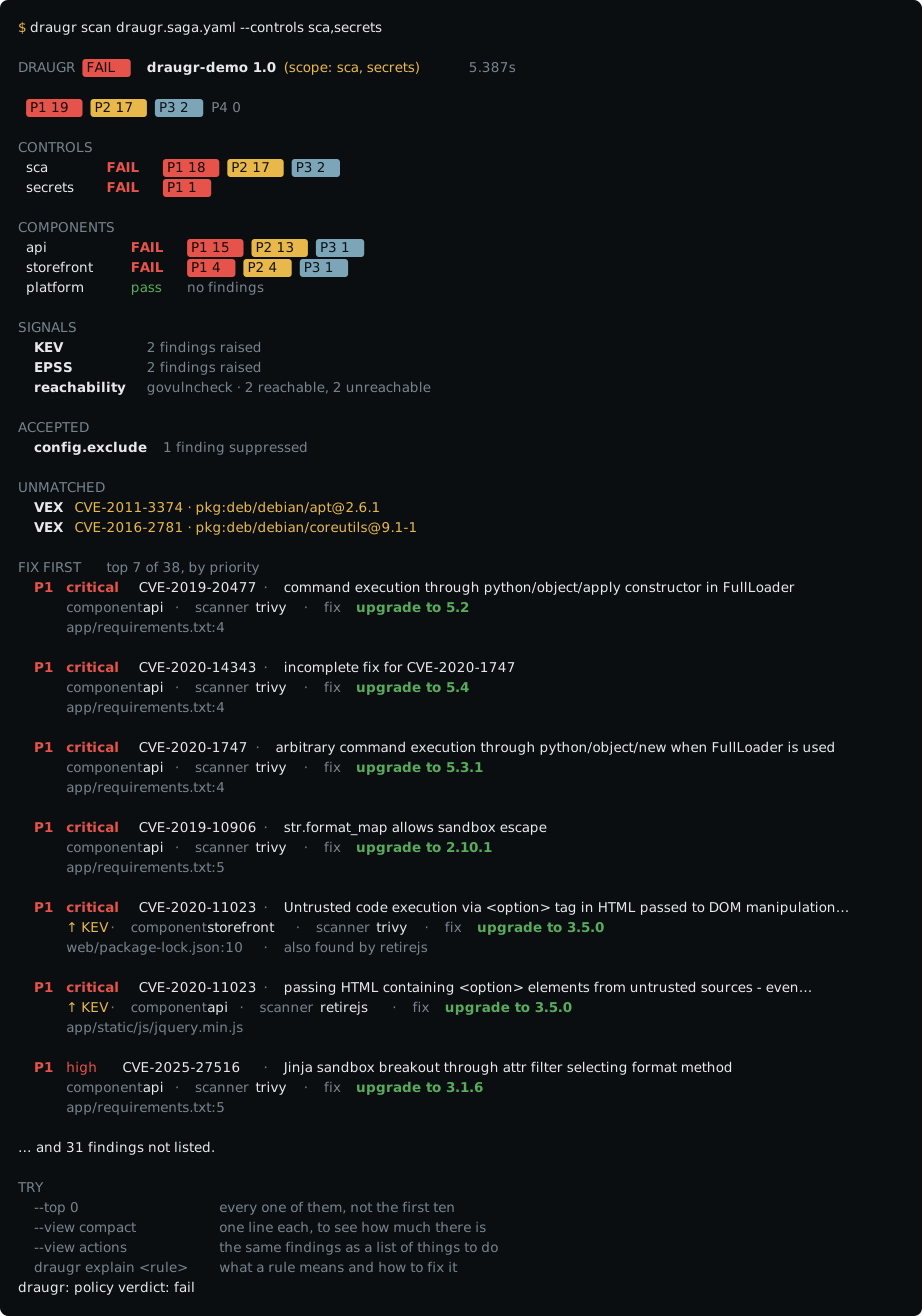
Priority (P1–P4) is not severity. Severity says how bad a flaw is at its worst, anywhere. Priority weighs that against how exposed and how important the part of your app it sits in is, which no scanner can work out, because it is not in the code.
draugr-dev/draugr-demo is a deliberately vulnerable app wired to Draugr: every control lights up, findings land in the repo's Security → Code scanning tab, and its example pull requests show the new-vs-fixed diff.
Quickstart
Installs to ~/.local/bin, no sudo. It verifies before it installs and says which checks ran, the
archive's SHA-256 against the release checksums.txt, plus the cosign signature on that file when
cosign is on your PATH, and installs nothing if a check
fails. The script is readable in the repo; other routes, including Homebrew and go install, are in the install guide.
tools install takes its answer from the descriptor beside it, so a small service gets three
scanners rather than every one Draugr can provision. --all when you are preparing a machine for
several projects.
Then describe what you actually ship:
Your editor already knows this file. Draugr's
JSON Schema is registered with
SchemaStore, so any *.saga.yaml gets completion, hover docs and
typo warnings on open with nothing to configure.
Or let discovery write the descriptor for you:
Full walkthrough: quickstart.
What it checks
Each control is backed by a tool Draugr executes rather than bundles, so every scanner stays under its own license, and you can swap it.
| Control | Looks for | By default |
|---|---|---|
sca | known flaws in the libraries you depend on | Trivy, Grype and Mend opt-in |
secrets | passwords and keys committed by accident, history included | Gitleaks |
sast | patterns in the code you wrote that let somebody in | Semgrep, gosec opt-in for Go |
iac | settings that leave a door open, in Terraform, Kubernetes and Dockerfiles | Trivy |
images | what is baked into your container images | Trivy, Grype opt-in |
licenses | terms attached to code you did not write | Trivy |
dast | problems only visible from outside a running app | Nuclei, authenticated, and from an OpenAPI spec |
headers | how your site answers a browser | native |
tls | certificates and encryption | native |
infrastructure | your Kubernetes cluster, against the CIS benchmarks | native, kube-bench opt-in |
threats | whether anything you talk to is on a public blocklist | abuse.ch URLhaus |
provenance | whether an image is signed by the builder you expect | Sigstore cosign |
Every scanner, what it sends and whose terms it carries: integrations catalog.
Alongside them: content-hash caching, an SBOM per repository and image, KEV/EPSS enrichment, per-control gate thresholds, and suppressions that stay in the report with the reason someone gave rather than disappearing.
In your pipeline
The first-party GitHub Action installs Draugr, provisions the scanners, and hands the merged SARIF to code scanning, one clean Draugr tool in the Security tab:
GitHub Actions · GitLab, an include, GitLab's own report formats, a sticky merge-request comment · Azure Pipelines, a step template
From an AI coding assistant. Ask one to check a change and it will, using whatever scanner it
finds over a scope it chose. draugr mcp serves Draugr over the Model Context
Protocol so it reads your committed descriptor instead, and
scanning is off by default, because it clones repositories and runs external tools.
See use Draugr from an AI coding assistant.
Documentation
- Quickstart, install, first scan, first survey, CI
- Concepts, the descriptor, controls, scanners, the verdict
- Saga schema · CLI reference, every field, every flag
- Integrations catalog, every scanner, with licenses and terms
- Contributing · Changelog
What Draugr doesn't promise
A passing verdict means the controls you configured found nothing they were looking for. It is not a statement that your software is secure. It is silent about anything your descriptor does not declare, controls you did not enable, and whatever the underlying scanners miss. License findings are information, not legal advice. Draugr is provided under Apache-2.0 without warranty.
The details, including whose terms the scanners carry and your responsibility for authorization when scanning live endpoints: scope and disclaimer.
Security & supply chain
A security tool should hold itself to what it checks. Draugr does:
-
Standard output. Every finding is normalized to SARIF 2.1.0 (OASIS), so results flow into GitHub / GitLab / Azure DevOps code scanning and any SARIF-aware tool.
-
Signed releases + provenance, release archives'
checksums.txtis keyless-signed with cosign (Sigstore) into achecksums.txt.sigstore.jsonbundle, and each release publishes SLSA build-provenance attestations (gh attestation verify …); verify before installing (recipe). -
SBOMs. A Syft SBOM is published for every release archive.
-
Verified tooling,
draugr tools installfetches scanners pinned by SHA-256 and, where the upstream signs them, verifies the cosign signature too, and cosign itself is installable, so verification is self-sufficient. -
We scan ourselves. Draugr runs on its own repo every PR (dogfood self-scan), and we track our supply-chain posture with the OpenSSF Scorecard (badge above).
That card reports
SAST: 0, and it is worth saying why we are leaving it there. Static analysis does run on this repository: Semgrep and gosec through Draugr's ownsastcontrol on every scan, and gosec again insidegolangci-linton every pull request. Scorecard looks for a specific set of tools it recognizes, and ours are not in it.Adding a third static analyzer purely to move the number would be the same thing as writing tests that touch code without asserting anything, a metric improved without the property behind it improving. We would rather the score be wrong and the analysis be real. If you want to check the analysis rather than the score, the findings are in the repository's Security tab, uploaded by the scan itself.
-
Report a vulnerability. See SECURITY.md.
Development
Requires Go 1.26+. make build builds ./bin/draugr; make gate runs the full local gate, fmt,
vet, lint, race tests with coverage, and govulncheck. See CONTRIBUTING.md.
License
Draugr is licensed under the Apache License 2.0.