AllMCPs
BrowseBestCategoriesStackCompareToolsGuidesBlog
Log in Submit MCP

Stay in the loop

Get new MCP servers and top picks in your inbox.

AllMCPs

The open directory for discovering and installing Model Context Protocol servers.

AllMCPs on GitHub (opens in a new tab)
Launched onTiny Startupstinystartups.com
Explore
  • Browse servers
  • Best MCP servers
  • Categories
  • MCP clients
  • Agent prompts
  • Stack Builder
  • Compare servers
  • Random discovery New
  • Submit a server
  • Pricing & Boost Boost
Learn
  • Guides hub
  • What is MCP?
  • Install guide
  • Build an MCP server
  • Deploy an MCP server
  • Security guide
  • Troubleshooting
  • MCP for SEO & AEO
  • Protocol versioning
  • Transports: stdio vs HTTP
  • State of MCP (stats)
  • Blog & updates
Tools
  • All developer tools
  • Config generator
  • Config validator
  • Config auditor
  • MCP playground
  • Token calculator
  • OpenAPI → MCP
  • Badge generator
For agents
  • REST API docs
  • Trust & traffic Live
  • Remote MCP server SSE ↗ (opens in a new tab)
  • llms.txt ↗ (opens in a new tab)
  • Catalog JSON ↗ (opens in a new tab)
Company
  • About
  • Advertise Sponsor
  • Contact
  • GitHub ↗ (opens in a new tab)
  • Terms
  • Privacy
AllMCPs VerifiedAllMCPs VerifiedFeatured on Nick LaunchesFeatured on Nick LaunchesLaunch Llama NewsletterLaunch Llama NewsletterVerified DR - allmcps.comVerified DR - allmcps.comFeatured on SaaSGrowFeatured on SaaSGrowFeatured on Twelve ToolsFeatured on Twelve ToolsFeatured on Saaspa.geFeatured on Saaspa.geFeatured on Findly.toolsFeatured on Findly.toolsFeatured on Startup FameFeatured on Startup FameFeatured on LaunchKiwiFeatured on LaunchKiwiFeatured on ScrollLaunchFeatured on ScrollLaunchFeatured on DailyPingsFeatured on DailyPingsFazier badgeFazier badgeFeatured on NewTool.siteFeatured on NewTool.siteFeatured on saasfame.comFeatured on saasfame.comDR Checker - Domain RatingDR Checker - Domain RatingListed on Turbo0Listed on Turbo0Launched on LaunchBoard - Product Launch PlatformLaunched on LaunchBoard - Product Launch PlatformList on SimilarlabsList on Similarlabshttps://codetrendy.comhttps://codetrendy.comListed on DevTool.ioFeatured on BuildlistFeatured on BuildlistLaunched on Tiny StartupsFeatured on ShowMeBestAIFeatured on ShowMeBestAIFind us on LaunchZoneFind us on LaunchZoneAllMCPs VerifiedAllMCPs VerifiedFeatured on Nick LaunchesFeatured on Nick LaunchesLaunch Llama NewsletterLaunch Llama NewsletterVerified DR - allmcps.comVerified DR - allmcps.comFeatured on SaaSGrowFeatured on SaaSGrowFeatured on Twelve ToolsFeatured on Twelve ToolsFeatured on Saaspa.geFeatured on Saaspa.geFeatured on Findly.toolsFeatured on Findly.toolsFeatured on Startup FameFeatured on Startup FameFeatured on LaunchKiwiFeatured on LaunchKiwiFeatured on ScrollLaunchFeatured on ScrollLaunchFeatured on DailyPingsFeatured on DailyPingsFazier badgeFazier badgeFeatured on NewTool.siteFeatured on NewTool.siteFeatured on saasfame.comFeatured on saasfame.comDR Checker - Domain RatingDR Checker - Domain RatingListed on Turbo0Listed on Turbo0Launched on LaunchBoard - Product Launch PlatformLaunched on LaunchBoard - Product Launch PlatformList on SimilarlabsList on Similarlabshttps://codetrendy.comhttps://codetrendy.comListed on DevTool.ioFeatured on BuildlistFeatured on BuildlistLaunched on Tiny StartupsFeatured on ShowMeBestAIFeatured on ShowMeBestAIFind us on LaunchZoneFind us on LaunchZone
© 2026 Jackalope Digital LLC. All rights reserved.
  1. Home
  2. 💻 Developer Tools
  3. Dotnetdevmcp
D
Health: Not checked yetWe have not completed a health check for this listing yet.No health check has run yet.

Dotnetdevmcp

User RatingsBe the first to rate and review this MCP server! Enrichment pendingWe haven’t run our AI enrichment pass on this listing yet, so the overview, use cases, and FAQ below may be sparse or missing. We work through the catalog over time — check back soon.
View Repository

MCP server for .NET: Roslyn code navigation and refactoring, build, and affected-test selection.

Quick Install

Automated & IDE Setup

Copy the AI prompt to install this server into Claude Code, Cursor, or another agent — or use 1-click editor setup below.

One-click editor setup isn’t available for this listing yet — we don’t have a confirmed install command, and we’d rather show nothing than point your editor at the wrong package or host. Follow the project’s own setup instructions, linked above.

Manual Client & Custom JSON ConfigExpand JSON â–¾
No confirmed setup config for this listing yet. We only publish a config block when the install details come from the project itself — its README, its docs, or a verified owner. We haven’t found those for dotnetdevmcp, and we’d rather show nothing than a guess you’d paste into your client. Follow the project’s own setup instructions for the current steps.
Install Directory Badge Claim listing Alternatives💻 More in Developer Tools

Documentation Overview

DotNetDevMCP

An MCP server that gives AI coding agents real .NET tooling: Roslyn code intelligence, dotnet build/test, affected-test selection, and an orchestrator that runs those tools concurrently as a dependency graph.

Build and Test NuGet NuGet downloads License: MIT .NET 10

Agents working on .NET code usually get by with grep and shelling out to dotnet. That means they read files instead of symbols, edit text instead of syntax trees, and run one command at a time. DotNetDevMCP replaces that with 37 tools by default (53 with the optional groups below enabled) that use the compiler's view of your solution and can run builds, tests and analysis in parallel.
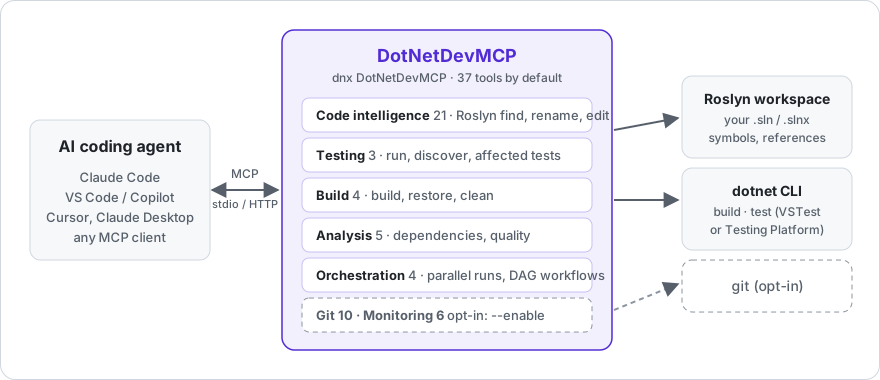
How DotNetDevMCP works: an AI agent talks MCP to DotNetDevMCP, which uses Roslyn and the dotnet CLI on your solution

New here? The wiki has a first-session tutorial, setup for every MCP client, and troubleshooting.

Install

Requires the .NET 10 SDK.

Claude Code

Terminal
claude mcp add dotnetdevmcp -- dnx DotNetDevMCP --yes

VS Code / Visual Studio (.mcp.json or .vscode/mcp.json)

config.json
{
  "servers": {
    "dotnetdevmcp": {
      "type": "stdio",
      "command": "dnx",
      "args": ["DotNetDevMCP", "--yes"]
    }
  }
}

Claude Desktop / Cursor / any stdio client (mcpServers form)

config.json
{
  "mcpServers": {
    "dotnetdevmcp": {
      "command": "dnx",
      "args": ["DotNetDevMCP", "--yes", "--", "--load-solution", "C:/src/MyApp/MyApp.sln"]
    }
  }
}

dnx downloads the package from NuGet.org on first run. Prefer a permanent install? dotnet tool install -g DotNetDevMCP, then use dotnetdevmcp as the command.

Pass --load-solution <path> to have Roslyn load your solution at startup, or let the agent call SharpTool_LoadSolution when it needs to. --http --port 3001 serves Streamable HTTP instead of stdio (localhost only, no authentication: see Security); it rejects requests carrying a foreign Origin header or a non-localhost Host header. --allowed-origin <origin> (repeatable) adds an extra origin to that allow-list, e.g. --allowed-origin http://localhost:5173 for a local dev-server proxy that forwards its Origin - the server sends no CORS headers, so this doesn't let a browser page call it directly. --clean-env starts dotnet and git with a minimal environment so tokens and cloud credentials in environment variables aren't passed on. dotnetdevmcp --help lists everything.

Git and Monitoring tools (see the table below) are off by default - a shell an agent already has covers them, and every registered tool costs context tokens in every session. Pass --enable git,monitoring (comma-separated and/or repeated, e.g. --enable git --enable monitoring) to turn either or both on.

By default, the Roslyn edit tools (SharpTool_RenameSymbol, OverwriteMember, AddMember, MoveMember, FindAndReplace, CreateRoslynDocument, OverwriteRoslynDocument, ManageUsings, ManageAttributes) never touch git - they apply changes to disk and return the usual compile-check output, nothing else. Pass --git-commit-edits to opt into the old behavior: each edit creates a sharptools/<timestamp> branch (if you aren't already on one) and commits the change, which is also what SharpTool_Undo needs in order to revert. Without the flag, SharpTool_Undo returns an explanatory error instead of failing obscurely. (--disable-git still exists but is a no-op now that git integration is opt-in by default.)

What the agent gets

GroupToolsWhat they do
Code intelligence (Roslyn)21Load a solution; search and view definitions; find references and implementations; add, overwrite, move and rename members; manage usings and attributes; find-and-replace with syntax awareness; complexity analysis; undo. Forked from SharpTools.
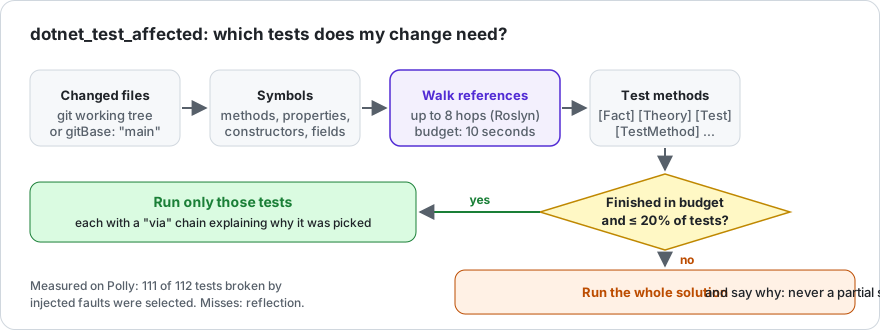
Testing3dotnet_test_run (one dotnet test per project or solution, TRX parsed into per-test results with messages and stack traces), dotnet_test_discover, and dotnet_test_affected: Roslyn walks references from your changed files to the test methods that reach them, and runs only those.
Build4dotnet build, restore, clean, build with MSBuild properties. Structured error/warning output.
Analysis5Project dependency graph, circular-dependency detection, quality metrics, outdated-package scan.
Orchestration4orchestrate_parallel runs any of the server's own tools concurrently; execute_workflow runs them as a DAG. Resource limits and metrics.
Git (opt-in)10Status, branches, checkout, stage, commit, diff, log, push, pull. Enable with --enable git.
Monitoring (opt-in)6Process performance metrics, GC stats, resource utilization, health check, profiling sessions. Enable with --enable monitoring.

Things you can say to an agent with this server attached:

  • "Load MyApp.sln, find every implementation of IOrderRepository, and rename GetById to FindById across the solution."
  • "Run only the tests affected by what I just changed, and show me the failures with stack traces."
  • "Build the API and the worker projects at the same time, then run both test projects."
  • "Which projects have circular dependencies?"

Orchestration

The tools above are individually useful. The orchestrator is what makes them fast. Any tool on the server can be dispatched by name, in parallel or as a dependency graph, from a single call:

config.json
{
  "name": "execute_workflow",
  "arguments": {
    "workflowName": "ci",
    "steps": [
      { "name": "build-tests",  "toolName": "dotnet_build",    "arguments": { "projectPath": "tests/Api.Tests/Api.Tests.csproj" } },
      { "name": "build-worker", "toolName": "dotnet_build",    "arguments": { "projectPath": "src/Worker/Worker.csproj" } },
      { "name": "test-api",     "toolName": "dotnet_test_run", "arguments": { "path": "tests/Api.Tests/Api.Tests.csproj", "noBuild": true }, "dependsOn": ["build-tests"] },
      { "name": "deps",         "toolName": "dotnet_detect_circular_dependencies", "arguments": { "projectPath": "src/Api/Api.csproj" } }
    ]
  }
}

build-tests, build-worker and deps start immediately; test-api waits for build-tests. Steps are throttled by a resource manager (default: processor count, adjustable with configure_resource_limits). Failures are reported per step; a failed dependency stops its dependents.

Under the hood this is ConcurrentExecutor / WorkflowEngine / ResourceManager, plain C# classes in DotNetDevMCP.Orchestration that can be used without MCP.

Numbers

Measured with BenchmarkDotNet on an i7-10750H, .NET 10.0.9. The orchestration benchmarks use Task.Delay stand-ins for I/O-bound work, so they measure the engine's overhead and scheduling, not dotnet itself.

Scenario (20 ops × 50 ms)Meanvs sequential
Sequential1,237 ms1.00
ConcurrentExecutor, throttled to 5246 ms0.20
ConcurrentExecutor, unthrottled (12 cores)123 ms0.10
WorkflowEngine with dependencies185 ms0.15
Task.WhenAll (lower bound)62 ms0.05
Workflow with a mix of dependent and independent stepsMeanvs sequential
Sequential308 ms1.00
WorkflowEngine185 ms0.60

Affected tests

How dotnet_test_affected chooses tests: changed files, symbols, reference walk, test methods, then either a filtered run or the whole solution

After an edit, the agent usually reruns the whole suite. dotnet_test_affected asks Roslyn instead: take the symbols declared in the changed files, follow references (up to maxDepth hops, default 8) until you land in a method with [Fact], [Theory], [Test], [TestCase] or [TestMethod], then run exactly those. Changed files default to the git working tree, or gitBase: "main" for a branch. dryRun: true lists the tests without running them; framework: "net10.0" runs one target framework of multi-targeted test projects.

Read the full README →View source on GitHub →

Related MCP Servers

View all in Developer Tools View all alternatives
  • O
    Openapi MCP Server

    Connect any HTTP/REST API server using an Open API spec (v3)

    💻 Developer Tools3 views
    Compare vs Openapi MCP Server →
  • C
    Claude Task Master

    AI-powered task management system for AI-driven development. Features PRD parsing, task expansion, multi-provider support (Claude, OpenAI, Gemini, Perplexity, xAI), and selective tool loading for optimized context usage.

    💻 Developer Tools8 views
    Compare vs Claude Task Master →
  • M
    MCP Server Docker

    Integrate with Docker to manage containers, images, volumes, and networks.

    💻 Developer Tools3 views
    Compare vs MCP Server Docker →
  • A
    Andrea9293 MCP

    Local-first document management and semantic search for AI coding agents

    💻 Developer Tools2 views
    Compare vs Andrea9293 MCP →

Reviews

No reviews yet — be the first to share how this listing worked for you.

Frequently Asked Questions about Dotnetdevmcp

We don't have a confirmed install command for dotnetdevmcp yet, so we don't publish a generated one — a guessed package name would point at the wrong package or none at all. Follow the project's own README or setup instructions (https://github.com/csa7mdm/DotNetDevMCP) for the current steps.

AllMCPs Directory Badge

Full Badge Customizer

Showcase your server listing on GitHub or your project documentation. Embed this dynamic SVG badge to highlight official listing status and live engagement.

Badge Style:
Live Dynamic SVG PreviewDotnetdevmcp AllMCPs Directory Badge

Markdown (GitHub README)
[![AllMCPs](https://allmcps.com/api/badge/dotnetdevmcp?style=directory)](https://allmcps.com/mcp/dotnetdevmcp)
HTML Embed
<a href="https://allmcps.com/mcp/dotnetdevmcp"><img src="https://allmcps.com/api/badge/dotnetdevmcp?style=directory" alt="Dotnetdevmcp on AllMCPs" /></a>

Technical Specs & Signals

Category💻Developer Tools
More technical detailsExpand â–¾
Last updatedSep 28, 2026
Views0
Unique ViewsTotal visits recorded for this listing page on AllMCPs.
Installs0
Installs & Copy ActionsTotal times users copied install commands or configuration snippets for this server.
27Quality signal: Emerging · 27/100How this signal is calculated ▾
Server availabilityNot measured

Not scored for repo-hosted servers — we can't reach the running server, only its GitHub page. Hosted MCP endpoints are health-checked live.

Verified ownership8/20
Documentation & tools11/30
Adoption & activity1/15
Community engagement0/10

A guidance signal from public completeness & health data — not a user rating. New listings start lower and rise as they add docs, get verified, and grow adoption. Signals we can't observe for a listing are skipped, not counted against it.

★ Featured
M

Moxie Docs MCP

MCP & Agent Skills for Automated Documentation, and codebase conventions + context

Explore Server →

Own this project?

This directory is pre-filled from public sources. Claim via GitHub README, site badge, or DNS TXT to unlock edit access and the Official badge and attach your website — proof is checked automatically, then reviewed by our team.

Free dofollow backlink: add your website and place the AllMCPs badge on it — no claim needed. We detect it automatically and keep it verified as long as the badge stays live.

Claim & get free dofollow

Share & Embed

Add our SVG badge (dark/light directory styles) or embeddable widget to your site.

Explore more

More in 💻 Developer Tools →Best MCP servers for Developers →Alternatives to Dotnetdevmcp →Install in Claude DesktopInstall in CursorInstall in VS CodeSetup guides for all 13 MCP clients