AllMCPs
BrowseBestCategoriesStackCompareToolsGuidesBlog
Log in Submit MCP

Stay in the loop

Get new MCP servers and top picks in your inbox.

AllMCPs

The open directory for discovering and installing Model Context Protocol servers.

AllMCPs on GitHub (opens in a new tab)
Launched onTiny Startupstinystartups.com
Explore
  • Browse servers
  • Best MCP servers
  • Categories
  • MCP clients
  • Agent prompts
  • Stack Builder
  • Compare servers
  • Random discovery New
  • Submit a server
  • Pricing & Boost Boost
Learn
  • Guides hub
  • What is MCP?
  • Install guide
  • Build an MCP server
  • Deploy an MCP server
  • Security guide
  • Troubleshooting
  • MCP for SEO & AEO
  • Protocol versioning
  • Blog & updates
Tools
  • All developer tools
  • Config generator
  • Config validator
  • Config auditor
  • MCP playground
  • Token calculator
  • OpenAPI β†’ MCP
  • Badge generator
For agents
  • REST API docs
  • Trust & traffic Live
  • Remote MCP server SSE β†— (opens in a new tab)
  • llms.txt β†— (opens in a new tab)
  • Catalog JSON β†— (opens in a new tab)
Company
  • About
  • Advertise Sponsor
  • Contact
  • GitHub β†— (opens in a new tab)
  • Terms
  • Privacy
AllMCPs VerifiedAllMCPs VerifiedFeatured on Nick LaunchesFeatured on Nick LaunchesLaunch Llama NewsletterLaunch Llama NewsletterVerified DR - allmcps.comVerified DR - allmcps.comFeatured on SaaSGrowFeatured on SaaSGrowFeatured on Twelve ToolsFeatured on Twelve ToolsFeatured on Saaspa.geFeatured on Saaspa.geFeatured on Findly.toolsFeatured on Findly.toolsFeatured on Startup FameFeatured on Startup FameFeatured on LaunchKiwiFeatured on LaunchKiwiFeatured on ScrollLaunchFeatured on ScrollLaunchFeatured on DailyPingsFeatured on DailyPingsFazier badgeFazier badgeFeatured on NewTool.siteFeatured on NewTool.siteFeatured on saasfame.comFeatured on saasfame.comDR Checker - Domain RatingDR Checker - Domain RatingListed on Turbo0Listed on Turbo0Launched on LaunchBoard - Product Launch PlatformLaunched on LaunchBoard - Product Launch PlatformList on SimilarlabsList on Similarlabshttps://codetrendy.comhttps://codetrendy.comListed on DevTool.ioFeatured on BuildlistFeatured on BuildlistLaunched on Tiny StartupsFeatured on ShowMeBestAIFeatured on ShowMeBestAIFind us on LaunchZoneFind us on LaunchZoneAllMCPs VerifiedAllMCPs VerifiedFeatured on Nick LaunchesFeatured on Nick LaunchesLaunch Llama NewsletterLaunch Llama NewsletterVerified DR - allmcps.comVerified DR - allmcps.comFeatured on SaaSGrowFeatured on SaaSGrowFeatured on Twelve ToolsFeatured on Twelve ToolsFeatured on Saaspa.geFeatured on Saaspa.geFeatured on Findly.toolsFeatured on Findly.toolsFeatured on Startup FameFeatured on Startup FameFeatured on LaunchKiwiFeatured on LaunchKiwiFeatured on ScrollLaunchFeatured on ScrollLaunchFeatured on DailyPingsFeatured on DailyPingsFazier badgeFazier badgeFeatured on NewTool.siteFeatured on NewTool.siteFeatured on saasfame.comFeatured on saasfame.comDR Checker - Domain RatingDR Checker - Domain RatingListed on Turbo0Listed on Turbo0Launched on LaunchBoard - Product Launch PlatformLaunched on LaunchBoard - Product Launch PlatformList on SimilarlabsList on Similarlabshttps://codetrendy.comhttps://codetrendy.comListed on DevTool.ioFeatured on BuildlistFeatured on BuildlistLaunched on Tiny StartupsFeatured on ShowMeBestAIFeatured on ShowMeBestAIFind us on LaunchZoneFind us on LaunchZone
Β© 2026 Jackalope Digital LLC. All rights reserved.
  1. Home
  2. 🧠 Knowledge & Memory
  3. Obsidian Codex MCP
Obsidian Codex MCP logo
Health: ActiveRecent health check succeeded.Last checked 9/9/2026, 11:17:57 AM

Obsidian Codex MCP

User RatingsBe the first to rate and review this MCP server!
View Repository14 GitHub StarsTotal stargazers on GitHub for the source repository (14 stars).Visit Website
obsidianmarkdownknowledge-baselocalmcp

Local-first MCP server for direct read/write access to Obsidian markdown vaults without Obsidian or API keys.

Quick Install

Automated & IDE Setup

Copy the AI prompt to install this server into Claude Code, Cursor, or another agent β€” or use 1-click editor setup below.

One-click editor setup isn’t available for this listing yet β€” we don’t have a confirmed install command, and we’d rather show nothing than point your editor at the wrong package or host. Follow the project’s own setup instructions, linked above.

Manual Client & Custom JSON ConfigExpand JSON β–Ύ
No confirmed setup config for this listing yet. We only publish a config block when the install details come from the project itself β€” its README, its docs, or a verified owner. We haven’t found those for dot-RealityTest/obsidian-codex-mcp, and we’d rather show nothing than a guess you’d paste into your client. Follow the project’s own setup instructions for the current steps.
Install Directory Badge Claim listing Alternatives🧠 More in Knowledge & Memory

Overview

This MCP server enables clients to read, search, create, update, and delete markdown notes directly in a local Obsidian vault without requiring the Obsidian app, plugins, or API keys. It supports full filesystem access with safety features like path isolation, read-only mode, and backup-on-write. It also uniquely supports creating and editing Obsidian Bases (.base files) with schema validation to ensure compatibility. Use it when you want local, plugin-free MCP integration with Obsidian markdown files for knowledge management or automation.

Use cases

β€’Read and search notes in a local Obsidian vault
β€’Create, update, and delete markdown notes without Obsidian
β€’Create and edit Obsidian Bases with schema validation
β€’Automate local knowledge workflows using MCP clients
β€’Generate summaries and reports from vault content

Key features

β€’Direct filesystem access to markdown notes
β€’Read-only mode to prevent writes
β€’Backup-on-write before updates and deletes
β€’Path traversal protection and vault isolation
β€’Full support for Obsidian Bases (.base) with schema validation
β€’Works with any MCP client via JSON or TOML config

Capabilities & Tool Schemas

Inspect callable tools, capabilities, and parameters exposed to AI agents by Obsidian Codex MCP.

Extracted Tool Capabilities
Direct filesystem access to markdown notes
Read-only mode to prevent writes
Backup-on-write before updates and deletes
Path traversal protection and vault isolation
Full support for Obsidian Bases (.base) with schema validation
Works with any MCP client via JSON or TOML config

Documentation Overview

Kika Obsidian MCP

CI Python MCP Obsidian Works with Local first License: MIT

Local-first MCP server for working with an Obsidian vault.

  • No Obsidian plugin required
  • No API key required
  • No cloud service required
  • No Obsidian running in the background

This is for people who want MCP clients to work directly with markdown files on disk.

Independent open-source project. Not affiliated with Obsidian, Anthropic, OpenAI, or any MCP client.

What it does

It lets MCP clients work with your vault to:

  • read and search notes
  • create and update notes
  • create and edit Obsidian Bases (.base files) with schema validation
  • generate summaries, status reports, and release notes
  • automate local knowledge workflows

All directly against your local markdown files.

Best for

  • Anyone using an MCP client β€” Claude Code, Claude Desktop, Cursor, Cline, Codex, Grok β€” who wants safe local access to an Obsidian vault
  • Developers who prefer filesystem-based Obsidian automation over the Local REST API plugin
  • People who want to create and edit Obsidian Bases (.base) from an agent
  • Personal knowledge bases, project logs, daily notes, task notes, and markdown-first workflows

Why this exists

There are already a handful of Obsidian MCP servers. Many depend on the Obsidian Local REST API plugin or run as an Obsidian plugin. This project is intentionally simpler:

  • direct filesystem access to a local vault
  • no network calls
  • no Obsidian API token
  • works with any MCP client β€” simple JSON or TOML config for Claude Code, Claude Desktop, Cursor, Cline, Codex, and Grok
  • tolerant of real-world vaults with imperfect frontmatter
  • path traversal protection so tools cannot escape the configured vault
  • optional read-only mode for safer review/search workflows
  • optional backup-on-write before updates and deletes
  • first-class Obsidian Bases (.base) support with schema validation β€” a differentiator: almost no other Obsidian MCP server can create or edit Bases, and this one validates them against the official schema so it never writes a file Obsidian would silently reject

How it compares

NeedThis project
Use Obsidian with any MCP clientYes β€” Claude Code, Claude Desktop, Cursor, Cline, Codex, Grok
Config formatJSON or TOML, per client (examples for each)
Require an Obsidian pluginNo
Require an API keyNo
Require Obsidian to be openNo
Read/write markdown files directlyYes
Create and edit Obsidian Bases (.base)Yes, with schema validation
Work over a remote HTTP APINo, local stdio MCP only

Safety features

Designed to be useful without being reckless:

  • read-only mode, which refuses writes
  • backup-on-write mode before updates and deletes
  • vault path isolation
  • path traversal protection
  • no external network calls

Tools

  • configure_vault - set or change the vault path
  • get_note - read one markdown note by vault-relative path
  • create_note - create a new markdown note with optional metadata
  • update_note - update note content and/or frontmatter
  • delete_note - delete a markdown note
  • list_notes - list notes in the vault or a folder
  • search_notes - search note title, content, and tags
  • get_all_tags - list unique tags from frontmatter and inline tags
  • get_backlinks - find notes that link to a note
  • get_note_links - extract wikilinks from a note
  • create_folder - create a folder inside the vault
  • get_folder_structure - return the vault folder tree

Bases (.base files)

First-class, schema-validated support for Obsidian Bases β€” database-like views over your notes. Very few Obsidian MCP servers support these.
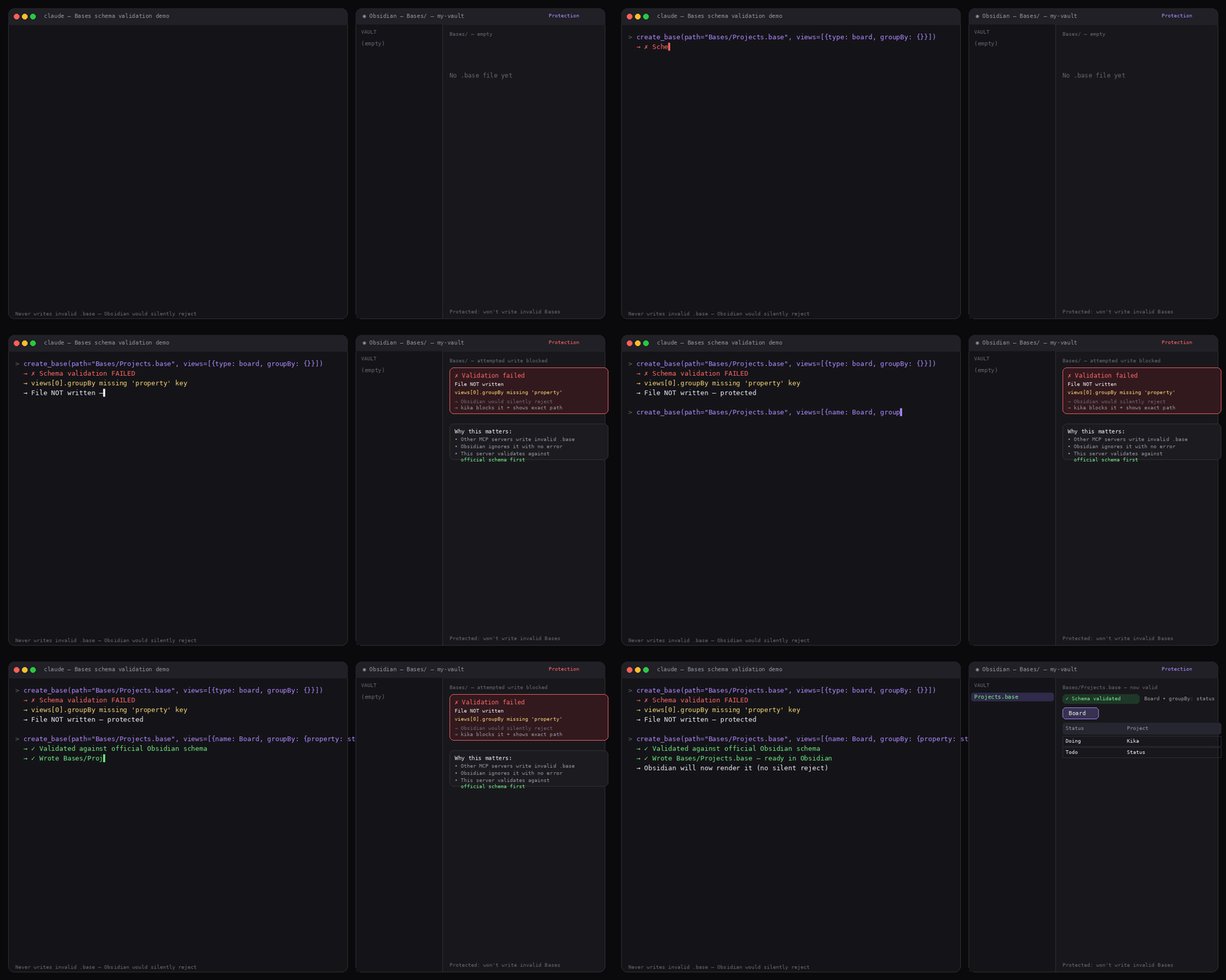
A base is validated against the Bases schema before anything is written β€” an invalid view is rejected with the offending path named, and no file is created

  • create_base - create a .base file, validated against the Bases schema before writing
  • update_base - merge changes into a base (update a view by name, add/remove views, change filters/formulas/properties)
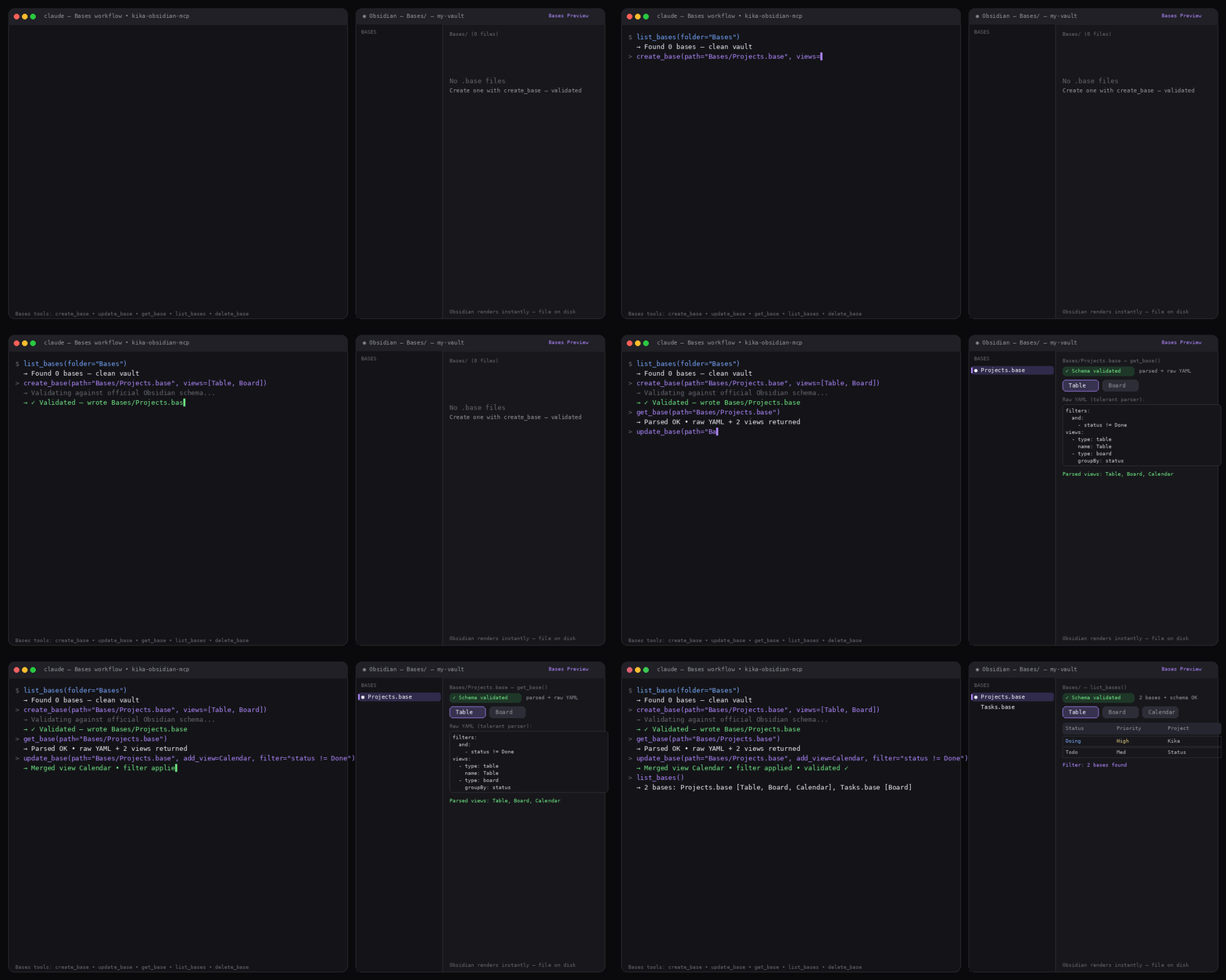
  • get_base - read a .base as parsed structure + raw YAML; tolerant of imperfect files
  • list_bases - list .base files in the vault or a folder, with their view names
  • delete_base - delete a .base file

Creating a base and reading it back through the MCP tools β€” the full round-trip

All four Obsidian view modes are supported β€” table, list, cards, and map β€” and any of them can be mixed in a single base. Map views (from the Maps community plugin) round-trip cleanly too: their marker and zoom settings are preserved on read and re-write.

See docs/bases-examples.md for copyable examples of each view mode.

Demo
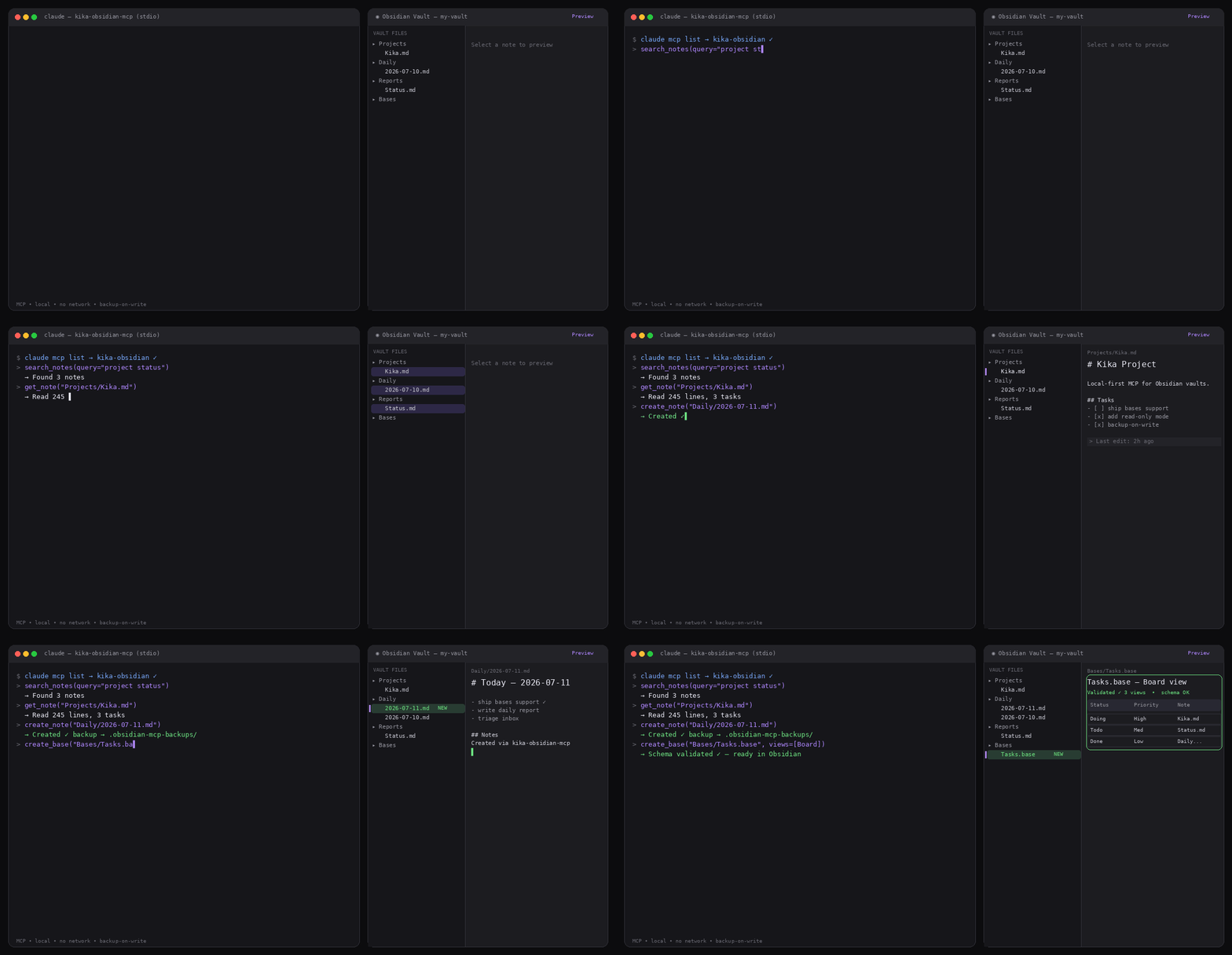
Claude drives the MCP server on the left while the Obsidian vault updates live on the right

Full-length clip: Obsidian + MCP demo

Quick start

Install

Requirements:

  • Python 3.10 or newer recommended
  • An Obsidian vault stored as local markdown files
bash
git clone https://github.com/aka-kika/kika-obsidian-mcp.git
cd kika-obsidian-mcp
./install.sh /absolute/path/to/your/obsidian-vault

install.sh creates a local virtualenv, installs dependencies, verifies against your vault, then prints ready-to-paste config for the client you choose (--client claude|claude-desktop|codex|cursor|cline|grok, default: all).

Prefer to do it by hand? The manual steps are:

bash
python3 -m venv .venv
.venv/bin/python -m pip install --upgrade pip
.venv/bin/python -m pip install -r requirements.txt
OBSIDIAN_VAULT_PATH="/absolute/path/to/your/vault" .venv/bin/python test_server.py

Configure your MCP client

The server is a local stdio MCP server, so any MCP-capable client can run it. Point the client at your virtualenv's Python and server.py, and set the vault path via env. Then restart or reconnect the client.

Claude Code

Terminal
claude mcp add kika-obsidian \
  --env OBSIDIAN_VAULT_PATH="/absolute/path/to/your/obsidian-vault" \
  --env OBSIDIAN_READ_ONLY="false" \
  --env OBSIDIAN_BACKUP_ON_WRITE="true" \
  -- /absolute/path/to/kika-obsidian-mcp/.venv/bin/python \
     /absolute/path/to/kika-obsidian-mcp/server.py

Claude Desktop / Cursor / Cline

Add this to the client's MCP config (claude_desktop_config.json, or the equivalent mcpServers block):

config.json
{
  "mcpServers": {
    "kika-obsidian": {
      "command": "/absolute/path/to/kika-obsidian-mcp/.venv/bin/python",
      "args": ["/absolute/path/to/kika-obsidian-mcp/server.py"],
      "env": {
        "OBSIDIAN_VAULT_PATH": "/absolute/path/to/your/obsidian-vault",
        "OBSIDIAN_READ_ONLY": "false",
        "OBSIDIAN_BACKUP_ON_WRITE": "true"
      }
    }
  }
}

Codex / Grok

Add this to ~/.codex/config.toml (or ~/.grok/config.toml):

toml
[mcp_servers.kika-obsidian]
command = "/absolute/path/to/kika-obsidian-mcp/.venv/bin/python"
args = ["/absolute/path/to/kika-obsidian-mcp/server.py"]
enabled = true

[mcp_servers.kika-obsidian.env]
OBSIDIAN_VAULT_PATH = "/absolute/path/to/your/obsidian-vault"
OBSIDIAN_READ_ONLY = "false"
OBSIDIAN_BACKUP_ON_WRITE = "true"

For a safer read/search-only setup, set OBSIDIAN_READ_ONLY="true" (TOML: OBSIDIAN_READ_ONLY = "true").

Environment

VariableRequiredDefaultDescription
OBSIDIAN_VAULT_PATHyesnoneAbsolute path to the vault folder.
OBSIDIAN_READ_ONLYnofalseWhen true, create/update/delete/folder creation tools refuse writes.
OBSIDIAN_BACKUP_ON_WRITEnofalseWhen true, copies existing notes into .obsidian-mcp-backups/ before update/delete.

Safety model

  • All note paths are resolved relative to OBSIDIAN_VAULT_PATH.
  • Absolute paths and ../ path traversal are rejected.
  • Writes can be disabled with OBSIDIAN_READ_ONLY=true (this also blocks create_base, update_base, and delete_base).
  • Existing notes and .base files can be copied to .obsidian-mcp-backups/ before update/delete with OBSIDIAN_BACKUP_ON_WRITE=true.
  • Deletes are extension-scoped: delete_note only removes markdown (.md) notes and delete_base only removes Bases (.base) files. Neither can touch other file types.
  • Base tools accept only .base paths and note tools only .md paths, so the two never cross-contaminate.
  • The server makes no external network calls.
  • Broken YAML frontmatter does not break listing/search; the note is still readable with empty metadata.

Development

Run the local test script:

bash
OBSIDIAN_VAULT_PATH="/absolute/path/to/your/vault" .venv/bin/python test_server.py

Start the MCP server:

bash
OBSIDIAN_VAULT_PATH="/absolute/path/to/your/vault" .venv/bin/python server.py

Optional automation

Generate a daily project status report from your vault:

bash
OBSIDIAN_VAULT_PATH="/absolute/path/to/your/vault" .venv/bin/python scripts/daily_status_report.py --folder "Projects"

Write the report back into Obsidian:

Read the full README β†’View source on GitHub β†’

Related MCP Servers

View all in Knowledge & Memory View all alternatives
  • Moxie Docs MCP logoMoxie Docs MCP
    β˜… Featured

    MCP & Agent Skills for Automated Documentation, and codebase conventions + context

    🧠 Knowledge & Memory21 views
    Compare vs Moxie Docs MCP β†’
  • Scrivener MCP logoScrivener MCP

    Connect Scrivener 3 writing projects to Claude and other AI assistants. 47 tools for document management, writing analysis, semantic search, character/plot memory, and content enhancement. Progressive skill loading, relationship engine with HMS triplets, and JS fallback for offline semantic search. npm i -g scrivener-mcp

    🧠 Knowledge & Memory16 views
    Compare vs Scrivener MCP β†’
  • Basic Memory logoBasic Memory

    Persistent, local-first AI memory: a semantic knowledge graph of plain Markdown files that humans and LLMs both read and write. Works with any MCP client, with optional cloud sync and team workspaces.

    🧠 Knowledge & Memory2 views
    Compare vs Basic Memory β†’
  • MCP Obsidian logoMCP Obsidian

    Universal AI bridge for Obsidian vaults using MCP. Provides safe read/write access to notes with 11 comprehensive methods for vault operations including search, batch operations, tag management, and frontmatter handling. Works with Claude, ChatGPT, and any MCP-compatible AI assistant.

    🧠 Knowledge & Memory4 views
    Compare vs MCP Obsidian β†’

Adoption & maintenance

Factual signals from GitHub, npm, and our automated checks β€” not a rating.

GitHub stars
14
Stargazers on the source repository.
Directory activity
2 views
Config copies, upvotes, and views on AllMCPs.

Reviews

No reviews yet β€” be the first to share how this listing worked for you.

Frequently Asked Questions about Obsidian Codex MCP

No, it works directly with markdown files on disk without needing Obsidian running or any plugins.

AllMCPs Directory Badge

Full Badge Customizer

Showcase your server listing on GitHub or your project documentation. Embed this dynamic SVG badge to highlight official listing status and live engagement.

Badge Style:
Live Dynamic SVG PreviewObsidian Codex MCP AllMCPs Directory Badge

Markdown (GitHub README)
[![AllMCPs](https://allmcps.com/api/badge/dot-realitytest-obsidian-codex-mcp?style=directory)](https://allmcps.com/mcp/dot-realitytest-obsidian-codex-mcp)
HTML Embed
<a href="https://allmcps.com/mcp/dot-realitytest-obsidian-codex-mcp"><img src="https://allmcps.com/api/badge/dot-realitytest-obsidian-codex-mcp?style=directory" alt="Obsidian Codex MCP on AllMCPs" /></a>

Technical Specs & Signals

Category🧠Knowledge & Memory
PricingFree
More technical detailsExpand β–Ύ
AuthNo auth required
LicenseMIT
ClientsClaude Desktop, Cursor, Cline / VS Code
Last updatedAug 9, 2026
Views2
Unique ViewsTotal visits recorded for this listing page on AllMCPs.
Installs0
Installs & Copy ActionsTotal times users copied install commands or configuration snippets for this server.
GitHub stars14
GitHub Star CountTotal stargazers on GitHub representing community popularity (14 stars).
44Quality signal: Fair Β· 44/100How this signal is calculated β–Ύ
Server availabilityNot measured

Not scored for repo-hosted servers β€” we can't reach the running server, only its GitHub page. Hosted MCP endpoints are health-checked live.

Verified ownership10/20
Documentation & tools20/30
Adoption & activity3/15
Community engagement0/10

A guidance signal from public completeness & health data β€” not a user rating. New listings start lower and rise as they add docs, get verified, and grow adoption. Signals we can't observe for a listing are skipped, not counted against it.

β˜… Spotlight Slot

Feature Your MCP Server

Get maximum visibility for your server across our directory, search results, and detail pages.

Spotlight Your Server

Own this project?

This directory is pre-filled from public sources. Claim via GitHub README, site badge, or DNS TXT to unlock edit access and the Official badge β€” proof is checked automatically, then reviewed by our team.

Free dofollow backlink: add your website and place the AllMCPs badge on it β€” no claim needed. We detect it automatically and keep it verified as long as the badge stays live.

Claim & get free dofollow

Share & Embed

Add our SVG badge (dark/light directory styles) or embeddable widget to your site.

Explore more

More in 🧠 Knowledge & Memory β†’Best MCP servers for Memory & Knowledge β†’Alternatives to Obsidian Codex MCP β†’Install in Claude DesktopInstall in CursorInstall in VS Code