Verify what agents actually shipped, arbitrate file collisions, refuse with structured reasons.
Quick Install
Automated & IDE SetupCopy the AI prompt to install this server into Claude Code, Cursor, or another agent — or use 1-click editor setup below.
Not yet automatically verified
We haven't yet run this listing's install command through our automated sandbox check. This isn't a red flag — we're steadily working through the catalog.
Manual Client & Custom JSON ConfigExpand JSON ▾
Client Config & Setup
Choose your client or environment
Target File:
💡 Paste the JSON block into your client's configuration file under mcpServers, then restart the application.
Documentation Overview
DOS — the Dispatch Operating System
Catch your AI agents when they lie about what they shipped.






📊 See it run on real repos: the scoreboard scores 15 popular AI-built repos (roborev, open-interpreter, crewAI, autogen, …) — how much agents wrote, which ones, and whether each commit's claim is backed by its own diff. Score yours:
dos commit-audit --sweep --workspace . BASE..HEAD.
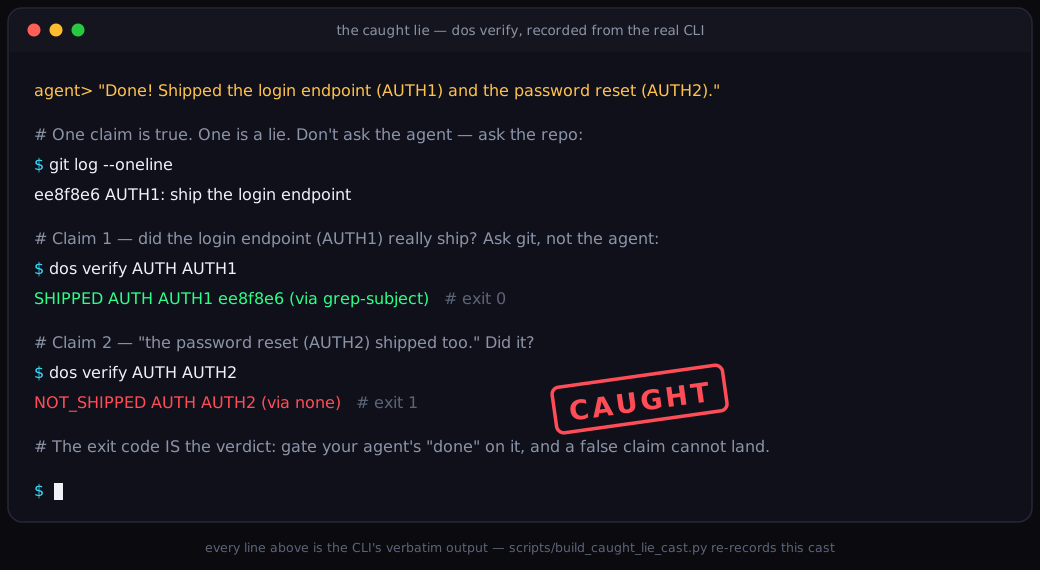
The whole pitch in one recording: the agent claims two features shipped; git backs one.
dos verify answers from the commits, the lie exits 1, and a gate on that
exit code refuses the false "done". Every line is the real CLI's verbatim output —
scripts/build_caught_lie_cast.py re-records it whenever the output changes.
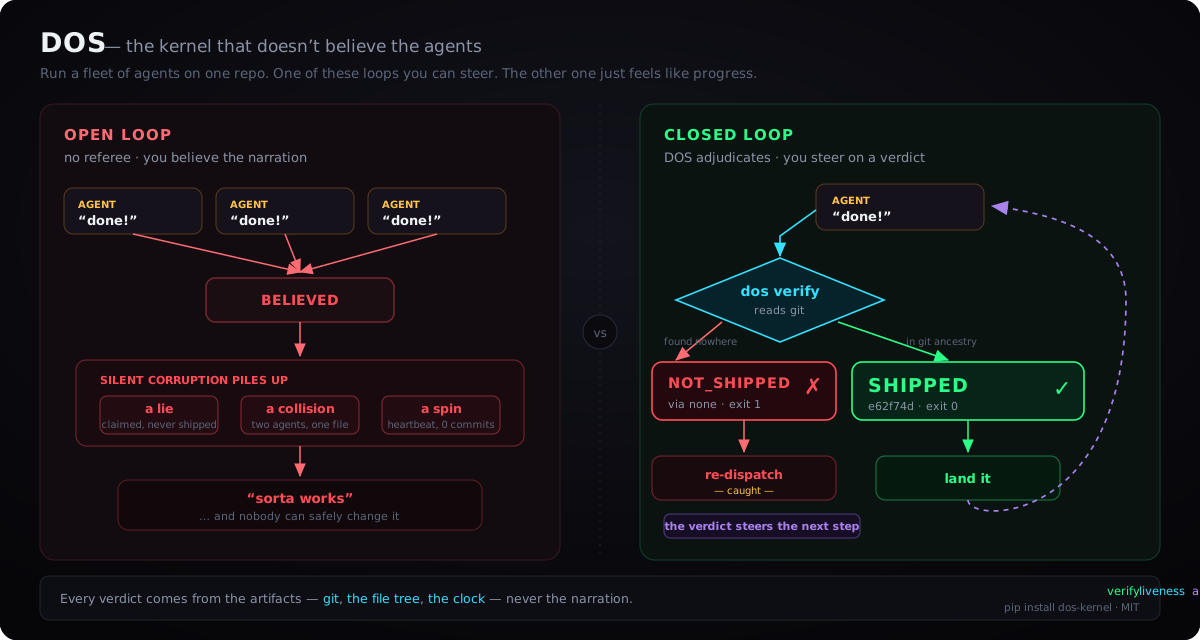
Run a fleet of agents on one repo. The left loop just feels like progress; the right one you can steer.
The only difference is a verdict DOS reads from the real world — here, git — never the agent's word.
An AI agent will tell you it finished. DOS checks the real world instead of
taking its word — and the nearest piece of the real world is your git history.
An agent says it shipped the login endpoint; did it? Run one command,
dos verify, and it answers from the artifacts the work left behind, not from
what the agent typed: a commit backs the claim → SHIPPED, exit 0; nothing
landed → NOT_SHIPPED, exit 1. The agent's story never enters into it. (Git
is just the first witness DOS reads; the file tree, the clock, a CI status, a
test environment's own state are others — anything the agent didn't author.)
That's the smallest version. It scales up, too: point a dozen agents at one
repo — in CI, in a fleet, racing on the same files — and DOS also tells you
which ones are stepping on each other, which one is spinning in circles, and
which claim of "done" is real. Every answer comes from the artifacts (git, the
file tree, the clock), never the narration. It works on a plain git repo with
zero config and gets smarter the more you tell it, and the only thing you ever
install is one small Python package.
Setup — use DOS in your repo
DOS is a Python package you install into the existing git repo where your agents work. You do not need to clone or fork the DOS source unless you plan to develop DOS itself.
From then on, your agent cannot tell you "done" unless the work actually
landed, two agents cannot silently overwrite each other's files, and a run
that stalls gets flagged instead of quietly spinning. dos init prints the
config and hook entries it wrote; removing those generated entries undoes the
setup. If no runtime is detected, it says so and lists the explicit choices —
it never guesses.
| What you want | Start here |
|---|---|
| Use DOS in my repo | Install the package, then run dos init --hooks auto in that repo (the setup above). |
| See the 60-second demo | Run uvx --from dos-kernel dos quickstart; it creates and removes a throwaway repo. |
| Read or change DOS itself | Clone this repository and use the contributor install; most users do not need the source clone. |
v0.30.0 · 5,600+ tests · CI: Python 3.11–3.13 on Linux + a Windows 3.13 smoke run · the only runtime dependency is PyYAML · MIT.
🧭 Where to go next: the why & evidence (plain-words story, the 20-lines-of-bash answer, what's proven), wire it into your stack (MCP · hooks · install), the syscall + CLI reference, or, reading this as an AI agent?, AGENTS.md — build/test/check in three lines. The full map is the router just below.
🔤 Five words the rest of this page leans on. A plan is a named goal (
AUTH); a phase is one shippable step of it (AUTH1); a lane is the slice of the file tree one agent may touch; the oracle is the part of DOS that reads the evidence and rules; a stamp is the mark a shipped phase leaves in a commit subject (AUTH1: …) — the thing the oracle greps for. That's the whole vocabulary.
In plain words
A coding agent does work, then tells you how it went. Usually the story is true; sometimes it's the cheerful "all work completed!" from a worker that shipped nothing. With one agent you catch that yourself by re-reading its output — a real tax you already pay. Run twenty at once and that tax stops being payable: nobody reads everything, each worker grades its own homework, and the unchecked problems pile up quietly until the codebase sorta works and nobody can safely change it. DOS is the referee that never reads the story — it reads what happened (the commit, the file, the clock) and hands you a verdict no narration can move. It costs about an afternoon, has one runtime dependency, and stays in its lane: it tells you what happened, never whether the code is good — quality stays with your tests and reviews. (The full plain-words version.)
Measured, not asserted
Every number here is scored against a fact the agent can't fake (a test environment's DB state, git history). A DOS gate caught 15 "I shipped it" lies in 258 tasks across two models with zero false alarms; the same referee stopped 6 of 8 silent collisions on one shared record; quitting doomed runs at the right moment saved ~11% of fleet compute with 0 of 1,634 winners wrongly killed; and the reward-set admission label lifted acceptance precision 60% → 100% by purging poison a self-graded collector keeps. The methodology, the two money-moment figures, and the projected-vs-bet honesty gradient are in what's proven and what's still a bet.
Where the rest of the docs are
This page keeps the hook, the demo, and the failure it fixes. Everything deeper lives on a focused page — find the question you arrived with and jump:
Related MCP Servers
Adoption & maintenance
Factual signals from GitHub, npm, and our automated checks — not a rating.
GitHub stars
20
Stargazers on the source repository.
Last commit
4d ago
Most recent push to the default branch.
Reviews
No reviews yet — be the first to share how this listing worked for you.
Frequently Asked Questions about DOS — the trust substrate for agent fleets
AllMCPs Directory Badge
Showcase your server listing on GitHub or your project documentation. Embed this dynamic SVG badge to highlight official listing status and live engagement.
Badge Style:
Live Dynamic SVG Preview
Markdown (GitHub README)
[](https://allmcps.com/mcp/dos-the-trust-substrate-for-agent-fleets)HTML Embed
<a href="https://allmcps.com/mcp/dos-the-trust-substrate-for-agent-fleets"><img src="https://allmcps.com/api/badge/dos-the-trust-substrate-for-agent-fleets?style=directory" alt="DOS — the trust substrate for agent fleets on AllMCPs" /></a>Technical Specs & Signals
CategoryDeveloper Tools
6/10 checks healthy over the last 46d
43Quality signal: Fair · 43/100How this signal is calculated ▾
Server availabilityNot measured
Not scored for repo-hosted servers — we can't reach the running server, only its GitHub page. Hosted MCP endpoints are health-checked live.
Verified ownership10/20
Documentation & tools16/30
Adoption & activity6/15
Community engagement0/10
A guidance signal from public completeness & health data — not a user rating. New listings start lower and rise as they add docs, get verified, and grow adoption. Signals we can't observe for a listing are skipped, not counted against it.
Supply-chain signal
No high-severity advisories surfaced by our automated scan.
Critical 0High 0Medium 0Low 0
Scanned 3d ago via OSV.dev · dos-kernel (PyPI)
Own this project?
This directory is pre-filled from public sources. Claim via GitHub README, site badge, or DNS TXT to unlock edit access and the Official badge — proof is checked automatically, then reviewed by our team.
Free dofollow backlink: add your website and place the AllMCPs badge on it — no claim needed. We detect it automatically and keep it verified as long as the badge stays live.
Claim & get free dofollowShare & Embed
Add our SVG badge (dark/light directory styles) or embeddable widget to your site.