AllMCPs
BrowseBestCategoriesStackCompareToolsGuidesBlog
Log in Submit MCP

Stay in the loop

Get new MCP servers and top picks in your inbox.

AllMCPs

The open directory for discovering and installing Model Context Protocol servers.

Follow AllMCPs on X (opens in a new tab)AllMCPs on GitHub (opens in a new tab)
Launched onTiny Startupstinystartups.com
Explore
  • Browse servers
  • Best MCP servers
  • Categories
  • MCP clients
  • Agent prompts
  • Stack Builder
  • Compare servers
  • Random discovery New
  • Submit a server
  • Pricing & Boost Boost
Learn
  • Guides hub
  • What is MCP?
  • Install guide
  • Build an MCP server
  • Deploy an MCP server
  • Security guide
  • Troubleshooting
  • MCP for SEO & AEO
  • Protocol versioning
  • Blog & updates
Tools
  • All developer tools
  • Config generator
  • Config validator
  • Config auditor
  • MCP playground
  • Token calculator
  • OpenAPI β†’ MCP
  • Badge generator
For agents
  • REST API docs
  • Trust & traffic Live
  • Remote MCP server SSE β†— (opens in a new tab)
  • llms.txt β†— (opens in a new tab)
  • Catalog JSON β†— (opens in a new tab)
Company
  • About
  • Advertise Sponsor
  • Contact
  • X (@AllMCPs) β†— (opens in a new tab)
  • GitHub β†— (opens in a new tab)
  • Terms
  • Privacy
AllMCPs VerifiedAllMCPs VerifiedFeatured on Nick LaunchesFeatured on Nick LaunchesLaunch Llama NewsletterLaunch Llama NewsletterVerified DR - allmcps.comVerified DR - allmcps.comFeatured on SaaSGrowFeatured on SaaSGrowFeatured on Twelve ToolsFeatured on Twelve ToolsFeatured on Saaspa.geFeatured on Saaspa.geFeatured on Findly.toolsFeatured on Findly.toolsFeatured on Startup FameFeatured on Startup FameFeatured on LaunchKiwiFeatured on LaunchKiwiFeatured on ScrollLaunchFeatured on ScrollLaunchFeatured on DailyPingsFeatured on DailyPingsFazier badgeFazier badgeFeatured on NewTool.siteFeatured on NewTool.siteFeatured on saasfame.comFeatured on saasfame.comDR Checker - Domain RatingDR Checker - Domain RatingListed on Turbo0Listed on Turbo0Launched on LaunchBoard - Product Launch PlatformLaunched on LaunchBoard - Product Launch PlatformList on SimilarlabsList on Similarlabshttps://codetrendy.comhttps://codetrendy.comListed on DevTool.ioFeatured on BuildlistFeatured on BuildlistLaunched on Tiny StartupsFeatured on ShowMeBestAIFeatured on ShowMeBestAIFind us on LaunchZoneFind us on LaunchZoneAllMCPs VerifiedAllMCPs VerifiedFeatured on Nick LaunchesFeatured on Nick LaunchesLaunch Llama NewsletterLaunch Llama NewsletterVerified DR - allmcps.comVerified DR - allmcps.comFeatured on SaaSGrowFeatured on SaaSGrowFeatured on Twelve ToolsFeatured on Twelve ToolsFeatured on Saaspa.geFeatured on Saaspa.geFeatured on Findly.toolsFeatured on Findly.toolsFeatured on Startup FameFeatured on Startup FameFeatured on LaunchKiwiFeatured on LaunchKiwiFeatured on ScrollLaunchFeatured on ScrollLaunchFeatured on DailyPingsFeatured on DailyPingsFazier badgeFazier badgeFeatured on NewTool.siteFeatured on NewTool.siteFeatured on saasfame.comFeatured on saasfame.comDR Checker - Domain RatingDR Checker - Domain RatingListed on Turbo0Listed on Turbo0Launched on LaunchBoard - Product Launch PlatformLaunched on LaunchBoard - Product Launch PlatformList on SimilarlabsList on Similarlabshttps://codetrendy.comhttps://codetrendy.comListed on DevTool.ioFeatured on BuildlistFeatured on BuildlistLaunched on Tiny StartupsFeatured on ShowMeBestAIFeatured on ShowMeBestAIFind us on LaunchZoneFind us on LaunchZone
Β© 2026 Jackalope Digital LLC. All rights reserved.
  1. Home
  2. πŸ’» Developer Tools
  3. Doc Scraper
D
Health: Not checked yetWe have not completed a health check for this listing yet.No health check has run yet.

Doc Scraper

User RatingsBe the first to rate and review this MCP server! Enrichment pendingWe haven’t run our AI enrichment pass on this listing yet, so the overview, use cases, and FAQ below may be sparse or missing. We work through the catalog over time β€” check back soon.
View Repository

Crawl documentation sites into local corpora agents can search, read, and diff fully offline.

Quick Install

Automated & IDE Setup

Copy the AI prompt to install this server into Claude Code, Cursor, or another agent β€” or use 1-click editor setup below.

Add to CursorAdd to VS Code
Manual Client & Custom JSON ConfigExpand JSON β–Ύ

Client Config & Setup

Choose your client or environment
Target File:~/Library/Application Support/Claude/claude_desktop_config.json
claude_desktop_config.json
{
  "mcpServers": {
    "doc-scraper": {
      "command": "npx",
      "args": [
        "-y",
        "doc-scraper"
      ]
    }
  }
}

πŸ’‘ Paste the JSON block into your client's configuration file under mcpServers, then restart the application.

Install Directory Badge Claim listing AlternativesπŸ’» More in Developer Tools

Documentation Overview

LLM Documentation Scraper (doc-scraper)

Go Version Go Reference License Glama score

A configurable, concurrent, and resumable web crawler written in Go. Specifically designed to scrape technical documentation websites, extract core content, convert it cleanly to Markdown format suitable for ingestion by Large Language Models (LLMs), and save the results locally.
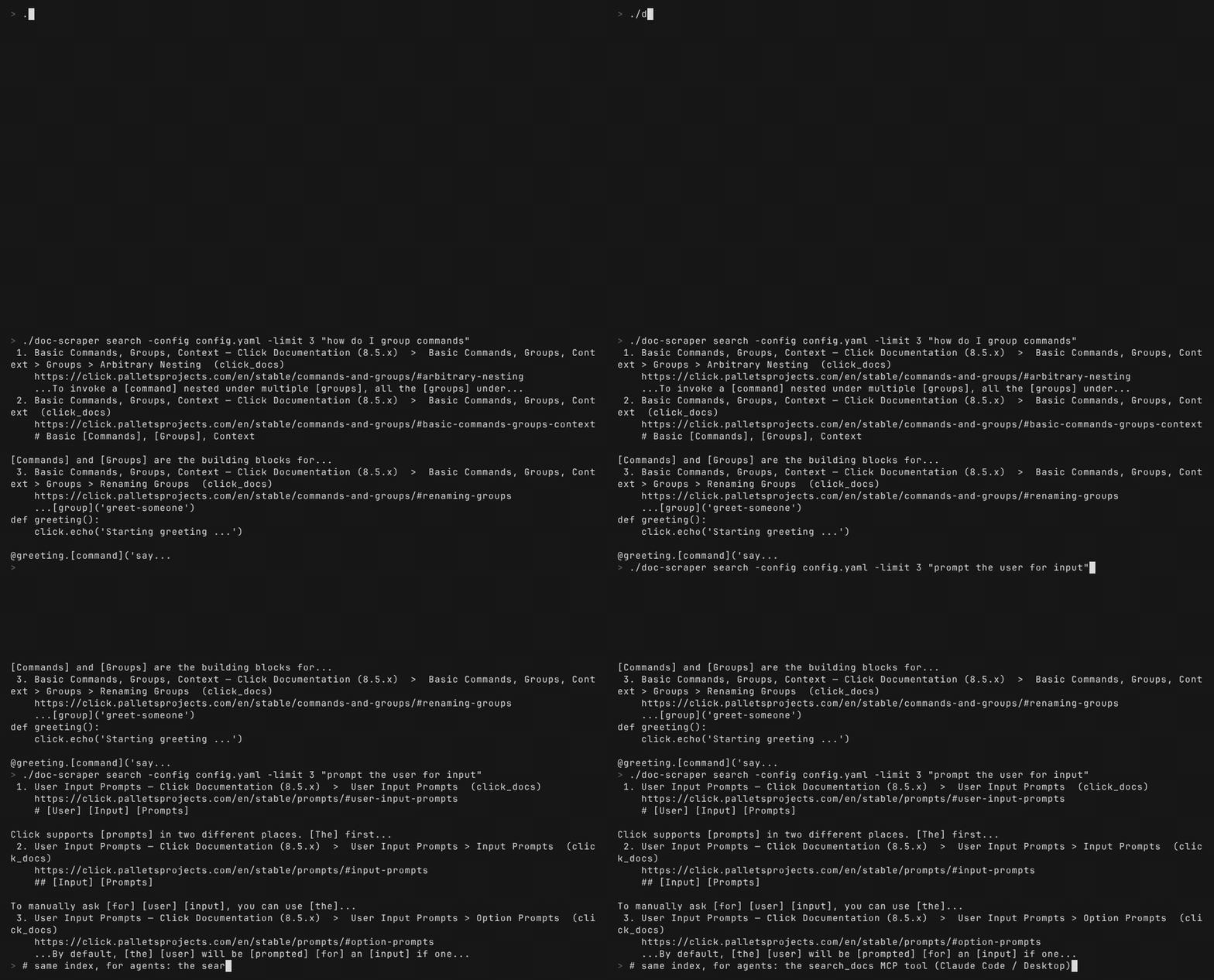
doc-scraper crawling a docs site and answering search queries offline

Overview

This project provides a powerful command-line tool to crawl documentation sites based on settings defined in a config.yaml file. It navigates the site structure, extracts content from specified HTML sections using CSS selectors, and converts it into clean Markdown files.

Why Use This Tool?

  • Built for LLM Training & RAG Systems - Creates clean, consistent Markdown optimized for ingestion
  • Preserves Documentation Structure - Maintains the original site hierarchy for context preservation
  • Production-Ready Features - Offers resumable crawls, rate limiting, and graceful error handling
  • High Performance - Uses Go's concurrency model for efficient parallel processing

Goal: Preparing Documentation for LLMs

The main objective of this tool is to automate the often tedious process of gathering and cleaning web-based documentation for use with Large Language Models. By converting structured web content into clean Markdown, it aims to provide a dataset that is:

  • Text-Focused: Prioritizes the textual content extracted via CSS selectors
  • Structured: Maintains the directory hierarchy of the original documentation site, preserving context
  • Cleaned: Converts HTML to Markdown, removing web-specific markup and clutter
  • Locally Accessible: Provides the content as local files for easier processing and pipeline integration

Key Features

FeatureDescription
Configurable CrawlingUses YAML for global and site-specific settings
Scope ControlLimits crawling by domain, path prefix, and disallowed path patterns (regex)
Content ExtractionExtracts main content using CSS selectors
HTML-to-MarkdownConverts extracted HTML to clean GitHub-Flavored Markdown (tables, task lists, strikethrough)
Image HandlingOpt-in downloading and local rewriting of image links with domain and size filtering (disabled by default; doc-scraper is text-first)
Link RewritingRewrites internal links to relative paths for local structure
JSONL OutputOptional one-record-per-page JSONL with a trailing crawl-summary record, for RAG ingestion
ConcurrencyConfigurable worker pools and semaphore-based request limits (global and per-host)
Rate LimitingConfigurable per-host delays with jitter
Robots.txt & SitemapsRespects robots.txt and processes discovered sitemaps
State PersistenceUses BadgerDB for state; supports resuming crawls via crawl --resume
Graceful ShutdownHandles SIGINT/SIGTERM with proper cleanup
HTTP RetriesExponential backoff with jitter for transient errors
ObservabilityStructured logging (log/slog); optional pprof endpoint (build with -tags pprof)
Modular CodeOrganized into packages for clarity and maintainability
CLI UtilitiesBuilt-in config validate and config list commands for configuration management
MCP Server ModeExpose as Model Context Protocol server for Claude Code/Cursor integration
Full-Text SearchOffline BM25 search over crawled docs (SQLite FTS5) via the search_docs MCP tool
Auto Content DetectionAutomatic framework detection (Docusaurus, MkDocs, Sphinx, GitBook, ReadTheDocs) with readability fallback
Parallel Site CrawlingCrawl multiple sites concurrently with shared resource management
Watch ModeScheduled periodic re-crawling with state persistence

Getting Started

Prerequisites

  • Go: Version 1.26 or later
  • Git: For cloning the repository
  • Disk Space: Sufficient for storing crawled content and state database

Installation

Option 1: Direct Installation (Recommended)

Install the latest version directly from GitHub:

bash
go install github.com/Sriram-PR/doc-scraper/v2/cmd/doc-scraper@latest

This installs the doc-scraper binary to your GOPATH/bin directory (usually ~/go/bin or %USERPROFILE%\go\bin). Make sure this directory is in your PATH.

Option 2: Clone and Build

  1. Clone the repository:

    bash
    git clone https://github.com/Sriram-PR/doc-scraper.git
    cd doc-scraper
    
  2. Install Dependencies:

    bash
    go mod tidy
    
  3. Build the Binary:

    bash
    make build
    # or: go build -o doc-scraper ./cmd/doc-scraper
    

    This creates an executable named doc-scraper in the project root.

Quick Start

Create a minimal config.yaml in the project root:

yaml
output_base_dir: "./crawled_docs"
state_dir: "./crawler_state"
enable_jsonl_output: true
sites:
  rust_cli_book:
    start_urls:
      - "https://rust-cli.github.io/book/index.html"
    allowed_domain: "rust-cli.github.io"
    allowed_path_prefix: "/book/"
    content_selector: "#content, main"
    max_depth: 2          # seed plus one level; set 0 for the whole book

Run the crawl:

bash
./doc-scraper crawl -site rust_cli_book -loglevel info

The Markdown, plus pages.jsonl, llms.txt, and llms-full.txt, lands under ./crawled_docs/rust_cli_book/ (output is organized by site key). A small book like this finishes in a few seconds; large sites can take minutes, so start with a low max_depth to gauge size before removing the bound.

Configuration (config.yaml)

A config.yaml file is required to run the crawler. Create this file in the project root or specify its path using the -config flag.

Key Settings for LLM Use

When configuring for LLM documentation processing, pay special attention to these settings:

  • sites.<your_site_key>.content_selector: Define precisely to capture only relevant text
  • sites.<your_site_key>.allowed_domain / allowed_path_prefix: Define scope accurately
  • skip_images: Images are not downloaded by default (text-first). Set to false globally or per-site to download and localize images for offline consumption
  • Adjust concurrency/delay settings based on the target site and your resources

Example Configuration

yaml
# Global settings (applied if not overridden by site)
default_delay_per_host: 500ms
num_workers: 8
num_image_workers: 8
max_requests: 48
max_requests_per_host: 4
output_base_dir: "./crawled_docs"
state_dir: "./crawler_state"
max_retries: 4
initial_retry_delay: 1s
max_retry_delay: 30s
global_crawl_timeout: 0s
skip_images: true # Default. Set to false to download and localize images
max_image_size_bytes: 10485760 # 10 MiB (applies only when images are downloaded)
enable_jsonl_output: true
jsonl_output_filename: "pages.jsonl"

# HTTP Client Settings
http_client_settings:
  timeout: 45s
  max_idle_conns_per_host: 6

# Site-specific configurations
sites:
  # Key used with -site flag
  pytorch_docs:
    start_urls:
      - "https://pytorch.org/docs/stable/"
    allowed_domain: "pytorch.org"
    allowed_path_prefix: "/docs/stable/"
    content_selector: "article.pytorch-article .body"
    max_depth: 0 # 0 for unlimited depth
    skip_images: false # Opt in to downloading images for this site
    disallowed_path_patterns:
      - "/docs/stable/.*/_modules/.*"
      - "/docs/stable/.*\.html#.*"

  tensorflow_docs:
    start_urls:
      - "https://www.tensorflow.org/guide"
      - "https://www.tensorflow.org/tutorials"
    allowed_domain: "www.tensorflow.org"
    allowed_path_prefix: "/"
    content_selector: ".devsite-article-body"
    max_depth: 0
    delay_per_host: 1s  # Site-specific override
    # Disable JSONL output for this site, overriding global
    enable_jsonl_output: false
    disallowed_path_patterns:
      - "/install/.*"
      - "/js/.*"

Full Configuration Options

Read the full README β†’View source on GitHub β†’

Related MCP Servers

View all in Developer Tools View all alternatives
  • PraisonAI logoPraisonAI

    AI Agents Framework with Self Reflection and MCP support

    πŸ’» Developer Tools1 views
    Compare vs PraisonAI β†’
  • Docs logoDocs

    Search and read Empryo's documentation. Read-only, no auth, no local access.

    πŸ’» Developer Tools0 views
    Compare vs Docs β†’
  • HeyClaude β€” Claude & AI workflow directory logoHeyClaude β€” Claude & AI workflow directory

    Search the HeyClaude directory of Claude Code agents, MCP servers, skills, and tools.

    πŸ’» Developer Tools0 views
    Compare vs HeyClaude β€” Claude & AI workflow directory β†’
  • Ignite UI MCP Server logoIgnite UI MCP Server

    Unified MCP server for Ignite UI β€” documentation, API, and CLI scaffolding

    πŸ’» Developer Tools1 views
    Compare vs Ignite UI MCP Server β†’

Reviews

No reviews yet β€” be the first to share how this listing worked for you.

Frequently Asked Questions about Doc Scraper

Add the following block to your claude_desktop_config.json under mcpServers: "mcpServers": { "doc-scraper": { "command": "npx", "args": ["-y", "doc-scraper"] } }

AllMCPs Directory Badge

Full Badge Customizer

Showcase your server listing on GitHub or your project documentation. Embed this dynamic SVG badge to highlight official listing status and live engagement.

Badge Style:
Live Dynamic SVG PreviewDoc Scraper AllMCPs Directory Badge

Markdown (GitHub README)
[![AllMCPs](https://allmcps.com/api/badge/doc-scraper?style=directory)](https://allmcps.com/mcp/doc-scraper)
HTML Embed
<a href="https://allmcps.com/mcp/doc-scraper"><img src="https://allmcps.com/api/badge/doc-scraper?style=directory" alt="Doc Scraper on AllMCPs" /></a>

Technical Specs & Signals

CategoryπŸ’»Developer Tools
More technical detailsExpand β–Ύ
TransportSTDIO
RuntimeNode.js
Last updatedSep 7, 2026
Views0
Unique ViewsTotal visits recorded for this listing page on AllMCPs.
Installs0
Installs & Copy ActionsTotal times users copied install commands or configuration snippets for this server.
27Quality signal: Emerging Β· 27/100How this signal is calculated β–Ύ
Server availabilityNot measured

Not scored for repo-hosted servers β€” we can't reach the running server, only its GitHub page. Hosted MCP endpoints are health-checked live.

Verified ownership8/20
Documentation & tools11/30
Adoption & activity1/15
Community engagement0/10

A guidance signal from public completeness & health data β€” not a user rating. New listings start lower and rise as they add docs, get verified, and grow adoption. Signals we can't observe for a listing are skipped, not counted against it.

β˜… Spotlight Slot

Feature Your MCP Server

Get maximum visibility for your server across our directory, search results, and detail pages.

Spotlight Your Server

Own this project?

This directory is pre-filled from public sources. Claim via GitHub README, site badge, or DNS TXT to unlock edit access and the Official badge and attach your website β€” proof is checked automatically, then reviewed by our team.

Free dofollow backlink: add your website and place the AllMCPs badge on it β€” no claim needed. We detect it automatically and keep it verified as long as the badge stays live.

Claim & get free dofollow

Share & Embed

Add our SVG badge (dark/light directory styles) or embeddable widget to your site.

Explore more

More in πŸ’» Developer Tools β†’Best MCP servers for Developers β†’Alternatives to Doc Scraper β†’Install in Claude DesktopInstall in CursorInstall in VS Code

