Dns vs Ms 365 MCP Server
A side-by-side look at the Dns and Ms 365 MCP Server MCP servers: transport, auth, tools, quality signals, and the config to install either one in Claude, Cursor, Windsurf or VS Code.
Verdict: choose Dns for communication work as a local process; choose Ms 365 MCP Server for communication as a local process. You can also run both side by side in one mcpServers block.
Which MCP server should you choose?
 Choose Dns when
- You need dedicated capabilities in the Communication domain.
- You prefer a local stdio subprocess transport.
- Its auth model fits you: No auth required.
- You want tools like
check_mx, check_spf, check_dmarc.
 Choose Ms 365 MCP Server when
- You need dedicated capabilities in the Communication domain.
- You prefer a local stdio subprocess transport.
- Its auth model fits you: OAuth 2.0.
- You want tools like
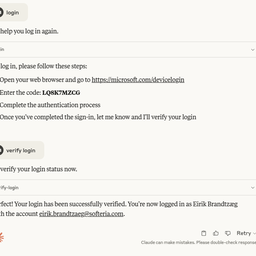
login, logout, verify-login.
Feature & specification comparison
Rows where the two servers differ are marked.
| Spec | ||
|---|---|---|
| Category | Communication | Communication |
| Quality signal | 61/100 · Good | 73/100 · Great |
| Install command | Confirmed | Confirmed |
| Transport | Local subprocess (stdio) | Local subprocess (stdio) |
| Auth | No auth required | OAuth 2.0 |
| Pricing | Free | Free |
| Required env vars | None listed | None listed |
| Verified owner | Community listing | Community listing |
| GitHub stars | 9 | 1,076 |
| Directory activity | 0 views 0 installs 0 upvotes | 8 views 0 installs 0 upvotes |
| Tools | 81 | 19 |
| Full listing | View Dns | View Ms 365 MCP Server |
Tools & capabilities
Dns tools 81
check_mxLook up MX records for a domain. Identifies which mail servers receive inbound email for the domain and which email hosting provider is used (Google Workspace, Microsoft 365, Proofpoint, etc.). Use when asked which email provider hosts inbound mail for a domain, or to see MX record configuration. Part of the scan_domain audit.check_spfLook up and validate the SPF record for a domain. Lists all IP addresses and third-party senders authorised to send email on behalf of the domain, flags syntax errors, and shows the trust surface (which mail servers are whitelisted). Use when you need to know who is permitted to send email as a domain. Part of the scan_domain audit.check_dmarcLook up and validate the DMARC record for a domain. Shows the enforcement level (none/quarantine/reject), alignment mode (strict/relaxed), and aggregate/forensic reporting destinations. Use to determine a domain's DMARC enforcement level, whether it sends aggregate reports, or if it is protected against email impersonation — distinct from check_shadow_domains (which checks TLD variants) and assess_spoofability (composite score). Part of the scan_domain audit.check_dkimLook up DKIM records for a domain. Probes common selectors, validates the signing algorithm used for outgoing email (RSA-1024/2048, Ed25519), and reports key strength. Use to verify that outbound email signatures are cryptographically sound. Part of the scan_domain audit.check_dnssecCheck DNSSEC status for a domain. Verifies whether DNS is tamper-proof and protected against cache poisoning and DNS spoofing attacks by validating DNSKEY and DS records. Reports whether DNSSEC is enabled and validating. Part of the scan_domain audit.check_sslCheck the HTTPS/TLS posture of a domain: HTTPS reachability, HSTS policy, and HTTP-to-HTTPS redirect. Also returns certificate metadata (issuer, expiry date, days remaining, SAN count) read from public Certificate Transparency logs — this describes the most recently LOGGED certificate, which may differ from the one currently served. Origin TLS protocol support and cipher suites are not assessed; legacy-TLS detection is withdrawn because the probe cannot observe the origin handshake. Use to verify HTTPS/HSTS configuration and certificate issuer/expiry. Part of the scan_domain audit.check_mta_stsCheck whether a domain enforces SMTP TLS for inbound mail via MTA-STS, protecting against downgrade attacks. Queries _mta-sts.<domain> and fetches the policy file, reports mode (enforce/testing/none) and MX coverage. Use to verify whether inbound SMTP is protected against TLS downgrade or MITM — distinct from check_dane which uses TLSA pinning. Part of the scan_domain audit.check_nsAudit a domain’s nameserver delegation and redundancy. Identifies the DNS hosting provider and, when the infrastructure probe is available, directly compares parent and child NS sets, verifies authoritative AA responses, and checks required glue addresses. Use to detect stale registrar delegations, lame nameservers, and intermittent resolution risk. Part of the scan_domain audit.check_caaLook up CAA records for a domain. Shows which Certificate Authorities are authorized to issue certificates. Part of the scan_domain audit.check_bimiCheck the BIMI brand-logo record at default._bimi.<domain>. Validates the logo URL (l=) and the presence of mark-certificate authority evidence (a=) — the a= tag is a bare URL, so the certificate type (VMC or CMC) is not determined — and verifies the DMARC enforcement prerequisite (p=quarantine/reject) that mail clients require before displaying a BIMI logo. Returns findings for a missing/malformed record or unmet prerequisites. Use to assess brand-indicator readiness in inboxes. Part of the scan_domain audit.check_tlsrptCheck whether a domain has SMTP TLS Reporting (TLS-RPT) configured. Queries _smtp._tls.<domain> for the v=TLSRPTv1 record and validates its reporting destination (rua= mailto:/https:), flagging a missing record, duplicate records, or an invalid/absent reporting URI. Complements MTA-STS by giving visibility into TLS delivery failures. Part of the scan_domain audit.check_http_securityAudit a domain's browser-facing HTTP security headers over HTTPS. Inspects Content-Security-Policy (flagging unsafe-inline/unsafe-eval/wildcards), X-Frame-Options, X-Content-Type-Options, Referrer-Policy, Permissions-Policy, and the cross-origin isolation headers (COOP/COEP/CORP), and detects CDN/WAF interception. Returns per-header findings for missing or weak protections against XSS, clickjacking, and cross-origin attacks. Part of the scan_domain audit.- +69 more on the listing page
Ms 365 MCP Server tools 19
loginAuthenticate with Microsoft accountlogoutLog out from Microsoft accountverify-loginCheck current Microsoft authentication statuslist-accountsList all Microsoft accounts configured in this server. Use this to discover available account emails before making tool calls. Reflects accounts added mid-session via --login.select-accountSelect a Microsoft account as the default. Accepts email address (e.g. user@outlook.com) or account ID. Use list-accounts to discover available accounts.remove-accountRemove a Microsoft account from the cache. Accepts email address (e.g. user@outlook.com) or account ID. Use list-accounts to discover available accounts.graph-batchCombine up to 20 Graph requests into a single HTTP call. Body: { requests: [{ id: '1', method: 'GET'|'POST'|'PATCH'|'DELETE', url: '/me/messages?$top=5', headers?: {...}, body?: {...}, dependsOn?: ['1'] }, ...] }. Returns { responses: [{ id, status, body, headers }] } in arbitrary order — match by id. Use cases: (1) parallelize many small reads (e.g. fetch 15 mail messages by id in one round-trip); (2) sequence dependent writes via dependsOn; (3) batch many Excel range writes into one call to dramatically reduce latency on large workbook builds. Note: each sub-request URL is relative to the Graph version root (/me/..., /drives/..., NOT https://graph.microsoft.com/v1.0/...). 💡 TIP: Combine up to 20 Graph requests into a single HTTP call. Body: { requests: [{ id: '1', method: 'GET'|'POST'|'PATCH'|'DELETE', url: '/me/messages?$top=5', headers?: {...}, body?: {...}, dependsOn?: ['1'] }, ...] }. Returns { responses: [{ id, status, body, headers }] } in arbitrary order — match by id. Use cases: (1) parallelize many small reads (e.g. fetch 15 mail messages by id in one round-trip); (2) sequence dependent writes via dependsOn; (3) batch many Excel range writes into one call to dramatically reduce latency on large workbook builds. Note: each sub-request URL is relative to the Graph version root (/me/..., /drives/..., NOT https://graph.microsoft.com/v1.0/...).list-subscriptionsRetrieve the properties and relationships of webhook subscriptions, based on the app ID, the user, and the user's role with a tenant. The content of the response depends on the context in which the app is calling; for details, see the scenarios in the Permissions section. 💡 TIP: Lists webhook subscriptions owned by the current app/user. Returns id, resource, changeType, notificationUrl, expirationDateTime, clientState. Use $filter=resource eq '/me/messages' to find subscriptions for a specific resource. No dedicated 'Subscription.*' scope exists — the caller must already have a read permission for the subscribed resource (e.g. Mail.Read for /me/messages), which is supplied by the tool that reads that resource.create-subscriptionSubscribes a listener application to receive change notifications when the requested type of changes occur to the specified resource in Microsoft Graph. To identify the resources for which you can create subscriptions and the limitations on subscriptions, see Set up notifications for changes in resource data: Supported resources. Some resources support rich notifications, that is, notifications that include resource data. For more information about these resources, see Set up change notifications that include resource data: Supported resources. 💡 TIP: Creates a webhook subscription for change notifications. Required body: { changeType (comma-separated: 'created,updated,deleted'), notificationUrl (HTTPS, must validate with token echo), resource (e.g. '/me/mailFolders/inbox/messages', '/users/{id}/events', '/teams/{id}/channels/{id}/messages'), expirationDateTime (ISO 8601, max varies by resource type — 1 hour for calls, 24h for messages, 3 days for mail), clientState (opaque string returned in notifications, for validation) }. Optional: includeResourceData (true enables rich notifications, requires encryptionCertificate + encryptionCertificateId). No dedicated scope — caller must have a read permission for the target resource (e.g. Mail.Read, Calendars.Read, ChannelMessage.Read.All, Files.Read.All).get-subscriptionRetrieve the properties and relationships of a subscription. See the table in the Permissions section for the list of resources that support subscribing to change notifications. 💡 TIP: Gets a specific webhook subscription by id. Use list-subscriptions to find the id. Returns full subscription details including resource, changeType, notificationUrl, expirationDateTime, applicationId.update-subscriptionRenew a subscription by extending its expiry time. The table in the Permissions section lists the resources that support subscribing to change notifications. Subscriptions expire after a length of time that varies by resource type. In order to avoid missing change notifications, an app should renew its subscriptions well in advance of their expiry date. See subscription for maximum length of a subscription for each resource type. 💡 TIP: Renews a webhook subscription by extending its expiration. Body: { expirationDateTime (ISO 8601, new expiry) }. Call before the current expirationDateTime to avoid missing notifications. Max extension varies by resource type — check Microsoft Graph docs for subscription limits.delete-subscriptionDelete a subscription. For the list of resources that support subscribing to change notifications, see the table in the Permissions section. 💡 TIP: Deletes a webhook subscription. No further change notifications will be sent. Use this to clean up stale subscriptions or stop receiving notifications. Use list-subscriptions to find the id.- +7 more on the listing page
Ready-to-paste client configs
Paste either block (or both) into your client config, e.g. claude_desktop_config.json or ~/.cursor/mcp.json. We only show a config when the install command is confirmed.
Dns
{
  "mcpServers": {
    "dns": {
      "command": "npx",
      "args": [
        "-y",
        "-p",
        "blackveil-dns",
        "blackveil-dns-mcp"
      ]
    }
  }
}
Ms 365 MCP Server
{
  "mcpServers": {
    "softeria-ms-365-mcp-server": {
      "command": "npx",
      "args": [
        "-y",
        "@softeria/ms-365-mcp-server"
      ]
    }
  }
}
Frequently asked questions
Dns is categorized under Communication and uses a local stdio subprocess. Ms 365 MCP Server belongs to Communication and uses a local stdio subprocess. Pick Dns for communication work and Ms 365 MCP Server for communication.
Copy the mcpServers block from the config section on this page into your client's config (for example claude_desktop_config.json or ~/.cursor/mcp.json), then fully restart the client.
Dns is listed as free. Auth: no auth required. Ms 365 MCP Server is listed as free. Auth: oauth 2.0. If a server needs environment variables such as API keys, define them under the env key in your client's MCP config.
Yes. MCP clients support multiple servers: add dns and softeria-ms-365-mcp-server as separate keys in the same mcpServers object, and your assistant will call tools from either one.
On AllMCPs, Dns has a quality signal of 61/100 (Good) with 0 views, 0 installs and 9 GitHub stars. Ms 365 MCP Server has 73/100 (Great) with 8 views, 0 installs and 1,076 GitHub stars.