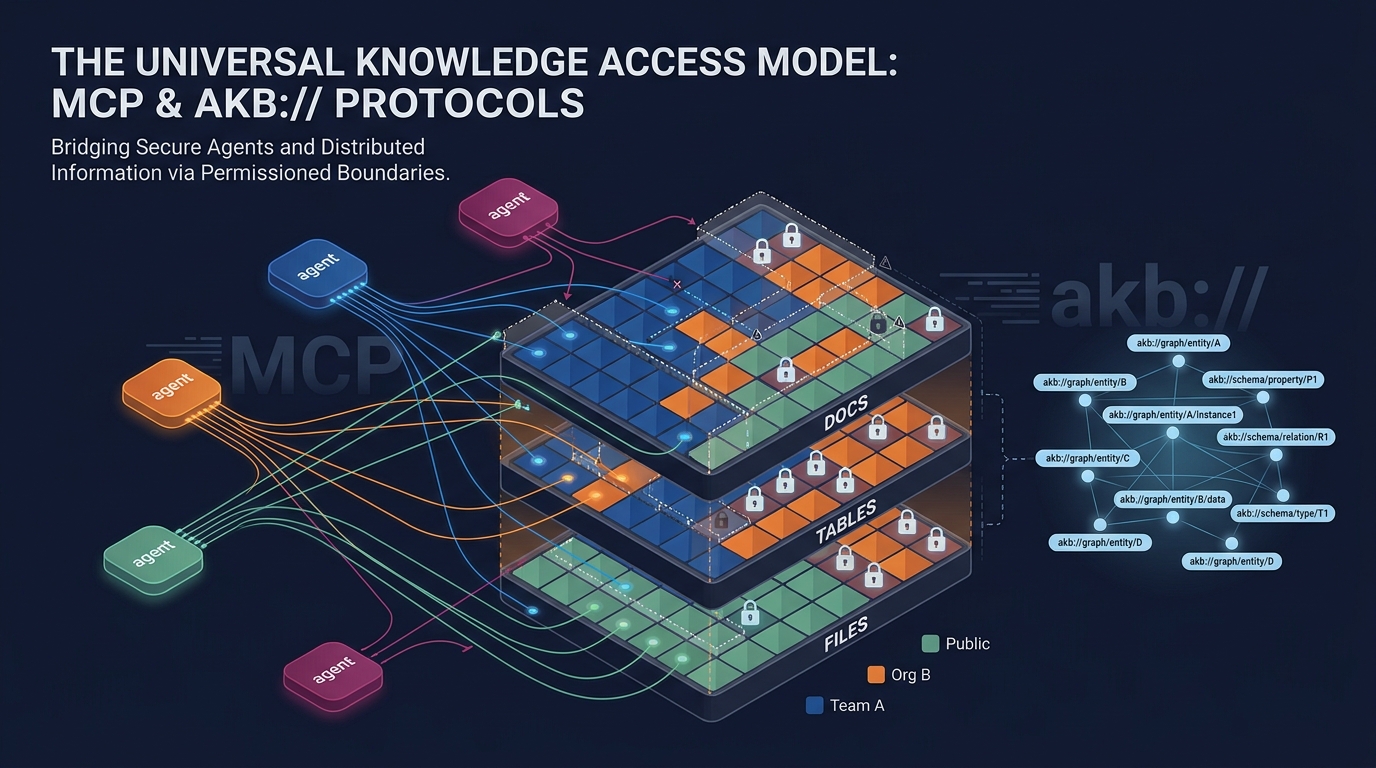
AKB — Agent Knowledge Base
Organizational memory for AI agents. PostgreSQL-native knowledge base served over the Model Context Protocol (MCP) — agents read and write directly with hybrid semantic + keyword search, structured tables, files, and a URI graph. Drop-in alternative to Confluence / Notion for Claude Code, Cursor, Windsurf, and any MCP-aware agent.



Works with
Any agent client that speaks MCP (Streamable HTTP or stdio):
- Claude Code — CLI / VS Code / JetBrains
- Claude Desktop — macOS / Windows
- Cursor, Windsurf, Cline, Continue — via the
akb-mcpstdio proxy - Custom agents — direct HTTP
POST /mcp/with a Bearer token
The default flow uses a Personal Access Token. Deployments with the
optional MCP OAuth Resource Server path turned on (via Keycloak as
the AS — see docs/mcp-clients/web-connectors.md)
also accept Claude Code's mcp add --transport http + mcp login flow
end-to-end, without a PAT.
MCP protocol compatibility
AKB keeps one tool and authorization core behind two protocol adapters:
| Surface | Modern | Legacy |
|---|---|---|
Direct HTTP /mcp/ | 2026-07-28 stateless server/discover and per-request _meta with Mcp-Protocol-Version / Mcp-Method (and Mcp-Name for named calls) | 2024-11-05, 2025-03-26, 2025-06-18, 2025-11-25 initialize, stateless requests (no Mcp-Session-Id lifecycle) |
akb-mcp stdio proxy | 2026-07-28 discovery and per-request metadata | 2025-06-18 initialize |
The proxy answers either handshake locally and normalizes backend calls to the modern stateless contract when available. For older backends without modern discovery, the proxy can fall back to legacy initialization and retain a session ID if that older server returns one. The current backend runs both adapters statelessly. A process cannot mix generations, and unsupported revisions or conflicting protocol evidence fail closed before a tool or local-file operation runs.
Plugins
Beyond raw MCP access, AKB ships ready-made agent plugins for Claude Code and Codex that wrap common vault workflows:
- akb-wiki — ingest a source (local file, web URL, GitHub PR / release / commit, Confluence page, or Jira issue) into the vault as a structured document, and answer questions from the vault with grounded, cited synthesis (read-only).
- akb-sessions — capture a coding session as structured notes: a session report plus follow-up tasks, learnings, ideas, and decisions.
- akb-claude-code — a Claude Code lifecycle bridge: hooks anchor each session to your AKB memory vault, injecting preferences and recent learnings at the start and writing a recap at the end.
/plugin marketplace add dnotitia/akb        # Claude Code
codex plugin marketplace add dnotitia/akb   # Codex
Install details and credentials: plugins/.
Try it live
A public demo runs at akb-demo.agent.seahorse.dnotitia.ai.
Browse and search a small fictional-organization knowledge base — product docs,
a company handbook, agent session notes, and an engineering wiki, cross-linked
by the URI graph — right in your browser, no signup. To wire it into your own
agent, sign up with any email (a throwaway address is fine) and point the
akb-mcp proxy at
https://akb-demo.agent.seahorse.dnotitia.ai/mcp/.
⚠️ Throwaway demo. It is public, wiped and re-seeded weekly, and runs on minimal resources with no uptime, privacy, or data guarantees. Don't put anything real or sensitive in it — treat every write as public and ephemeral. For real use, self-host with Docker Compose or Kubernetes.
Why AKB
Most knowledge tools are built for humans clicking through a UI. Agents need a
different shape: structured documents, semantic + keyword search in one call,
explicit relations, and full version history. AKB gives agents a single set of
tools (akb_put, akb_search, akb_browse, akb_relations, …) over a
PostgreSQL-native revision store and hybrid index. Explicit Bare Git installations
remain supported for existing deployments.
Retrieval quality
Memory is only useful if the right note comes back. AKB's hybrid retrieval (dense + BM25, source-level dedup) was benchmarked on LongMemEval-S — 500 long-context questions, ~50 chat sessions per question. Recall@5 = 98.4%, with no reranker in the loop.
| System | R@5 | n | Reranker | Source |
|---|---|---|---|---|
| AKB hybrid | 98.4% | 500 | no | this repo |
| MemPalace hybrid + rerank | 98.4% | 450 | yes | MemPalace |
| gbrain hybrid | 97.6% | 500 | no | gbrain-evals |
| gbrain vector | 97.4% | 500 | no | gbrain-evals |
Methodology, per-category breakdown, and a one-command reproducible harness
live in eval/longmemeval/. The embedding model differs
across systems (AKB: bge-m3@1024), so read this as a stack-level comparison.
Design philosophy
Core stays small; flexibility comes from extension, not built-in
automation. AKB does not ship its own consolidator, summariser, or
"knowledge gardener" — instead every write records a structured event in the
PostgreSQL outbox. When redis_url is configured, the publisher fans those
events out to a Redis Stream (akb:events). Operators wire any external
consumer (periodic synthesis bot, doc-rot reaper, weekly-digest agent, audit
trail, …) on top, with no patches to the core. The base contract is a
read/write store; opinions about what to do with the knowledge live outside.
Architecture
┌──────────────────────────────────────────────────────────┐
│                  Access Layer                            │
│   MCP Server  │  REST API  │  Web UI                     │
├──────────────────────────────────────────────────────────┤
│                  Core Services                           │
│   Document (Put/Get)  │  Search (Hybrid: dense+BM25)     │
│   Relations (graph)   │  Session  │  Publications        │
├──────────────────────────────────────────────────────────┤
│                  Storage Layer                           │
│   Native revisions     │  PostgreSQL 16 (text + meta SoT)│
│                        │  Vector store (driver):         │
│                        │    pgvector        (default, PG)│
│                        │    qdrant          (optional)   │
│                        │    seahorse-cloud  (managed)    │
│                        │    seahorse-db     (self-hosted)│
│                        │    seahorse-db-grpc(experimental)│
└──────────────────────────────────────────────────────────┘
PostgreSQL is the source of truth — chunk text + metadata + BM25 vocab.
The vector store is a driver-pluggable derived index holding dense
embeddings and corpus-side sparse vectors. Full vector-store loss is
recoverable from PG by setting chunks.vector_indexed_at = NULL and
letting the indexing worker re-populate.
Key Concepts
- Vault — The unit of access control and knowledge organization. Native revisions live in PostgreSQL; the legacy backend uses one bare Git repo per vault.
- Collection — A directory inside a vault. Topical grouping of documents.
- Document — Markdown + YAML frontmatter, optimised for agent read/write.
- Hybrid Search — Dense (semantic) + BM25 (lexical) fused via RRF in one call.
- Relations —
depends_on,related_to,implementsin frontmatter form an explicit knowledge graph. - Vault isolation in
akb_sql— Enforced by PostgreSQL ACL. Each AKB user has a corresponding PG role (akb_user_<uid>) and each vault has three group roles (akb_vault_<vid>_{reader,writer,admin}).akb_sqlruns the user's SQL inside a transaction withSET LOCAL ROLE; cross-vault references return PG42501directly. No application-side regex inspects user SQL for forbidden identifiers. Seedocs/designs/pg-native-rbac/.
MCP Tools (selection)
| Tool | Description |
|---|---|
akb_list_vaults / akb_create_vault | Vault management |
akb_put / akb_get / akb_update / akb_delete | Document CRUD (revision + indexing) |
akb_put_file / akb_get_file / akb_update_file / akb_delete_file | File attachments — proxy-side (requires local filesystem) |
akb_put_image / akb_discard_image | Validated inline Markdown images — proxy-side in akb-mcp 2.2+ |
akb_create_table / akb_alter_table / akb_drop_table / akb_sql | Tabular content — per-doc tables + SQL |
akb_browse | Tree traversal (collection → docs) |
akb_search / akb_grep | Hybrid search (dense + BM25) / literal grep |
akb_drill_down | Section-level retrieval |
akb_relations / akb_link / akb_unlink / akb_graph | Knowledge graph |
akb_edit / akb_diff / akb_history | In-place edit, diff, revision history |
akb_grant / akb_revoke / akb_set_public | Permission boundaries — per-user, per-org, public |
akb_publish / akb_unpublish | Public publication |
Agent memory and session lifecycle are not MCP tools — they live on
the dedicated /api/v1/agent-sessions REST surface, driven by AKB
lifecycle plugins (akb-claude-code, akb-cursor, …) that hook into
the agent's own SessionStart / PreCompact / SessionEnd events. As an
agent, your own memory vault (agent-memory-{username}) is browsable
through the standard akb_search / akb_browse / akb_get tools
exactly like any other vault.
The full tool catalogue is exposed via akb_help() from any MCP client.
Inline document images from MCP
Inline images are hidden document attachments, not browsable Files. Upload a local PNG, JPEG, GIF, or WebP (maximum 10 MiB), then insert the returned Markdown without reconstructing its asset URL:
image = akb_put_image(
  parent="akb://eng/coll/specs",
  file_path="/workspace/architecture.png",
  alt_text="Request processing architecture")

akb_put(
  parent="akb://eng/coll/specs",
  title="Request Processing",
  content="# Architecture\n\n" + image.markdown)
For an existing document, use akb_get followed by a targeted
akb_edit(base_commit=...). Do not pass only the image fragment to
akb_update(content=...), which replaces the complete body. Image bytes are
immutable: replacing an image means uploading a new one and editing the
Markdown reference. Remove an image by deleting its Markdown expression; use
akb_discard_image only for an upload that never reached a successful document
commit. Run akb_help(topic="images") for retention and publication behavior.
The image tools require both the matching backend release and akb-mcp 2.2 or
newer. For upgrades, deploy the backend first, then publish/install the proxy
and restart existing MCP processes so they load the updated tool list.
Document Format
Every vault resource has a location-aware AKB URI — the canonical handle used by every tool and stored in relations. As of 0.3.0:
akb://{vault}                                          vault root (browse target)
akb://{vault}/coll/{coll_path}                         collection (browse target)
akb://{vault}[/coll/{coll_path}]/doc/{filename}        document
akb://{vault}[/coll/{coll_path}]/table/{name}          table
akb://{vault}[/coll/{coll_path}]/file/{uuid}           file
The /coll/{coll_path} segment is omitted for resources at the vault
root. Walking up a URI to its parent collection is a pure string
operation — paste the parent into akb_browse(uri=...) to list
siblings without an extra lookup.
For large Vaults, start with akb_browse(uri=..., depth=0, page_size=100)
and follow next_cursor until complete=true, or drill into a Collection.
See bounded navigation and literal-search scope limits
for paging, partial results and protective grep errors.
---
title: "Payment API v2 migration plan"
type: plan              # note | report | decision | spec | plan | session | task | reference
status: active          # draft | active | archived | superseded
tags: [payments, api]
domain: engineering
summary: "REST → gRPC transition plan."
depends_on: ["akb://eng/coll/specs/doc/payment-api-v2.md"]
related_to: ["akb://eng/coll/meetings/doc/2026-05-01-payments.md"]
---

# Payment API v2 migration plan
...
Open Knowledge Format (OKF) compatible
With the explicit Bare Git backend, a vault is stored as a git tree of
.md + YAML-frontmatter files whose
identity is the path — the same model as Google Cloud's
Open Knowledge Format
(OKF v0.1), which AKB independently arrived at before the spec existed.
AKB-authored bundles satisfy all three OKF MUST rules. Server-side
akb_export({"vault": "<vault>", "format": "okf"}) and authenticated
GET /api/v1/vaults/{vault}/export?format=okf support both PostgreSQL Native
and Bare Git through the document service. Bundles contain documents plus
tables/files represented as concept documents.
The offline CLI below reads an existing Bare Git worktree; it does not read
Native storage. Run it from backend/:
cd backend
uv run python -m app.cli okf-export --from-git /data/vaults/_worktrees/<vault> \
    --vault <vault> --out ./okf-out/
uv run python -m app.cli okf-validate ./okf-out/
OKF and AKB are complementary — OKF standardizes how knowledge is written
down; AKB stores, versions, searches, governs, and serves it to agents. See
okf/ for the mapping and a sample bundle.
Quick Start
New installations use PostgreSQL Native with a persisted installation identity and an explicit database bootstrap. Use a new Compose project and never-used database. Existing installations must follow the pre-upgrade preservation procedure before using this version; changing a default does not migrate their data.
The recommended stack runs PostgreSQL with pgvector, MinIO, API, a separate worker, and frontend. One-shot services prepare the File bucket and Native authority before the application starts. Docker Compose 2.24.4+ is required. Configure an OpenAI-compatible embedding endpoint for dense search; pgvector and Qdrant degrade to BM25-only lexical search when embedding is unavailable.
MinIO uses a mirror with the original upstream server digest pinned after
the Quay image removal.
Local, evaluation, CI, and all-in-one builds use the same artifact; bucket
bootstrap and all-in-one builds use the mc bundled in that server image.
# 1. Build this checkout's images. For a registry installation, use a backend
# image pinned as registry.example.com/akb-backend@sha256:... instead.
docker build -t akb-backend:native-local ./backend
docker compose -p my-native-install build frontend postgres
export AKB_NATIVE_IMAGE="$(docker image inspect akb-backend:native-local --format '{{.Id}}')"
export AKB_NATIVE_CONFIG_DIR="$PWD/config/native"

# 2. Prepare installation assets ONCE. Keep them and the original template.
mkdir -p "$AKB_NATIVE_CONFIG_DIR"
cp config/app.yaml.example "$AKB_NATIVE_CONFIG_DIR/template.yaml"
cp config/secret.yaml.example "$AKB_NATIVE_CONFIG_DIR/secret.yaml"
$EDITOR "$AKB_NATIVE_CONFIG_DIR/template.yaml" # provider and public URL settings
$EDITOR "$AKB_NATIVE_CONFIG_DIR/secret.yaml"   # credentials and independent secrets

docker run --rm -v "$AKB_NATIVE_CONFIG_DIR:/installation" \
  "$AKB_NATIVE_IMAGE" python -m app.cli generate-local-session-keyset \
  --output-dir /installation/local-session
docker run --rm -v "$AKB_NATIVE_CONFIG_DIR:/installation" \
  "$AKB_NATIVE_IMAGE" python -m app.cli prepare-native-config \
  --source /installation/template.yaml --secret /installation/secret.yaml \
  --output /installation/app.yaml --tenant-id my-installation --namespace akb \
  --image-digest "${AKB_NATIVE_IMAGE##*@}"

# 3. Use the same project, files and environment on every subsequent operation.
docker compose -p my-native-install \
  -f docker-compose.yaml -f docker-compose.native.yaml up -d --no-build

# 4. Provision the local recovery administrator with an operator-owned password.
docker compose -p my-native-install \
  -f docker-compose.yaml -f docker-compose.native.yaml \
  exec -T backend python -m app.cli provision-recovery-admin local \
  --username recovery-admin --email recovery-admin@example.com \
  --password-file - < /secure/operator/recovery-admin.password

open http://localhost:3000
To upgrade, update the checkout and repeat step 1 before step 3. up --no-build
never builds, so it cannot pick up what the new checkout builds (frontend,
postgres): a missing image makes it fail, and an old one keeps running. On the
upgrade that turned PostgreSQL into a built image, skipping step 1 stops the API
(backend) and then fails with No such image: my-native-install-postgres:latest,
which leaves the API down.
The local image ID pins the locally built bytes; it is not a registry digest.
For distributed installs, build/push first and use the registry digest for
AKB_NATIVE_IMAGE. Keep the generated initializing image receipt unchanged
when upgrading the workload image. Never regenerate identity or local-session
keys on restart. On Linux, ensure the operator can read and back up assets
created by the container (or run the preparer with the operator's UID/GID).
The generated app.yaml and companion secret.yaml are the single source of
application configuration and are mounted read-only at /etc/akb.
AKB_PROCESS_ROLE=all|api|worker only selects process composition;
AKB_TOKENIZER_PROCESSES=1..4 can reduce tokenizer concurrency. Revision
selection is not an environment-variable switch.
See the Native installation guide for image upgrades, bootstrap recovery and Kubernetes. The Compose guide preserves the explicit Bare Git upgrade path. Helm, all-in-one and standalone SSO remain legacy Bare Git compatibility paths in this release. Native does not support document templates or external Git imports; its discovery and API reject those capabilities. Existing migration/history/diff/activity compatibility remains.
Ordinary registration always creates a non-admin account, including on an
empty database. Administrator bootstrap is available only through the
operator CLI; there is no unauthenticated HTTP bootstrap endpoint. The CLI
profile must match auth_mode:
# Local: have AKB generate the password only when an operator-owned output
# file is explicitly requested. A new file is created with mode 0600 and the
# password is not written to stdout, stderr, logs, or application config.
python -m app.cli provision-recovery-admin local \
  --username recovery-admin --email recovery-admin@example.com \
  --generate-password-file /secure/operator/recovery-admin.password

# SSO: pre-bind the product administrator to the exact external identity.
# Username and email are snapshots; issuer + subject are the identity key.
python -m app.cli provision-recovery-admin sso \
  --username recovery-admin --email recovery-admin@example.com \
  --issuer https://issuer.example.com/realms/akb \
  --subject exact-provider-subject
The same exact identity is idempotent. A different designation, an existing
username/email, or an already-bound external identity fails closed. The SSO
command stores no usable local password and does not contact the identity
provider. Generated output files are create-only and never overwritten; for a
retry after the file exists, pass that file back with --password-file.
The two local forms differ in one further way. --generate-password-file is
AKB producing a credential and handing it over, so the account it creates owes
a replacement for it: the first session that credential opens can reach the
password change and nothing else, exactly as a password reset behaves.
--password-file installs a value the caller already holds — AKB delivers it
to nobody — so it arms nothing, and an installation that signs in as this
account to bootstrap its own service identity keeps working. To force a
replacement for a credential supplied that way, rotate it afterwards with the
command below; rotation always leaves the account owing a change.
If that credential later leaks, is lost, or has to be taken back, rotate it rather than reprovisioning the account:
# Break-glass: replace the credential and print the new one once. Nothing
# stores or logs the value, and the machine-readable report omits it.
python -m app.cli issue-recovery-admin-credential \
  --expected-username recovery-admin \
  --expected-email recovery-admin@example.com
Rotation names the account it expects and refuses any mismatch, so it cannot
act on the wrong one. The credential it replaces stops working immediately,
including one currently in use, and sessions held before the rotation are
revoked — both are what a compromise response requires. The same operation is
available at POST /admin/recovery-admin/issue-credential, which requires an
independent service-administrator token rather than a human session. Rotation
is not available in sso mode: the identity provider holds the credential,
and nothing in a running AKB can replace it.
Open /admin for the separate product-administration surface. In local
mode it accepts the provisioned local administrator and returns the same
local-session-rs256-v2 profile used by local human authentication, but it
refuses non-admin accounts. In sso mode local credentials are absent:
/admin uses a dedicated confidential akb-admin Keycloak client with PKCE
and nonce, then accepts only the exact pre-bound (issuer, subject) whose AKB
account is still active and is_admin=true.
In SSO mode the same /admin surface can configure a built-in upstream IdP,
save it disabled, inspect its exact broker redirect URI, and enable or disable
its ordinary-login option without redeploying AKB. The option becomes a usable
button only when the server-side browser-session capability is ready. Client
secrets are write-only, and an enabled provider must be disabled before
reconfiguration.
See the SSO provider guide, the standards-based
generic OIDC integration, and the stricter
Keycloak OIDC reference. Existing
Kubernetes installations should also follow the
local-to-SSO cutover runbook instead of
treating auth_mode as a rolling one-line configuration change.
The dedicated admin callback stores no Keycloak access, refresh, or ID token.
It creates a short-lived opaque HttpOnly admin cookie plus a CSRF token;
PostgreSQL stores only their hashes plus the exact identity snapshot, and
rechecks the account, unchanged external binding, and admin flag on every
request. Its one-time OIDC state is also bound to a short-lived HttpOnly cookie
so a callback copied into another browser fails before token exchange.
Configure keycloak_admin_client_secret, register
<public_base_url>/api/v1/admin/auth/keycloak/callback and
<public_base_url>/admin in the dedicated client, and keep the admin client ID
out of every API/MCP resource-client path. Browser-facing AKB and Keycloak URLs
must use HTTPS outside the explicit loopback development exception.
Ordinary SSO login uses the separate akb-web client. The browser receives
only an opaque HttpOnly AKB session plus a readable CSRF value; SSO does not
mint an AKB user JWT. AKB encrypts the Keycloak refresh/ID token set with the
independent sso_browser_session_encryption_key and never persists an access
token. The client must map Keycloak's identity_provider user-session note
into both ID and access tokens with oidc-usersessionmodel-note-mapper; AKB
binds that signed broker alias to the selected enabled provider on callback
and every refresh. Production HTTPS cookies use the browser-enforced __Host- prefix,
Secure, no Domain, and Path=/; loopback HTTP uses isolated development
names. Generate the key as 32 random bytes encoded with unpadded base64url and
keep it stable across restarts. See the Keycloak boundary
for refresh, logout, and back-channel revocation details.
Local JWT migration and rotation
Local login issues only the versioned local-session-rs256-v2 profile:
RS256 with an installation-owned RSA-3072 key, an RFC 7638 kid, exact
deployment issuer/audience, jti, and a public-only JWKS at
GET /api/v1/auth/jwks. AKB never chooses a verifier from an untrusted token
alg header. Upgrading from an HS256 release is an intentional forced-login
boundary: generate and persist the v2 keyset before rollout, set
jwt_algorithm: RS256, and restart all backends together. Existing HS256 user
sessions then receive 401 and must sign in again; PATs and service keys are not
revoked. The old jwt_secret may be retained for one release only as migration
input for short-lived internal HMAC capabilities, or renamed unchanged to
system_hmac_secret; it is never accepted as human-session signing material.
For routine v2 key rotation, generate a new directory while retaining the current public JWKS, publish the new immutable Secret/config revision, and roll every backend to that exact pair:
cd backend
uv run python -m app.cli generate-local-session-keyset \
  --output-dir /secure/akb/local-session-next \
  --retain-jwks /secure/akb/local-session-current/jwks.json
Keep a retained public key for at least jwt_expire_hours plus rollout skew,
then remove it in a later coordinated keyset revision. Restoring the previous
private/JWKS pair is the rollback; never overwrite key files in place.
Vector store (driver-pluggable)
See BM25 statistics and VChord-only deployments for weight conventions, external statistics consumers and posting rollback requirements.
Hybrid search (dense + BM25 sparse, RRF-fused) runs through a driver interface. Five drivers ship; pick at config time:
pgvector(default) — uses the same Postgres container that holds application data. The install paths build that container's image fromdeploy/postgres/Dockerfile: pgvector plus thevchord_bm25BM25 index, which gives a new database the defaultvchordsparse shape. The driver creates a separatevector_indexschema, so the mainchunkstable stays plain PostgreSQL. RRF fusion runs application-side. No external service to operate.qdrant— runs a separate Qdrant container; native RRF via the Query API. Useful when you already operate Qdrant or want to scale the vector store independently of Postgres.seahorse-cloud— points at a managed Seahorse Cloud table over its BFF management API + per-table data-plane host (Bearer auth). No infrastructure to run on your side; you provision a table in the Seahorse console (or let the driver auto-create one) and AKB stores its chunks there. Native RRF, server-side BM25. Seedocs/vector-store-seahorse.mdfor the end-to-end setup walkthrough (sign-up → token → schema → config).seahorse-db— points at a self-hosted SeahorseDB cluster via its Coral coordinator HTTP API. You run Coral + Writer + Reader(s) + Redis + Kafka + a sparse-embedding server yourself (the SeahorseDB monorepo'sdeploy/docker-compose.ymlbrings up a minimal single-box stack). Native dense+sparse hybrid. Unlike the other drivers it does not support BM25-only fallback when the embed API is down (its sparse path is server-side and structurally coupled to a live embed step) — keep an embedding endpoint reachable for this driver.seahorse-db-grpc(experimental) — same Coral coordinator asseahorse-db, sameseahorsedb_*settings, but talks gRPC instead of REST/JSONL. Coral merges axum + tonic onto a single listener so the port doesn't change; only the wire format does. Trades the JSON parsing path (and a class of foot-guns like INT64 sign mismatch and Arrow JSON decoder edge cases) for typed protobuf messages and an Arrow IPC streaming result. Prefer the REST driver for production until the gRPC variant clears its own QPS / recall benchmark. Same CRUD parity with REST (passes the same 25-scenario hybrid e2e), but it has not yet had the production-scale exposure the REST driver has.
Switching drivers is a config edit (no schema migration on the main DB):
# Default flow targets pgvector.
docker compose up

# Qdrant:
docker compose -f docker-compose.yaml -f docker-compose.qdrant.yaml up
$EDITOR config/app.yaml     # vector_store_driver: qdrant
                            # vector_url: http://qdrant:6333

# Seahorse Cloud (managed; full guide in docs/vector-store-seahorse.md):
docker compose up           # no extra container needed
$EDITOR config/app.yaml     # vector_store_driver: seahorse-cloud
                            # seahorse_cloud_tenant_uuid: <your tenant>
                            # seahorse_cloud_table_name: <your table>
$EDITOR config/secret.yaml  # seahorse_cloud_token: shsk_<...>

# SeahorseDB (self-hosted cluster reached via the Coral coordinator):
docker compose up           # run the SeahorseDB stack separately
$EDITOR config/app.yaml     # vector_store_driver: seahorse-db
                            # seahorsedb_coordinator_url: http://localhost:3003
                            # seahorsedb_table_name: akb_chunks
Embedding model + dimensions are also fully pluggable via
embed_base_url / embed_model / embed_dimensions — the codebase has
no hard-coded model. For pgvector with HNSW, keep embed_dimensions ≤ 2000
(or 4000 with halfvec); larger models fall back to exact scan.
Qdrant / Seahorse (cloud or db) have no such limit (Qdrant up to 65536,
Seahorse up to its table-defined dim).
LLM features (optional)
LLM is only used by the metadata_worker to auto-tag documents imported via
external git mirroring. Core CRUD/search works without it. To enable, set
llm_base_url / llm_model in app.yaml and llm_api_key in secret.yaml.
Standalone deployments default to model_api_governance_mode: external_metering
and may point embedding, chat, and rerank at any compatible provider. A managed
control plane can instead set platform_hard plus an exact
platform_gateway_base_url. In that mode AKB fails startup if an active model
route points anywhere else or lacks a credential, and every model call carries
a caller-generated Idempotency-Key for durable gateway reservation/settlement.
Gateway policy or budget denials are never fanned out into per-item retries.
Event fanout (optional)
The PG events outbox is always written. Set redis_url in app.yaml to
have the events_publisher worker drain the outbox to a Redis Stream
(akb:events) so external services can subscribe via XREAD / consumer
groups. Leave blank to disable Redis fanout; the authenticated
GET /api/v1/events/{vault} SSE tail reads the same PG outbox. Native document
writes participate in this outbox at the authority transaction boundary.
See the change-event contract for supported
File/document actions, move identity, retry semantics and consumer recovery.
Audit log (optional)
Off by default. Set audit.enabled: true in app.yaml to emit a structured,
append-only, hash-chained JSON-lines audit log at the MCP dispatch
chokepoint — every read, write, and auth denial, uniformly. AKB is a
producer only: it does not store, query, or retain audit data; your SIEM
(Splunk/QRadar/Elastic) scrapes the stream and owns retention under its own
compliance regime. Each line carries a monotonic seq plus
sha256(prev ‖ line), so the chain can be verified for dropped or altered
lines and re-seeds from disk across restarts. Optionally hand the daily
rolled file off to a WORM object-storage bucket (audit.bucket —
provision with Object Lock and a write-only key for a true immutable trail);
the local buffer is pruned only after a confirmed upload. Capture is
best-effort and never raises into the serving path. See
config/app.yaml.example for the full audit: block.
Production deployment
For Kubernetes, start with the
deployment guide. AKB provides standalone local and
standalone-SSO resource sets through both Helm and Kustomize.
- Use the dependency-free
AKB Helm chartfor a standardhelm upgrade --installworkflow. - Use
deploy/k8sfor the standalone Kustomization ordeploy/k8s/standalone-ssofor an installation-owned Keycloak stack. - Both paths consume pre-existing, operator-owned Kubernetes Secrets. AKB does not install or operate a credential service or synchronization controller.
Real hostnames, registries, storage classes, TLS issuers, and provider settings belong in Helm values or an operator-owned Kustomize overlay; do not commit production credentials to this repository.
Project Structure
akb/
├── backend/                  # Python 3.14 / FastAPI / asyncpg / GitPython
│   ├── app/
│   │   ├── api/routes/       # REST endpoints
│   │   ├── services/         # Business logic + workers
│   │   └── db/               # PostgreSQL schema + migrations
│   ├── mcp_server/           # Streamable HTTP MCP server
│   └── tests/                # E2E shell tests
├── frontend/                 # React 19 + TypeScript + Vite + Tailwind
├── packages/
│   ├── akb-client/           # REST SDK boundary (npm: @akb/client)
│   └── akb-mcp-client/       # stdio ↔ HTTP MCP proxy (npm: akb-mcp)
├── agents/                   # Reference Python agent runtime (think/act loop over MCP)
├── plugins/                  # Claude Code / Codex agent plugins (ingest, query, session capture, lifecycle)
├── templates/                # Doc templates (ADR, PRD, runbook, …) and vault profiles
├── okf/                      # Open Knowledge Format interop: positioning + sample bundle
├── design-system/            # Frontend design system docs
├── config/
│   ├── app.yaml.example      # Non-secret runtime settings
│   └── secret.yaml.example   # API keys, passwords (gitignored when not .example)
├── deploy/
│   ├── all-in-one/           # Single-container demo image
│   ├── helm/
│   │   └── akb/              # AKB chart with local and standalone-SSO profiles
│   └── k8s/
│       ├── *.yaml            # Standalone AKB + PostgreSQL resources
│       └── standalone-sso/   # Standalone plus owned Keycloak and its database
└── docker-compose.yaml       # Local stack (PG + MinIO + API + worker + frontend)
Tech Stack
- Backend: Python 3.14, FastAPI, Uvicorn, asyncpg, GitPython, MCP SDK
- Database: PostgreSQL 16 (main DB needs no extension; the same pgvector/pgvector image hosts the optional vector_index schema)
- Vector store: driver-pluggable (pgvector default; Qdrant, Seahorse Cloud, or self-hosted SeahorseDB optional — hybrid dense + BM25 sparse, RRF fusion; BM25-only fallback when embed is down)
- Event stream (optional): PG
eventsoutbox + Redis Streams fanout - Audit log (optional): hash-chained append-only JSONL at the MCP dispatch point + optional WORM S3 handoff; producer-only (SIEM owns retention)
- Frontend: React 19, TypeScript, Vite, Tailwind CSS v4, Radix UI
- Auth: local RS256 sessions or Keycloak SSO, plus Personal Access Tokens (PATs) for API and MCP access
- MCP: Streamable HTTP (backend) + stdio proxy (
akb-mcpon npm)
Versioning
AKB follows SemVer. The backend product version lives in
backend/pyproject.toml ([project].version). A coordinated release uses
scripts/bump-version.sh <x.y.z> to update it together with
frontend/package.json. With image building enabled, each
deploy/k8s/deploy.sh run tags the Docker images with both the
explicit backend version (:${VERSION}) and :latest, so historical builds
remain pullable for rollback.
packages/akb-mcp-client (the akb-mcp npm proxy) follows its own npm
semver lifecycle and is not tied to the product version.
License
The AKB backend, frontend, and deployment manifests are licensed under the Business Source License 1.1 — source-available, with an Additional Use Grant that permits production use (commercial or non-commercial) up to a seat-count threshold, automatically converting to Apache License 2.0 four years after each version's first public release.
The npm akb-mcp proxy (packages/akb-mcp-client/) is separately
licensed under the MIT License so it can be freely embedded in any
agent client without restriction.
Free production use of the backend — you may deploy AKB in
production, commercial or not, provided your aggregate deployment
serves fewer than 100 Named Seats (distinct human user accounts in
the users table, per deployment; service accounts and
90-day-inactive accounts excluded — see LICENSE for the
precise definition).
Commercial license required for any of:
- Production use of the backend at or above 100 Named Seats.
- Offering AKB (modified or not) as a hosted service, on-premises product, embedded component, or rebranded distribution to third parties — regardless of seat count.
Trademarks — "AKB", "Dnotitia", and "Seahorse" are trademarks of Dnotitia, Inc. The software license does not grant trademark rights. Forks and derivative works must be distributed under a different name. See TRADEMARKS.md.
For commercial licensing, the rationale behind the BSL transition, or trademark permission requests, see LICENSE-CHANGE.md or contact support@dnotitia.com.
Security
Found a vulnerability? See SECURITY.md — please report privately, not via public issues.
Contributing
See CONTRIBUTING.md.