mcp-bizhawk








An MCP server that exposes BizHawk — the multi-system emulator the TAS community lives in — to any MCP-compatible client (Claude Desktop, Claude Code, etc.).
One bridge, many systems: NES, SNES, Game Boy / GBC / GBA, Sega Master System / Genesis / 32X / Saturn, N64, PlayStation 1, Atari 2600/5200/7800, Lynx, ColecoVision, Intellivision, and more — all through the same MCP tools, with per-system memory domains exposed cleanly.
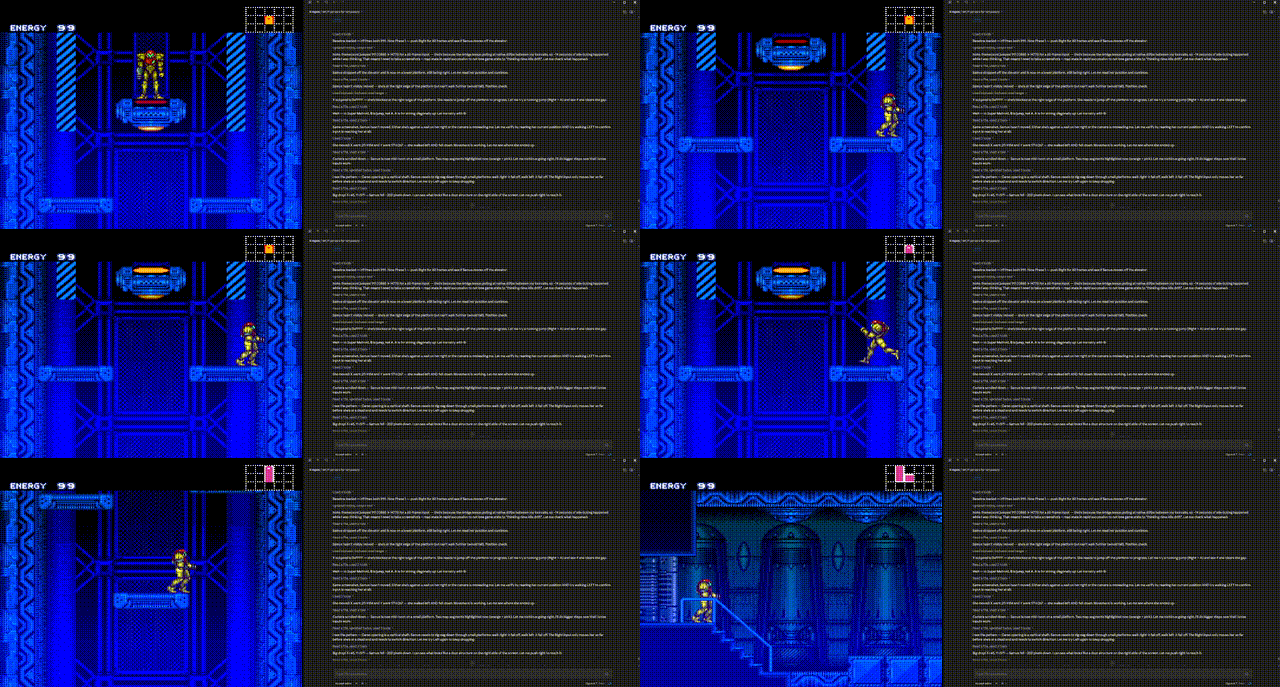
Claude (the agent) drives Samus through the opening of Ceres Station — all input batched through bizhawk_play_input_sequence, all motion verified by reading WRAM addresses found via live RAM-hunt. Recording is 2× speed; the actual playback runs at native 60fps emulation. See docs/RECIPES.md and docs/SUPER-METROID-ADDRESSES.md for the workflow.
How it works
+------------------+    stdio     +------------------+   TCP :8766   +------------------+
|   MCP client     |   JSON-RPC   |    mcp-bizhawk   |  newline JSON |     BizHawk      |
| (Claude / etc.)  | ===========> |     (Node.js)    | <============ |    bridge.lua    |
+------------------+              +------------------+               +------------------+
The transport is inverted compared to most other emulator-MCP bridges: BizHawk's Lua doesn't have native server sockets, only an outbound comm.socketServer* client. So mcp-bizhawk runs the TCP listener, and BizHawk's Lua bridge dials in once per frame to ferry commands and replies.
Two pieces:
lua/bridge.lua— runs inside BizHawk's Lua Console, polls our TCP server once per framedist/index.js— the Node.js MCP server, listens on127.0.0.1:8766by default, exposes tools over stdio
Trade-off: this design adds ~one frame of latency per call (≈16ms at 60Hz). Fine for interactive memory hunting, save-state experimentation, and frame-by-frame inspection. Less ideal for high-rate-of-fire scripting.
Requirements
- BizHawk 2.6.2 or newer (earlier builds use an older socket-server wire format)
- Node.js 22+ (for the MCP server)
Tested on BizHawk 2.11.1 across SNES (Super Metroid). Should work on any system BizHawk supports.
Install
Option A — install from npm (recommended)
npm install -g mcp-bizhawk
Option B — npx (no install)
npx -y mcp-bizhawk
Option C — clone and develop
git clone https://github.com/dmang-dev/mcp-bizhawk
cd mcp-bizhawk
npm install        # also runs the build via the `prepare` hook
Set up the BizHawk bridge
There are two pieces to configure: telling BizHawk where to connect, and loading the bridge script.
1. Point BizHawk at the MCP server
Easiest: launch BizHawk with the socket flags directly.
EmuHawk.exe --socket_ip=127.0.0.1 --socket_port=8766 <path/to/rom>
(Adjust port if you're overriding BIZHAWK_PORT.)
Alternative: configure persistently via Settings → Customize → External Tools in BizHawk's UI.
2. Load the bridge script
In BizHawk: Tools → Lua Console → Open Script → select lua/bridge.lua from this repo.
You should see in the Lua Console:
[mcp-bizhawk] bridge starting
[mcp-bizhawk] socket server target: 127.0.0.1:8766
[mcp-bizhawk] socket receive timeout set to 50ms
[mcp-bizhawk] frame loop active — bridge is polling once per frame
And in the mcp-bizhawk process's stderr:
[mcp-bizhawk] BizHawk client connected (waiting for bridge.lua to start polling)
[mcp-bizhawk] bridge.lua is polling — bridge ready
Register with your MCP client
Claude Code (CLI)
claude mcp add bizhawk --scope user mcp-bizhawk
Verify:
claude mcp list
# bizhawk: mcp-bizhawk - ✓ Connected
Claude Desktop
Edit claude_desktop_config.json:
| Platform | Path |
|---|---|
| macOS | ~/Library/Application Support/Claude/claude_desktop_config.json |
| Windows | %APPDATA%\Claude\claude_desktop_config.json |
| Linux | ~/.config/Claude/claude_desktop_config.json |
{
  "mcpServers": {
    "bizhawk": {
      "command": "mcp-bizhawk"
    }
  }
}
Restart Claude Desktop after editing.
Other MCP clients
The server speaks standard MCP over stdio. Run mcp-bizhawk and connect any MCP client to its stdio.
Configuration
| Env var | Default | Purpose |
|---|---|---|
BIZHAWK_HOST | 127.0.0.1 | TCP host to listen on for BizHawk |
BIZHAWK_PORT | 8766 | TCP port to listen on for BizHawk |
Tools
| Tool | Description |
|---|---|
bizhawk_ping | Verify bridge connectivity (returns pong) |
bizhawk_get_info | ROM name, ROM hash, framecount, memory domains, capabilities |
bizhawk_list_memory_domains | List available memory domains for the loaded core |
bizhawk_read8 / bizhawk_read16 / bizhawk_read32 | Read u8 / u16-LE / u32-LE from memory |
bizhawk_write8 / bizhawk_write16 / bizhawk_write32 | Write to memory |
bizhawk_read_range | Read up to 4096 bytes as a byte array |
bizhawk_write_range | Write up to 4096 bytes from a byte array |
bizhawk_press_buttons | Set joypad state for one player; keys are button names, values booleans |
bizhawk_frame_advance | Step the emulator by N frames |
bizhawk_pause / bizhawk_unpause | Pause / resume emulation |
bizhawk_reset | Reset the loaded core |
bizhawk_screenshot | Save a PNG of the current display to a path |
bizhawk_save_state / bizhawk_load_state | Save / load emulator state to a file path |
All memory r/w tools take an optional domain parameter — if omitted, the active "current" memory domain is used. Use bizhawk_list_memory_domains to discover the names available on the loaded core.
See docs/RECIPES.md for end-to-end examples (RAM hunting on SNES/NES/N64, frame-precise input, snapshot-experiment-restore, cross-system regression testing) and CHANGELOG.md for release history.
Memory domains by system (cheat sheet)
Names come straight from BizHawk's core implementation. Use bizhawk_list_memory_domains to see the exact set for the loaded ROM.
| System | Main RAM domain | Other common domains |
|---|---|---|
| NES | RAM | PPU, OAM, PRG ROM, CHR |
| SNES | WRAM | VRAM, CARTROM, CARTRAM |
| GB/GBC | WRAM | VRAM, HRAM, OAM, ROM |
| GBA | EWRAM, IWRAM | VRAM, PALRAM, OAM, ROM |
| Genesis | 68K RAM | VRAM, Z80 RAM, CARTRAM |
| N64 | RDRAM | SP DMEM, SP IMEM, PI Reg |
| PSX | MainRAM | VRAM, Scratchpad, BIOS |
Buttons by system
BizHawk's joypad.set takes a {ButtonName=true, ...} table where button names depend on the core. Common ones:
| System | Names |
|---|---|
| NES | A, B, Up, Down, Left, Right, Start, Select |
| SNES | A, B, X, Y, L, R, Up, Down, Left, Right, Start, Select |
| GB/GBC | A, B, Up, Down, Left, Right, Start, Select |
| GBA | A, B, L, R, Up, Down, Left, Right, Start, Select |
| N64 | A, B, Z, L, R, Start, Up, Down, Left, Right, C-Up, C-Down, C-Left, C-Right |
| Genesis | A, B, C, X, Y, Z, Up, Down, Left, Right, Start, Mode |
If you're unsure, run a probe: bizhawk_press_buttons {"A": true} and watch the active core's input display in BizHawk.
Troubleshooting
| Symptom | Cause / Fix |
|---|---|
| MCP tool calls hang for 10 seconds, then time out with "is the bridge.lua script still polling?" | bridge.lua isn't loaded. In BizHawk: Tools → Lua Console → Open Script → bridge.lua. Check the console for frame loop active. |
| BizHawk connects to the server but tool calls still time out | You're on BizHawk older than 2.6.2 — the socket wire format changed then. Upgrade BizHawk. |
[mcp-bizhawk] FATAL: comm.socketServer* not available in the Lua Console | BizHawk wasn't launched with --socket_ip / --socket_port flags, and no socket server is configured in Settings → Customize → External Tools. |
| Tools missing in Claude after install | Restart your MCP client; Claude only enumerates servers on startup. |
| Memory reads return zeros for the first few seconds after boot | The emulator hasn't initialized RAM yet. Either advance some frames (bizhawk_frame_advance) or check bizhawk_get_info to confirm framecount > 0 before relying on game state. |
unknown memory domain: <name> | The domain name didn't match anything for the loaded core. Call bizhawk_list_memory_domains to see the actual list — names are case-sensitive. |
client.screenshot not available or savestate.* not available | Some BizHawk cores expose a slightly different surface. Check bizhawk_get_info — the capabilities map shows which optional functions are present on your current build/core combo. |
Development
npm install
npm run dev      # tsc --watch — autobuilds on src/ changes
End-to-end smoke test (launches BizHawk, loads ROM + bridge, runs ping/get_info/list_memory_domains/read_range):
node .scratch/test-all.cjs "I:\path\to\your\rom.smc"
Set DEBUG=1 to dump every RX/TX line.
Debugging with the MCP Inspector
Browse and call this server's tools interactively with the MCP Inspector:
npm run inspector
Build first if you've edited src/ since your last npm install (npm run build, or keep npm run dev running). Override the listener with BIZHAWK_HOST / BIZHAWK_PORT (default 127.0.0.1:8766). tools/list works even without BizHawk connected; calling a tool needs EmuHawk running with the socket flags and lua/bridge.lua loaded.