Query a precomputed code graph (nodes, edges, summaries) of TS/JS/React/Next.js/Node repos via MCP.
Quick Install
Automated & IDE SetupCopy the AI prompt to install this server into Claude Code, Cursor, or another agent — or use 1-click editor setup below.
Not yet automatically verified
We haven't yet run this listing's install command through our automated sandbox check. This isn't a red flag — we're steadily working through the catalog.
Manual Client & Custom JSON ConfigExpand JSON ▾
Client Config & Setup
Choose your client or environment
Target File:
💡 Paste the JSON block into your client's configuration file under mcpServers, then restart the application.
Documentation Overview

DevLens
Intelligent codebase visualizer.
Turn any TypeScript, JavaScript, Python, Go, Rust, or Java repository into a living, queryable graph — every node carries a functional summary, a technical summary, and a security assessment.




Click the image to watch the demo
Table of Contents
- What is DevLens?
- Supported languages
- Prerequisites
- Quick Start
- Screenshots
- Why it's fast & cheaper
- Ways to use DevLens
- How to summarize
- Configuration
- What DevLens understands
- Benchmarks
- Who is this for
- How DevLens compares
- Repository layout
- DevLens Cloud
What is DevLens?
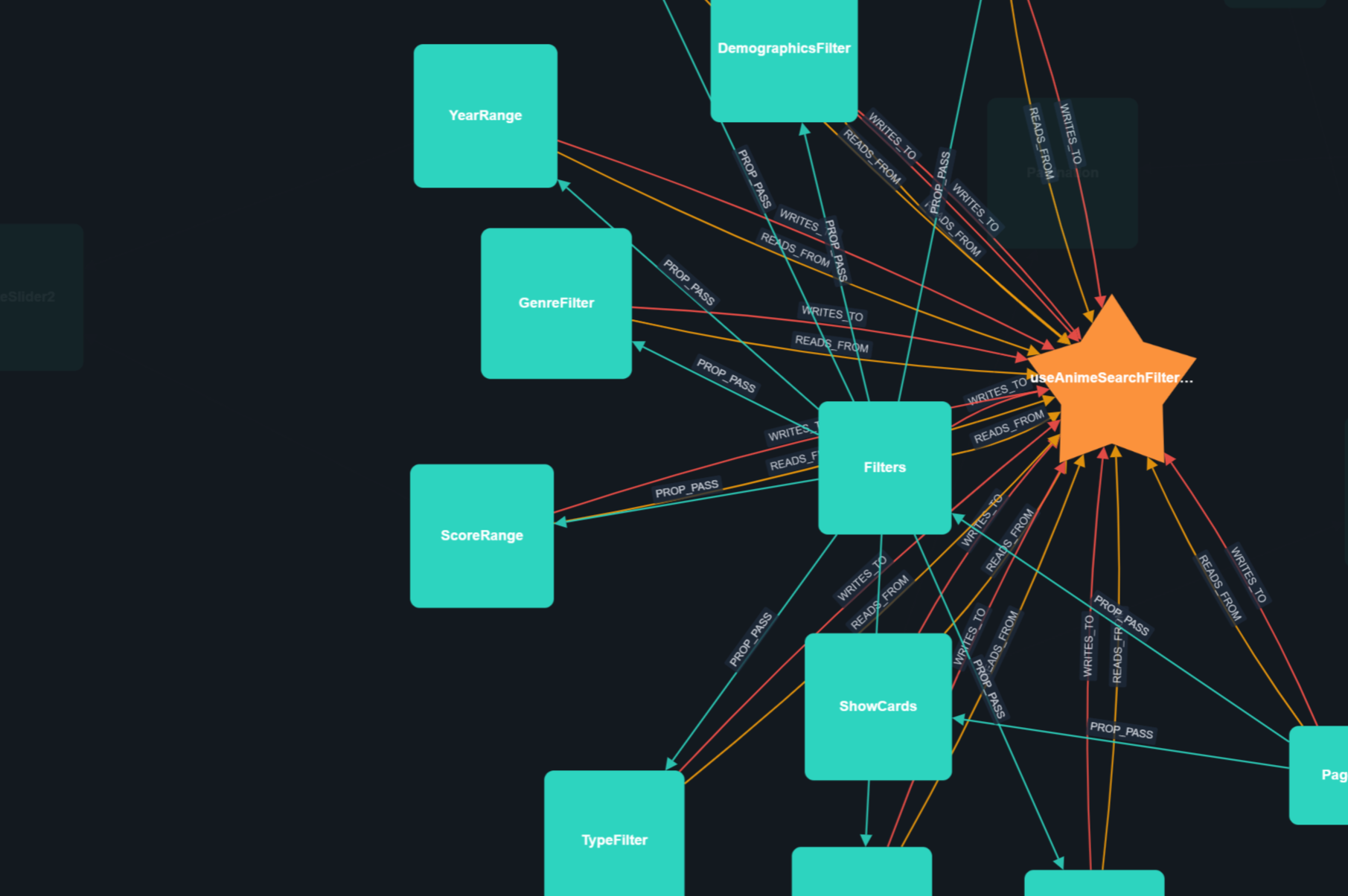
DevLens turns a codebase into a pre-built dependency graph. Instead of reading files one at a time, you (or your AI agent) query the graph: every component, class, function, route, struct, or trait is a node, and every connection is a typed edge (CALLS, IMPORTS, HANDLES, IMPLEMENTS, …). Each node carries:
- Functional summary — what business purpose does this serve?
- Technical summary — how does it work?
- Security assessment — severity + explanation
This is the difference between an AI that re-reads your whole repo every session and an AI that already knows the architecture — architecture reviews, impact analysis, security audits, and onboarding take minutes, not hours.
Typical use cases:
- Onboarding — a developer joining a new team sees the architecture, functional/ technical summaries, modules, and gotchas in minutes, not weeks.
- Impact analysis — before touching a symbol, see its blast radius: what breaks if you change it?
- Security reviews — every node carries a severity-ranked security assessment with real reach.
- PR review — a review packet that explains the diff's impact, tests, and security delta.
- AI agents — give Claude/Cursor/Kilo an MCP server + skill that queries the graph instead of re-reading files.
Supported languages
DevLens parses six languages with native parsers (no AI, no regex, no tree-sitter) and understands their frameworks:
| Language | Frameworks / stacks the graph understands | What gets parsed |
|---|---|---|
| TypeScript / JavaScript | React, Next.js (app & pages router), Express/Hono/Fastify, React Router, TanStack Router, any Node | components, hooks, state stores, classes, methods, functions, routes |
| Python | FastAPI, Flask, Django (+DRF), SQLAlchemy / Django ORM, Celery, Pydantic | classes, methods, functions, routes, data models |
| Java | Spring Boot (controllers, JPA, Spring Data repositories) | classes, methods, interfaces, enums, routes |
| Go | net/http, Gin, Echo, chi, Fiber, GORM, database/sql | structs, interfaces, methods, functions, routes |
| Rust | axum, actix-web, rocket, utoipa, Diesel | structs, enums, traits, impl blocks, methods, functions, routes |
Each repo is analyzed with its language's own parser (Python ast, JavaParser, Go go/ast + go/types, Rust syn, TS compiler API), so edges are real — type-checked interfaces (IMPLEMENTS), framework routes (HANDLES), and ORM data layers (READS_FROM/WRITES_TO).
Prerequisites
| Requirement | Needed for | Notes |
|---|---|---|
| Bun ≥ 1.x | Build & run from source (bun install, bun run dev, bun start) | macOS/Linux/Windows |
| Node.js ≥ 18 | npm install -g @devlensio/cli (optional path) | not needed for the standalone binary |
git | analyzing a repo (DevLens shells out to git) | required on all install paths |
| A JVM 17+ | Java analysis | only when analyzing Java repos |
python3 3.11+ | Python analysis | only when analyzing Python repos |
| An LLM provider API key | AI summaries (optional) | needed only for --summarize; structure-only analysis works offline |
Summaries are never generated silently — the CLI and skill ask permission first, and structure-only analysis needs no provider at all.
Quick Start
The fastest way to try the full experience (Web UI + CLI + hot reload) is to clone and run from source. The one-line installers give you the CLI with zero build time.
Option A — Clone & develop (Web UI + CLI together, recommended)
Production bun start builds the frontend only the first time (later runs skip the rebuild unless you pass --rebuild) and serves the Web UI and the backend API on one port. Open the printed URL, paste an absolute repo path, and click Analyze (enable the skip summaries checkbox if you don't want summaries).
Option B — Install the CLI from npm
Option C — Install the standalone binary (no Node.js required)
The installers are verbose — they print progress, warnings, errors, and next steps, and automatically add devlens to your PATH (your shell's rc file on macOS/Linux, your user PATH on Windows).
Customize with environment variables: DEVLENS_VERSION (e.g. v0.5.1), DEVLENS_INSTALL_DIR (install folder), or DEVLENS_NO_PATH=1 to skip the automatic PATH setup.
Using any install — summarize, then explore
Want it in your AI agent instead? Jump to Agent Skill.
Screenshots
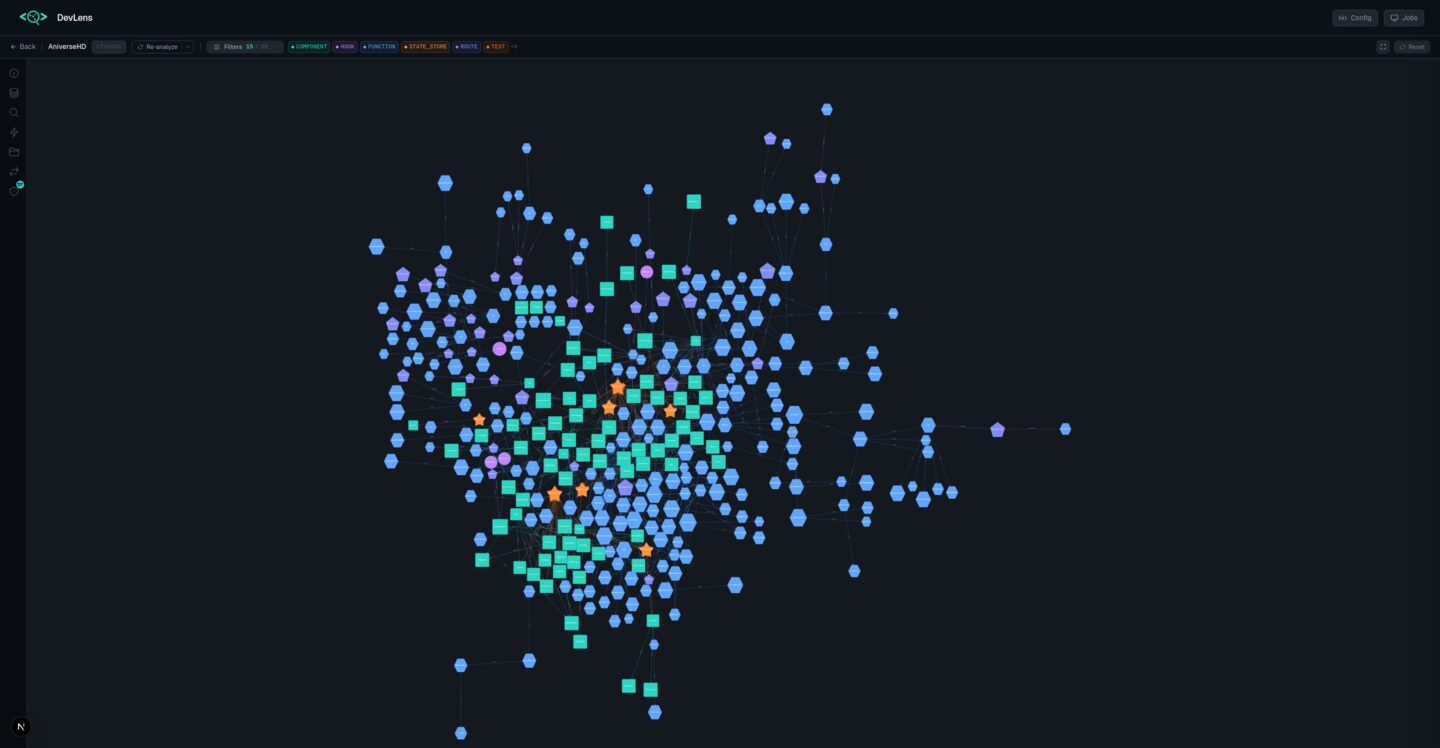
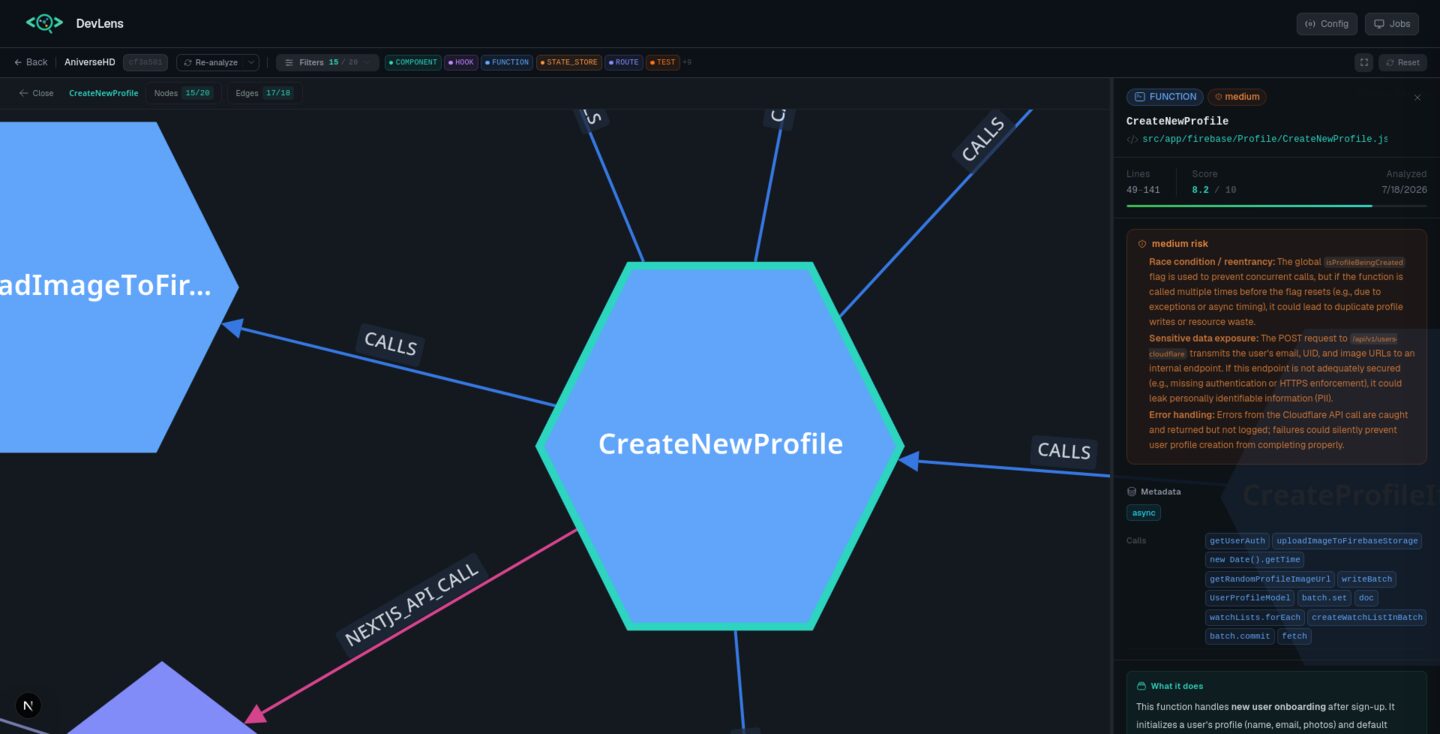
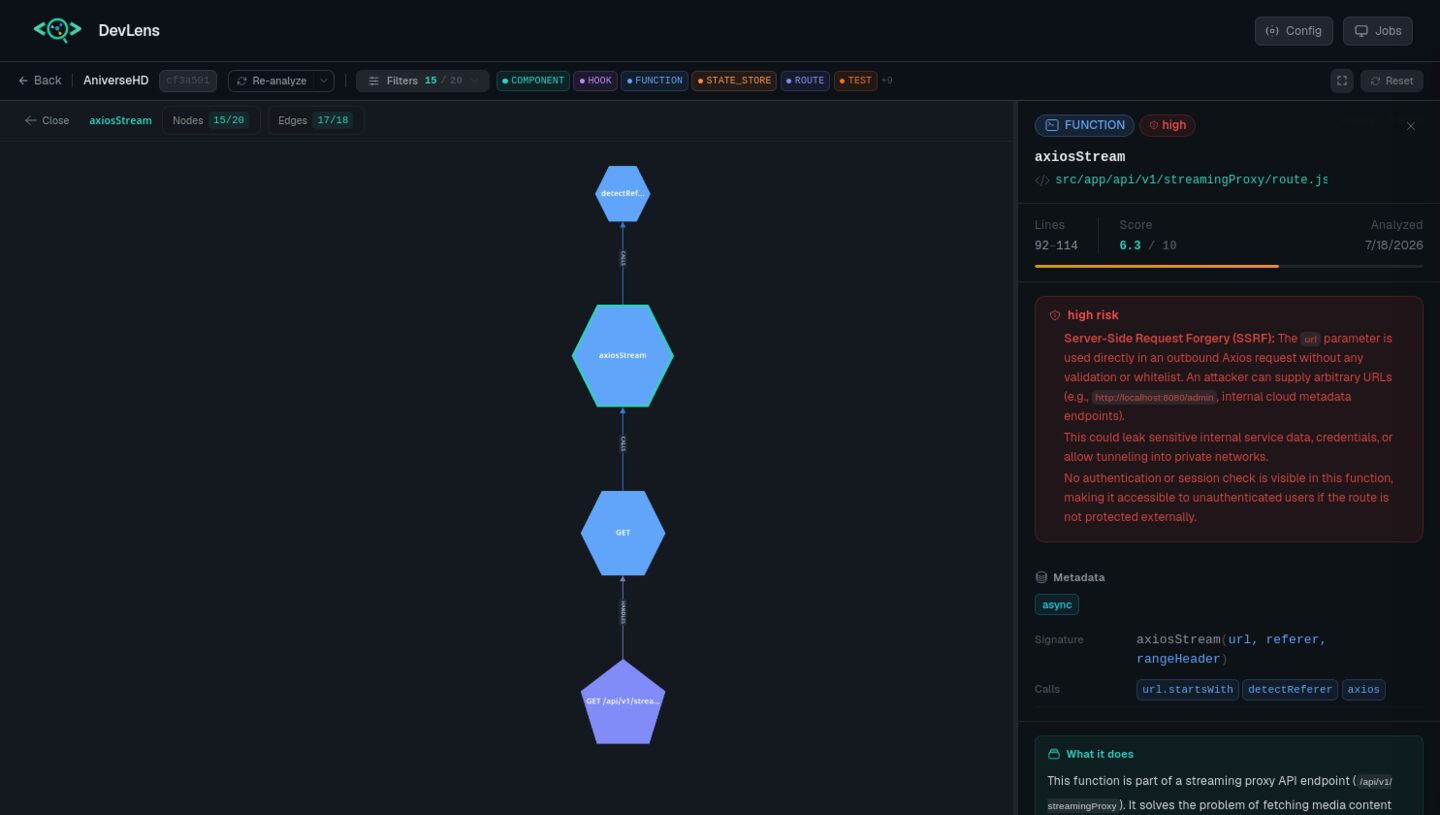
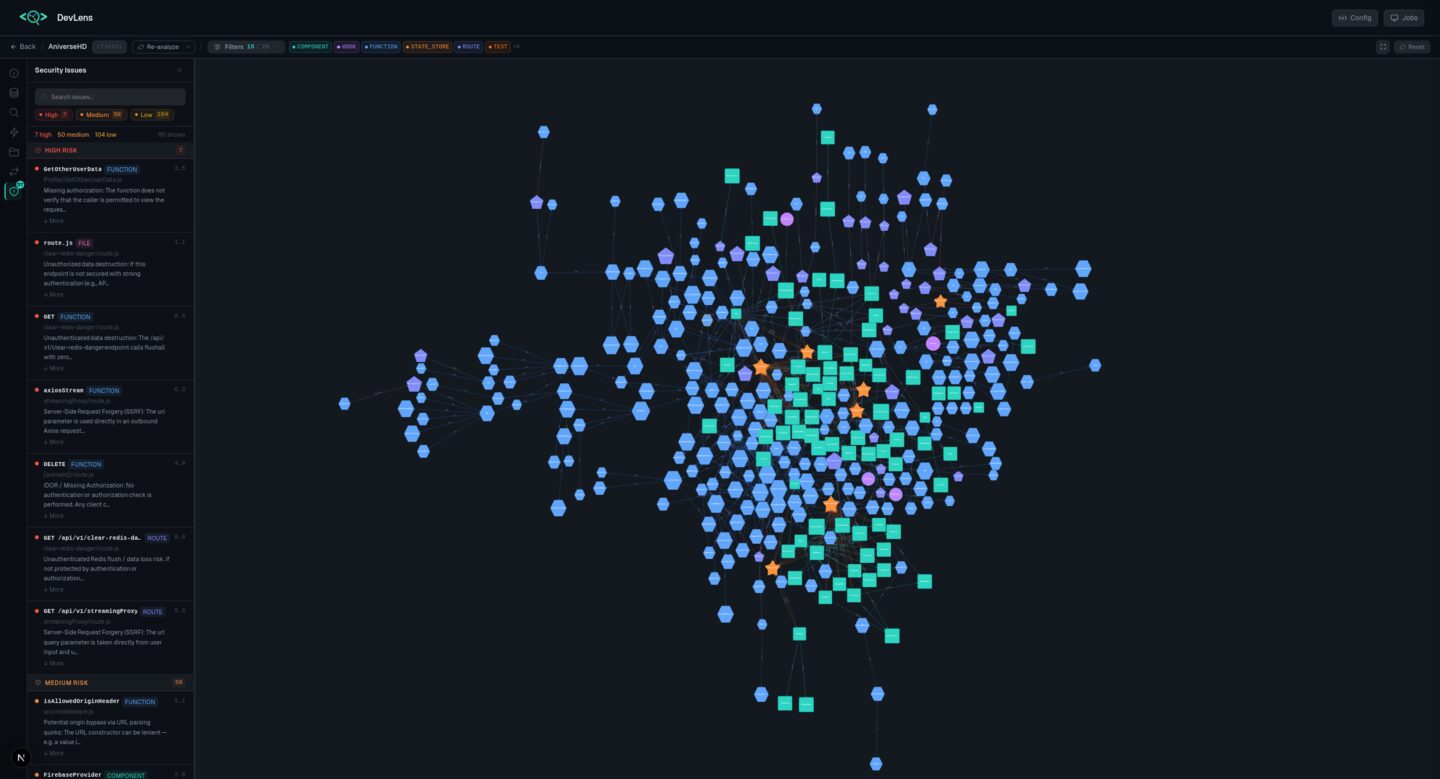
Interactive graph explorer · node inspector with AI summaries & security risk · focused node subgraph · security findings
Why it's fast & cheaper
A node summary is ~50 tokens. The file it describes is ~2,000. Querying summaries and graph slices (get_blast_radius, get_subgraph) costs a fraction of reading files — humans get answers faster, and AI agents spend dramatically fewer tokens on the same task.
Ways to use DevLens
Pick the interface that fits your workflow:
 Web UI — visual exploration
For when you want to see your codebase laid out as an interactive graph.
Open the Web UI, paste your repo path, and explore a force-directed canvas — click any node to see its summaries, callers, callees, and security flags. Search, filter, diff commits across versions. The UI runs on a live server, so opening /graph/<any-new-id> (e.g. clicking a repository card) always renders the graph — even for repos analyzed after the server started.
Or from source (see Quick Start): bun run dev (hot reload) or bun run start (production). The Web UI runs from the source tree — it is not bundled into the installed CLI binary.
 CLI (
CLI (@devlensio/cli) — terminal power
For scripts, CI, and answers fast without leaving the terminal. Every command supports --json for piping into scripts, -v/--verbose for diagnostics, and --quiet for minimal output.
Analyze & summarize
Related MCP Servers
Reviews
No reviews yet — be the first to share how this listing worked for you.
Frequently Asked Questions about DevLens
AllMCPs Directory Badge
Showcase your server listing on GitHub or your project documentation. Embed this dynamic SVG badge to highlight official listing status and live engagement.
Badge Style:
Live Dynamic SVG Preview
Markdown (GitHub README)
[](https://allmcps.com/mcp/devlens)HTML Embed
<a href="https://allmcps.com/mcp/devlens"><img src="https://allmcps.com/api/badge/devlens?style=directory" alt="DevLens on AllMCPs" /></a>Technical Specs & Signals
CategoryDeveloper Tools
40Quality signal: Fair · 40/100How this signal is calculated ▾
Server availabilityNot measured
Not scored for repo-hosted servers — we can't reach the running server, only its GitHub page. Hosted MCP endpoints are health-checked live.
Verified ownership10/20
Documentation & tools16/30
Adoption & activity4/15
Community engagement0/10
A guidance signal from public completeness & health data — not a user rating. New listings start lower and rise as they add docs, get verified, and grow adoption. Signals we can't observe for a listing are skipped, not counted against it.
Own this project?
This directory is pre-filled from public sources. Claim via GitHub README, site badge, or DNS TXT to unlock edit access and the Official badge — proof is checked automatically, then reviewed by our team.
Free dofollow backlink: add your website and place the AllMCPs badge on it — no claim needed. We detect it automatically and keep it verified as long as the badge stays live.
Claim & get free dofollowShare & Embed
Add our SVG badge (dark/light directory styles) or embeddable widget to your site.