Discover public open-source developer profiles and request consent-gated introductions.
Quick Install
Automated & IDE SetupCopy the AI prompt to install this server into Claude Code, Cursor, or another agent — or use 1-click editor setup below.
Manual Client & Custom JSON ConfigExpand JSON ▾
Client Config & Setup
Choose your client or environment
Target File:
💡 Paste the JSON block into your client's configuration file under mcpServers, then restart the application.
Documentation Overview
🌐 DevGlobe
The open-source talent graph for humans and AI agents.







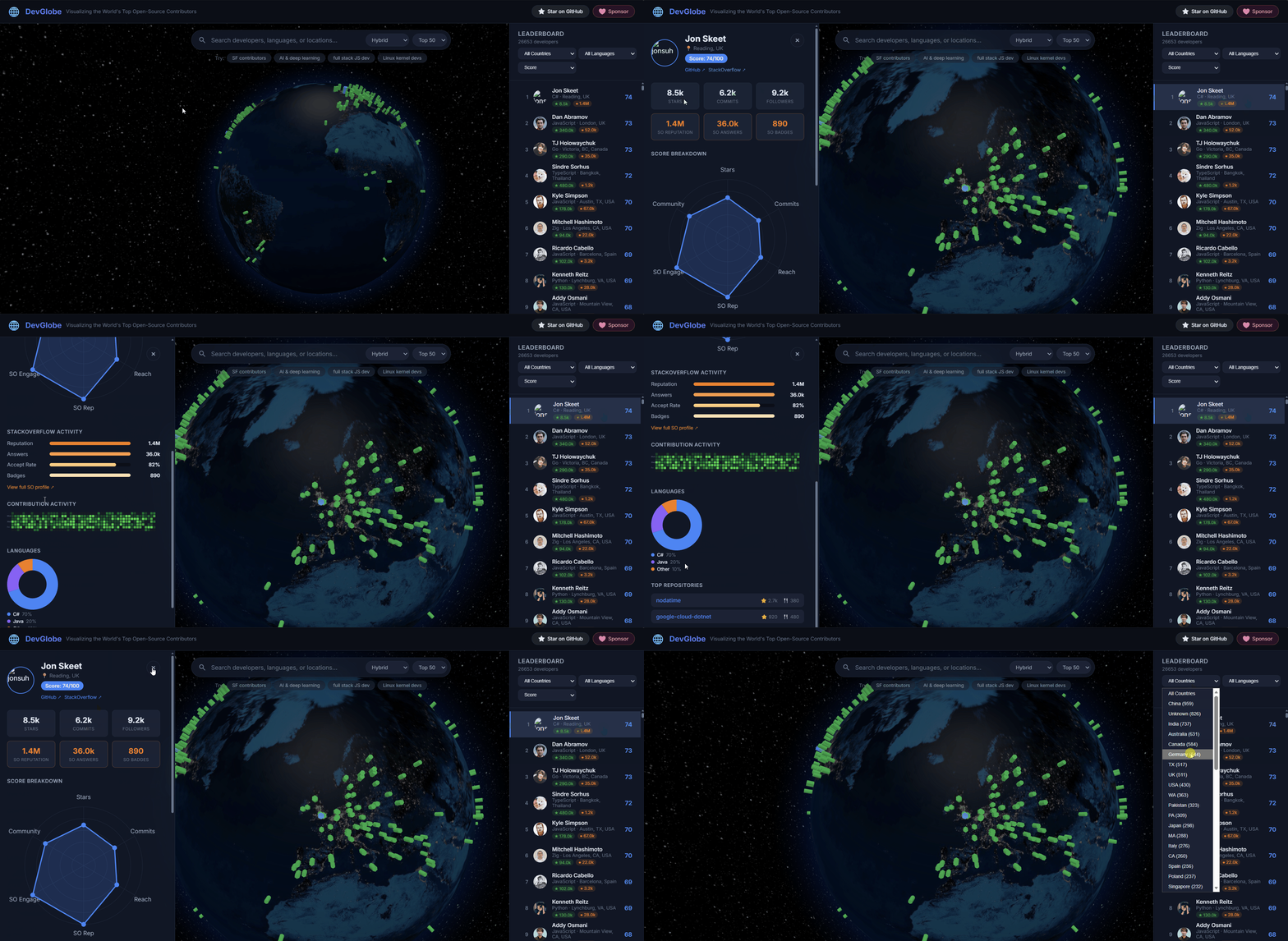
26,000+ developers · ranked by stars, commits, repo reach & StackOverflow reputation · searchable by skill, location & language
DevGlobe is the open-source talent graph for humans and AI agents. It combines a 3D developer map with Azure Cosmos DB vector and hybrid search to surface relevant expertise from real contribution signals rather than popularity alone. The long-term vision is a consent-aware discovery layer where AI agents can find the right human collaborators.
The dynamic application is hosted on Azure Container Apps. Product, API, MCP, Agent Skill, and agent-readiness documentation is published separately on GitHub Pages.
[!IMPORTANT] Connect an AI agent to DevGlobe: MCP-compatible agents can use the hosted endpoint at
https://www.devglobe.dev/mcpto search public developer profiles without credentials. Verified agents can also request developer-approved introductions. See the MCP setup guide.Use DevGlobe in VS Code: Install DevGlobe.dev Developer Discovery to search profiles, share identity cards, and copy MCP configuration from the Command Palette.
🎬 Watch the DevGlobe Demo

✨ Features
- Interactive 3D Globe — Explore developers pinned to their real-world locations using Three.js
- AI-Powered Search — Hybrid + vector search via Azure Cosmos DB (e.g. "AI & deep learning", "full stack JS dev")
- Composite Scoring — Each developer scored 0–100 across 6 dimensions
- Leaderboard — Filter by country, language, or sort by score/stars/commits
- Developer Profiles — Click any pin to see detailed stats, top repos, and contribution breakdown
- Remote MCP Access — Agents can discover developers and request consent-gated introductions through hosted tools
- VS Code Extension — Search developers, open profiles, share identity cards, and configure MCP from the editor
- Mobile Responsive — Bottom-sheet filters and full-width search on smaller screens
🚀 Quick Start
Option 1: Zero-config (sample data, no database needed)
The app automatically falls back to the bundled sample data (20 developers) when no Cosmos DB credentials are configured. No API keys, no emulator, no setup — just clone and run.
Text search works fully offline. Vector/hybrid search requires Azure OpenAI (see Option 3).
Option 2: Cosmos DB Emulator (full database experience locally)
For contributors working on the API layer or data pipeline:
-
Install the Cosmos DB Emulator — Download here (Windows, macOS via Docker, or Linux Docker)
-
Start the emulator and wait for it to be ready at
https://localhost:8081 -
Seed sample data into the emulator:
-
Create
.env.local(the seed script prints this for you): -
Run the app:
The emulator key above is Microsoft's well-known emulator key — it is intentionally public and only works locally.
Option 3: Full Azure backend (vector + hybrid search)
For the complete experience including AI-powered search:
AZURE_OPENAI_CHAT_DEPLOYMENT enables generated fun facts on identity cards. Cards use factual profile copy when the chat deployment is unavailable.
Production serves the Next.js application from Azure Container Apps, high-volume public API reads from Azure Functions, and the developer snapshot from Azure Blob Storage. See docs/azure-backend.md for the resource layout, environment switches, and deployment checks.
🏗️ Tech Stack
| Layer | Technology |
|---|---|
| Frontend | React 19, Three.js (react-globe.gl), Next.js 15 |
| Search | Azure Cosmos DB (vector + hybrid search) |
| API | Next.js API Routes |
| Hosting | Azure Container Apps and Azure Functions |
| Data Pipeline | Node.js scripts (GitHub GraphQL, StackOverflow API, geocoding) |
📊 Scoring Formula (0–100)
| Dimension | Weight | Source |
|---|---|---|
| GitHub Stars | 20% | Total stars across repos |
| GitHub Commits | 20% | Yearly commit activity |
| Repo Reach | 15% | Forks + watchers |
| SO Reputation | 25% | StackOverflow reputation |
| SO Engagement | 15% | Answer acceptance × count |
| Community | 5% | Followers + badges |
All dimensions are log-normalized to prevent outlier domination.
🔧 Building the Full Dataset
Requires API keys — copy .env.example to .env and fill in your tokens.
Developer credentials
Verified community credentials are stored explicitly on each developer document. Do not infer them from stars, followers, or profile text.
Supported IDs: github-star, microsoft-mvp, google-developer-expert, docker-captain, cncf-ambassador, aws-hero, and aws-community-builder. The legacy docker-champion ID remains supported. The upload script preserves this field from source JSON, and the list, detail, and search APIs project it from Cosmos DB.
Populate exact GitHub-login matches from the official GitHub Stars, Google Developer Experts, and CNCF Ambassadors rosters:
The command preserves existing tags and is idempotent. Other credentials require an official profile that explicitly identifies the developer's GitHub account; do not populate them by matching display names.
📁 Project Structure
🌍 Deploy to Azure Container Apps
Pushes to main build the standalone Next.js image in Azure Container Registry and deploy it to Azure Container Apps through GitHub Actions OIDC. The deployment identity requires Contributor access scoped to the application resource group and these repository variables: AZURE_CLIENT_ID, AZURE_TENANT_ID, and AZURE_SUBSCRIPTION_ID.
Required environment variables:
Related MCP Servers
Reviews
No reviews yet — be the first to share how this listing worked for you.
Frequently Asked Questions about DevGlobe
AllMCPs Directory Badge
Showcase your server listing on GitHub or your project documentation. Embed this dynamic SVG badge to highlight official listing status and live engagement.
Badge Style:
Live Dynamic SVG Preview
Markdown (GitHub README)
[](https://allmcps.com/mcp/devglobe)HTML Embed
<a href="https://allmcps.com/mcp/devglobe"><img src="https://allmcps.com/api/badge/devglobe?style=directory" alt="DevGlobe on AllMCPs" /></a>Technical Specs & Signals
CategoryDeveloper Tools
27Quality signal: Emerging · 27/100How this signal is calculated ▾
Server availabilityNot measured
Not scored for repo-hosted servers — we can't reach the running server, only its GitHub page. Hosted MCP endpoints are health-checked live.
Verified ownership8/20
Documentation & tools11/30
Adoption & activity1/15
Community engagement0/10
A guidance signal from public completeness & health data — not a user rating. New listings start lower and rise as they add docs, get verified, and grow adoption. Signals we can't observe for a listing are skipped, not counted against it.
Own this project?
This directory is pre-filled from public sources. Claim via GitHub README, site badge, or DNS TXT to unlock edit access and the Official badge and attach your website — proof is checked automatically, then reviewed by our team.
Free dofollow backlink: add your website and place the AllMCPs badge on it — no claim needed. We detect it automatically and keep it verified as long as the badge stays live.
Claim & get free dofollowShare & Embed
Add our SVG badge (dark/light directory styles) or embeddable widget to your site.