Manage dev container environments via MCP (Docker, DevPod, Codespaces).
Quick Install
Automated & IDE SetupCopy the AI prompt to install this server into Claude Code, Cursor, or another agent — or use 1-click editor setup below.
One-click editor setup isn’t available for this listing yet — we don’t have a confirmed install command, and we’d rather show nothing than point your editor at the wrong package or host. Follow the project’s own setup instructions, linked above.
Manual Client & Custom JSON ConfigExpand JSON ▾
No confirmed setup config for this listing yet. We only publish a config block when the install details come from the project itself — its README, its docs, or a verified owner. We haven’t found those for devcontainer-mcp, and we’d rather show nothing than a guess you’d paste into your client. Follow the project’s own setup instructions for the current steps.
Capabilities & Tool Schemas (46)
Inspect callable tools, capabilities, and parameters exposed to AI agents by Devcontainer MCP.
auth_statusCheck auth for a provider — returns handles, accounts, scopes
auth_loginInitiate login or refresh scopes — browser + device code flow
auth_selectSwitch the active account for a provider
auth_logoutRevoke credentials for an account
devpod_upCreate and start a workspace from a git URL, local path, or image
devpod_stopStop a running workspace
Documentation Overview
devcontainer-mcp


Give your AI agent its own dev environment — not yours.
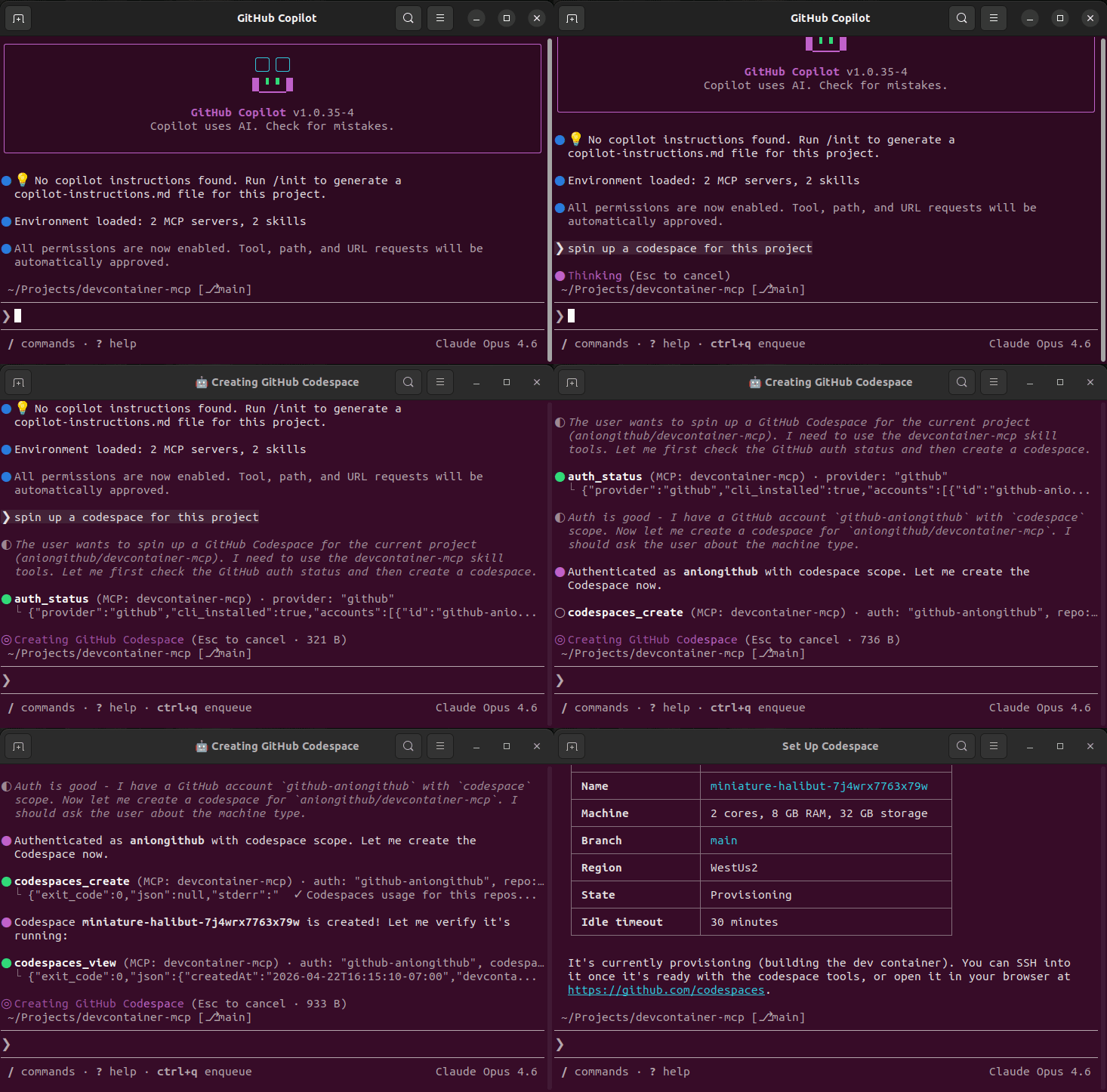
devcontainer-mcp is an MCP server that lets AI coding agents create, manage, and work inside dev containers across three backends: local Docker, DevPod, and GitHub Codespaces. The agent builds, tests, and ships code in an isolated container — your laptop stays clean.
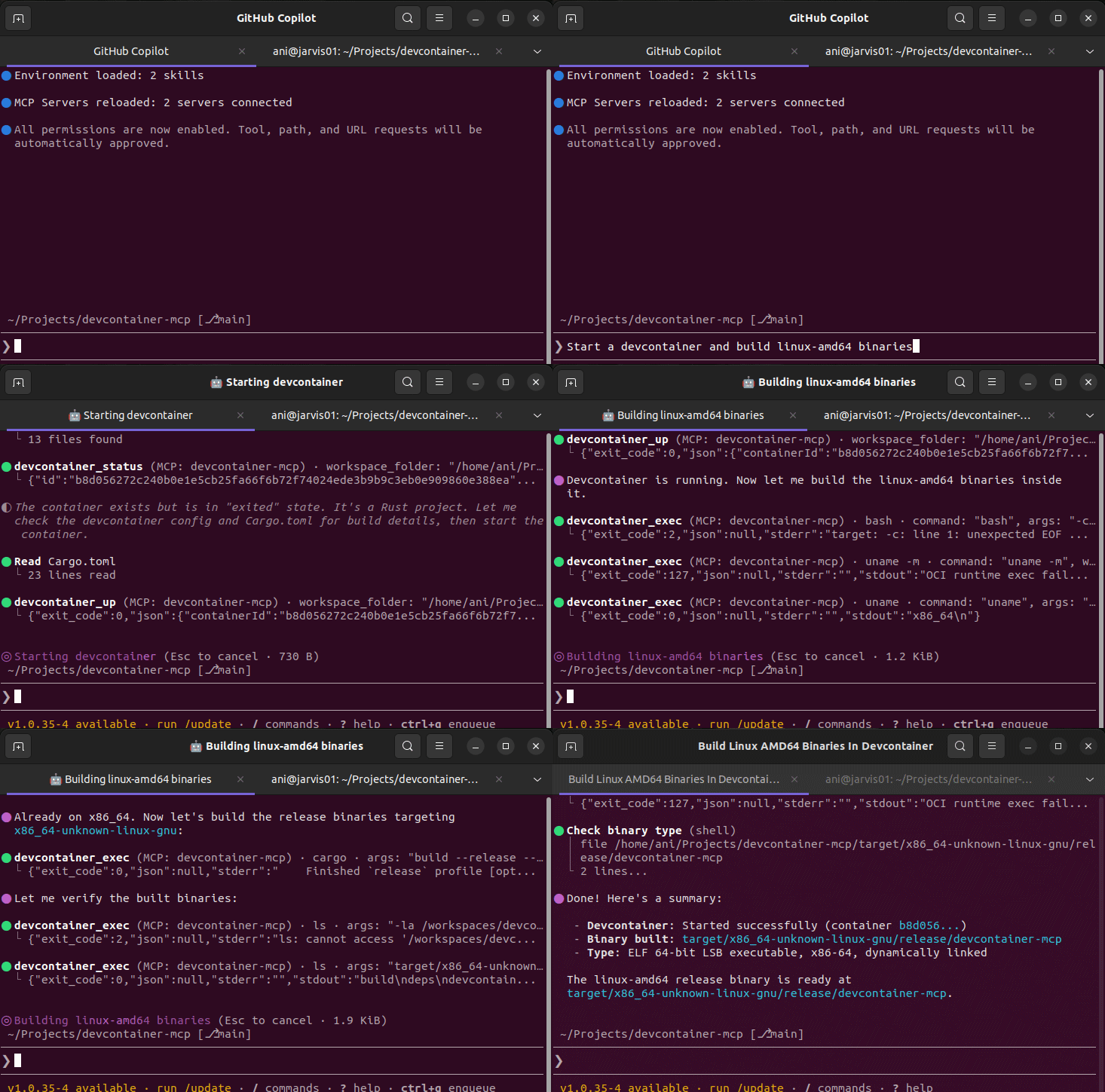
Works with GitHub Copilot, Claude, Cursor, opencode, and any MCP-compatible client.
The Problem
When AI agents write code, they need to run it somewhere. Today that means your host machine:
- 🔴 Host contamination — agents install packages, modify PATH, leave behind build artifacts
- 🔴 "Works on my machine" — agents assume your local toolchain matches production
- 🔴 No isolation — one project's dependencies break another
- 🔴 Security risk — agents run arbitrary commands with your user privileges
- 🔴 Hardware constraints — you're limited to your local machine's resources
The Solution
The devcontainer spec already defines reproducible, container-based dev environments. Every major project ships a .devcontainer/devcontainer.json. But AI agents can't use them — until now.
devcontainer-mcp exposes 45 MCP tools that let any AI agent:
- Spin up a dev container from any repo — locally, on a cloud VM, or in Codespaces
- Run commands inside the container — builds, tests, linting, anything
- Manage the lifecycle — stop, restart, delete when done
- Authenticate against cloud providers — GitHub, AWS, Azure, GCP — without ever seeing a raw token
Quick Install
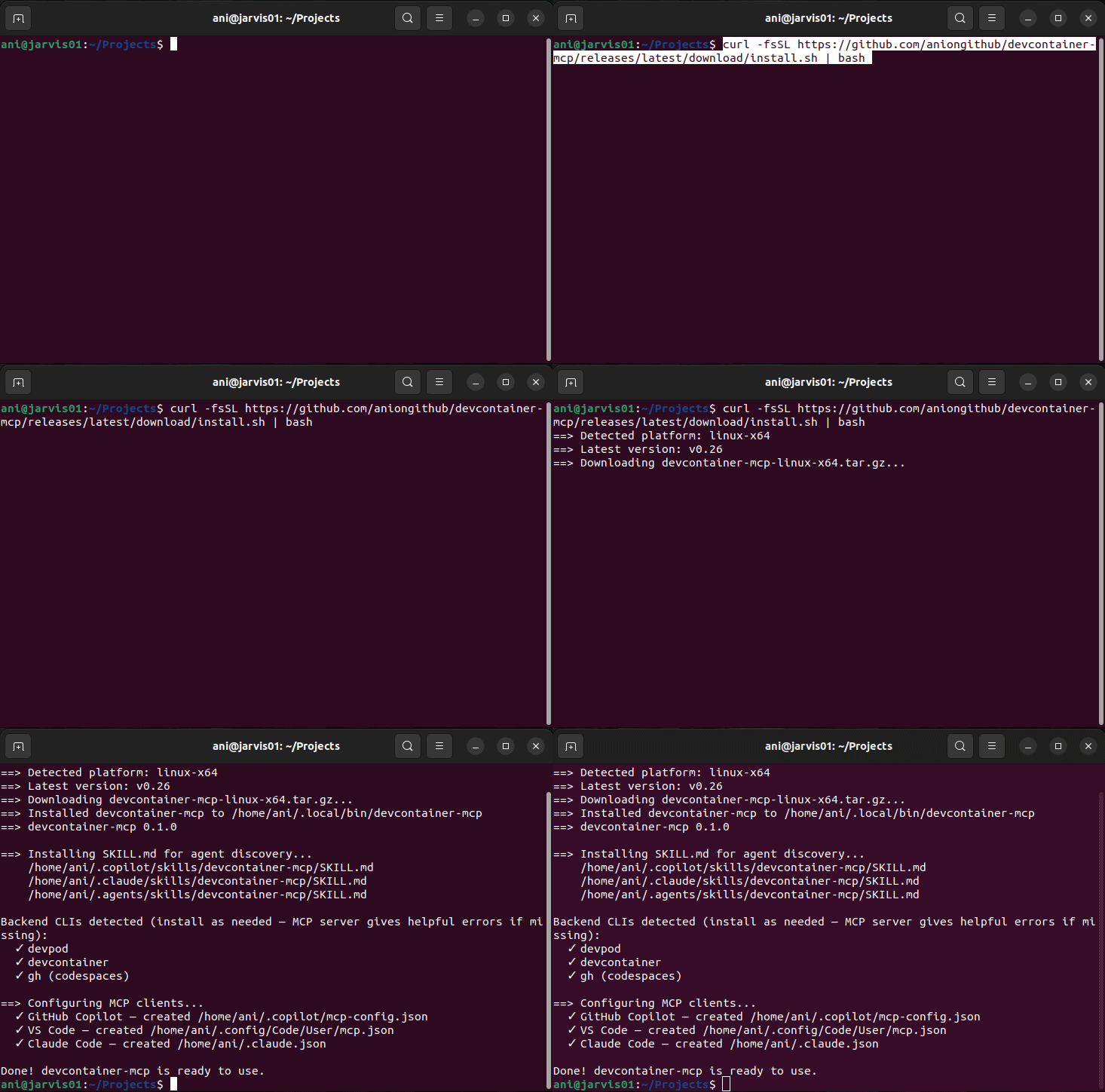
Linux / macOS
Windows (via WSL)
How it works: The binary runs inside WSL; MCP clients on Windows launch it via
wsl ~/.local/bin/devcontainer-mcp serve. The stdio transport works transparently across the WSL boundary. WSL 2 is required — install it withwsl --installif you haven't already.
Backend CLIs (devpod, devcontainer, gh) are detected at runtime — if one is missing, the MCP server returns a helpful error with install instructions.
Binaries available for linux-x64, linux-arm64, darwin-x64, and darwin-arm64.
Host Protection & Opt-Out
The installer configures two agent hooks (Claude Code & GitHub Copilot CLI) that activate only in a directory containing .devcontainer/devcontainer.json:
devcontainer-guard(PreToolUse) — blocks shell/command execution on the host so the agent routes builds, tests, and runs through the MCP tools instead. Host-safe commands (git,gh) are allowlisted, and both hooks fail open — ifjqis missing or a payload can't be parsed, commands are allowed rather than blocked.devcontainer-skill-loader(SessionStart) — injects theSKILL.mdusage guide as context.
Turning it off for a repo
Sometimes a project ships a stale or unmaintained .devcontainer that you don't actually want to route work through. To disable both hooks for that repo, drop a marker file at the repo root:
When .devcontainer-mcp-disable is present, the guard allows host commands through and the skill-loader skips context injection — the agent works locally as if no devcontainer were declared. Commit it (or add it to .gitignore for a local-only opt-out).
One-off bypass: to run a single host command without disabling the guard, include USER_CONFIRMED_HOST_OPERATION=1 anywhere in the command.
Architecture
Three Backends, One Interface
| Backend | Best for | Requires | Auth needed? |
|---|---|---|---|
devcontainer CLI (devcontainer_*) | Local Docker — fast, simple | @devcontainers/cli + Docker | No |
DevPod (devpod_*) | Multi-cloud: Docker, K8s, AWS, Azure, GCP | DevPod CLI | Optional (cloud providers) |
Codespaces (codespaces_*) | GitHub-hosted cloud environments | gh CLI | Yes (auth handle) |
Auth Broker
The agent never sees raw tokens. Instead:
auth_status(provider)— list available accounts and scopesauth_login(provider, scopes?)— initiate login, opens browser, handles device codesauth_select(id)— switch the active accountauth_logout(id)— revoke credentials
Codespaces tools require an auth handle (e.g. "github-aniongithub"). The MCP server resolves it to the real token on each call via the CLI's native keyring.
Supported providers: GitHub, AWS, Azure, GCP, Kubernetes
MCP Tools (46 total)
Auth (4 tools)
| Tool | Description |
|---|---|
auth_status | Check auth for a provider — returns handles, accounts, scopes |
auth_login | Initiate login or refresh scopes — browser + device code flow |
auth_select | Switch the active account for a provider |
auth_logout | Revoke credentials for an account |
DevPod (19 tools)
| Tool | Description |
|---|---|
devpod_up | Create and start a workspace from a git URL, local path, or image |
devpod_stop | Stop a running workspace |
devpod_delete | Delete a workspace and its resources |
devpod_build | Build a workspace image without starting it |
devpod_status | Get workspace state (Running, Stopped, Busy, NotFound) |
devpod_list | List all workspaces with IDs, sources, providers, and status |
devpod_ssh | Execute a command inside a workspace via SSH |
devpod_logs | Get workspace logs |
devpod_provider_list | List all configured providers |
devpod_provider_add | Add a new provider |
devpod_provider_delete | Remove a provider |
devpod_context_list | List all contexts |
devpod_context_use | Switch to a different context |
devpod_container_inspect | Docker inspect — labels, ports, mounts, state |
devpod_container_logs | Stream container logs via Docker API |
devpod_file_read | Read file content with optional line range |
devpod_file_write | Create or overwrite a file (auto-creates parent dirs) |
devpod_file_edit | Surgical string replacement — old_str → new_str |
devpod_file_list | List directory contents (non-hidden, 2 levels deep) |
devcontainer CLI (12 tools)
| Tool | Description |
|---|---|
devcontainer_up | Create and start a local dev container |
devcontainer_exec | Execute a command inside a running dev container |
devcontainer_build | Build a dev container image |
devcontainer_read_config | Read merged devcontainer configuration as JSON |
devcontainer_list_configs | Discover all devcontainer.json files in a workspace (single + multi-container) |
devcontainer_stop | Stop a dev container (via Docker API) |
devcontainer_remove | Remove a dev container and its resources |
devcontainer_status | Get dev container state by workspace folder |
devcontainer_file_read | Read file content with optional line range |
devcontainer_file_write | Create or overwrite a file (auto-creates parent dirs) |
devcontainer_file_edit | Surgical string replacement — old_str → new_str |
devcontainer_file_list | List directory contents (non-hidden, 2 levels deep) |
GitHub Codespaces (11 tools) — require auth handle
Related MCP Servers
Adoption & maintenance
Factual signals from GitHub, npm, and our automated checks — not a rating.
GitHub stars
27
Stargazers on the source repository.
Last commit
16d ago
Most recent push to the default branch.
Tools exposed
46
Callable tools this server registers over MCP.
Directory activity
1 views
Config copies, upvotes, and views on AllMCPs.
Reviews
No reviews yet — be the first to share how this listing worked for you.
Frequently Asked Questions about Devcontainer MCP
AllMCPs Directory Badge
Showcase your server listing on GitHub or your project documentation. Embed this dynamic SVG badge to highlight official listing status and live engagement.
Badge Style:
Live Dynamic SVG Preview
Markdown (GitHub README)
[](https://allmcps.com/mcp/devcontainer-mcp)HTML Embed
<a href="https://allmcps.com/mcp/devcontainer-mcp"><img src="https://allmcps.com/api/badge/devcontainer-mcp?style=directory" alt="Devcontainer MCP on AllMCPs" /></a>Technical Specs & Signals
CategoryDeveloper Tools
4/5 checks healthy over the last 45d
49Quality signal: Fair · 49/100How this signal is calculated ▾
Server availabilityNot measured
Not scored for repo-hosted servers — we can't reach the running server, only its GitHub page. Hosted MCP endpoints are health-checked live.
Verified ownership10/20
Documentation & tools20/30
Adoption & activity7/15
Community engagement0/10
A guidance signal from public completeness & health data — not a user rating. New listings start lower and rise as they add docs, get verified, and grow adoption. Signals we can't observe for a listing are skipped, not counted against it.
Own this project?
This directory is pre-filled from public sources. Claim via GitHub README, site badge, or DNS TXT to unlock edit access and the Official badge — proof is checked automatically, then reviewed by our team.
Free dofollow backlink: add your website and place the AllMCPs badge on it — no claim needed. We detect it automatically and keep it verified as long as the badge stays live.
Claim & get free dofollowShare & Embed
Add our SVG badge (dark/light directory styles) or embeddable widget to your site.