Schema-aware read/write access to Salesforce Marketing Cloud via Devart dotConnect.
Quick Install
Automated & IDE SetupCopy the AI prompt to install this server into Claude Code, Cursor, or another agent — or use 1-click editor setup below.
One-click editor setup isn’t available for this listing yet — we don’t have a confirmed install command, and we’d rather show nothing than point your editor at the wrong package or host. Follow the project’s own setup instructions, linked above.
Manual Client & Custom JSON ConfigExpand JSON ▾
No confirmed setup config for this listing yet. We only publish a config block when the install details come from the project itself — its README, its docs, or a verified owner. We haven’t found those for Devart MCP Server for Salesforce Marketing Cloud (ADO.NET), and we’d rather show nothing than a guess you’d paste into your client. Follow the project’s own setup instructions for the current steps.
Documentation Overview
Version 1.1.0
Devart MCP Server for Salesforce Marketing Cloud
Devart MCP Server for Salesforce Marketing Cloud enables AI clients to interact with your data through a secure server running in your environment. It turns a regular AI chat into a practical way to work with real-world business data — and it is faster than conventional export or manual querying.
Key benefits
Devart MCP Server for Salesforce Marketing Cloud allows you to:
- Work with data intuitively through natural language.
- Retrieve the required data for analysis within minutes.
- Report on your data faster with AI-powered assistance.
- Minimize manual data handling and integration maintenance.
How it works
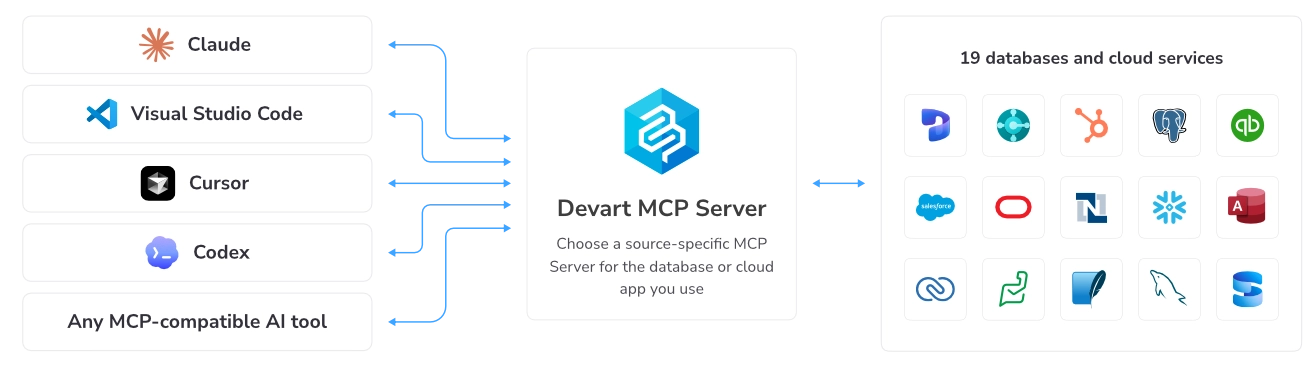
Devart MCP Server for Salesforce Marketing Cloud helps AI clients communicate directly with Salesforce Marketing Cloud databases using natural-language prompts. It translates AI requests into structured queries, executes them through Devart connectivity drivers, and returns clean, structured results for seamless AI-powered data access.
Quick start
To get started with Devart MCP Server for Salesforce Marketing Cloud:
1. Download and install Devart ODBC Driver for Salesforce Marketing Cloud.
2. Download and install Devart MCP Server for Salesforce Marketing Cloud.
3. In Devart MCP Server for Salesforce Marketing Cloud, configure your data connection and integration settings.
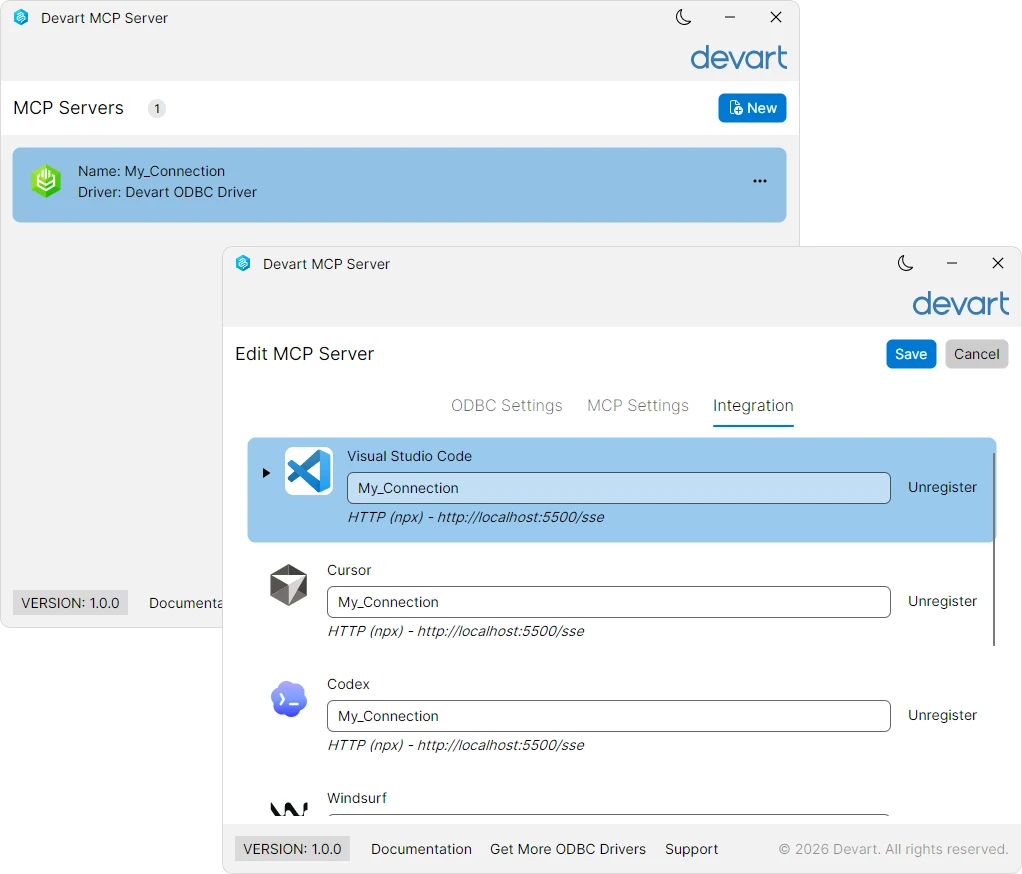
4. Run your first natural-language query.

Manual installation and configuration
Prerequisites
Before building and running Devart MCP Server for Salesforce Marketing Cloud, ensure the following components are installed:
- .NET 8 SDK
- ADO.NET connection — Devart.AI.McpServer.AdoNet.SalesforceMc.csproj Devart dotConnect for Salesforce Marketing Cloud (installed automatically via NuGet during build)
- ODBC connection — Devart.AI.McpServer.Odbc.SalesforceMc.csproj Devart ODBC Driver for Salesforce Marketing Cloud (requires manual download and installation)
Step 1: Clone the repository
Clone the project repository and navigate to the project directory:
1. Open Command Prompt.
2. Enter the following command:
Step 2: Build the MCP Server from source
You can build Devart MCP Server for Salesforce Marketing Cloud from source using either of the supported database connectivity technologies: ADO.NET or ODBC.
- To build the MCP server with ADO.NET, run the following command:
The Devart dotConnect for Salesforce Marketing Cloud NuGet package is downloaded and restored automatically.
- To build the MCP server with ODBC, select the command based on the bitness of your data source.
For 64-bit data source, run the following command:
For 32-bit data source, run the following command:
Note
The target platform must match the bitness of your ODBC data source.
Step 3: Configure the database connection for the MCP Server
1. Create an mcpserver.json configuration file in the directory containing the built MCP Server executable.
2. In the file, configure the database connection.
- Configure a connection with ADO.NET.
Add the following configuration to the mcpserver.json file:
- Configure a connection with ODBC.
Add the following configuration to the mcpserver.json file:
- Configure a connection with ODBC using a connection string.
Add the following configuration to the mcpserver.json file:
where:
-
Name— The connection name. -
ConnectionString(applies to ADO.NET) — A database-specific connection string used to establish a connection to the target database. -
DsnName(applies to ODBC) — The name of your data source. -
ProtocolType— A transport protocol. The possible options are:stdioorhttp. -
HttpPort(required ifProtocolTypeis set tohttp) — The port number for thehttpprotocol.
Step 4: Run the MCP server
After you configure the MCP Server, you can start it.
Note
This step is required only when
ProtocolTypeis configured ashttp. If you use thestdiotransport protocol, your AI client starts the server automatically.
- To start the server with ADO.NET, run the following command:
- To start the server with ODBC, run the following command:
where my_salesforcemc is the name of the ODBC connection.
Step 5: Integrate with Claude Desktop
1. Open claude_desktop_config.json, the Claude configuration file.
Tip
If you can't locate the configuration file, it may not exist yet. To create it, open Claude Desktop and navigate to File > Settings > Developer, then click Edit Config. The folder with the
claude_desktop_config.jsonfile opens.
2. Add one of the following objects, depending on the transport protocol used by MCP Server:
- STDIO
where:
-
devartis the connector name that will appear in Claude Desktop. -
C:\\path\\to\\Devart.AI.McpServer.AdoNet.SalesforceMc.exeis the path to the executable file. For an ODBC connection, useDevart.AI.McpServer.Odbc.SalesforceMc.exe. -
my_salesforcemcis the connection name specified in themcpserver.jsonconfiguration file. -
HTTP
where:
devartis the connector name that will appear in Claude Desktop.5000is the MCP Server listening port.
3. Save the file.
4. Restart Claude Desktop.
Devart MCP Server for Salesforce Marketing Cloud is now integrated with Claude, and devart appears in the Claude Desktop app in Customize > Connectors.
You can also integrate Devart MCP Server for Salesforce Marketing Cloud with other AI clients such as Cline, Codex, Cursor, Visual Studio Code, Windsurf, Zed.
Supported clients
Devart MCP Server for Salesforce Marketing Cloud supports integration with the following AI clients:
- Claude Desktop
- Visual Studio Code
- Cursor
- Codex
- Windsurf
- Cline
- Zed
- ...and other MCP-compatible AI clients
Typical use cases
Devart MCP Server for Salesforce Marketing Cloud is a practical fit for teams working with Salesforce Marketing Cloud as their primary data source.
-
Email campaign performance analysis
Query send volumes, open rates, click-through rates, bounces, and unsubscribes across Marketing Cloud email campaigns without building custom reports. -
Audience and subscriber analytics
Analyze subscriber list growth, engagement scores, suppression lists, and audience segment compositions stored in Marketing Cloud. -
Customer journey analysis
Explore journey entry rates, path distributions, exit points, and conversion performance across Marketing Cloud Journey Builder data.
Related MCP Servers
Reviews
No reviews yet — be the first to share how this listing worked for you.
Frequently Asked Questions about Devart MCP Server for Salesforce Marketing Cloud (ADO.NET)
AllMCPs Directory Badge
Showcase your server listing on GitHub or your project documentation. Embed this dynamic SVG badge to highlight official listing status and live engagement.
Badge Style:
Live Dynamic SVG Preview
Markdown (GitHub README)
[](https://allmcps.com/mcp/devart-mcp-server-for-salesforce-marketing-cloud-ado-net)HTML Embed
<a href="https://allmcps.com/mcp/devart-mcp-server-for-salesforce-marketing-cloud-ado-net"><img src="https://allmcps.com/api/badge/devart-mcp-server-for-salesforce-marketing-cloud-ado-net?style=directory" alt="Devart MCP Server for Salesforce Marketing Cloud (ADO.NET) on AllMCPs" /></a>Technical Specs & Signals
CategoryDeveloper Tools
33Quality signal: Emerging · 33/100How this signal is calculated ▾
Server availabilityNot measured
Not scored for repo-hosted servers — we can't reach the running server, only its GitHub page. Hosted MCP endpoints are health-checked live.
Verified ownership10/20
Documentation & tools11/30
Adoption & activity4/15
Community engagement0/10
A guidance signal from public completeness & health data — not a user rating. New listings start lower and rise as they add docs, get verified, and grow adoption. Signals we can't observe for a listing are skipped, not counted against it.
Own this project?
This directory is pre-filled from public sources. Claim via GitHub README, site badge, or DNS TXT to unlock edit access and the Official badge and attach your website — proof is checked automatically, then reviewed by our team.
Free dofollow backlink: add your website and place the AllMCPs badge on it — no claim needed. We detect it automatically and keep it verified as long as the badge stays live.
Claim & get free dofollowShare & Embed
Add our SVG badge (dark/light directory styles) or embeddable widget to your site.