design-systemsaccessibilitywcagdesign-tokensvalidation
Design Constraint Validator (DCV) is a reasoning-based validator for design-system tokens — checking WCAG contrast, monotonic scales, threshold policies, and cross-axis relationships, not just schema shape.
Quick Install
Automated & IDE SetupCopy the AI prompt to install this server into Claude Code, Cursor, or another agent — or use 1-click editor setup below.
We couldn’t automatically confirm this listing starts correctly
We ran the install command below but it didn't respond within our test window — this can mean a slow first-time install rather than a real problem.
npx -y design-constraint-validatorNo response to initialize.
This is an experimental automated check and can have false negatives — missing environment variables, a slow cold install, etc. It doesn’t necessarily mean something’s wrong. Last checked 7d ago.
Manual Client & Custom JSON ConfigExpand JSON ▾
Client Config & Setup
Choose your client or environment
Target File:
💡 Paste the JSON block into your client's configuration file under mcpServers, then restart the application.
Overview
Use cases
Check whether a design system's contrast ratios meet WCAG accessibility floors
Verify a typography or spacing scale increases monotonically
Enforce cross-axis threshold policies like size × weight × contrast
Get a graph-based why explanation for a failed constraint, not just a pass/fail
Key features
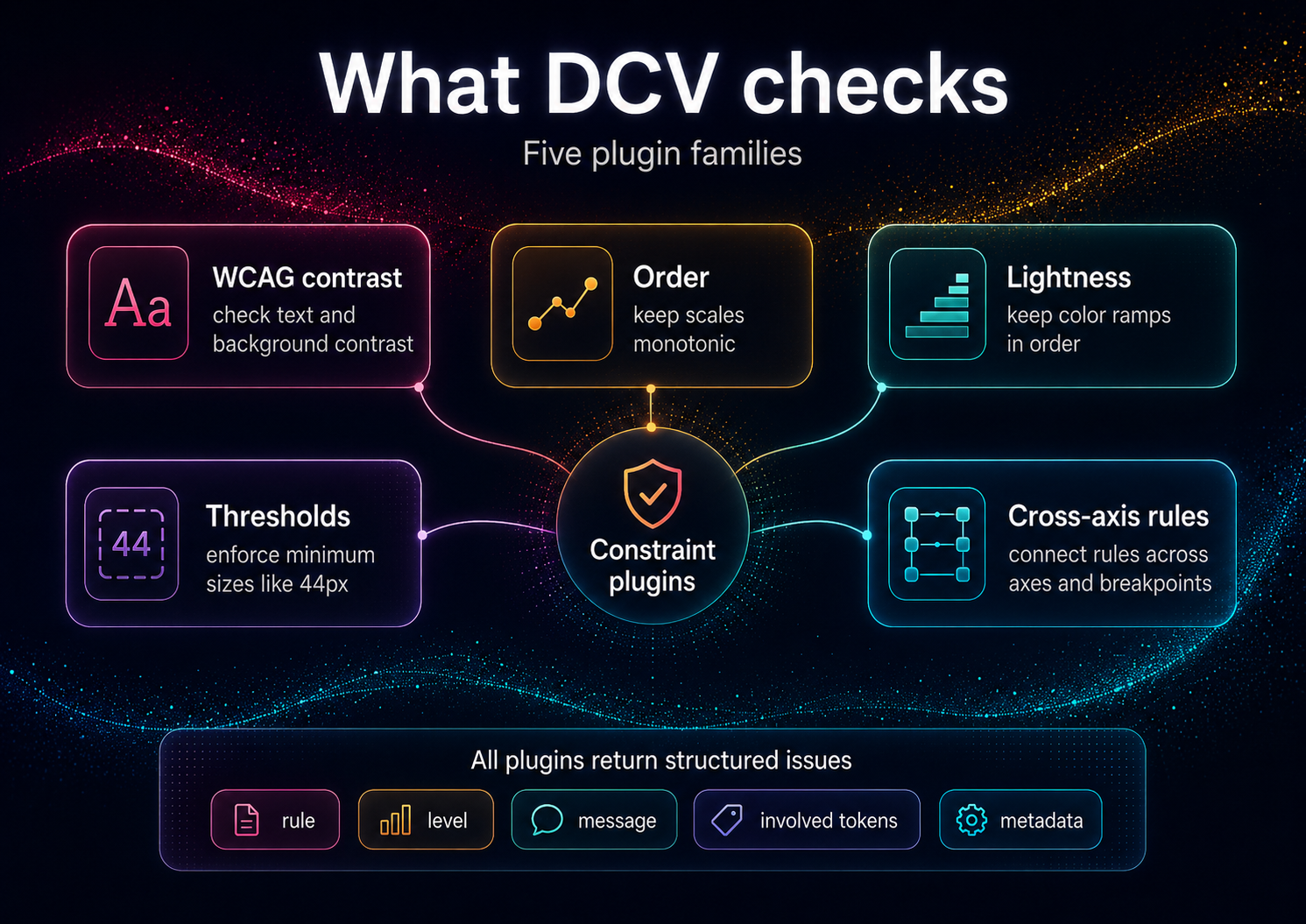
WCAG text-contrast and perceptual lightness validation
Order/monotonicity checks for typography and spacing scales
Threshold and cross-axis policy checks
Hasse/poset graph export with implicated-edge explanations
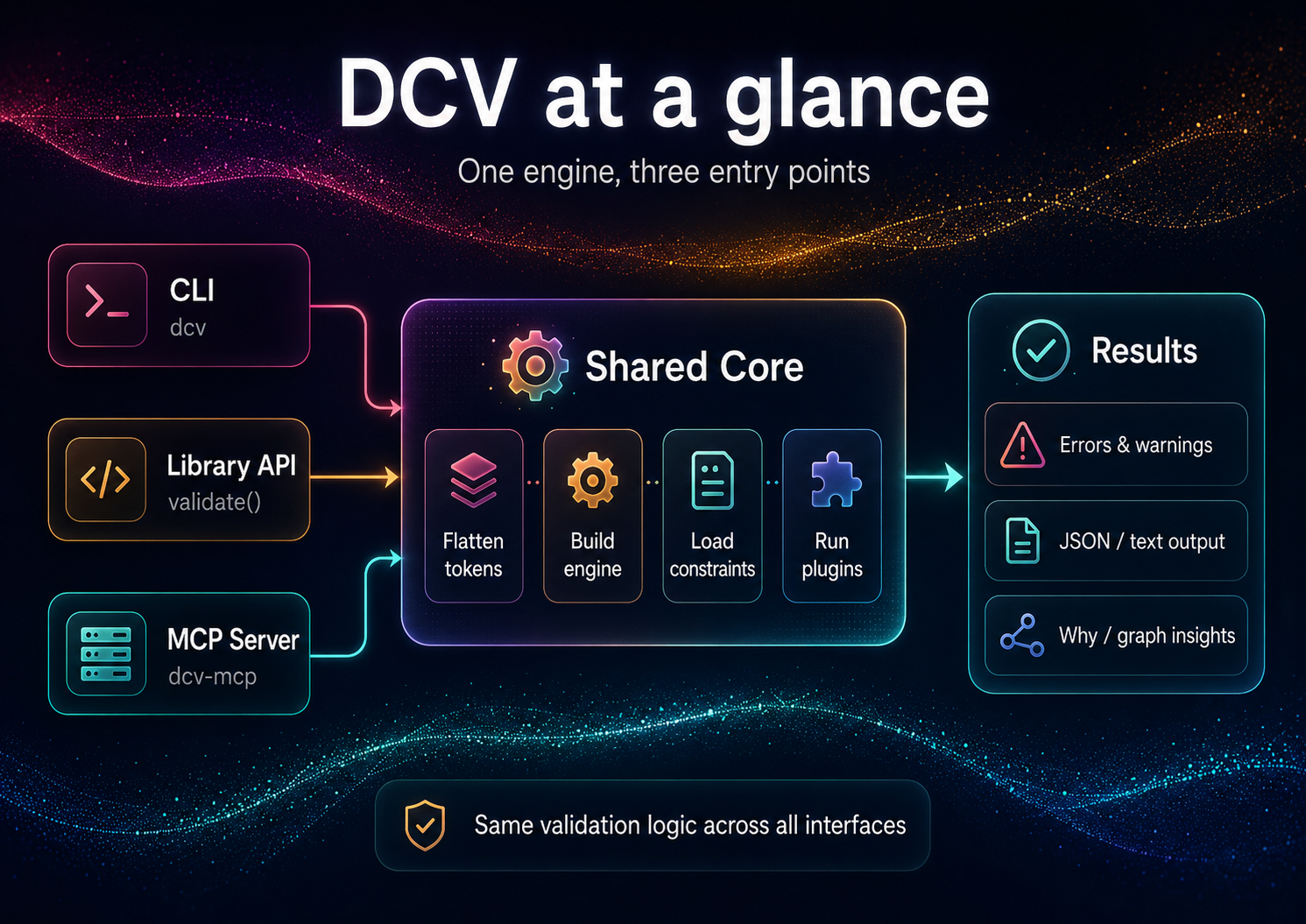
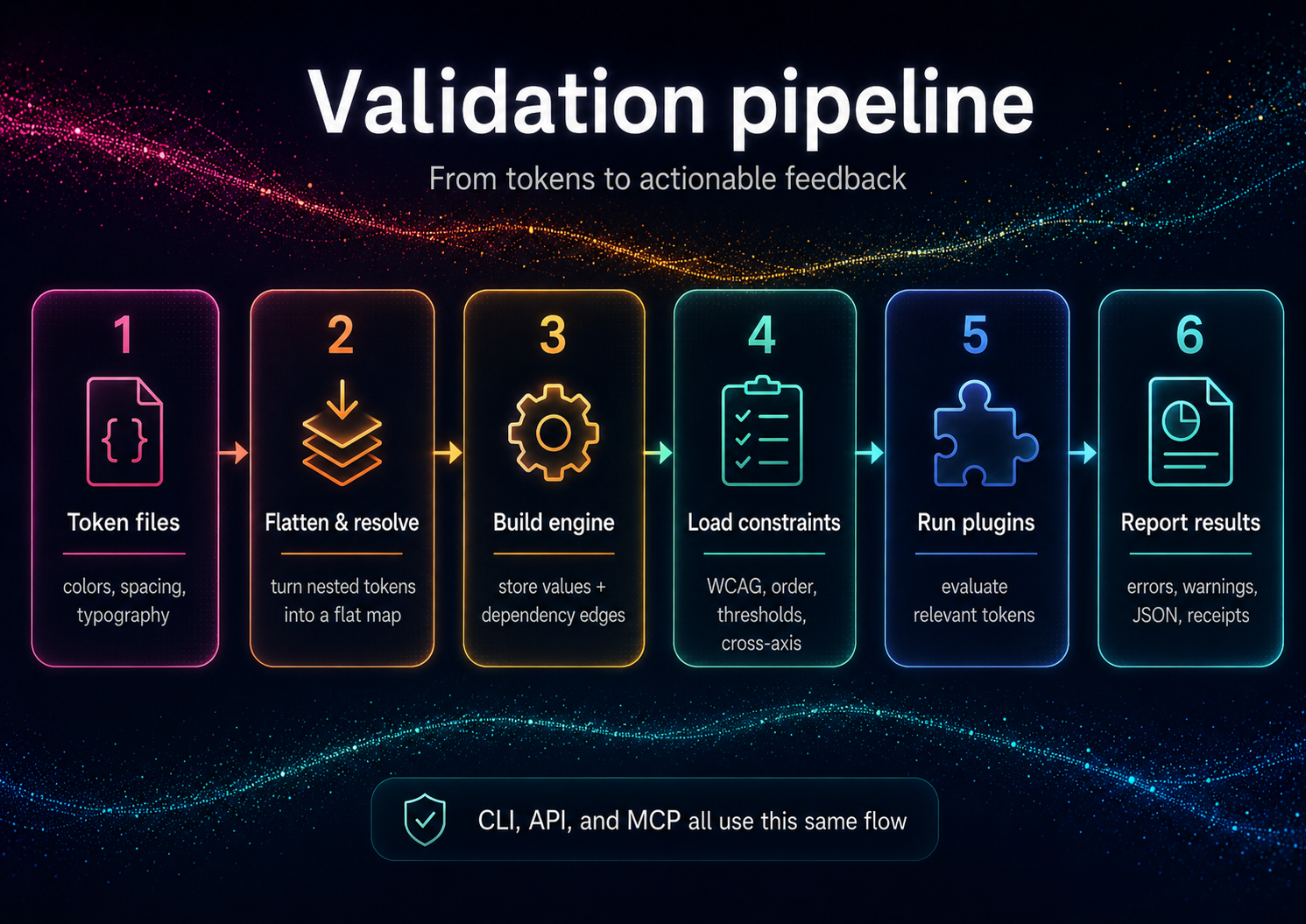
One validation core shared by CLI, library API, and MCP server
Capabilities & Tool Schemas
Inspect callable tools, capabilities, and parameters exposed to AI agents by Design Constraint Validator.
Extracted Tool Capabilities
WCAG text-contrast and perceptual lightness validation
Order/monotonicity checks for typography and spacing scales
Threshold and cross-axis policy checks
Hasse/poset graph export with implicated-edge explanations
One validation core shared by CLI, library API, and MCP server
Documentation Overview
Design Constraint Validator (DCV)
Mathematical constraint validator for design systems — ensuring consistency, accessibility, and logical coherence.







Design Constraint Validator (DCV) validates design constraints across token sets and styles:
- ✅ Accessibility: WCAG text contrast, perceptual lightness floor/ceilings
- ✅ Order & Monotonicity: increasing typography scales, spacing hierarchies
- ✅ Thresholds & Policies: min/max ranges, cross-axis guards (size × weight × contrast)
- ✅ Graph Intelligence: Hasse/poset graph export; "why" explanations with implicated edges
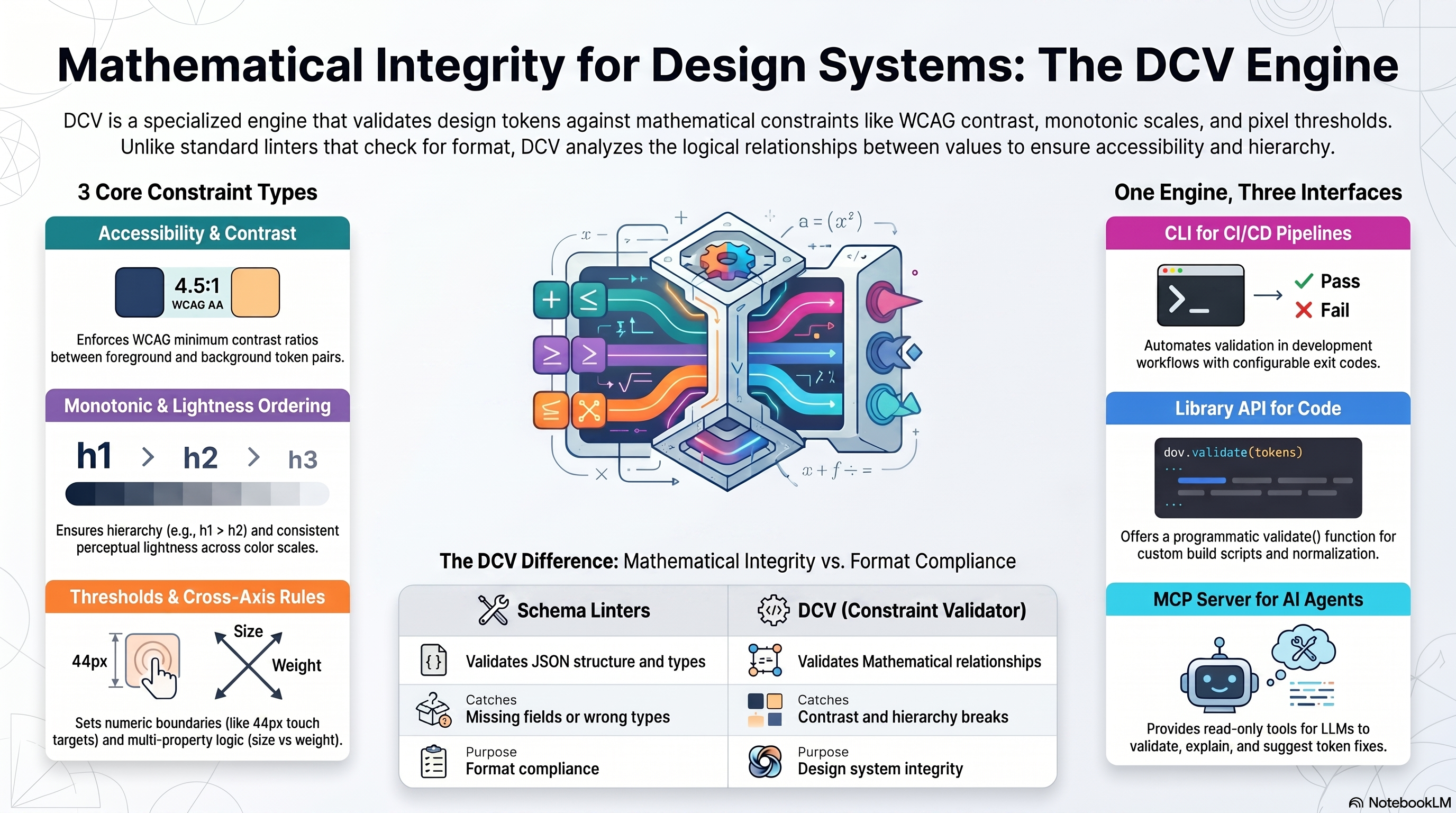
This is not a schema linter; it's a reasoning validator for values and relationships.
Installation
After a local install, the shorter dcv bin is available (e.g. npx dcv --help).
Requirements: Node.js ≥ 18.x (ESM)
Quick Start
DCV validates your tokens against your constraints. From an empty directory:
These one-offs use the full package name because the bare
dcvbin name on npm belongs to an unrelated package. Afternpm i -D design-constraint-validator, use the shorternpx dcv ….
Example output (validate):
Exit code is 1 when violations are found, 0 when clean (use --fail-on off to always exit 0). The built-in WCAG/threshold defaults target the bundled example token ids, so disable them (as above) when validating your own token names.
Programmatic API
See API Reference for complete programmatic usage.
Use from AI agents (MCP)
DCV ships a second binary, dcv-mcp, that exposes the validator over MCP stdio for agent clients. Add it to a Claude Desktop or generic MCP client config like this:
The server exposes six read-only, JSON-returning tools:
validate- validate inlinetokensor atokensPathagainst inlineconstraintsor a config file.why- explain provenance, aliases, dependencies, dependents, and alias chain for one token id.graph- return token dependencynodesandedges.list-constraints- enumerate the active constraints (WCAG pairs, thresholds, order/lightness scales, cross-axis) for the given input.explain- turn a violation into plain-English text plus machine-readable facts.suggest-fix- compute a verified satisfying value for a violation (WCAG color, threshold/monotonic boundary) without writing anything.
The three derivation tools (list-constraints, explain, suggest-fix) stay read-only — they return suggestions; applying them is up to you (dcv set / dcv patch). See AI Guide for the full agent loop.
Tool failures are returned as structured JSON: { "ok": false, "error": { "code": "...", "message": "..." } }.
Documentation
For Everyone
- Getting Started - 5-minute tutorial
- Features & Complete Guide - All features, examples, and FAQ
- Examples - Sample projects and use cases
For Users
- Constraints - All 5 constraint types in detail
- CLI Reference - Complete command documentation
- Configuration - Config file options
- Concepts - Core terminology and defaults
For Developers
- API Reference - Programmatic usage
- Architecture - Internal design
- Adapters - Input/output formats
Additional Resources
- Prior Art / Method - Design rationale (Decision Themes, receipts)
- AI Guide - Using DCV with ChatGPT/Claude/Copilot
- Contributing - Contribution guidelines
- Security - Supply chain security measures
Why Constraints, Not Conventions?
Conventional linters catch schema issues ("has a value, has a type"). DCV enforces relationships that matter to users and brand integrity:
- Legible contrast under all themes and states
- Proper hierarchical spacing/typography (monotonic scales)
- Coherent cross-axis behavior (e.g., weight increases with size where needed)
- Policy conformance (AA/AAA, internal thresholds)
This transforms tokens from "bags of numbers" into a formal design system.
Comparison: Schema Linters vs DCV
| Feature | Schema Linters | DCV |
|---|---|---|
| Validates | JSON structure, types | Mathematical relationships, accessibility |
| Catches | Missing fields, wrong types | Contrast violations, hierarchy breaks |
| Purpose | Format compliance | Design system integrity |
| Examples | DTCG schema validator | WCAG checks, monotonic scales |
DCV is not affiliated with Anima's
design-tokens-validator(schema-focused).
Input Formats
DCV accepts token JSON (flat or nested) and optional policy JSON. Adapters normalize common ecosystems:
- Style Dictionary - See examples/style-dictionary/
- Tokens Studio JSON - See examples/tokens-studio/
- DTCG (Design Tokens Community Group) — reads the 2025.10 stable spec (structured sRGB colors, structured dimensions,
{alias}references,$extensionspassthrough; non-sRGB spaces warn rather than mis-calculate; composite types out of scope). See examples/dtcg/
Full adapter documentation: Adapters
DCV & DecisionThemes
DCV is the standalone validation engine — use it for any token system.
Related MCP Servers

Adoption & maintenance
Factual signals from GitHub, npm, and our automated checks — not a rating.
npm downloads
328
Package downloads in the last 30 days.
Last commit
3mo ago
Most recent push to the default branch.
Install check
Inconclusive
Didn't respond in our test window — often a slow first install.
Directory activity
2 views
Config copies, upvotes, and views on AllMCPs.
Reviews
No reviews yet — be the first to share how this listing worked for you.
Frequently Asked Questions about Design Constraint Validator
AllMCPs Directory Badge
Showcase your server listing on GitHub or your project documentation. Embed this dynamic SVG badge to highlight official listing status and live engagement.
Badge Style:
Live Dynamic SVG Preview
Markdown (GitHub README)
[](https://allmcps.com/mcp/design-constraint-validator)HTML Embed
<a href="https://allmcps.com/mcp/design-constraint-validator"><img src="https://allmcps.com/api/badge/design-constraint-validator?style=directory" alt="Design Constraint Validator on AllMCPs" /></a>Technical Specs & Signals
CategoryBrowser Automation
PricingFree
13/13 checks healthy over the last 46d
40Quality signal: Fair · 40/100How this signal is calculated ▾
Server availabilityNot measured
Not scored for repo-hosted servers — we can't reach the running server, only its GitHub page. Hosted MCP endpoints are health-checked live.
Verified ownership10/20
Documentation & tools17/30
Adoption & activity3/15
Community engagement0/10
A guidance signal from public completeness & health data — not a user rating. New listings start lower and rise as they add docs, get verified, and grow adoption. Signals we can't observe for a listing are skipped, not counted against it.
Supply-chain signal
No high-severity advisories surfaced by our automated scan.
Critical 0High 0Medium 0Low 0
Scanned 4d ago via OSV.dev · design-constraint-validator (npm)
Own this project?
This directory is pre-filled from public sources. Claim via GitHub README, site badge, or DNS TXT to unlock edit access and the Official badge — proof is checked automatically, then reviewed by our team.
Free dofollow backlink: add your website and place the AllMCPs badge on it — no claim needed. We detect it automatically and keep it verified as long as the badge stays live.
Claim & get free dofollowShare & Embed
Add our SVG badge (dark/light directory styles) or embeddable widget to your site.