DBConvert Streams (Federated SQL) README
The full upstream README, mirrored here for reference. Install config, tool schemas, adoption signals, and an original overview live on the DBConvert Streams (Federated SQL) listing page.
 DBConvert Streams
Database IDE + migration + real-time CDC — in one workflow.
Query data,
move it,
keep it in sync,
and let your AI assistant see it all
without switching between tools.
If this looks useful, consider giving it a ⭐
Why this exists
Most setups look like this:
- a DB client for queries
- scripts or tools for migration
- a separate CDC pipeline
It works, but it's fragmented.
DBConvert Streams combines these into one workspace.
What it feels like
Think of it as:
DBeaver / DataGrip
- migration tool
- CDC
but without switching tools every time
Example
Run queries across databases and files:
Then use the same query as a data source — and stream it anywhere.
What you can do
- explore databases, files, and S3
- run SQL across multiple sources
- move data between systems
- keep it in sync with CDC
- connect Claude, Cursor, or Copilot — the AI reads your live schemas, data, and streams (read-only, via MCP)
All in the same workflow.
Note: This is the public home of DBConvert Streams — example configurations, documentation, issue tracking, and release notes. The product itself is proprietary.
Quick Start
Runs anywhere — your laptop, a VPS, or your own infra. No cloud dependency, no vendor lock-in.
Desktop App
Download for Windows, macOS, or Linux — no account required.
AI client extension
Grab dbconvert-streams-<version>.mcpb from Releases and drop it into Claude → Settings → Extensions. It asks for connection strings and folders, and nothing else has to be installed — no DBConvert Streams, no toolchain, no server to run.
Several sources go in the one field, separated by spaces — shop=postgres://… orders=mysql://… — and a single question can join across all of them.
Add folders of Parquet, CSV or JSON files with the folder picker. Every source becomes read-only tools in your chat, and one question can span several of them at once.
One file covers Windows and Linux — the bundle carries a binary for each and picks the right one. macOS is planned for a later release.
Not a Claude user? The same server runs as a container, and every MCP client that can launch one can use it:
Cursor and VS Code can set that up in one click — Add to Cursor · Add to VS Code — VS Code asks for the connection string as you install it; in Cursor you replace the sample one. Folders, S3 keys and the rest: standalone server.
The bundled server is proprietary software, distributed under the DBConvert Streams licence. The MIT licence in this repository covers the examples, docs and assets here, not that binary.
Self-Hosted (Docker)
Deploy on any machine with Docker — a local server, a VPS (DigitalOcean, Hetzner, AWS EC2, etc.), or your own infrastructure:
What is DBConvert Streams?
DBConvert Streams is a database IDE with built-in migration and real-time CDC.
Browse databases, local files, and S3 storage. Edit data directly. Run federated SQL queries that join tables across different database engines — no intermediate exports needed.
Key Features
In practice, it comes down to this:
Database IDE & Workspace (Free)
- Data Explorer — Browse databases, files, and S3 in one place
- ER Diagrams — Visualize database relationships
- Schema Comparison — Compare schemas and data across databases
- Schema Navigation — Persistent state and search across connections
Federated SQL
- Execute SQL queries across multiple databases and file sources simultaneously
- Join live PostgreSQL and MySQL tables using connection aliases
- Query CSV, JSON, Parquet files and S3 storage alongside databases
Built-in AI Chat — new in 2.5.0
Ask about the database work already open in the desktop app: a table, view, file, SQL console, connection, or migration/CDC stream. AI Chat starts with that live workspace context, so it can inspect schemas and data, explain or repair a failed query, and diagnose stream status without asking you to paste DDL into a separate chat.
Use your own installed agent CLI — Claude Code, Codex, GitHub Copilot CLI, or OpenCode. AI Chat automatically supplies the relevant scoped subset of DBConvert's read-only tools and shows tool activity while it works; it cannot change connections, configuration, streams, or data.
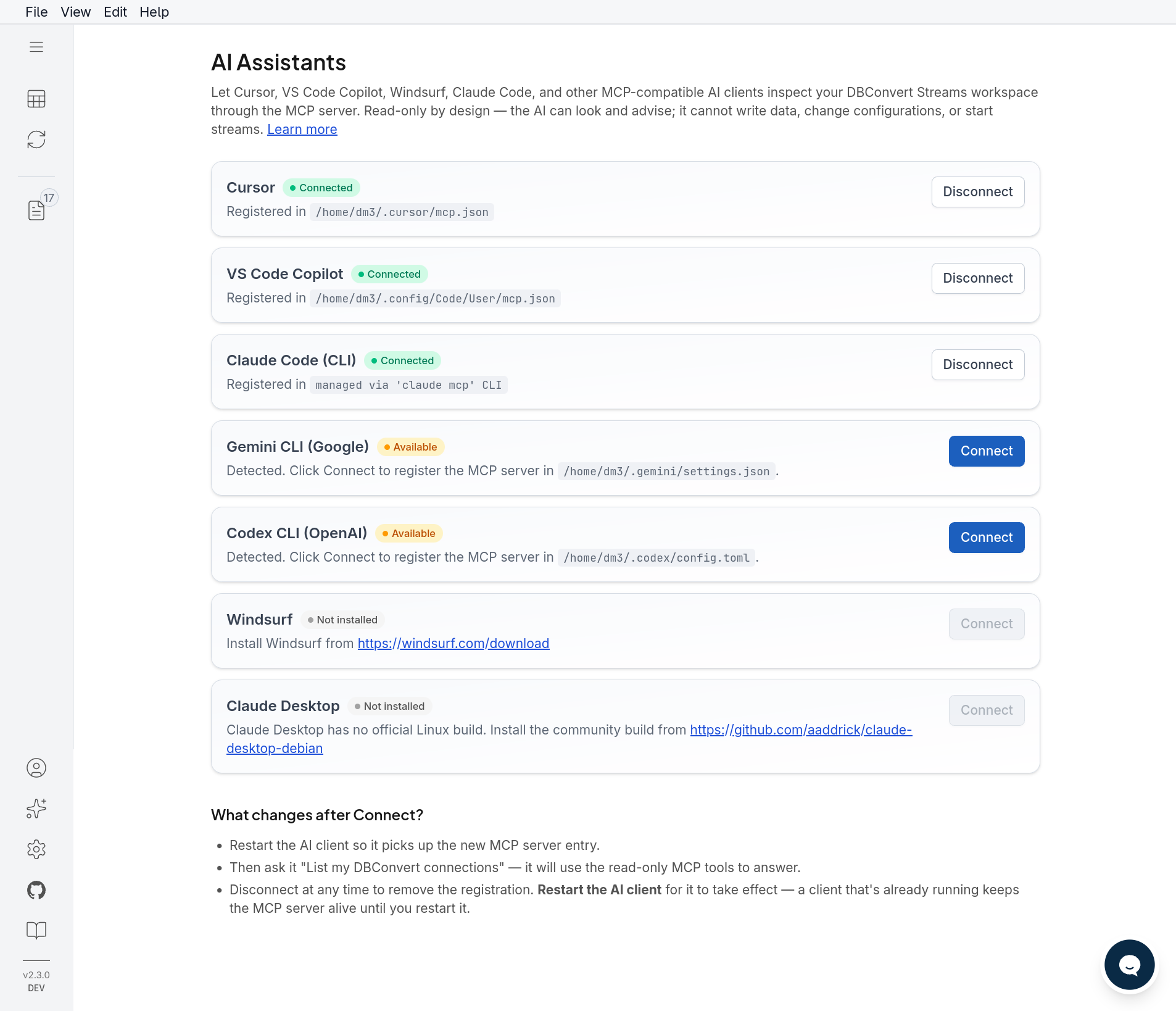
AI Assistants via MCP — new in 2.4
- Built-in MCP server: Claude, Cursor, VS Code Copilot, Windsurf, Gemini CLI, and Codex read live schemas, data, and stream state — no more pasting DDL into chat
- 27 read-only tools: inspect workspace connections, schemas, tables and views; run read-only SQL and federated queries; compare schemas and samples; diagnose streams; browse files and S3
- One-click setup from the ✨ AI Assistants panel; Docker deployments expose
/mcpover HTTP(S) - Read-only by design: only
SELECTpasses the server-side filter — the AI can look and advise, never write
Tools
DBConvert Streams exposes these 27 read-only MCP tools. The names below match the live MCP server.
Connections and schema
dbconvert_list_connections— list workspace connectionsdbconvert_get_connection— inspect one connectiondbconvert_list_databases— list databasesdbconvert_list_schemas— list schemasdbconvert_list_tables— list tablesdbconvert_list_views— list views
Table and view inspection
dbconvert_describe_table— inspect table columns and keysdbconvert_preview_table— preview table rowsdbconvert_describe_view— inspect a viewdbconvert_preview_view— preview view rows
Read-only SQL
dbconvert_run_select— run a SELECT querydbconvert_explain_select— explain a SELECT query
Schema and data comparison
dbconvert_compare_schemas— compare schemasdbconvert_compare_data_sample— compare data samples
Stream diagnostics
dbconvert_list_streams— list streamsdbconvert_get_stream— inspect a streamdbconvert_get_stream_status— get stream statusdbconvert_get_stream_stats— get stream throughput and statisticsdbconvert_get_stream_recent_errors— inspect recent stream errorsdbconvert_get_stream_recent_logs— inspect recent stream logs
Files and S3
dbconvert_list_files— list workspace filesdbconvert_get_file_schema— inspect a file schemadbconvert_preview_file— preview file rowsdbconvert_list_s3_buckets— list S3 bucketsdbconvert_list_s3_objects— list S3 objects
Federated SQL
dbconvert_run_federated_select— run a read-only query across sourcesdbconvert_explain_federated_select— explain a federated SELECT query
Only read-only operations are exposed: the server-side filter permits
SELECT, so an AI client cannot alter connections, configuration, streams, or
data. For client setup, see the MCP setup guide.
Data Migration (Load Mode)
Rapidly move large datasets between databases with automatic schema conversion and validation.
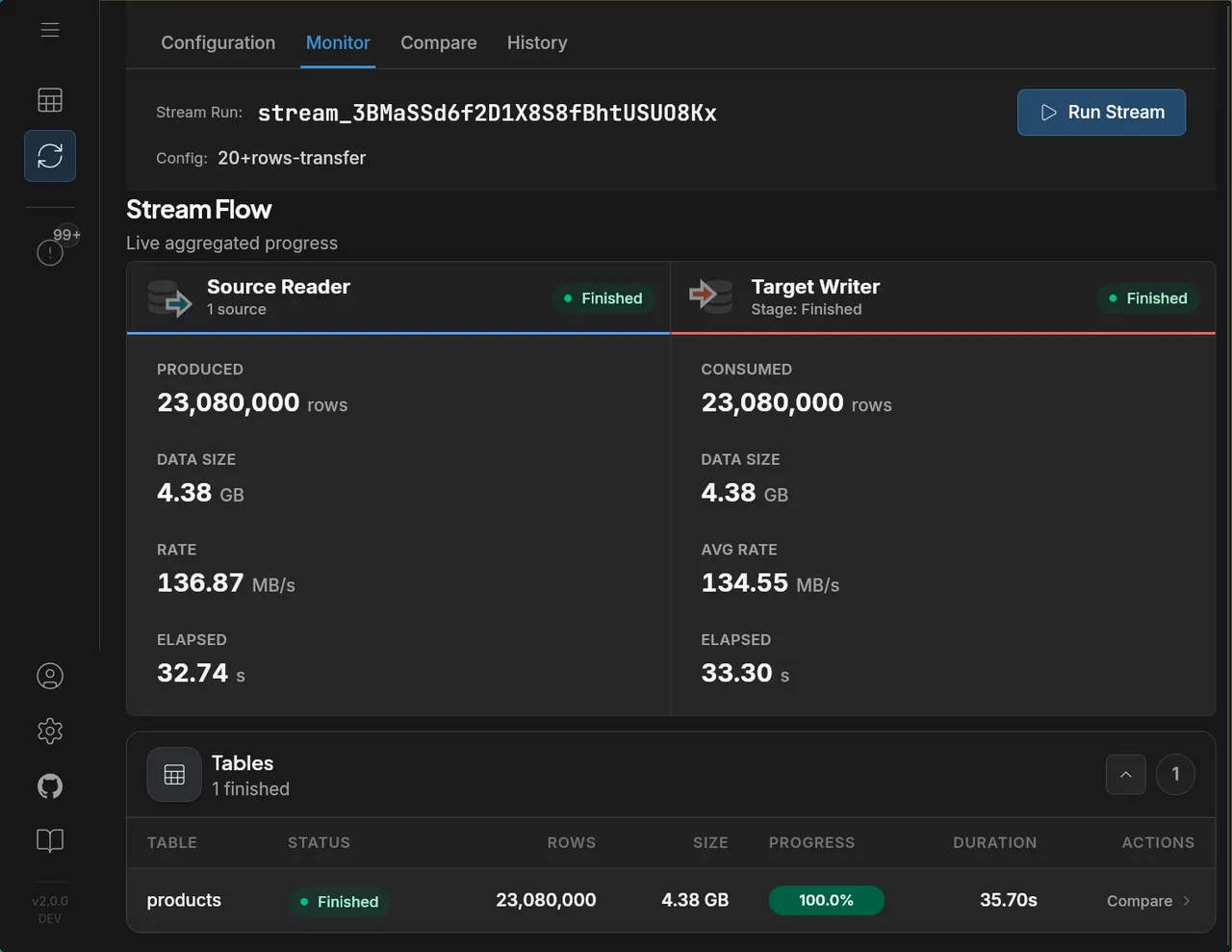
Performance: 23 million rows (4.38 GB) migrated from MySQL to Parquet in 35.7 seconds at 136 MB/s.
Real-time CDC (Change Data Capture)
Stream INSERT, UPDATE, and DELETE operations from source to target in real-time with minimal latency. Supports CDC to databases, files, and S3 storage.
When this is probably not for you
- you need 100+ connectors (SaaS, APIs, etc.)
- you already run Kafka pipelines at scale
- you need complex ETL / transformations
Screenshots
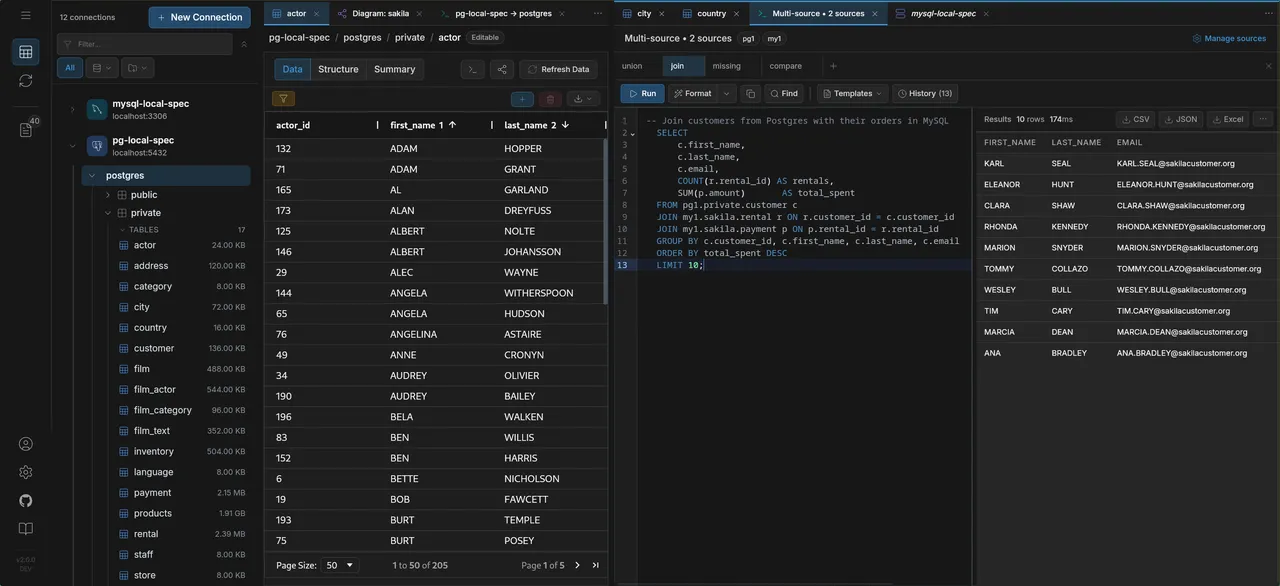
Data Explorer
Browse schemas, view and edit data across multiple database connections with a unified tree navigation:
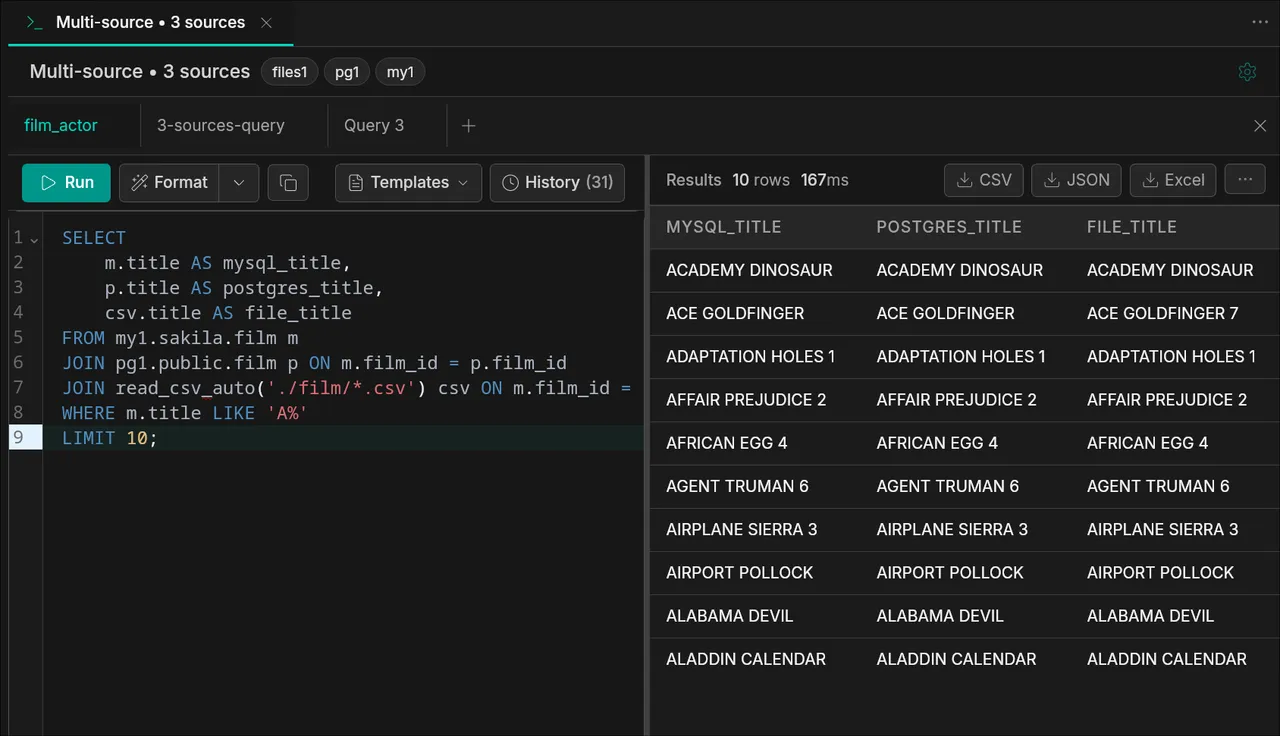
Federated SQL
Join tables across MySQL, PostgreSQL, and file sources (CSV, Parquet) in a single query:
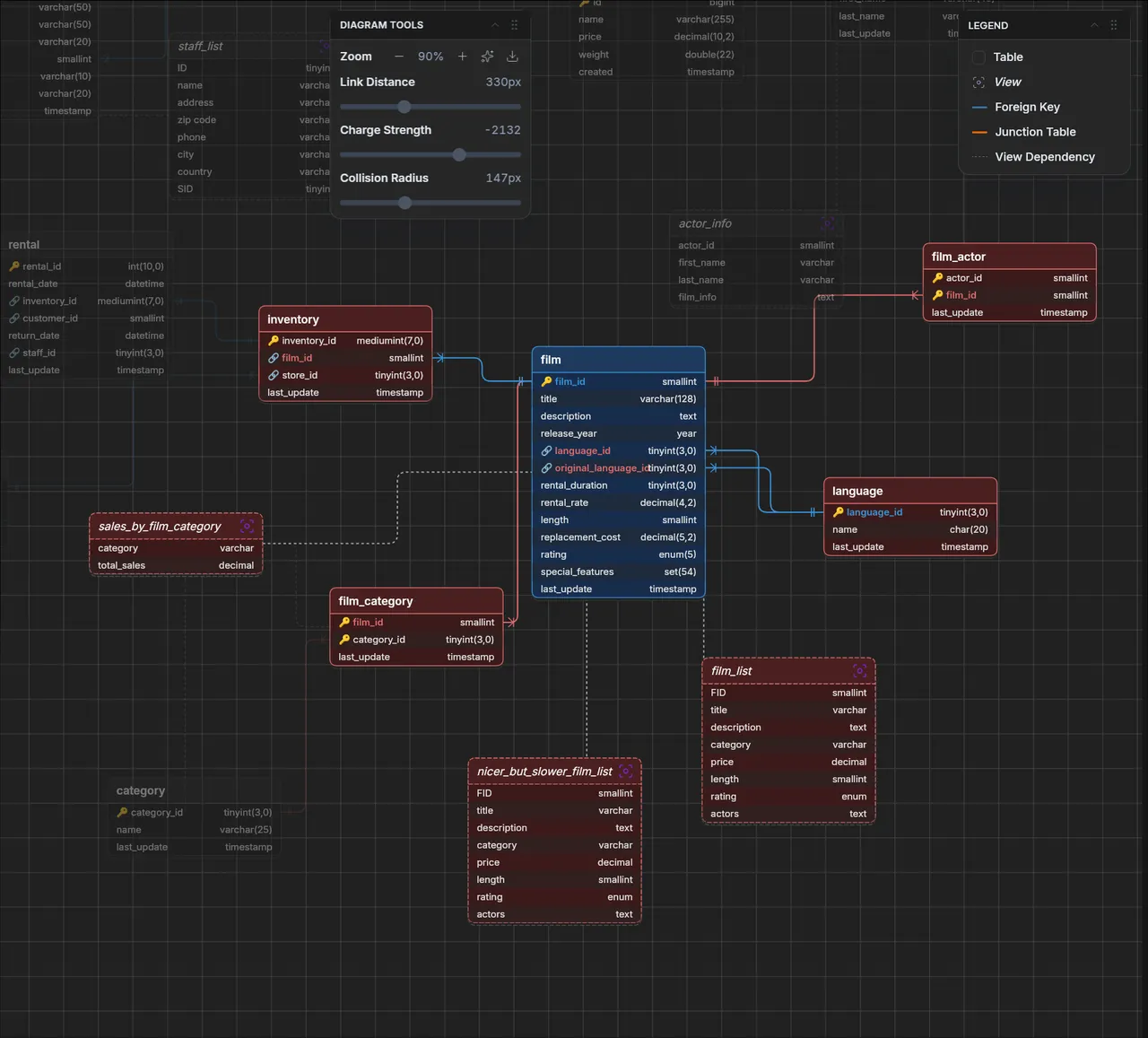
ER Diagrams
Visualize database relationships with interactive entity-relationship diagrams:
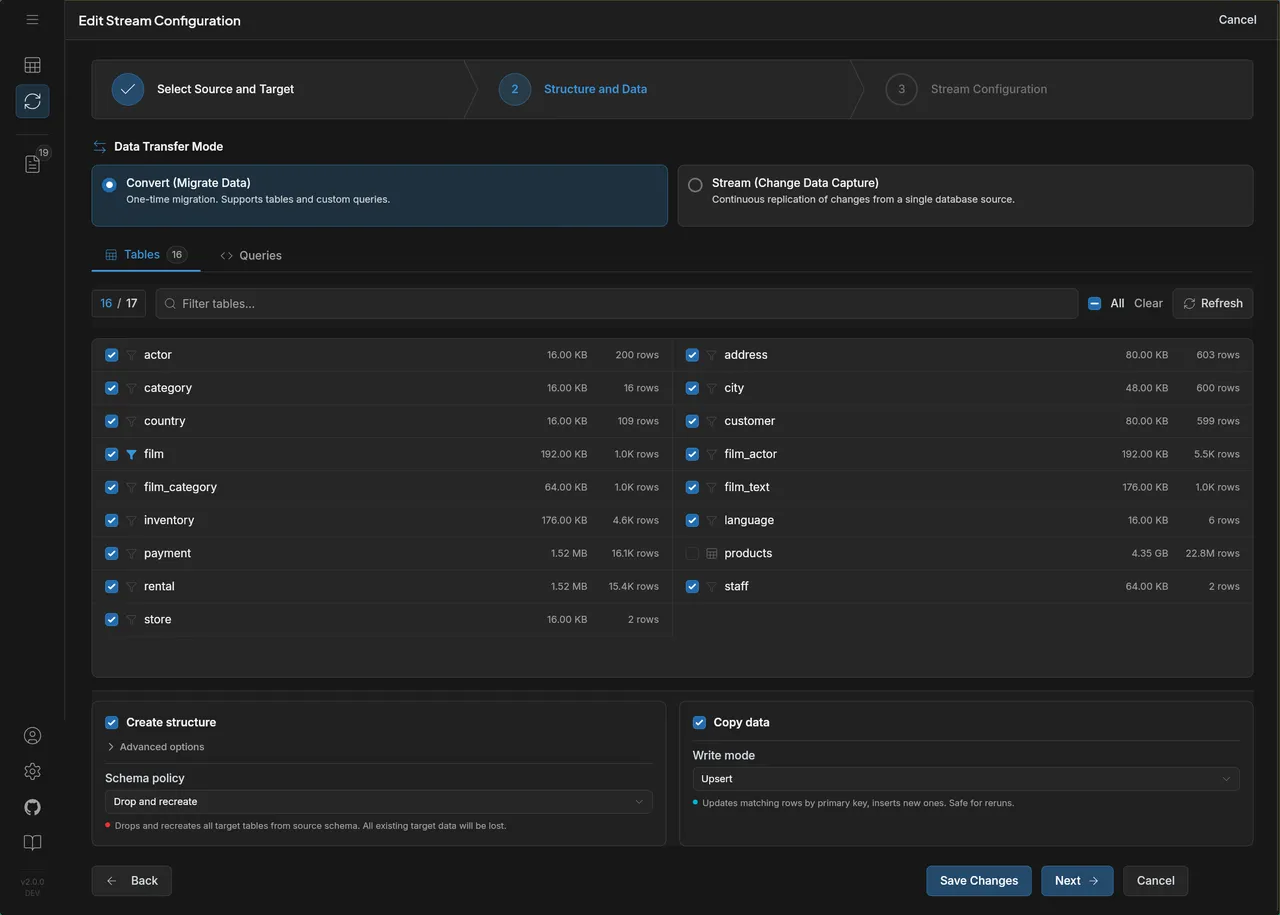
Stream Configuration
Configure data migration and CDC streams with table selection, custom queries, and transfer settings:
Stream Monitoring
Track data streams with real-time metrics — rows, data size, transfer rates, and per-table progress:
AI Assistants
Connect your AI client with one click — it reads the same workspace you see, read-only:
Supported Sources & Targets
Sources
- MySQL / MariaDB / Percona
- PostgreSQL / CockroachDB
- Amazon RDS, Aurora, Google Cloud SQL, Azure Database
- Local files (CSV, JSONL, Parquet)
- S3-compatible storage (AWS S3, MinIO, DigitalOcean Spaces, Wasabi)
Targets
- MySQL / PostgreSQL
- Snowflake
- CSV / JSONL / Parquet (local files)
- Amazon S3 / MinIO / S3-compatible storage
- Google Cloud Storage (GCS)
- Azure Blob Storage
Deployment Options
Run it anywhere — no cloud account required, no vendor lock-in.
| Method | Description |
|---|---|
| Desktop | Windows, macOS, Linux — local setup, no account required |
| Self-hosted | Docker / Docker Compose on any machine — local server, VPS, or your own infra |
Pricing
The Database IDE is free forever. For data migration and CDC streaming, see pricing details.
Examples
Most people never touch the API. The UI covers connections, table selection, federated SQL, stream configuration, and monitoring end-to-end. The
curlexamples below are for users who want to script deployments, wire DBConvert Streams into CI/CD, or drive it from another service — not a required workflow.
Connections are managed separately and stream configs reference them by ID. Here are typical workflows via the API.
1. Create connections
2. MySQL → PostgreSQL (load)
One-time migration with table selection:
3. MySQL → PostgreSQL (CDC)
Real-time replication capturing inserts, updates, and deletes:
4. PostgreSQL → S3 Parquet (load)
Export database tables to Parquet files on S3:
5. Multi-source federated query (load)
Join data from MySQL and PostgreSQL into one target:
6. Start a stream
7. Monitor progress
See the full API documentation for all endpoints and options. Standalone stream-config files live in
examples/api/, and reproducible benchmarks (including a side-by-side vs Debezium) are inexamples/benchmarks/.
Learn More
Feedback and Support
Have questions or feedback? Use Discussions or open an Issue.