Control the free edition of DaVinci Resolve 21.1 from Claude through a Lua script inside Resolve.
Quick Install
Automated & IDE SetupCopy the AI prompt to install this server into Claude Code, Cursor, or another agent — or use 1-click editor setup below.
One-click editor setup isn’t available for this listing yet — we don’t have a confirmed install command, and we’d rather show nothing than point your editor at the wrong package or host. Follow the project’s own setup instructions, linked above.
Manual Client & Custom JSON ConfigExpand JSON ▾
No confirmed setup config for this listing yet. We only publish a config block when the install details come from the project itself — its README, its docs, or a verified owner. We haven’t found those for DaVinci Resolve Lua MCP, and we’d rather show nothing than a guess you’d paste into your client. Follow the project’s own setup instructions for the current steps.
Documentation Overview
DaVinci Resolve Lua MCP
Control the free edition of DaVinci Resolve 21.1 from Claude through a Lua script that runs inside Resolve. macOS and Windows (experimental), no Studio licence, no network.




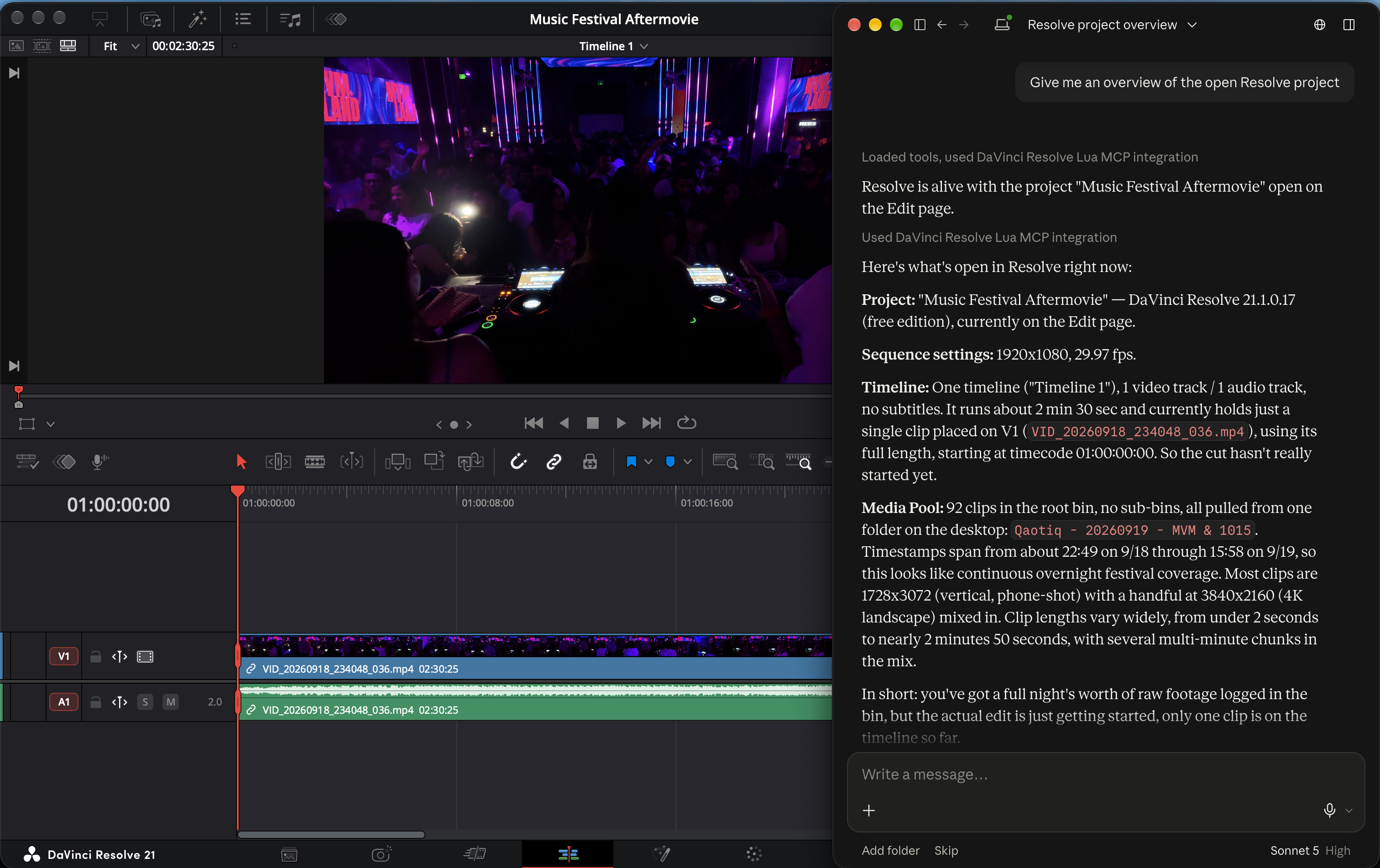
DaVinci Resolve 21.1 moved Python scripting and the external scripting API to the Studio edition, and Blackmagic's own MCP server ships with Studio only. One door is still open on the free edition: Workspace > Scripts lists and runs Lua files. This project puts a small Lua script there. Launched once per Resolve session, it holds the live resolve object and executes Lua on behalf of an MCP server that Claude Desktop runs as an extension.
[!NOTE] Nothing here unlocks Studio features: the bridge uses the free edition's own Lua scripting API. Studio 21.1 users already have Blackmagic's native MCP server.
Features
- 15 purpose-built tools: project overview, project and timeline lists, Media Pool clips, timeline items, markers, timeline and project switching, rendering with status polling, and a search over Blackmagic's shipped scripting reference.
run_luafor everything else: any Lua 5.1 chunk runs inside Resolve with the liveresolveobject and returns JSON, capturedprintoutput and errors.- One
.mcpbbundle: install it in Claude Desktop, and the server copies its two Lua scripts into Resolve's user scripts folder on first launch. - No network: the server and the script talk through a request file and Fusion's preferences. There are no sockets, no listeners and no telemetry.
- Fast enough to feel interactive: about 60 ms per call, measured end to end on a Mac.
Requirements
- macOS (Apple Silicon is the only hardware measured).
- Windows 10 or 11, experimental. The default paths come from Blackmagic's documentation and forum reports; nothing has been measured on Windows yet. docs/windows.md lists what to check.
- DaVinci Resolve 21.1 free edition (build 21.1.0.17 is the one measured). Studio is not needed and not targeted. Blackmagic documents neither this Lua host nor its sandbox, so a point release can change what works.
- Claude Desktop. It ships the Node runtime the server needs (Node 20 or newer); nothing else is installed.
- A project open in Resolve while you use the tools.
Install
- Download
davinci-resolve-lua-mcp.mcpb(the latest release; the release notes and the SHA-256 are on the Releases page). - Double-click the file, or drag it onto the Claude Desktop window. Claude Desktop shows the extension's details and five settings; keep the defaults and click Install.
- In Resolve, open a project and click
Workspace > Scripts > resolve_mcp_bridge. That script is the bridge; the extension put it there when it first started.- The bridge stops when Resolve quits. Click it again after every Resolve launch, before using the tools.
- Ask Claude "Are you connected to DaVinci Resolve?".
From a terminal, either command downloads the file and opens the same dialog.
macOS:
Windows (PowerShell):
If nothing opens, install the file from Claude Desktop: Settings > Extensions > Advanced settings > Install Extension.
To update, download the new file and open it; extensions installed from a file do not update on their own. The server refreshes its two Lua scripts on its next start, so click Workspace > Scripts > resolve_mcp_bridge again afterwards. To build the bundle yourself, see Development.
Start and stop the bridge
Open a project in Resolve and click Workspace > Scripts > resolve_mcp_bridge. Nothing appears in the Console (the free edition mutes print in menu scripts); the bridge loops in the background and Resolve stays responsive. In Claude Desktop, resolve_status then reports alive: true with the product, version, edition, page and open project.
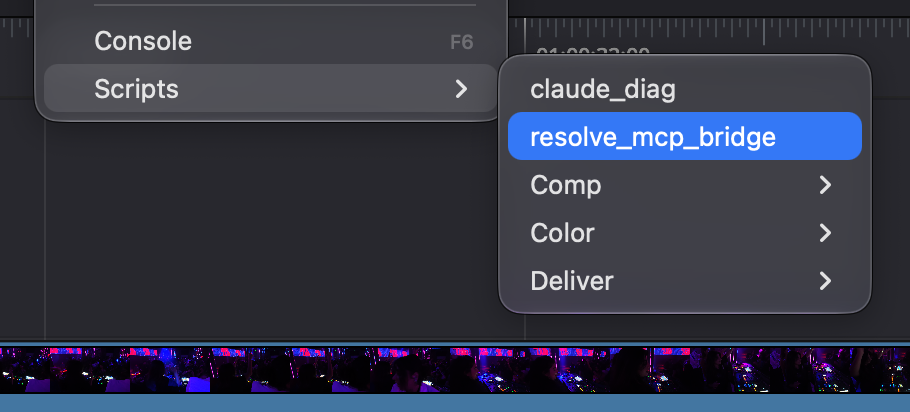
[!IMPORTANT] The bridge lives and dies with Resolve. After every Resolve launch, click
Workspace > Scripts > resolve_mcp_bridgeagain before using the tools. It is never started automatically, by design: a loop started throughfusion:Executeholds Fusion's shared script executor for the whole session, so the Scripts menu is the only supported launch.
To stop it, ask Claude to stop the bridge (stop_bridge), or quit Resolve. Clicking the script a second time while the bridge is running is harmless: the new one takes over and the old one exits on the first request addressed to the newer session.
Example prompts
https://github.com/user-attachments/assets/febdf2b9-8e0d-4fbf-8462-0d6ecd98c829
Tools
| Tool | What it does | Parameters | Access |
|---|---|---|---|
resolve_status | Whether the bridge is running and why not, its session, the platform, the self-install outcome and, when alive, product, version, edition, page and project | none | read-only |
run_lua | Runs a Lua 5.1 chunk inside Resolve with the live resolve object; returns its first return value as JSON plus captured prints and errors | code; timeout_s 1..300 (default from the settings) | destructive |
get_project_info | Name, page, database, frame rate, resolution, timeline count, root-bin counts and the current timeline of the open project | none | read-only |
list_projects | Projects in the current project-manager folder with dates and notes; marks the open one | none | read-only |
list_timelines | Every timeline with unique id, frame range and track counts; marks the current one | none | read-only |
list_media_pool_clips | Clips in one bin with path, duration, fps, resolution, type, frames and colour | bin_path (default /); offset; limit 1..200 (default 50) | read-only |
get_timeline_items | Items on one track of the current timeline with type, frames, source frames, enabled state and file path | track_type video, audio or subtitle; track_index from 1; offset; limit 1..500 (default 100) | read-only |
add_marker | Adds a marker to the current timeline and returns the stored marker | frame (relative to the timeline start); color (one of the 16 Resolve colours); name; note; duration in frames (default 1) | writes |
delete_markers | Deletes every marker of one colour, or all markers, from the current timeline | color (omit for all); confirm must be true | destructive |
set_current_timeline | Makes the named timeline current; an unknown name lists the known ones | name | writes |
open_project | Loads the named project, saving the open one first by default; an unknown name lists the known projects | name; save_current (default true) | writes |
render_current_timeline | Queues and starts a render of the current timeline and returns the job id | preset (optional, validated against the preset list); output_dir (absolute, must exist); filename | writes |
get_render_status | Status, completion percentage and error of one render job, plus whether Resolve is rendering | job_id | read-only |
stop_bridge | Asks the bridge to exit cleanly; relaunch it from Workspace > Scripts afterwards | none | writes |
scripting_api_docs | Searches Blackmagic's shipped scripting reference (.pyi signatures, README sections, CHANGELOG) with file and line; flags deprecated and unsupported calls | query; limit 1..10 (default 5) | read-only |
Every tool declares its access hints to the client. delete_markers refuses without confirm: true, and Claude is told to ask you first; run_lua takes no confirmation and is flagged destructive so the client can warn. Results are JSON with a matching structuredContent; the paginated tools (list_media_pool_clips, get_timeline_items) report total, offset, limit and truncated, and every failure names the next step instead of throwing.
Related MCP Servers
Reviews
No reviews yet — be the first to share how this listing worked for you.
Frequently Asked Questions about DaVinci Resolve Lua MCP
AllMCPs Directory Badge
Showcase your server listing on GitHub or your project documentation. Embed this dynamic SVG badge to highlight official listing status and live engagement.
Badge Style:
Live Dynamic SVG Preview
Markdown (GitHub README)
[](https://allmcps.com/mcp/davinci-resolve-lua-mcp)HTML Embed
<a href="https://allmcps.com/mcp/davinci-resolve-lua-mcp"><img src="https://allmcps.com/api/badge/davinci-resolve-lua-mcp?style=directory" alt="DaVinci Resolve Lua MCP on AllMCPs" /></a>