applenotessemantic-searchproductivitylocal
Local MCP server for semantic search and management of Apple Notes with on-device embeddings and folder support.
Quick Install
Automated & IDE SetupCopy the AI prompt to install this server into Claude Code, Cursor, or another agent — or use 1-click editor setup below.
We couldn’t automatically confirm this listing starts correctly
The install command below didn't complete successfully in our automated test.
npx -y Ifnpm ERR! code E404 npm ERR! 404 Not Found - GET https://registry.npmjs.org/If - Not found npm ERR! 404 npm ERR! 404 'If@*' is not in this registry. npm ERR! 404 This package name is not valid, because npm ERR! 404 1. name can no longer contain capital letters npm ERR! 404 npm ERR! 404 Note that you can also install from a npm ERR! 404 tarball, folder, http url, or git url. npm ERR! A complete log of this run can be found in: /home/user/.npm/_logs/2026-09-07T12_12_25_829Z-debug-0.log
This is an experimental automated check and can have false negatives — missing environment variables, a slow cold install, etc. It doesn’t necessarily mean something’s wrong. Last checked 4d ago.
Manual Client & Custom JSON ConfigExpand JSON ▾
Client Config & Setup
Choose your client or environment
Target File:
💡 Paste the JSON block into your client's configuration file under mcpServers, then restart the application.
Overview
Use cases
Index Apple Notes for semantic search
Search notes by content or folder with semantic and full-text queries
Create, edit, append, move, or delete notes programmatically
List folders and browse notes by folder
Retrieve full note content by ID or title with ambiguity resolution
Key features
Semantic search with all-MiniLM-L6-v2 on-device embeddings
Full-text search capabilities
Folder listing and filtering
Full CRUD operations on notes
Local vector storage using LanceDB
Runs fully locally with no API keys required
Capabilities & Tool Schemas (10)
Inspect callable tools, capabilities, and parameters exposed to AI agents by MCP Apple Notes.
index-notesIndex all notes for semantic search. Run this first
list-foldersList all Apple Notes folders with full paths and note counts
list-notesList notes with metadata. Optional `path` filter, `includeContent` flag, and `contentPreviewChars` (HTML-stripped per-note preview truncated to N chars — one fast call, avoids the response token cap when listing many notes' content)
search-notesSemantic + full-text search with optional path filter and limit
get-noteGet full content by noteId or title. Returns candidates on ambiguity
create-noteCreate a new note with markdown content, optionally in a folder
Documentation Overview
Features · Security · Installation · Tools · Verification · Response Shape
MCP Apple Notes

A Model Context Protocol (MCP) server that enables semantic search and RAG (Retrieval Augmented Generation) over your Apple Notes. Works with any MCP-compatible client — Claude Desktop, Cursor, Windsurf, Cline, and others.
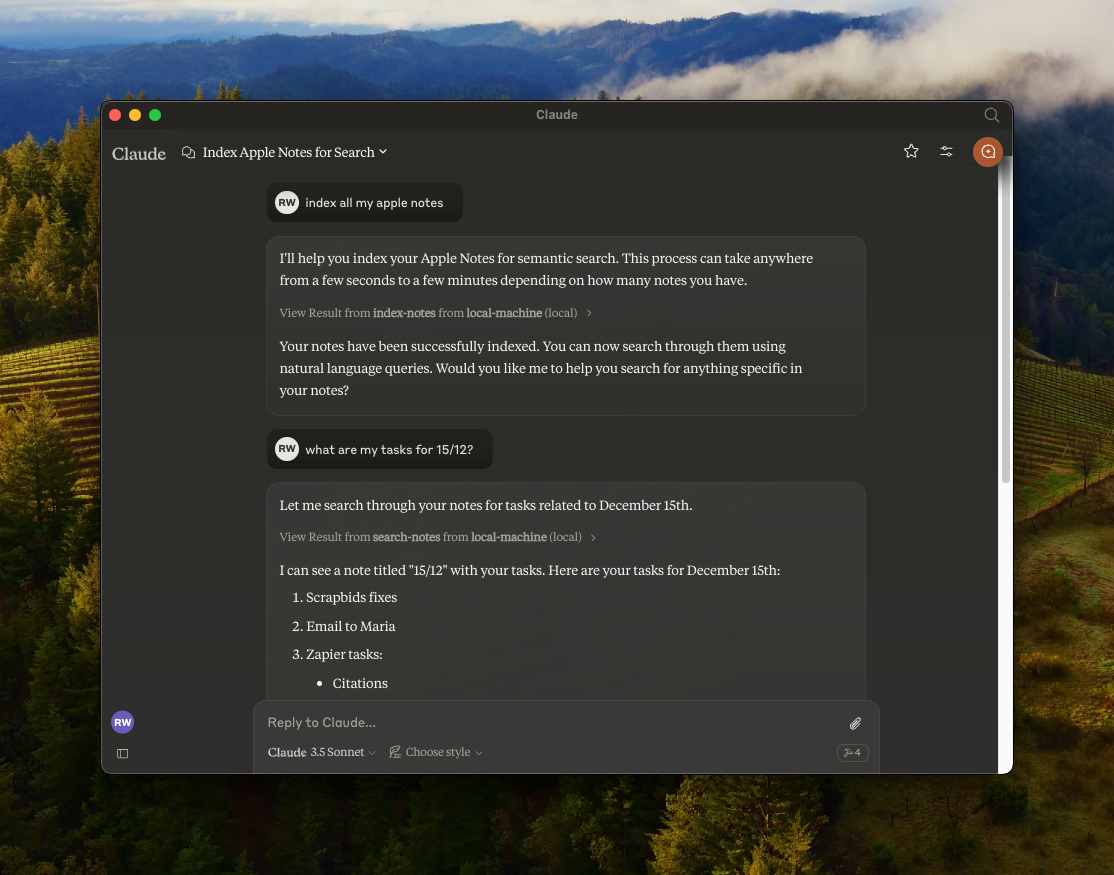
Features
- 🔍 Semantic search over Apple Notes using
all-MiniLM-L6-v2on-device embeddings model - 📝 Full-text search capabilities
- 📂 Folder support — list folders, browse by folder, filter search by folder
- 📊 Vector storage using LanceDB
- 🤖 Works with any MCP-compatible client (Claude, Cursor, Windsurf, Cline, etc.)
- 🍎 Native Apple Notes integration via JXA
- 🔒 Optional read-only mode for safe exploration
- 🏃♂️ Fully local execution — no API keys needed
Security & Transparency
Because this server interacts with your private Apple Notes, it is designed with absolute transparency in mind. It runs 100% locally on your Mac.
- No Cloud, No Telemetry — No API keys, no data leaving your machine.
- Native Apple JXA — Uses Apple's official JavaScript for Automation scripting bridge.
- Embeddings on-device — The
all-MiniLM-L6-v2model runs locally via@huggingface/transformers. - Verifiable — You are highly encouraged to read every line of code (especially
index.ts) before it ever touches your notes. - GitHub releases include SHA-256 checksums so you can verify downloaded artifacts.
Installation & Setup
Choose the installation method that fits your workflow.
Method 1: Install from source (recommended)
By cloning the repository locally, you can inspect the source code and know exactly what is executing on your machine.
Prerequisites: Node.js (v18+) or Bun
Using Bun?
Using NPM:
Then add the server to your MCP client config. Replace /path/to/mcp-apple-notes with where you cloned the repo:
Tip: Want to try it without risk? Enable read-only mode to block all write operations while you explore.
"env": { "MCP_APPLE_NOTES_READ_ONLY": "1" }
Method 2: Quick start via npx
If you prefer a zero-setup approach and trust the published npm package, you can simply add this directly to your MCP config:
After setup, restart your client and ask your AI assistant to "index my notes" to get started.
Per-client instructions
Claude Desktop
- Open Settings → Developer → Edit Config
- Paste your chosen JSON config into
claude_desktop_config.json - Restart Claude Desktop
Logs:
Claude Code
Cursor
Add the JSON config to ~/.cursor/mcp.json (global) or .cursor/mcp.json in your project root.
Windsurf
Add the JSON config to ~/.windsurf/mcp.json.
Available Tools
| Tool | Description |
|---|---|
index-notes | Index all notes for semantic search. Run this first |
list-folders | List all Apple Notes folders with full paths and note counts |
list-notes | List notes with metadata. Optional path filter, includeContent flag, and contentPreviewChars (HTML-stripped per-note preview truncated to N chars — one fast call, avoids the response token cap when listing many notes' content) |
search-notes | Semantic + full-text search with optional path filter and limit |
get-note | Get full content by noteId or title. Returns candidates on ambiguity |
create-note | Create a new note with markdown content, optionally in a folder |
edit-note | Edit title and/or content (markdown) of an existing note |
append-to-note | Append markdown content to an existing note |
move-note | Move a note to a different folder |
delete-note | Delete a note (moves to Recently Deleted) |
Verify Before You Trust
Every Apple Notes operation is a JXA call you can inspect in index.ts. No network requests, no background syncing — just local scripting bridge calls.
Read-only mode
Want a safety net? Enable read-only mode to block all write operations — only search, list, and read tools will be available:
When enabled, only these tools are available: index-notes, list-folders, list-notes, search-notes, get-note.
Verbose mode
Enable verbose logging to see every JXA call before it executes (logged to stderr):
CLI flag — add --verbose to your MCP client config args:
Environment variable — for clients that support env:
JXA operations reference
Related MCP Servers
Adoption & maintenance
Factual signals from GitHub, npm, and our automated checks — not a rating.
GitHub stars
12
Stargazers on the source repository.
Last commit
2mo ago
Most recent push to the default branch.
Install check
Inconclusive
Install command did not finish in our automated test.
Tools exposed
10
Callable tools this server registers over MCP.
Directory activity
2 views
Config copies, upvotes, and views on AllMCPs.
Reviews
No reviews yet — be the first to share how this listing worked for you.
Frequently Asked Questions about MCP Apple Notes
AllMCPs Directory Badge
Showcase your server listing on GitHub or your project documentation. Embed this dynamic SVG badge to highlight official listing status and live engagement.
Badge Style:
Live Dynamic SVG Preview
Markdown (GitHub README)
[](https://allmcps.com/mcp/dan8oren-mcp-apple-notes)HTML Embed
<a href="https://allmcps.com/mcp/dan8oren-mcp-apple-notes"><img src="https://allmcps.com/api/badge/dan8oren-mcp-apple-notes?style=directory" alt="MCP Apple Notes on AllMCPs" /></a>Technical Specs & Signals
CategoryWorkplace & Productivity
PricingFree
10/10 checks healthy over the last 31d
56Quality signal: Good · 56/100How this signal is calculated ▾
Server availabilityNot measured
Not scored for repo-hosted servers — we can't reach the running server, only its GitHub page. Hosted MCP endpoints are health-checked live.
Verified ownership10/20
Documentation & tools28/30
Adoption & activity4/15
Community engagement0/10
A guidance signal from public completeness & health data — not a user rating. New listings start lower and rise as they add docs, get verified, and grow adoption. Signals we can't observe for a listing are skipped, not counted against it.
Supply-chain signal
No high-severity advisories surfaced by our automated scan.
Critical 0High 0Medium 0Low 0
Scanned 23d ago via OSV.dev · If (npm)
Own this project?
This directory is pre-filled from public sources. Claim via GitHub README, site badge, or DNS TXT to unlock edit access and the Official badge — proof is checked automatically, then reviewed by our team.
Free dofollow backlink: add your website and place the AllMCPs badge on it — no claim needed. We detect it automatically and keep it verified as long as the badge stays live.
Claim & get free dofollowShare & Embed
Add our SVG badge (dark/light directory styles) or embeddable widget to your site.