cyntrisec/cyntrisec-cli

πŸ”’ Security🟒 Verified Active
0 Views
0 Installs

🐍 🏠 - Local-first AWS security analyzer that discovers attack paths and generates remediations using graph theory.

Quick Install

One-Click IDE Configuration
claude_desktop_config.json
{
  "mcpServers": {
    "cyntrisec-cyntrisec-cli": {
      "command": "npx",
      "args": [
        "-y",
        "cyntrisec-cyntrisec-cli"
      ]
    }
  }
}
Or

Using an AI coding agent (Claude Code, Cursor, etc.)? Copy a ready-made prompt that tells it to fetch the setup instructions and install this server for you.

Documentation Overview

Cyntrisec CLI

PyPI License Status

Historical pre-company project. cyntrisec-cli was created before Cyntrisec narrowed its company focus to EphemeralML and AIR v1. It is not a current Cyntrisec product, support surface, or commercial offering. The PyPI package name cyntrisec, CLI command cyntrisec, and MCP server ID io.github.cyntrisec/cyntrisec are retained only to avoid breaking historical installs.

image-download

[!CAUTION] Historical Software Disclaimer: This tool is no longer an active Cyntrisec product. It is provided "as is", without warranty of any kind. While the CLI is a read-only analysis tool by default, the user assumes all responsibility for any actions taken based on its findings. Always review generated remediation plans and Terraform code before application.

Historical AWS capability graph analysis and attack path discovery CLI.

A read-only CLI tool that historically:

  • Scans AWS infrastructure via AssumeRole
  • Builds a capability graph (IAM, network, dependencies)
  • Discovers attack paths from internet to sensitive targets
  • Prioritizes fixes by ROI (security impact + cost savings)
  • Identifies unused capabilities (blast radius reduction)
  • Outputs deterministic JSON with proof chains

Demo
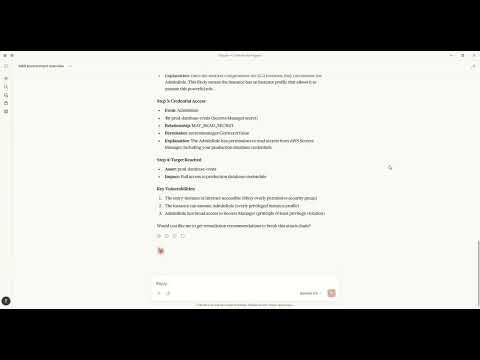
Cyntrisec Demo

Watch how to discover attack paths and generate fixes using natural language with Claude MCP.

Architecture

+----------------------------------------------------------------------------------+
|                                   CYNTRISEC CLI                                   |
+----------------------------------------------------------------------------------+
| CLI Layer (Typer)                                                                 |
|   scan   analyze   cuts   waste   report   comply   can   diff   serve   ...      |
+-----------------------------+----------------------------------------------------+
| Core Engine                 | Storage (local)                                     |
|  - AWS collectors           |  ~/.cyntrisec/scans/<scan_id>/                      |
|  - Normalization/schema     |    snapshot.json, assets.json, relationships.json   |
|  - GraphBuilder -> AwsGraph |    findings.json, attack_paths.json                 |
|  - Path search -> paths     |  ~/.cyntrisec/scans/latest -> <scan_id>             |
|  - Min-cut + Cost (ROI)     |  (Windows fallback: latest is a file)               |
+-----------------------------+----------------------------------------------------+
| Outputs: JSON/agent, HTML report, remediation plan + Terraform hints              |
+----------------------------------------------------------------------------------+

Data Flow

CLI (scan) --AssumeRole--> AWS Session --Describe/Get/List--> AWS APIs (read-only)
     |
     v
Collectors -> normalize -> Assets + Relationships -> AwsGraph
                                                |
                                                v
                                   Attack path search (BFS/DFS)
                                                |
                                                v
                                   Min-cut (remediation cuts)
                                                |
                                                v
                                      Cost engine (ROI)

Local artifacts: ~/.cyntrisec/scans/<scan_id>/*.json

Installation

pip install cyntrisec

Windows PATH Fix

If you see "cyntrisec is not recognized", the Scripts folder isn't on PATH:

# Option 1: Run with python -m
python -m cyntrisec --help

# Option 2: Add to PATH for current session
$env:PATH += ";$env:APPDATA\Python\Python311\Scripts"

Quick Start

Prerequisite: Ensure you have AWS CLI installed and configured with credentials (e.g., aws configure) or environment variables set. terraform is required for the setup step.

# 1. Create the read-only IAM role in your account
cyntrisec setup iam 123456789012 --output role.tf

# 2. Apply the Terraform
cd your-infra && terraform apply

# 3. Run a scan
cyntrisec scan --role-arn arn:aws:iam::123456789012:role/CyntrisecReadOnly

# 4. View attack paths
cyntrisec analyze paths --min-risk 0.5

# 5. Find minimal fixes (prioritized by ROI)
cyntrisec cuts --format json

# 6. Generate HTML report
cyntrisec report --output report.html

Commands

Core Analysis

CommandDescription
scanScan AWS infrastructure
analyze pathsView attack paths
analyze findingsView security findings
analyze statsView scan statistics
analyze businessBusiness entrypoint analysis
reportGenerate HTML/JSON report

Setup & Validation

CommandDescription
setup iamGenerate IAM role Terraform
validate-roleValidate IAM role permissions

Remediation

CommandDescription
cutsFind minimal fixes (Cost & ROI prioritized)
wasteFind unused IAM permissions
remediateGenerate or optionally apply Terraform plans (gated)

Policy Testing

CommandDescription
canTest "can X access Y?"
diffCompare scan snapshots
complyCheck CIS AWS / SOC2 compliance

Agentic Interface

CommandDescription
manifestOutput machine-readable capabilities
explainNatural language explanations
askQuery scans in plain English
serveRun as MCP server for AI agents

MCP Server Mode

The historical CLI can still run as an MCP server for compatibility with existing local setups:

# Install with MCP support (now included by default)
pip install cyntrisec
cyntrisec serve              # Start stdio server
cyntrisec serve --list-tools # List available tools

MCP Tools (15)

CategoryToolDescription
Discoverylist_toolsList all available tools
set_session_snapshotSet active snapshot for session
get_scan_summaryGet summary of latest AWS scan
Assetsget_assetsGet assets with type/name filtering
get_relationshipsGet relationships between assets
get_findingsGet security findings with severity filtering
Attack Pathsget_attack_pathsGet attack paths with risk scores
explain_pathDetailed hop-by-hop path breakdown
explain_findingDetailed finding explanation
Remediationget_remediationsFind optimal fixes for attack paths
get_terraform_snippetGenerate Terraform code for remediation
Accesscheck_accessTest if principal can access resource
get_unused_permissionsFind unused IAM permissions
Compliancecheck_complianceCheck CIS AWS or SOC 2 compliance
compare_scansCompare scan snapshots

Claude Desktop

MacOS: ~/Library/Application Support/Claude/claude_desktop_config.json Windows: %APPDATA%\Claude\claude_desktop_config.json

{
  "mcpServers": {
    "cyntrisec": {
      "command": "python",
      "args": ["-m", "cyntrisec", "serve"]
    }
  }
}

Claude Code (CLI)

Run the following command to configure the server:

claude mcp add cyntrisec -- python -m cyntrisec serve

Google Gemini / Antigravity

Locate your agent configuration (e.g., ~/.gemini/antigravity/mcp_config.json) and add:

{
  "mcpServers": {
    "cyntrisec": {
      "command": "python",
      "args": ["-m", "cyntrisec", "serve"]
    }
  }
}

Trust & Safety

Read-Only Guarantees

This tool makes read-only API calls to your AWS account. The IAM role should have only Describe*, Get*, List* permissions.

No Data Exfiltration

All data stays on your local machine. Nothing is sent to external servers. Scan results are stored in ~/.cyntrisec/scans/.

No Auto-Remediation (Default Safe Mode)

By default, Cyntrisec is read-only and does not modify your AWS infrastructure.

  • It analyzes your account using read-only APIs.
  • It can generate remediation artifacts (e.g., Terraform modules) for you to review.
  • It does not apply changes automatically.

Optional Remediation Execution (Explicit Opt-In)

Cyntrisec includes an explicitly gated path that can execute Terraform only if you intentionally enable it.

This mode is:

  • Disabled by default
  • Requires --enable-unsafe-write-mode
  • Requires an additional explicit flag (e.g. --execute-terraform) to run Terraform
  • Intended for controlled environments (sandbox / CI with approvals), not unattended production

If you do not pass these flags, Cyntrisec will never run terraform apply.

Write Operations

Cyntrisec makes no AWS write API calls during scanning and analysis.

The only supported "write" behavior is optional execution of Terraform locally on your machine, and only when explicitly enabled via unsafe flags.

Every AWS API call is logged in CloudTrail under session name cyntrisec-cli.

Trust & Permissions

Cyntrisec runs with a read-only IAM role. Generate the recommended policy with cyntrisec setup iam <ACCOUNT_ID> and keep permissions to Describe*, Get*, and List*. Live modes (waste --live, can --live) require extra IAM permissions; the generated policy and docs cover those additions.

Output Format

Primary output is JSON to stdout. When stdout is not a TTY, the CLI automatically switches to JSON:

cyntrisec analyze paths --format json | jq '.paths[] | select(.risk_score > 0.7)'

Agent-friendly output wraps results in a structured envelope:

cyntrisec analyze paths --format agent
{
  "schema_version": "1.0",
  "status": "success",
  "data": {...},
  "artifact_paths": {...},
  "suggested_actions": [...]
}

Exit Codes

CodeMeaning
0Success / compliant
1Findings / regressions / denied
2Usage error
3Transient error (retry)
4Internal error

Use in CI/CD:

cyntrisec scan --role-arn $ROLE_ARN || exit 1
cyntrisec diff || echo "Regressions detected"

Storage

Scan results are stored locally:

~/.cyntrisec/
|-- scans/
|   |-- 2026-01-17_123456_123456789012/
|   |   |-- snapshot.json
|   |   |-- assets.json
|   |   |-- relationships.json
|   |   |-- findings.json
|   |   `-- attack_paths.json
|   `-- latest -> 2026-01-17_...
`-- config.yaml

Versioning

This project follows Semantic Versioning. See CHANGELOG.md for release notes.

License

Apache-2.0

Links

Related MCP Servers

13bm/GhidraMCP

🐍 β˜• 🏠 - MCP server for integrating Ghidra with AI assistants. This plugin enables binary analysis, providing tools for function inspection, decompilation, memory exploration, and import/export analysis via the Model Context Protocol.

πŸ”’ Security1 views
123Ergo/unphurl-mcp

πŸ“‡ ☁️ - URL intelligence for AI agents. 13 tools for security signals and data quality: redirect behaviour, brand impersonation detection, domain age, SSL validation, parked detection, URL structural analysis, DNS enrichment.

πŸ”’ Security0 views
82ch/MCP-Dandan

🐍 πŸ“‡ 🏠 🍎 πŸͺŸ 🐧 - Real-time security framework for MCP servers that detects and blocks malicious AI agent behavior by analyzing tool call patterns and intent across multiple threat detection engines.

πŸ”’ Security0 views
9hannahnine-jpg/arc-gate-mcp

🐍 - Runtime governance for MCP tool calls. Blocks prompt injection and capability abuse before tool results reach your agent.

πŸ”’ Security0 views

Engagement

Views
0
Installs
0
Upvotes
0

Views and upvotes are unique per visitor network (hashed IP). Installs count copy actions.

Status

Health: Active

Recent health check succeeded.

Last checked: 7/28/2026, 9:23:20 PM

Unclaimed listing (imported or pending owner verification). Claim it β†’
β˜… Spotlight Slot

Feature Your MCP Server

Get maximum visibility for your server across our directory, search results, and detail pages.

Spotlight Your Server

Own this project?

This directory is pre-filled from public sources. Claim via GitHub README, site badge, or DNS TXT to get the verified badge and attach your website.

Claim this listing

Promote this listing

Optional paid placement. Free listings stay free forever.

Share & Embed

Add our SVG badge (dark/light directory styles) or embeddable widget to your site.


