CVE Intel
Know which vulnerabilities matter, and what to do about them.
A private desktop app for vulnerability triage and scanning, written in native Rust, with a CLI, REST API and MCP server for developers and AI agents.
41 MCP tools, 41 data sources, SBOMs in and out, on-device AI.




What it is · Getting started · Features · Install · Local AI · Data sources · Developer notes · Citing
Sped-up demo on macOS (1080p video): the threat landscape, triage and recording a decision, the decision ledger, a scan with attack chains and an SBOM, and the watchlist.
What is CVE Intel?
Every known software vulnerability gets a public ID, such as CVE-2024-3400. For each one, security, IT and development teams face the same question: does this affect us, and do we fix it now or can it wait? Answering it usually means checking NVD, CISA, FIRST, GitHub and vendor advisories by hand, one browser tab at a time.
Why it matters now
CVE publication keeps rising (48,185 in 2025, 20.6% more than 2024, and over 86,000 by 27 October 2026), and in April 2026 NIST said the National Vulnerability Database cannot keep up, so it will enrich CVEs in CISA's Known Exploited Vulnerabilities (KEV) catalog, federal-use software and critical software first, and move its unenriched backlog from before 1 March 2026 to "Not Scheduled". Meanwhile, Mandiant's M-Trends 2026 estimates the mean time to exploit at −7 days, so exploitation routinely begins before a patch is released, and exploits were the most common initial infection vector for the sixth year running (32% of intrusions).
What it does
Give CVE Intel a CVE ID, a project folder, a lockfile or SBOM, a container image, the software on this computer, your own domains, or a suspicious IP address, file hash or domain. It queries up to 41 public sources, including CISA KEV, FIRST's EPSS and ENISA's EU Vulnerability Database alongside NVD, and returns what the vulnerability is, a risk score from 0 to 100, whether attackers are already using it, the evidence behind each signal and what to do next. It also shows what changed this week across those sources, and watches the vendors, products and packages you run.
- 41 data sources for vulnerability, exploit, network and threat intelligence, listed under Data sources. Many need no API key.
- 41 MCP tools for AI agents and coding assistants. The same program is also a command line and a REST API (see Developer notes).
- SBOMs in and out. It reads CycloneDX and SPDX SBOMs along with
lockfiles, and Save SBOM (or
scan deps . --format cyclonedx) writes any scan as a CycloneDX 1.5 SBOM with the findings, their risk signals and your recorded decisions. - Local. There is no CVE Intel account or server. Lookups go straight from your computer to the public sources, and the AI assistant runs on a local model unless you choose a remote provider.
It is for security analysts, IT and operations teams, developers checking their dependencies, and anyone learning vulnerability management.
What it helps you do
- Decide whether to patch now. Enter a CVE ID and get a risk score from 0 to 100, a plain recommendation and how urgent it is, with the evidence behind it.
- Put a list of vulnerabilities in order. Paste up to 10 CVE IDs from a scanner report and get the order to patch them in.
- Check your project's dependencies. Drop a project folder on the window, or paste a lockfile or SBOM. You see which packages have known vulnerabilities, ranked by how likely they are to hurt you (Log4Shell first, not just the highest CVSS), and which version fixes them. Scan again later to see what is new, fixed or riskier since last time, or save the scan as a CycloneDX SBOM with the findings in it.
- Check what you run and ship. Scan the apps and operating system on this computer, or a container image you build (no Docker needed). Or see what public sources already know about your own domains and servers, without CVE Intel ever connecting to them.
- See what affects the products you run. List the known vulnerabilities for a product and version, such as Apache Tomcat 9.0.80, with actively exploited ones first.
- See what changed this week. Open Landscape for new CISA KEV entries, CVEs ENISA marks exploited that KEV does not list yet, rising EPSS scores, new Metasploit modules and PoCs, new critical CVEs, Project Zero's in-the-wild zero-days and the latest CISA advisories. CVEs that several sources agree on are listed first.
- Watch the products you run. Add a vendor, product, package or CVE to the local watchlist. Each refresh records what changed: new CVEs, KEV listings, EPSS jumps, new exploits, CVSS revisions and newly available fixes.
- Remember what you decided, and hear when the reasons change. Record a decision on a CVE (patch now, defer until a date, accept the risk, not affected, mitigated) with the assumptions it rests on. Every refresh re-checks them: a deferral turns stale the day the CVE enters CISA KEV or an exploit appears, and the ledger tells you how your past calls held up.
- Keep an eye on what attackers are exploiting. Filter CISA's catalog of actively exploited vulnerabilities by vendor, product, ransomware use or date.
- Investigate something suspicious. Check an IP address from your logs, a file hash your antivirus flagged, or an unfamiliar domain or URL against threat-intelligence sources.
- Ask questions in plain English. "Should we patch CVE-2024-3400 this weekend?" The AI assistant looks up the facts first, then explains them, and shows which sources it used.
- Give AI coding assistants the same knowledge. Claude Code, Cursor, VS Code and other tools can use CVE Intel while they work, through MCP.
Terms you'll see
| Term | What it means |
|---|---|
| CVE | A public ID for one known vulnerability, such as CVE-2021-44228 (Log4Shell). |
| CVSS | A 0–10 severity score: how bad the flaw is if someone exploits it. It says nothing about how likely an attack is. |
| EPSS | The probability that a vulnerability will be exploited in the next 30 days, published daily by FIRST. |
| CISA KEV | The US government's catalog of vulnerabilities known to be exploited by attackers. A CVE on this list is urgent. |
| ENISA EUVD | The EU vulnerability database. Its own "exploited" flag is independent of CISA KEV and can raise the SSVC Exploitation input. |
| Exploit / PoC | Public code that demonstrates or carries out an attack. A Metasploit module means the attack is packaged and easy to use. |
| SSVC | A decision method from CISA and CERT/CC that ends in one of four actions: Act, Attend, Track* or Track. |
| SBOM / lockfile | A list of every package your software uses, with exact versions. |
| MCP | Model Context Protocol, the standard way AI assistants call outside tools. |
The risk score combines these signals: severity (CVSS), the chance of exploitation (EPSS), confirmed exploitation (CISA KEV) and public exploit code. Anything on CISA KEV is always CRITICAL. See Risk score for the formula.
CVE Intel helps you decide what to patch. It does not probe, port-scan or attack anything, and it does not apply fixes. Scans read what is already on your machine (dependency files, the software installed on this computer, a container image you choose) and send only package and product names and versions to OSV.dev and NVD. The exposure check is passive: it asks public sources (Shodan, certificate transparency logs) what they already know about domains and addresses you own, and sends nothing to them. Results are only as current as the public sources.
Getting started
You don't need an account or any API keys to start. Most people are looking at their first result within a couple of minutes:
- Download the app for your operating system and open it. The Landscape view loads first: what changed this week across the public sources.
- Open CVE Triage, type a CVE ID such as
CVE-2024-3400and press Triage, or click one of the examples under the search box. Press Watch CVE (or Watch next to the vendor) to be told when it changes. - Drag a project folder onto the window to check its dependencies, or open Scan and choose This computer to check the software installed on this machine. Findings come back ranked by real-world risk, with the version that fixes each one.
- Press
⌘K(Ctrl+Kon Windows and Linux) to open Quick Find. Paste anything there (a CVE, IP address, file hash, domain, URL orpackage:ecosystem:version) and CVE Intel picks the right lookup. - Optional: in Settings → Data source API keys, add free API keys for faster lookups and more exploit data. See API keys.
- Optional: open Local Model and download a model to use Ask AI with answers that never leave your computer.
- Optional: open MCP Server to connect your AI coding assistant.
The buttons at the bottom of the sidebar switch between the light and dark themes and make the text larger or smaller. The version you are running is shown below them.
Everything up to Developer notes is about the desktop app. To use CVE Intel from a terminal, a script, a CI pipeline or another program, go straight to that section.
Features
Threat landscape
What changed recently, from several independent sources at once: new CISA KEV entries (with ransomware flags and vendor counts), CVEs ENISA EUVD marks exploited that CISA KEV does not list, the largest EPSS rises, new or updated Metasploit modules and PoC-in-GitHub repositories, newly published critical NVD CVEs, Project Zero's in-the-wild zero-days and the latest CISA advisories. Each panel names its source and when it was fetched, and the ⓘ on each tile explains what it counts. Your watchlist comes first, then the CVEs that appear in two or more panels. Each watched item is a chip that opens it in the Watchlist. Copy the briefing as Markdown for a ticket or weekly note. Ask "What's new this week?" in Ask AI for the same briefing.
Watchlist
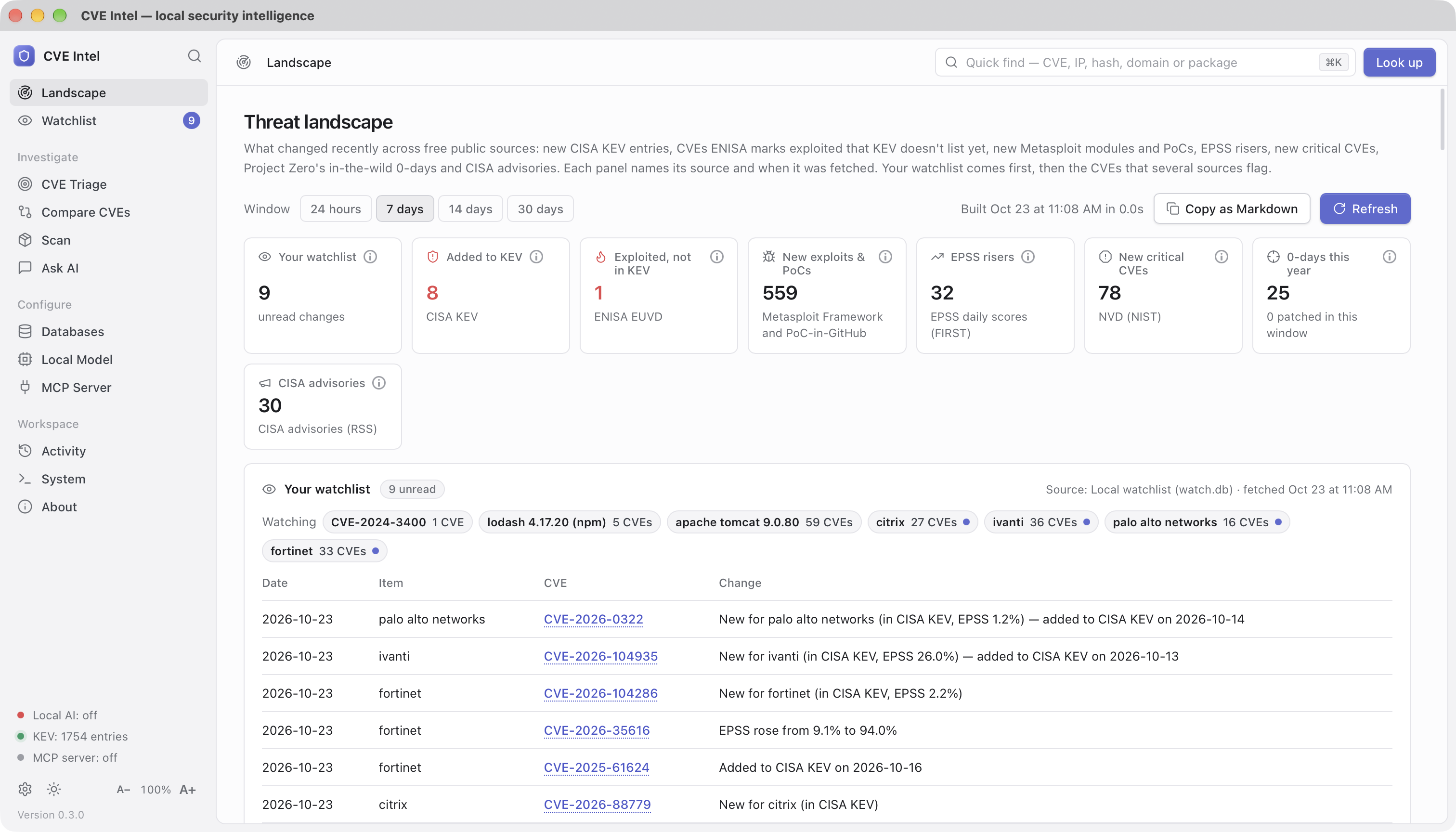
Watch the vendors, products, packages and CVEs you run. Each refresh
compares them with the last check and records what changed: new CVEs, KEV
listings, ransomware use, EPSS jumps, new exploits or Metasploit modules,
CVSS changes, newly available fixes and ENISA exploitation reports. The
first check of an item records a silent baseline. The list lives only on
this machine (~/.cve-intel/watch.db, owner-only). While the app is open
it can refresh on a schedule (every 6 hours by default; change or turn it
off in Settings). AI agents can read the watchlist over MCP but cannot
change it.
Decisions
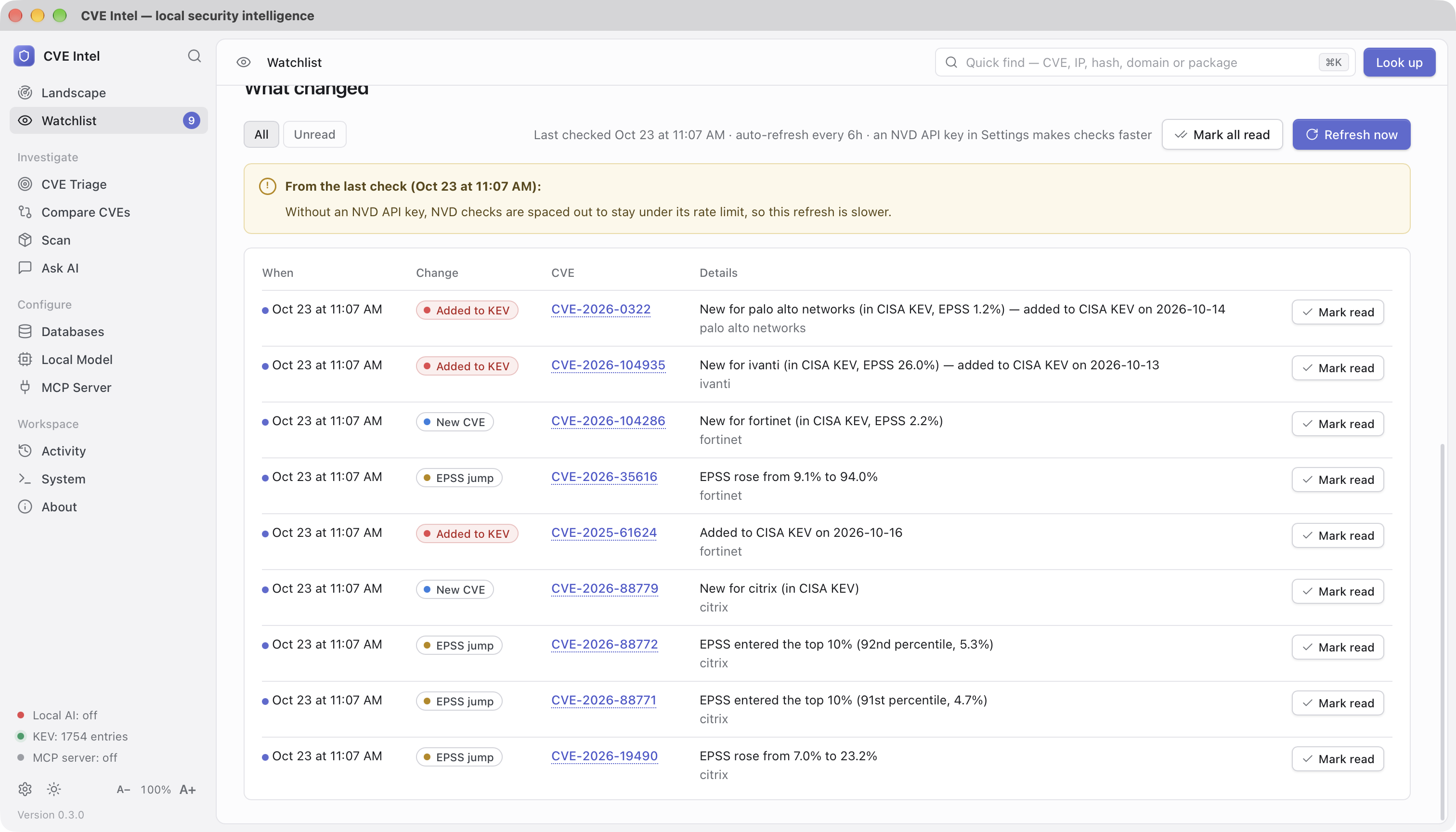
Every tool says what is risky. None remembers what you decided, why, and whether the reasons still hold. Decisions does. Press Record decision on a triage result, a scan finding or a comparison, choose a verdict (patch now, defer until a date, accept the risk, not affected, mitigated) and tick the assumptions it rests on. The machine-checked ones are pre-ticked from today's evidence: not in CISA KEV, EPSS below a threshold, no public exploit, no Metasploit module, local access only, needs privileges, needs user interaction, no fix yet, not marked exploited by ENISA, no ransomware use, CVSS below a threshold, the sources agree, NVD has not analysed it yet. The manual ones (not internet-facing, behind a WAF, a compensating control, not reachable, the vendor says not affected, or your own words) carry a review date.
Recording a decision adds the CVE to the watchlist, and every refresh re-checks the assumptions. The day the CVE enters KEV, EPSS crosses the threshold, an exploit or a fix appears, or NVD publishes its analysis, the decision turns stale with the exact reason, an event lands in the watchlist feed, and the Landscape counts it under Decisions to revisit. A deferral past its date is expired; a manual assumption past its review date is review due. Re-decide replaces a decision and keeps the old one as history; Close records whether it was patched, accepted for good, won't be fixed, or other.
The ledger also tells you how your judgment held up: of the CVEs you held
back in the last 30, 90 or 365 days, how many later entered KEV, gained
an exploit or rose in EPSS, and how many days after the decision; of the
patch-now calls, how many were confirmed by KEV, an exploit or a high
EPSS at the time or since. Export the ledger as OpenVEX or CycloneDX VEX
for scanners and SBOM consumers (the CycloneDX document lists each
decided-on package as a component, so its references resolve in
Dependency-Track and the like). It lives only on this machine
(~/.cve-intel/decisions.db, owner-only); AI agents can read it over MCP
(list_decisions, get_decision_calibration) but never change it, and
Ask AI mentions your decision when you ask about a CVE you decided on.
From the terminal: cve-intel decide record CVE-2025-12345 --verdict defer --until 2026-12-31 --auto, then decide list, decide check,
decide calibration and decide export.
CVE Triage
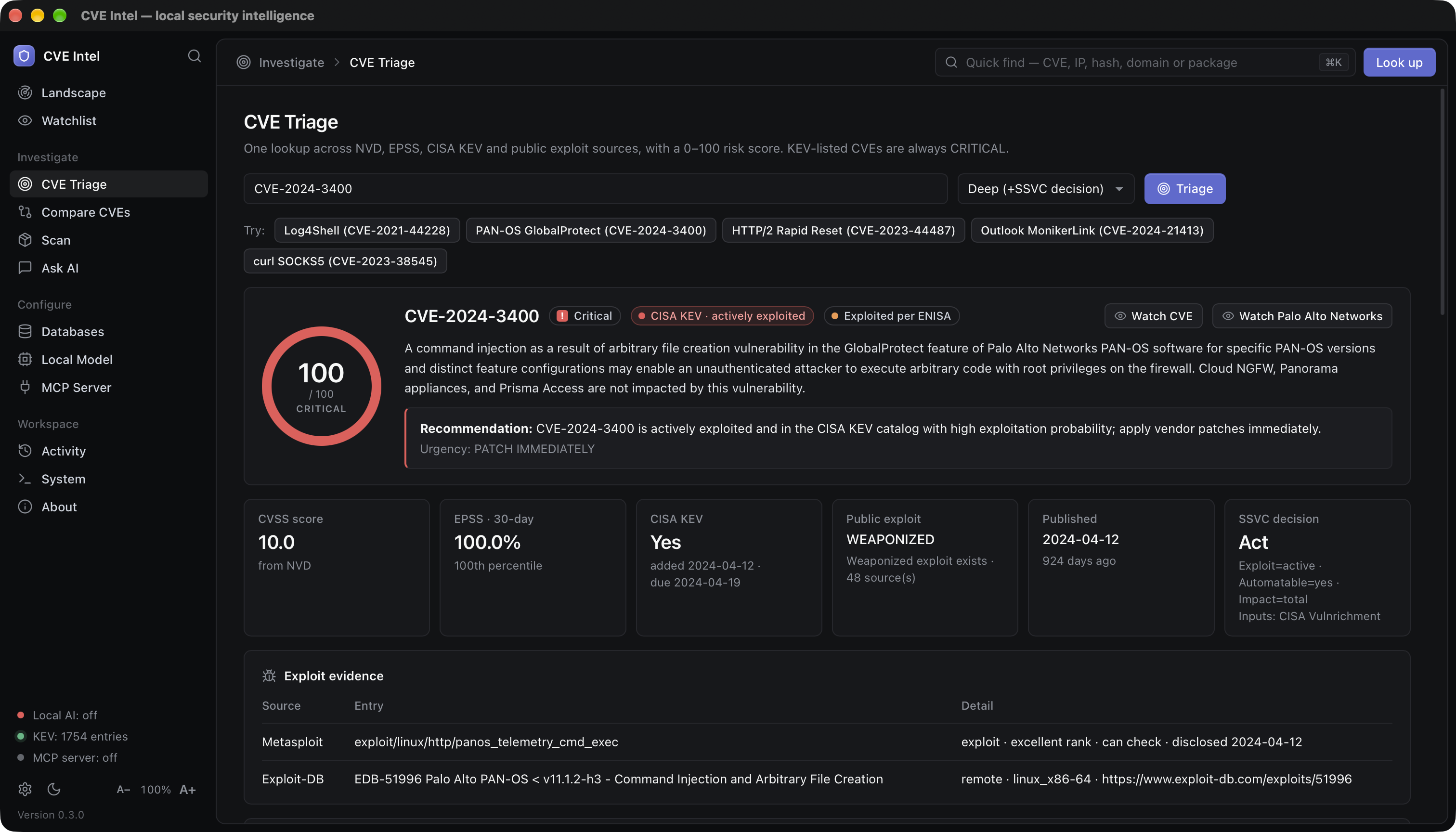
One lookup across NVD, CVE.org, EPSS, CISA KEV, ENISA EUVD and public
exploit sources. The result includes the risk score, a plain recommendation
and urgency, and the evidence behind it: CVSS (and where it came from),
30-day EPSS probability and its recent trend, KEV dates, ENISA's exploited
flag, CIRCL sightings (deep triage), and the exploit evidence found in
Metasploit, Exploit-DB, Nuclei, GitHub, PoC-in-GitHub and, with a
VulnCheck token, VulnCheck KEV and XDB. When NVD has not scored a CVE yet,
the CNA's or CISA's score from the CVE.org record is used. Deep triage
also returns a CISA SSVC decision, using CISA's own published SSVC
assessment (Vulnrichment) where one exists. ENISA EUVD or VulnCheck KEV
can raise SSVC Exploitation to active; they do not change the risk
score.
Who says what. Every triage result also lays the sources side by side:
NVD's own score and analysis status, the CNA's score, CISA's ADP
(Vulnrichment) score and SSVC assessment, EPSS, CISA KEV, ENISA EUVD,
VulnCheck KEV and, in deep triage, Microsoft, Red Hat and Ubuntu (press
Check vendors on a standard triage to add them). It names where they
disagree: scores 2 or more points apart, a CVE that NVD has not analysed
(common since NVD limited its analysis in 2026), a critical score that
attackers have ignored for six months, exploitation reported by a source
other than CISA KEV, a distribution that says its build is not affected or
will not be fixed, and rejected or disputed CVEs. The card is marked
Sources agree, Sources disagree or Thin evidence, and the
same appears as the Agreement row in Compare CVEs, in the
consensus field of triage_cve, and in the CLI's triage output. None of
it changes the risk score.
Exploit speed. EPSS is a daily statistical model and the exploit
indexes record what already exists; both lag. With language models
reading patches, the public fix commit of an open-source CVE is itself a
leading signal. A standard or deep triage therefore shows an Exploit
speed estimate: Hours, Days, Weeks, Unknown, or
Exploit exists when a PoC or a KEV listing already makes the question
moot. It starts at 30 points and adds or subtracts for the fix (a small,
localised public fix with a test that encodes the trigger counts most; no
public fix at all counts against), the weakness class (injection,
traversal, authentication bypass and deserialisation are fast; memory
corruption and races are slow), the CVSS vector (network, no privileges,
no user interaction) and the time already elapsed without a PoC. Every
line of the rationale is shown, the label says estimate, the confidence
never exceeds medium, and without a public fix the label is capped at
Days. Fix commits come from the references NVD, CVE.org, OSV and GitHub
Advisories tag as the patch and are read from GitHub (two requests per
CVE at most; a free token raises the limit from 60 to 5,000 an hour). The
same estimate is a row in Compare CVEs, a chip on the riskiest
unexploited findings of a scan, the exploit_speed field of triage_cve
and scan_dependencies, and the fix date on get_cve_timeline. It never
changes the risk score.
The interface follows your system's light or dark theme until you pick one
with the sun and moon button at the bottom of the sidebar. Beside it,
A− and A+ make the text and controls smaller or larger in every
view (⌘ −, ⌘ + and ⌘ 0 on macOS; Ctrl on Windows and Linux), and
the size is remembered.
Ask in plain language
Ask questions such as "Which is worse: CVE-2024-3400 or CVE-2023-44487?" CVE Intel runs the lookups first, then the model explains the results and lists the tools it used. Small local models can still get details wrong, so check an answer you will act on against CVE Triage.
Compare and prioritise
Paste 2 to 10 CVE IDs to compare them and get a patch order based on KEV status, score, EPSS and exploit evidence, not on CVSS alone. Not sure where to start? The examples under the box (KEV vs. CVSS, VPN & firewall zero-days, Microsoft patch day and Open-source libraries) each show one way the order can surprise you.
CISA KEV CVEs come first, then the risk score. Equal scores are common (exploited CVEs with a high EPSS all reach 100), so ties are broken by known ransomware use, EPSS, exploit maturity, CVSS and the earlier KEV due date. Each CVE says why it sits above the next one.
- Side by side: one column per CVE, with rows for the score's parts, KEV dates, ransomware use, who reports exploitation, EPSS and its 30-day trend, exploit sources, CVSS attack vector, complexity, privileges, user interaction and impact, product, CWE and age. Riskier values that differ are in red. Only rows that differ hides the rest.
- What they have in common: CVEs in the same product (one update may cover them) or from the same vendor, ransomware use, exploitation reported outside CISA KEV (which the score doesn't count), network access without sign-in or user action, public exploits, rising EPSS, and shared weaknesses.
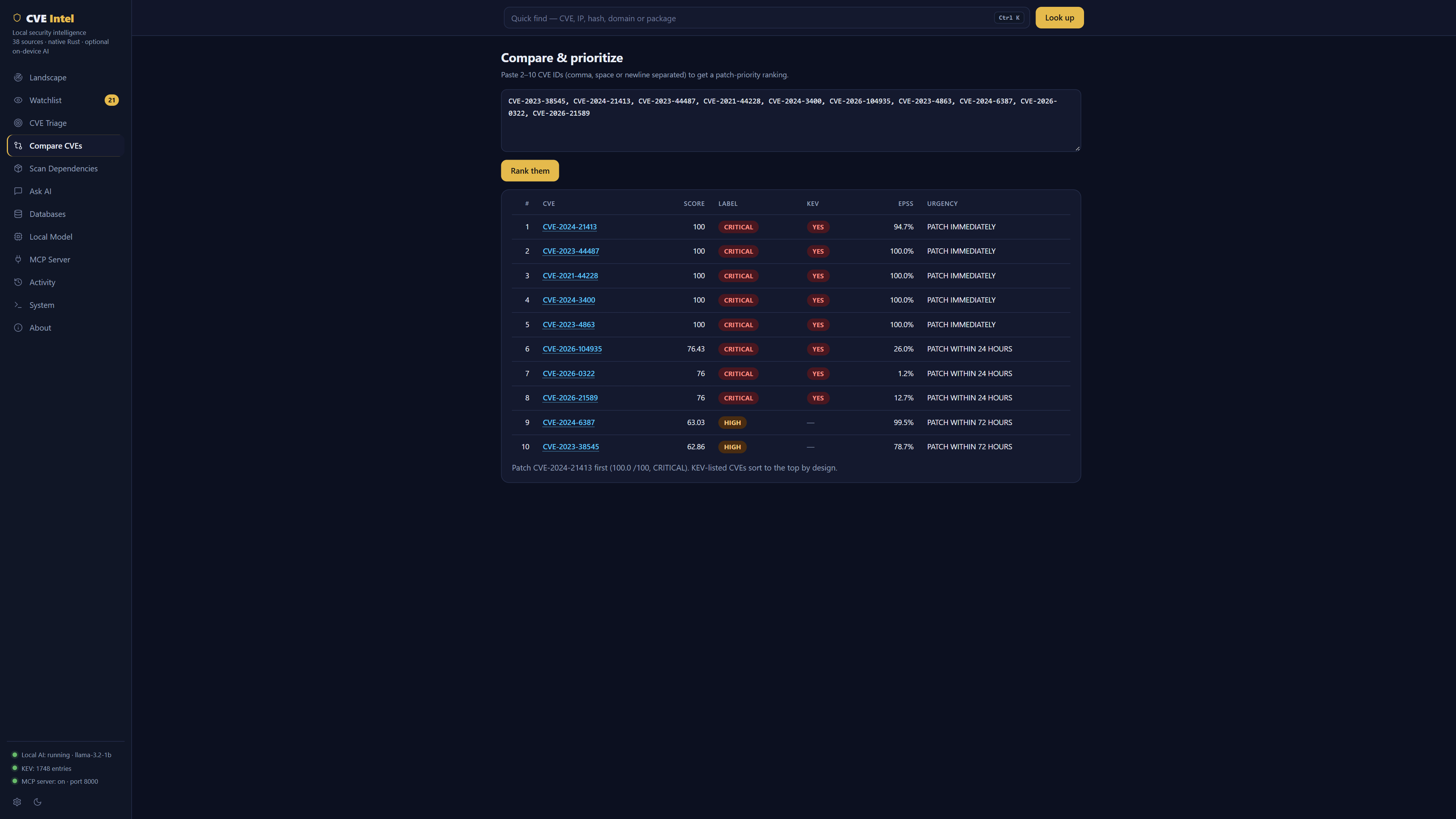
Scan dependencies
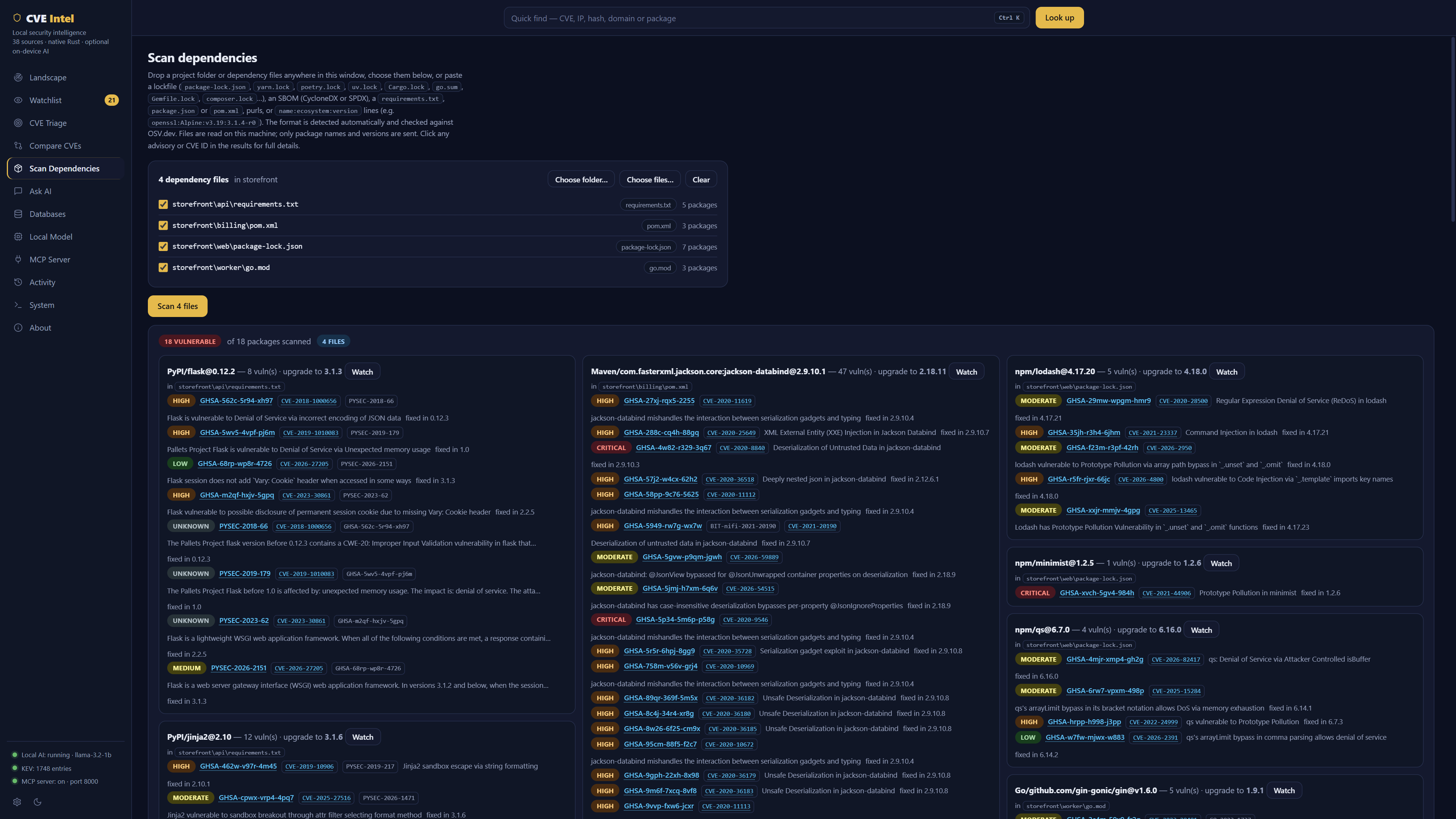
Drop a project folder or dependency files anywhere on the window, or use
Choose folder… / Choose files…. A folder is searched, including
subfolders, for the lockfiles, manifests and SBOMs listed below. The search
skips node_modules, virtualenvs, vendor, build output and hidden
folders, and skips a package.json or go.sum that sits next to the
lockfile that pins it. Each file found is listed with its format and
package count. Untick any you don't want, then press Scan. Every file is
parsed on its own, a package listed in several files is checked once, and
each finding names the files it came from. Files are read on your machine;
only package names and versions are sent to OSV.dev.
You can also paste a lockfile (package-lock.json, yarn.lock, Pipfile.lock,
poetry.lock, uv.lock, Cargo.lock, go.sum, go.mod, composer.lock,
Gemfile.lock), an SBOM (CycloneDX JSON or XML, SPDX JSON or tag-value), a
requirements.txt, package.json or pom.xml, purls, or
name:ecosystem:version lines (for example from apk info -v or
dpkg -l; Alpine needs its release, as in openssl:Alpine:v3.19:3.1.4-r0).
The format is detected automatically and up to 10,000 packages are checked
against OSV.dev.
Findings are ranked by risk, not just severity. Each one gets the same
signals as CVE Triage: whether its CVE is in CISA KEV (and used by
ransomware), its EPSS score, exploit evidence from Exploit-DB and
Metasploit, and the risk score. Log4Shell in an old
log4j-core comes out on top; a CVSS 9.8 nobody exploits does not. When
GitHub, PyPI and a distribution each publish the same issue, it is shown
once. Filter by risk, KEV or whether a fix exists, or switch to By
package to see each vulnerable package with its advisories and the
version that fixes them. In a CI pipeline the same scan can fail the build
or feed GitHub code scanning; see CI and automation.
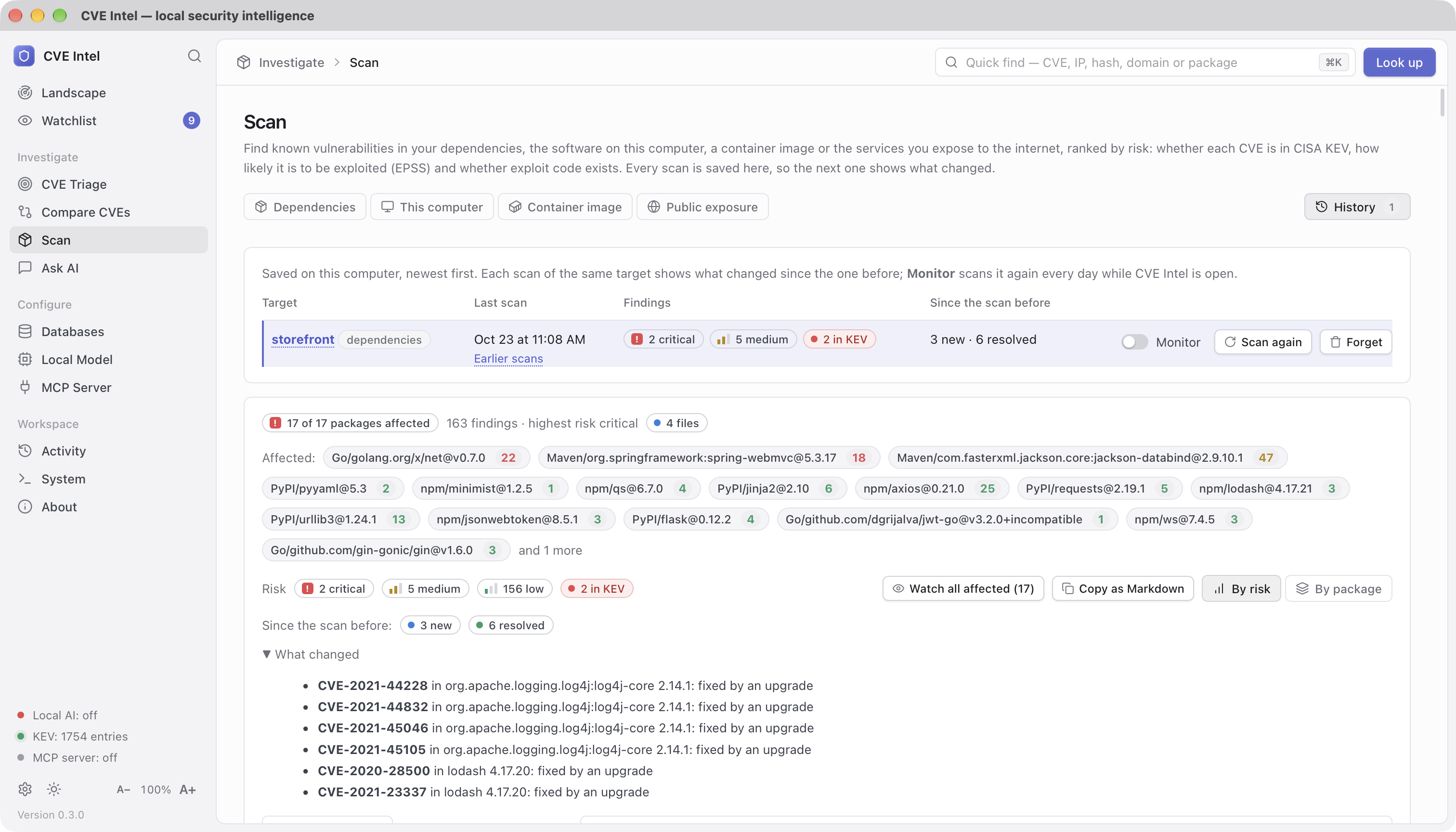
Every scan is saved in History, on this computer only. Scan the same folder again (or press Scan again) and the results say what changed since the scan before: findings that are new, resolved (and whether an upgrade or a removal fixed them), or riskier because they were added to CISA KEV, gained an exploit or jumped in EPSS. A pasted list is saved under a hash of its packages, never its text. Copy as Markdown puts the findings table on the clipboard for a ticket, and Forget deletes every scan of a target.
Save SBOM writes the scan you just ran as a CycloneDX 1.5 document:
every package or app it read, clean ones included, each finding as a
vulnerability affecting its component with the risk signals (KEV, EPSS,
exploit evidence, risk score) and the fix version, and your recorded
decision on it as the analysis. It is a scan-derived
inventory (what the lockfiles, image or this computer declared, with no
supplier, hashes, licences or dependency graph), and says so in its
metadata; a build-time generator such as Syft or cdxgen remains the
authoritative source for those. Load it into Dependency-Track, attach it to
a release, or hand it to an auditor. The same document comes from
cve-intel scan deps . --format cyclonedx on the command line.
Chains. A ranked list hides chains: a LOW local privilege escalation
and a HIGH network RCE on the same host are a full compromise together.
The Chains tab of every scan links the findings of a target into
attack chains, from network entry through code execution, privilege
escalation, credential access or persistence to an outcome. Each step
names its basis: the CVSS vector (network, no privileges, scope change),
the weakness, CTID's curated KEV → ATT&CK mapping, or an inference from
the weakness through CAPEC. Chains get a transparent score (stages
covered, the riskiest step, an exploited entry, an unfixed privilege
escalation) that never touches a finding's risk score, and the callout
at the top names the break point: the finding whose fix cuts the most
chains, which may well be that LOW. On this computer and in a container
image a chain may start at code execution, since code already runs
there. Every result states its assumptions: all findings of a target are
treated as present together, and nothing is known about reachability or
mitigations. The chains are in the scan's Markdown, in scan … --chains
and scans show … --chains on the command line, and in the read-only
get_scan_chains tool for local agents.
Watch all affected adds the affected packages and apps of a scan to the Watchlist, riskiest first, so you hear when one of them is added to CISA KEV or gains an exploit. Tick Monitor next to a target in History to have CVE Intel scan it again every day while the app is open (the same folders, this computer, the same image or the same exposure targets); what becomes new or riskier appears in the Watchlist feed and on the Landscape.
Scan this computer
Scan → This computer checks the operating system and the apps installed on this machine. On Windows they come from the registry (the programs in Installed apps, including per-user installs) and the Windows build; on macOS from Applications, ~/Applications, Homebrew (Apple silicon and Intel) and the macOS version. List installed software shows what was found and what will be checked, without contacting anything. Check sends NVD only the vendor, product and version of the apps CVE Intel recognises (browsers, Java, Acrobat, archivers, remote-access tools, VPN clients, developer tools and about 100 more) and of the OS, then ranks the findings like any other scan.
On Linux the distribution's packages come from its package database (dpkg, apk, rpm or pacman) and are checked with OSV.dev. Arch Linux is the exception: OSV has no Arch packages, so they are checked against the Arch Linux Security Tracker instead. Its whole list is downloaded and matched on your machine with pacman's version order, so no package names are sent. Arch derivatives (Manjaro, EndeavourOS, CachyOS, Garuda, Artix, SteamOS) are matched against it too, with a note that packages they build themselves can differ from Arch's. The tracker leaves many advisories marked unfixed long after upstream fixed them, so an unfixed advisory confirmed only in an older upstream version than the one installed is listed as not checked, with the advisory, rather than reported as a finding. A rebuild of the confirmed version (a new pkgrel only) is still a finding. Packages from third-party repositories and the AUR that CVE Intel recognises (Chrome, Edge, Brave, VS Code) are checked with NVD.
Apps CVE Intel does not recognise are listed as not checked, with the reason. Tick Also look up apps CVE Intel does not recognise to ask NVD's product dictionary for them: this sends their names to NVD, and a match is kept only when NVD's vendor fits the app's publisher. Without an NVD API key NVD allows a few requests a minute, so a first scan checks the riskiest apps (browsers, Java, Acrobat, the OS) first and leaves the rest for the next scan; answers are cached, so later scans are quicker. Programs that are parts of others (system components, drivers) are skipped, and Microsoft 365 and the Visual C++ runtimes are reported as not checked because NVD lists them without versions.
Scan a container image
Scan → Container image checks a saved image without Docker: drop a
docker save or OCI archive (.tar, .tar.gz) on the window, or choose an
OCI layout folder. The image is read on your computer in one pass, layer by
layer, without unpacking anything to disk. Its operating system packages
(Debian, Ubuntu, Alpine, Wolfi, Chainguard, Red Hat, Rocky, AlmaLinux, Azure
Linux and openSUSE) and any lockfiles, manifests or SBOMs inside it are
checked with OSV.dev and ranked like any other scan. Arch Linux images are
checked against the Arch Linux Security Tracker, matched locally. A multi-platform image
is scanned for this computer's architecture unless you name another
platform. Images whose distribution OSV does not cover (Fedora, Amazon
Linux, SUSE Linux Enterprise, Debian testing) and older rpm databases are
listed as not checked rather than reported clean.
docker save myapp:latest -o myapp.tar
cve-intel scan image myapp.tar --fail-on kev
Check your public exposure
Scan → Public exposure shows what public sources already know about domains and addresses you own. Enter domains or public IP addresses, confirm they are yours (or that you are authorised to assess them), and press Find addresses: CVE Intel collects host names from certificate transparency logs (crt.sh, keeping only names under your domain), resolves them, and lists the public addresses, dropping private and reserved ones. Untick any that are not yours, then press Check. For each address it asks Shodan (with a Shodan key) or the free Shodan InternetDB what services, software versions and CVEs have been seen there, then checks the versions with NVD and ranks the findings like any other scan.
The check is passive: CVE Intel never connects to the targets, and nothing is port-scanned. Addresses that belong to a CDN or hosting platform are flagged and left out, because the software seen there is the provider's. CVEs Shodan infers from a banner are marked as reported, not verified, and distribution builds (Ubuntu, Debian, RHEL) may have the fix backported.
cve-intel scan exposure example.com --authorized --list-only   # names and addresses only
cve-intel scan exposure example.com 203.0.113.10 --authorized --max-ips 20
Databases and data sources
See every upstream source: what it provides, whether it needs a key, whether your key is set, how long results are cached, and which tools use it. Press Check connectivity to probe all of them live. The view also shows the local cache, downloaded models and the model runtime.
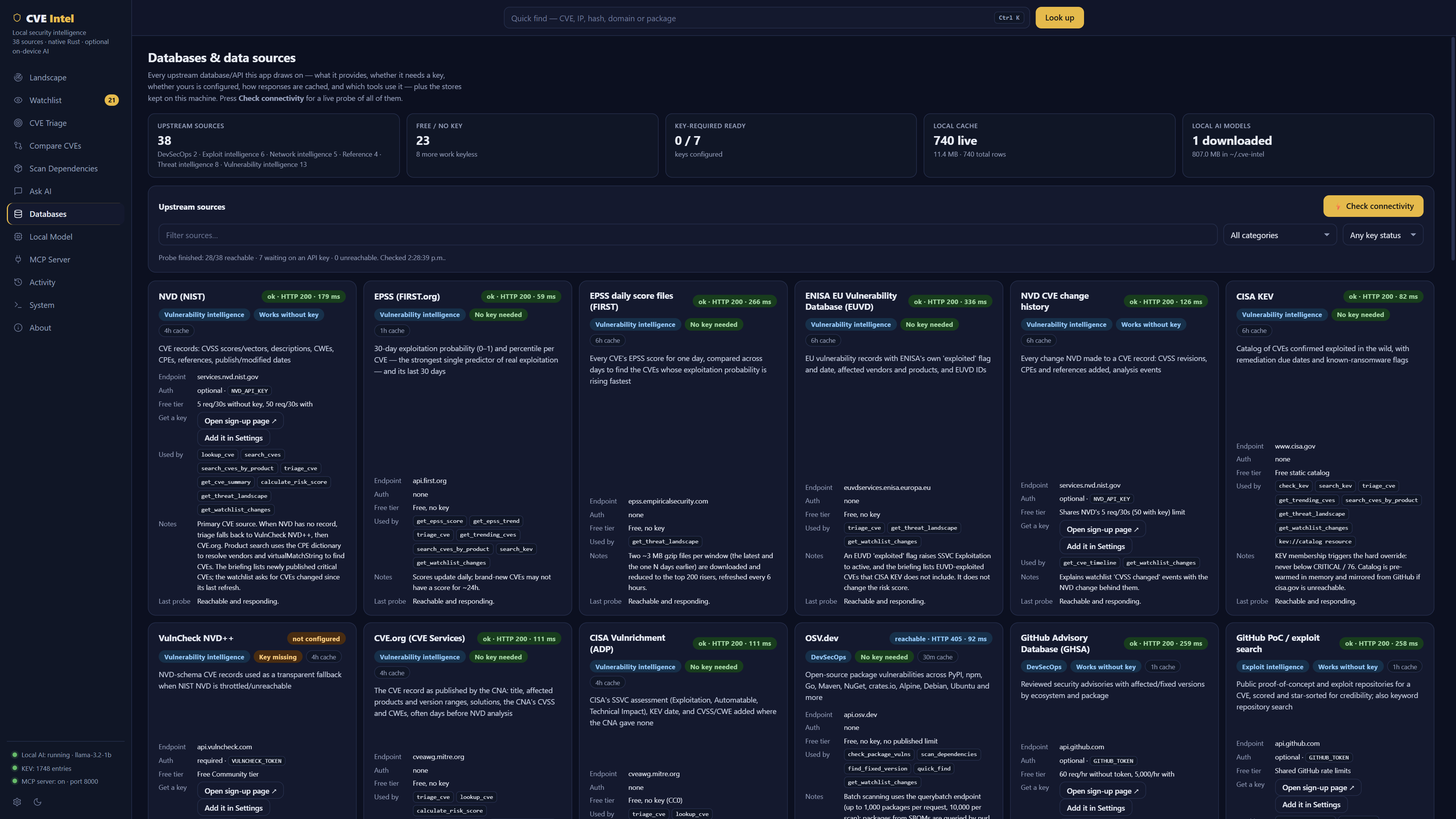
MCP server for AI agents
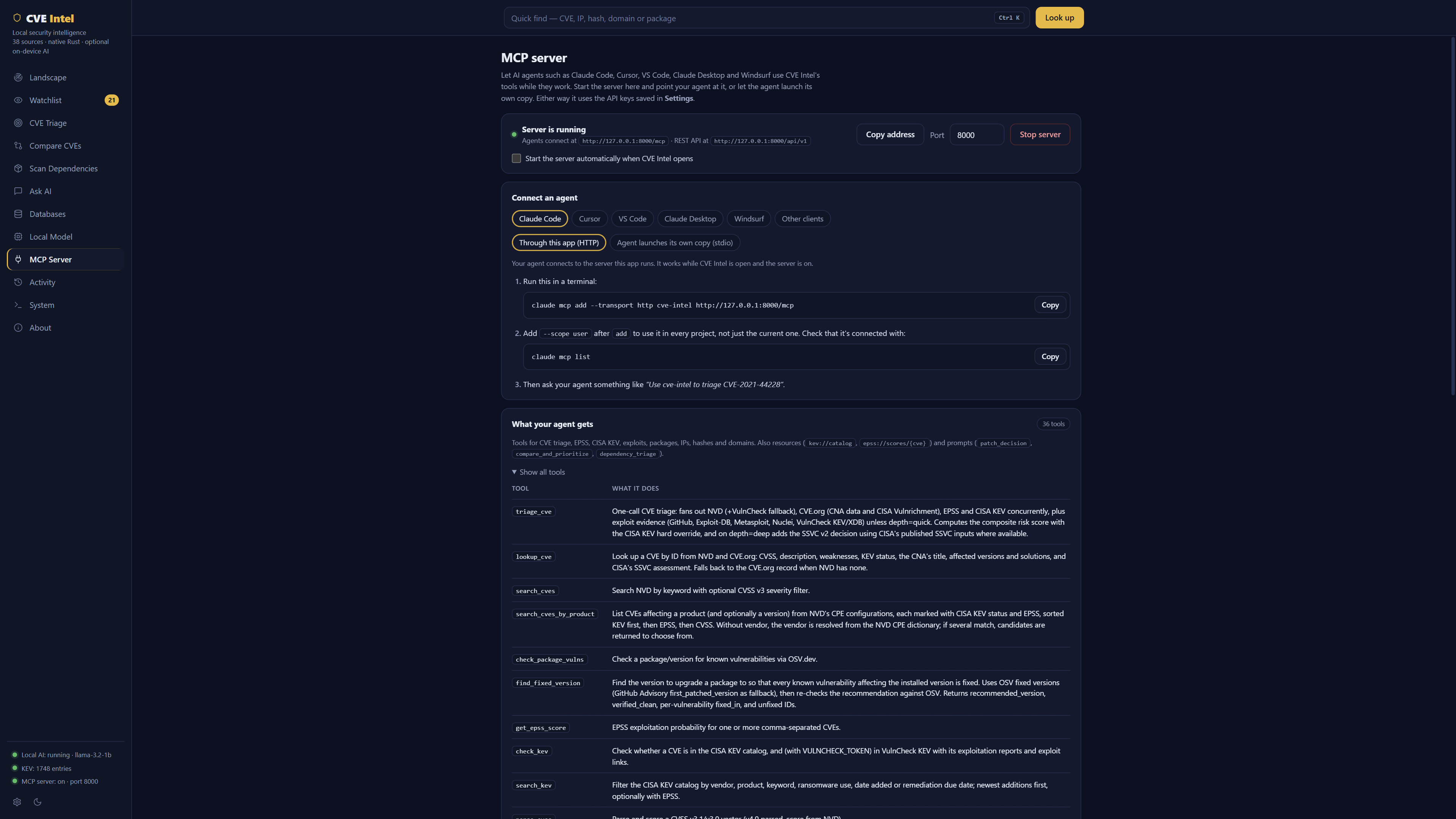
Give AI agents CVE Intel's 41 tools while they work. Start the server from the app, choose your agent, and copy setup steps with the correct address and executable path already filled in. Guides are included for Claude Code, Cursor, VS Code, Claude Desktop, Windsurf and any other MCP client.
- Two ways to connect. The agent can connect over HTTP to the server the app runs, or launch its own copy over stdio. The stdio option works even when the app is closed.
- Simple control. Start and stop the server, pick a port (8000 by default), and optionally start it whenever the app opens. The sidebar shows whether it is running.
- Local only. The server listens on
127.0.0.1and refuses requests from web pages, so websites and other computers cannot use it. - Uses your saved keys. Agents get the same data sources and API keys you configured in Settings.
To configure an agent by hand instead, see MCP server setup.
Also included
- Quick Find (
⌘KorCtrl+K): paste a CVE, IP, hash, domain, URL orpackage:ecosystem:versionand CVE Intel picks the right lookup. - Fixed versions: the version to upgrade a package to so that every
known vulnerability is fixed, re-checked against OSV. Quick Find
lodash:npm:4.17.15to see it, or ask in Ask AI. - Product and KEV search: every CVE affecting a product and version, exploited ones first, and filters over the CISA KEV catalog by vendor, product, ransomware use or date. Available in Ask AI, the CLI and MCP.
- MITRE ATT&CK mapping: curated CTID mappings for KEV-listed CVEs, plus techniques inferred from the CVE's weaknesses through CAPEC, labelled as inferred. Available to AI agents over MCP and through the REST API.
- IP, hash and domain intelligence from AbuseIPDB, GreyNoise, Shodan, VirusTotal, MalwareBazaar, crt.sh and more. Private and internal IPs are rejected before any lookup is made.
- Activity view: a searchable local history of your lookups, answers and the tool calls agents made, which you can pause or clear.
- Local Model view: install the runtime and download a model in one click.
- System view: health and version information.
Common uses
| Situation | What to do in the app |
|---|---|
| What happened this week? | Open Landscape, or ask "What's new this week?" in Ask AI. |
| A new CVE is in the news. Do we drop everything? | Enter it in CVE Triage, or ask "Should we patch CVE-2024-3400 this weekend?" in Ask AI. |
| We run Fortinet (or another vendor). Tell me when something new hits it. | Add the vendor on Watchlist, or press Watch next to the vendor on a triage result. |
| We decided not to patch something yet. Tell me if that stops being safe. | Press Record decision on the triage result and tick the reasons. Decisions marks it stale the moment one of them breaks. |
| A scanner reported 40 findings. Which come first? | Paste the IDs into Compare CVEs, up to 10 at a time. |
| Checking dependencies before a release. | Drop the project folder on Scan, or paste the lockfile or SBOM. Press Watch all affected to follow them, or Monitor in History to have it scanned again daily. |
| Is anything installed on this laptop being exploited? | Scan → This computer, then Check. Findings in CISA KEV come first. |
| Is the image we ship affected by a new KEV entry? | docker save it and drop the .tar on Scan → Container image. |
| What does the internet see on our servers? | Scan → Public exposure with your domain; passive, nothing connects to your hosts. |
| Which version of a library fixes everything? | Open Quick Find and paste lodash:npm:4.17.15. |
| What is known about the Tomcat version we run? | Ask "Which CVEs affect Apache Tomcat 9.0.80?" in Ask AI.¹ |
| Is anything from a vendor being exploited right now? | Ask "Which Fortinet vulnerabilities are in CISA KEV?" in Ask AI.¹ |
| An unknown IP appears in firewall or login logs. | Paste it into Quick Find. |
| EDR flags an unknown file. | Paste its SHA-256 hash into Quick Find. |
| You work in an AI coding tool. | Open MCP Server, start the server and copy the setup steps for your agent. |
| You are new to vulnerability management. | Ask "Explain EPSS and CISA KEV like I'm new." |
¹ For these questions the model has to pick the right lookup itself, which larger local models and cloud providers do more reliably. The same searches are always available from the terminal (see Recipes).
Install
Download the file for your OS from the latest release. The desktop app, CLI, MCP server and REST API are all one executable, with nothing else to install.
| OS | File | How to run |
|---|---|---|
| Windows | CVE-Intel_<version>_windows-x64-setup.exe (or …-portable.exe) | Run the installer, then open CVE Intel |
| macOS (Apple Silicon and Intel) | CVE-Intel_<version>_macos-universal.dmg | Drag CVE Intel to Applications |
| Linux | CVE-Intel_<version>_linux-x64.AppImage (or .deb) | chmod +x the file and run it |
Each file has a .sha256 checksum next to it. Builds are not code-signed
yet, so Windows SmartScreen and macOS Gatekeeper warn on first launch. On
macOS, right-click the app and choose Open.
To build it yourself, run the headless server in Docker, or run the desktop app in a container and use it from your browser (no install), see Build from source and Docker.
Local AI
Ask AI uses a small language model that runs on your computer, so your questions stay private. Before the model runs, CVE Intel finds the CVE IDs, IPs, hashes and domains in your question, runs the matching lookups and gives the model the results as facts to rely on. If no model is running, Ask returns those lookup results directly, so it is useful before any download finishes.
Open the Local Model view to install the llama.cpp runtime and download
a model, one click each (files go under ~/.cve-intel/). The default is
Qwen 2.5 3B Instruct, a ~1.9 GB download that needs 6 GB of RAM; the 1B and
1.5B models need 4 GB and Qwen 2.5 7B needs 10 GB. On Apple silicon the view
also offers two MLX models that run on the GPU and answer faster. The model
server listens on 127.0.0.1 only. Already running Ollama, LM Studio or
your own llama-server? See
Use your own model server.
Remote providers (opt-in)
For stronger answers, open Configure → Remote AI and choose OpenAI, Anthropic, Google Gemini, or any OpenAI-compatible endpoint: a LiteLLM proxy, vLLM, Azure OpenAI, OpenRouter, Together, Groq, Ollama behind HTTPS… Paste a key (and for an OpenAI-compatible endpoint, its base URL), then pick a model. Save & use enables the provider and tests it; Save without switching keeps your current choice. You can switch back to the local model at any time.
| Provider | Default model | Environment variables |
|---|---|---|
| OpenAI | gpt-4o | OPENAI_API_KEY |
| Anthropic | claude-opus-5 | ANTHROPIC_API_KEY |
| Google Gemini | gemini-2.5-flash | GEMINI_API_KEY |
| OpenAI-compatible endpoint (LiteLLM, vLLM, …) | (the server's model name) | CUSTOM_LLM_BASE_URL, CUSTOM_LLM_API_KEY (optional) |
Models come from the provider itself: once a key is saved, the model
list is fetched live from the provider's /models endpoint, so it shows
every model your key can use (for OpenAI and Gemini, embedding, speech and
image models are left out). Press ↻ to refresh it, or choose Other
to type any model ID. Until a key is saved, a few suggestions are shown.
The same settings work from a terminal:
cve-intel ai list                                   # every provider, where it sends requests, what it still needs
cve-intel ai set anthropic --key                    # hidden prompt
cve-intel ai models anthropic                       # every model the key can use, fetched live
cve-intel ai set anthropic --model claude-opus-5 --use
cve-intel ai set custom --url https://litellm.example.com/v1 --key --model claude-sonnet-5 --use   # LiteLLM, vLLM, …
cve-intel ai test                                   # one tiny request to the provider in use
cve-intel ai use local                              # back to the on-device model
--key reads the key from a hidden prompt (or stdin when piped), never from
the command line.
- Off by default. When a remote provider is selected, each question and the lookup results gathered for it are sent to that endpoint under its operator's terms. The Ask view shows a banner while this is on.
- Where requests go. OpenAI, Anthropic and Gemini use built-in HTTPS
addresses. An OpenAI-compatible endpoint must be
https://; plainhttp://is accepted only to this machine (localhost,127.0.0.1). A saved key is tied to its URL: changing the URL forgets the key, so it is never sent to a new host without being entered again. A key saved while the URL comes fromCUSTOM_LLM_BASE_URLis saved with that URL, andCUSTOM_LLM_API_KEYis only sent toCUSTOM_LLM_BASE_URL. Requests to a loopback address skipHTTPS_PROXY. - Keys stay local. Keys are stored in
~/.cve-intel/settings.dbwith owner-only permissions. They are never shown again in the UI and never logged. You can use environment variables instead. See SECURITY.md. - No vendor SDK. Every provider here offers an OpenAI-compatible chat API with tool calling. Anthropic describes its compatible endpoint as intended mainly for evaluation; for Claude-specific features, use CVE Intel through MCP in a Claude client.
Data sources
The Databases view lists all 41 sources, and the CLI, REST API and MCP server report the same list.
| Category | Sources |
|---|---|
| Vulnerability intelligence | NVD, NVD change history, CVE.org, CISA Vulnrichment, EPSS (FIRST) and its daily score files, CISA KEV, ENISA EUVD, VulnCheck NVD++, VulnCheck KEV, MSRC, Red Hat, Ubuntu |
| Exploit intelligence | GitHub PoC search, PoC-in-GitHub (nomi-sec), Exploit-DB, Metasploit modules, Nuclei templates, GitHub commits and pull requests (fix size for the exploit-speed estimate), Project Zero 0day In the Wild |
| Network intelligence | AbuseIPDB, GreyNoise, Shodan, crt.sh, CIRCL Passive DNS |
| Threat intelligence | VirusTotal, MalwareBazaar, ThreatFox, URLScan, CISA advisories (RSS), CIRCL Vulnerability-Lookup sightings, Ransomwhere, CIRCL hashlookup |
| DevSecOps and reference | OSV.dev, Arch Linux Security Tracker, GitHub Advisories, MITRE ATT&CK (STIX), CTID KEV → ATT&CK mappings, MITRE CAPEC, HIBP Pwned Passwords |
Many tools need no API key at all: EPSS and its daily files, KEV, ENISA EUVD, CVE.org and CISA Vulnrichment, OSV, the Arch Linux Security Tracker, CVSS, Exploit-DB, Metasploit, PoC-in-GitHub, Project Zero, CISA advisories, CIRCL sightings, ATT&CK, CAPEC, crt.sh, Ransomwhere, hashlookup, Pwned Passwords, and NVD at a lower rate limit. Large feeds (EPSS daily files, Exploit-DB, Metasploit, ATT&CK, CAPEC, the CTID mappings) are downloaded once, reduced to a small index, and refreshed daily or every few hours.
Risk score
Risk = CVSS×0.20 + EPSS×0.35 + KEV×0.30 + PoC×0.15 (boosters up to ×1.27, capped at 100)
- KEV override: a CVE in CISA KEV is confirmed exploited, so it is always CRITICAL with a score of at least 76. Only CISA KEV earns the KEV points and the override.
- EPSS measures the probability of exploitation. CVSS is treated as severity, not likelihood.
- PoC is the strongest public exploit evidence. A Metasploit exploit module counts as weaponized (the full 15 points); Exploit-DB entries and VulnCheck XDB exploits count as public exploits.
- Deep triage also returns the SSVC v2 CISA Deployer decision:
Act,Attend,Track*orTrack. Its inputs come from CISA's published SSVC assessment when there is one. Because that assessment is a snapshot, newer evidence can raise Exploitation: a CISA KEV, VulnCheck KEV or ENISA EUVD exploited listing, or an EPSS of 0.90 or more, makes itactive. EUVD and VulnCheck do not change the risk score. - Bands: 0–25 LOW, 26–50 MEDIUM, 51–75 HIGH, 76–100 CRITICAL.
- This is scoring version 1.1, reported as
scoring_versionin results.
API keys
Keys are optional. Each one unlocks more data or raises a rate limit. In the app, open Settings → Data source API keys, press Get a key to open the sign-up page, paste the key and press Save. The key is used on the next lookup, with no restart needed.
| Key | What it unlocks | Get it |
|---|---|---|
| NVD API key | 10× faster CVE lookups | nvd.nist.gov |
| GitHub token (no scopes) | Exploit search, Nuclei templates and advisory fixed versions (5,000 instead of 60 requests/hour) | github.com/settings/tokens |
| VulnCheck token | VulnCheck KEV (exploitation reports and XDB exploit links), and backup CVE data if NVD is down | vulncheck.com |
| AbuseIPDB key | IP abuse score | abuseipdb.com |
| GreyNoise key | Whether an IP is harmless background noise | docs.greynoise.io |
| Shodan key | Open ports and services on an IP | account.shodan.io |
| VirusTotal key | 70+ antivirus verdicts for a file hash | virustotal.com |
| URLScan key | Higher limits for URL checks | urlscan.io |
| abuse.ch Auth-Key | MalwareBazaar and ThreatFox lookups | auth.abuse.ch |
| CIRCL passive DNS login | Historical DNS records (access by request) | circl.lu |
Keys are stored in ~/.cve-intel/settings.db with owner-only permissions
and shared by the app, CLI, MCP server and REST API on the same machine. A
key saved in the app takes precedence over an environment variable. Free
tiers and sign-up steps are set by each vendor, so check their pages. To
manage keys from a terminal or with environment variables, see
Terminal configuration.
Privacy and security
- All network traffic is outbound HTTPS: to the data sources, to the cloud
AI provider if you opt in to one, and for the model and runtime
downloads you start (Hugging Face, the llama.cpp release on GitHub and,
for MLX,
uvand a Python 3.12 build from GitHub plusmlx-lmfrom PyPI). - API keys are never logged, cached, shown in the UI or returned by any tool.
- Private and reserved IPs are rejected before any network lookup.
- The local model server and the app's MCP server bind to loopback only.
- SQLite files are created on first use:
cache.db, a disposable lookup cache;~/.cve-intel/settings.db, which holds keys, provider settings and the watchlist auto-refresh interval; and~/.cve-intel/watch.db, the local watchlist (items, snapshots and change events). Clearing the cache never touches settings or the watchlist. - While the app is open, an optional background task can refresh the watchlist (every 6 hours by default). It only contacts the public sources needed for the items you watch, and you can turn it off in Settings. Nothing runs while the app is closed.
- The desktop app keeps an activity log in
~/.cve-intel/activity.db(owner-only). It records what you look up and ask, the answers, setting and model changes, the tools agents call through the app's MCP server, and which hosts each action contacted. API keys are never recorded, only key names. Upstream requests are stored as host and path, without query strings. Open Activity to search it, pause it or clear it. It keeps the latest 20,000 entries. The CLI andcve-intel mcprecord nothing.
See SECURITY.md for the full security model and how to report a vulnerability.
Developer notes
Everything in this section is for using CVE Intel from a terminal, scripts, CI pipelines, other programs or AI agents, and for building it yourself. The desktop app needs none of it.
- The
cve-intelexecutable: where it is and how one file runs every mode - Command line (CLI): every command, with recipes for common tasks
- CI and automation: fail a build, upload SARIF to GitHub code scanning, JSON output
- REST API: endpoints and examples
- MCP server setup: connect AI agents by hand
- Terminal configuration: keys, environment variables, your own model server
- Build from source and Docker
- Architecture and Development and tests
The cve-intel executable
The desktop app and the command-line tool are the same file. Double-clicking it opens the app; running it with any argument starts the CLI, the MCP server or the REST server instead.
| OS | Executable |
|---|---|
| macOS | /Applications/CVE Intel.app/Contents/MacOS/cve-intel |
| Windows (default per-user install) | %LOCALAPPDATA%\CVE Intel\cve-intel.exe |
| Linux | /usr/bin/cve-intel (.deb), or the downloaded .AppImage |
# macOS
"/Applications/CVE Intel.app/Contents/MacOS/cve-intel" triage CVE-2024-3400
# Linux
./CVE-Intel_<version>_linux-x64.AppImage triage CVE-2024-3400
# Windows (default per-user install)
"%LOCALAPPDATA%\CVE Intel\cve-intel.exe" triage CVE-2024-3400
On Windows the executable is a windowed program, so the terminal does not wait for it. To see the output in order, use
start /wait "" "…\cve-intel.exe" triage CVE-2024-3400, or in PowerShell& "…\cve-intel.exe" … | Out-Host. MCP clients start it directly and are not affected.
For servers and containers there is also a headless build without the GUI
(cargo build --release -p cve-server, which produces
target/release/cve-intel). From a source checkout, replace cve-intel
with cargo run -p cve-server --. The examples below assume cve-intel is
on your PATH.
Command line (CLI)
cve-intel triage CVE-2024-3400 --depth deep
cve-intel ask "Should we patch CVE-2021-44228?" --model qwen2.5-3b
cve-intel quick-find 185.220.101.34
cve-intel scan deps .                          # every lockfile, manifest and SBOM here, ranked by risk
cve-intel scan deps . --fail-on kev            # exit 3 if anything is in CISA KEV
cve-intel fix lodash npm 4.17.15               # version that fixes every known vulnerability
cve-intel product confluence_data_center --vendor atlassian --version 8.5.0
cve-intel kev-search --vendor microsoft --ransomware-only --epss
cve-intel landscape --days 7                    # what's new; --markdown for a ticket
cve-intel watch add vendor fortinet
cve-intel watch refresh && cve-intel watch changes --unread
cve-intel decide record CVE-2025-12345 --verdict defer --until 2026-12-31 --auto --note "waiting for the vendor"
cve-intel decide list --state needs_attention   # decisions whose reasons stopped holding
cve-intel decide calibration                    # how your decisions held up
cve-intel compare CVE-2024-3400 CVE-2023-44487
cve-intel password-check                       # hidden prompt; only a 5-character hash prefix is sent to HIBP
cve-intel sources --probe                      # every data source, with live status
cve-intel tls-check                            # HTTPS diagnosis: proxy, CA store, certificate chain, verdict
| Command | What it does |
|---|---|
triage <CVE> [--depth quick|standard|deep] | Risk score, recommendation, KEV, EPSS and exploit evidence; deep adds SSVC |
lookup <CVE> | The NVD and CVE.org record |
search <keyword> [--severity …] [--limit N] | Keyword search in NVD |
compare <CVE> <CVE> … [--json] | Compare 2–10 CVEs: patch order with the reason for each place, and what they have in common |
epss <CVE,CVE,…> | EPSS scores |
kev <CVE> | CISA KEV status, and VulnCheck KEV with a token |
kev-search [--vendor] [--product] [--keyword] [--ransomware-only] [--added-since] [--due-before] [--epss] | Filter the CISA KEV catalog, newest first |
landscape [--days N] [--markdown] | Threat briefing for the last 1–30 days |
watch add vendor|product|package|cve … | Watch a vendor, product, package or CVE |
watch list|remove|refresh|changes | List items, stop watching, refresh, or show recorded changes |
product <name> [--vendor] [--version] [--cpe] | CVEs affecting a product, KEV-listed first |
fix <package> <ecosystem> <version> | The version that fixes every known vulnerability |
scan deps <path>… [--format text|json|sarif|markdown|cyclonedx] [--fail-on …] [--fail-on-severity …] | Scan files or folders (- for stdin); findings ranked by risk; cyclonedx writes an SBOM with the findings in it. See CI and automation |
scan-deps <file> [--sarif] | Scan one lockfile, SBOM, manifest or package list; prints JSON |
scan exposure <domain|ip>… --authorized [--no-subdomains] [--max-ips N] [--list-only] | Passive public exposure: certificate logs, DNS, and what Shodan or InternetDB has seen on your addresses |
scan image <file or folder> [--platform os/arch] [--list-only] | A container image (docker save, OCI archive or folder): OS packages and lockfiles, checked with OSV |
scan host [--list-only] [--lookup-unknown] [--max-products N] | This computer's OS and installed apps, checked with NVD; --list-only contacts nothing |
scans list|show <id|latest>|forget <key> | Saved scans (scan … --save and the app), each with what changed since the scan before |
cvss <vector> | Score a CVSS vector |
quick-find <anything> | Detect the input type and run the right lookup |
ip <address>, hash <hash>, domain <name> | Threat intelligence for an IP, file hash or domain |
password-check | Check a password against HIBP Pwned Passwords |
ask "<question>" [--model …] [--provider …] | Ask a question; --provider openai|anthropic|gemini|custom uses a remote model |
ai list|set|models|use|remove-key|test | Configure remote AI for ask: OpenAI, Anthropic, Gemini or any OpenAI-compatible endpoint such as LiteLLM; models lists what your key can use (see Remote providers) |
models list|download|remove, llama status|install|install-mlx | Set up the local model and its runtime (install-mlx on Apple silicon) |
keys list|links|set|remove | Manage API keys (see Terminal configuration) |
sources [--probe], health, clear-cache | Data sources, health check, clear the lookup cache |
tls-check [host…] [--json] | For each host (default: the core sources): the proxy used, the CA store read, the certificate chain presented and whether it verifies. See HTTPS, proxies and private CAs |
mcp, serve | Start the MCP server over stdio, or the HTTP server (MCP and REST) |
triage, fix, product, kev-search, landscape, watch, sources
and ask print readable text; add --json for JSON. lookup, epss and
kev print text, and the other lookup commands print JSON, ready for jq.
Run cve-intel <command> --help for every option.
Recipes
| Situation | Command |
|---|---|
| What happened this week? | cve-intel landscape --days 7 (add --markdown for a ticket) |
| Watch Fortinet and see what changed | cve-intel watch add vendor fortinet then cve-intel watch refresh and cve-intel watch changes --unread |
| A new CVE is in the news. Do we drop everything? | cve-intel triage CVE-2024-3400 --depth deep |
| A scanner reported 40 findings. Which come first? | cve-intel compare CVE-… CVE-… |
| Which version of a library fixes everything? | cve-intel fix lodash npm 4.17.15 |
| What is known about the Tomcat version we run? | cve-intel product tomcat --vendor apache --version 9.0.80 |
| Is anything from a vendor being exploited right now? | cve-intel kev-search --vendor fortinet --added-since 2026-01-01 |
| An unknown IP appears in firewall or login logs. | cve-intel ip 185.220.101.34 |
| EDR flags an unknown file. | cve-intel hash <sha256> checks MalwareBazaar, VirusTotal and CIRCL hashlookup. |
| Checking dependencies before a release. | cve-intel scan deps . |
CI and automation
Fail a CI build on the findings that matter. scan deps takes files and
folders (searched like the app does), ranks the findings by risk and exits
with code 3 when a gate trips:
cve-intel scan deps . --fail-on kev                 # anything in CISA KEV
cve-intel scan deps . --fail-on exploited           # in KEV, or a public or weaponized exploit
cve-intel scan deps . --fail-on high                # risk HIGH or CRITICAL
cve-intel scan deps . --fail-on-severity critical   # the advisory's own rating, ignoring risk
| Exit code | Meaning |
|---|---|
| 0 | No gate tripped |
| 1 | An error; or --strict and something could not be checked; or a KEV-based gate when CISA KEV could not be loaded |
| 2 | Wrong command-line arguments |
| 3 | A gate tripped (change it with --exit-code N) |
The risk score weighs exploitation, so a CVSS 9.8 that nobody exploits can
rank LOW. Use --fail-on-severity to gate on advisory severity instead, or
both. Without --strict, anything that could not be checked (a package OSV
rejected, EPSS or the exploit indexes unreachable) is reported on stderr and
does not fail the build. --enrich basic skips the exploit indexes (about
50 MB, downloaded once a day); on CI runners, cache CACHE_DB_PATH to avoid
fetching them on every run.
--format markdown writes a summary table for $GITHUB_STEP_SUMMARY or a
pull request comment, --format json the full result for jq,
--format cyclonedx a CycloneDX 1.5 SBOM of everything scanned with each
finding, its risk signals and your decisions attached (for Dependency-Track,
a release artifact or an auditor; it works for scan image and scan host
too), and -o FILE writes to a file:
cve-intel scan deps . --format markdown >> "$GITHUB_STEP_SUMMARY"
cve-intel scan deps requirements.txt --format json | jq '.summary'
cve-intel scan deps . --format cyclonedx -o sbom.cdx.json
Show the findings in GitHub code scanning (the Security tab and pull request annotations) by uploading SARIF:
# .github/workflows/dependencies.yml
on: [push, pull_request]
permissions:
  contents: read
  security-events: write
jobs:
  scan:
    runs-on: ubuntu-latest
    steps:
      - uses: actions/checkout@v4
      - name: Scan the dependencies with CVE Intel
        run: cve-intel scan deps . --format sarif -o cve-intel.sarif
      - uses: github/codeql-action/upload-sarif@v3
        with:
          sarif_file: cve-intel.sarif
          category: cve-intel
This assumes cve-intel is on the runner's PATH (for example the release
AppImage, or cargo build --release -p cve-server). Each vulnerability is a
rule with an OSV link and a security-severity. Each result points at the
file and line that declares the package, names the advisory and the fixed
version, and carries the risk score, KEV status and EPSS. Findings in KEV or
with HIGH or CRITICAL risk are errors whatever the advisory's own rating.
Get a machine-readable verdict for a ticket or dashboard:
cve-intel triage CVE-2024-3400 --depth deep --json | jq '.risk | {risk_score, risk_label, urgency}'
REST API
cve-intel serve starts an HTTP server on 127.0.0.1:8000 (set HOST and
PORT to change it, and see Serving HTTPS for TLS) with
the REST API under /api/v1 and MCP at /mcp.
The server the desktop app starts from MCP Server serves the same
endpoints.
| Method and path | Returns |
|---|---|
GET /health | Version, scoring version, NVD and KEV status (with OAuth on, just {"status":"ok"}) |
GET /api/v1/health | The same report, always in full |
GET /api/v1/triage/{cve_id}?depth=quick|standard|deep | The full triage report |
GET /api/v1/cves/{cve_id} | The NVD and CVE.org record |
GET /api/v1/search?q=…&severity=…&limit=… | NVD keyword search |
POST /api/v1/quick-find with {"input": "…"} | Auto-detected lookup |
GET /api/v1/kev | CISA KEV catalog summary |
GET /api/v1/landscape?days=7 | The threat-landscape briefing (format=markdown for Markdown) |
GET /api/v1/watch | The local watchlist (read-only) |
GET /api/v1/watch/changes?unread_only=true | Recorded watchlist changes (read-only) |
GET /api/v1/scans, GET /api/v1/scans/{id}, GET /api/v1/scans/findings?min_risk=HIGH | Saved scans and their findings (read-only; only on the server the app starts) |
GET /api/v1/tools | The tools with their input schemas: 38 on the server the app starts, 36 from cve-intel serve, which leaves out the scan history tools |
POST /api/v1/tools/{name} with the tool's arguments | Runs any tool |
GET /api/v1/sources, POST /api/v1/sources/probe | The source catalog, and live connectivity checks |
DELETE /api/v1/cache | Clears the lookup cache |
GET /api/v1/models | The local model catalog |
POST /api/v1/ask with {"question": "…"} | An Ask answer from the local model |
POST /mcp | MCP over streamable HTTP |
Errors return HTTP 400 with {"error": "…"}.
curl -s "http://127.0.0.1:8000/api/v1/triage/CVE-2024-3400?depth=deep" | jq '.risk'

curl -s -X POST http://127.0.0.1:8000/api/v1/tools/find_fixed_version \
  -H 'content-type: application/json' \
  -d '{"package": "lodash", "ecosystem": "npm", "version": "4.17.15"}'

curl -s -X POST http://127.0.0.1:8000/api/v1/tools/get_attack_mapping \
  -H 'content-type: application/json' -d '{"cve_id": "CVE-2024-34102"}'
/api/v1/askonly uses the local model (orCVE_LLM_BASE_URL), never a remote provider, so a caller cannot spend your remote-AI key.- By default
cve-intel servehas no authentication and allows cross-origin requests, so browser front ends can call it. That also means any web page open in your browser can reach it while it runs, so by default it only binds to loopback. To serve other machines, turn on OAuth (see Securing the HTTP server). The server the desktop app starts refuses web pages instead (see below).
Securing the HTTP server
To run cve-intel serve for a team or in production, put it behind your
organisation's identity provider. The server then acts as an OAuth 2.1
resource server: every request needs an access token except /health
and the discovery document, and MCP clients (Claude Code, Cursor, VS Code, …)
discover where to log in from the server itself
(RFC 9728 protected-resource
metadata, as the MCP authorization spec requires). /health stays open for
load balancers but only answers {"status":"ok"}; the full health report
(NVD and KEV status, which API keys are set) moves to GET /api/v1/health,
which needs a token. Each accepted request is logged with the user and
client it came from, and each MCP tool call with the tool's name.
The server never issues tokens, never sees a password and needs no client
secret. It checks each token's signature against the issuer's published
keys (JWKS, found through OIDC discovery and cached), and its iss, aud,
exp, nbf, iat, sub and optional scopes. Only asymmetric algorithms
(RS256/384/512, PS256/384/512, ES256, ES384, EdDSA) are accepted, and a
token with a crit header is refused. So is an OpenID Connect ID token:
one with a Keycloak typ other than Bearer, a Cognito token_use other
than access, or a nonce, at_hash, c_hash or s_hash claim.
| Variable | Meaning |
|---|---|
CVE_INTEL_OAUTH_ISSUER | The authorization server's issuer, exactly as in its tokens' iss (keep or omit a trailing slash to match). Setting it turns OAuth on. |
CVE_INTEL_OAUTH_RESOURCE | The public URL of the MCP endpoint, e.g. https://cve.example.com/mcp. Required with the issuer. |
CVE_INTEL_OAUTH_AUDIENCE | Expected aud, comma-separated for several. Default: the resource URL. |
CVE_INTEL_OAUTH_REQUIRED_SCOPES | Scopes every token must carry (403 insufficient_scope otherwise), separated by spaces or commas. Default: none. Set but empty ("", ,) is an error. |
CVE_INTEL_OAUTH_SCOPES_SUPPORTED | Scopes advertised to clients, separated by spaces or commas. Default: openid plus the required scopes. |
CVE_INTEL_OAUTH_REQUIRED_ROLES | Who may use the server: roles or groups, separated by commas (a name may contain spaces, e.g. CVE Admin,/Security Team); a user needs any one of them. Default: none, so any valid token gets in. Set but empty ("", ,) is an error. |
CVE_INTEL_OAUTH_JWKS_URI | Use this JWKS instead of discovering it. |
CVE_INTEL_OAUTH_LEEWAY_SECS | Clock-skew allowance for exp, nbf and iat, 0–600 seconds. Default 60. |
CVE_INTEL_ALLOW_UNAUTHENTICATED | 1 to serve a non-loopback HOST without OAuth, for example behind your own authenticating proxy. |
Without OAuth, cve-intel serve refuses to start on a non-loopback address
(including Docker's 0.0.0.0) unless CVE_INTEL_ALLOW_UNAUTHENTICATED=1 is
set. At startup with OAuth on, it fetches the issuer's discovery document
and keys, and refuses to start if they can't be loaded, if none of the keys
can verify tokens, or if the issuer in the discovery document doesn't match
CVE_INTEL_OAUTH_ISSUER exactly. Keys the server doesn't understand (an
ES512, ECDH-ES or ML-DSA key, say) are skipped. The keys are refetched every
hour and when a token names an unknown key; if the issuer moves its keys,
discovery runs again. While the issuer is unreachable, the keys already
held keep working for up to four hours; after that, requests get 503
until it is back.
Each connection must send a complete request header within 10 seconds of connecting (or of its previous response), and the server holds at most 512 connections at once, counting those still in the TLS handshake. At the limit it stops accepting until one closes, and logs a warning at most once a minute. Both limits are fixed.
Keycloak example. With a realm acme at https://sso.example.com and
the server at https://cve.example.com/mcp:
-
Create a client for the resource server, e.g.
cve-intel(no secret needed; it only represents the audience). Create a client scope, e.g.cve-intel-audience, with an Audience mapper whose Included Custom Audience is exactlyhttps://cve.example.com/mcp. Without it, Keycloak's tokens carryaud: accountand are rejected. -
Let your MCP clients register (dynamic client registration) or create a public client for them with that scope available.
-
Configure the server:
export CVE_INTEL_OAUTH_ISSUER=https://sso.example.com/realms/acme   # no trailing slash
export CVE_INTEL_OAUTH_RESOURCE=https://cve.example.com/mcp
export CVE_INTEL_OAUTH_SCOPES_SUPPORTED="openid offline_access profile cve-intel-audience"
HOST=0.0.0.0 cve-intel serve
Or put the three settings in
.env(withoutexportand without the comment), sincecve-intelreads it at startup. -
Check it:
curl -s https://cve.example.com/.well-known/oauth-protected-resource/mcp
curl -si -X POST https://cve.example.com/mcp -d '{}' | grep -i www-authenticate
claude mcp add --transport http cve-intel https://cve.example.com/mcp   # then /mcp to log in
Troubleshooting. cve-intel serve logs each rejected token's reason
(wrong audience, token expired, …). cve-intel --debug serve logs the
whole exchange: its discovery and JWKS fetches (URLs, status, the
advertised issuer and endpoints, each key's id, type and algorithm), the
metadata it served, and for every request the client, the token's header
and standard claims (iss, aud, sub, azp, scope, times; control
characters and bidi overrides shown as \u{..}), what the server
expected, each check's result and the challenge it sent back. Tokens appear
only as a fingerprint (tok: and 12 hex digits of their SHA-256) so one
token can be followed across lines; the token, its signature and the
Authorization header are never logged. A Keycloak token with
aud="account" in that log means the audience mapper or the
<client>-audience scope is missing, and not an access token means the
client sent its ID token instead. Without --debug, only cve-intel's own
lines appear; messages from the TLS, HTTP and proxy libraries (a scanner's
illegal SNI, say) need --debug.
Notes for other providers: Entra ID puts scopes in scp (accepted) and
uses api://<app-id> or the app ID as audience, so set
CVE_INTEL_OAUTH_AUDIENCE; Auth0's issuer ends in /. Serve the public
URL over HTTPS, from cve-intel itself (Serving HTTPS) or
from a proxy in front of it; the URLs in the
metadata and the WWW-Authenticate challenge come from
CVE_INTEL_OAUTH_RESOURCE, never from request headers. If the proxy does
its own authentication, exempt /mcp, /api/v1 and
/.well-known/oauth-protected-resource* so its challenge doesn't replace
the server's.
Who may use it. Without CVE_INTEL_OAUTH_REQUIRED_ROLES, any valid
token for this server gets in. Set it to restrict the server to users who
hold one of the listed roles or groups:
CVE_INTEL_OAUTH_REQUIRED_ROLES=cve-intel-user,secops
Separate entries with commas only, because role and group names may
contain spaces (CVE Admin,/Security Team is two entries).
Each entry is matched exactly (case-sensitive) against the token's:
| Claim | Write it as | Comes from |
|---|---|---|
realm_access.roles | cve-intel-user | Keycloak realm roles (the roles client scope) |
resource_access.<client>.roles | cve-intel:admin (client:role) | Keycloak client roles; only that client's roles count |
groups | secops or /org/secops | Keycloak's group membership mapper (the microprofile-jwt scope, or a mapper you add), Okta; a top-level group's leading / is optional, a nested group needs its full path |
roles | CveIntel.User | Entra ID app roles |
A user who authenticates but holds none of them gets a plain 403 access_denied, with no bearer challenge (logging in again wouldn't help)
and without the list of allowed roles. The server logs who was refused,
and --debug shows which role and group claims the token carried. For
Keycloak, make sure the clients your users connect with receive the
roles scope (or your group mapper), or the claims won't be in the token;
adding roles to CVE_INTEL_OAUTH_SCOPES_SUPPORTED asks clients for it.
Saved scans and decisions are never served by cve-intel serve, so a
permitted user can use every tool the server offers.
Serving HTTPS
OAuth providers and MCP clients expect the server's URL to be https://.
cve-intel serve can serve HTTPS itself, with no reverse proxy, given a
certificate and its private key:
| Variable | Meaning |
|---|---|
CVE_INTEL_TLS_CERT | The certificate chain in PEM: the server's certificate first, then any intermediates (certbot's fullchain.pem). |
CVE_INTEL_TLS_KEY | Its private key in PEM, unencrypted (certbot's privkey.pem): RSA of 2048 bits or more, ECDSA P-256 or P-384, or Ed25519. |
CVE_INTEL_TLS_CERT=/etc/cve-intel/tls/fullchain.pem \
CVE_INTEL_TLS_KEY=/etc/cve-intel/tls/privkey.pem \
HOST=0.0.0.0 PORT=8443 cve-intel serve
# [cve-intel] MCP at https://0.0.0.0:8443/mcp · …
# [cve-intel] HTTPS on: certificate "/etc/cve-intel/tls/fullchain.pem" (SHA-256 3F:A2:…), reloaded when it changes
- Set both or neither. If only one is set, a file can't be read, or the
key doesn't belong to the certificate,
serverefuses to start rather than fall back to plain HTTP. With TLS on, the port speaks only HTTPS. - The files are read again every minute, and a renewed certificate is used
for new connections without a restart; the log shows its fingerprint
(compare with
openssl x509 -noout -fingerprint -sha256 -in <file>). If the new files don't load, for example while the certificate has been replaced but the key not yet, the server logs why once and keeps serving the previous certificate. - HTTPS protects the connection, not who may use it: a non-loopback
HOSTstill needs OAuth (orCVE_INTEL_ALLOW_UNAUTHENTICATED=1). - Clients must trust the certificate, so use a public CA such as Let's
Encrypt, or your organisation's CA installed on each client (Node-based
clients also read
NODE_EXTRA_CA_CERTS). A self-signed certificate works only where each client is set up to trust it. The certificate's names must include the host inCVE_INTEL_OAUTH_RESOURCE. - cve-intel doesn't obtain certificates itself. Get them with certbot (a
standalone or DNS challenge), your CA or cert-manager. The user running
cve-intelmust be able to read the key, and certbot's keys are readable only by root, so copy them on each renewal, for example withcertbot certonly … --deploy-hook 'install -m 0640 -g cve-intel "$RENEWED_LINEAGE/fullchain.pem" "$RENEWED_LINEAGE/privkey.pem" /etc/cve-intel/tls/'. - Ports below 1024 need privileges. Use a high port with a port forward
(Docker:
-p 443:8000), or on Linux grant the binarycap_net_bind_servicewithsetcap. - TLS 1.2 and 1.3 only (rustls).
cve-intel --debug servelogs each failed handshake and its reason, such as a client that doesn't trust the certificate.
MCP server setup
MCP is an open protocol and works with many clients, not only Claude. The easiest setup is the MCP Server view in the desktop app (see MCP server for AI agents). To configure it by hand:
# HTTP: connect to the server started from the app, or from `cve-intel serve`
claude mcp add --transport http cve-intel http://127.0.0.1:8000/mcp

# stdio: the agent launches its own copy (macOS app path shown)
claude mcp add cve-intel -- "/Applications/CVE Intel.app/Contents/MacOS/cve-intel" mcp

# stdio, using the headless binary
claude mcp add cve-intel -- /absolute/path/to/target/release/cve-intel mcp
Ready-made configs for Claude Code, Claude Desktop, Cursor, VS Code and
other clients are in examples/mcp/.
The server exposes 41 tools, resources (kev://catalog,
epss://scores/{cve_id}, manifest://tool-hash) and prompts
(patch_decision, compare_and_prioritize, dependency_triage). It never
registers a sampling handler or issues sampling/createMessage. Older tool
names that duplicated other tools (prioritize_cves,
check_exploit_availability, scan_container_packages,
scan_repo_secrets) are no longer listed but still work. The watchlist
tools (list_watchlist, get_watchlist_changes) are read-only: agents
cannot add, remove or refresh items. The scan history tools (list_scans,
get_scan_findings) are read-only too, and only answer local callers: MCP
over stdio and the server the app starts. cve-intel serve accepts
requests from any web page, so it does not serve saved scans.
The server started from the app always binds to 127.0.0.1 and checks the
Host, Origin and Sec-Fetch-Site headers to refuse cross-site browser
requests, which protects against DNS rebinding. It has no sign-in, so any
program on the same computer can use it with your saved keys. Stop it when
you don't need it.
Terminal configuration
Manage API keys without the app:
cve-intel keys list                          # which keys are set and where from (never prints values)
cve-intel keys links                         # where to get each key
cve-intel keys set SHODAN_KEY                # hidden prompt, keeps the key out of shell history
echo "$KEY" | cve-intel keys set SHODAN_KEY  # or pipe it in from a script
cve-intel keys remove SHODAN_KEY
For headless use, copy .env.example to .env, or set
environment variables. Everything works without keys, with fewer results. A
key saved in the app takes precedence over an environment variable.
In .env, one KEY=value per line, optionally after export. Quote a
value that contains #: unquoted, a # after whitespace starts a comment
(PASS=#abc keeps its #). Inside double quotes, \" and \\ stand for
" and \; single quotes are literal. If a line is ignored, or text is cut
from a value (a comment, or text after the closing quote), cve-intel
prints a warning naming the line and key, never the value.
| Purpose | Variables |
|---|---|
| Data sources | NVD_API_KEY, GITHUB_TOKEN, VULNCHECK_TOKEN, ABUSEIPDB_KEY, VIRUSTOTAL_KEY, SHODAN_KEY, GREYNOISE_API_KEY, URLSCAN_KEY, CIRCL_PDNS_USER, CIRCL_PDNS_PASS, ABUSECH_AUTH_KEY |
| Remote AI | OPENAI_API_KEY, ANTHROPIC_API_KEY, GEMINI_API_KEY, CUSTOM_LLM_BASE_URL, CUSTOM_LLM_API_KEY |
| Local AI | CVE_LLM_BASE_URL, CVE_LLM_MODEL, LLAMA_SERVER_BIN, MLX_LM_SERVER_BIN |
| Storage and server | CACHE_DB_PATH, CVE_INTEL_HOME, HOST, PORT, REQUEST_TIMEOUT |
HTTPS, proxies and private CAs
Certificates are checked by the operating system's verifier, so a CA you
installed in the OS is trusted, including the CA of a TLS-inspecting proxy:
the macOS keychains, the Windows certificate store, or on Linux the system
bundle (update-ca-trust on RHEL/Amazon Linux, update-ca-certificates on
Debian/Ubuntu). SSL_CERT_FILE / SSL_CERT_DIR replace the Linux bundle.
HTTPS_PROXY, ALL_PROXY and NO_PROXY are honoured.
If a lookup fails with invalid peer certificate: UnknownIssuer, run
cve-intel tls-check. It shows the issuer at the top of the chain the
server sent, which is the CA missing from your store. Add --debug to any
command to log TLS and connection details to stderr.
Use your own model server
Set CVE_LLM_BASE_URL to any OpenAI-compatible endpoint, such as Ollama
(http://127.0.0.1:11434/v1), LM Studio or your own llama-server, and
optionally CVE_LLM_MODEL to the model name. Ask then uses it instead of
the built-in runtime. To use a llama-server or mlx_lm.server you
installed yourself, set LLAMA_SERVER_BIN or MLX_LM_SERVER_BIN to its
path. To use a remote provider from the CLI, configure it with cve-intel ai
(see Remote providers), then
cve-intel ask "Should we patch CVE-2024-3400?" --provider anthropic.
Build from source and Docker
# Desktop app (debug)
cargo build -p cve-intel-desktop
./target/debug/cve-intel-desktop

# Installable bundle (.dmg / .exe / .AppImage)
cargo install tauri-cli --version "^2" --locked
cd apps/desktop/src-tauri && cargo tauri build

# Headless binary only (servers, Docker)
cargo build --release -p cve-server
Docker runs the headless MCP server over HTTP, plus the REST API. The
container listens on 0.0.0.0, so it needs OAuth, or an explicit opt-out
when only this machine can reach it:
docker build -t cve-intel .
# Production: OAuth settings in .env (see "Securing the HTTP server")
docker run --rm -p 8000:8000 --env-file .env cve-intel
# Local only: published on the host's loopback, no sign-in
docker run --rm -p 127.0.0.1:8000:8000 -e CVE_INTEL_ALLOW_UNAUTHENTICATED=1 --env-file .env cve-intel
# HTTPS from the container itself (see "Serving HTTPS")
docker run --rm -p 443:8000 --env-file .env \
  -v /etc/cve-intel/tls:/tls:ro --group-add "$(getent group cve-intel | cut -d: -f3)" \
  -e CVE_INTEL_TLS_CERT=/tls/fullchain.pem -e CVE_INTEL_TLS_KEY=/tls/privkey.pem cve-intel
For HTTPS, mount the directory that holds the certificate and key, not
the files themselves: a renewal replaces the files, and a single-file
mount keeps showing the old one. The container runs as an unprivileged
user, so --group-add gives it the group that may read the key.
To run the desktop app without installing it, use the container below and open http://127.0.0.1:6080 to see it over noVNC:
docker build -f Dockerfile.desktop -t cve-intel-desktop .
docker run --rm -p 127.0.0.1:6080:6080 --env-file .env -v cve-intel-data:/home/app cve-intel-desktop
- noVNC asks for a password. The container prints a random one to its log at start-up. To pick your own, pass
-e VNC_PASSWORD=...(VNC only checks the first 8 characters). - Keep
127.0.0.1:in the-pflag. Without it, anyone on your network can reach the app.
Architecture
crates/cve-core     Harness-agnostic engine: 38 source clients, risk scorer,
                    SSVC, CVSS, validators, lockfile/SBOM parsers, SARIF
                    and CycloneDX output, SQLite cache, settings DB, activity log and
                    watchlist, landscape briefing, source catalog,
                    llama.cpp and MLX manager, cloud-provider settings and
                    the Ask agent. No MCP, Tauri or CLI types.
crates/cve-server   The cve-intel binary: MCP (stdio and streamable HTTP),
                    REST (/api/v1) and the CLI, as thin adapters over cve-core.
apps/desktop        Tauri app linking cve-core and cve-server natively. The
                    same executable runs the GUI, the CLI and the MCP server,
                    and can host MCP over HTTP in-process. The model server
                    (llama-server, or mlx_lm.server on Apple silicon) is the
                    only child process.
examples/mcp        Client configs for common MCP clients.
Development and tests
cargo test -p cve-core -p cve-server   # scorer, SSVC, CVSS, validators, cache, parsers, agent routing, source catalog
cargo test -p cve-core -p cve-server -- --ignored   # live checks against the real sources (network)
cargo build --release                  # cve-intel and the desktop binary
See CONTRIBUTING.md for the full development setup and the checks CI runs.
Citing and attribution
Citing results in a report or ticket
CVE Intel gathers facts from public sources; it is not the source. When you record a decision, cite the primary source and the retrieval date, not the app or the AI's wording:
Example (illustrative values): CVE-2021-44228: CVSS 10.0 (NVD); listed in CISA KEV, added 2021-12-10 (CISA); EPSS 0.94 as of 2026-10-18 (FIRST). Retrieved 2026-10-18 with CVE Intel 0.3.0, scoring v1.1.
- Scores change. EPSS updates daily, KEV grows and NVD entries are revised. Results are cached for minutes to hours, and up to a day for some feeds. The Databases view shows each source's cache time.
- The risk score is CVE Intel's own. Cite it as "CVE Intel risk score
(scoring v1.1)" alongside the underlying CVSS, EPSS and KEV values.
cve-intel healthand the System view show the version. - An AI answer is not evidence. Local or cloud, a model can be wrong. Cite the data shown beside the answer and verify it against the source.
Citing this software
@software{cve_intel,
  title   = {CVE Intel: local security intelligence for CVE triage},
  author  = {{CVE Intel contributors}},
  year    = {2026},
  version = {0.3.0},
  url     = {https://github.com/Fazmin/cve-intel},
  license = {MIT OR Apache-2.0},
  note    = {Native Rust desktop app, CLI, MCP server and REST API}
}
Use the version you ran (cve-intel --version).
Data source terms
CVE Intel only queries these services. It does not own or republish their data, and their terms apply to anything you copy out of the app. Check each provider's current terms, especially before commercial use. This is not legal advice.
| Source | Credit and terms |
|---|---|
| NVD (NIST) | Products using the NVD API should state: "This product uses data from the NVD API but is not endorsed or certified by the NVD." See the terms of use. |
| EPSS (FIRST) | Attribute FIRST and link first.org/epss. Daily score files are hosted at epss.empiricalsecurity.com. |
| CVSS (FIRST) | first.org/cvss |
| CISA KEV | Credit CISA: Known Exploited Vulnerabilities Catalog. |
| ENISA EUVD | EU Vulnerability Database: euvd.enisa.europa.eu. Subject to ENISA's terms. |
| CISA advisories | RSS feed of CISA alerts and ICS advisories: cisa.gov. |
| PoC-in-GitHub | Repository index by nomi-sec/PoC-in-GitHub. Repositories are listed, not scanned. |
| Project Zero 0day In the Wild | Google Project Zero's public spreadsheet: 0day.html. |
| CIRCL Vulnerability-Lookup | Sightings from vulnerability.circl.lu. |
| CVE.org | CVE records are provided under the CVE Terms of Use. CVE® is a registered trademark of The MITRE Corporation. |
| CISA Vulnrichment | CISA's ADP enrichment (SSVC, CVSS, CWE), released under CC0 1.0: github.com/cisagov/vulnrichment. |
| SSVC | CERT/CC and CISA: github.com/CERTCC/SSVC |
| VulnCheck KEV, XDB and NVD++ | Shown with VulnCheck's attribution, "VulnCheck KEV (VulnCheck Known Exploited Vulnerabilities), https://vulncheck.com/kev". Use is subject to VulnCheck's terms. |
| Metasploit Framework | Module metadata from rapid7/metasploit-framework, BSD-3-Clause. |
| MITRE ATT&CK® | Registered trademark of The MITRE Corporation. See the terms of use. |
| MITRE CAPEC™ | Attack patterns from capec.mitre.org; see the terms of use. |
| CTID Mappings Explorer | KEV → ATT&CK mappings by the Center for Threat-Informed Defense, Apache-2.0: mappings-explorer. |
| Arch Linux Security Tracker | Advisory groups published by the Arch Linux Security Team at security.archlinux.org. |
| OSV.dev, GitHub Advisory Database | Attribution varies by database; the GitHub Advisory Database is CC BY 4.0. See osv.dev and github.com/advisories. |
| abuse.ch (MalwareBazaar, ThreatFox) | Community data; see abuse.ch. |
| Others | VirusTotal, Shodan, AbuseIPDB, GreyNoise, URLScan, CIRCL, Red Hat, Ubuntu, Microsoft MSRC, crt.sh, Exploit-DB, Ransomwhere and HIBP each have their own terms and rate limits. Free tiers are often limited to non-commercial use. |
Local AI models are not part of this project and carry their own
licences, such as the Llama 3.2 Community License and size-dependent Qwen
licences. Read the model's page before commercial use. GGUF files come from
the Hugging Face repositories listed in crates/cve-core/src/llm.rs (the
vendors' own for Qwen, bartowski's builds for Llama), and MLX builds from
the mlx-community conversions. The
runtimes are llama.cpp (MIT) and,
on Apple silicon, mlx-lm (MIT).
Community
- CONTRIBUTING.md: development setup and pull request guidelines
- CODE_OF_CONDUCT.md: community standards
- SECURITY.md: reporting a vulnerability privately
License
Copyright 2024-2025 Fazmin Nizam. Licensed under either of
- Apache License, Version 2.0 (LICENSE-APACHE or https://www.apache.org/licenses/LICENSE-2.0)
- MIT License (LICENSE-MIT or https://opensource.org/licenses/MIT)
at your option. See also NOTICE.
These licenses cover the CVE Intel code. Data and models the app downloads keep their own terms; see Data source terms.
Unless you explicitly state otherwise, any contribution intentionally submitted for inclusion in the work by you, as defined in the Apache-2.0 license, shall be dual licensed as above, without any additional terms or conditions.