creatorrmode-lead/avp-sdk

🔒 Security🟢 Verified Active
0 Views
0 Installs

📇 ☁️ - Trust, identity (W3C DID), and EigenTrust reputation for AI agents. Attestations, disputes, sybil detection, IPFS audit anchoring.

Quick Install

One-Click IDE Configuration
claude_desktop_config.json
{
  "mcpServers": {
    "creatorrmode-lead-avp-sdk": {
      "command": "npx",
      "args": [
        "-y",
        "creatorrmode-lead-avp-sdk"
      ]
    }
  }
}
Or

Using an AI coding agent (Claude Code, Cursor, etc.)? Copy a ready-made prompt that tells it to fetch the setup instructions and install this server for you.

Documentation Overview

AgentVeil

AgentVeil

PyPI Python Tests SDK License: MIT Proxy License: BUSL-1.1 Glama MCP Directory

The risk isn't what AI says. It's what AI does.

AgentVeil is an independent action-control layer for AI agents and MCP tools. It works alongside agent runtimes such as Cursor, Claude Code, Codex, Gemini CLI, and Hermes CLI: attempt, decision, controlled path when available, local proof.

Quick Start · The Loop · Connectors · Evidence · Scope · Design Basis · Docs

pip install agentveil-mcp-proxy

Proxy PyPI: agentveil-mcp-proxy | Website: agentveil.dev | Package source: packages/agentveil-mcp-proxy/

Agent action boundary: AI runtimes execute agents. AgentVeil mediates configured action paths around them. When a native or risky action hits the boundary, AgentVeil decides allow, approval required, redirect guidance toward a controlled path, or hard-block. Routed MCP calls follow the same decision model and record bounded local evidence.

AgentVeil is not machine-wide control. Actions outside configured AgentVeil boundaries are not classified or logged.
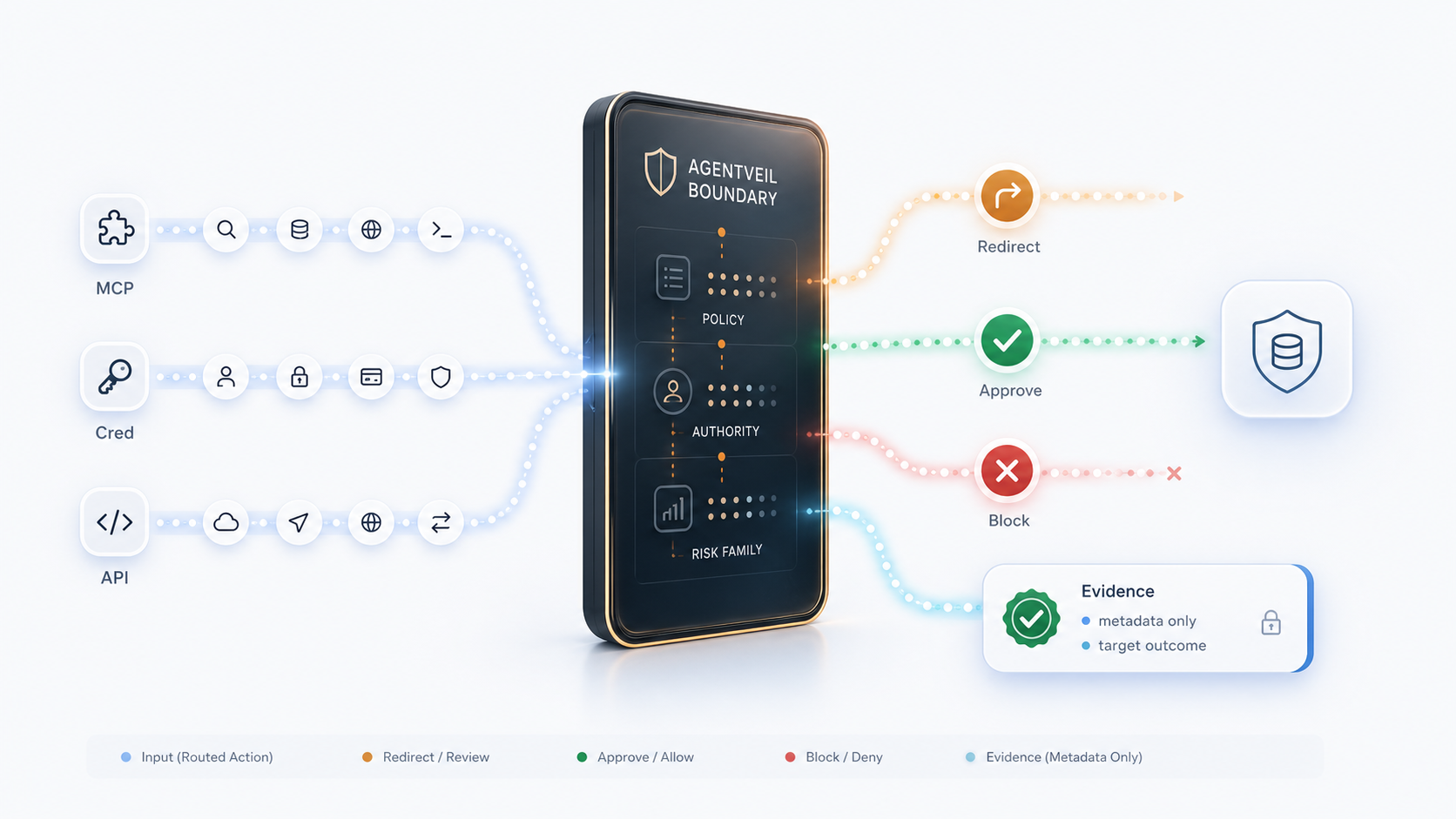
AgentVeil routed action control flow

Visual overview: request → AgentVeil boundary → redirect / approval / hard-block → local proof.

Data handling: AgentVeil is designed to keep raw MCP arguments local by default and to record bounded metadata and hashes for evidence. See Data Handling.

The AgentVeil Loop

AgentVeil is one product loop, not a pile of separate components:

StepWhat happens
AttemptAgent tries a native mutation or routed MCP action in a configured project
DecisionAgentVeil returns allow, approval required, redirect, or hard-block
Controlled pathWhen one is available, redirect guidance tells the agent to retry through the managed MCP route
ProofBounded local evidence records the decision; inspect it with events show --last

Approval fixes actions that need human review. Redirect tells the agent to retry through the controlled MCP route when one is available. Hard-block means approval will not help for that action. Local proof is available now through the CLI—not a future dashboard page.

What AgentVeil Adds

AgentVeil is not an AI agent and does not replace an agent runtime. It adds a control layer around actions that are configured to pass through AgentVeil.

LayerAgent runtime / frameworkAgentVeil adds
ExecutionRuns the agent and exposes toolsMediates configured action paths before execution
ApprovalMay prompt per tool call, depending on runtimeAdds policy-aware approval for routed writes and mutations
Risk classificationRuntime-specific, if presentShared read / write / destructive / unknown classification
Sandbox boundaryRuntime-specificProject or downstream sandbox limits for routed actions
EvidenceUsually chat or runtime logsBounded local records with request ids, decisions, and hashes
Cross-runtime consistencyPer runtimeSame core control semantics where actions are routed through AgentVeil

Quick Start

Use AgentVeil with a supported project connector, or run the Core MCP Proxy directly.

Cursor project connector

pip install agentveil-mcp-proxy
agentveil-mcp-proxy setup cursor --choose-folder

Choose the project folder you want to protect, then reopen / reload Cursor for that project.

After setup, in the configured project:

  • supported native risky agent actions can be blocked before execution;
  • the agent receives redirect guidance toward the AgentVeil MCP route;
  • routed MCP writes can require approval;
  • AgentVeil records bounded local evidence for decisions and outcomes.

Some Cursor versions may require enabling the managed agentveil-mcp-proxy MCP server once in Tools & MCPs after reload.

Claude Code project connector

pip install agentveil-mcp-proxy
agentveil-mcp-proxy setup claude-code --choose-folder --yes

Choose the project folder you want to protect, then reopen / reload Claude Code for that project.

After setup, in the configured project:

  • supported native Claude Code mutation tools are checked by a project-local hook;
  • risky native mutations are blocked with redirect guidance toward the controlled MCP route;
  • AgentVeil MCP writes go through the proxy approval path;
  • bounded evidence is written locally.

Codex project connector

pip install agentveil-mcp-proxy
agentveil-mcp-proxy setup codex --choose-folder --yes

Choose the project folder you want to protect, then open / restart Codex for that project. Codex asks you to trust the AgentVeil project hook once; until the hook fires and evidence is observed, setup status --client codex remains advisory, not protected.

After setup and hook trust, in the configured project:

  • supported native Codex mutation tools are checked by a project-local hook;
  • risky native mutations are blocked with redirect guidance toward the controlled MCP route;
  • AgentVeil MCP writes go through the proxy approval path;
  • bounded evidence is written locally.

Gemini CLI project connector

pip install agentveil-mcp-proxy
agentveil-mcp-proxy setup gemini-cli --choose-folder --yes

Choose the project folder you want to protect, then open / restart Gemini CLI for that project. Gemini CLI asks you to trust the project folder before it loads local settings, hooks, and MCP servers.

After setup and folder trust, in the configured project:

  • supported native Gemini CLI mutation tools are checked by a project-local hook;
  • risky native mutations are blocked with redirect guidance toward the controlled MCP route;
  • AgentVeil MCP writes go through the proxy approval path;
  • bounded evidence is written locally.

Hermes CLI controlled MCP profile

Hermes CLI is launched through AgentVeil rather than installed as a persistent project hook:

pip install agentveil-mcp-proxy
agentveil-mcp-proxy launch --profile hermes-cli --choose-folder -- \
  hermes chat -q "Create a project note"

The launcher configures a project-local Hermes home, routes Hermes to the AgentVeil MCP tools, and keeps local proof/evidence in the selected project.

In this profile:

  • Hermes project work is routed through the AgentVeil MCP route;
  • routed reads, writes, approval, sandbox boundaries, redirect guidance, and local proof use the shared AgentVeil control layer;
  • native Hermes tools are limited by profile settings, but AgentVeil does not claim host-wide control of Hermes or the machine.

Core MCP Proxy path

For lower-level MCP routing without an IDE connector:

pip install agentveil-mcp-proxy
agentveil-mcp-proxy init --quickstart-filesystem ./sandbox
agentveil-mcp-proxy doctor --full
agentveil-mcp-proxy run

This starts the core route: MCP tool calls explicitly pointed at agentveil-mcp-proxy.

Verify your setup works

After installing a project connector, walk the current shipped path in that project:

  1. Ask the agent to read project context. Routed reads such as list_workspace, read_file, get_file_info, and instruction_surface_status should allow.
  2. Ask the agent to create or edit a file, for example:
Create avp-test.txt with the text hello

The configured connector should stop the native mutation with redirect guidance; the agent should then use the controlled MCP route, where risky writes require approval. 3. Open the approval page when prompted and review the bounded proof details. 4. Inspect local proof from the CLI:

agentveil-mcp-proxy events show --last

The default human output should include lines like decision=approval_required and tool=write_file without dumping raw JSON. Use --json when you need structured fields.

Connectors Available Today

AgentVeil is built around action-control boundaries. Cursor, Claude Code, Codex, and Gemini CLI are supported project hook connectors. Hermes CLI is available as a controlled MCP launch profile. The Core MCP Proxy is runtime-agnostic for MCP clients that are explicitly configured to call it.

SurfaceMechanismWhat it addsStatus
Cursor project connectorProject-local hooks + MCP routeNative mutation block + redirect guidance, routed MCP approval/evidenceAvailable
Claude Code project connectorProject-local PreToolUse hook + MCP routeNative mutation block + redirect guidance, routed MCP approval/evidenceAvailable
Codex project connectorProject-local PreToolUse hook + MCP routeNative mutation block after one-time hook trust, redirect guidance, routed MCP approval/evidenceAvailable
Gemini CLI project connectorProject-local BeforeTool hook + MCP routeNative mutation block after one-time folder trust, redirect guidance, routed MCP approval/evidenceAvailable
Hermes CLI profileAgentVeil launcher + project-local Hermes MCP routeRouted MCP approval/evidence, sandbox boundaries, redirect guidance inside the AgentVeil routeAvailable
Core MCP ProxyMCP transport boundaryRouted MCP policy, approval, redirect / policy-stop outcomes, bounded evidenceAvailable

The Python SDK also includes framework examples and optional helper modules for CrewAI, LangGraph, AutoGen, PydanticAI, OpenAI, Gemini, and AWS Bedrock. Those examples are not the same as a project connector: they show how agent workflows can use AgentVeil primitives, while connector coverage still depends on what is configured and routed through AgentVeil.

Future connectors can follow the same model: configure a boundary, route risky actions through controlled tools, and record evidence.

Compatibility

Current connector checks have been run with:

SurfaceChecked version
Cursor3.6.31
Claude Code2.1.126
Codexinteractive TUI hook trust path
Gemini CLI0.49.0 folder trust path
Hermes CLIlive controlled MCP route path
Python package metadataPython 3.10-3.13

Other versions may work, but are not listed here until verified.

What AgentVeil Controls

AgentVeil has two public action-control surfaces:

  1. Project connectors

    • configured per project/workspace;
    • install managed local hooks and MCP route config;
    • block supported native risky agent mutation tools;
    • return redirect guidance toward AgentVeil MCP tools;
    • use MCP Proxy approval and evidence for routed tool calls.
  2. Core MCP Proxy

    • wraps downstream MCP servers;
    • classifies routed MCP tool calls;
    • returns allow / approval_required / redirect / policy-stop outcomes;
    • records bounded local evidence.

What AgentVeil Does Not Control

AgentVeil does not claim machine-wide control.

It does not control:

  • your whole machine;
  • every Cursor / Claude / Codex / Gemini / Hermes chat globally;
  • every autonomous agent runtime globally;
  • direct human terminal commands outside configured AgentVeil paths;
  • IDE actions outside supported agent tool surfaces;
  • MCP servers not routed through AgentVeil;
  • disabled, removed, or bypassed hooks;
  • unsupported client modes that skip hooks.

Actions outside configured AgentVeil boundaries are not classified or logged.

Bounded Evidence

AgentVeil records bounded local evidence for controlled actions, so you can review what an agent requested, whether it was allowed, given redirect guidance, sent for approval, returned a hard-block decision, and whether the controlled path completed.

Inspect recent decisions:

agentveil-mcp-proxy events show --last
agentveil-mcp-proxy events show --last --json

Example evidence shape:

{
  "tool": "write_file",
  "decision": "approval_required",
  "approval": "approved",
  "target_reached": true,
  "payload_hash": "sha256:...",
  "timestamp": "2026-06-25T..."
}

Evidence is designed for audit and incident review:

  • what the agent requested;
  • what policy decided;
  • whether approval was required;
  • whether the action executed;
  • hashes and bounded metadata instead of raw prompts or full payloads by default.

This is useful for AI-agent governance, compliance review, and debugging unsafe automation.

Handling False Positives

AgentVeil is designed to fail closed for risky actions. If a supported agent action is blocked unexpectedly, inspect local decision evidence before changing the setup.

Start with:

agentveil-mcp-proxy events show --last
agentveil-mcp-proxy setup status --json

For routed MCP actions, approval and policy behavior are documented in:

If a connector is not right for a project, remove only the managed AgentVeil entries for that project instead of editing client config by hand.

Preview managed removal:

agentveil-mcp-proxy setup remove cursor
agentveil-mcp-proxy setup remove claude-code
agentveil-mcp-proxy setup remove codex
agentveil-mcp-proxy setup remove gemini-cli

Apply removal after review:

agentveil-mcp-proxy setup remove cursor --yes
agentveil-mcp-proxy setup remove claude-code --yes
agentveil-mcp-proxy setup remove codex --yes
agentveil-mcp-proxy setup remove gemini-cli --yes

Scope

Available today:

  • MCP Proxy for routed MCP tool calls;
  • project-local Cursor connector;
  • project-local Claude Code connector;
  • project-local Codex connector;
  • project-local Gemini CLI connector;
  • Hermes CLI controlled MCP launch profile;
  • approval / redirect / block / evidence outcomes for routed actions;
  • bounded local evidence export.

Available as SDK / protocol primitives:

  • capability-token primitives;
  • local identity helpers;
  • delegation receipts;
  • proof packet helpers.

Preview / design-partner product flows:

  • session-token flows for reducing repeated approvals;
  • richer policy packs;
  • credential custody;
  • egress boundary;
  • hosted approval and team governance.

Not included in the public connector:

  • machine-wide shell interception;
  • global Cursor / Claude / Codex / Gemini / Hermes lock;
  • automatic control of unrelated chats;
  • private enterprise policy packs;
  • hosted auth, licensing, telemetry, or enterprise custody logic.

Example Risk Patterns

AgentVeil is useful when an agent crosses from reading context into changing state.

WorkflowLow-risk actionsHigher-risk actions AgentVeil can gate
Code / PR workflowread files, inspect git history, list workspaceedit files, run mutation commands, change repo state
Content workflowread drafts, inspect metadatapublish, send, update CMS-like content
Data workflowread query results, inspect schemasmutate records, export sensitive data, run destructive operations
Package / build workflowinspect dependencies, read lockfilesinstall packages, run scripts, change build output

Agentic media / broadcast workflows

Agentic media and broadcast workflows often start with read access to files, assets, CMS entries, Git history, or SQL query results, then cross into higher-risk writes and sends: publishing updates, changing a repository, mutating a database, or sending final content.

This is one example of the broader risk pattern:

agent reads metadata        -> allow / observe
agent edits file or record  -> approval required
agent publishes or sends    -> approval / redirect
agent tries unsafe mutation -> block
agent action completes      -> bounded evidence

AgentVeil does not ship native broadcast, CMS, or SQL integrations in this package. The example describes the risk pattern for agentic workflows.

Why This Exists

AI agents increasingly hold direct access to files, repositories, package managers, credentials, and workflow tools.

The risk is no longer only what an AI says. The risk is what an AI can do.

AgentVeil focuses on action control:

  1. Block unsafe native agent actions in configured project connectors.
  2. Return redirect guidance so the agent can retry through controlled MCP tools.
  3. Require approval for routed writes and mutations.
  4. Record bounded evidence for audit, review, and compliance.

AgentVeil does not solve the general access-control safety problem. It narrows the problem to configured projects, routed MCP calls, supported agent tool paths, and explicit policy decisions.

Design Basis

The MCP Proxy design is summarized in MCP Proxy Design Principles.

  • Fail-safe defaults: missing policy, missing approval, or unavailable trusted decisions move toward denial or explicit review.
  • Complete mediation on routed calls: each protected downstream MCP call goes through the same classify, decide, evidence, and forward-or-deny path.
  • Least privilege: approvals are scoped to concrete action context instead of broad standing permission.
  • Separation of privilege: local proxy identity, control grants, and backend signing authority are separate roles.
  • Bounded evidence: receipts, payload hashes, and local evidence chains bind decisions to the routed action subset.

For deeper security framing, including Saltzer & Schroeder and HRU-aware limits, see MCP Proxy Design Principles.

Comparison

CategoryMain focusWhere AgentVeil differs
Prompt/content guardrailsDetect unsafe textAgentVeil controls actions and tool calls, not only prompts
LLM API gatewaysRoute model trafficAgentVeil mediates agent tool execution and evidence
Direct MCP serversExpose tools to agentsAgentVeil adds policy, approval, redirect, and evidence between agent and tool when routed through the proxy
Secret managersStore credentialsAgentVeil controls when risky agent actions may execute
Generic audit logsRecord app eventsAgentVeil binds evidence to specific agent action requests and decisions

Reporting Issues And Security Findings

For bugs and integration problems, use the repository issue tracker. For security-sensitive findings, follow the repository Security Policy.

Security-sensitive reports should not include secrets, raw credentials, private keys, or full customer data in public issues.

Licensing

The root SDK is MIT-licensed.

agentveil-mcp-proxy is a separately packaged source-available component under BUSL-1.1. See Licensing before using it in commercial or competing hosted services.

Python SDK and advanced protocol primitives

Advanced Python SDK package: agentveil.

The public SDK also includes protocol primitives that can support custom integrations: local did:key identity, delegation receipts, credential helpers, reputation credential access, receipt helpers, and optional framework adapter modules under agentveil.tools.* when their framework dependencies are installed.

These primitives are not the main product path in this README. For direct use, start with:

Related MCP Servers

13bm/GhidraMCP

🐍 ☕ 🏠 - MCP server for integrating Ghidra with AI assistants. This plugin enables binary analysis, providing tools for function inspection, decompilation, memory exploration, and import/export analysis via the Model Context Protocol.

🔒 Security1 views
123Ergo/unphurl-mcp

📇 ☁️ - URL intelligence for AI agents. 13 tools for security signals and data quality: redirect behaviour, brand impersonation detection, domain age, SSL validation, parked detection, URL structural analysis, DNS enrichment.

🔒 Security0 views
82ch/MCP-Dandan

🐍 📇 🏠 🍎 🪟 🐧 - Real-time security framework for MCP servers that detects and blocks malicious AI agent behavior by analyzing tool call patterns and intent across multiple threat detection engines.

🔒 Security0 views
9hannahnine-jpg/arc-gate-mcp

🐍 - Runtime governance for MCP tool calls. Blocks prompt injection and capability abuse before tool results reach your agent.

🔒 Security0 views

Engagement

Views
0
Installs
0
Upvotes
0

Views and upvotes are unique per visitor network (hashed IP). Installs count copy actions.

Status

Health: Active

Recent health check succeeded.

Last checked: 7/28/2026, 9:23:12 PM

Unclaimed listing (imported or pending owner verification). Claim it →
★ Spotlight Slot

Feature Your MCP Server

Get maximum visibility for your server across our directory, search results, and detail pages.

Spotlight Your Server

Own this project?

This directory is pre-filled from public sources. Claim via GitHub README, site badge, or DNS TXT to get the verified badge and attach your website.

Claim this listing

Promote this listing

Optional paid placement. Free listings stay free forever.

Share & Embed

Add our SVG badge (dark/light directory styles) or embeddable widget to your site.