CoS Codex Bridge README
The full upstream README, mirrored here for reference. Install config, tool schemas, adoption signals, and an original overview live on the CoS Codex Bridge listing page.
CoS Codex Bridge
Your Chief of Staff. Now in charge of Codex, too.
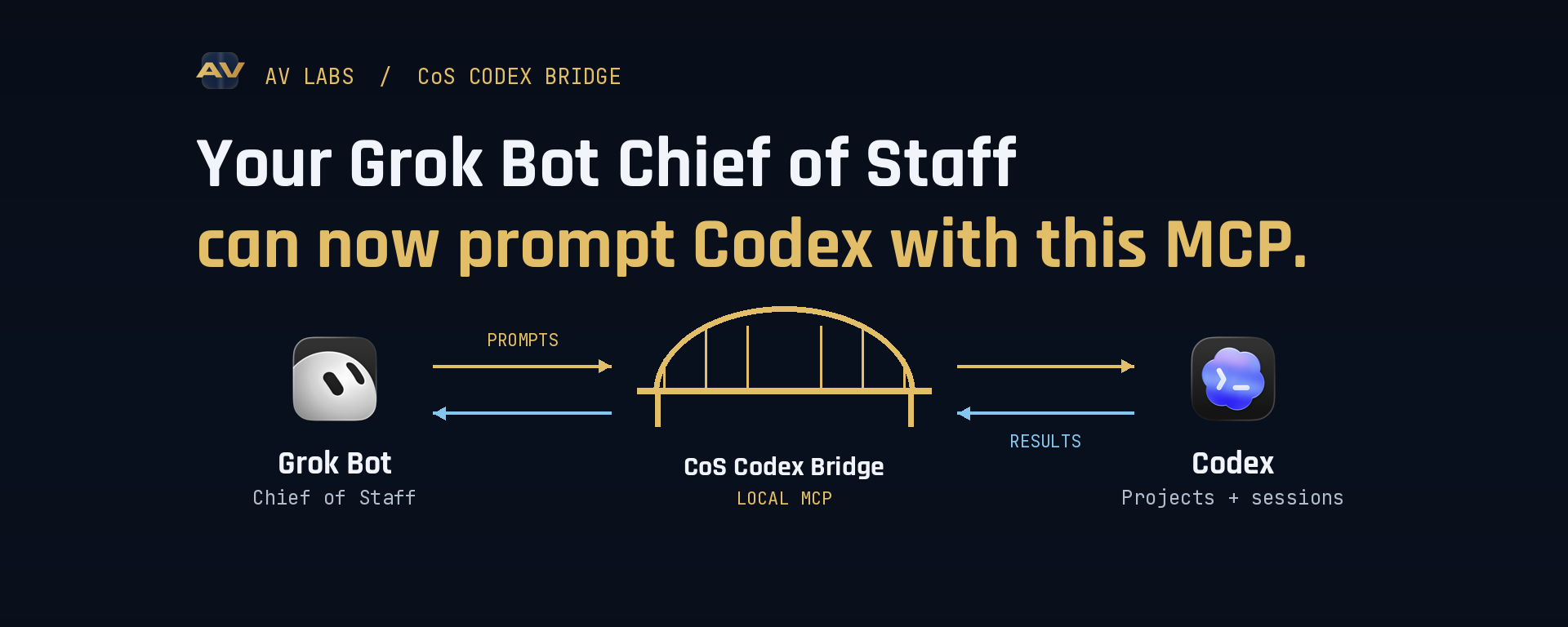





A local MCP server that lets a Chief of Staff client find Codex tasks, create project work, deliver whole prompts, follow progress and continue the same conversation. An optional Claude Code CLI route in the same MCP does this with local project folders and saved CLI sessions. Free MIT core. No bridge subscription or checkout. Your existing Codex or Claude Code access is required for real execution.
Choose your release: 0.1.4 on npm is the stable Codex-only route (@latest). 0.2.0-beta.1 adds Claude Code CLI support (@beta) in the same MCP. Install locally, connect your client, then use the bridge_* tools. No daemon or Desktop-owner adapter installation is required. The Codex core workflow and the Grok Bot → Claude Code CLI handoff have passed owner field testing on macOS. Desktop-owned paused-queue recovery remains a known Codex limitation. Sidebar rendering on newer Codex Desktop versions is not certified; check the compatibility table before relying on it. A queued receipt is never proof that work started.
The bridge is indexed in the official MCP Registry and Glama. These are discovery listings; the bridge still installs and runs locally.
What your Chief of Staff can do
- Turn research or a product idea into a new Codex project and task.
- Send the complete prompt and attached text without manual copying and pasting.
- Find an existing Codex task, read its progress and continue the same conversation.
- Track delivery with durable receipts instead of assuming an accepted prompt ran.
- Rename, assign, pin and cancel scoped work across approved projects.
- Keep local project access inside explicit allowlisted directories.
Example: “Create a project for this idea, send my research to Codex, monitor the build, and follow up in the same task with the review findings.”
Claude Code route (beta)
The same MCP can now start and continue Claude Code CLI work. Pass provider:"claude-code" to bridge_projects, bridge_sessions and bridge_submit; the existing Codex route remains the default. A local folder is the Claude Code project context. The bridge creates a saved CLI session there, returns a durable receipt, reads its result and follows up in the same session. This was locally tested with Claude Code 2.1.269, including a real file edit in a disposable folder.
In an owner field test, the Grok Bot Chief of Staff used the installed MCP to create an allowlisted folder, send a prompt to Claude Code, read its completion, and follow up in the same saved session. Both bridge receipts and Claude Code's native session history were checked. This proves the local CLI handoff, not Claude Desktop or account Project control.
Claude account Projects, ordinary chats, Cowork/Dispatch and Desktop-owned sessions are separate surfaces. This route does not create or control them, and a CLI session does not automatically appear in Claude Desktop's sidebar. Claude setup, exact workflow and limits.
See the handoff
The animation illustrates the local handoff. It uses no private Desktop data or project screenshots.
Try the safe demo
New here? Start with the no-account quickstart. It uses the stable npm package, needs no Git clone, and shows what a completed receipt looks like. Report your install result, including which local MCP client you use.
This exercises the MCP workflow locally without a Codex account, model call or project changes:
This clone uses GitHub main, currently the Claude Code CLI preview (0.2.0-beta.1). To demo the stable Codex-only source instead, run git checkout v0.1.4 after cd cos-codex-bridge and before npm ci.
The demo prints a completed receipt, payload hash and task metadata so you can see the bridge contract before granting access to a real project.
Easiest setup: give this link to your local assistant
Open the repository and installation instructions. An assistant with local terminal access can install it for you. A browser-only or cloud-only chat cannot install software on your computer.
Copy this installation request to your Chief of Staff:
Install CoS Codex Bridge from https://github.com/AV-Labs-Co/cos-codex-bridge. Read the README and SECURITY.md first. Use only a project folder I approve, keep read-only defaults, and preserve existing client configuration. Follow the installer instructions, run doctor, and connect the generated stdio MCP entry to my local client. Tell me what passed and what still needs setup. Wait for my first task before submitting any work. Do not publish or deploy anything.
You can also download the source archive from Releases, extract it and follow the steps below. Git cloning makes later updates easier. A public npm package is available, but no hosted endpoint is required.
Install
Requires Node.js 22+, npm, a locally authenticated Codex CLI for Codex work and/or Claude Code CLI for Claude work, and a local client supporting stdio MCP. Codex Desktop registration additionally requires Codex Desktop on macOS.
The Git clone below installs the current main branch, which is the Claude Code CLI preview (0.2.0-beta.1). For the stable Codex-only source, run git checkout v0.1.4 immediately after cd cos-codex-bridge, before npm ci. The pinned npm @0.1.4 command below is the stable package route.
The installer writes a private config, launcher and MCP snippet under ~/.local/share/cos-codex-bridge. Keep the checkout in place. Default execution is read-only; use --write only for approved project edits. Choose specific project roots, never your entire home directory. Add --codex /absolute/path/to/codex or --claude /absolute/path/to/claude if either CLI is not on the MCP client's PATH. See installer and upgrade steps.
If you prefer npm to Git, install a pinned release into a dedicated folder, then run its same local installer. Use @0.1.4 for stable Codex only or @0.2.0-beta.1 for Codex plus the Claude Code CLI preview:
Keep that package folder: the generated launcher points to it. The npm path was checked with clean stable and beta installs, isolated demo configs and doctor. The installer does not edit any MCP client settings for you.
Check codexAvailable, claudeCodeAvailable, claudeCodeAuthenticated, mode, sandbox and roots. The Claude sign-in check is made from the MCP host's process and may differ from a sandboxed terminal; doctor does not verify Desktop sidebar rendering. For a model-free demo, install into a separate prefix with --demo.
Paste the generated mcp-client.json into your client's MCP configuration. Equivalent shape:
A complete handoff
Tell your Chief of Staff: “Find my app project, send this entire implementation brief to Codex, monitor it, then continue that same task with the review findings.”
- Resolve the exact project and task with
bridge_projectsandbridge_sessions. - Create a directory if needed, then register it. A directory alone is not a Desktop project.
- Call
bridge_submitwithproject, the wholeprompt, and a stablerequestId. IncludethreadIdfor follow-ups. - Poll
bridge_receipt. Verify hashes, task ID and eventual completion. Handle clarification withbridge_answer. - Use
bridge_session_manageto rename, assign or pin the task. Stored metadata and visible Desktop rendering are separate proofs.
A successful model completion does not independently prove that generated code works. Review and test the result.
Ten tools, twelve features and one known limitation
| Tool | Purpose |
|---|---|
bridge_projects | List aliases, create a folder, register/open or inspect a Desktop project |
bridge_sessions | Find and read existing allowed tasks, including externally created tasks |
bridge_submit | Start or follow up; stable request IDs and complete UTF-8 payloads |
bridge_receipt | Durable progress, hashes, bounded output and explicit uncertainty |
bridge_steer | Retry recovery of an existing bridge queue item, without resending it |
bridge_answer | Answer pending clarification; never approve permission expansion |
bridge_cancel | Request cancellation of bridge-owned direct work |
bridge_artifact | Read/write versioned text artifacts without overwrite |
bridge_session_manage | Rename, pin/unpin and assign to a registered project |
bridge_doctor | Report mode, Codex version, scope and honest capability limits |
Known limitation (uncommon): If a session already has an active writer and a steering prompt is sent, the prompt waits for a natural pause/stopping point. On a long autonomous run, the only human intervention needed is pressing Steer in that case.
See the v1 capability contract and verification matrix.
Busy tasks, steering and interruption recovery
Direct submission defaults to SESSION_BUSY when another writer owns the task. To opt into the existing Desktop execution policy, use onBusy:"queue" and acceptDesktopPolicy:true. delivery:"desktop-queue" explicitly queues to an existing task. These paths use Codex's first-party queue API, the equivalent of codex queue, and preserve separate text inputs and stable client message IDs.
Receipts distinguish busy, queued, steered, delivered, completed, blocked and uncertain. thread/queue/start recovery has passed a local live test with the writer available. Desktop-owned paused recovery is deferred for v0.1; it may require a human Steer click. bridge_steer retries the exact saved item when the writer is available, including an existing CLI-created item adopted by its queue ID. bridge_sessions with includeQueue:true exposes pending IDs and inferred needs-steer state. It never silently forks or treats queue disappearance as delivery. See queue semantics.
Security defaults
Source preview, not in npm 0.1.4 or 0.2.0-beta.1: direct submissions now accept per-handoff writeIntent. A read-only handoff narrows a write-enabled configuration; a write handoff cannot expand configured authority. Desktop queue rejects explicit per-handoff intent because its existing permissions cannot be narrowed by this route. Contract and examples.
Default-deny realpath allowlists, read-only direct execution, private local receipts, bounded UTF-8 input, explicit project/task matching and no implicit cloud endpoint. Prompts and artifacts are stored locally in plaintext for receipt integrity; do not treat them as encrypted storage.
Direct workers disable inherited connectors and deny permission approvals. Desktop queue is a separate, explicit policy boundary: it uses the existing task's permissions and tools. The bridge cannot enforce a narrower sandbox inside that already-running task. No automatic store submission, social posting or publication is authorized. See SECURITY.md.
Client matrix
| Environment | Evidence |
|---|---|
| Grok Bot / CoS on owner's Mac | Codex orchestration and a Claude Code CLI create → complete → same-session follow-up field-tested; installation-specific integration |
| Standard stdio MCP client | Protocol handshake, schemas, errors, installer and demo tested automatically on macOS and Ubuntu |
| Codex Desktop macOS / CLI 0.153.4 | Owner-tested registration, assignment, pinning, continuity and queue delivery |
| Codex Desktop 0.155.0-alpha.9.2 | Native metadata observed in field; sidebar rendering not certified; legacy adapter disabled |
| Other MCP clients | Expected protocol compatibility; not individually field-certified |
| Claude Code CLI 2.1.269 | Local create, complete, read and same-session follow-up verified; restricted file write verified in a disposable folder |
| Claude Desktop/Claude account Projects | No creation, sidebar registration, pinning or live-session control claim; saved local transcript may be readable but not resumable through this route |
| Windows runtime / Linux Desktop integration | Not verified; no macOS Desktop parity claim |
| Ordinary ChatGPT chats | Not supported |
| Hosted service / Composio cloud | Not provided or listed |
Native project assignment is supported through the installed experimental App Server API. An optional, version-gated legacy Desktop assignment adapter has backup and race checks; it is off by default and remains experimental.
Community
This project focuses on reliable Chief of Staff handoffs rather than a universal superiority claim. Other Codex MCP projects solve useful adjacent workflows. We do not claim “most advanced,” all-account control or blanket autonomy.
Ask an installation question or share a client recipe in GitHub Discussions. Use Issues for reproducible bugs, with redacted version, state and error details. Never post full private prompts or credentials.
Star it to follow development and fork it for your client. MIT License.