AllMCPs
BrowseBestCategoriesStackCompareToolsGuidesBlog
Log in Submit MCP

Stay in the loop

Get new MCP servers and top picks in your inbox.

AllMCPs

The open directory for discovering and installing Model Context Protocol servers.

AllMCPs on GitHub (opens in a new tab)
Launched onTiny Startupstinystartups.com
Explore
  • Browse servers
  • Best MCP servers
  • Categories
  • MCP clients
  • Agent prompts
  • Stack Builder
  • Compare servers
  • Random discovery New
  • Submit a server
  • Pricing & Boost Boost
Learn
  • Guides hub
  • What is MCP?
  • Install guide
  • Build an MCP server
  • Deploy an MCP server
  • Security guide
  • Troubleshooting
  • MCP for SEO & AEO
  • Protocol versioning
  • Blog & updates
Tools
  • All developer tools
  • Config generator
  • Config validator
  • Config auditor
  • MCP playground
  • Token calculator
  • OpenAPI β†’ MCP
  • Badge generator
For agents
  • REST API docs
  • Trust & traffic Live
  • Remote MCP server SSE β†— (opens in a new tab)
  • llms.txt β†— (opens in a new tab)
  • Catalog JSON β†— (opens in a new tab)
Company
  • About
  • Advertise Sponsor
  • Contact
  • GitHub β†— (opens in a new tab)
  • Terms
  • Privacy
AllMCPs VerifiedAllMCPs VerifiedFeatured on Nick LaunchesFeatured on Nick LaunchesLaunch Llama NewsletterLaunch Llama NewsletterVerified DR - allmcps.comVerified DR - allmcps.comFeatured on SaaSGrowFeatured on SaaSGrowFeatured on Twelve ToolsFeatured on Twelve ToolsFeatured on Saaspa.geFeatured on Saaspa.geFeatured on Findly.toolsFeatured on Findly.toolsFeatured on Startup FameFeatured on Startup FameFeatured on LaunchKiwiFeatured on LaunchKiwiFeatured on ScrollLaunchFeatured on ScrollLaunchFeatured on DailyPingsFeatured on DailyPingsFazier badgeFazier badgeFeatured on NewTool.siteFeatured on NewTool.siteFeatured on saasfame.comFeatured on saasfame.comDR Checker - Domain RatingDR Checker - Domain RatingListed on Turbo0Listed on Turbo0Launched on LaunchBoard - Product Launch PlatformLaunched on LaunchBoard - Product Launch PlatformList on SimilarlabsList on Similarlabshttps://codetrendy.comhttps://codetrendy.comListed on DevTool.ioFeatured on BuildlistFeatured on BuildlistLaunched on Tiny StartupsFeatured on ShowMeBestAIFeatured on ShowMeBestAIFind us on LaunchZoneFind us on LaunchZoneAllMCPs VerifiedAllMCPs VerifiedFeatured on Nick LaunchesFeatured on Nick LaunchesLaunch Llama NewsletterLaunch Llama NewsletterVerified DR - allmcps.comVerified DR - allmcps.comFeatured on SaaSGrowFeatured on SaaSGrowFeatured on Twelve ToolsFeatured on Twelve ToolsFeatured on Saaspa.geFeatured on Saaspa.geFeatured on Findly.toolsFeatured on Findly.toolsFeatured on Startup FameFeatured on Startup FameFeatured on LaunchKiwiFeatured on LaunchKiwiFeatured on ScrollLaunchFeatured on ScrollLaunchFeatured on DailyPingsFeatured on DailyPingsFazier badgeFazier badgeFeatured on NewTool.siteFeatured on NewTool.siteFeatured on saasfame.comFeatured on saasfame.comDR Checker - Domain RatingDR Checker - Domain RatingListed on Turbo0Listed on Turbo0Launched on LaunchBoard - Product Launch PlatformLaunched on LaunchBoard - Product Launch PlatformList on SimilarlabsList on Similarlabshttps://codetrendy.comhttps://codetrendy.comListed on DevTool.ioFeatured on BuildlistFeatured on BuildlistLaunched on Tiny StartupsFeatured on ShowMeBestAIFeatured on ShowMeBestAIFind us on LaunchZoneFind us on LaunchZone
Β© 2026 Jackalope Digital LLC. All rights reserved.
  1. Home
  2. πŸ’» Developer Tools
  3. Corral
C
Health: ActiveRecent health check succeeded.Last checked 9/8/2026, 2:16:32 PM

Corral

User RatingsBe the first to rate and review this MCP server! Enrichment pendingWe haven’t run our AI enrichment pass on this listing yet, so the overview, use cases, and FAQ below may be sparse or missing. We work through the catalog over time β€” check back soon.
View Repository1 GitHub StarsTotal stargazers on GitHub for the source repository (1 stars).Visit Website

Query your Corral-organised local mirror of cloned GitHub repositories. Zero network calls.

Quick Install

Automated & IDE Setup

Copy the AI prompt to install this server into Claude Code, Cursor, or another agent β€” or use 1-click editor setup below.

Add to CursorAdd to VS Code
Manual Client & Custom JSON ConfigExpand JSON β–Ύ

Client Config & Setup

Choose your client or environment
Target File:~/Library/Application Support/Claude/claude_desktop_config.json
claude_desktop_config.json
{
  "mcpServers": {
    "corral": {
      "command": "npx",
      "args": [
        "-y",
        "corral"
      ]
    }
  }
}

πŸ’‘ Paste the JSON block into your client's configuration file under mcpServers, then restart the application.

Install Tool Schemas (13) Directory Badge Claim listing AlternativesπŸ’» More in Developer Tools

Capabilities & Tool Schemas (13) ~268 tokensApproximate context cost of this server’s tool schemas (~4 chars/token), before any tool is called. Actual usage depends on your client and model.Self-reported Self-reportedParsed from the repository README, not verified against a live server β€” may be incomplete or out of date.

Inspect callable tools, capabilities, and parameters exposed to AI agents by Corral.

corral_list_repos

Filter local clones by visibility / language / name / sync state

corral_find_repo

Resolve a fuzzy name to one clone (returns candidates on ambiguity)

corral_get_repo_metadata

Full metadata for one clone, including current branch

corral_status_summary

Workspace summary: counts by visibility and language

corral_workspace_index

Full structured index in a single call

corral_find_symbol

Where a symbol is declared, across *every* clone

Documentation Overview

Corral logo

Corral

Automatically clone and organise repositories from GitHub, GitLab, Gitea, Forgejo, Codeberg and Bitbucket using Finder-friendly collections, ecosystems, and metadata.


Build Status Go Reference golangci-lint Code Coverage OpenSSF Scorecard OpenSSF Best Practices Documentation Release Version License

Corral Demo


Contents

Getting started

  • Install β€” mise, Homebrew, Arch, Nix, Go, or from source
  • Quick Start β€” clone and organise in one command

Features & Capabilities

  • Features β€” structured layout, concurrency, and security
  • Architecture β€” end-to-end flow from API fetch to per-repo dispatch
  • Interactive TUI Mode β€” keybindings, commands, and autocomplete
  • Layout Customization β€” Apple-style collections, ecosystems, and custom templates
  • Smart Syncing β€” network-optimised incremental updates
  • Exec Mode β€” concurrent batch execution of Git commands
  • MCP Server β€” expose your local workspace to AI coding agents
  • Cross-repository symbol lookup β€” find where anything is defined, across every clone

Reference & Operational

  • Usage & Flags β€” complete CLI parameter reference
  • Examples β€” index of runnable programmatic examples
  • Troubleshooting β€” quick solutions to common errors
  • Frequently Asked Questions β€” design decisions and Windows/WSL support

Project

  • Documentation β€” manual, API reference, developer docs
  • When not to use Corral β€” honest limits
  • Requirements & toolchain policy β€” the Go floor and when it moves
  • Stability guarantees β€” what a breaking change means here
  • Security & hardening β€” reporting, posture, fuzzing
  • License

Install

mise (macOS / Linux)

bash
mise use -g github:sebastienrousseau/corral

This installs the latest released corralctl binary and keeps it managed with the rest of your mise tools.

Homebrew (macOS)

bash
brew install sebastienrousseau/tap/corralctl

Homebrew here is a cask, which is a macOS-only mechanism β€” brew install on Linux will refuse it. On Linux use the .deb/.rpm packages or the tarballs attached to each release, or install with mise or the Go toolchain.

Arch Linux (AUR)

bash
yay -S corralctl-bin    # or: paru -S corralctl-bin

Nix (any platform)

sh
nix run github:sebastienrousseau/corral -- --help   # run without installing
nix profile install github:sebastienrousseau/corral # install

The flake ships the binary with its manpages and shell completions, and nix develop gives a shell with every tool the project's CI gates need, pinned by flake.lock.

Go toolchain

bash
go install github.com/sebastienrousseau/corral/cmd/corralctl@latest

Installs into $(go env GOPATH)/bin (or $GOBIN when set). Note that a binary built this way reports corralctl version dev: the real version is stamped by the release pipeline through -ldflags, which go install does not apply. Use a release artefact if you need --version to be meaningful.

Build from source

Requires Go 1.26+ and Git:

bash
git clone https://github.com/sebastienrousseau/corral.git
cd corral
make install            # installs ~/.local/bin/corralctl

Platform Prerequisites

macOS
bash
brew install go git gh
Ubuntu / Debian / WSL2
bash
sudo apt install golang git

Install gh separately following the GitHub CLI installation guide.

Fedora / RHEL
bash
sudo dnf install golang git gh

Quick Start

Run Corral with an owner name (GitHub username or organization) to clone and automatically sort all repositories into a clean local directory hierarchy:

bash
# Log in to GitHub CLI first (or set GITHUB_TOKEN)
gh auth login

# Run Corral for your profile
./corralctl my-username

This converges your local directory structure into a structured mirror:

text
~/Code/
β”œβ”€β”€ Public/
β”‚   β”œβ”€β”€ Go/
β”‚   β”‚   └── corral/
β”‚   β”œβ”€β”€ Rust/
β”‚   β”‚   └── my-crate/
β”‚   └── Web/
β”‚       └── project.github.io/
β”œβ”€β”€ Private/
β”‚   └── Python/
β”‚       └── internal-tool/
β”œβ”€β”€ Forks/
β”‚   └── Rust/
β”‚       └── upstream-project/
└── Work/

On macOS, Corral also writes native Finder Tags to repository folders while preserving tags you added yourself. This keeps the physical hierarchy shallow and makes Finder searches and Smart Folders useful across ecosystems.


Features

FeatureDescription
Apple-style LayoutSorts source repositories into Public/, Private/, and Forks/, using Finder-friendly ecosystem names such as Go, Rust, Python, and Web.
Finder TagsApplies native macOS lifecycle colors and searchable visibility, ecosystem, owner, fork, archive, template, and mirror metadata without replacing personal tags.
Smart SyncingCompares remote pushed_at metadata to skip redundant network calls, speeding up syncs by 10x-50x.
Interactive SelectionA fully featured Terminal UI (TUI) selector dashboard to search, preview, and select repositories to clone.
Legacy MigrationAutomatically moves existing flat directory layouts into the new structure and cleans up empty folders.
ConcurrencyProcesses clones and pulls concurrently with configurable worker limits (--concurrency).
Batch CommandsBatch execute Git commands concurrently across all cloned repositories using exec.
Zero ConfigurationNo configuration files required β€” simple, sensible defaults that work out of the box.

Architecture

A single run resolves git, fetches every repository concurrently from the forge (GitHub, GitLab, Gitea, Forgejo, Codeberg or Bitbucket), optionally lets you pick a subset interactively, then dispatches clone / smart-sync / skip decisions across a worker pool. Smart sync consults a per-repository .corral-state.json sidecar to skip a git pull when the upstream pushed_at is unchanged.

mermaid
graph TD
    A[User Shell] --> B{corralctl}
    B --> C[Pre-flight: exec.LookPath git]
    C -- Missing --> Z1[Exit: git not found on PATH]
    C -- OK --> D[Resolve auto/token/gh auth]
    D --> E[Forge API: list repos]
    E --> E1["First page<br/>+ resp.LastPage"]
    E1 --> E2{LastPage > 1?}
    E2 -- Yes --> E3["Concurrent fetch<br/>pages 2..N (max 5)"]
    E2 -- No --> F
    E3 --> F[Filtered repository set]
    F --> F1{TUI selector?}
    F1 -- "--select" --> F2[Interactive TUI<br/>/sort, /all, /none, search]
    F1 -- No --> G
    F2 --> G[Layout template render<br/>Collection/Bucket/Name]
    G --> H["Worker pool<br/>(--concurrency)"]
    H --> I{Already cloned?}
    I -- No --> J["git clone (+ blobless/<br/>depth/single-branch)"]
    I -- "Yes (--no-sync)" --> K[SKIP]
    I -- Yes --> L{Smart sync:<br/>pushed_at advanced?}
    L -- No --> M[SKIP up-to-date]
    L -- "Yes (or --force-sync)" --> N[git pull --rebase --autostash]
    N --> N1["+ optional submodule update<br/>(--ignore-submodule-failures)"]
    J & N1 --> O[Stamp .corral-state.json]
    O & K & M --> P{All workers done?}
    P -- No --> H
    P -- Yes --> Q[Cleanup empty legacy dirs]
    Q --> R{--orphans?}
    R -- Yes --> S[Walk baseDir<br/>parse .git/config]
    R -- No --> T[Print summary]
    S --> T

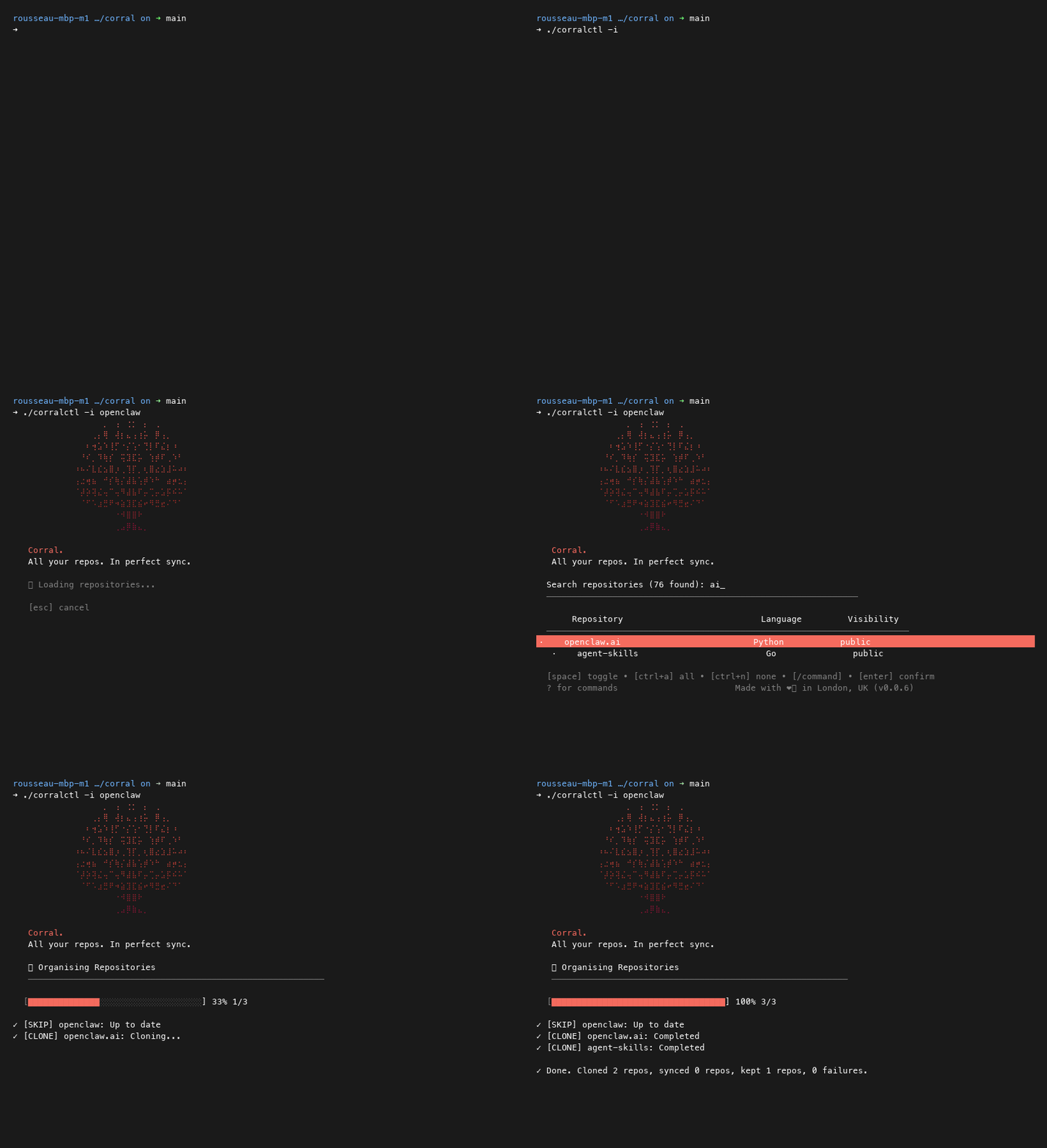
Interactive TUI Mode

By passing the -i or --interactive flag, you can launch the selection dashboard:

bash
./corralctl -i my-username

Keybindings

Read the full README β†’View source on GitHub β†’

Related MCP Servers

View all in Developer Tools View all alternatives
  • T
    Tldraw

    Draw and visually collaborate with your agents on tldraw's canvas.

    πŸ’» Developer Tools0 views
    Compare vs Tldraw β†’
  • Labelhead Artist Momentum logoLabelhead Artist Momentum

    Trending hip-hop artist momentum scores across four cultural dimensions.

    πŸ’» Developer Tools0 views
    Compare vs Labelhead Artist Momentum β†’
  • Andrea9293 MCP logoAndrea9293 MCP

    Local-first document management and semantic search for AI coding agents

    πŸ’» Developer Tools2 views
    Compare vs Andrea9293 MCP β†’
  • PraisonAI logoPraisonAI

    AI Agents Framework with Self Reflection and MCP support

    πŸ’» Developer Tools1 views
    Compare vs PraisonAI β†’

Adoption & maintenance

Factual signals from GitHub, npm, and our automated checks β€” not a rating.

GitHub stars
1
Stargazers on the source repository.
Last commit
3d ago
Most recent push to the default branch.
Tools exposed
13
Callable tools this server registers over MCP.

Reviews

No reviews yet β€” be the first to share how this listing worked for you.

Frequently Asked Questions about Corral

Add the following block to your claude_desktop_config.json under mcpServers: "mcpServers": { "corral": { "command": "npx", "args": ["-y", "Corral"] } }

AllMCPs Directory Badge

Full Badge Customizer

Showcase your server listing on GitHub or your project documentation. Embed this dynamic SVG badge to highlight official listing status and live engagement.

Badge Style:
Live Dynamic SVG PreviewCorral AllMCPs Directory Badge

Markdown (GitHub README)
[![AllMCPs](https://allmcps.com/api/badge/corral?style=directory)](https://allmcps.com/mcp/corral)
HTML Embed
<a href="https://allmcps.com/mcp/corral"><img src="https://allmcps.com/api/badge/corral?style=directory" alt="Corral on AllMCPs" /></a>

Technical Specs & Signals

CategoryπŸ’»Developer Tools
More technical detailsExpand β–Ύ
TransportSTDIO
RuntimeNode.js
Last updatedSep 6, 2026
Views0
Unique ViewsTotal visits recorded for this listing page on AllMCPs.
Installs0
Installs & Copy ActionsTotal times users copied install commands or configuration snippets for this server.
GitHub stars1
GitHub Star CountTotal stargazers on GitHub representing community popularity (1 stars).
Last commit3d ago
Last Repository CommitThe most recent commit or push recorded for this server's GitHub repository.Last commit on Sep 6, 2026
45Quality signal: Fair Β· 45/100How this signal is calculated β–Ύ
Server availabilityNot measured

Not scored for repo-hosted servers β€” we can't reach the running server, only its GitHub page. Hosted MCP endpoints are health-checked live.

Verified ownership10/20
Documentation & tools20/30
Adoption & activity4/15
Community engagement0/10

A guidance signal from public completeness & health data β€” not a user rating. New listings start lower and rise as they add docs, get verified, and grow adoption. Signals we can't observe for a listing are skipped, not counted against it.

β˜… Spotlight Slot

Feature Your MCP Server

Get maximum visibility for your server across our directory, search results, and detail pages.

Spotlight Your Server

Own this project?

This directory is pre-filled from public sources. Claim via GitHub README, site badge, or DNS TXT to unlock edit access and the Official badge β€” proof is checked automatically, then reviewed by our team.

Free dofollow backlink: add your website and place the AllMCPs badge on it β€” no claim needed. We detect it automatically and keep it verified as long as the badge stays live.

Claim & get free dofollow

Share & Embed

Add our SVG badge (dark/light directory styles) or embeddable widget to your site.

Explore more

More in πŸ’» Developer Tools β†’Best MCP servers for Developers β†’Alternatives to Corral β†’Install in Claude DesktopInstall in CursorInstall in VS Code