Wraps the ContinuityGuard CLI as a single generic MCP tool for video-clip continuity scans.
Quick Install
Automated & IDE SetupCopy the AI prompt to install this server into Claude Code, Cursor, or another agent — or use 1-click editor setup below.
Manual Client & Custom JSON ConfigExpand JSON ▾
Client Config & Setup
Choose your client or environment
Target File:
💡 Paste the JSON block into your client's configuration file under mcpServers, then restart the application.
Documentation Overview
ContinuityGuard




Install • Quickstart • CLI reference • FAQ • Contributing
A local, zero-network CLI that scores your already-generated AI short-drama clips for character-consistency drift and physically implausible motion, before you spend render credits finding out the hard way.
AI short-drama generation is having a real moment, and every title is a stack of individually generated shots. Generation models still drift: a character's face shifts slightly between cuts, or a motion jumps in a way that reads as physically wrong the moment a human watches it. Catching that after render is expensive. ContinuityGuard scans a folder of already-generated clips or frames from any pipeline and flags the shots worth a second look before you commit to a re-render.
Install
Two independent, equally first-class distributions ship the same scoring logic and the same bundled MobileNetV2 ONNX model. Both are published and installable today: the Python package on PyPI, and the TypeScript/npm package on the npm registry.
Python:
See python/README.md for the Python-specific
quickstart, CLI reference, and library API.
TypeScript/npm:
That puts the continuityguard command on your PATH -- run it with
continuityguard scan <directory>. To build from source instead (for
local development or to track main), clone the repo and run npm install && npm run build, then run the CLI with node dist/cli.js scan <directory>, or npm link it locally to get the continuityguard
command from your working copy.
Features
- Two independent scoring passes in one scan. Character-consistency (cosine similarity between MobileNetV2 embeddings of same-named-character crops) and physics-plausibility (frame-to-frame motion-discontinuity heuristic against each shot's own local baseline) both run from a single
scancommand. - Zero network calls, checked mechanically on every push.
npm run verify:zero-networkmonkey-patches every network entry point Node exposes and runs a real scan against this repo's own fixtures in CI; it fails loudly if any code path ever tries to reach the network. - Structured output for both humans and pipelines. The same scan writes a human-readable terminal summary and a full machine-readable JSON report (
--json), so a QA reviewer and a CI script can consume the same result. - Fast on ordinary hardware. The 8-clip fixture scan (decode, both scoring passes, and report write) completed in 0.53 to 0.63 seconds across repeated runs on a laptop CPU during this audit. No GPU required; scoring runs on CPU via
onnxruntime-nodeand a 14MB bundled model. - Every flag comes with a reason you can check yourself. Each flagged shot carries the clip name, the numeric score, the threshold it crossed, and a plain-language explanation, sourced directly from the JSON report's
reasonfield.
What it does
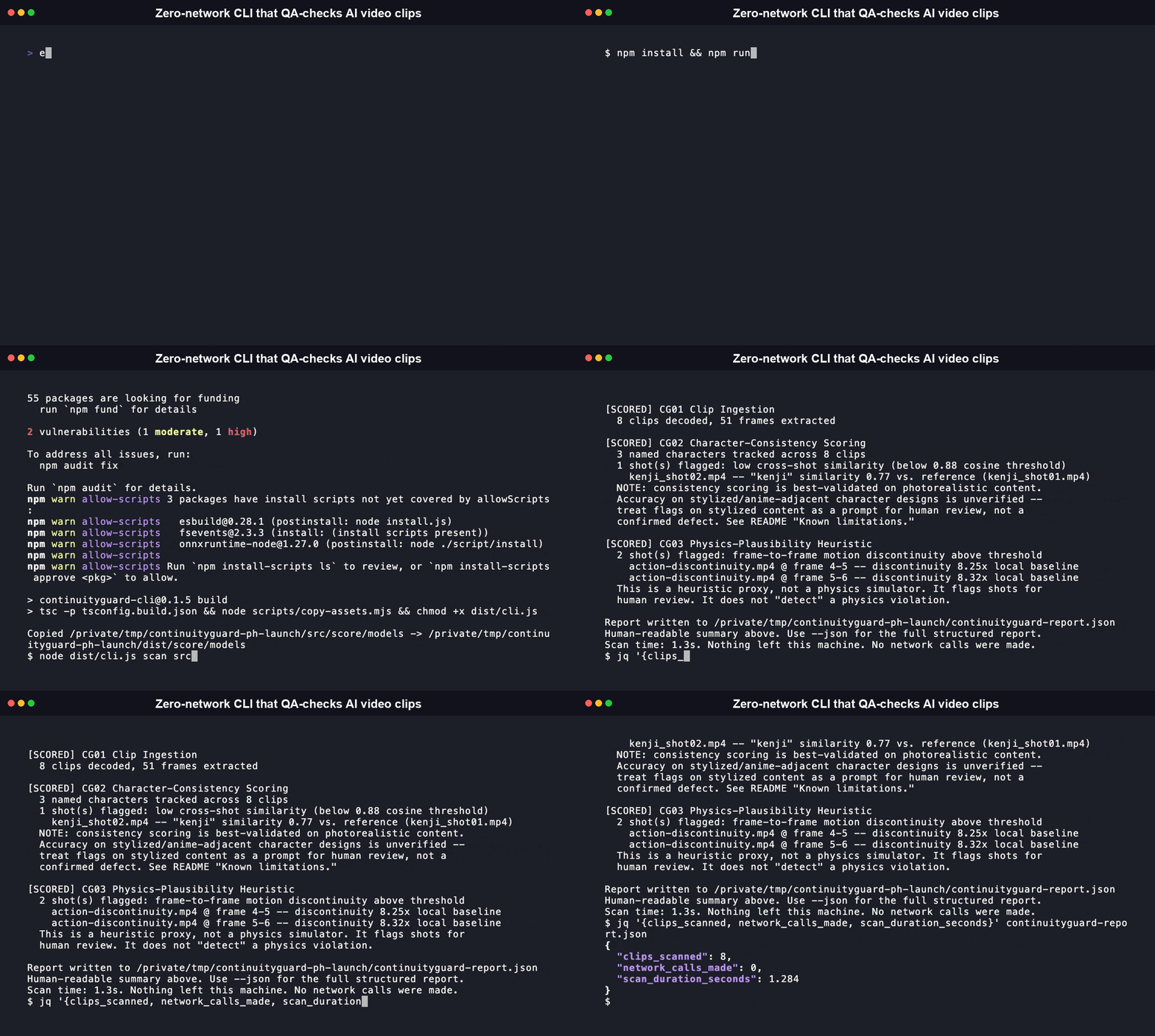
Real output, from this repo's own committed synthetic fixtures (src/score/testdata/clips/, generated by src/score/testdata/generate-fixtures.sh; no real short-drama footage was available for this build, so every number below is reproducible, not illustrative):
That full scan, decode plus both scoring passes plus report write, took between 0.6 and 1.4 seconds wall time across several runs on this machine. The two consistent-character pairs in the same fixture set score high and correctly go unflagged: mei_shot01.mp4 vs mei_shot02.mp4 at 0.9975 similarity, and aiko_shot01.mp4 vs aiko_shot02.mp4 at 0.9906. The deliberately inconsistent pair, kenji_shot01.mp4 vs kenji_shot02.mp4, scores 0.7709 and correctly gets flagged against the 0.88 threshold. On the physics side, calm-baseline.mp4 (smooth motion throughout) tops out at roughly 1.14x its own local baseline and stays unflagged, while action-discontinuity.mp4 (one deliberate abrupt jump) hits 8.25x and 8.32x and gets flagged against the 3x multiplier. Every one of these numbers came from the command above; the full raw diff values live in CHANGELOG.md.
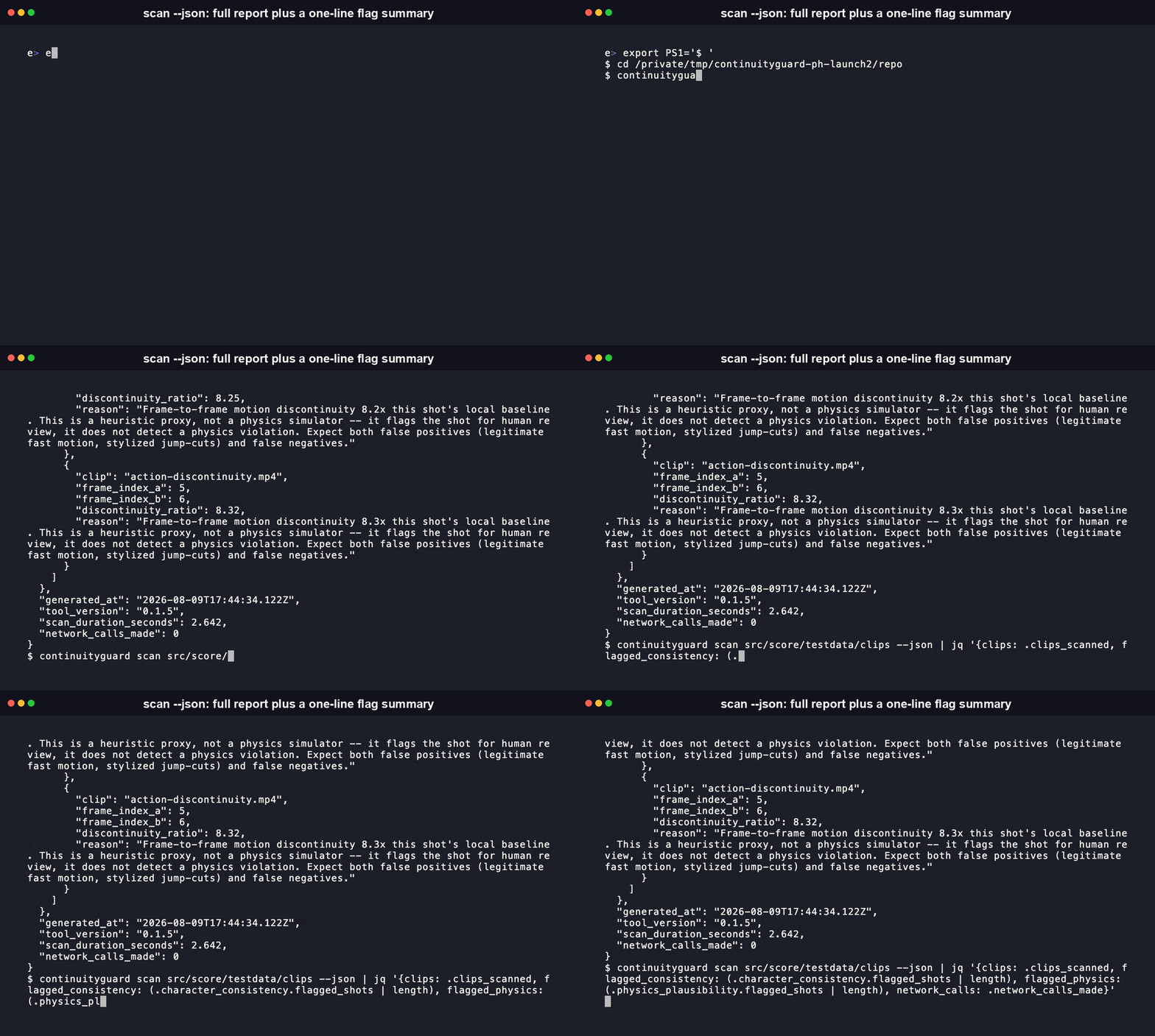
Every flag carries a clip name, a numeric score, and a plain-language reason, so you or your QA reviewer can see exactly why a shot got flagged.
Quickstart
scan walks a target directory of video clips, decodes them locally via ffmpeg, computes per-shot character-consistency embeddings and a physics-plausibility heuristic, and writes a structured report in both human-readable and JSON form. Nothing it reads or computes ever leaves the machine it runs on.
CLI reference
Real, current --help output from the built CLI:
Naming your clips so CG02 can track characters
CG02 infers which character a clip belongs to from its filename, using a <character>_<shot-id>.<ext> convention (for example mei_shot01.mp4, mei_shot02.mp4). Clips sharing a character prefix are compared against that character's first-seen shot. There is no industry-standard character-tagging metadata format across AI short-drama pipelines, so ContinuityGuard currently reads it from the filename instead of requiring a separate manifest. Clips that don't match the convention are still decoded and scored by CG03, just not compared for character consistency.
MCP Server
ContinuityGuard ships a Model Context Protocol (MCP) server, so an MCP-speaking agent (Claude Desktop, Claude Code, or any other MCP client) can drive a scan directly instead of you invoking the CLI by hand. It's part of the Python distribution, as an optional extra:
Add it to your MCP client's config (for example Claude Desktop's claude_desktop_config.json):
Related MCP Servers
Reviews
No reviews yet — be the first to share how this listing worked for you.
Frequently Asked Questions about Continuityguard
AllMCPs Directory Badge
Showcase your server listing on GitHub or your project documentation. Embed this dynamic SVG badge to highlight official listing status and live engagement.
Badge Style:
Live Dynamic SVG Preview
Markdown (GitHub README)
[](https://allmcps.com/mcp/continuityguard)HTML Embed
<a href="https://allmcps.com/mcp/continuityguard"><img src="https://allmcps.com/api/badge/continuityguard?style=directory" alt="Continuityguard on AllMCPs" /></a>