Self-hosted Cloudflare Worker remote backend for context-keeper (D1, streamable-HTTP).
Quick Install
Automated & IDE SetupCopy the AI prompt to install this server into Claude Code, Cursor, or another agent — or use 1-click editor setup below.
Not yet automatically verified
We haven't yet run this listing's install command through our automated sandbox check. This isn't a red flag — we're steadily working through the catalog.
Manual Client & Custom JSON ConfigExpand JSON ▾
Client Config & Setup
Choose your client or environment
Target File:
💡 Paste the JSON block into your client's configuration file under mcpServers, then restart the application.
Documentation Overview
context-keeper-remote
Part of the xylem stack.
A remote MCP server on Cloudflare Workers that exposes context-keeper's rationale store (decisions, pipelines, constraints) over Streamable HTTP. It works as a claude.ai custom connector, including on mobile, so your project's decisions and constraints are available from any Claude session — no PC left running, no tunnel.
It also serves a phone app for reading that store yourself: install it to your home screen once and it opens with no login and no token in the URL. Tabs for recent activity, per-project counts, cambium knowledge, and store health — and tapping any entry gives you the full rationale, not just its title. Optional, opt-in, and on its own read-only credential.
Self-host your own copy in a few clicks with the button above — Cloudflare copies this repo into your GitHub account, creates a fresh D1 database for you, and deploys the Worker. Then you add one secret and paste a URL into Claude. Full walkthrough below; every step is a click, no command line anywhere.
The maintainer's own instance runs at
https://context-keeper-remote.jarmstrong158.workers.dev. Yours will be at your own subdomain after you deploy.
Why it's built this way
- Worker, not tunnel — no "PC must be on" dependency.
- D1, not KV — row-level writes and
WHEREqueries; two writers (desktop + mobile) don't clobber each other the way whole-file JSON read-modify-write does. - Stateless handler, no Durable Objects — the tools are stateless RPCs against D1, so the Worker runs on the Cloudflare free plan.
- Secret-path auth — claude.ai custom connectors don't reliably send custom bearer headers, so the token is the last path segment of the URL. The URL is the credential.
- Self-migrating — the Worker creates its own D1 schema at runtime, so a brand-new empty database needs no manual SQL (verified by a cold-start test).
Self-host it (one-click, no command line)
Step 1 — Click "Deploy to Cloudflare"
Click the Deploy to Cloudflare button at the top of this page. Cloudflare will:
- Ask you to authorize GitHub and pick an account — it copies this repo into your GitHub account (you get your own repo).
- Automatically create a new D1 database in your Cloudflare account and bind it to the Worker. (This works because the Worker's config declares the database binding without a hard-coded id, so Cloudflare provisions a fresh one for you.)
- Set up Workers Builds so every push to your new repo redeploys automatically.
- Build and deploy the Worker.
When it finishes, your Worker is live at
https://context-keeper-remote.<your-subdomain>.workers.dev. Note that URL — you'll
need it in Step 3. (You can always find it under Workers & Pages in the
dashboard.)
Nothing to configure in the repo, and no SQL to run — the database starts empty and the Worker creates its tables on the first request.
Step 2 — Add the AUTH_TOKEN secret (Cloudflare dashboard)
The Worker refuses every request until it has an auth token, so set one:
- Cloudflare dashboard → Workers & Pages → your context-keeper-remote Worker.
- Settings → Variables and Secrets → Add.
- Type: Secret. Name:
AUTH_TOKEN. Value: a long random string (32+ characters — treat it like a password). Save/Deploy.
That value is your connector's password. Keep it somewhere safe; you'll paste it in the next step.
Also deploying the companion agentsync-remote worker?
agentsync-remote uses the same AUTH_TOKEN scheme, and additionally needs, in
its Worker's Variables and Secrets:
- a Secret named
GH_PAT— a GitHub personal access token, and - a Variable named
REPO— set to theowner/repoit should sync.
Those two do not apply to context-keeper-remote (this repo) — it only needs
AUTH_TOKEN. See the agentsync-remote README for its specifics.
Step 3 — Add the custom connector in claude.ai
-
claude.ai → Settings → Connectors → Add custom connector.
-
Paste your Worker URL with the token as the final path segment:
Replace
<your-subdomain>with your Worker's subdomain (Step 1) and<AUTH_TOKEN>with the exact value you set (Step 2). -
Save. The tools (
record_entry,get_context,query_entries, …) are now available in your Claude sessions.
Check it works: ask Claude to call get_project_summary. If it answers, the
whole chain (deploy → auto-provisioned D1 → auto-migration → auth) is working.
Step 4 — Migrate existing local data (optional)
If you already run local context-keeper, ask Claude (with the connector enabled) to
call import_entries, pasting each file's contents:
decisions.json→import_entries(project, kind="decision", entries=[...])pipelines.json→import_entries(project, kind="pipeline", entries=[...])constraints.json→import_entries(project, kind="constraint", entries=[...])
Incoming ids are preserved; existing ids are reported, never overwritten.
Step 5 — Install the phone view (optional)
Everything above is the MCP connector, which is for Claude to read. Step 5 is for you to read it, from your phone. It needs a clone of this repo and Node 22+, which is the only part of the setup that touches a command line — the connector itself never does.
See the phone view below.
The phone view
/view is a read-only, server-rendered page of every project's decisions and
constraints. Install it to your home screen and it opens like an app: no login,
no token in the URL, nothing to remember.
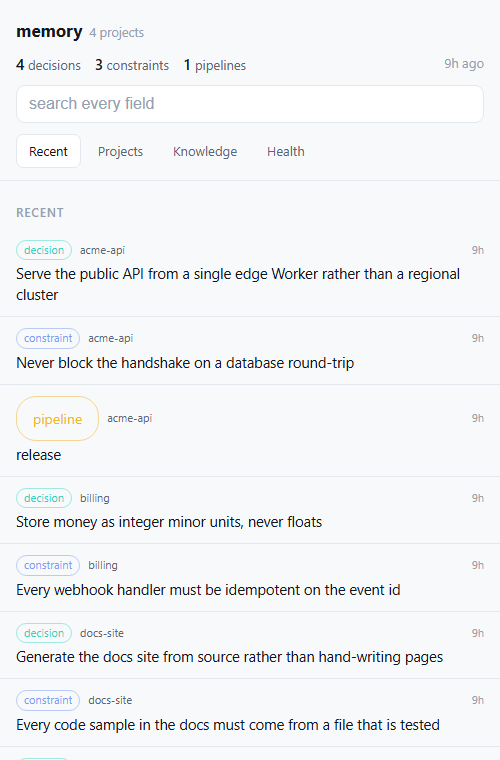 | 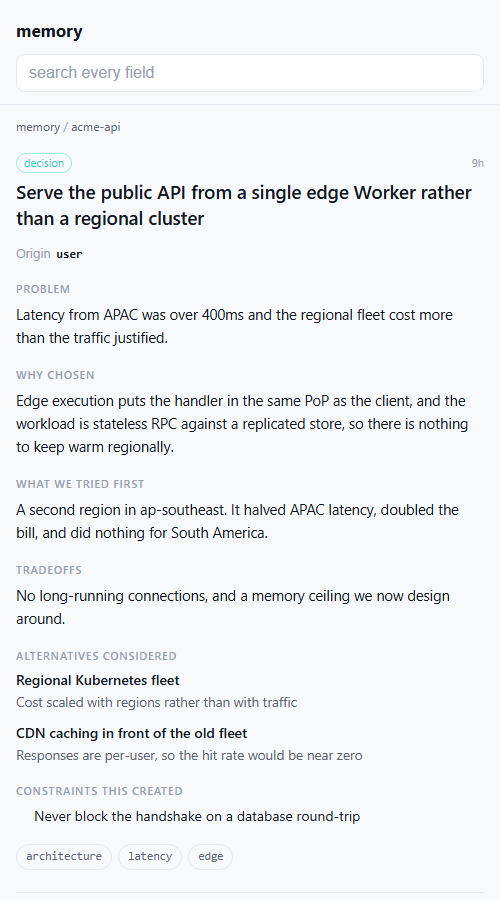 |
| Recent — what changed, across every project | Any entry — the reasoning, not just the title |
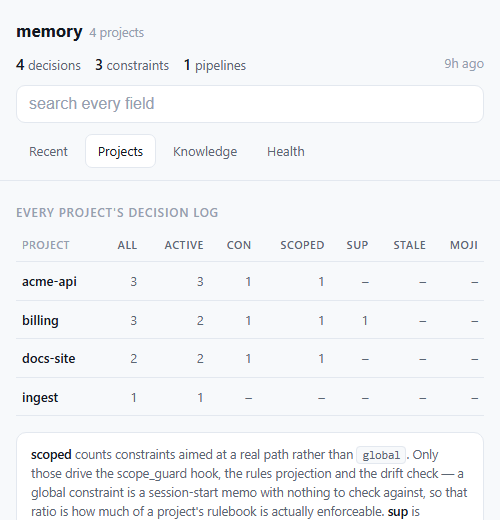 | 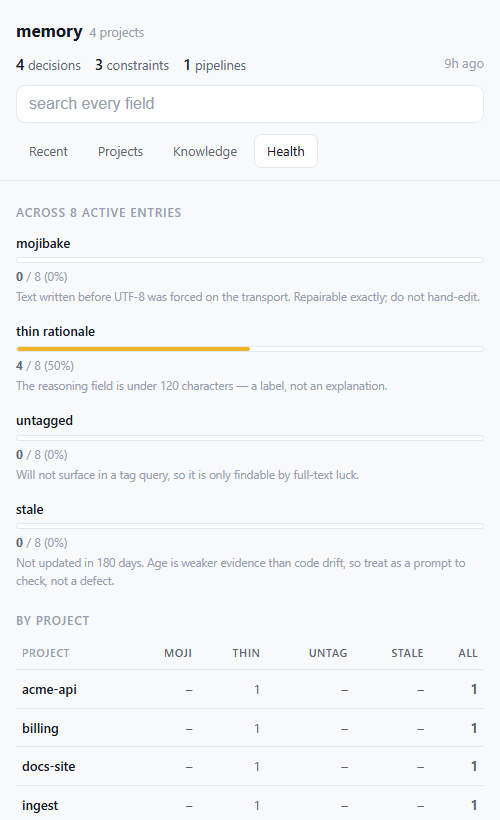 |
| Projects — counts per project, including how much of each rulebook is enforceable | Health — mojibake, thin rationale, untagged, stale |
Synthetic data. Every project and entry above is invented — see docs/screenshots for the dataset and how to regenerate these.
It has four tabs, matching the desktop dashboard:
| tab | what it answers |
|---|---|
| Recent | what changed lately, across every project |
| Projects | per-project counts: entries, active, constraints, scoped, supersession links, stale, mojibake |
| Knowledge | cambium's team/org counts, if wired (see below) |
| Health | mojibake, thin rationale, untagged, stale — as proportions and a per-project ranking |
Tap any row for the full entry: problem, why it was chosen, what was tried first, tradeoffs, alternatives with the reason each was rejected, and — for constraints — scope, hardness, and what enforces it. Search covers every field, including the reasoning, which is usually where the answer is. Superseded entries stay reachable, and each entry links to what it replaced and what replaced it.
Install
1. Create the credential. Double-click scripts/set-view-token.cmd
(macOS/Linux: scripts/set-view-token.sh). From a terminal use the absolute path
— not npm run, which needs the repo as your current directory:
One run generates the token, installs it, waits for the route to answer 200,
copies the URL, opens it in your browser, and prints a QR code.
2. Scan the QR with your phone, then install it:
- Android / Chrome — a banner offers Install, or use ⋮ → Install app. If the menu only says Add to Home screen, the manifest is failing Chrome's install criteria; the usual cause is a missing 192x192 icon, which makes Chrome degrade silently to a plain shortcut that opens in a browser tab.
- iPhone — must be Safari (Chrome on iOS cannot install web apps). Share → Add to Home Screen.
Then tap through Recent, Projects, Knowledge and Health once while you have signal — the offline cache only fills for pages you have actually opened.
Add -DryRun to run everything except the install, which is the fastest way to
check your setup before touching anything.
It works offline, and a tap is instant
A service worker caches every page you open, cache-first with a background revalidate. Measured on the live instance:
| served from cache | 1 ms |
| forced to the network | 278–383 ms |
So it opens with no signal, and switching tabs is instant rather than a round-trip. A decision log is not a live feed — showing yesterday's answer immediately and correcting it a moment later beats showing nothing for 300ms, and the header carries an "8h ago" stamp so stale data is never presented as current.
Only 200s are cached. A 404 is what this Worker returns for an
unauthenticated or rotated credential, and caching one would mean a device that
rotated its token keeps being told it is signed out — from its own disk, with no
network involved and no obvious way to clear it. Verified in both directions.
Related MCP Servers
Reviews
No reviews yet — be the first to share how this listing worked for you.
Frequently Asked Questions about Context Keeper (remote)
AllMCPs Directory Badge
Showcase your server listing on GitHub or your project documentation. Embed this dynamic SVG badge to highlight official listing status and live engagement.
Badge Style:
Live Dynamic SVG Preview
Markdown (GitHub README)
[](https://allmcps.com/mcp/context-keeper-remote)HTML Embed
<a href="https://allmcps.com/mcp/context-keeper-remote"><img src="https://allmcps.com/api/badge/context-keeper-remote?style=directory" alt="Context Keeper (remote) on AllMCPs" /></a>