Local-first personal context over MCP: mail/calendar metadata, briefings, person lookups. No cloud.
Quick Install
Automated & IDE SetupCopy the AI prompt to install this server into Claude Code, Cursor, or another agent — or use 1-click editor setup below.
Manual Client & Custom JSON ConfigExpand JSON ▾
Client Config & Setup
Choose your client or environment
Target File:
💡 Paste the JSON block into your client's configuration file under mcpServers, then restart the application.
Documentation Overview
Cortland 🍎
Give an AI real access to your Mac — Mail, Calendar, Reminders, Notes, files — without giving it the keys. Every consequential action previews first, waits for your approval through a channel the model can't touch, gets logged, and can be undone. Bring your own model: Claude, or a local one that never leaves the machine.
That conversation happened over iMessage, answered by a 4 GB model running on an 8 GB MacBook Air. Nothing left the Mac.
The texting interface needs a second Apple ID, signed into Messages on the Mac only — a mouthpiece, not a worker. It owns no mail, no calendar, no data. You text it from your phone like any contact; the Mac still does the work as you. Your system iCloud stays yours. Claude Code, Cursor, Codex, and other MCP clients skip this step: they talk to the same tools over stdio.
What it looks like in use
Ask about your week — reads are free, no approval needed:
Ask it to change something — writes stop and ask, every time:
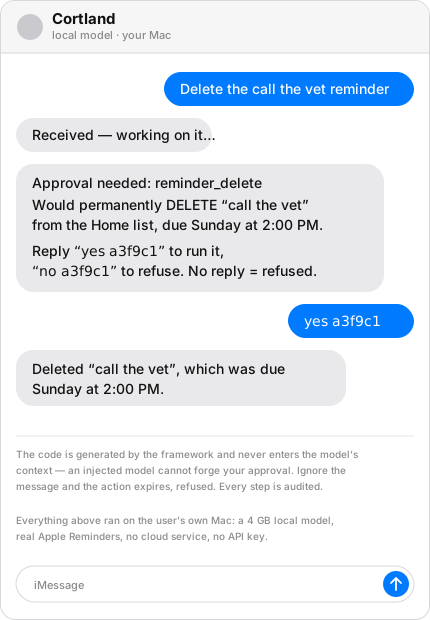
The code in that prompt is generated by the framework and never enters the model's context — so even a fully prompt-injected model can't forge your approval. Ignore the message and the action expires, refused.
Ask what it can do — answered from the tools actually installed, so it can't overclaim:
In Claude Code or Claude Desktop, the same tools are just there:
You: send a reply to Ms. Alvarez saying the slip is coming Thursday Claude: [searches mail, reads the thread] I can send this from your Personal account to alex@example.com. Approve in the usual channel.
mail_send is write-gated. Live mode plus per-action human approval. A stolen
token can only ask.
Requirements
macOS only. Nothing here runs on Windows or Linux — the tools talk to Apple apps via Automation.
| Minimum | Comfortable | |
|---|---|---|
| OS | macOS 13 Ventura | macOS 15+ |
| Mac | Any Mac that runs Ventura (Intel can drive Cursor/Claude) | Apple Silicon (M1 or newer) |
| Node | 20 LTS (node -v) | 22 |
| Toolchain | Xcode Command Line Tools (xcode-select -p) | same — better-sqlite3 compiles native code |
| Client | One MCP app: Cursor, Claude Code, Claude Desktop, Codex, or LM Studio | plus Ollama if you want to text it |
| RAM | 8 GB (cloud/Cursor model, or Gemma 4 E2B) | 16 GB+ for larger local models |
| Disk | ~500 MB for this repo’s build | +6 GB if you pull gemma4:e2b-it-qat |
| Apple apps | The apps you want touched, signed in as you | Mail + Reminders is the usual first pair |
iMessage bridge only: macOS 13+ (modern chat.db), Full Disk Access for
the process that runs Node, Automation → Messages, and a second Apple ID
signed into Messages.app — not into System Settings. See
SETUP.md §5.1.
Osaurus as a client: Apple Silicon, macOS 15.5+.
Not required: an npm @cortland install (0.2.0 is GitHub-only for now), a
developer account, iCloud for Path A, or any API key.
Quick start
Fastest path to “it searched my mail” — Cursor (or Claude Code) as the brain, no second Apple ID, no Ollama:
Then Cursor Settings → MCP, add servers pointing node at
packages/mail/dist/server.js (and reminders/notes/calendar if you want
them). Absolute paths. JSON is in
docs/08_local_models.md.
Ask: search my mail for anything from school this week. macOS will prompt Automation (Cursor → Mail). Allow it.
Writes stay previews until you set "live": true in
~/Library/Application Support/cortland/config.json. Even then, send/delete
asks you per action.
Texting it from your phone is a longer path (second Apple ID + Ollama). SETUP.md is the ordered list; docs/08 is the illustrated one.
Why it exists
Most MCP servers for personal data are thin wrappers around AppleScript:
delete_email, send_message, executed the instant a model calls them. That's
a hard thing to trust with an inbox, and the alternatives don't help — cloud
assistants (Poke, Arlo, Lindy) can't touch Apple-native data at all, because
Apple gives them no API, and self-hosted agents like OpenClaw run ungoverned
(a CVSS 8.8 in January 2026, with permission gates still on the roadmap).
Cortland inverts the default. A tool call previews what it would do unless you've opted into live mode, and even then every consequential action waits for you. The framework enforcing that is a small library with a test suite proving each guarantee can't be bypassed — and every tool in the suite is built on it.
The guarantees
| Dry-run by default | Gated tools preview instead of executing. Every config error resolves toward dry-run. |
| The human gate is out-of-band | Approval arrives via a native dialog, a file you move, your client's own UI, or a text you reply to — never through model text. |
| Everything is audited | Success, failure, dry-run, denial, refusal: one local SQLite row each. "What did my tools actually do?" always has an answer. |
| Undo is enforced at registration | A tool claiming native undo must produce a recipe before the write, or the framework refuses it. |
| Content is data, not instructions | Everything read from mail, notes, or messages returns inside a nonce-delimited fence. |
| Safety by absence | No ungated send. No attendee invitations. No reading conversations other than your own. |
| Local-first | No accounts, no credentials, no cloud. Your model, your machine, your disk. |
Install
@cortland 0.2.0 is not on npm yet. From the repo:
The wizard asks before every step and records what it did. Full walkthrough — including the iMessage bridge, permissions, and model choice — in SETUP.md. Connecting Cursor, Codex, LM Studio, Osaurus, or Ollama: docs/08_local_models.md.
Packages
| Package | What it does |
|---|---|
@cortland/governed | The framework: dry-run defaults, approval gates, audit, provenance, undo, injection fencing. Build your own governed tools on it. |
@cortland/mail | Apple Mail: read, search (two tiers), threads, drafts, send (write-gated). |
@cortland/reminders | Reminders: lists, search, create, complete, delete — with native undo. |
@cortland/notes | Notes: folders, search, read, create, append. |
@cortland/calendar | Calendar: window queries, create, delete. Cannot send invitations, by design. |
@cortland/context | Local context layer: mail/calendar metadata (pointers, never bodies), briefings, person lookups, a corrections flywheel. |
@cortland/imessage | Text your own AI. Second Apple ID in Messages (mouthpiece only); owner-only by construction, approvals by reply. |
@cortland/folders | Folder-as-API: drop a file in iCloud from any device, a declared local pipeline runs. |
@cortland/remote | Reach the suite from your other devices over your own private network. |
@cortland/setup | The onboarding wizard. |
Bring your own model
Cortland is the tools. You pick the brain.

Path A. Cursor, Claude Code, Claude Desktop, Codex, LM Studio, or Osaurus hosts the model. Cortland is an MCP plugin. No second Apple ID.
Path B. You text it. A second Apple ID signs into Messages on the Mac
(mouthpiece only). Ollama runs Gemma 4 on disk. Approvals are yes <code>
in the same thread.
Field-tested on an 8 GB M2: gemma4:e2b-it-qat (4.3 GB) makes clean tool
calls and refuses honestly. The governed contract matters more with a
small model, not less.
Walkthroughs, including LM Studio and Osaurus from a clean install: docs/08_local_models.md. Clean-Mac order, permissions, and the iMessage second-ID steps: SETUP.md.
Privacy model
Related MCP Servers
Reviews
No reviews yet — be the first to share how this listing worked for you.
Frequently Asked Questions about Context
AllMCPs Directory Badge
Showcase your server listing on GitHub or your project documentation. Embed this dynamic SVG badge to highlight official listing status and live engagement.
Badge Style:
Live Dynamic SVG Preview
Markdown (GitHub README)
[](https://allmcps.com/mcp/context)HTML Embed
<a href="https://allmcps.com/mcp/context"><img src="https://allmcps.com/api/badge/context?style=directory" alt="Context on AllMCPs" /></a>Technical Specs & Signals
CategoryDeveloper Tools
28Quality signal: Emerging · 28/100How this signal is calculated ▾
Server availabilityNot measured
Not scored for repo-hosted servers — we can't reach the running server, only its GitHub page. Hosted MCP endpoints are health-checked live.
Verified ownership8/20
Documentation & tools12/30
Adoption & activity1/15
Community engagement0/10
A guidance signal from public completeness & health data — not a user rating. New listings start lower and rise as they add docs, get verified, and grow adoption. Signals we can't observe for a listing are skipped, not counted against it.
Own this project?
This directory is pre-filled from public sources. Claim via GitHub README, site badge, or DNS TXT to unlock edit access and the Official badge and attach your website — proof is checked automatically, then reviewed by our team.
Free dofollow backlink: add your website and place the AllMCPs badge on it — no claim needed. We detect it automatically and keep it verified as long as the badge stays live.
Claim & get free dofollowShare & Embed
Add our SVG badge (dark/light directory styles) or embeddable widget to your site.